
Woodward easyYgen LS-6XT Circuit Breaker Control Unit: Technical Characteristics, Installation and Application Guide
Woodward easyYgen LS-6XT Circuit Breaker Control Unit: Technical Characteristics, Installation and Application Guide
Introduction
In the field of modern generator system management and power distribution, intelligent circuit breaker control units play a crucial role. The easyYgen LS-6XT series launched by Woodward is a high-performance control unit designed to meet this demand. As an industrial grade product designed in Germany, LS-6XT not only has excellent reliability, but also provides flexible configuration options and wide application compatibility. This article will delve into the technical characteristics, installation requirements, configuration methods, and practical application scenarios of the device, providing a comprehensive reference guide for engineers and technicians.
Product Overview and Technical Features
1.1 Product positioning and functions
The Woodward easyYgen LS-6XT series is a circuit breaker control unit designed specifically for engine generator system management. This device can be used as an independent unit or combined with Woodward easyYgen-3400/3500XT generator control unit and/or easyYgen | GC-3400XT to form a complete power management system.
The core functions of LS-6XT include:
Dual circuit breaker control (CBA and CBB modes)
System synchronization check and grid connection function
Real time monitoring of power parameters (voltage, current, frequency, power, power factor)
Advanced protection functions (overvoltage, undervoltage, overclocking, underflocking, etc.)
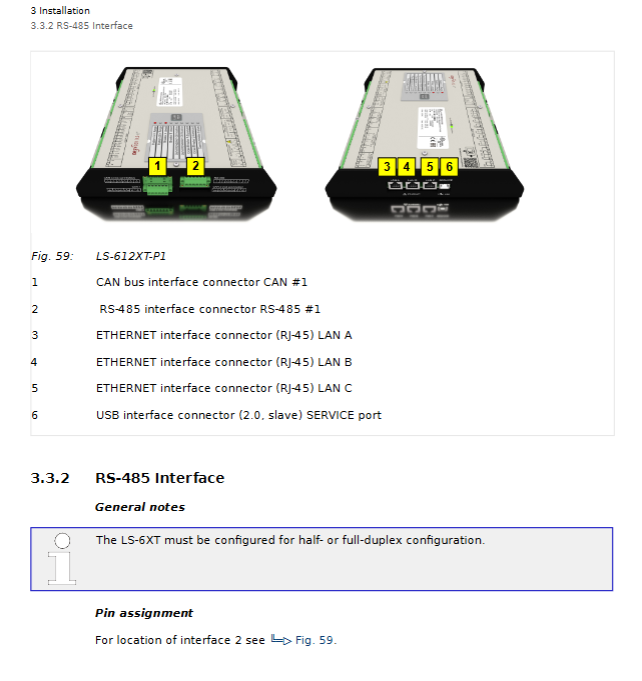
Multiple communication interface support (CAN, Ethernet, RS-485, USB)
Programmable Logic Manager ™) Analog Manager ™)
1.2 Technical Specifications Highlights
According to Chapter 8 "Technical Specifications" of the technical manual, LS-6XT has the following key characteristics:
Measurement performance:
Voltage measurement range: 0-690V AC (phase voltage)
Current measurement range: compatible with 1A/5A CT
Frequency measurement range: 0-75Hz
Power measurement accuracy: ± 0.5% of rated value
Real time clock battery: lithium battery backup
Environmental adaptability:
Working temperature: -25 ° C to+70 ° C
Storage temperature: -40 ° C to+85 ° C
Protection level: Complies with UL standards and is suitable for Type 1 enclosures
Humidity range: 5% to 95% relative humidity (non condensing)
Interface capability:
3 Ethernet ports (10/100Base-T)
CAN bus interface (supporting CANopen protocol)
RS-485 serial interface
USB 2.0 service port
12 digital inputs/12 relay outputs
3 analog inputs/2 analog outputs
1.3 Hardware Configuration and Packaging Content
The standard delivery scope includes:
EasyYgen LS-6XT equipment body
All pluggable terminal connectors
Installation Program Supplemental Instructions (IPS) and Printed QR Code Labels (2 copies)
Configuration files and technical manuals stored in the internal memory of the device
It is worth noting that the documents stored inside the device are in "delivery status" and may not be the latest version. The latest version needs to be obtained from Woodward's official website.
Safety regulations and installation requirements
2.1 Safety precautions
Section 1.3 of the technical manual emphasizes the important safety regulations that must be followed when using LS-6XT:
Personnel qualification requirements:
Electrical work must be carried out by qualified electricians
Operators need to receive relevant training and be familiar with all applicable regulations
Prohibit personnel under the influence of alcohol and drugs from operating equipment
Electrical safety measures:
Ensure that the system is powered off and prevent accidental restarts before operation
Voltage measurement input requires 2-6A slow melting fuse
One end of the CT secondary side must be grounded nearby
The power line requires the use of cables with a temperature rating of not less than 90 ° C
Anti static protection:
Release static electricity by touching grounded metal objects before operation
Suggest using an ESD wristband
Avoid wearing synthetic fiber clothing
Keep plastic and vinyl materials away from the work area
2.2 Mechanical Installation
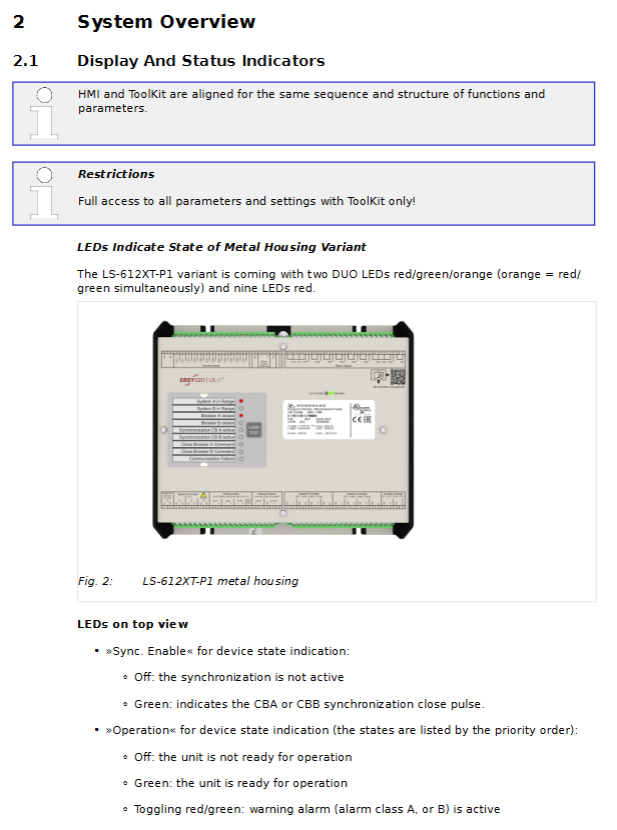
For the sheet metal shell model (LS-612XT-P1), installation should follow the following steps:
Hole positioning: Drill installation holes according to the hole spacing of 42.45 × 96.2mm
Equipment fixation: Use screws with a maximum diameter of 6mm (M6) for fixation
Torque control: Tighten according to the required torque of the screw quality grade
Wiring space: Ensure sufficient operating space above and below the terminals
Key installation dimensions:
Equipment width: 250mm
Installation hole spacing: horizontal 42.45mm, vertical 96.2mm
Maximum wire diameter: The terminal supports a maximum of 2.5mm ² wire
2.3 Electrical Connections
Power connection:
Power range: 8-40V DC (nominal 12/24V)
Positive terminal connected to terminal 63, negative terminal connected to terminal 64
Protective grounding (PE) connected to the bottom center of the sheet metal shell
Suggest using 6A fuses or C-type miniature circuit breakers for protection
Voltage measurement connection:
System A voltage: terminals 30-36
System B voltage: terminals 22-28
Auxiliary voltage: terminals 38-40
Supports multiple wiring configurations: 3-phase 4-wire, 3-phase 3-wire, 1-phase 3-wire, 1-phase 2-wire
Current measurement connection:
System A current: terminals 3-8 (L1, L2, L3 phases)
System B current: terminals 1-2 (single-phase)
The CT direction should be based on the software version. Note that version 2.10-0 points to system A, while version 2.10-1 and above points to system B
Power measurement configuration:
CBA mode: measuring power flow between system A and system B
CBA/BBB mode: Simultaneously monitor the power status of two circuit breakers
The definition of power factor follows international standards (inductive load is positive, capacitive load is negative)
System configuration and parameter settings
3.1 Access Level and Password System
LS-6XT adopts a multi-level password protection system, providing 5 access levels:
Basic level (CL01): Restricted viewing permission, no configuration permission
Temporary debugging level (AC02): Algorithm code access, expires after session ends
Debugging Level (CL03): General Debugging Parameter Access
Temporary Super Debugging Level (AC04): Algorithm Code Access Advanced Features
Super Debugging Level (CL05): Almost Full Access (except for calibration and super user items)
Access channels include:
Local HMI of the device (basic code input)
USB connection ToolKit (user account login)
Ethernet remote panel (user account login)
Third party devices use Modbus TCP/CANopen/RS-485
3.2 HMI Operation and Navigation
The main screen of the device is divided into five main areas:
Numerical display area: real-time data such as voltage, current, frequency, power, etc
Status message area: operating mode, device status
Alarm message area: Latest unconfirmed alarm
Single line diagram area: visualization of circuit breaker status and power flow direction
Soft key function area: Navigation and operation control
Special function screen:
Customer customized screen: up to 18 customizable monitoring values can be configured
Synchronous oscilloscope: visually display the phase difference between system A and B
Logic Manager: Visualize Logic Conditions and Variable States
Event history: system event records with timestamps
3.3 Key parameter configuration
Language and clock settings:
Supports English, German, and one reserved language
Real time clock with configurable time zone and daylight saving time rules
Network time can be synchronized through SNTP protocol
Measurement configuration:
Voltage Transformer Ratio Setting (Parameters 1800, 1803, 1812)
Current Transformer Ratio and Direction Configuration
Definition of power measurement symbols (based on CT installation direction)
Circuit breaker configuration:
Operation mode selection: manual/automatic
Synchronization parameters: frequency difference, voltage difference, phase angle, dwell time
Dead bus closure condition setting
Logical Command Configuration (AMF Function)
Monitoring function configuration:
System A/B protection: overvoltage, undervoltage, overclocking, underfrequency, voltage asymmetry, etc
Circuit breaker monitoring: closing transition monitoring, unloading mismatch detection
Communication monitoring: CAN, Ethernet, multi unit system status
Application Mode and Advanced Features
4.1 Application layer architecture
LS-6XT supports a two-tier application architecture:
Layer 1: Generator Unit Layer
Communicate with easyYgen-3000XT and other LS-6XT
Support CBA or CBA/BBB circuit breaker modes
Special application modes: L-MCB, L-GGB, L-MCB/GGB
Main power failure detection and main power decoupling
Layer 3: Power Station Layer
Communicate with group controller (GC) and other LS-6XT
Support CBA or CBA/BBB circuit breaker modes
Main power fault detection and decoupling (GCB)
4.2 Synchronization check function
As a redundancy check function, synchronous inspection enhances system security:
Available command variables:
02.29 Synchronization conditions: dependent on voltage, frequency, and phase angle
02.30 Dead bus closure condition: depends on system A/B voltage and dead bus configuration
02.28 Synchronization check relay: Triggered when any of the above conditions are met
Key parameters:
Positive/Negative Frequency Difference CBA (5711/5712)
Voltage difference CBA (5710)
Maximum positive/negative phase angle CBA (5713/5714)
Phase matching dwell time CBA (5717)
4.3 Expansion of External I/O Modules
External I/O modules can be connected via CAN1 bus:
IKD1: Up to 2, providing 16DI/16DO
IKD-IN-16:1, providing 16DI
IKD-OUT-16:1, providing 16DO
The configuration tool can be accessed through ToolKit and supports flexible digital input monitoring and relay output control.
4.4 Communication and Protocol Support
CAN interface:
CAN1 interface supports CANopen protocol
Support Process Data Objects (PDO) and Service Data Objects (SDO)
Configurable load balancing communication parameters
Ethernet interface:
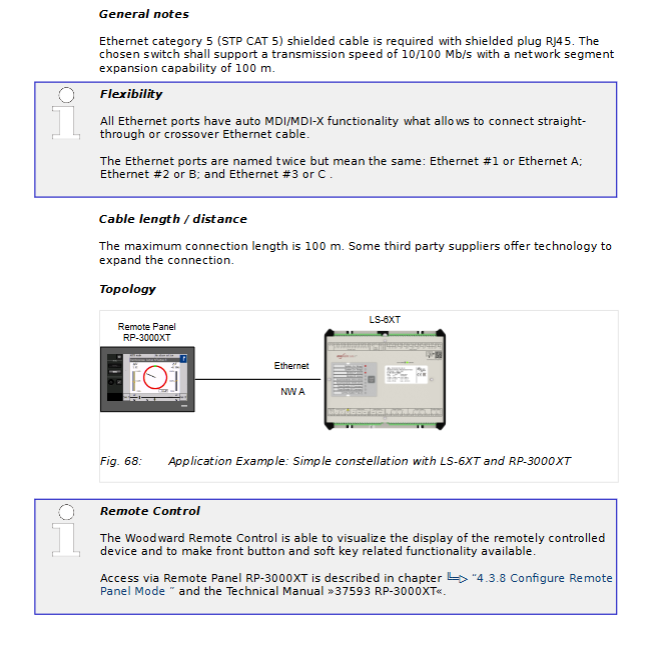
Three independent 10/100Base-T ports
Supports Modbus TCP/IP protocol
Remote Panel Access (RP-3000XT)
System interconnection function (new feature)
Serial interface:
RS-485 supports half duplex/full duplex operation
Modbus RTU protocol
USB 2.0 Device Interface (ToolKit Connection)
Load balancing:
Broadcast messages via CAN bus or UDP (Ethernet)
Configurable transmission rate and timeout period
Support redundant communication paths
Maintenance and troubleshooting
5.1 Daily Maintenance
Indicator light test:
Through the HMI "LAMPTEST" button or logical command variable 04.04
Test all panel LED indicator lights
System restart:
Both ToolKit and HMI provide restart function
Wait up to 20 seconds after parameter changes to ensure saving
Event and alarm management:
The alarm is divided into 6 levels (A-F)
Event history with timestamp
Alarm can be confirmed locally or remotely
5.2 Common problem handling
Communication fault inspection:
Verify that all devices have consistent baud rates
Check the terminal resistance of the CAN bus (120 Ω at both ends)
Confirm that the bus length does not exceed the speed limit
Check if the cable is close to the power cord
Measurement abnormality troubleshooting:
Confirm that the CT/PT ratio setting is correct
Check the wiring phase sequence
Verify voltage/current measurement range configuration
Check if the grounding connection is good
Circuit breaker operation issues:
Confirm operating mode (manual/automatic)
Check the status of the enable signal
Verify if the synchronization conditions are met
Check the configuration of the logic manager
5.3 Software Update
Get the latest files:
Accessing the complete product documentation through QR code
Download the latest configuration file from Woodward's official website
Use ToolKit 7.0.1 or higher version
Update precautions:
Hardware compatibility check (some hardware is incompatible with older software versions)
Backup the current configuration before updating
Perform updates at the super debug level (CL05)
Practical application case analysis
6.1 Independent Application Mode (A01)
In independent operation mode, LS-6XT can manage a single circuit breaker (CBA mode) or dual circuit breakers (CBA/BBB mode). Typical applications include:
Basic main power source - generator set switching:
System A serves as the main power source, while System B serves as the generator set
Automatically switch to the generator set when the main power supply fails
Automatically synchronize and switch back to the main power supply after the main power supply is restored
Key configuration parameters:
Main power decoupling threshold setting
Generator start-up delay
Synchronization check parameter optimization
6.2 Integrated application with easyYgen (A03/A04)
When LS-6XT is used in conjunction with easyYgen-3400XT/3500XT, a complete generator control system can be formed:
Parallel operation of multiple generator sets:
An externally operated main circuit breaker (MCB)
Multiple generator sets are connected in parallel through generator busbar circuit breakers (GGBs)
Load balancing and frequency/voltage modulation control
H configuration system:
Two incoming main power supplies with connecting circuit breakers
Multiple generator sets support
Complex logic interlocking and priority management
6.3 Special Application Configuration
Digital input monitoring (CBA response):
Can be configured as normally open or normally closed
Response signal timeout detection
Circuit breaker fault alarm
Ethernet interconnection function:
Multi device data synchronization
Remote configuration and monitoring
System redundancy and fault switching
Technological Development Trends and Suggestions
7.1 Software Function Enhancement
According to the revision history, LS-6XT continues to add new features:
Ethernet interconnection function (version 2.14-0)
External reactive power measurement
Modbus master station function
Logical command support (AMF function)
System rationality monitoring
7.2 Hardware compatibility considerations
Important precautions:
Software versions above 2.13-0 require hardware adjustments
Old hardware may not be compatible with new software
Before upgrading, it is necessary to check the hardware version
7.3 Best Practice Recommendations
Installation phase:
Carefully plan the wiring to avoid interference
Ensure proper cable shielding and grounding
Reserve sufficient maintenance space
Configuration phase:
Starting from default settings, gradually adjust
Record all parameter changes
Conduct comprehensive testing before putting it into operation
Operation phase:
Regularly check event logs
Monitor communication status
Keep software and documentation updated
- OMRON
- ABB
- General Electric
- EMERSON
- Honeywell
- HIMA
- ALSTOM
- Rolls-Royce
- MOTOROLA
- Rockwell
- Siemens
- Woodward
- YOKOGAWA
- FOXBORO
- KOLLMORGEN
- MOOG
- KB
- YAMAHA
- BENDER
- TEKTRONIX
- Westinghouse
- AMAT
- AB
- XYCOM
- Yaskawa
- B&R
- Schneider
- KONGSBERG
- NI
- WATLOW
- ProSoft
- SEW
- ADVANCED
- Reliance
- TRICONEX
- METSO
- MAN
- Advantest
- STUDER
- DANAHER MOTION
- Bently
- Galil
- EATON
- MOLEX
- DEIF
- B&W
- ZYGO
- Aerotech
- DANFOSS
- Beijer
- Moxa
- Rexroth
- Johnson
- WAGO
- TOSHIBA
- BMCM
- SMC
- HITACHI
- HIRSCHMANN
- Application field
- XP POWER
- CTI
- TRICON
- STOBER
- Thinklogical
- Horner Automation
- Meggitt
- Fanuc
- Baldor
- SHINKAWA
- Other Brands
- UniOP
- KUKA
- Iba
- Beckhoff
- ADLINK
-
 Micro Innovation GF1-10TVA-100 Touch Panel
 -
 Micro Innovation GSO-57EQD-000 Operator Panel
 -
 Micro Innovation XN-2AI-U Analog Input Module
 -
 Micro Innovation CAN-4AI/UI Analog Input Module
 -
 Micro Innovation ZSB-1.5/8-S/S/-/PE Base Terminal
 -
Micro Innovation AG XVH-340-57CAN-1-10 HMI Panel
-
 Micro Innovation GSO-57EQD-000 Micro Panel
 -
 Micro Innovation XN-2AI-PT/NI-2/3 Input Module
 -
 Micro Innovation AG GF0-57SQD-000 Display Panel
 -
 MICRO INNOVATION AG XN-16DI-24VDC-P Input Module
 -
 Micro Innovation XN-2AI-PT/NI-2/3 Input Module
 -
 Micro Innovation MC2-442-57CQB-1-2G Display Panel
 -
 Micro Innovation XN-16DO-24VDC-0.5A-P Module
 -
 Micro Design MC200PROFI Programmable Module
 -
Micro Innovation XV-252-57MPN-1-10 Micro Panel
-
 Micro Innovation CAN-4AI/UI Analog Input Module
 -
Micro Innovation GT1-MPI-A000 Panel
-
Micro Innovation MC2-440-10TVB-1-21 Display Panel
-
Micro Innovation XVS-430-57MPI-1-1S 6" HMI
-
Micro Innovation XV-442-57CQB-1-1AB Monitor
-
 Micro Innovation ZSB-1.5/8-S/S/-/PE Base Terminal
 -
Micro Design 895A Microfiche Reader
-
 MICRO INNOVATION XNE-8DI-24VDC-P Input Module 8550100794
 -
MICRO INNOVATION MICRO PANEL GF0-10CVD-002
-
 Micro Innovation XN-PLC-CANopen Controller 85 50 274124
 -
Micro Innovation Display Panel GS0-57E0D-000
-
MICRO INNOVATION CAN-32DI/P2X16 Input Module
-
MICRO INNOVATION XN-2DO-R-NO Relay Output Module
-
MICRO INNOVATION XNE-16DI-24VDC-P Input Module
-
Micro Innovation AG XN-2AI-U Analog Input Module
-
Micro Innovation XN-BR-24DC-D Power Supply
-
Micro Innovation MH2-342-57EIB-1-20 Panel
-
Micro Innovation XV-252-57MPN-1-10 Micro Panel
-
 Micro Innovation Display Card EIB2-TP
 -
 Micro Innovation XV-252-57MPN-1-10 6" HMI
 -
 Micro Innovation XN-B3T-SBC 16x DO Base Module
 -
Micro Innovation XVH-330-57MPI-1-10 Panel
-
Micro Innovation XN-BR-24VDC-D Power Module
-
 Micro Innovation EIB2-TP EIB2TP Module
 -
Micro Innovation GF0-10CVD-100 Touch Panel
-
MICRO INNOVATION XV-230-57CNN-1-10 HMI-PLC
-
MICRO INNOVATION XN-2DO-R-CO Relay Output Module
-
KMK MICRO INNOVATION GS2-90EMD-000 Micro Panel
-
 Micro Innovation XN-2AO-U Analog Output Module
 -
 Micro Innovation XN-1AO-I Analog Output Module
 -
 Micro Innovation CAN-32DI/P-2x16 Rack Module
 -
Eaton Micro Innovation MC2-440-10TVB-1-11 HMI
-
Micro Innovation AG CAN Bridge 8551224177
-
 Micro Innovation XN-2AI-I Analog Input Module Set
 -
Micro Innovation XN-4DI-24VDC-P Input Module
-
 Micro Innovation Winbloc CAN-16DO/0.5A-PK Module
 -
Micro Innovation Micro Panel GFO-10SVD-002 HMI
-
 Micro Innovation CAN-24DI/8DO/0.5A-PK Module
 -
 Micro Innovation DP-24DI/8DO/0.5A-PK I/O Module
 -
 Weidmuller Micro Innovation CAN-BRIDGE ZSFA 1,5R
 -
Micro Innovation CAN-3AI/1AO-UI Profibus Module
-
 Micro Innovation PDP-TP Profibus DP Module
 -
Micro Innovation CAN-3AI/1AO-UI Analog Module
-
 Micro Innovation MC2-430-12TSB-10 HMI Panel
 -
Micro Innovation XNE-8DO-24VDC-0.5A-P I/O Module
-
MICRO INNOVATION AG WINBLOC CAN-32DI/P-2x16 85 51 224182
-
 MICRO INNOVATION AG WINBLOC CAN-4AO/UI 85 51 224195
 -
Micro Innovation Xv-252-57cnn-1-10 HMI Panel
-
Micro Innovation XN Basis XN-S4T-SBBS-CJ 225200
-
Micro Innovation GF1-10TVD-100 Micro Panel
-
Micro Innovation XN-B3T-SBC 16-Fold DO Base Module
-
MICRO INNOVATION AG WINBLOC CAN-3AI/1AO-UI 85 51 224192
-
KMK Micro Innovation GS2-90EMD-000 Micro Panel
-
Micro Innovation MC2-430-10TVB-1-10 PanelView Terminal 24VDC
-
 Micro Innovation XNE-8DO-24VDC-0.5A-P I/O Module 8550100795
 -
MICRO INNOVATION GF1-10TVB-100 Touch Panel
-
MICRO INNOVATION AG WINBLOC CAN-4AI/UI Analog Input Module
-
MICRO INNOVATION AG WINBLOC CAN-32DO/0.5A-P-2x16 Output Module
-
MICRO INNOVATION AG CAN-32DI/P-2X16 8551224182 Input Module
-
 MICRO INNOVATION MK2-230/232-57 Circuit Board 85 28 200000
 -
 MICRO INNOVATION CAN-BRIDGE 8551224177 CAN Bridge
 -
Micro Innovation MC2-430-10TVB-1-10 Panel 24VDC
-
MICRO INNOVATION MC2-432-57CQB-1-10 HMI Panel
-
MICRO INNOVATION AG CAN-BRIDGE 85 51 224177 CAN Bridge
-
MICRO INNOVATION CAN-4AI/UI Analog Input Module
-
MICRO INNOVATION CAN-32DI/P-2X16 Input Module
-
 SIGMATEK MDD111 09-404-111 Drive Module
 -
 SIGMATEK DVI021 Display Interface Module
 -
 SIGMATEK 00-450-024 C-IPC Processor
 -
 SIGMATEK MDD-111 MDD111 Drive Module
 -
 SIGMATEK ICA011 20-102-011 Interface Module
 -
 SIGMATEK 01-250-010-D NC4Kompakt Control Module
 -
 SIGMATEK CRIF081 12-751-081 Interface Module
 -
 SIGMATEK S1026-8AF61-R4E-Z57 Drive Module
 -
 SIGMATEK 9305.081.02 9227.082.00 Control Module
 -
 Sigma Tek 5000B-36 Attitude Indicator
 -
 SIGMATEK CEZ201 12-051-201-O Counter Module
 -
 SIGMATEK DPS001 Power Supply Module
 -
 SIGMATEK 994 395 01z Via Interface Module
 -
 SIGMATEK PC411-K 01-310-411-K Industrial PC
 -
 SIGMATEK 9816.324.00 Demag NC4 Keyboard
 -
 SIGMATEK ET261 90010C-71 Operator Terminal
 -
 SIGMATEK DDI 164 05-006-164 Input Module
 -
 SIGMATEK CCP 082 C-DIAS Processor Module
 -
SIGMATEK CEZ201 12-051-201-O PLC Module
-
SIGMATEK MDD 1111 06178867 Drive Module
-
SIGMATEK S1 073-6AC61-RE-Y08-Z Drive Module
-
SIGMATEK MDD 111 Drive Module MDD111
-
 SIGMATEK CSDI161 Safety Module 12-891-161
 -
SIGMATEK C-IPC Processor 01-450-024
-
 SIGMATEK DIAS DAM122 Analog Mixing Module
 -
Sigma Tek 5000B-36 Attitude Gyro Indicator
-
 SIGMATEK TMS012 Motherboard Module 05-250-012-T
 -
 SIGMATEK CCP-531 PLC Module
 -
SIGMATEK DIAS DNC4 I/O Module 05-250-011
-
 SIGMATEK AI088 Analog Input Module
 -
 SIGMATEK CEZ201 Counter Module
 -
SIGMATEK CIC011 Industrial Computer Module
-
 SIGMATEK MDM021 Motor Drive Module
 -
 SIGMATEK DTO163 Digital Output Module
 -
SIGMA-TEK 5000B-36 Attitude Gyro
-
SIGMATEK DM161 Digital Input Module
-
SIGMATEK CCP-531 PLC Control Panel
-
 SIGMATEK HZS773 Touch Terminal Operator Panel
 -
SIGMATEK MDP101 3 KVA 45-65Hz Driver
-
 SIGMATEK ETV1251 Touch Panel 12-230-1251
 -
SIGMATEK CIO021 Safety Module 12-013-021
-
Sigma Tek 4000H-5 Directional Gyro
-
 SIGMATEK TAE531 I/O Module 01-240-531
 -
 SIGMATEK DAI081 Input Module 05-009-081
 -
 SIGMATEK DCP640 Drive Control Module
 -
 SIGMATEK DCP643 Slides Module A6-29
 -
SIGMATEK SCP011 Safety Module 20-890-011


