
Allen Bradley 1203-CN1 ControlNet Communication Module
Allen Bradley 1203-CN1 ControlNet Communication Module
Product Overview and Core Positioning
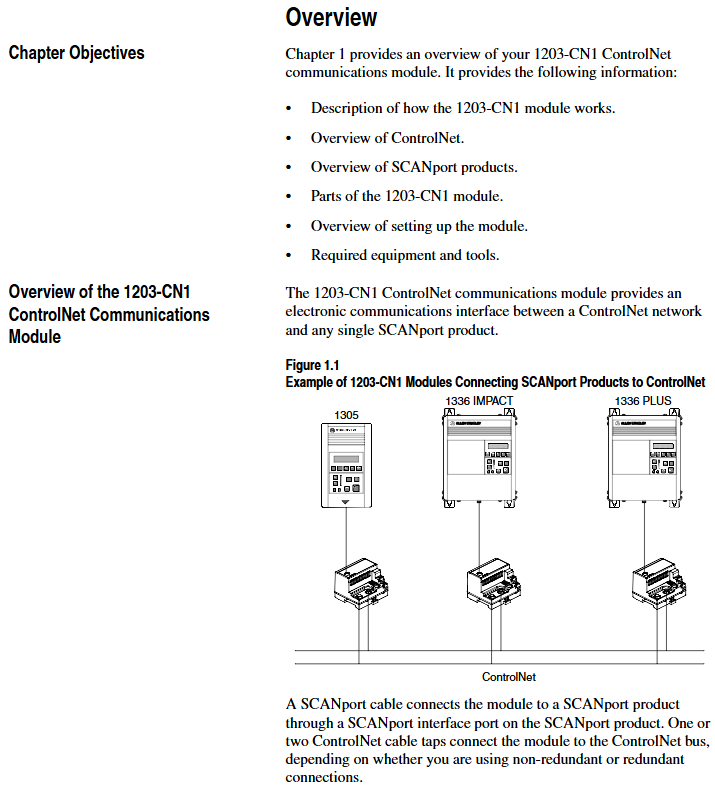
Product Function: As a bridge between the ControlNet network and SCAnport products, the module can convert ControlNet messages into signals recognizable by SCAnport products, supporting the transmission of scheduled I/O data (such as logical instructions, analog reference values) and non scheduled messages (such as parameter read/write, fault query). The ControlNet network speed reaches 5Mbps, ensuring real-time and deterministic performance.
Adaptation scenarios: Compatible with various Allen Bradley SCANPort products, including 1305 AC micro drives, 1336 series inverters (IMPACT/PLUS/FORCE), 1394 multi axis motion control systems, SMC Dialog Plus controllers, etc. Different products support 1-6 peripheral connections, with an I/O word length range of 0-10 words (depending on the product model).
Hardware composition: The core hardware interfaces and components of the module are shown in the table below:
|Component Name | Function Description|
|DIN rail mounting seat | Fixed module and electrically grounded, compatible with 35 × 7.5mm DIN rails (models 199-DR1, etc.)|
|ControlNet coaxial interface (A/B channels) | Connect ControlNet cable taps, supporting redundant/non redundant network configurations|
|Two color LED indicator lights | 4 status lights (ControlNet A/B channels SCANport、 The module itself is used for fault diagnosis|
|SCANPort interface | 8-pin circular mini DIN connector, connected to SCANPort products through a dedicated SCANPort cable|
|ControlNet Node Address Indicator | Press the key to set the node address (0-99), which needs to be powered off and restarted to take effect, ensuring that the address is unique within the network|
|24V DC power interface | Supports multi module Daisy chain power supply, reduces wiring complexity|
|Network Access Port (RJ-45) | To connect ControlNet network devices, a 1786-CP cable and a 1784-KTCX communication card are required|
|RS-232 serial port | Used for parameter configuration and firmware upgrade, requires 1203-SFC serial port cable and terminal simulation software/VT100 terminal|
Installation and electrostatic protection
1. Installation preparation
Tools and equipment: Grounding wristband (included with module), 1/8 inch flathead screwdriver, blunt tool (set node address), ohmmeter, SCANPort cable (such as 1202-C03/C10, up to 10m), ControlNet tap (such as 1786-TPS/TPR, redundant configuration requires 2).
Static protection: The module contains ESD sensitive components, and a grounding wristband must be worn during operation. Refer to Allen Bradley document 8000-4.5.2 "Guidelines for Preventing Static Damage".
2. Installation steps
Set node address: Use a blunt tool to press the "+/-" keys to set a unique address (0-99). It needs to be powered off and restarted to take effect. Avoid using pencils/pens to prevent damage to the switch.
Rail installation: Insert the top hook of the module into the DIN rail, rotate and fasten it, and use an ohmmeter to check the rail grounding (the resistance between the metal shell of the RS-232 port of the module and the rail grounding is ≤ 2 Ω).
Cable connection: Insert the SCANPort cable alignment interface (hear a snap sound); Screw the ControlNet tap into the corresponding A/B channel; 24V DC power supply connection (supports multi module cascade power supply).
Installation verification: After power on, the SCANPort and ControlNet LEDs remain constantly green, and the module LED flashes green (when network configuration is not completed). If the LED status is abnormal, the wiring needs to be checked.
3. Module removal
After power failure, disconnect all cables (SCANPort cables need to be pressed and pulled out), pry the release buckle with a screwdriver, remove the module, and maintain grounding protection throughout the process.
Basic configuration and operation
1. Serial port connection and parameter configuration
(1) Connection preparation
Hardware: 1203-SFC serial port cable (connecting module RS-232 port to PC/terminal).
Software: PC needs to install terminal simulation software (such as Windows HyperTerminal) or use VT100 compatible terminals.
(2) Serial port configuration steps
Software settings: default baud rate of 9600 (parameter 21 can be modified, supports 2400/4800/19.2K/38.4K), data bit 8, no checksum, stop bit 1, no flow control; Simulate to select VT100 mode.
Access main menu: Press Enter to enter the module main menu, supporting 7 functions:
1: Display/edit parameters; 2: Specify parameter number for query; 3: Display event queue; 4: Display current I/O data; 5: Display DF1 protocol statistics; 6: View serial number; 7: Firmware upgrade.
(3) Key parameter configuration
The default parameters of the module support 16 bit logic instructions/status and 16 bit reference/feedback values. When the SCANPort product triggers a fault in PLC programming mode or network failure, the following parameters can be used to adjust the function:
Parameter Number Name Function Description Default Value
4 CMD/Stat enable/disable logical instructions from ControlNet to SCAnport/simulate reference data transfer 1 (enable)
- OMRON
- ABB
- General Electric
- EMERSON
- Honeywell
- HIMA
- ALSTOM
- Rolls-Royce
- MOTOROLA
- Rockwell
- Siemens
- Woodward
- YOKOGAWA
- FOXBORO
- KOLLMORGEN
- MOOG
- KB
- YAMAHA
- BENDER
- TEKTRONIX
- Westinghouse
- AMAT
- AB
- XYCOM
- Yaskawa
- B&R
- Schneider
- KONGSBERG
- NI
- WATLOW
- ProSoft
- SEW
- ADVANCED
- Reliance
- TRICONEX
- METSO
- MAN
- Advantest
- STUDER
- DANAHER MOTION
- Bently
- Galil
- EATON
- MOLEX
- DEIF
- B&W
- ZYGO
- Aerotech
- DANFOSS
- Beijer
- Moxa
- Rexroth
- Johnson
- WAGO
- TOSHIBA
- BMCM
- SMC
- HITACHI
- HIRSCHMANN
- Application field
- XP POWER
- CTI
- TRICON
- STOBER
- Thinklogical
- Horner Automation
- Meggitt
- Fanuc
- Baldor
- SHINKAWA
- Other Brands
- UniOP
- KUKA
- Iba
- Beckhoff
- ADLINK
-
 GE IS2I5WEMAHIA+IS210BPPBHZCAA Mark VIe Safety Controller & I/O Module Set
 -
 GE IS2I5AEPAHICH+IS210BPPBHZCAA Mark VIe Analog I/O Control Module Set
 -
 GE IS2I5WECAH1B+IS2108PPBHZCAA Mark VIe Controller Redundant I/O Set
 -
 VMIC HSDA 332-000111 Scanning Analog-to-Digital Converter Module
 -
 GE VMIC VMIVME1150B VME Module
 -
 FANUC VMIVME3128 VME Digital I/O Board
 -
 GE Fanuc VMIVME-7697-350 VMEbus Single Board Computer
 -
 GE Fanuc VMIVME-4150 PLC Board
 -
 FANUC VMIVME-1160A VMEbus Module
 -
 GE Fanuc VMIVME-4116 VMEbus CPU Processor Controller
 -
 FANUC VMIVME-9300 VMEbus Module
 -
 VMIVME-7589A Pentium VMEbus CPU Board
 -
 GE Fanuc VMIPCI-7767-13100 PCI Board
 -
 GE Fanuc VMIVME-4140 VMEbus Module
 -
 IS415UCVGH1A VME Controller Card
 -
 VMIC VMIVME-1150 VME Circuit Board
 -
 VMIC VMIVME7589 Processor Board
 -
 FANUC VMIVME-2200 VME Circuit Board
 -
 IS215UCVEH2A VME Controller Card
 -
VMIC VMIVME-7589A-446 VMEbus CPU SBC
-
 VMIC VMIVME-7658-330 VME Single Board Computer
 -
 VMIC SEMIVISION OPAL VMEbus CPU Module with VMIVME-7588
 -
GE Fanuc VMIVME-4140 VME Module
-
 Abaco VMIVME 2532A 32-Bit High-Voltage Digital I/O Board – VMEbus
 -
 VMIC VMIVME 100-Pin VME Bus I/O Cables
 -
 VMIC ASSY 11994R13 VMEbus Module
 -
 GE Fanuc VMIVME 1182 VMEbus Input Board – 332-011182-030A
 -
VMIC VMIVME-7589 VMEbus Module with VMIVME-7434
-
 VMIC VMIVME-7588-787 Single Board Computer – 332-250236
 -
 VMIC 7487A VMEbus CPU Board – 332-107487-033 H
 -
 FANUC VMIVME-3125 VMEbus Analog Input Board
 -
 VMIC VMIVME 6015 VMEbus Board – 332-006015-000
 -
 VMIC ASSY 11993R2 VMEbus Module
 -
 Cisco 2851 Router with VMIC2-1MFT-T1/E1 Module
 -
 Applied Materials VMIC 7505 800MHz CPCI SBC
 -
VMIVME-2534-046D 32-Bit High-Voltage Digital I/O Board
-
 VMIC 5530M Optical Extender PCB Board
 -
 GE VMIC XVB602 Control Module
 -
 VMIVME-6005-020 Octal ARINC-429 Controller
 -
 VMIC VMI PCI 3322 Board
 -
 FANUC VMIVME-7487 VME Processor Board
 -
 VMIC 332-800576-000A VMIACC 0576 Module
 -
 VMIC VMIVME-7805-231000 VME Board
 -
 ABACO VMIC VMICBL-000-F3-102 Reflective Memory Cable
 -
 VMIC 332-000131-B VMIVME PCB Card
 -
VMIC 320-250236 with VMIVME-7588 Processor Board
-
 VMIC ASSY 12149 Module
 -
 FANUC VMIC VMIVME5010 I/O PCB Board
 -
 VMIC VMIVME-7698-345 VME Single Board Computer
 -
IS215UCVEH2A VME Controller Card
-
 VMIC VMIVME-7658-330 VME Single Board Computer
 -
 VMIC VMIPCI-5790-000 Dual-Channel Ultra160 SCSI Adapter
 -
 VMIC VMICPCI-7756-460 Single Board Computer
 -
 VMIVME-4920 Dual Channel Digital Converter Board – VMEbus
 -
GE Fanuc VMIVME-4140 VMEbus Module
-
 VMIC VMIPMC-7440 PMC Sound Card
 -
 VMIC PCI 4320 VMEbus Board-333-854320-000
 -
VMIC VMIVME 5530S VMEbus Interface Module
-
 FANUC 332-999995-000 VMEbus PCB Assembly
 -
FANUC VMIVME-4116-030 VMEbus Module
-
VMIC VMIVME-7658-330 VMEbus Single Board Computer
-
VMIC VME-2532A VMIVME2532A-413 Digital I/O Board
-
 VMIC VMIVME-7696-650 VMEbus Processor Board
 -
VMIC VMIVME-7487A Mainframe Board
-
 GE Fanuc VMIVME-2120-175 Digital Output Board
 -
 Abaco VMIVME-4125A-000 System Test Calibration Board
 -
 VMIC VMICPCI-5579 Reflective Memory PCI Board
 -
 FANUC A860-2000-X003 Encoder Interface Module
 -
FANUC 332-999992-000 VME Module
-
 VMIC VMIVME-7698 VME Module
 -
FANUC A860-2000-X003 Encoder Interface Module
-
 VMIC 333-657755-000 B LSC-3 4201 Board
 -
VMIVME-9304 CPU Board with NEC FGA-002A Interface Chip
-
VMIC VMIVME-7805 VMEbus Board – VMIVME-7805-234001
-
VMIC 332-000131-000M01 VMIVME PCB Card
-
 FANUC GE VMIC VMIVME 2510B Digital I/O Board
 -
 VMIC VMIPMC-5795-000 PMC Ultra160 SCSI Adapter
 -
GE Fanuc VMIVME 5588 High-Speed Reflective Memory Board
-
 VMIC VMIVME 4132 VMEbus Analog Output Board
 -
 VMIC VMIVME-3418 8-Channel Strain Gauge and RTD Board
 -
 VMIC VMIPMC-5797-000 Ultra320 SCSI Host Bus Adapter
 -
 VMIC VMIACC 0562 Accessory Module
 -
Abaco VMIVME 4116 8-Channel 16-Bit Analog Output Board
-
 VMIC VMIVME 4512 Analog I/O Board – 332-004512-300
 -
 VMIC VMIVME 4120 VMEbus Circuit Board – 332-004120
 -
 VMIC VMIVME-3801-100C Analog-to-Digital Converter Module
 -
IS215UCVEH2AE VME Controller Card
-
 FANUC 333-00DMA0-000 VME Module
 -
GE Fanuc VMIVME-5588-200 High-Speed Reflective Memory Card
-
VMIC VMIVME-7696-650 VMEbus Single-Board Computer
-
 GE Fanuc VMIVME-5532S VMEbus Fiber-Optic Repeater Link
 -
 VMIC GE EV-DIO-01 Control Board
 -
 Abaco VMIVME-7751 Pentium III VME Single Board Computer
 -
 PMC-5565PIORC-110000 128MB Reflective Memory Card
 -
 Abaco VMIVME-5565-010000 Reflective Memory Board
 -
 VMIC VMIPMC-5565 Reflective Memory PMC Module
 -
 VMIC VMIVME 5504 Slave VME Module
 -
 VMIC VMIVME-5740-12000 VMEbus Hard Drive Module
 -
 VMIC VMIVME-7751 VMEbus Processor Module
 -
VMIC VMIVME-7588 CPU Module
-
 VMIC 332-000132 VMIVME PCB Card
 -
 GE Fanuc VMIVME-4514A Analog I/O Board
 -
 Abaco VMIVME-2528-000 128-Bit TTL Digital I/O
 -
 VMIC VMIVME 4514 Scanning Analog I/O Board
 -
 VMIPCI 5588-101 High Speed Fiber Optic Reflective Memory Card
 -
 VMIC VMIVME-1228 VMEbus Board
 -
 VMIC VMIVME-7455 CD-ROM Drive Module
 -
 VMIC VMIACC 0577 Compact PCI Board
 -
IS415UCVGH1A VME Controller Card
-
 VMICPMC-5664 VME PMC Dual Fiber Card
 -
VMIVME1128 128-Bit High-Voltage Digital Output Board
-
VMIC VMIVME-2170A VMEbus PCB Board
-
VMIC 332-015565-010L VME Module
-
 VMIC VMICPCI-7612-470 Single Board Computer
 -
 VMIC EV-CNT/01 Control Board
 -
 VMIC VMIVME 1181 VMEbus Input Board – 333-001181-000 A
 -
VMIC VMIVME-1150 VMEbus Module
-
 VMIC VMIVME-5576 VMEbus Module
 -
 VMIC VMIVME-4150 VMEbus Module
 -
 VMIC VMIOMAX-8001B PLC Rack
 -
 VMIC VMIVME 2128 High-Voltage Digital Output Board
 -
VMIC VMIVME-1111 64-Bit High-Voltage Digital Input Board
-
GE Fanuc VMIVME 1182 VMEbus Input Board – 332-011182-060C
-
 VMIC VMIVME-7696 VMEbus PC Board
 -
 VMIC VMIVME-7686 VMEbus Module
 -
 GE VMIVME-7486 VME PCB Board
 -
VMIC VMIVME-7740-840 Processor Module
-
 VMIC VMIACC BT01 REV 0 Transition Board


