
Westinghouse 2400i digital inverter generator
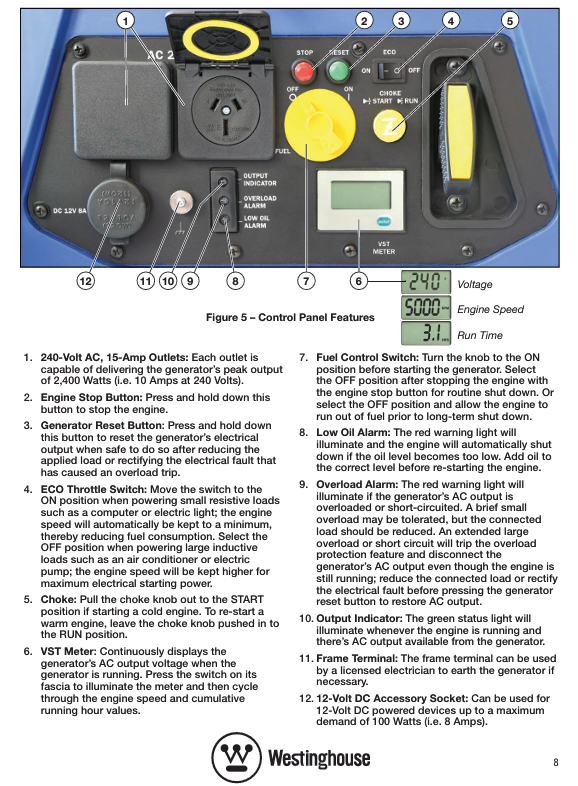
Power parameters: displacement of 79cm ³, maximum speed of 5000rpm, intelligent adjustment of speed with load (operating at the lowest speed in ECO mode)
Operation steps:
Start the generator according to the normal procedure and turn off the ECO mode after stable operation.
Clean the positive and negative terminals of the battery and remove oxides (gently rub with sandpaper).
Connect the crocodile clip of the charging cable to the battery: the red clip is connected to the positive pole (+), and the black clip is connected to the negative pole (-), ensuring clamping (to avoid poor contact and heat generation).
Insert the cigarette lighter plug of the charging cable into the 12V DC socket of the generator.
During the charging process, maintain a distance of at least 1m between the battery and the generator (to prevent hydrogen explosions during battery charging), monitor the battery temperature in real-time, and immediately stop charging if the battery is hot or the electrolyte boils.
Charging time: adjusted according to battery capacity, generally not exceeding 3 hours; When there is no monitoring tool, disconnect after charging for 2 hours and test the battery voltage (full charge voltage is about 12.6V).
Charging completed: First unplug the cigarette lighter plug, then disconnect the crocodile clip (negative first, positive later), and cover the battery vent caps.
Method 2: Charging the AC socket through a charger (recommended)
Tool preparation: A 12V battery charger with 240V AC input (compatible with battery types such as lead-acid and lithium batteries).
Operation steps:
Start the generator and connect the charger power plug to a 240V AC socket after stable operation.
Connect the battery according to the charger manual (positive to positive, negative to negative).
Turn on the charger and set the appropriate charging mode (such as constant voltage, constant current).
During the charging process, monitor the charger indicator light and battery temperature, and complete the charging according to the charger prompts.
Charging completed: Turn off the charger, unplug the power plug, disconnect the battery connection, and stop the generator.
Advantages: The charger can intelligently adjust the charging current and voltage, avoiding overcharging and damaging the battery, and has higher safety.
Complete maintenance process (including cycle and operation details)
1. Preparation before maintenance
Safety measures: Turn off the generator and remove the spark plug cap (to prevent accidental starting); Let the engine cool to room temperature (to avoid scalding of high-temperature components); Operate in a well ventilated area and prepare tools such as cloths, wrenches, containers, etc.
Tool list: Phillips screwdriver, Phillips screwdriver, spark plug socket wrench, oil pan, funnel, wire brush, compressed air (optional), new engine oil, new spark plug (spare).
2. Routine maintenance items (executed on a periodic basis)
Before/after each use
Cleaning: Use a damper cloth to wipe the dust and oil stains on the surface of the generator, and clean the debris from the heat dissipation port and ventilation hole (to avoid blockage that affects heat dissipation).
Check:
Appearance: The components are not loose or damaged, and the socket has no burn marks.
Oil: The oil level is within the standard range and there is no leakage; There is no fuel leakage and the fuel gauge shows sufficient.
Wiring: The wires are not damaged or aged, and the plugs are securely connected.
Every 20 hours (after first use)
Oil change:
Place the generator on a level surface, start the engine and run it for 1 minute (allowing the oil to flow and facilitate drainage), then stop it.
Open the oil inspection cover, clean the area around the filling port, and place the oil basin under the filling port.
Unscrew the oil filler plug, tilt the generator, and allow the old oil to flow completely into the oil pan (about 5 minutes).
Tighten the oil filling plug and add 400mL of new oil (SAE 15W-40 API SG grade) through the funnel.
Tighten the filling plug, start the engine and run it for 1 minute, check if the oil level is normal and if there are any leaks.
Old engine oil treatment: Pour into a sealed container and hand it over to a professional organization for recycling (no dumping at will).
Every 50 hours/3 months
Air filter cleaning:
Unscrew the 6 screws of the air filter maintenance cover on the right side of the body, and remove the maintenance cover and air filter cover (with the central screw).
Take out the foam filter element and pay attention to the position of the bevelled corner (easy to replace).
Clean the filter element with warm water and a small amount of detergent, gently squeeze (without twisting or tearing), and remove dust and oil stains.
Rinse with clean water, squeeze and drain the water, then use a dry cloth to absorb any remaining moisture (or air dry naturally, do not expose to direct sunlight).
Apply a thin layer of engine oil evenly on the surface of the filter element (to enhance the filtering effect), and squeeze to remove excess engine oil.
Reinstall the filter element, filter cover, and maintenance cover in their original positions, and tighten the screws.
Fuel filter inspection:
Unscrew the fuel cap and remove the fuel filter from the fuel tank (pull it out directly by hand).
- OMRON
- ABB
- General Electric
- EMERSON
- Honeywell
- HIMA
- ALSTOM
- Rolls-Royce
- MOTOROLA
- Rockwell
- Siemens
- Woodward
- YOKOGAWA
- FOXBORO
- KOLLMORGEN
- MOOG
- KB
- YAMAHA
- BENDER
- TEKTRONIX
- Westinghouse
- AMAT
- AB
- XYCOM
- Yaskawa
- B&R
- Schneider
- KONGSBERG
- NI
- WATLOW
- ProSoft
- SEW
- ADVANCED
- Reliance
- TRICONEX
- METSO
- MAN
- Advantest
- STUDER
- DANAHER MOTION
- Bently
- Galil
- EATON
- MOLEX
- DEIF
- B&W
- ZYGO
- Aerotech
- DANFOSS
- Beijer
- Moxa
- Rexroth
- Johnson
- WAGO
- TOSHIBA
- BMCM
- SMC
- HITACHI
- HIRSCHMANN
- Application field
- XP POWER
- CTI
- TRICON
- STOBER
- Thinklogical
- Horner Automation
- Meggitt
- Fanuc
- Baldor
- SHINKAWA
- Other Brands
- UniOP
- KUKA
- Iba
- Beckhoff
- ADLINK
-
 Sigmatek MDD111-1 DIAS Drive Axis Module
 -
 Sigmatek DKL042 05-024-042 Terminal Module
 -
 Sigmatek DM822 Control Module
 -
 Sigmatek CDM167 12-008-167-O Module
 -
 Sigmatek TAE151 Touch Display Unit
 -
 Sigmatek DCC041 SLIDES Module 05-700-041-D
 -
 Sigmatek AKM65M-ANC2GBB0 PM Servo Motor
 -
 Sigmatek ETT221 01-230-221 Operator Terminal
 -
 Sigmatek SLIDES DAM 124 Analog Module
 -
Sigmatek AKM31C-ANCNGBB0 Servo Motor
-
 Mannesmann Demag Sigmatek CP626 Central Unit
 -
 SIGMATEK 0332.554.03 Board 371071000154
 -
 SIGMATEK 12-250-021 Base Plate Back Panel CM5V020
 -
 SIGMATEK DM162 S-DIAS Digital Mix Module
 -
 DEMAG ERGOTECH 061 381 66 Sigmatek 9842.243.02 Circuit Board
 -
 SIGMATEK CP313-1 PLC Module
 -
Sigmatek ETV0551-2 VARAN Touch Terminal
-
 Sigmatek SDM 081 FS S-Dias Safety Module
 -
 DEMAG 05-250-023 Ergotech Motherboard with Sigmatek TMS012
 -
Sigmatek CM5V020 12-250-023-K Wiring Base
-
 Sigma Tek 5000B-37 Attitude Gyro Indicator
 -
 Sigmatek SDD120-2 DIAS Drive
 -
 Sigmatek CME221 Memory Module
 -
 Sigmatek DCP640 DIAS Central Unit
 -
 Sigmatek STO040 Safety Output Module
 -
Sigmatek CET281 Control Panel
-
 Sigmatek CIPC LX800 Demag NC5 CPU
 -
 Sigmatek DKL093 05-024-093 Terminal Module
 -
 Sigmatek AI088 20-009-088 Analog Input Module
 -
Sigmatek CAI888 Analog Input Module
-
SIGMATEK CCA021 12-025-021 Analog Output Module
-
SIGMATEK 1104.579.05 Control Module
-
SIGMATEK SDI100 Digital Input Module
-
 SIGMATEK C-IPC 256MB LX800 Compact Dias
 -
 SIGMATEK 9423.090.02 Control Module
 -
SIGMATEK C-IPC 256 Power Supply 148498
-
 SIGMATEK CAI025 Analog Input Module
 -
 SIGMATEK CTO166 Digital Output Module
 -
 SIGMATEK CP112 20-004-112 Processor Module
 -
SIGMATEK CAI887 12-009-887 Safety Module
-
 Sigma-Tek 4000B-31 Directional Gyro 1U262-002-42
 -
Sigmatek C-IPC 256MB LX800 IPC Controller
-
Sigmatek C-IPC 01-450-031 Industrial PC LX800
-
Sigmatek C-IPC 256 Industrial PC Controller
-
Sigmatek CCP-531 PLC Processor Module
-
Sigmatek CDI163 Digital Input Module
-
 Sigmatek ETV0501 VARAN Terminal 12-230-0501
 -
 Sigmatek CTMS020 C-DIAS Technology Module
 -
 Sigmatek CIV512 VARAN Switch Module
 -
 Sigmatek HU011 20-080-011 Interface Module
 -
SIGMATEK SLIDES DAM 124 Module
-
 SIGMATEK C-IPC 161 01-450-161L Industrial PC
 -
SIGMATEK C-IPC 128MB VIA 733MHz 01-450-024-K
-
 SIGMATEK 12-780-012 R8-IPC Geode LX800 Module
 -
SIGMATEK CAM124 Analog Module
-
 SIGMATEK S1 032-8AF61-R4 EZ Servo Motor
 -
 SIGMATEK CTO163 Digital Output Module
 -
 SIGMATEK CCP082 12-004-082 Processor Module
 -
 SIGMATEK CRCH081 C-DIAS Temperature Module
 -
 SIGMATEK PC322-K 01-310-322-K Industrial PC
 -
SIGMATEK SDD310-2 Servo Drive
-
 SIGMATEK AI084 Analog Input Module
 -
SIGMATEK CRCH081 12-752-081 Temperature Module
-
Sigma-Tek 5000L-4 Attitude Gyro 1U284-001-3
-
 SIGMATEK CM5V020 12-250-023-K Wiring Module
 -
Sigma-Tek 4000H-6 Directional Gyro IU262-035-7
-
 SIGMATEK Dias DCP160 05-004-160 Processor Module
 -
SIGMATEK 0147.395.02 Control Module
-
SIGMATEK A1084 Control Module
-
SIGMATEK DI200 20-006-2000 Digital Input Module
-
Sigmatek DNC115 Encoder Module
-
 Sigmatek DAM122 05-017-122 Analog Module
 -
Sigmatek 9802.289.01 Control Board TA71 Display
-
Sigmatek TO127 20-007-127 Digital Output Module
-
Sigmatek DNC031 05-011-031 Digital Module
-
Sigmatek VI022 20-003-022 Interface Module
-
Sigmatek CAI085 Analog Input Module
-
 Sigmatek CP111 S-DIAS CPU Module
 -
Sigmatek CTMS030 Krauss Maffei Module
-
 Sigmatek CAM123 Control Module
 -
 Sigmatek TAE732-P 01-240-732-P Touch Display Unit
 -
Sigmatek MDM021 Digital Mixed Module
-
Sigmatek DCP642 DIAS Central Unit
-
 Sigmatek CST022 12-014-022 C-DIAS Module
 -
 Sigmatek SRO021 20-893-021 Safety Relay Output
 -
 Krauss Maffei MC5 Control System Sigmatek
 -
 Sigmatek DC061 Module 18-24VDC 300mA
 -
 Herrmann EVT0855 Ultrasonic Welder Touch Panel
 -
Sigmatek CIV521 Control Module 1.4A 2W
-
Sigmatek DDI61 05-006-161 Digital Input Module
-
SIGMATEK ETT312-E Touch Terminal 01-230-312
-
Cessna S3326-1 Sigma Tek 5000B-67 Gyro 1U149-015-9
-
SIGMATEK PS101 Power Supply Module
-
SIGMATEK 0332.554.03 Control Module 371071000154
-
 SIGMATEK ETT312-E Touch Terminal 01-230-312
 -
SIGMATEK CDM163 Control Module
-
 SIGMATEK VSV046 16-023-046 Module
 -
SIGMATEK AM221 20-017-221 Analog Module
-
SIGMATEK CTS051 12-053-051 Control Module
-
SIGMATEK AM221 20-017-221 Analog Module
-
Sigmatek CSDI161 12-891-161 Safety Input Module
-
Sigma Tek 4000C-1 Directional Gyro Indicator
-
Sigmatek ETV0501 12-230-0501 VARAN Terminal
-
Sigmatek DDM165 SLIDES Module
-
Sigmatek N100 20-011-100 Control Module
-
Sigmatek AKM54K-ANC2R-B0 PM Servo Motor
-
Sigmatek CTO166 Digital Output Module
-
Sigmatek CP212-K 20-004-212-K CPU Module
-
Sigmatek CDI161 Digital Input Module
-
Sigmatek DCC080 05-700-080-2 Control Module
-
 SIGMATEK SCP011 S-DIAS Safety CPU
 -
SIGMATEK SCP011 S-DIAS Safety CPU
-
SIGMATEK SRO022 Relay Output Module
-
SIGMATEK MDD 121 Drive Axis Module
-
SIGMATEK DSI021 SLIDES Siemens Interface
-
SIGMATEK DIAS DCP161 Module 05-004-161
-
 Sigmatek ETT312 Built-in Touch Terminal
 -
SIGMATEK DCP 643 DIAS Controller System
-
SIGMATEK CIO021 Multi I/O Module
-
SIGMATEK CTMS020 Control Module
-
 Sigmatek CME 221 Memory Module
 -
Sigmatek 0420.615.01 Control Board
-
Sigmatek CP111 20-004-111 CPU Module
-
Sigmatek 9405.065.03 Control Board
-
Sigmatek ETEK 01-450-032-K C-IPC 256MB Industrial PC
-
Sigmatek CTO163 12-007-163 Safety Output Module
-
Sigmatek TO081 20-007-081 Digital Output Module
-
 Sigmatek SI021 20-022-021 Safety Input Module


