
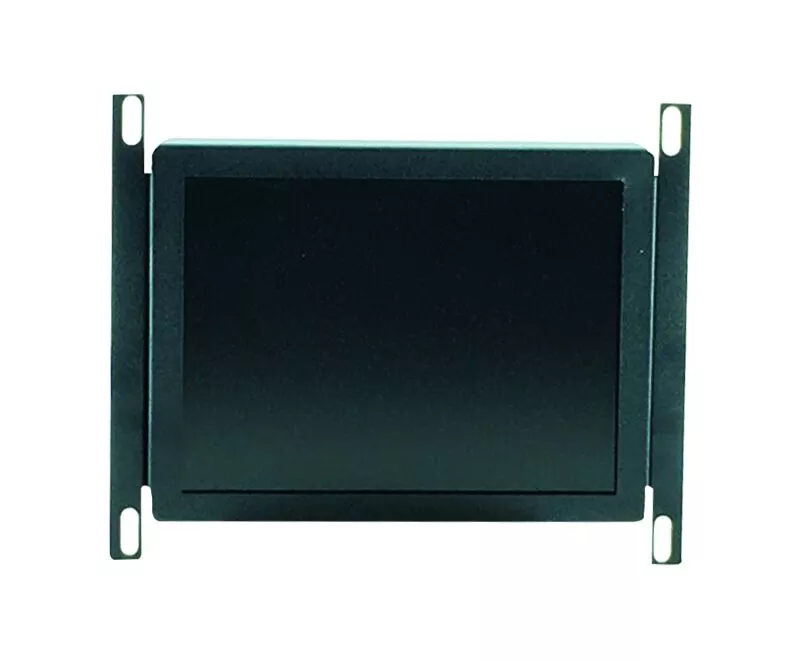
Xycom 8450 LCD screen upgrade with cable kit 14 inch CRT
Xycom 8450 LCD screen upgrade with cable kit 14 inch CRT
Product Overview
The Xycom 8450 LCD Screen Upgrade Kit is designed specifically to upgrade an existing 14 inch CRT monitor to an advanced LCD screen. This kit aims to solve many problems exposed by CRT monitors in long-term use, such as decreased display quality, high energy consumption, and difficult maintenance, bringing significant performance improvement and user experience optimization to users. The kit includes a high-quality LCD screen compatible with the Xycom 8450 system, as well as a complete set of cable components to ensure stable and efficient connection between the new screen and the existing system, achieving a convenient plug and play upgrade experience. Whether it is monitoring industrial automation production lines or displaying complex equipment operation interfaces, this upgrade kit can provide users with clear and stable visual display effects, helping to improve work efficiency and production quality.
Brand background
Xycom has long been renowned in the field of industrial automation control, with profound technical accumulation and rich industry experience. For many years, Xycom has been committed to providing high-quality, high-performance industrial control products and solutions to global customers. Its products are widely used in key industries such as manufacturing, energy, and transportation, and have won high trust from customers with stable and reliable performance. In the continuous evolution of display technology, Xycom has keenly captured users' demand for clearer, more energy-efficient, and durable display devices, and has launched the 8450 LCD screen upgrade kit. With a profound understanding of industrial application scenarios and excellent research and development capabilities, Xycom ensures that this upgrade kit can perfectly adapt to existing 8450 systems, providing users with a seamless upgrade experience and continuously leading the development trend of industrial display technology.
Specification parameters
Screen size: 14 inches
Screen type: TFT-LCD (Thin Film Transistor Liquid Crystal Display)
Resolution: Typically up to 1024 × 768 (depending on the product batch, some may be higher)
Viewing angle: Both horizontal and vertical directions are close to 170 ° (depending on the product batch, some may be higher)
Contrast ratio: The typical value is 800:1 (some products may have higher values, depending on the specific model)
Brightness: Approximately 250-300cd/㎡ (depending on the product batch, some may be higher)
Color depth: 16.7M (approximately 24 bit true color)
Response time: generally 10-15ms (grayscale response time may be shorter depending on the product batch)
Cable interface: video interface (such as VGA or specific industrial interface), power interface, compatible with Xycom 8450 system
Installation size: Accurately adapted to the installation position of the original 14 inch CRT monitor of Xycom 8450
Kit weight: approximately 4-5kg (including screen and cable components)
Core functions
(1) Clear image display
The upgraded LCD screen, with higher resolution and advanced LCD display technology, can present clearer and more delicate images than a 14 inch CRT monitor. Whether it is complex equipment operating parameters, precise production process monitoring screens, or tiny equipment status indicator lights, they can all be clearly displayed in front of operators, greatly improving the accuracy and efficiency of information reading.
(2) Wide perspective display
With a wide viewing angle of nearly 170 °, the clarity, color, and contrast of the image will not show significant attenuation or distortion when the operator views the screen from different angles. In an industrial environment where multiple people collaborate, it is convenient for personnel from different locations to view screen information clearly at the same time, reducing communication barriers caused by perspective issues.
(3) Stable signal transmission
The accompanying cable components have been carefully designed to stably transmit video signals and power, ensuring that LCD screens do not experience signal instability issues such as image flickering, screen flickering, and black screens during operation. The cable interface is closely matched with the Xycom 8450 system, plug and play, reducing the risk of failures caused by incompatible or improperly connected interfaces.
Working principle
(1) Working mechanism of LCD screen
The LCD screen in the upgrade kit adopts TFT-LCD technology. Its basic working principle is to control the transmission and obstruction of light through the arrangement changes of liquid crystal molecules, thereby achieving image display. Inside the screen, the liquid crystal layer is sandwiched between two glass substrates, which are engraved with transparent electrodes and TFT transistors. When current passes through TFT transistors, it changes the alignment direction of liquid crystal molecules, thereby controlling the intensity of light passing through the liquid crystal layer. The light emitted by the backlight passes through the liquid crystal layer and color filter, forming three primary colors of red, green, and blue. By mixing the three primary colors in different proportions, a rich and colorful image is presented.
(2) Signal transmission process
The video signal from the Xycom 8450 system is transmitted to the LCD screen through the video interface in the cable assembly. If it is an analog signal (such as VGA signal), the first step is to perform analog-to-digital conversion in the signal processing circuit inside the screen, converting the analog signal into a digital signal for subsequent processing. The digital signal undergoes a series of image processing algorithms, including image scaling, color correction, contrast enhancement, etc., and is then sent to the TFT driver circuit. The TFT driving circuit controls the switching state of each TFT transistor based on the received signal, thereby accurately controlling the arrangement of liquid crystal molecules, and ultimately displaying an image corresponding to the input signal on the screen. At the same time, the power interface in the cable assembly provides stable power to the screen, ensuring the normal operation of the entire working process.
Key advantages
(1) Significant reduction in energy consumption
Compared to a 14 inch CRT monitor, the upgraded LCD screen has significantly reduced energy consumption. The LCD screen adopts backlight emission technology, which consumes much less power than the method of electron gun emitting electron beam to excite fluorescent powder to emit light in CRT displays. This not only helps companies reduce long-term energy costs, but also meets the strict requirements of modern industry for energy conservation and environmental protection, reducing carbon emissions during equipment operation.
(2) Extended service life
The service life of LCD screens can usually reach over 50000 hours, which greatly reduces the frequency of frequent replacement due to aging display components compared to CRT monitors with gradually aging and limited lifespan. This means that for a long time in the future, users do not need to worry about the impact of display device failures on production and operation, reducing equipment maintenance costs and downtime risks, and improving the continuity and stability of industrial production.
(3) Display quality improvement
The characteristics of high resolution, wide viewing angle, high contrast, and fast response time make LCD screens surpass CRT monitors in terms of display quality. Clear image display can help operators more accurately judge the operating status of equipment, timely discover potential problems, and take effective measures for adjustment and maintenance, which helps to improve product quality and reduce the rate of defective products in the production process.
(4) Easy installation
The upgrade kit fully considers compatibility with the existing system of Xycom 8450, and the installation process is simple and fast. The accompanying installation guide, in the form of illustrations and text, provides detailed guidance to users on every step from removing the original CRT monitor to installing a new LCD screen and cable assembly. Even non professional technicians can complete the upgrade and installation work in a short period of time, reducing the impact on normal production.
Precautions
(1) Key points of installation operation
Before installing the upgrade kit, make sure that the Xycom 8450 device is powered off to prevent electric shock and equipment damage. When dismantling the original CRT monitor, be careful to avoid damaging the device casing or internal circuits due to excessive force. When installing a new LCD screen, pay attention to correctly installing the bracket and screen according to the installation guide, ensure that they are firmly fixed, and avoid the screen shaking or falling off during device operation. When connecting cables, carefully check the shape and labeling of the interface to ensure correct connection and avoid inserting the wrong interface, which may cause abnormal signal transmission or equipment failure.
(2) Environmental requirements for use
LCD screens have certain requirements for the usage environment. The working temperature range is generally 0 ℃ -40 ℃. Avoid using in high temperature, high humidity or low temperature environments to avoid affecting the display performance and service life of the screen. At the same time, the screen should be avoided from being exposed to strong magnetic fields to prevent image distortion or display abnormalities caused by magnetic field interference. In industrial production environments, pay attention to preventing pollutants such as dust and oil from adhering to the surface of the screen. Regularly wipe the screen with a clean and soft cloth to keep it clean.
(3) Troubleshooting and Maintenance
If problems such as no display, abnormal images, or flickering are found on the screen during use, first check if the cable connection is loose, and then re plug and unplug the cable to ensure a secure connection. If the problem is still not resolved, refer to the troubleshooting section in the installation guide to check if the device settings, signal sources, etc. are normal. For some simple faults, users can follow the guide to troubleshoot and solve them themselves; For more complex issues, it is recommended to contact Xycom's official technical support or professional maintenance personnel in a timely manner to avoid disassembling the screen and causing equipment damage, which may result in loss of warranty eligibility.
Similar model supplement
(1) Xycom 8450 Light LCD Upgrade Kit
This kit is also used to upgrade the 14 inch CRT monitor of Xycom 8450 to an LCD screen. Compared to regular upgrade kits, it may have been optimized in certain aspects while maintaining core functionality. For example, thinner and lighter materials may have been used in the screen material, making the entire kit lighter in weight and easier to install and transport. In terms of power consumption, it may further reduce energy consumption and be more energy-efficient and environmentally friendly. In terms of display performance, some parameters such as brightness and contrast may be improved to provide users with a better visual experience.
(2) Xycom customized upgrade kit for specific industries
Xycom has launched a customized 8450 LCD upgrade kit for specific industries with high display requirements, such as healthcare, aerospace, etc. These kits have been specially designed for industry characteristics while meeting basic display functions. In the medical industry, the color reproduction of the screen may be enhanced to display medical images more accurately; In the aerospace industry, it may improve the reliability and stability of screens to ensure they can function properly even in extreme environments. Meanwhile, customized kits may have enhanced protective performance, such as better dust, water, and impact resistance, to adapt to complex industrial environments.
- OMRON
- ABB
- General Electric
- EMERSON
- Honeywell
- HIMA
- ALSTOM
- Rolls-Royce
- MOTOROLA
- Rockwell
- Siemens
- Woodward
- YOKOGAWA
- FOXBORO
- KOLLMORGEN
- MOOG
- KB
- YAMAHA
- BENDER
- TEKTRONIX
- Westinghouse
- AMAT
- AB
- XYCOM
- Yaskawa
- B&R
- Schneider
- KONGSBERG
- NI
- WATLOW
- ProSoft
- SEW
- ADVANCED
- Reliance
- TRICONEX
- METSO
- MAN
- Advantest
- STUDER
- DANAHER MOTION
- Bently
- Galil
- EATON
- MOLEX
- DEIF
- B&W
- ZYGO
- Aerotech
- DANFOSS
- Beijer
- Moxa
- Rexroth
- Johnson
- WAGO
- TOSHIBA
- BMCM
- SMC
- HITACHI
- HIRSCHMANN
- Application field
- XP POWER
- CTI
- TRICON
- STOBER
- Thinklogical
- Horner Automation
- Meggitt
- Fanuc
- Baldor
- SHINKAWA
- Other Brands
- UniOP
- KUKA
- Iba
- Beckhoff
- ADLINK
-
 MICRO INNOVATION GF1-10TVB-100 Touch Panel
 -
 MICRO INNOVATION AG WINBLOC CAN-4AI/UI Analog Input Module
 -
 MICRO INNOVATION AG WINBLOC CAN-32DO/0.5A-P-2x16 Output Module
 -
 MICRO INNOVATION AG CAN-32DI/P-2X16 8551224182 Input Module
 -
 MICRO INNOVATION MK2-230/232-57 Circuit Board 85 28 200000
 -
 MICRO INNOVATION CAN-BRIDGE 8551224177 CAN Bridge
 -
 Micro Innovation MC2-430-10TVB-1-10 Panel 24VDC
 -
 MICRO INNOVATION MC2-432-57CQB-1-10 HMI Panel
 -
MICRO INNOVATION AG CAN-BRIDGE 85 51 224177 CAN Bridge
-
 MICRO INNOVATION CAN-4AI/UI Analog Input Module
 -
MICRO INNOVATION CAN-32DI/P-2X16 Input Module
-
 SIGMATEK MDD111 09-404-111 Drive Module
 -
 SIGMATEK DVI021 Display Interface Module
 -
 SIGMATEK 00-450-024 C-IPC Processor
 -
 SIGMATEK MDD-111 MDD111 Drive Module
 -
 SIGMATEK ICA011 20-102-011 Interface Module
 -
 SIGMATEK 01-250-010-D NC4Kompakt Control Module
 -
 SIGMATEK CRIF081 12-751-081 Interface Module
 -
 SIGMATEK S1026-8AF61-R4E-Z57 Drive Module
 -
 SIGMATEK 9305.081.02 9227.082.00 Control Module
 -
 Sigma Tek 5000B-36 Attitude Indicator
 -
 SIGMATEK CEZ201 12-051-201-O Counter Module
 -
 SIGMATEK DPS001 Power Supply Module
 -
 SIGMATEK 994 395 01z Via Interface Module
 -
 SIGMATEK PC411-K 01-310-411-K Industrial PC
 -
 SIGMATEK 9816.324.00 Demag NC4 Keyboard
 -
 SIGMATEK ET261 90010C-71 Operator Terminal
 -
 SIGMATEK DDI 164 05-006-164 Input Module
 -
 SIGMATEK CCP 082 C-DIAS Processor Module
 -
SIGMATEK CEZ201 12-051-201-O PLC Module
-
SIGMATEK MDD 1111 06178867 Drive Module
-
SIGMATEK S1 073-6AC61-RE-Y08-Z Drive Module
-
SIGMATEK MDD 111 Drive Module MDD111
-
 SIGMATEK CSDI161 Safety Module 12-891-161
 -
SIGMATEK C-IPC Processor 01-450-024
-
 SIGMATEK DIAS DAM122 Analog Mixing Module
 -
Sigma Tek 5000B-36 Attitude Gyro Indicator
-
 SIGMATEK TMS012 Motherboard Module 05-250-012-T
 -
 SIGMATEK CCP-531 PLC Module
 -
SIGMATEK DIAS DNC4 I/O Module 05-250-011
-
 SIGMATEK AI088 Analog Input Module
 -
 SIGMATEK CEZ201 Counter Module
 -
SIGMATEK CIC011 Industrial Computer Module
-
 SIGMATEK MDM021 Motor Drive Module
 -
 SIGMATEK DTO163 Digital Output Module
 -
SIGMA-TEK 5000B-36 Attitude Gyro
-
SIGMATEK DM161 Digital Input Module
-
SIGMATEK CCP-531 PLC Control Panel
-
 SIGMATEK HZS773 Touch Terminal Operator Panel
 -
SIGMATEK MDP101 3 KVA 45-65Hz Driver
-
 SIGMATEK ETV1251 Touch Panel 12-230-1251
 -
SIGMATEK CIO021 Safety Module 12-013-021
-
Sigma Tek 4000H-5 Directional Gyro
-
 SIGMATEK TAE531 I/O Module 01-240-531
 -
 SIGMATEK DAI081 Input Module 05-009-081
 -
 SIGMATEK DCP640 Drive Control Module
 -
 SIGMATEK DCP643 Slides Module A6-29
 -
SIGMATEK SCP011 Safety Module 20-890-011
-
SIGMATEK DDM 164-D Slides Module
-
 SIGMATEK C-IPC Processor 146267
 -
SIGMATEK ET3200 Display Screen
-
SIGMATEK CEZ221 C-DIAS Mixing Module
-
 SIGMATEK SDD120-2 DIAS Servo Drive
 -
SIGMATEK DIP011 05-058-011 Module
-
 Sigmatek DEC181 I/O Module
 -
SIGMATEK DCP640 DIAS Central Unit
-
SIGMATEK 00-450-024 C-IPC Industrial Computer
-
SIGMATEK AKM32C-ANCNR-B0 Servomotor
-
SIGMATEK DVI021 DIAS Power Module
-
SIGMATEK CTS051 12-053-051 Control Module
-
 SIGMATEK CTS022 Control Module
 -
 Sigmatek 01-250-010-D NC4Kompakt V2.1 Module
 -
 SIGMATEK Control Keyboard 01-285-042 Interface
 -
 SIGMATEK TO081 20-007-081 Digital Output Module
 -
 Sigmatek AKM73Q-ANCNGBB0 7.07kW Servo Motor
 -
Sigmatek DIP012 Demag 07024165 Processor Module
-
 SIGMATEK PC 411 Injection Molding Controller
 -
SIGMATEK CEZ201 12-051-201-O Processor Module
-
 SIGMATEK VI021 20-003-021 Digital Input Module
 -
SIGMATEK Computer C-IPC 144904 Industrial PC
-
 SIGMATEK 9307.083.01 9305.081.02 Industrial Module
 -
 SIGMATEK AI075 Analog Input Module
 -
 SIGMATEK HGT834-W Teaching Pendant
 -
Sigmatek CDI161 Digital Input Module
-
 SIGMATEK HGT834 Teaching Pendant
 -
 SIGMATEK CEZ201 12-051-201-O Module
 -
SIGMATEK Demag 9617.067.03 9708.244.00 Module
-
 SIGMATEK SCP010 Safety CPU Module
 -
SIGMATEK N100 20-011-100 Module
-
 SIGMATEK CNC 031 Positioning Output Module
 -
 Sigmatek 01-355-016 Control Module
 -
 Sigmatek MDM021 Digital Mixed Module
 -
Sigmatek DAI411 05-020-411 Analog Module
-
Attitude Gyro 1U367-232-2 Aircraft Instrument
-
 Sigma-Tek 5000B-36 Attitude Gyro 23-501-06-16
 -
Sigmatek HGT834-W Injection Molding Teach Pendant
-
Sigma Tek 5000EG Attitude Gyro 1U670-003-12
-
Sigmatek HGT834-W Teach Pendant
-
Sigmatek DEE011 05-068-011 Module
-
Sigmatek DIAS DCP643 Central Processing Unit
-
Sigmatek MDD111-1 DIAS Drive Axis Module
-
 Sigmatek DKL042 05-024-042 Terminal Module
 -
Sigmatek DM822 Control Module
-
Sigmatek CDM167 12-008-167-O Module
-
Sigmatek TAE151 Touch Display Unit
-
 Sigmatek DCC041 SLIDES Module 05-700-041-D
 -
Sigmatek AKM65M-ANC2GBB0 PM Servo Motor
-
Sigmatek ETT221 01-230-221 Operator Terminal
-
Sigmatek SLIDES DAM 124 Analog Module
-
Sigmatek AKM31C-ANCNGBB0 Servo Motor
-
Mannesmann Demag Sigmatek CP626 Central Unit
-
SIGMATEK 0332.554.03 Board 371071000154
-
 SIGMATEK 12-250-021 Base Plate Back Panel CM5V020
 -
SIGMATEK DM162 S-DIAS Digital Mix Module
-
DEMAG ERGOTECH 061 381 66 Sigmatek 9842.243.02 Circuit Board
-
 SIGMATEK CP313-1 PLC Module
 -
Sigmatek ETV0551-2 VARAN Touch Terminal
-
 Sigmatek SDM 081 FS S-Dias Safety Module
 -
 DEMAG 05-250-023 Ergotech Motherboard with Sigmatek TMS012
 -
Sigmatek CM5V020 12-250-023-K Wiring Base
-
Sigma Tek 5000B-37 Attitude Gyro Indicator
-
Sigmatek SDD120-2 DIAS Drive
-
 Sigmatek CME221 Memory Module
 -
Sigmatek DCP640 DIAS Central Unit
-
 Sigmatek STO040 Safety Output Module
 -
Sigmatek CET281 Control Panel
-
Sigmatek CIPC LX800 Demag NC5 CPU
-
Sigmatek DKL093 05-024-093 Terminal Module


