
Tektronix AFG1022 Function Generator
Tektronix AFG1022 Function Generator
Basic Information
Tektronix has released an official programming guide for the AFG1022 dual channel function generator, with the core goal of guiding users to achieve instrument automation control through SCPI (Standard Commands for Programmable Instruments), suitable for engineers who need to integrate AFG1022 into testing systems such as production line testing and laboratory automation.
Product core parameters: 2 independent channels, with a maximum bandwidth of 120MHz per channel, supporting 11 waveforms including sine wave, square wave, pulse wave, etc;
Supporting interfaces: GPIB (compliant with IEEE 488.2 standard), USB-TMC (USB 2.0 High Speed, compatible with USBTMC protocol);
Software compatibility: Supports mainstream VISA libraries such as TekVISA and NI-VISA, and can be called through programming languages such as Python, C #, LabVIEW, etc;
Document structure: Organized according to the sequence of "Command Fundamentals ->Function Control ->Interface Configuration ->Error Handling ->Appendix", containing a large number of command examples and code snippets.
SCPI Command Fundamentals (Programming Control Premiere)
1. Command structure and syntax rules
The SCPI command of AFG1022 adopts a hierarchical structure, separated by colons (:) to facilitate functional classification and memory. The core rules are as follows:
Example of Specific Explanation of Rule Categories
Hierarchical structure root command (e.g. SOURce)+sub command (e.g. FREQuency), channels can be omitted (default channel 1) Control channel 1 frequency: SOURce: FREQ 1000 (or SOURce: FREQ 1000); Control channel 2: SOURce2: FREQ 2000
Case sensitivity commands are not case sensitive, and parameter enumeration (such as ON/OFF) is also not sensitive: SOURce: WAVEform SIN is equivalent to: source: Waveform sin
The space rule allows for the addition of spaces between commands and parameters, as well as between parameters, without affecting parsing. SOURce: FREQ 1000 is equivalent to SOURce: FREQ 1000
The abbreviation rule command can use the first 3 characters for abbreviation (some commands support longer abbreviations): SOURce can be abbreviated as: SOU,: FREQuency can be abbreviated as: FRE
2. Command types and data formats
Command type:
Set command: used to configure instrument parameters, in the format of "command+parameter", with no return value;
Example: SOURce: VOLTage: AMPity 5 (set channel 1 amplitude to 5Vpp).
Query command: used to read the current parameters of the instrument, in the format of "command+question mark (?)", and return the corresponding value;
Example: SOURce: VOLTage: AMPlity? (Query the current amplitude of channel 1 and return "5.000000e+00").
Data format:
Example of Data Type Format Requirements
Numerical type supports integer (1000), decimal (1.234), Scientific notation (1e6) frequency setting: SOURCE: FREQ 1.234e6 (1.234MHz)
String type needs to be enclosed in double quotation marks ("), supporting letters, numbers, and special characters. Save settings: SYSTem: SETup: SAVE" MY_STUP1“
Enumeration type predefined options that require strict matching (case insensitive) waveform selection: SOURce: WAVEform SQUare, SOURce: WAVEform TRIangle
Core functional programming control (divided by functional modules)
1. Basic waveform generation and parameter control
AFG1022 supports 11 standard waveforms, and can select waveform types and configure core parameters (frequency, amplitude, DC offset, etc.) through SCPI commands. The parameter range and corresponding commands are as follows:
Function module core parameter range control command (channel 1 as an example) query command
11 types of waveform selection, including sine wave (SINusoid), square wave (SQUare), pulse wave (PULSe), etc.: SOURCE: WAVEform SINusoid: SOURCE: WAVEform?
Frequency setting output frequency: 0.1Hz~120MHz (sine wave/square wave); 0.1Hz~10MHz (pulse wave): SOURce: FREQuency 1000 (1kHz): SOURce: FREQuency?
Amplitude setting peak to peak amplitude of 10mVpp~20Vpp (50 Ω load); 20mVpp~40Vpp (high impedance load): SOURce: VOLTage: AMPlity 5 (5Vpp): SOURce: VOLTage: AMPlity?
DC offset DC offset voltage ± 10V (50 Ω load); ± 20V (high impedance load): SOURce: VOLTage: OFFset 2 (+2V): SOURce: VOLTage: OFFset?
Square wave duty cycle, such as wave height to level ratio of 10% to 90% (frequency ≤ 10MHz): SOURce: PULSe: DCYCle 50 (50%): SOURce: PULSe: DCYCle?
2. Advanced Function Control
(1) Modulation function (AM/FM/PM)
Support amplitude modulation (AM), frequency modulation (FM), phase modulation (PM), configurable modulation source (internal/external), modulation depth and other parameters:
Enable modulation: SOURce: MOD: STATe ON;
Select modulation type: SOURce: MOD: TYPE AM (AM modulation);
Configure internal modulation source frequency: SOURce: MOD: INTernal: FREQ 100 (100Hz modulation signal);
Configure AM modulation depth: SOURce: MOD: AM: DEPTh 50 (50% modulation depth).
(2) Trigger and synchronization
Supports internal triggering (continuous output), external triggering (controlled by external signals), and software triggering, suitable for synchronous multi device testing:
Select trigger source: TRIGger: SURce EXTernal (external trigger, trigger signal connected to TRIG IN interface of Rear panel);
Set trigger edge: TRIGger: EDGE RISING (rising edge trigger);
Execute software trigger: TRIGger: IMMediate (immediately trigger output once);
Trigger delay: TRIGger: DELay 0.1 (output delayed by 0.1 seconds after triggering).
(3) Setting up storage and calling
The current instrument configuration (waveform, parameters, modulation, etc.) can be saved to the internal storage area (supporting 10 user settings), and can be directly called later:
Save settings: SYSTem: SETup: SAVE "SET1", 1 (Save current settings as "SET1", Store location 1);
Call settings: SYSTem: SETup: LOAD 1 (setting to call storage location 1);
Delete setting: SYSTem: SETup: DELETE 1 (delete storage location 1 setting).
3. Multi channel control (AFG1022 has 2 channels)
Two channels are independently controllable, and channel 2 can be distinguished by adding 2 in the command. The example is as follows:
Channel 2 waveform selection: SOURce2: WAVEform TRIangle (Channel 2 outputs triangular waves);
Channel 2 frequency setting: SOURce2: FREQ 2000 (channel 2 frequency 2kHz);
Channel synchronization: SOURce: SYNC: STATe ON (synchronizes channel 2 with channel 1 in phase).
Interface configuration and communication implementation
1. Supported communication interfaces
AFG1022 provides two programming interfaces to meet different testing system requirements:
Advantages of Interface Type Standard Protocol Hardware Requirements
GPIB IEEE 488.2 requires GPIB cards (such as NI GPIB-US-HS) with strong anti-interference capabilities, suitable for industrial environments
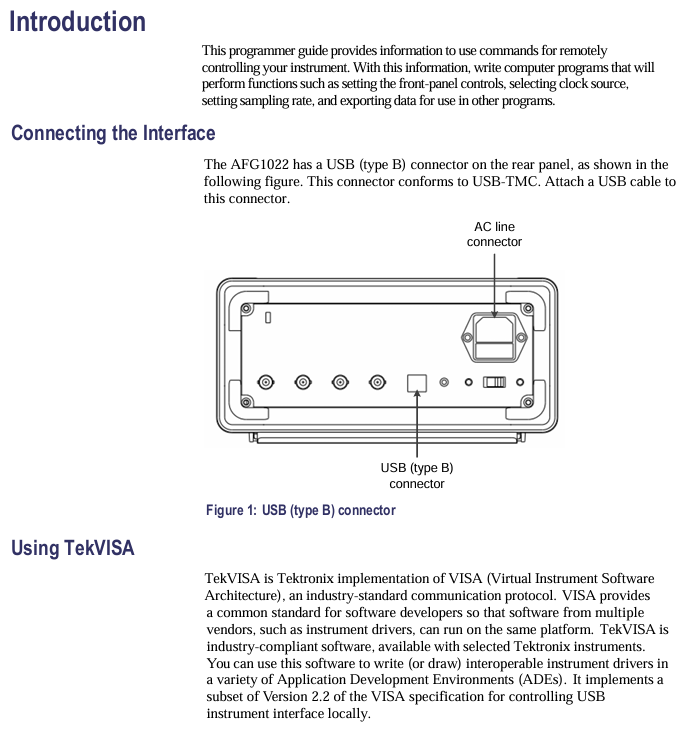
USB-TMC USB 2.0 High Speed+USBTMC standard USB cable (A-B type) plug and play, no additional hardware required
2. Communication parameter configuration
GPIB interface: default address is 22, baud rate is 115200, data bit is 8, stop bit is 1, checksum is None; The address can be modified by the command: SYSTem: GPIB: DDRess 23 (set to 23).
USB-TMC interface: No manual parameter configuration is required, the system automatically recognizes it as a "USBTMC device" and can be directly connected through the VISA library (the resource name is usually USB0:: 0x0699:: 0x0368: C012345:: 0:: INSTR).
3. Typical Communication Example (Python+pyvisa)
Taking "Generate 1kHz sine wave and query amplitude" as an example, the steps are as follows:
Install dependency library: pip install pyvisa pyvisa py;
Write code:
python
Import pyvisa # Import VISA library
# 1. Initialize Resource Manager
rm = pyvisa.ResourceManager()
# 2. Connect AFG1022 (resource name can be queried through rm.list_desources())
afg = rm.open_resource("USB0::0x0699::0x0368::C012345::0::INSTR")
# 3. Send command: Channel 1 outputs a 1kHz sine wave with an amplitude of 5Vpp
Afg.write ("SOURce: WAVEform SINusoid") # Select sine wave
Afg.write ("SOURce: FREQuency 1000") # Frequency 1kHz
Afg.write ("SOURce: VOLTage: AMPlity 5") # amplitude 5Vpp
Afg. write (": OUTPut: STATe ON") # Enable output
# 4. Query the current amplitude
amplitude = afg.query(":SOURce:VOLTage:AMPlitude?")
Print (f "Current amplitude: {amplitude} Vpp")
# 5. Close connection
afg.close()
rm.close()
Generating
Error handling and debugging
1. Error code query and parsing
When the instrument executes a command error (such as parameter out of range, syntax error), an error code will be recorded, which can be queried and located through the command:
Query error: SYSTem: ERRor? (Return format: -221, "Parameter out of range");
Common error code parsing:
Error code, error description, possible causes, and solutions
-221 Parameter out of range Check if the parameter is within the specified range (e.g. frequency ≤ 120MHz)
-102 Syntax error command syntax error check command spelling (e.g. SOURce: FREQ mistakenly written as SOURce: FRE)
-256 Calibration required: The instrument has not been calibrated and the accuracy of the parameters cannot be guaranteed. Execute the calibration command (SYSTem: CALibrate) or contact after-sales service
0 No error command executed successfully-
2. Status Register and Status Query
By reading the status register, the current working status of the instrument can be obtained (such as whether it is outputting or triggering):
Operation status query: Status: Operation: CONDition? (Return 1 indicates normal operation, 0 indicates standby);
Event status query:: Status: EVENT: CONDition? (Return the event status code, such as 8 indicating trigger completion).
3. Debugging tools
Command echo: When enabled: SYSTem: ECHO ON, the instrument will return the received command for confirmation of whether the command was sent correctly;
Grammar check: Before sending a command, you can check the syntax using the command SYSTem: HECK: CMD (e.g. SYSTem: HECK: CMD ": SOURce: FREQ 1000");
Timeout setting: Set a timeout in the VISA library (recommended ≥ 1000ms) to avoid communication interruption caused by long command execution time (such as afg. timeout=2000).
Appendix Resources
Command index: a complete list of commands classified by "Source", "Trigger", and "System", including parameter descriptions and examples;
Example program: In addition to Python, it also provides control examples for C # and LabVIEW, covering scenarios such as waveform generation, modulation, and triggering;
VISA library compatibility: It explicitly supports TekVISA 4.0+and NI-VISA 5.0+, and it is not recommended to use older versions;
Firmware version description: Command differences between different firmware versions (such as some advanced commands requiring firmware ≥ 1.5.0).
Key issue
Question 1: How to ensure that the waveforms of two channels are "phase synchronized" when AFG1022 controls the output of two channels through SCPI commands? If there is still a phase deviation after synchronization, what commands can be used to adjust it?
answer:
1. Steps to ensure phase synchronization:
Enable channel synchronization function: Send command: SOURce: SYNC: STATe ON. At this time, the trigger signal of channel 2 will follow channel 1 to ensure that the output starting phase is consistent;
Unified trigger source: Set both channels' trigger sources to internal (TRIGger: SURCE INTernal) or the same external trigger (TRIGger: SURCE EXTernal) to avoid differences in trigger timing;
Same sampling clock: The two channels of AFG1022 share the same sampling clock without additional configuration, only ensuring that the channel synchronization function is enabled.
2. Phase deviation adjustment method:
If there is still a phase deviation after synchronization (such as channel 2 lagging behind channel 1 by 10 °), the phase of channel 2 can be fine tuned using the phase offset command:
Command format: SOURce2: PHAse: AJust<degrees>(phase adjustment range: -180 °~+180 °);
Example: SOURce2: PHAse: AJust 10 (leading channel 2 phase by 10 ° to offset the original lag);
Verification: Simultaneously collect the outputs of two channels through an oscilloscope, or check the phase setting (SOURce2: PHAse: ADJust?) to confirm the adjustment results.
Question 2: When using Python+pyvisa to control AFG1022 to generate a "10MHz square wave (duty cycle 30%, amplitude 8Vpp, DC offset 1V)", if the instrument does not output after executing the command, what are the possible reasons? Please list and provide troubleshooting steps according to priority.
answer:
1. Possible reasons and troubleshooting steps sorted by priority:
Steps for troubleshooting possible reasons for priority
1. Output not enabled. 1. Send query command: OUTPut: State? Confirm whether the return value is "ON";
If it is "OFF", send: OUTPut: STATe ON to enable output.
2 parameters exceed hardware limitations. 1. Check square wave frequency: 10MHz within the AFG1022 square wave frequency range (0.1Hz~120MHz), no problem;
2. Check the duty cycle: 30% is within the duty cycle range (10%~90%) corresponding to the 10MHz frequency, and there are no issues;
3. Check the amplitude and DC offset:
-Amplitude 8Vpp (maximum 20Vpp under 50 Ω load, compliant);
-DC offset 1V (± 10V under 50 Ω load, compliant);
-Key verification: amplitude+2 × DC offset ≤ 20V (8Vpp+2 × 1V=10V ≤ 20V, no overload).
3 command syntax errors 1. Check if the square wave configuration command is complete:
Correct command sequence:
-Choose square wave: SOURce: WAVEform SQUare;
-Set frequency: SOURce: FREQuency 10e6;
-Set duty cycle: SOURce: PULSe: DCYCle 30;
-Set amplitude: SOURce: VOLTage: AMPity 8;
-Set DC offset: SOURce: VOLTage: OFFset 1;
2. Enable command echo (SYSTem: ECHO ON), confirm that the sent command is consistent with the above and has no spelling errors (e.g. SOURce: PULSe: DCYCle mistakenly written as SOURce: SQARE: DCYCle).
4. Communication connection abnormality 1. Check VISA resource name: Confirm the resource name of AFG1022 through rm.list_desources() (e.g. USB interface is USB0:: 0x0699:: 0x0368:: C012345:: 0:: INSTR), ensure that the resource name connected in the code is correct;
2. Check the USB cable: Replace the USB 2.0 cable to avoid communication interruption caused by poor cable contact;
3. Restart the instrument: Power off and restart AFG1022 to establish a VISA connection again.
5 Instrument hardware failure 1. Execute self-test command: SYSTem: SELFtest? If "PASSED" is returned, it indicates that the hardware is normal. Otherwise, contact after-sales service;
2. Manual operation verification: Manually configure the same parameters through the instrument front panel, observe whether there is output, and rule out hardware problems other than programming control.
Question 3: In the "Modulation Function" of AFG1022, the "Modulation Depth" parameter range for AM modulation (amplitude modulation) is 0%~100%. Please explain the physical meaning of "Modulation Depth 50%" and use the SCPI command to implement "Channel 1 outputs a 100kHz sine wave carrier and uses a 1kHz sine wave for AM modulation (depth 50%, modulation source is internal)". At the same time, write a command sequence to query whether the modulation parameters have been successfully configured.
answer:
1. The physical meaning of "modulation depth 50%":
AM modulation (amplitude modulation) is the process of controlling the amplitude of a carrier signal through a modulation signal, causing the amplitude of the carrier signal to vary with the modulation signal. Modulation depth of 50% represents:
The maximum variation of carrier amplitude is 50% of the nominal amplitude of the carrier;
If the nominal amplitude of the carrier is 8Vpp, the range of amplitude variation of the modulated carrier is from "8Vpp -4Vpp=4Vpp" (minimum value) to "8Vpp+4Vpp=12Vpp" (maximum value);
When the modulation signal is a sine wave, the amplitude of the carrier wave varies sinusoidally with the modulation signal, and the amplitude of the variation is determined by the modulation depth (the greater the depth, the more significant the amplitude change).
2. Implement SCPI command sequence for AM modulation (channel 1):
Step Function SCPI Command Description
1. Select carrier waveform (sine wave): SOURCE: WAVEform SINusoid. The carrier is a sine wave
2. Set carrier frequency (100kHz): SOURce: FREQuency 100e3 Carrier frequency 100 × 10 ³ Hz
3. Set carrier amplitude (example 8Vpp): SOURce: VOLTage: AMPity 8. Carrier nominal amplitude 8Vpp
4. Enable modulation function: SOURce: MOD: STATe ON Enable modulation mode
5. Choose modulation type (AM): SOURce: MOD: TYPE AM modulation type is amplitude modulation
6. Select modulation source (internal): SOURce: MOD: SOURce INTernal. The modulation signal is generated internally by the instrument
7. Set internal modulation signal frequency (1kHz): SOURce: MOD: INTernal: FREQ 1e3 Modulation signal frequency 1 × 10 ³ Hz
8. Set AM modulation depth (50%): SOURce: MOD: AM: DEPTh 50 Modulation depth 50%
9. Open channel 1 output: OUTPut: STATe ON starts outputting AM modulation signal
3. Command sequence for querying whether the modulation parameters have been successfully configured:
SCPI query command expected return result (example)
1. Check if modulation is enabled: SOURce: MOD: STATe? 1 (indicates activation)
2. Query modulation type: SOURce: MOD: TYPE? AM "(stands for amplitude modulation)
3. Query modulation source: SOURce: MOD: SOURce? INT "(indicating internal source)
4. Query internal modulation signal frequency: SOURce: MOD: INTernal: FREQ? 1.000000e+03(1kHz)
5. Query AM modulation depth: SOURce: MOD: AM: DEPTh? 50.000000e+00(50%)
6. Query carrier frequency: SOURce: FREQuency? 100.000000e+03(100kHz)
7. Query carrier amplitude: SOURce: VOLTage: AMPity? 8.000000e+00(8Vpp)
- OMRON
- ABB
- General Electric
- EMERSON
- Honeywell
- HIMA
- ALSTOM
- Rolls-Royce
- MOTOROLA
- Rockwell
- Siemens
- Woodward
- YOKOGAWA
- FOXBORO
- KOLLMORGEN
- MOOG
- KB
- YAMAHA
- BENDER
- TEKTRONIX
- Westinghouse
- AMAT
- AB
- XYCOM
- Yaskawa
- B&R
- Schneider
- KONGSBERG
- NI
- WATLOW
- ProSoft
- SEW
- ADVANCED
- Reliance
- TRICONEX
- METSO
- MAN
- Advantest
- STUDER
- DANAHER MOTION
- Bently
- Galil
- EATON
- MOLEX
- DEIF
- B&W
- ZYGO
- Aerotech
- DANFOSS
- Beijer
- Moxa
- Rexroth
- Johnson
- WAGO
- TOSHIBA
- BMCM
- SMC
- HITACHI
- HIRSCHMANN
- Application field
- XP POWER
- CTI
- TRICON
- STOBER
- Thinklogical
- Horner Automation
- Meggitt
- Fanuc
- Baldor
- SHINKAWA
- Other Brands
- UniOP
- KUKA
- Iba
- Beckhoff
- ADLINK
-
 Bonfiglioli AGL402-09 1FA Inverter
 -
 Bonfiglioli ANG 410-19 3 FA Inverter
 -
Bonfiglioli ANG 410-33 6A Inverter
-
 Bonfiglioli W86UN56C Gearbox
 -
 Bonfiglioli 2KB2 060-0405 Motor
 -
 Bonfiglioli VF49P P71B14B3 Gearbox
 -
 Bonfiglioli SA 400-150 Inverter
 -
Bonfiglioli TQF 070 Planetary Gearbox
-
 Bonfiglioli ACT 401-19 A Inverter
 -
 Bonfiglioli ACT 401-13FA Inverter
 -
Bonfiglioli W 63 U 24 Gearbox
-
Bonfiglioli BN 80 B4 Electric Motor
-
 Bonfiglioli A 30 2 UH35 Gearbox
 -
 Bonfiglioli ACT 401-09 FA Inverter
 -
 Bonfiglioli EM-SYS DS179675010 Communication Module
 -
Bonfiglioli AGL402-15 2 FA Inverter
-
 Bonfiglioli W63UF115P90B5B3 Gear Reducer
 -
 Bonfiglioli 2KB2 060-0405-A00003 Bearing
 -
 Bonfiglioli VF 44 A 10 P63 B5 B3 Gearbox
 -
 Bonfiglioli ACU401-13FA Frequency Inverter
 -
 Bonfiglioli ACT 201-11FA Inverter
 -
Bonfiglioli AGL402-15 2 FA Inverter
-
 Bonfiglioli AGL402-07 1 FA Inverter
 -
Bonfiglioli ACU 410-19 3 A Inverter
-
 Bonfiglioli A 10 2 UH25 P71 Gearmotor
 -
Bonfiglioli ACT 401-13 FA Inverter
-
Bonfiglioli ACU 410-15 2 FA Inverter
-
Bonfiglioli ACU 410-27 5 A Inverter
-
 Bonfiglioli BN 63B 4 B5 Motor
 -
Bonfiglioli AGL402-18 2 FA Frequency Inverter
-
Bonfiglioli W86-UF1-P90B5 Worm Gear Reducer
-
 Bonfiglioli MP 080 80 STD 80A1 Planetary Gearbox
 -
Bonfiglioli BN90S4 Motor
-
Bonfiglioli A413 UH40 Gear Motor
-
 Bonfiglioli VF 63 Gear Reducer
 -
 Bonfiglioli ACU 201-05 FA Inverter
 -
Bonfiglioli ACT 401-13FA Inverter
-
Bonfiglioli LC 120 1 10 STD 110A1 CD 24 KE Gear Unit
-
Bonfiglioli Fuji GVX2000-11-TSL2 Inverter
-
Bonfiglioli ACU 401-05 FA Inverter
-
Bonfiglioli W86UP100B5 Gearbox
-
Bonfiglioli MP 130.1.5.10 Gear Unit
-
 Bonfiglioli ACT W401-29C Vector Inverter
 -
Bonfiglioli BE 71A 4 Gearmotor
-
 Bonfiglioli BN 71B 4 Asynchronous Motor
 -
Bonfiglioli W110U100P90B5B3 Gear Reducer
-
 Bonfiglioli VF 49 F1 7 P71 B5 B3 Gearbox
 -
 Bonfiglioli MP 080 2 16 STD 50D Gear Unit
 -
Bonfiglioli VF 44 A 10 P63 B5 B3 Worm Gearbox
-
 Bonfiglioli ACU401-13FA Frequency Inverter
 -
Bonfiglioli CM-EtherCAT DS179675207 Module
-
Bonfiglioli 8AF2400CK BX 90 L A 4 Motor
-
Bonfiglioli BRA 400-045 BF2 Inverter
-
Bonfiglioli TQF 070 Planetary Servo Gearbox
-
 Bonfiglioli B-SYN-04-0780 Servomotor
 -
 Bonfiglioli TA45.50-25.0-D-0S Shaft Gearbox
 -
Bonfiglioli AS 20 F 21.19 071 B5 Helical Gearbox
-
 Bonfiglioli 07/63 EE B5 Gear Unit
 -
Bonfiglioli EVO200280738 Drive Assembly
-
Bonfiglioli ACT 401-29A Frequency Converter
-
 Bonfiglioli ACT 401-22A Frequency Inverter
 -
Bonfiglioli Siemens 1LA70964AA91-Z VF72 Motor
-
Bonfiglioli BN 100 LA 4 Electric Motor
-
Bonfiglioli BN 63B 4 8D1002058S Electric Motor
-
Bonfiglioli HPC-Module 150303003 Inverter Module
-
Bonfiglioli Vectron ACU 210-07 1 FA Drive Unit
-
Bonfiglioli ACT 401-18FA Frequency Inverter
-
 Bonfiglioli VCB 400-060 400031060 Brake Chopper
 -
 Bonfiglioli W86UP90B5 2G28010656 Gearbox Reducer
 -
 Bonfiglioli EM-ENC-05 DS179675024 Encoder Module
 -
 Bonfiglioli ACT 401-25A Frequency Inverter
 -
 Bonfiglioli PMT400-034 BF1 Inverter
 -
Bonfiglioli CM-485 T Communication Module
-
Bonfiglioli AS 20 F 21.19 071 B5 Gearbox
-
Bonfiglioli W86UFC146P90B5B3 Gear Reducer
-
Bonfiglioli ACT201-05FA Frequency Inverter
-
 Bonfiglioli VF 44 P P63 B14 Gear Reducer Motor
 -
Bonfiglioli ZFA 400-014 D Frequency Inverter
-
 Bonfiglioli Engineering 2B HMI Touch Panel
 -
Bonfiglioli ACT 401-26A Inverter Driver
-
Bonfiglioli SPL400 13F Inverter
-
 Bonfiglioli ZFA 400-040 D Frequency Inverter
 -
Bonfiglioli ACT 401-23A Frequency Inverter
-
 Bonfiglioli BTD5-2730-30-400-FD24 Servo Motor
 -
 Bonfiglioli ACT401-11FA Frequency Inverter
 -
Bonfiglioli EM-ENC 03 179-675 022 Encoder Module
-
Bonfiglioli EM-I/O 03 179-675 043 I/O Module
-
 Bonfiglioli DS179675597 Meter Module
 -
 Bonfiglioli ZFA 400-010 D2 Frequency Inverter
 -
Bonfiglioli Vectron ZBA400-018D Frequency Inverter
-
 Bonfiglioli Vectron ACT 401-26A Inverter
 -
 Bonfiglioli ACT ZR 401-18D Frequency Inverter
 -
Bonfiglioli Vectron ZFB 400-018 Frequency Inverter
-
Bonfiglioli ACT W 401-29 C Frequency Inverter
-
Bonfiglioli Vectron BRA 400-045 BF2 Inverter
-
Bonfiglioli ACT 400-034A Frequency Inverter
-
 Bonfiglioli RAN 15 D A 1 HS B3 Gear Unit
 -
Bonfiglioli ZFB 400-060 Frequency Inverter
-
 Milton Industries LT1240 LTI Tool Lugnut Remover
 -
 LTi Drives SO84.200.P030.0000.0-W Servo Spindle 100kW
 -
 Milton LTI LT1600P Torx Stick
 -
 LTI Lust VF1424L Variable Frequency Drive
 -
LTI SO84.045.0002.0001.2-W Servo Drive
-
 LTI Lust VF1404M Frequency Inverter
 -
 LTI SA54.0550.0033.0000.0 Servo Drive
 -
LTI Tools LT-1400C Wheel Torque Extension
-
LTI SO84.143.0020.0101.2-W Servo Drive
-
 LTI MOTION SC34.0200.0011.0000.0 Servo Drive
 -
LTI DRIVES MS100 0927.0017 Assembly Set
-
 LTI MOTION SO84.032.0003.0101.2 Servo Drive
 -
LTI DRIVES SE84.200.SC00.0001.0-W 110kW Drive
-
 Lust CDE34.005.W2.2 Lti Drives Servo Drive
 -
 LTi SO84.012.0030.0011.2 ServoOne Servo Drive
 -
 LTi CDE34.017.W3.0 Servo Drive
 -
 Seagate 9CC132-302 Harris LTI-CS Hard Drive 160GB
 -
 LTI SO24.007.0070.0000.1 Servo Controller
 -
 LTi Drive CDA32.003.C3.0.H05-01.PC1 Controller
 -
LTI SO84.016.0030.0000.2 Servo Controller
-
LUST LTI CD A34.008 W1.4 BR Servo Drive
-
LTI Servo One SO84.045.0030.0001.2-W Drive 22kW
-
Lust LTi Servo One SO84.032.0040.0000.2 Drive
-
 Milton LTI LT1600P Torx Stick
 -
LTI Lust VF1424L Variable Frequency Drive
-
 LTI SO84.045.0002.0001.2-W Servo Drive
 -
 LTI Lust VF1404M Frequency Inverter
 -
 LTI SA54.0550.0033.0000.0 Servo Drive
 -
LTI Tools LT-1400C Wheel Torque Extension
-
LTI SO84.143.0020.0101.2-W Servo Drive


