
TOSHIBA CANVIO BASICS portable hard drive
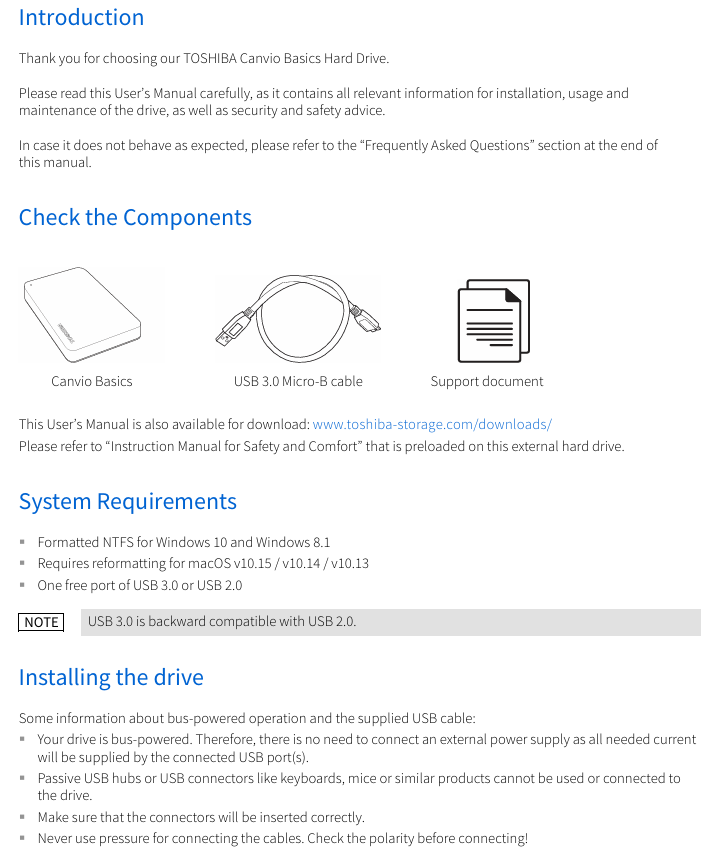
Packaging components: Consists of three types of fixed items, as shown in the table below:
Component name, quantity, and purpose
CANVIO BASICS hard disk body 1 core storage carrier
One USB 3.0 Micro-B cable connects the hard drive to the computer, transferring data and providing power
TOSHIBA CANVIO BASICS portable hard drive
Product Overview
1.1 Basic Information
Product Name: TOSHIBA CANVIO BASICS Mobile Hard Drive
Packaging components: Consists of three types of fixed items, as shown in the table below:
Component name, quantity, and purpose
CANVIO BASICS hard disk body 1 core storage carrier
One USB 3.0 Micro-B cable connects the hard drive to the computer, transferring data and providing power
1 set of supporting documents (including security guidelines) including multilingual operation instructions, security specifications, and compliance statements
Language version: covering more than 20 languages, including English (EN), German (DE), French (FR), Italian (IT), Spanish (ES), Turkish (TR), Russian (RU), Ukrainian (UK), etc., to meet the needs of users in different regions.
Interface specifications: Adopting USB 3.2 Gen 1 interface (compatible with USB 3.0/2.0), with Micro-B connector on the hard drive end and Type-A connector on the computer end.
System requirements
2.1 Operating System Adaptation
Windows system:
Supported versions: Windows 10, Windows 8.1;
Format requirement: Pre installed with NTFS file system, can be used directly without additional formatting.
MacOS system:
Supported versions: macOS v10.15 (Catalina), v10.14 (Mojave), v10.13 (High Sierra);
Format requirement: Must be reformatted (default format incompatible), it is recommended to format to APFS or Mac OS Extended format supported by macOS.
2.2 Hardware and Power Requirements
Port requirements: The computer requires one free USB 3.0 or USB 2.0 port (USB 3.0 is backward compatible with USB 2.0, and if a USB 2.0 port is used, the transfer speed will be reduced to USB 2.0 level);
Power supply method: Bus powered, no external power supply required, all current is provided through USB port;
Disabled devices: Cannot connect passive USB hubs (without independent power supply), keyboard/mouse and other USB device expansion interfaces, which may result in insufficient power supply or data transmission errors.
Operation process
3.1 Connection steps
Hard drive connection: Insert the USB 3.2 Gen 1 Micro-B connector into the corresponding port of the hard drive (note polarity, do not forcefully plug or unplug);
Computer connection: After the computer is fully powered on and the operating system is loaded, insert the USB Type-A connector into the USB Type-A port of the computer;
Status confirmation:
Windows: The Power/Data indicator light is on, the hard drive is automatically mounted, and a new hard drive icon is displayed in "My Computer";
Mac: The Power/Data indicator light is on, the hard drive is ready directly, and the desktop displays the hard drive icon.
3.2 Secure uninstallation
It is strictly prohibited to directly unplug the cable (which may cause data loss or physical damage to the hard drive), and it should be operated according to the system type:
System type uninstallation steps
Windows 1. Click on the "Hardware and Pop Up Media" icon on the taskbar;
2. Select TOSHIBA hard drive from the pop-up list;
3. After receiving the "Safely Removable" notification, click "OK" and unplug the cable
Mac 1. Ctrl click on the desktop hard drive icon and select "Eject";
2. Alternatively, simply drag the hard drive icon to the trash can;
3. After the icon disappears, unplug the cable
3.3 Cleaning and Maintenance
Cleaning prerequisite: The hard drive must be physically disconnected from the computer first (unplug the USB cable);
Cleaning supplies: Use standard cleaning agents (such as neutral cleaning agents), and prohibit the use of corrosive liquids (such as phenol, gasoline, diluents, etc.);
Operation requirements: After cleaning, wipe off any residual liquid on the surface to prevent liquid from seeping into the interior of the hard drive and causing a short circuit.
Frequently Asked Questions (FAQ) and Troubleshooting
4.1 Frequently Asked Questions and Answers
Problem Description Answer
Does Windows require an additional USB driver? No need, the driver is integrated into the Windows system and plug and play
2. Can the computer system be started from this hard drive? No, Windows does not support booting the system from an external hard drive
Why does a hard drive not require a fan? Adopting optimized heat dissipation structure, it can naturally dissipate heat and achieve near silent operation (without fan noise)
Why does Windows display a smaller capacity than indicated? Differences in calculation methods: Manufacturers use decimal (1TB=1000GB), systems use binary (1GB=1024MB), and 1TB hard drives display approximately 931GB
Can I copy the operating system to another computer? No, you need to reinstall according to the installation guide provided by the operating system manufacturer. Simple copying cannot achieve system operation
4.2 Fault Handling Plan
Fault 1: The computer does not recognize the hard drive at all
Troubleshooting steps: ① Check if the USB cable connection is secure; ② If using a USB hub, confirm that the hub has independent power supply; ③ If using an expansion card, check if the expansion card is working properly and update the firmware.
Fault 2: The hard drive displays' unable to start device '
Possible reasons: ① Insufficient power supply (check if the USB port is in good contact); ② Hard disk hardware malfunction (requires contact with after-sales maintenance).
Fault 3: The hard drive is not displayed in "My Computer", but it exists in the Device Manager
Solution steps:
Right click on "My Computer" and select "Manage";
Enter 'Disk Management' and confirm that the hard drive is in the list;
Right click on the hard disk partition and select "Delete Partition" (note: data may be lost);
Right click on unallocated space and select 'New Primary Partition', then follow the wizard to complete the setup;
Confirm formatting (recommended NTFS format), and once completed, it can be displayed.
Fault 4: When formatting, it prompts' unable to complete formatting '
Reason: Mostly caused by the use of FAT file system (insufficient compatibility);
Solution: Replace with NTFS file system and reformat.
Compliance and environmental requirements
5.1 Certification Compliance
CE certification: The product complies with relevant EU directives (such as the EMC electromagnetic compatibility directive), and the responsible party is Toshiba Electronics Europe GmbH (Dusseldorf, Germany);
UKCA certification: compliant with British standards, responsible by Toshiba Electronics Europe GmbH UK branch (Surrey, UK);
REACH compliance: Toshiba will provide users with relevant information on chemical substances in its products to comply with the EU's Chemical Registration, Evaluation, Authorization and Restriction Regulations.
5.2 Environmental Protection Disposal
Disposal requirements: The product must bear the label "Prohibited from being disposed of as household waste" and must be handled by a professional industrial waste organization (such as a qualified recycler);
Special regional requirements: Türkiye market shall comply with AEEE regulations (electronic waste recycling regulations);
Risk Warning: Self disassembly may cause capacitor explosion or release of toxic gases, violating the Waste Disposal and Cleaning Law.
- OMRON
- ABB
- General Electric
- EMERSON
- Honeywell
- HIMA
- ALSTOM
- Rolls-Royce
- MOTOROLA
- Rockwell
- Siemens
- Woodward
- YOKOGAWA
- FOXBORO
- KOLLMORGEN
- MOOG
- KB
- YAMAHA
- BENDER
- TEKTRONIX
- Westinghouse
- AMAT
- AB
- XYCOM
- Yaskawa
- B&R
- Schneider
- KONGSBERG
- NI
- WATLOW
- ProSoft
- SEW
- ADVANCED
- Reliance
- TRICONEX
- METSO
- MAN
- Advantest
- STUDER
- DANAHER MOTION
- Bently
- Galil
- EATON
- MOLEX
- DEIF
- B&W
- ZYGO
- Aerotech
- DANFOSS
- Beijer
- Moxa
- Rexroth
- Johnson
- WAGO
- TOSHIBA
- BMCM
- SMC
- HITACHI
- HIRSCHMANN
- Application field
- XP POWER
- CTI
- TRICON
- STOBER
- Thinklogical
- Horner Automation
- Meggitt
- Fanuc
- Baldor
- SHINKAWA
- Other Brands
- UniOP
- KUKA
- Iba
- Beckhoff
- ADLINK
-
 Sigmatek MDD111-1 DIAS Drive Axis Module
 -
 Sigmatek DKL042 05-024-042 Terminal Module
 -
 Sigmatek DM822 Control Module
 -
 Sigmatek CDM167 12-008-167-O Module
 -
 Sigmatek TAE151 Touch Display Unit
 -
 Sigmatek DCC041 SLIDES Module 05-700-041-D
 -
 Sigmatek AKM65M-ANC2GBB0 PM Servo Motor
 -
 Sigmatek ETT221 01-230-221 Operator Terminal
 -
 Sigmatek SLIDES DAM 124 Analog Module
 -
Sigmatek AKM31C-ANCNGBB0 Servo Motor
-
 Mannesmann Demag Sigmatek CP626 Central Unit
 -
 SIGMATEK 0332.554.03 Board 371071000154
 -
 SIGMATEK 12-250-021 Base Plate Back Panel CM5V020
 -
 SIGMATEK DM162 S-DIAS Digital Mix Module
 -
 DEMAG ERGOTECH 061 381 66 Sigmatek 9842.243.02 Circuit Board
 -
 SIGMATEK CP313-1 PLC Module
 -
Sigmatek ETV0551-2 VARAN Touch Terminal
-
 Sigmatek SDM 081 FS S-Dias Safety Module
 -
 DEMAG 05-250-023 Ergotech Motherboard with Sigmatek TMS012
 -
Sigmatek CM5V020 12-250-023-K Wiring Base
-
 Sigma Tek 5000B-37 Attitude Gyro Indicator
 -
 Sigmatek SDD120-2 DIAS Drive
 -
 Sigmatek CME221 Memory Module
 -
 Sigmatek DCP640 DIAS Central Unit
 -
 Sigmatek STO040 Safety Output Module
 -
Sigmatek CET281 Control Panel
-
 Sigmatek CIPC LX800 Demag NC5 CPU
 -
 Sigmatek DKL093 05-024-093 Terminal Module
 -
 Sigmatek AI088 20-009-088 Analog Input Module
 -
Sigmatek CAI888 Analog Input Module
-
SIGMATEK CCA021 12-025-021 Analog Output Module
-
SIGMATEK 1104.579.05 Control Module
-
SIGMATEK SDI100 Digital Input Module
-
 SIGMATEK C-IPC 256MB LX800 Compact Dias
 -
 SIGMATEK 9423.090.02 Control Module
 -
SIGMATEK C-IPC 256 Power Supply 148498
-
 SIGMATEK CAI025 Analog Input Module
 -
 SIGMATEK CTO166 Digital Output Module
 -
 SIGMATEK CP112 20-004-112 Processor Module
 -
SIGMATEK CAI887 12-009-887 Safety Module
-
 Sigma-Tek 4000B-31 Directional Gyro 1U262-002-42
 -
Sigmatek C-IPC 256MB LX800 IPC Controller
-
Sigmatek C-IPC 01-450-031 Industrial PC LX800
-
Sigmatek C-IPC 256 Industrial PC Controller
-
Sigmatek CCP-531 PLC Processor Module
-
Sigmatek CDI163 Digital Input Module
-
 Sigmatek ETV0501 VARAN Terminal 12-230-0501
 -
 Sigmatek CTMS020 C-DIAS Technology Module
 -
 Sigmatek CIV512 VARAN Switch Module
 -
 Sigmatek HU011 20-080-011 Interface Module
 -
SIGMATEK SLIDES DAM 124 Module
-
 SIGMATEK C-IPC 161 01-450-161L Industrial PC
 -
SIGMATEK C-IPC 128MB VIA 733MHz 01-450-024-K
-
 SIGMATEK 12-780-012 R8-IPC Geode LX800 Module
 -
SIGMATEK CAM124 Analog Module
-
 SIGMATEK S1 032-8AF61-R4 EZ Servo Motor
 -
 SIGMATEK CTO163 Digital Output Module
 -
 SIGMATEK CCP082 12-004-082 Processor Module
 -
 SIGMATEK CRCH081 C-DIAS Temperature Module
 -
 SIGMATEK PC322-K 01-310-322-K Industrial PC
 -
SIGMATEK SDD310-2 Servo Drive
-
 SIGMATEK AI084 Analog Input Module
 -
SIGMATEK CRCH081 12-752-081 Temperature Module
-
Sigma-Tek 5000L-4 Attitude Gyro 1U284-001-3
-
 SIGMATEK CM5V020 12-250-023-K Wiring Module
 -
Sigma-Tek 4000H-6 Directional Gyro IU262-035-7
-
 SIGMATEK Dias DCP160 05-004-160 Processor Module
 -
SIGMATEK 0147.395.02 Control Module
-
SIGMATEK A1084 Control Module
-
SIGMATEK DI200 20-006-2000 Digital Input Module
-
Sigmatek DNC115 Encoder Module
-
 Sigmatek DAM122 05-017-122 Analog Module
 -
Sigmatek 9802.289.01 Control Board TA71 Display
-
Sigmatek TO127 20-007-127 Digital Output Module
-
Sigmatek DNC031 05-011-031 Digital Module
-
Sigmatek VI022 20-003-022 Interface Module
-
Sigmatek CAI085 Analog Input Module
-
 Sigmatek CP111 S-DIAS CPU Module
 -
Sigmatek CTMS030 Krauss Maffei Module
-
 Sigmatek CAM123 Control Module
 -
 Sigmatek TAE732-P 01-240-732-P Touch Display Unit
 -
Sigmatek MDM021 Digital Mixed Module
-
Sigmatek DCP642 DIAS Central Unit
-
 Sigmatek CST022 12-014-022 C-DIAS Module
 -
 Sigmatek SRO021 20-893-021 Safety Relay Output
 -
 Krauss Maffei MC5 Control System Sigmatek
 -
 Sigmatek DC061 Module 18-24VDC 300mA
 -
 Herrmann EVT0855 Ultrasonic Welder Touch Panel
 -
Sigmatek CIV521 Control Module 1.4A 2W
-
Sigmatek DDI61 05-006-161 Digital Input Module
-
SIGMATEK ETT312-E Touch Terminal 01-230-312
-
Cessna S3326-1 Sigma Tek 5000B-67 Gyro 1U149-015-9
-
SIGMATEK PS101 Power Supply Module
-
SIGMATEK 0332.554.03 Control Module 371071000154
-
 SIGMATEK ETT312-E Touch Terminal 01-230-312
 -
SIGMATEK CDM163 Control Module
-
 SIGMATEK VSV046 16-023-046 Module
 -
SIGMATEK AM221 20-017-221 Analog Module
-
SIGMATEK CTS051 12-053-051 Control Module
-
SIGMATEK AM221 20-017-221 Analog Module
-
Sigmatek CSDI161 12-891-161 Safety Input Module
-
Sigma Tek 4000C-1 Directional Gyro Indicator
-
Sigmatek ETV0501 12-230-0501 VARAN Terminal
-
Sigmatek DDM165 SLIDES Module
-
Sigmatek N100 20-011-100 Control Module
-
Sigmatek AKM54K-ANC2R-B0 PM Servo Motor
-
Sigmatek CTO166 Digital Output Module
-
Sigmatek CP212-K 20-004-212-K CPU Module
-
Sigmatek CDI161 Digital Input Module
-
Sigmatek DCC080 05-700-080-2 Control Module
-
 SIGMATEK SCP011 S-DIAS Safety CPU
 -
SIGMATEK SCP011 S-DIAS Safety CPU
-
SIGMATEK SRO022 Relay Output Module
-
SIGMATEK MDD 121 Drive Axis Module
-
SIGMATEK DSI021 SLIDES Siemens Interface
-
SIGMATEK DIAS DCP161 Module 05-004-161
-
 Sigmatek ETT312 Built-in Touch Terminal
 -
SIGMATEK DCP 643 DIAS Controller System
-
SIGMATEK CIO021 Multi I/O Module
-
SIGMATEK CTMS020 Control Module
-
 Sigmatek CME 221 Memory Module
 -
Sigmatek 0420.615.01 Control Board
-
Sigmatek CP111 20-004-111 CPU Module
-
Sigmatek 9405.065.03 Control Board
-
Sigmatek ETEK 01-450-032-K C-IPC 256MB Industrial PC
-
Sigmatek CTO163 12-007-163 Safety Output Module
-
Sigmatek TO081 20-007-081 Digital Output Module
-
 Sigmatek SI021 20-022-021 Safety Input Module


