
Rockwell Automation ControlLogix 5570 and 5560 controllers
Features ControlLogix 5570 ControlLogix 5560
Power Supply and Memory Backup Energy Storage Module (ESM) Lithium Battery (1756-BA1/BA2/BATM)
Built in communication port USB 2.0 (temporary programming only, cable length ≤ 3m, no hub) RS-232 serial port
The maximum number of connections is 500 and 250
Non volatile storage SD card (standard 1784-SD1 1GB) CompactFlash card (available separately)
Status display: 4-line scrolling text screen+4 indicator lights, 6 indicator lights (no text screen)
Representative models 1756-L71/L72/L73/L74/L75 1756-L61/L62/L63/L64/L65
Rockwell Automation ControlLogix 5570 and 5560 controllers
Product Overview and Classification
1. Controller types and core differences
The ControlLogix series controllers are divided into two major series, 5570 and 5560, as well as extreme environment type (- XT suffix) and Armor protection type (- EROM suffix). The core differences are as follows:
Features ControlLogix 5570 ControlLogix 5560
Power Supply and Memory Backup Energy Storage Module (ESM) Lithium Battery (1756-BA1/BA2/BATM)
Built in communication port USB 2.0 (temporary programming only, cable length ≤ 3m, no hub) RS-232 serial port
The maximum number of connections is 500 and 250
Non volatile storage SD card (standard 1784-SD1 1GB) CompactFlash card (available separately)
Status display: 4-line scrolling text screen+4 indicator lights, 6 indicator lights (no text screen)
Representative models 1756-L71/L72/L73/L74/L75 1756-L61/L62/L63/L64/L65
2. Special Model Description
Extreme environment type (- XT): such as 1756-L73XT/L63XT, supports working temperatures of -25~+70 ° C, and other functions are consistent with the corresponding basic model.
Armor protective type (- ROM): such as 1756-L72EROM/L73EROM, integrated with 1756-L7x controller and 2 EtherNet/IP DLR communication modules, IP67 protection level, suitable for machine installation, ESM non removable.
Installation and hardware configuration
1. Installation environment requirements
Environmental conditions: Pollution level 2 industrial environment, overvoltage category II, altitude ≤ 2000m, no derating requirements; Storage temperature -40~+80 ° C, working temperature for conventional type 0~+60 ° C, extreme type -25~+70 ° C.
Shell requirements: It needs to be installed in a shell that complies with NEMA 250 or IEC 60529 standards, with a flame retardant rating of 5VA (non-metallic shells need to be certified), and can only be opened with tools inside. The explosion-proof environment needs to additionally comply with ATEX/IECEx requirements (such as Zone 2 environment requiring an IP54 or above shell).
2. Core hardware installation steps
(1) Key installation of ControlLogix 5570
**Chassis and power supply pre installation * *: Chassis and power supply need to be installed according to the manuals "1756-IN621 (Chassis)" and "1756-IN619 (Power Supply)" first.
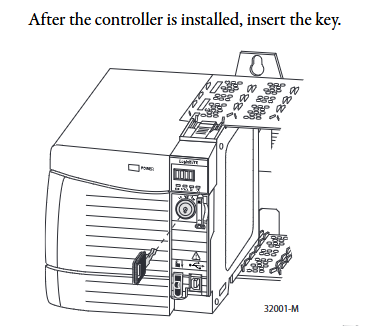
Controller insertion: Align the upper and lower rails of the chassis, slide in to the buckle lock, and ensure that it is flush with adjacent modules; Attention should be paid to the risk of electric arc in explosion-proof environment during live plugging and unplugging. It is recommended to perform power-off operation.
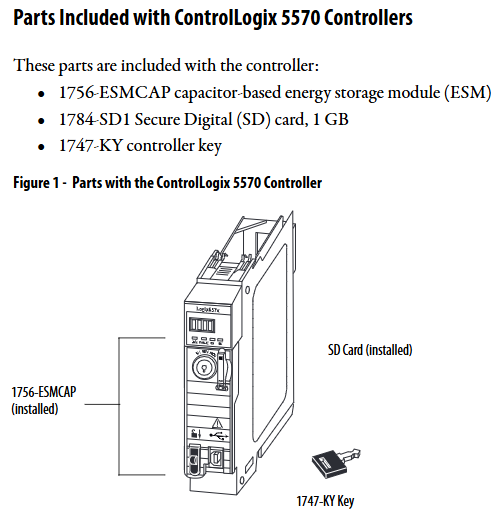
ESM installation: Align with the tongue and grain slot and push it into the buckle for fixation. After installation, start charging (up to 2 minutes, the status screen displays "CHRG"). Do not turn off the power before charging is complete, otherwise the program may be lost.
SD card operation: Open the SD card card, insert the 1784-SD1/SD2 card (recommended original card to avoid data damage), and press it until the card buckle locks; Before removal, it is necessary to confirm that the SD indicator light is off and that the explosion-proof environment requires power-off operation.
(2) Key installation of ControlLogix 5560
Battery installation: Series A uses 1756-BA1/BATM, Series B uses 1756-BA2, connect the positive and negative poles (red+black -), write the replacement date and paste it on the inside of the cabinet door.
CompactFlash card operation: Series A needs to lift the locking clip to insert, Series B needs to push open the buckle and insert, and before removing, confirm that the OK indicator light is green.
3. Hardware security specifications
Static protection: Before operation, touch grounded objects to discharge electricity, wear a grounding wristband, avoid touching connector pins and internal circuits, and use anti-static workstation storage devices.
Explosion proof requirements: In Class I Zone 2 (Groups A-D) environments, equipment/components can only be plugged in and out after power failure or confirmation of non hazardous areas; It is prohibited to replace non certified components, and batteries must be replaced in non hazardous areas.
Software configuration and firmware upgrade
1. Essential software and version requirements
Different controller models need to be matched with specific software versions, and the core requirements are as follows:
Controller model Studio 5000 environment minimum version RSLogix 5000 minimum version RSLinx Classic minimum version
1756-L71/L72/L73 and other V21.00.00 V20.01.02 V2.59.00
1756-L61/A - V12.06.00 any version
1756-L63XT/B - V13.04.00 V2.55.00
2. Firmware upgrade method
Supports two methods: ControlFLASH software and AutoFlash (built-in in Logix Designer). The steps are as follows:
(1) ControlFLASH upgrade
Connect the controller (USB/Ethernet), start ControlFLASH, select the controller model and network driver.
Select the target firmware version (download the matching version from the official website to avoid file corruption), click "Finish" to start the upgrade, and do not turn off the power during the process.
- OMRON
- ABB
- General Electric
- EMERSON
- Honeywell
- HIMA
- ALSTOM
- Rolls-Royce
- MOTOROLA
- Rockwell
- Siemens
- Woodward
- YOKOGAWA
- FOXBORO
- KOLLMORGEN
- MOOG
- KB
- YAMAHA
- BENDER
- TEKTRONIX
- Westinghouse
- AMAT
- AB
- XYCOM
- Yaskawa
- B&R
- Schneider
- KONGSBERG
- NI
- WATLOW
- ProSoft
- SEW
- ADVANCED
- Reliance
- TRICONEX
- METSO
- MAN
- Advantest
- STUDER
- DANAHER MOTION
- Bently
- Galil
- EATON
- MOLEX
- DEIF
- B&W
- ZYGO
- Aerotech
- DANFOSS
- Beijer
- Moxa
- Rexroth
- Johnson
- WAGO
- TOSHIBA
- BMCM
- SMC
- HITACHI
- HIRSCHMANN
- Application field
- XP POWER
- CTI
- TRICON
- STOBER
- Thinklogical
- Horner Automation
- Meggitt
- Fanuc
- Baldor
- SHINKAWA
- Other Brands
- UniOP
- KUKA
- Iba
- Beckhoff
- ADLINK
-
 SIGMATEK 0332.554.03 Board 371071000154
 -
 SIGMATEK 12-250-021 Base Plate Back Panel CM5V020
 -
 SIGMATEK DM162 S-DIAS Digital Mix Module
 -
 DEMAG ERGOTECH 061 381 66 Sigmatek 9842.243.02 Circuit Board
 -
 SIGMATEK CP313-1 PLC Module
 -
 Sigmatek ETV0551-2 VARAN Touch Terminal
 -
 Sigmatek SDM 081 FS S-Dias Safety Module
 -
 DEMAG 05-250-023 Ergotech Motherboard with Sigmatek TMS012
 -
Sigmatek CM5V020 12-250-023-K Wiring Base
-
 Sigma Tek 5000B-37 Attitude Gyro Indicator
 -
 Sigmatek SDD120-2 DIAS Drive
 -
 Sigmatek CME221 Memory Module
 -
 Sigmatek DCP640 DIAS Central Unit
 -
 Sigmatek STO040 Safety Output Module
 -
 Sigmatek CET281 Control Panel
 -
 Sigmatek CIPC LX800 Demag NC5 CPU
 -
 Sigmatek DKL093 05-024-093 Terminal Module
 -
 Sigmatek AI088 20-009-088 Analog Input Module
 -
 Sigmatek CAI888 Analog Input Module
 -
 SIGMATEK CCA021 12-025-021 Analog Output Module
 -
SIGMATEK 1104.579.05 Control Module
-
SIGMATEK SDI100 Digital Input Module
-
 SIGMATEK C-IPC 256MB LX800 Compact Dias
 -
 SIGMATEK 9423.090.02 Control Module
 -
SIGMATEK C-IPC 256 Power Supply 148498
-
 SIGMATEK CAI025 Analog Input Module
 -
 SIGMATEK CTO166 Digital Output Module
 -
 SIGMATEK CP112 20-004-112 Processor Module
 -
SIGMATEK CAI887 12-009-887 Safety Module
-
 Sigma-Tek 4000B-31 Directional Gyro 1U262-002-42
 -
Sigmatek C-IPC 256MB LX800 IPC Controller
-
Sigmatek C-IPC 01-450-031 Industrial PC LX800
-
Sigmatek C-IPC 256 Industrial PC Controller
-
Sigmatek CCP-531 PLC Processor Module
-
Sigmatek CDI163 Digital Input Module
-
 Sigmatek ETV0501 VARAN Terminal 12-230-0501
 -
 Sigmatek CTMS020 C-DIAS Technology Module
 -
 Sigmatek CIV512 VARAN Switch Module
 -
 Sigmatek HU011 20-080-011 Interface Module
 -
 SIGMATEK SLIDES DAM 124 Module
 -
 SIGMATEK C-IPC 161 01-450-161L Industrial PC
 -
SIGMATEK C-IPC 128MB VIA 733MHz 01-450-024-K
-
 SIGMATEK 12-780-012 R8-IPC Geode LX800 Module
 -
SIGMATEK CAM124 Analog Module
-
 SIGMATEK S1 032-8AF61-R4 EZ Servo Motor
 -
 SIGMATEK CTO163 Digital Output Module
 -
 SIGMATEK CCP082 12-004-082 Processor Module
 -
 SIGMATEK CRCH081 C-DIAS Temperature Module
 -
 SIGMATEK PC322-K 01-310-322-K Industrial PC
 -
SIGMATEK SDD310-2 Servo Drive
-
 SIGMATEK AI084 Analog Input Module
 -
SIGMATEK CRCH081 12-752-081 Temperature Module
-
Sigma-Tek 5000L-4 Attitude Gyro 1U284-001-3
-
 SIGMATEK CM5V020 12-250-023-K Wiring Module
 -
Sigma-Tek 4000H-6 Directional Gyro IU262-035-7
-
 SIGMATEK Dias DCP160 05-004-160 Processor Module
 -
SIGMATEK 0147.395.02 Control Module
-
SIGMATEK A1084 Control Module
-
SIGMATEK DI200 20-006-2000 Digital Input Module
-
Sigmatek DNC115 Encoder Module
-
 Sigmatek DAM122 05-017-122 Analog Module
 -
Sigmatek 9802.289.01 Control Board TA71 Display
-
Sigmatek TO127 20-007-127 Digital Output Module
-
Sigmatek DNC031 05-011-031 Digital Module
-
Sigmatek VI022 20-003-022 Interface Module
-
Sigmatek CAI085 Analog Input Module
-
 Sigmatek CP111 S-DIAS CPU Module
 -
 Sigmatek CTMS030 Krauss Maffei Module
 -
 Sigmatek CAM123 Control Module
 -
 Sigmatek TAE732-P 01-240-732-P Touch Display Unit
 -
Sigmatek MDM021 Digital Mixed Module
-
Sigmatek DCP642 DIAS Central Unit
-
 Sigmatek CST022 12-014-022 C-DIAS Module
 -
 Sigmatek SRO021 20-893-021 Safety Relay Output
 -
 Krauss Maffei MC5 Control System Sigmatek
 -
 Sigmatek DC061 Module 18-24VDC 300mA
 -
 Herrmann EVT0855 Ultrasonic Welder Touch Panel
 -
Sigmatek CIV521 Control Module 1.4A 2W
-
 Sigmatek DDI61 05-006-161 Digital Input Module
 -
SIGMATEK ETT312-E Touch Terminal 01-230-312
-
Cessna S3326-1 Sigma Tek 5000B-67 Gyro 1U149-015-9
-
SIGMATEK PS101 Power Supply Module
-
SIGMATEK 0332.554.03 Control Module 371071000154
-
 SIGMATEK ETT312-E Touch Terminal 01-230-312
 -
SIGMATEK CDM163 Control Module
-
 SIGMATEK VSV046 16-023-046 Module
 -
SIGMATEK AM221 20-017-221 Analog Module
-
SIGMATEK CTS051 12-053-051 Control Module
-
SIGMATEK AM221 20-017-221 Analog Module
-
Sigmatek CSDI161 12-891-161 Safety Input Module
-
Sigma Tek 4000C-1 Directional Gyro Indicator
-
Sigmatek ETV0501 12-230-0501 VARAN Terminal
-
Sigmatek DDM165 SLIDES Module
-
 Sigmatek N100 20-011-100 Control Module
 -
Sigmatek AKM54K-ANC2R-B0 PM Servo Motor
-
Sigmatek CTO166 Digital Output Module
-
Sigmatek CP212-K 20-004-212-K CPU Module
-
Sigmatek CDI161 Digital Input Module
-
Sigmatek DCC080 05-700-080-2 Control Module
-
 SIGMATEK SCP011 S-DIAS Safety CPU
 -
SIGMATEK SCP011 S-DIAS Safety CPU
-
SIGMATEK SRO022 Relay Output Module
-
SIGMATEK MDD 121 Drive Axis Module
-
SIGMATEK DSI021 SLIDES Siemens Interface
-
SIGMATEK DIAS DCP161 Module 05-004-161
-
 Sigmatek ETT312 Built-in Touch Terminal
 -
SIGMATEK DCP 643 DIAS Controller System
-
SIGMATEK CIO021 Multi I/O Module
-
SIGMATEK CTMS020 Control Module
-
 Sigmatek CME 221 Memory Module
 -
Sigmatek 0420.615.01 Control Board
-
Sigmatek CP111 20-004-111 CPU Module
-
Sigmatek 9405.065.03 Control Board
-
Sigmatek ETEK 01-450-032-K C-IPC 256MB Industrial PC
-
Sigmatek CTO163 12-007-163 Safety Output Module
-
Sigmatek TO081 20-007-081 Digital Output Module
-
 Sigmatek SI021 20-022-021 Safety Input Module
 -
Sigmatek 05-052-014 Control Module HW 1.0
-
Sigmatek TO127 20-007-127 Digital Output Module
-
Sigmatek SV141 20-023-141 VARAN Splitter
-
 SIGMATEK CIV513 C-DIAS VARAN Control Module
 -
Sigmatek DCP 642 SLIDES Control Module with DKL002
-
Sigma-Tek 5000B-36 Attitude Gyro
-
SIGMATEK 01-450-024 C-IPC Industrial Computer
-
SIGMATEK CP102 S-DIAS Processor Module
-
Sigmatek CRCH081 12-752-081 PLC Module
-
SIGMATEK SDD340-46 Series Drive
-
SIGMATEK TAE731 Touch Display Unit


