
YOKOGAWA DLM3054HD Mixed Signal Oscilloscope
YOKOGAWA DLM3054HD Mixed Signal Oscilloscope
Instrument positioning and core use
DLM3054HD is a 4+16 channel mixed signal oscilloscope (4 analog channels+16 digital channels), with the core advantages of high sampling rate, large storage depth, and multi-channel synchronous measurement capability. It can simultaneously capture analog signals (such as voltage and current) and digital signals (such as SPI, CAN, UART communication signals), realizing the linkage analysis of "analog waveform+digital logic".
The main application scenarios include:
Automotive electronics: ECU (Electronic Control Unit) signal monitoring, CAN/LIN bus communication analysis, motor drive waveform and control logic synchronization diagnosis.
Industrial control: timing matching of PLC (Programmable Logic Controller) output signals and sensor feedback signals, analysis of servo system voltage/current and pulse signals.
Power electronics: synchronous capture of inverter switch waveforms, IGBT drive signals, and protection logic to locate switch losses or fault triggering causes.
Core technical parameters and hardware structure
1. Key technical parameters
The hardware performance of DLM3054HD covers high bandwidth, high sampling rate, and large storage depth. The core parameters are as follows:
Parameter category specific specifications
Number of simulated channels: 4; Bandwidth: 100MHz (-3dB); Sampling rate: 2GSa/s per channel (single channel), 1GSa/s per channel (dual channel), 500MSa/s per channel (four channel); Vertical sensitivity: 1mV/div~10V/div (probe attenuation ratio 1X/10X/100X switchable)
Number of digital channels: 16 channels (logic probe extension); Input voltage range: 0~5V (TTL/CMOS compatible); Sampling rate: synchronized with the analog channel (up to 2GSa/s); Threshold voltage: adjustable from 0.8V to 2.0V (suitable for different logic levels)
Storage depth simulation channels: maximum 125Mpts per channel (single channel), 62.5Mpts per channel (dual channel), 31.25Mpts per channel (four channel); Digital channel: Shared storage with analog channel, with no change in total storage depth
Time reference time base range: 1ns/div~50s/div; Horizontal resolution: 1ps (high-resolution mode); Trigger delay: -100ns~1000s (accurate to 1ps)
The triggering function supports edge triggering, pulse width triggering, video triggering, bus triggering (CAN/LIN/SPI/I2C), and mode triggering (analog+digital combination logic); Trigger sensitivity: ≤ 5mV (20%~80% threshold) under 100MHz bandwidth
Automatic measurement of analysis function: 50+parameters (peak to peak value, effective value, frequency, duty cycle, etc.); Mathematical operations: addition, subtraction, multiplication, and division, FFT (up to 1M points), filtering (low-pass/high pass/band-pass); Protocol decoding: CAN 2.0A/B, LIN 2.0, SPI, I2C, UART/RS-232/485
Display and interface screen: 10.1-inch color LCD (1280 × 800 pixels, capacitive touch); Interfaces: USB 3.0 (2 for data storage/PC connection), Ethernet (1000BASE-T, remote control), HDMI (video output), EXT TRIG (external trigger input), AUX OUT (auxiliary output)
2. Hardware structure and component functions
(1) Core components of the front panel
Component name, location, and function
Four BNC interfaces (CH1~CH4) on the left side of the analog channel input terminal, connected to analog probes (such as Yokogawa 701977 differential probe), supporting 1X/10X/100X attenuation ratio settings
The "DIGITAL" port on the right side of the digital channel interface is connected to 16 logic probes (which need to be purchased separately, such as Yokogawa 701982) to achieve digital signal acquisition
The central area of the touch screen supports multi finger zoom (waveform zoom), drag and drop (waveform translation), and displays function soft keys (F1~F6) at the bottom
The front panel buttons include "Auto Setup", "Run/Stop", "Single", "Save", and channel on/off keys (CH1-CH4, DIGITAL)
Knob and directional keys vertical/horizontal position knob (adjust waveform up/down/left/right offset), vertical/horizontal zoom knob (adjust sensitivity/time base), directional keys (menu navigation)
There are two USB 3.0 ports at the bottom of the USB host interface, which can be inserted into a USB flash drive/portable hard drive to save data, or connected to a mouse/keyboard to improve operational efficiency
(2) Core components of the rear panel
Component Name Function
AC power interface connected to dedicated power cord (input 100~240VAC, 50/60Hz, maximum power consumption 120VA)
Ethernet interface RJ45 interface, supporting TCP/IP protocol, used for PC remote control (VISA/LXI compatible) or data network transmission
Connect the HDMI output interface to the monitor and synchronize the content of the oscilloscope screen (supporting 1080P resolution)
EXT TRIG interface BNC interface, receiving external trigger signals (trigger sensitivity ≤ 50mV, frequency ≤ 100MHz)
AUX OUT interface BNC interface, output trigger signal or sampling clock (for synchronizing other instruments)
USB device interface USB Type-B interface, connected to PC, enables high-speed data transfer (such as waveform file export) or remote control

Basic operation process
1. Startup and initialization settings
(1) Power on preparation
Hardware connection: Confirm that the instrument is powered off, connect the analog probes (CH1~CH4) and digital logic probes (if necessary), insert the AC power cord, and turn on the power switch on the rear panel.
Start self-test: After powering on, the instrument automatically performs hardware self-test (checking channels, triggering systems, storage modules), and enters the main interface after passing the self-test; If the self-test fails and the screen displays an error code (such as E012: CH1 channel abnormality), contact maintenance.
Restore default settings: To reset all parameters, press the "Utility" key → "System" → "Factory Reset", confirm and restore to factory default (time base 100 μ s/div, vertical sensitivity 1V/div, trigger mode automatic).
(2) Probe calibration (key steps)
To ensure measurement accuracy, calibration should be performed on the analog probe after its first use or replacement
Connect the probe to CH1, set the probe attenuation ratio to 10X, and connect the probe tip to the front panel "CAL" terminal (providing 1kHz, 3Vp-p standard square wave) with the grounding clip.
Press the "CH1" key → "Probe Setup" → "Probe Calibration", the instrument automatically collects standard square waves, calibrates vertical gain and phase, and displays "Calibration OK" after calibration is completed.
Repeat steps 1-2 to complete calibration of other analog channel probes; The digital probe does not require calibration, but it needs to be confirmed that the threshold voltage matches the measured logic level (such as TTL set to 1.4V).
2. Signal acquisition and basic settings
Taking "synchronous acquisition of analog signal (CH1)+digital signal (D01~D04)" as an example, the operation process is as follows:
Channel activation: Press the "CH1" button on the front panel (indicator light on), press the "DIGITAL" button (indicator light on), and activate 1 analog channel and 16 digital channels (unnecessary channels can be disabled through "Digital Setup").
Parameter settings:
Vertical setting: Rotate the CH1 vertical sensitivity knob and adjust it to the appropriate gear (if the measured signal is 5Vp-p, set it to 1V/div); Press the "CH1" key → "Offset", rotate the vertical position knob to center the waveform.
Horizontal setting: Rotate the horizontal time base knob and select the time base gear (if the measured signal frequency is 1kHz, set it to 100 μ s/div, and display 10 grids per cycle); Press the "Horizontal" key → "Delay" to set the trigger delay to 0 (real-time acquisition).
Trigger settings: Press the "Trigger" key → "Source" to select "CH1", "Type" to select "Edge", "Slope" to select "Rising", rotate the trigger threshold knob to place the threshold line in the middle of the rising edge of the CH1 waveform.
Start acquisition: Press the "Run/Stop" button (indicator light is green and constantly on), and the instrument will start continuous signal acquisition. The screen will synchronously display CH1 analog waveform and D01~D04 digital waveform (digital channels are displayed with high and low level bars, with high level being "1" and low level being "0").
Single acquisition: To capture a single transient signal (such as a fault pulse), press the "Single" button, and the instrument will wait for the triggering conditions to be met before collecting the waveform once. After the acquisition is completed, it will automatically stop (the "Run/Stop" indicator light is red and always on).
3. Auto Setup function
For beginners or quick testing scenarios, parameter configuration can be completed with one click through "Auto Setup":
Connect the probe to the measured signal and press the "Auto Setup" button on the front panel.
The instrument automatically detects signal amplitude and frequency, sets vertical sensitivity, time base, trigger source, and threshold, and displays the optimized waveform on the screen (default display shows all open channels).
If the waveform display is poor (such as too small amplitude or unstable triggering), the vertical sensitivity or triggering threshold can be manually adjusted without the need to perform automatic settings again.

Core functions and advanced operations
1. Trigger function (precise capture of target signals)
DLM3054HD supports multiple trigger types, covering both conventional and complex signal scenarios. The core trigger modes are as follows:
Trigger type functional characteristics and applicable scenario operation examples
Edge triggering is the most basic triggering mode, which detects the rising/falling/double edge of the signal and is suitable for stable periodic signals (such as sine waves and square waves). The triggering source is set to "CH1" and the slope is set to "Falling" to capture the zero crossing falling signal of the power supply voltage
Pulse width trigger is triggered based on the pulse width (greater than/less than/equal to/not equal to the set value), suitable for capturing narrow pulse or wide pulse fault signals. The trigger source is set to "CH2" and the condition is set to "Width>10 μ s" to capture excessively wide pulses in the motor drive signal
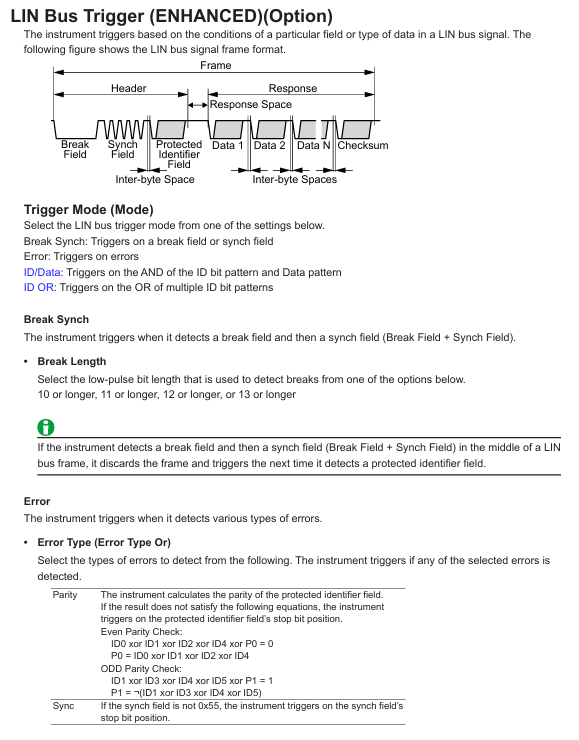
Bus triggering supports CAN/LIN/SPI/I2C/UART protocols, triggered by specific frame IDs and data contents, suitable for communication signal analysis. CAN triggering: set to "ID=0x123", data "D0=0x55", captures CAN frames sent by specific ECUs
Mode triggered combination of analog and digital channel condition triggering (such as "CH1>2V and D01=1 and D02=0"), suitable for complex timing triggering conditions set to "CH3 (IGBT drive)>15V AND D05 (protection signal)=0", capturing the protection trigger when IGBT is conducting
Video triggering supports NTSC/PAL/SECAM standards, triggered by field/line, suitable for video signal testing (such as car display screen signals). The trigger source is set to "CH4", the standard is set to "PAL", and the field is set to "Even", capturing even field signals of the video
2. Analysis function (extracting key signal information)
(1) Automatic measurement
Press the "Measure" button on the front panel to enter the automatic measurement interface, and select "Add Measurement".
Select parameters from the measurement category (voltage/time/frequency/count) (such as "Vpp" peak to peak value, "Freq" frequency, "Duty" duty cycle), and specify the measurement channel (such as CH1, D01).
The measurement results are displayed at the bottom of the screen (updated in real-time), supporting the simultaneous display of 10 measurement parameters; Press the "Statistics" button to view statistical data (mean, maximum, minimum, standard deviation).
(2) Mathematical Operations and FFT Analysis
Mathematical operation: Press the "Math" key, select the operation type (such as "CH1-CH2" to calculate differential signals, "CH3 × CH4" to calculate power waveforms), set the operation range (full screen/specified area), and display the operation result waveform on the screen (default red).
FFT analysis: Press the "Math" key → "FFT", select the FFT channel (such as CH1), set the number of FFT points (128~1M points, the more points there are, the higher the frequency resolution), window function (Hanning window/rectangular window, reducing spectrum leakage), switch the screen to frequency domain display, and label the peak frequency and amplitude.
(3) Protocol decoding (communication signal analysis)
Taking CAN bus decoding as an example:
Press the "decode" key → "Add decode" → "CAN".
Set the decoding channel (such as "CH1" as CAN_S, "CH2" as CAN_L), baud rate (such as 500kbps), and protocol version (CAN 2.0A/B).
The screen displays the CAN frame decoding result (frame ID, data length, data content, frame type), which is aligned with the simulated waveform time. Clicking on the decoding entry can locate the corresponding waveform position and quickly troubleshoot communication errors (such as bit errors and CRC errors).
3. Data management (saving and exporting)
(1) Data saving types and formats
DLM3054HD supports multiple data formats to meet different usage needs:
Data Type Format Usage
Save analog/digital waveforms in. wfm (Yokogawa specific format, including waveforms and settings) and. csv (numerical format, can be imported into Excel for analysis) for later playback or data analysis
Screenshot. bmp/. png/. jpg (image format) saves the current screen display content for report generation or fault recording
Set file. set (instrument setting parameters, including channel, trigger, measurement configuration) to save commonly used test configurations, which can be directly imported for the next use without the need for repeated settings
Decoding Data. txt (text format, including protocol frame information) stores the bus decoding results for analyzing communication frame sequences
(2) Quick save operation
Press the "Save" button on the front panel, and a save menu will pop up on the screen. Select the save type (such as "Waveform" or "Screenshot").
Select the save location (USB device/internal memory), enter the file name (supports Chinese/English, default includes date and timestamp).
Press the "OK" button to complete the save. After successful saving, the screen will display a "Save Completed" prompt.
(3) PC data export
Connect the oscilloscope to the PC via a USB cable and install Yokogawa specific software (such as "Yokogawa Scope Order") to achieve:
Real time data transmission: The PC displays the waveform collected by the oscilloscope in real-time, supporting remote control of acquisition and parameter settings.
Batch data export: Export the. wfm/. csv files from the oscilloscope's internal memory or USB device to a PC and perform secondary analysis using Excel or MATLAB.

Maintenance and troubleshooting
1. Daily maintenance
Cleaning: Use a dry soft cloth to wipe the display screen and housing. If there are stains, dip a small amount of water to wipe them (do not use solvents such as alcohol and acetone to avoid damaging the coating); If there is dust on the BNC terminal and USB interface, it can be blown clean with compressed air (pressure ≤ 0.3MPa).
Probe maintenance: Regularly check whether the probe cable is damaged and whether the probe tip is oxidized (lightly polish with fine sandpaper during oxidation); Simulate probe calibration every 6 months to ensure measurement accuracy (can be done using the oscilloscope's built-in "Probe Calibration" function or sent for calibration).
Storage media: USB devices and SD cards (if any) need to be formatted regularly (using oscilloscope formatting function) to avoid file fragmentation affecting storage speed; Long term unused storage media should be stored in a dry environment to prevent data loss.
2. Troubleshooting
Possible causes and solutions for the fault phenomenon
Power cord not connected properly, power switch not turned on, internal power failure. Check the power cord connection and confirm that the power switch is turned on; If there is still no response, contact Yokogawa for repair
The waveform has no display, the channel is not turned on, the probe is not connected/damaged, the trigger is not set correctly, and the signal is not input. Press the channel key to turn on the corresponding channel, check the probe connection and attenuation ratio, reset the trigger source and threshold, and confirm that the measured signal is normal
Unstable trigger threshold inappropriate, excessive signal noise, incorrect trigger source selection. Fine tune the trigger threshold to the signal edge, turn on "trigger filtering" (reduce noise interference), and replace with a more stable trigger source
Data saving failed due to unrecognized USB device, full storage medium, unsupported file format. Re plug and unplug the USB device, delete useless files to free up space, and select a format supported by the oscilloscope (such as. wfm/. csv)
Remote control failed due to network disconnection, IP address mismatch, VISA driver not installed. Check Ethernet/USB connection, confirm that oscilloscope and PC IP are in the same network segment, and reinstall VISA driver
3. Calibration and Maintenance
Calibration cycle: It is recommended to conduct a comprehensive calibration once a year. You can contact the authorized service center of Yokogawa or refer to the "User Calibration Manual" for self calibration (requiring a standard signal source, such as Yokogawa FG420 function generator).
Maintenance restrictions: It is prohibited to disassemble the instrument by oneself (disassembly will void the warranty). If there is a hardware failure (such as abnormal channel or damaged screen), please contact Yokogawa Global Service Center (contact information can be found in PIM 113-01Z2) and have it repaired by a certified engineer.
- OMRON
- ABB
- General Electric
- EMERSON
- Honeywell
- HIMA
- ALSTOM
- Rolls-Royce
- MOTOROLA
- Rockwell
- Siemens
- Woodward
- YOKOGAWA
- FOXBORO
- KOLLMORGEN
- MOOG
- KB
- YAMAHA
- BENDER
- TEKTRONIX
- Westinghouse
- AMAT
- AB
- XYCOM
- Yaskawa
- B&R
- Schneider
- KONGSBERG
- NI
- WATLOW
- ProSoft
- SEW
- ADVANCED
- Reliance
- TRICONEX
- METSO
- MAN
- Advantest
- STUDER
- DANAHER MOTION
- Bently
- Galil
- EATON
- MOLEX
- DEIF
- B&W
- ZYGO
- Aerotech
- DANFOSS
- Beijer
- Moxa
- Rexroth
- Johnson
- WAGO
- TOSHIBA
- BMCM
- SMC
- HITACHI
- HIRSCHMANN
- Application field
- XP POWER
- CTI
- TRICON
- STOBER
- Thinklogical
- Horner Automation
- Meggitt
- Fanuc
- Baldor
- SHINKAWA
- Other Brands
- UniOP
- KUKA
- Iba
- Beckhoff
- ADLINK
-
 Sigmatek MDD111-1 DIAS Drive Axis Module
 -
 Sigmatek DKL042 05-024-042 Terminal Module
 -
 Sigmatek DM822 Control Module
 -
 Sigmatek CDM167 12-008-167-O Module
 -
 Sigmatek TAE151 Touch Display Unit
 -
 Sigmatek DCC041 SLIDES Module 05-700-041-D
 -
 Sigmatek AKM65M-ANC2GBB0 PM Servo Motor
 -
 Sigmatek ETT221 01-230-221 Operator Terminal
 -
 Sigmatek SLIDES DAM 124 Analog Module
 -
Sigmatek AKM31C-ANCNGBB0 Servo Motor
-
 Mannesmann Demag Sigmatek CP626 Central Unit
 -
 SIGMATEK 0332.554.03 Board 371071000154
 -
 SIGMATEK 12-250-021 Base Plate Back Panel CM5V020
 -
 SIGMATEK DM162 S-DIAS Digital Mix Module
 -
 DEMAG ERGOTECH 061 381 66 Sigmatek 9842.243.02 Circuit Board
 -
 SIGMATEK CP313-1 PLC Module
 -
Sigmatek ETV0551-2 VARAN Touch Terminal
-
 Sigmatek SDM 081 FS S-Dias Safety Module
 -
 DEMAG 05-250-023 Ergotech Motherboard with Sigmatek TMS012
 -
Sigmatek CM5V020 12-250-023-K Wiring Base
-
 Sigma Tek 5000B-37 Attitude Gyro Indicator
 -
 Sigmatek SDD120-2 DIAS Drive
 -
 Sigmatek CME221 Memory Module
 -
 Sigmatek DCP640 DIAS Central Unit
 -
 Sigmatek STO040 Safety Output Module
 -
Sigmatek CET281 Control Panel
-
 Sigmatek CIPC LX800 Demag NC5 CPU
 -
 Sigmatek DKL093 05-024-093 Terminal Module
 -
 Sigmatek AI088 20-009-088 Analog Input Module
 -
Sigmatek CAI888 Analog Input Module
-
SIGMATEK CCA021 12-025-021 Analog Output Module
-
SIGMATEK 1104.579.05 Control Module
-
SIGMATEK SDI100 Digital Input Module
-
 SIGMATEK C-IPC 256MB LX800 Compact Dias
 -
 SIGMATEK 9423.090.02 Control Module
 -
SIGMATEK C-IPC 256 Power Supply 148498
-
 SIGMATEK CAI025 Analog Input Module
 -
 SIGMATEK CTO166 Digital Output Module
 -
 SIGMATEK CP112 20-004-112 Processor Module
 -
SIGMATEK CAI887 12-009-887 Safety Module
-
 Sigma-Tek 4000B-31 Directional Gyro 1U262-002-42
 -
Sigmatek C-IPC 256MB LX800 IPC Controller
-
Sigmatek C-IPC 01-450-031 Industrial PC LX800
-
Sigmatek C-IPC 256 Industrial PC Controller
-
Sigmatek CCP-531 PLC Processor Module
-
Sigmatek CDI163 Digital Input Module
-
 Sigmatek ETV0501 VARAN Terminal 12-230-0501
 -
 Sigmatek CTMS020 C-DIAS Technology Module
 -
 Sigmatek CIV512 VARAN Switch Module
 -
 Sigmatek HU011 20-080-011 Interface Module
 -
SIGMATEK SLIDES DAM 124 Module
-
 SIGMATEK C-IPC 161 01-450-161L Industrial PC
 -
SIGMATEK C-IPC 128MB VIA 733MHz 01-450-024-K
-
 SIGMATEK 12-780-012 R8-IPC Geode LX800 Module
 -
SIGMATEK CAM124 Analog Module
-
 SIGMATEK S1 032-8AF61-R4 EZ Servo Motor
 -
 SIGMATEK CTO163 Digital Output Module
 -
 SIGMATEK CCP082 12-004-082 Processor Module
 -
 SIGMATEK CRCH081 C-DIAS Temperature Module
 -
 SIGMATEK PC322-K 01-310-322-K Industrial PC
 -
SIGMATEK SDD310-2 Servo Drive
-
 SIGMATEK AI084 Analog Input Module
 -
SIGMATEK CRCH081 12-752-081 Temperature Module
-
Sigma-Tek 5000L-4 Attitude Gyro 1U284-001-3
-
 SIGMATEK CM5V020 12-250-023-K Wiring Module
 -
Sigma-Tek 4000H-6 Directional Gyro IU262-035-7
-
 SIGMATEK Dias DCP160 05-004-160 Processor Module
 -
SIGMATEK 0147.395.02 Control Module
-
SIGMATEK A1084 Control Module
-
SIGMATEK DI200 20-006-2000 Digital Input Module
-
Sigmatek DNC115 Encoder Module
-
 Sigmatek DAM122 05-017-122 Analog Module
 -
Sigmatek 9802.289.01 Control Board TA71 Display
-
Sigmatek TO127 20-007-127 Digital Output Module
-
Sigmatek DNC031 05-011-031 Digital Module
-
Sigmatek VI022 20-003-022 Interface Module
-
Sigmatek CAI085 Analog Input Module
-
 Sigmatek CP111 S-DIAS CPU Module
 -
Sigmatek CTMS030 Krauss Maffei Module
-
 Sigmatek CAM123 Control Module
 -
 Sigmatek TAE732-P 01-240-732-P Touch Display Unit
 -
Sigmatek MDM021 Digital Mixed Module
-
Sigmatek DCP642 DIAS Central Unit
-
 Sigmatek CST022 12-014-022 C-DIAS Module
 -
 Sigmatek SRO021 20-893-021 Safety Relay Output
 -
 Krauss Maffei MC5 Control System Sigmatek
 -
 Sigmatek DC061 Module 18-24VDC 300mA
 -
 Herrmann EVT0855 Ultrasonic Welder Touch Panel
 -
Sigmatek CIV521 Control Module 1.4A 2W
-
Sigmatek DDI61 05-006-161 Digital Input Module
-
SIGMATEK ETT312-E Touch Terminal 01-230-312
-
Cessna S3326-1 Sigma Tek 5000B-67 Gyro 1U149-015-9
-
SIGMATEK PS101 Power Supply Module
-
SIGMATEK 0332.554.03 Control Module 371071000154
-
 SIGMATEK ETT312-E Touch Terminal 01-230-312
 -
SIGMATEK CDM163 Control Module
-
 SIGMATEK VSV046 16-023-046 Module
 -
SIGMATEK AM221 20-017-221 Analog Module
-
SIGMATEK CTS051 12-053-051 Control Module
-
SIGMATEK AM221 20-017-221 Analog Module
-
Sigmatek CSDI161 12-891-161 Safety Input Module
-
Sigma Tek 4000C-1 Directional Gyro Indicator
-
Sigmatek ETV0501 12-230-0501 VARAN Terminal
-
Sigmatek DDM165 SLIDES Module
-
Sigmatek N100 20-011-100 Control Module
-
Sigmatek AKM54K-ANC2R-B0 PM Servo Motor
-
Sigmatek CTO166 Digital Output Module
-
Sigmatek CP212-K 20-004-212-K CPU Module
-
Sigmatek CDI161 Digital Input Module
-
Sigmatek DCC080 05-700-080-2 Control Module
-
 SIGMATEK SCP011 S-DIAS Safety CPU
 -
SIGMATEK SCP011 S-DIAS Safety CPU
-
SIGMATEK SRO022 Relay Output Module
-
SIGMATEK MDD 121 Drive Axis Module
-
SIGMATEK DSI021 SLIDES Siemens Interface
-
SIGMATEK DIAS DCP161 Module 05-004-161
-
 Sigmatek ETT312 Built-in Touch Terminal
 -
SIGMATEK DCP 643 DIAS Controller System
-
SIGMATEK CIO021 Multi I/O Module
-
SIGMATEK CTMS020 Control Module
-
 Sigmatek CME 221 Memory Module
 -
Sigmatek 0420.615.01 Control Board
-
Sigmatek CP111 20-004-111 CPU Module
-
Sigmatek 9405.065.03 Control Board
-
Sigmatek ETEK 01-450-032-K C-IPC 256MB Industrial PC
-
Sigmatek CTO163 12-007-163 Safety Output Module
-
Sigmatek TO081 20-007-081 Digital Output Module
-
 Sigmatek SI021 20-022-021 Safety Input Module


