
YASKAWA MEMOCON-SC 2000 series reversible counter module
YASKAWA MEMOCON-SC 2000 series reversible counter module
Core specifications of the product
1. General specifications
Category parameter details
Working environment temperature: 0~55 ℃ (storage: -20~85 ℃); Humidity: 10~90% RH (without condensation)
Environmental restrictions: no explosive, flammable, or corrosive gases; No severe vibration/impact (compliant with JIS C0911/C0912 standards)
Electrical performance and insulation strength: 1500VAC/1 minute; Insulation resistance: ≥ 100M Ω (500VDC); Anti noise: 1500V (noise simulator)
Physical dimensions: 38 (width) x 250 (height) x 104 (depth) mm (including terminal block); Weight approximately 0.6kg
Power consumption 5VDC ± 3%, 0.25A (internal consumption current)
2. Performance specifications
Detailed description of core parameters
Counter configuration with 2 independent counter circuits, supporting separate configuration function
Count digit GL20 adaptation: 6-digit decimal (0~999999); GL60S adaptation: 8-bit decimal (0~99999999)
Counting speed multiplier X1: 50kpps; X2:100kpps; X4:200kpps
Pulse input supports voltage levels of 5VDC, 12VDC, and 24VDC; Input mode: Phase A/B pulse, signed pulse
External coincidence output capability: open collector, maximum load 29V/250mA; Response time ≤ 5ms
External signals support external counting enable, external reset, and external sampling (1 counter per channel)
Test Input Common ADD Test (TST1), SUBTRACT Test (TST2) Input (Supports 12V/24V)
System configuration and installation requirements
1. System composition
Core components: Power module → CPU module → B2801 reversible counter module → Other I/O modules → Programming panel (P150) → Pulse generator
Connection relationship: The CPU module communicates with B2801 through the I/O interface, and external devices (pulse generators, sensors) are connected to B2801 through terminals, supporting multi module expansion
2. Installation specifications
(1) Environmental requirements
Prohibited installation scenarios: direct sunlight, temperatures exceeding 0-55 ℃, humidity>95% or condensation, contact with water/oil/chemicals, areas with severe vibration/impact
Installation operation: The fixing screws need to be tightened and checked regularly; Unused connector cover plates must not be removed (to prevent foreign objects from entering)
(2) Wiring requirements
Power specification: Use a power supply that meets the rated specifications to avoid overload and fire hazards
Anti interference measures:
The signal line adopts shielded twisted pair cable, and the shielding layer is grounded at a single point
The distance between the I/O line and the power line is ≥ 30cm, and bundling or wiring in the same pipe is prohibited
Install insulation transformer and noise filter on external power supply
Wiring taboos: Avoid foreign objects such as wire shavings from entering the module or installation base
(3) Switch settings
SW1: Counting bit switching (OFF=6-digit mode/GL20; ON=8-bit mode/GL60S)
SW2: Reserved unused (factory default OFF)
Four core counter functions
B2801 supports four independent counter functions, which can be configured with two separate counters through initial settings. The counting operation is not affected by the running status of the CPU (counting can still continue when the CPU stops).
1. Comparison Counter
(1) Core functions
Basic ability: addition and subtraction bidirectional counting (supports carry/borrow), outputs coincidence signals by comparing the current count value with the preset value
Coincidence mode: 3 options (current value>preset value, current value=preset value, current value<preset value)
Signal characteristics: Coincidentally, the ON/OFF state of the output is controlled by the "output disable" signal (no output when disabled in>/<mode; reset ON state when disabled in mode)
(2) Key operations
Reset logic: When powered on, the module is reset, or switched to the comparison counter mode, the current value is reset to zero from the preset value
Notes:
When the preset value is set to the maximum value (such as 999999), the>mode does not meet the coincidence condition
When the preset value is set to 0, the<mode does not meet the coincidence condition
Coincidentally, the ON/OFF time of the signal needs to be longer than the CPU scanning time to avoid unrecognized states
(3) Ladder diagram configuration
Initial settings: Configure pulse input mode, counting multiplier, and coincidence output mode through output registers 4001-4004
Example parameters: Coincidence preset value=500, pulse input mode=phase A/B, counting multiplier=X1
2. Cyclic Counter
(1) Core functions
Basic ability: Automatically reset when the current count value reaches the preset value or counting width, repeat counting in a loop
Default configuration: After initial setting, the preset value and count width are automatically set to 100
Coincidentally output: When the target value is reached, an ON signal is output, which needs to be reset through the "output disable" signal
(2) Key operations
Count width: When set to 0, the counter stays at 0 and does not perform addition or subtraction counting
Time requirement: The preset value and counting width must meet the requirement of t>5ms (to avoid signal conflicts)
Reset logic: When the external reset or current value reset signal is ON, the count stops and clears to zero
(3) Ladder diagram configuration
Core parameters: Coincidence preset value=1000, count width=2000 (maximum value 999999 in GL20 6-digit mode)
Counting process: ADD count up to 1000 → Coincidence output ON → Continue counting up to 2000 → Auto reset → Repeat loop
3. Sampling Counter
(1) Core functions
Basic ability: When receiving external sampling signals, latch the current count value and store it in the designated input register
Storage allocation: Counter 1 data is stored in input registers 1-2; Counter 2 data is stored in input registers 3-4
Sampling control: The sampling frequency can be reset through the "output disable" signal
(2) Key parameters
Sampling period: T ≥ 10ms, and must meet T ≤ (2 ¹⁹ -1)/(f · k) (GL20) or T ≤ (2 Ω³ -1)/(f · k) (GL60S), where f is the input pulse frequency and k is the magnification ratio
Signal requirements: Sampling signal ON response time<1ms, OFF response time<2ms, pulse width ≥ 5ms
(3) Operational logic
Initial state: When switching to sampling counter mode, the current value and carry/borrow flag are reset to zero
Data update: When the current value is preset, the sampled value is synchronously updated to the preset value
4. Memory Counter
(1) Core functions
Basic ability: When triggered by external sampling signals, latch the current count value and store it in the built-in data memory in the order of reception (up to 999 sets of data can be stored)
Data reading: By specifying the address through the "pointer command", the corresponding stored data can be read from the input register
Coincidence output: When the amount of stored data reaches the preset value, output a coincidence ON signal
(2) Key parameters
Storage limit: Stop sampling after the storage capacity reaches 999; When the preset value is 0, no coincidence signal is output
Sampling period: As required by the sampling counter (T ≥ 10ms, meeting frequency related constraints)
Read latency: After the local I/O pointer command is turned on, the data read latency is ≤ 3 scan cycles; Remote I/O ≤ 5 scanning cycles
(3) Operational logic
Reset control: When the "output disable" signal is turned on, the stored data is reset to zero, the storage count is reset, and the coincidence output is turned off
Pointer feature: When the pointer command is OFF, the input register displays the current count value; Display data stored at the specified address when turned on
Internal interface and signal definition
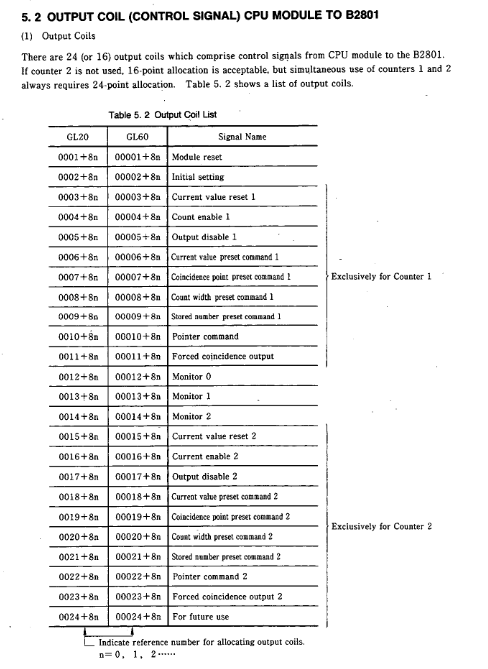
1. I/O allocation (interaction between CPU and B2801)
Interface type allocation specification signal flow direction
Output coil 24 points (dual counter)/16 points (single counter) CPU → B2801 (control signal)
Input relay 16 points (dual counter)/8 points (single counter) B2801 → CPU (status signal)
4 output registers (binary allocation) CPU → B2801 (set data)
4 input registers (binary allocation) B2801 → CPU (monitoring data)
2. Core control signal (output coil)
Signal Name Function Description Effective Methods
Module reset initializes internal RAM and external I/O signals, and the counter returns to its default value, triggering OFF → ON
Initial setting: Configure the counter function mode (compare/cycle/sample/store) OFF → ON trigger (count enable needs to be OFF)
Count enable, in conjunction with an external enable signal (ENB), allows the counter to count ON effectively
Output disable: Disable coincidence output or reset coincidence signal ON to be effective
The preset command (Current/Consensus/Count width preset) sets the current value, coincidence point, and count width OFF → ON trigger
Pointer command stores counter data, reads address specified ON is valid
3. Status feedback signal (input relay)
Signal Name Function Description Status Definition
READY module self diagnosis result (ROM/RAM/WDT check) ON=normal; OFF=abnormal
Preset ACK/NAK preset operation completion status feedback ACK=successful; NAK=Failed
Carry/Borrow count overflow feedback ON=1 scan cycle (compare/loop mode); Storage data overflow (sampling/storage mode)
Coincidence output - Coincidence signal output status feedback ON=coincidence condition satisfied
Scanning time error: CPU scanning time too short ON=error; OFF=Normal
4. Definition of Register Data
(1) Output register (set data)
1-2: Counter 1 dedicated (pulse mode, counting multiplier, coincidence mode, function selection, preset value, etc.)
3-4: Counter 2 dedicated (same as counter 1 configuration item)
Data range: GL20 (3-digit decimal); GL60S (4-digit decimal)
(2) Input register (monitoring data)
1-2: Counter 1 monitoring (current value, sampled value, stored data, etc.)
3-4: Monitoring of counter 2 (same as monitoring item of counter 1)
Monitoring mode: Switch through the combination of "Monitor 0~2" (e.g. 0-0-0=current value; 0-1-1=sampling times)
External interface and terminal connection
1. Front panel layout
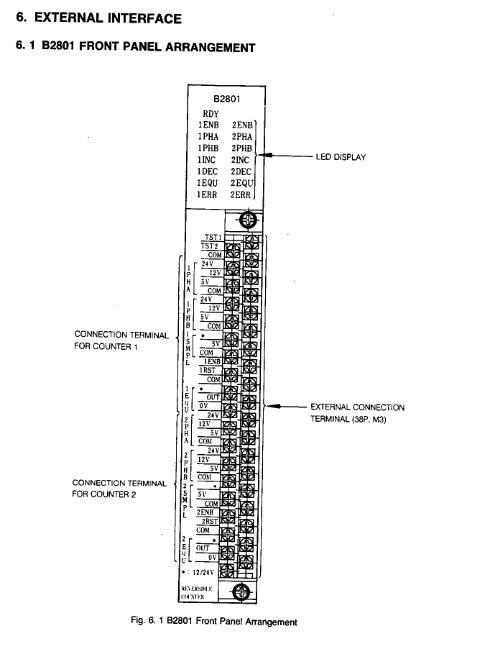
LED indicator lights: RDY (self diagnostic status), 1ENB/2ENB (counting enabled), 1PHA/2PHA (phase A input), 1PHB/2PHB (phase B input), 1INC/2INC (addition counting), 1DEC/2DEC (subtraction counting), 1EQU/2EQU (coincidence output), 1ERR/2ERR (error alarm)
Connection terminal: 38P M3 terminal block (1/2 dedicated terminal for sub counter+common terminal)
Power terminal: 12/24V power input (providing power for external signals)
2. Key terminal functions
Terminal Type Function Description Electrical Specifications
The phase A/B (PHA/PHB) pulse input terminal supports 5V/12V/24V; Maximum input pulse 200kpps (X4 mode)
External enable (ENB) counting allows control input operating voltage of 10.2~26.4V; operating current of 4~11mA
The reset input of the RST counter and the "current value reset" signal form OR logic; Response time ≤ 6ms
External sampling (SMPL) sampling/storage trigger input pulse width ≥ 5ms; operating voltage 4.5~5.5V (5V mode)
Coincidence output (EQU): Coincidence signal output with open collector; Maximum load of 29V/250mA; ON voltage ≤ 1.5V
Test input (TST1/TST2) addition/subtraction test input operating voltage 10.2~26.4V; response time ≤ 120ms
3. Terminal connection example
Pulse generator (open collector output 12V): PHA/B terminal → pulse generator output; COM terminal → generator ground; Single point grounding of shielding layer
External enable/reset (12/24V): ENB/RST terminal → external control signal; COM terminal → power ground; Need to connect current limiting resistors in series
Coincidentally output (inductive load): EQU terminal → load positive pole; Load negative pole → power supply ground; Parallel surge absorber
4. Wiring precautions
Cable selection: Shielded twisted pair cable is used for signal lines, with a length of ≤ 30m (when 50kpps)
Grounding requirements: single point grounding of shielding layer; Connection between module FG terminal and equipment grounding system
Power isolation: External power supply is equipped with a line filter, and the primary/secondary of the filter is wired differently from the DC output terminal
Operation process and test run
1. Basic operating procedures
Installation wiring: Confirm the installation environment, fix modules, and connect terminals (shielding layer grounding, wire spacing compliance)
Switch setting: Set the number of counting bits (SW1) according to the CPU model
Initial configuration: Set counter function, pulse mode, magnification and other parameters through CPU output registers
Start counting: Activate the "count enable" signal (output coil+external ENB signal), and the counter starts working
Monitoring status: Read counting status, coincidence output, and error messages through LED indicator lights or input registers
2. Test running steps
(1) Check before powering on
Switch setting: Confirm that SW1 (counting digits) matches the CPU
Voltage matching: The input terminal voltage level is consistent with the external device
Wiring correctness: The terminal connections are not loose, there are no short circuits, and the signal polarity is correct
(2) Power on verification
Power on: After the module self diagnosis is completed, the RDY indicator light is turned on (self diagnosis time is about 0.8 seconds)
Pulse test: Operate the pulse generator, the PHA/PHB indicator light flashes (phase A/B input)
Counting direction: INC light on when ADD counts, DEC light on when SUBTRACT counts
Coincidence verification: When the preset value is reached, the EQU indicator light is turned on; reset after triggering "output disabled"
3. Initial setup steps
Configure output registers: set pulse input mode (phase A/B or signed), counting multiplier (X1/X2/X4), counter function (0=compare/1=loop/2=sample/3=store)
Activate initial settings: Output coil "Initial setting" from OFF to ON (make sure the counting enable is OFF)
Preset parameter: Set the target value through the "Coincidence/Count width preset" command
Start counting: Activate the "Count enable" coil and, in conjunction with an external ENB signal, the counter begins to run
Fault handling and diagnosis
1. Self diagnostic function
Power on diagnosis: ROM checksum check, RAM check, WDT (watchdog) check
Run diagnostics: Set up error monitoring, CPU scan time monitoring, CPU run/stop status check
Error feedback: Fault feedback through READY input relay, ERR indicator light, scan time error relay
2. Common faults and solutions
Possible causes and solutions for the fault phenomenon
RDY light OFF (module unresponsive) ROM/RAM/WDT error, power failure module reset or power failure restart; If the fault persists, replace B2801
Do not count (PHA/PHB light does not flash) pulse input wiring error, voltage level mismatch check external wiring, pulse generator output; Confirm terminal voltage
Do not count (PHA/PHB light flashing), count enable not activated, external ENB signal OFF check the status of the "Count enable" coil; Connect external enable signal
Counting error (numerical deviation), incorrect setting of counting multiplier, abnormal pulse waveform, check the counting multiplier in the initial setting; Check the output waveform of the pulse generator
Coincidentally, the preset value for abnormal output is set incorrectly, and the output disable signal is turned on to reset the coincidence point/count width; Confirm that the 'Output disable' coil is OFF
Scanning time error (1016 relay ON): CPU scanning time is too short. Add ladder program or virtual allocation; Extend scanning cycle
3. Troubleshooting process
Observe indicator lights: RDY (module status), ERR (error type), ENB/INC/DEC (counting status)
Read input relays: READY, Preset NAK, Scanning time error
Check the setting parameters: Read the initial setting value through the input register, confirm that the function mode, magnification, and preset value are correct
Check hardware connections: loose terminals, damaged cables, grounded shielding layer, power supply voltage
- OMRON
- ABB
- General Electric
- EMERSON
- Honeywell
- HIMA
- ALSTOM
- Rolls-Royce
- MOTOROLA
- Rockwell
- Siemens
- Woodward
- YOKOGAWA
- FOXBORO
- KOLLMORGEN
- MOOG
- KB
- YAMAHA
- BENDER
- TEKTRONIX
- Westinghouse
- AMAT
- AB
- XYCOM
- Yaskawa
- B&R
- Schneider
- KONGSBERG
- NI
- WATLOW
- ProSoft
- SEW
- ADVANCED
- Reliance
- TRICONEX
- METSO
- MAN
- Advantest
- STUDER
- DANAHER MOTION
- Bently
- Galil
- EATON
- MOLEX
- DEIF
- B&W
- ZYGO
- Aerotech
- DANFOSS
- Beijer
- Moxa
- Rexroth
- Johnson
- WAGO
- TOSHIBA
- BMCM
- SMC
- HITACHI
- HIRSCHMANN
- Application field
- XP POWER
- CTI
- TRICON
- STOBER
- Thinklogical
- Horner Automation
- Meggitt
- Fanuc
- Baldor
- SHINKAWA
- Other Brands
- UniOP
- KUKA
- Iba
- Beckhoff
- ADLINK
-
 VALMET PMB 2R 16 Slot Backplane PCB Card
 -
 NELES VALMET A413135 AOU 4 Output Module
 -
 Metso Valmet A413345 FPU Power Unit
 -
 VALMET A413171 PIC Module
 -
 VALMET A413620 Repeater Module
 -
 Valmet M851521 Memory Card
 -
 Valmet DIFF-EL 140 M1 Transmitter
 -
 Valmet A413064 DMU Module
 -
 Valmet IOP371 I/O Bus Extender Module
 -
 Valmet Cooking Liquor Measurement 3400 Model 3417H
 -
 Metso Valmet A413043 CPU Module – Industrial Processor
 -
 Valmet BIU4 M851221 Binary Input Module
 -
 Valmet PMB 1S CPU SCU Rack Module
 -
 Valmet A413248 Controller Module
 -
 Valmet PDP601 Distributed Processing Unit
 -
 VALMET M851004 M2 CPU Printed Circuit Board Module
 -
 Metso Valmet A413045 Ver.05 CPU Module
 -
 Valmet A413181 Ver.05 PLU1 Board
 -
 Lyngso Valmet ATB16 Controller Board
 -
 VALMET AIU 16 Analog Input Unit 545100-3A/3B
 -
 VALMET PUD 10 B Power Supply PCB Rack Module
 -
 Valmet MS-50V/120V Bearing Unit
 -
 Valmet PDP603 Distributed Processing Unit – DPU Module
 -
 Valmet A413110 TIU Board – Terminal Interface Unit
 -
 Valmet S420154 I/O Backplane PCB – Printed Circuit Board
 -
 Valmet A413173 Industrial Control Module
 -
 Valmet A413044 CPU Module
 -
Valmet A4IU1 Analog I/O Module
-
 Valmet A413325 IPU Power Unit – PLC Module
 -
 Valmet M851002 CPU Module – Central Processing Unit
 -
 Valmet PUD10B Power Supply Board
 -
Valmet K00990 Master CPU Electronic Assy
-
 Valmet Metso IOP345 Input Module
 -
 Metso Automation T545215 Board
 -
Valmet Metso IOP304 Input Module
-
 Valmet 542844-6A SCU Module
 -
 Metso A413043 Ver.11 Valmet CPU Module
 -
Valmet Automation BIU 8A Input Module
-
Metso A413044 Ver05 Valmet CPU Module
-
 VALMET 542821-5A Control System Rack Module
 -
 Metso A413005 Ver.04 Valmet CPU Module
 -
 Valmet M851207 AIU16 Card
 -
Valmet BIU8 Binary Input Unit
-
 VALMET 547070-2B CPU Printed Circuit Board Module
 -
 Valmet Automation A413325 Power Module
 -
 VALMET AUTOMATION A413135 AOU4 Module
 -
 VALMET ACU A413165 Model 9 Analog Controller
 -
 VALMET AUTOMATION A413511-02 Slot Rack with I/O Backplane
 -
 Valmet A413148 BIE 4 Rev 08 Board
 -
 Valmet ATB16-4 Controller Board
 -
 Neles Automation BOR82 A413292 Processor Module
 -
 Valmet A413015 NCU Module – Network Control Unit
 -
 Valmet AIU 16 Analog Input Unit – M8512071
 -
 Metso Valmet A413091 GDU Board
 -
 Valmet M851565 Damatic Main Keyboard
 -
 Metso A413082 CPU Module
 -
 Valmet A403037 GDC – Graphics Display Controller
 -
Valmet A413076 FBC Board
-
Valmet A413015 NCU Module – Network Control Unit
-
Valmet A413082 CPU Module
-
 VALMET AUTOMATION A413620 Fieldbus Repeater
 -
 Valmet Metso IOP341R Positioner Module
 -
 Metso A413082 Ver.04 CPU Module
 -
 Valmet Metso MCA FT250/10 10 Inch Sensor
 -
 Valmet N0542 ABMB Printed Circuit Board
 -
 Valmet A413000 Ver.07 CPU Module
 -
Valmet A413061 Ver.05 DMU Module
-
 Valmet M851241 M1 BCU Binary Input Module
 -
Valmet Automation NCU A413015 Circuit Board
-
Valmet A413046 Ver.06 CPU Module
-
 Valmet A651B001 Panel Mount Keyboard
 -
 Valmet IQ Scanner A418080R Basis Weight Detector Head
 -
Metso Valmet A413370 ESU Ethernet SCSI Unit
-
 Valmet A413340 FPU Power Supply Unit
 -
 Valmet SKF GE 400/600 Spherical Plain Bearing
 -
 Valmet SCU PCB Card 542844-7B – System Control Unit
 -
Valmet A413075 FBU Fieldbus Controller Module
-
 Valmet A413171 PIC Card Binary Output
 -
Valmet A413002 Ver.05 CPU
-
 Valmet ABMB PCB Card – Industrial Control Board
 -
 Valmet PMB 2R 542821-4A PCB Card
 -
Metso Valmet A413001 CPU Module
-
 Metso Valmet A413050 RSU 6 Serial Controller Unit
 -
 Valmet ABMB MT241 Input Mother Board
 -
 Valmet DAMATIC M851565 Keyboard
 -
 Valmet A413075 Ver05 FBC Board
 -
 VALMET K14891 FLEXI-U Operating Terminal
 -
VALMET AUTOMATION MKB2 DAMATIC Keyboard
-
 Valmet Metso Consistency Transmitter Smart Pulp M1 RL Blade
 -
VALMET AUTOMATION A413230 ECU Module
-
 Beckhoff EP9224-0037 - 4-Channel Power Distribution Box EtherCAT
 -
 Beckhoff CX2900-0026 - Solid State Flash Memory Card 20GB CFast
 -
 Beckhoff BK7500 - SERCOS Interface Fieldbus Bus Coupler Terminal
 -
 Beckhoff Ep2328-0002 - 4-Channel Input 4-Channel Output EtherCAT Box IP67
 -
 Beckhoff CX1020-0111 - Controller Kit Combo Interface Modules
 -
 B&R X20AI2237 - X20 System Analog Input Interface Module
 -
 Beckhoff CP2221-0010 - Multi-Touch Built-In Panel PC Touchscreen
 -
 Beckhoff CX1500-M310 - Fieldbus Master Interface Module 24V
 -
 Beckhoff CX2100-0904 - Power Charging Module Smart UPS Extension
 -
 Beckhoff CP3918-0000 - Multi-Touch Control Panel 18.5-Inch Monitor
 -
 Beckhoff CP2915-0000 - 15-Inch Multi-Touch Built-In Control Panel
 -
 Beckhoff CP7037-1027 - HMI Industrial Control Panel Built-In PC
 -
 Beckhoff EL3152 - 2-Channel Analog Input Terminal 4-20mA EtherCAT
 -
 Beckhoff CP6607-0000-0020 - 5.7-Inch Built-In Panel PC HMI Touch
 -
 Beckhoff EJ1809-0000 - 16-Channel Digital Input Pluggable Signal Level Terminal
 -
 Beckhoff AM8563-0N10-0000 - Synchronous Servo Motor
 -
 Beckhoff AX2006-S60600-520 - Compact Servo Drive Inverter
 -
 Beckhoff AM8053-0K20-0000 - Servo Motor with Planetary Gearbox AG3210
 -
 Beckhoff AM8042-0FH1-0000 - Synchronous Servo Motor
 -
 Rexroth R911338600 - IndraControl V HMI Terminal Beckhoff PCI Card FC9002
 -
 Beckhoff AX5125-0000 - 3 Phase Industrial Servo Drive 1000Hz
 -
 Beckhoff EP2328-0002 - 4-Channel Digital Input 4-Channel Output EtherCAT Box
 -
 B&R 7CP476-02 - System 2005 RTD CPU Module 3IF681.86 Interface
 -
 Beckhoff AX8620-0000-0000 - Power Supply Module Axis Drive System
 -
 Beckhoff CX1010-0111 - PLC Module CPU Controller 24V
 -
 Beckhoff AM8043-0H10-0000 - Synchronous Servo Motor
 -
 Beckhoff C6240-1009 - Control Cabinet Industrial PC Mainframe
 -
 Beckhoff BX8000-0000 - Bus Terminal Controller HW 4.4 Standalone
 -
 Beckhoff CP7721-1089-0020 - 12.1-Inch Touch Screen HMI Panel PC
 -
 Beckhoff CP7132-0001 - Industrial Built-In Panel PC Screen
 -
 Beckhoff CP2912-0010 - Multi-Touch Built-In Control Panel Display
 -
 Beckhoff CP2915-0000 - 15-Inch Multi-Touch Built-In Control Panel
 -
 Beckhoff AM8532-1EN0-0000 - Synchronous Servo Motor
 -
 Beckhoff AX5203-0000 - 2-Channel Digital Compact Servo Drive
 -
 Beckhoff CX2020-0141 - Embedded PC Core CPU Module
 -
 Beckhoff CP6832-0002-0010 - Built-In Industrial Control Panel Display
 -
 Beckhoff CX5020-0112 - Embedded PC CPU Control Module
 -
 Beckhoff CX5140-0175 - 4GB Embedded PC CPU Unit 24V


