
HITACHI S10VE Programmable Controller
HITACHI S10VE Programmable Controller
Usage Notes
■ Installation
The programmable controller employs electronic circuit and processor technologies. Note the following in particular:
● When constructing a system, make sure that conditions including the maximum rating, operating power supply voltage range, heat dissipation characteristics, and installation conditions are within the guaranteed operating range described in this manual. Hitachi bears no responsibility for failures or accidents that arise from use of the product outside the guaranteed range.
Even when using the product within the guaranteed range, you must consider the predicted failure rate and failure mode of the product. You can then implement system measures such as making the system failsafe so that operation of the Hitachi product will not cause personal injury, fire, and other consequential damage.
The Programmable Controllers ( ((PCs^{#})) ) in which the CPU unit and PI/O units are installed are neither fireproof, dustproof, nor waterproof. Install the PCs in steel cabinets that are fireproof, dustproof, and waterproof (see Figure 1-1).
#: PCs means the programmable controllers in their entirety including the CPU unit and PI/O units.
● Use the S10VE in an environment that is within the specifications explained in Chapter 3. To ensure long-term stable operation, we recommend that you use the product at room temperature and normal relative humidity (15 to 35°C and 45 to 85% RH). Using the product in a high-temperature or high-humidity environment or an environment where the temperature varies widely over the course of a day leads to a reduced service life.

■ Output module
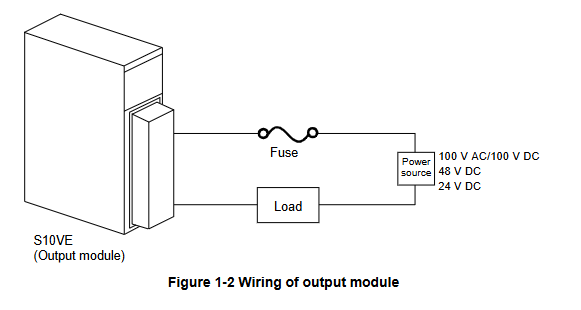
You must provide a short-circuit protection fuse in the load power supply circuit of the output module. Use fuses with the correct load rating. Using the wrong fuse might result in damage to the PCB or housing if the load shortcircuits.
■ Grounding
● Panel grounding specifications
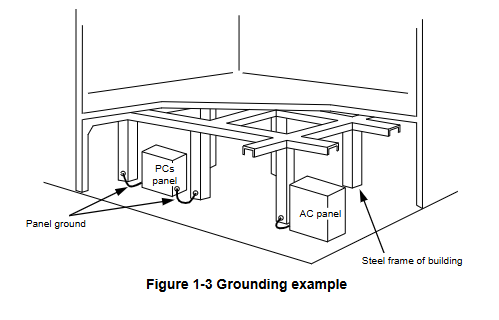
The PCs panel that incorporates the S10VE must be welded to the steel frame of a building that provides at least class D grounding with the ground resistance of 100Ω or less.
Conditions for grounding to the steel frame of a building
- The steel frame is welded together
- The grounding between the earth and the steel frame meets the criteria for class D
If this is not achievable, ground the PCs panel by connecting it to a grounding rod driven into the earth. This provides a low grounding resistance that prevents surrounding noise from entering the PCs.
■ Noise
Do not install the S10VE in or near a panel to which a high-voltage device (such as an inverter) is mounted. If this is unavoidable, use a shielding plate to shield the CPU unit, PI/O units, and cabling from electromagnetic and electrostatic induction.
■ Emergency stop circuit
A partial failure can affect the entire system. Provide an emergency stop circuit as an external circuit. Do not incorporate the emergency stop circuit into programs run on the programmable controller.
■ Disassembling modules
Do not disassemble the modules.
■ Removing/inserting modules
You must turn off the power before removing or inserting a module. To prevent module damage due to static electricity, discharge any static electricity from your body before touching the equipment.
■ Installation of new equipment
When peripheral equipment is added or replaced, check the following aspects of the power supply and grounding:
●Power supply
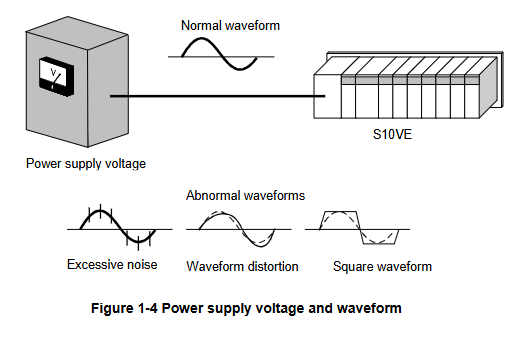
Inspect the power supply voltage and waveform.
- Has the voltage dropped?
- Is there any noise in the power cable?
1. Usage Notes
● Grounding
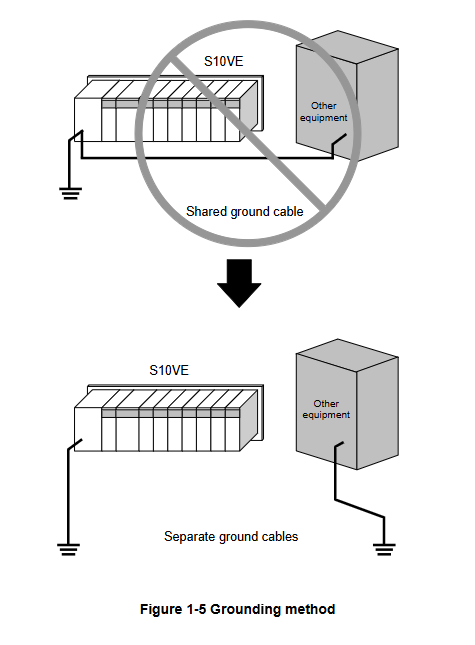
- Make sure that the S10VE does not share its ground cable with other equipment.
- Make sure that no power or lead cables are positioned too closely to a signal cable (such as a remote I/O cable).
2. Overview
2.1 Overview of the system
The S10VE is a programmable controller suited for a wide range of applications from simple condition control to complex arithmetic control. It is capable of simultaneously executing ladder logic, HI-FLOW, and C languages.
2.2 System configuration
2.2.1 Example system configuration
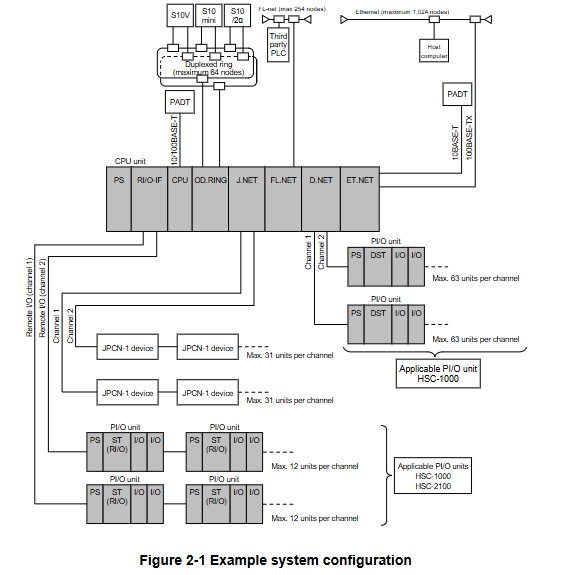
Figure 2-1 shows an example configuration of an S10VE system.
An S10VE system is made up of a CPU unit, PI/O units, and peripherals.
By installing option modules (OD.RING, D.NET, J.NET, FL.NET, ET.NET) in the CPU unit, an S10VE system can connect to an optical communication network and various other optional networks.
By installing a remote I/O interface module (hereafter RI/O-IF module) in the CPU unit, the system can connect to HSC-1000 and HSC-2100 PI/O units using remote I/O lines. A given system can incorporate both HSC-1000 and HSC-2100 PI/O units.
2.2.2 CPU unit configuration
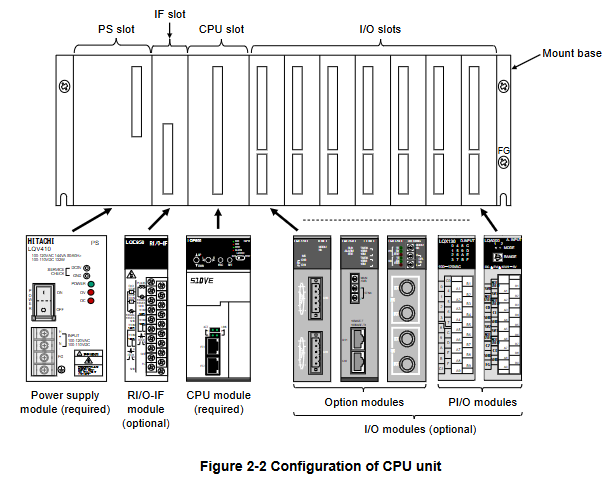
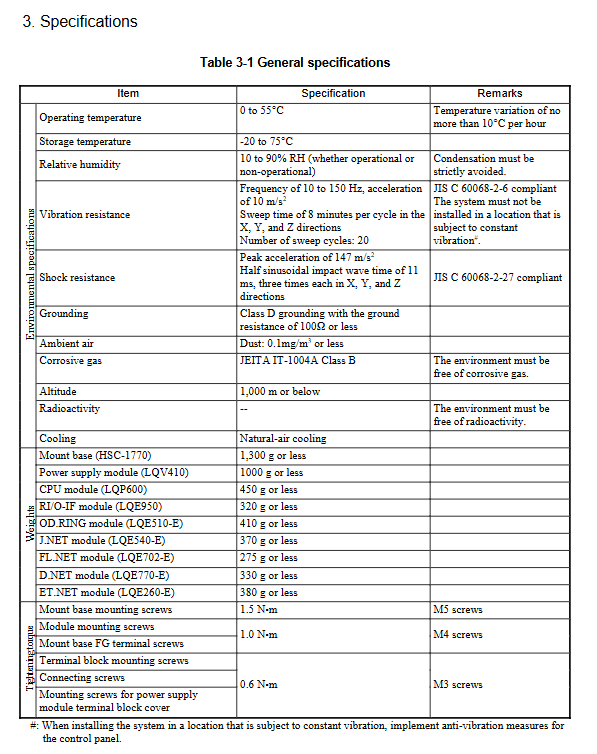
An S10VE system is made up of a mount base, power supply module, RI/O-IF module, CPU module, and PI/O modules. The mount base incorporates one PS slot (a dedicated slot for the power supply module), one IF slot (a dedicated slot for the RI/O-IF module), one CPU slot (a dedicated slot for the CPU module), and seven I/O slots. The power supply module and CPU module are mandatory components of an S10VE system. Installation of an RI/O-IF module, option modules, and PI/O modules is optional.
2.2.3 Configuration of remote I/O communication
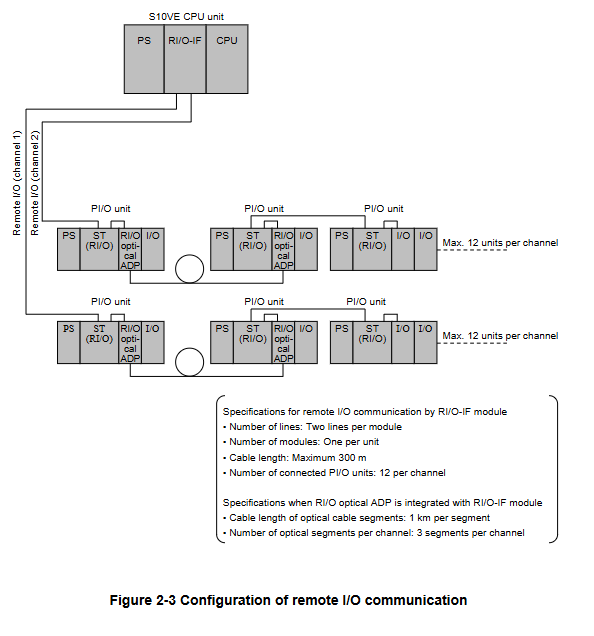
The S10VE system can use an RI/O-IF module to perform remote I/O communication on a maximum of two lines (see Figure 2-3).
The maximum length of each line is 300 m by remote I/O cable alone, extendable to a maximum of 3.3 km using remote I/O optical adapters. This length of 3.3 km is three optical cables of 1 km each, plus the 300 m achievable by remote I/O cable.
You can use HSC-1000 and HSC-2100 PI/O units in the same system.
2.3 System components
2.3.1 Components of CPU unit
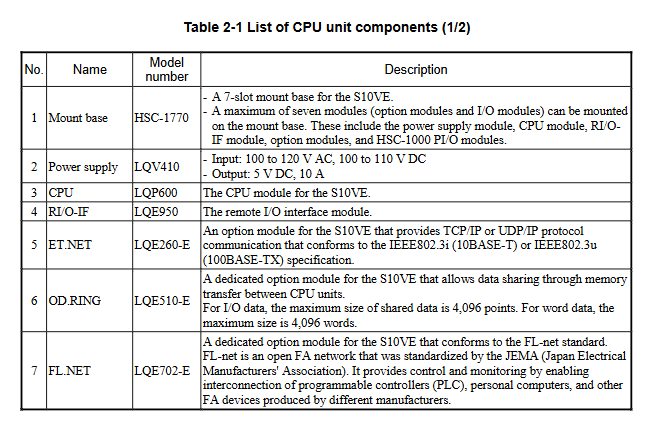
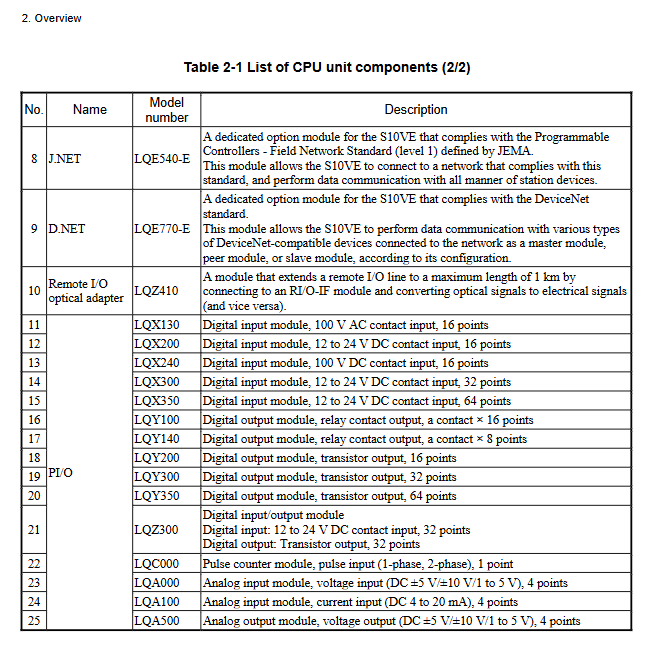
Table 2-1 shows the components that make up the CPU unit.
The specifications and functions of the mount base, power supply module, CPU module, and RI/O-IF module are explained in the following chapters:
- Chapter 3: Specifications
- Chapter 5: Part Names and Functions
For details about the specifications and functions of the option modules, see the following manuals:
- S10VE User's Manual Option OD.RING (LQE510-E) (manual number SEE-1-101)
- S10VE User's Manual Option J.NET (LQE540-E) (manual number SEE-1-102)
- S10VE User's Manual Option D.NET (LQE770-E) (manual number SEE-1-103)
- S10VE User's Manual Option FL.NET (LQE702-E) (manual number SEE-1-104)
- S10VE User's Manual Option ET.NET (LQE260-E) (manual number SEE-1-105)
For details about the specifications and functions of the PI/O modules, see the following manual:
- S10mini Hardware Manual I/O Modules (manual number SME-1-114)
2.3.2 PI/O units and peripherals
A PI/O unit is made up of an HSC-1000 module and an HSC-2100 module. For details, see the following manuals:
- S10mini Hardware Manual I/O Modules (manual number SME-1-114)
- S10mini Hardware Manual D.Station (manual number SME-1-119)
- HSC-2100 Hardware Manual I/O Modules (manual number SME-1-126)
You can also connect a D.NET optical adapter as a peripheral. For details, see the following manual:
- S10mini Hardware Manual OPT.D-NET (manual number SME-1-120)
2.3.3 PADT
PADT (Programming and Debugging Tools) is a programming tool used to make, test, run, and troubleshoot application programs for the S10VE system. The PADT is a personal computer with the required software such as BASE SYSTEM/S10VE installed.
The required specifications for the personal computer that serves as the PADT are as follows:
- 1 GHz or faster CPU
- At least 2GB RAM
- At least 200 MB free hard disk space
- A display resolution of at least 1,366 × 768 (FWXGA)
- Microsoft® Windows® 7 (64bit) operating system or Microsoft® Windows® 10 (64bit) operating system
Detailed explanation of core hardware components
1. Core module specifications and functions
Module type, model, key parameters, core functions, installation requirements
CPU module LQP600 has a maximum of 2048 I/O points; Main memory 128MB; PI/O memory (bit area 2MB/word area 1MB); Processing speed: bit operation 9.4ns/step system control core, supports ladder diagram/HI-FLOW/C language parallel execution; Built in Ethernet ports (ET1/ET2); Install resources such as event registers and data registers in dedicated CPU slots; Need to connect the main battery (HDC5200) in advance; Avoid direct proximity to high-voltage modules
Power module LQ410 input: 100-120VAC/100-110VDC; Output: 5VDC/10A; The power of 144VA (AC)/132W (DC) provides stable DC power supply for the system; Equipped with overcurrent (OC) and overvoltage (OV) protection; Support the installation of power status LED indicators in PS dedicated slots; Reliable grounding is required; Power switch start stop interval ≥ 5 seconds
RI/O-IF module LQE950 2-channel remote I/O cable; Communication speed 768kbps; Maximum of 12 PI/O units per channel; Implement remote I/O expansion with a transmission distance of ≤ 300m; Support 100 Ω/150 Ω terminal resistor configuration; Provide PCsOK signal output installed in IF dedicated slot; Remote I/O cables require shielded twisted pair cables; Unused ports require a 150 Ω resistor to be connected
Option module - OD.RING LQE510-E duplex ring network; Maximum 64 nodes; Shared data: I/O 4096 points/word data 4096 words cross CPU unit memory data sharing; Simplified line fault analysis installation in I/O slots; Optical connectors require insulation materials for protection
Option module - ET.net LQE260-E supports TCP/IP/UDP/IP; Compatible with 10BASE-T/100BASE-TX; Maximum 1024 node Ethernet communication extension; Adapting to industrial network integration requires configuring IP addresses and routing information; Prioritize using the ET2 port for communication with PADT
2. Classification and specifications of PI/O modules
The PI/O module is divided into three categories: digital I/O, analog I/O, and pulse counter, which are suitable for different signal acquisition and execution requirements:
Digital input modules: such as LQX200 (12-24VDC/16 points), LQX350 (12-24VDC/64 points), support contact input, current consumption 80-170mA/module;
Digital output module: such as LQY200 (transistor output/16 points), LQY100 (relay output/16 points), supporting a maximum output current of 2A and a relay life of 70000 times;
Simulation module: such as LQA000 (voltage input/4 points), LQA500 (voltage output/4 points), supporting ± 5V/± 10V/1-5V voltage range;
Pulse counter module: LQC000 (1-phase/2-phase pulse input), supports 1-point pulse counting, with a current consumption of 150mA per module.
3. Key physical and environmental parameters
Physical specifications: 7-slot mounting base (HSC-1770) with dimensions of 437 × 138.6 × 100mm and weight ≤ 1300g; the thickness of each module is uniformly 34mm (excluding some), and the tightening torque of the mounting screws is 1.0N · m (M4);
Environmental adaptability: operating temperature 0-55 ° C (temperature variation ≤ 10 ° C/hour), storage temperature -20-75 ° C; relative humidity 10-90% RH (no condensation); Seismic resistance: 10-150Hz, 10m/s ² acceleration, 8 minutes/cycle; Impact resistance: 147m/s ² peak acceleration, 11ms half sine wave;
Grounding requirements: Class D grounding (grounding resistance ≤ 100 Ω), separated from the AC panel grounding main line, with a spacing of ≥ 15m.
Installation and commissioning process
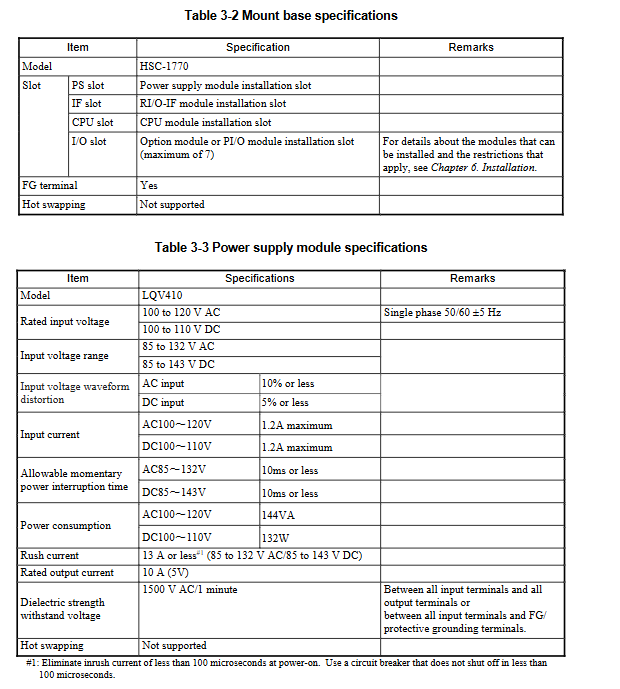
1. Key steps and requirements for installation
(1) Preliminary preparation
Confirm installation environment: temperature 0-55 ° C, humidity 10-90% RH, no corrosive gases, dust concentration ≤ 0.1mg/m ³;
Grounding preparation: Construction shall be carried out in accordance with Class D grounding standards, with a grounding resistance of ≤ 100 Ω, and multiple cabinets shall be connected to the ground using a daisy chain connection;
Tool preparation: Use calibrated measuring instruments and compatible screwdrivers (tightening torque 1.0-1.5N · m).
(2) Installation process
Installation base: fixed on the vertical surface of the cabinet, using M5 screws (tightening torque 1.5N · m) to ensure that the insulation lining does not fall off and the metal part of the base does not touch the control cabinet;
Module assembly: Install in the order of "power module → RI/O-IF module → CPU module → option module → PI/O module", align the module with the guide rail, insert it vertically, and tighten the screws;
Battery connection: Before installing the CPU module, insert the main battery cable into the connector according to the corresponding color, and cover the battery cover tightly (hear a snap sound);
Wiring specifications:
Power cable: ≥ 2mm ² shielded twisted pair, with a distance of ≥ 100mm from the network cable;
Remote I/O cable: Select according to the transmission distance (0.75mm ² cable for long distances, ≤ 300m), with single ended grounding of the shielding layer (RI/O-IF side);
Grounding wiring: The FG terminal is connected in a daisy chain and ultimately connected to the power module FG terminal. The cable cross-section is ≥ 2mm ² (inside the cabinet)/≥ 5.5mm ² (outside the cabinet).
(3) Installation gap requirements
The distance between the cabinet and the unit is ≥ 100mm, and the distance between the sides is ≥ 50mm;
There is a requirement for no distance between modules, but one empty slot needs to be left between the high-voltage PI/O module (≥ 100VAC/48VDC) and the CPU/option/simulation module;
Cooling measures: The cabinet needs to have air vents or install fans to ensure that the intake temperature is ≤ 55 ° C.
2. Debugging core processes and tools
(1) Debugging Tools and Environment
Tool: BASE SYSTEM/S10VE (requires administrator privileges to install), supports Windows 7/10 (64 bit), PADT needs to meet 1GHz CPU, 2GB memory, 200MB free hard disk;
Connection: Connect PADT to CPU module ET1/ET2 ports via Ethernet cable, with default IP address 192.192.192.1 (ET1)/192.192.193.1 (ET2).
(2) Debugging key steps
Project creation: Start BASE SYSTEM, create a new project and configure PC numbers and comments, enable C mode requires installation of RPDP;
Network configuration: Set the IP address, subnet mask, and routing information of the CPU's built-in Ethernet or ET.net module, write them, and restart the system;
Program download: Write the program using LADDER DIAGRAM SYSTEM/HI-FLOW SYSTEM, download it to the CPU module, and confirm that there are no syntax errors;
Parameter configuration: Set PI/O installation status, partition (FIX/FREE), I/O point count, remote I/O synchronization mode, etc;
System startup: Turn the CPU RUN/STOP switch to RUN, observe that the RUN LED is constantly on, and confirm that there are no error codes through the indicator;
Function verification: Monitor memory data through MCS function, view module status and error logs through RAS menu, and verify that I/O signal acquisition and execution are normal.
3. Operations and troubleshooting
(1) Key points of daily operation and maintenance
Regular inspection: monthly check the tightness of module screws, LED status, and cable connections; Clean ventilation ducts and verify grounding resistance annually;
Backup strategy: Regularly backup CPU data, including main memory and MRAM data, through the BACKUP STORE SYSTEM, and backup files need to be stored remotely;
Module replacement: It is recommended to replace the power module within 10 years (the lifespan of the aluminum electrolytic capacitor), and replace the main battery within 5 years. When replacing, the power should be turned off;
(2) Common troubleshooting
LED fault indication:
ERR LED constantly on: CPU module has a serious error. Check the error code through the indicator (such as ECF=xxxxx) and refer to the manual for troubleshooting;
OV/OC LED on: Power module overvoltage/overcurrent, check input voltage and load current;
LINK LED not lit: Ethernet physical connection abnormality, check cable and switch ports;
Remote I/O communication failure: Confirm terminal resistance configuration (unused port connected to 150 Ω), cable shielding grounding, station number setting, and check timeout status through system registers;
Program execution exception: Check for ladder mode (RUN/STOP), PI/O module installation restrictions, and locate syntax or logic errors through error logs.
- OMRON
- ABB
- General Electric
- EMERSON
- Honeywell
- HIMA
- ALSTOM
- Rolls-Royce
- MOTOROLA
- Rockwell
- Siemens
- Woodward
- YOKOGAWA
- FOXBORO
- KOLLMORGEN
- MOOG
- KB
- YAMAHA
- BENDER
- TEKTRONIX
- Westinghouse
- AMAT
- AB
- XYCOM
- Yaskawa
- B&R
- Schneider
- KONGSBERG
- NI
- WATLOW
- ProSoft
- SEW
- ADVANCED
- Reliance
- TRICONEX
- METSO
- MAN
- Advantest
- STUDER
- DANAHER MOTION
- Bently
- Galil
- EATON
- MOLEX
- DEIF
- B&W
- ZYGO
- Aerotech
- DANFOSS
- Beijer
- Moxa
- Rexroth
- Johnson
- WAGO
- TOSHIBA
- BMCM
- SMC
- HITACHI
- HIRSCHMANN
- Application field
- XP POWER
- CTI
- TRICON
- STOBER
- Thinklogical
- Horner Automation
- Meggitt
- Fanuc
- Baldor
- SHINKAWA
- Other Brands
- UniOP
- KUKA
- Iba
- Beckhoff
- ADLINK
-
 Sigmatek MDD111-1 DIAS Drive Axis Module
 -
 Sigmatek DKL042 05-024-042 Terminal Module
 -
 Sigmatek DM822 Control Module
 -
 Sigmatek CDM167 12-008-167-O Module
 -
 Sigmatek TAE151 Touch Display Unit
 -
 Sigmatek DCC041 SLIDES Module 05-700-041-D
 -
 Sigmatek AKM65M-ANC2GBB0 PM Servo Motor
 -
 Sigmatek ETT221 01-230-221 Operator Terminal
 -
 Sigmatek SLIDES DAM 124 Analog Module
 -
Sigmatek AKM31C-ANCNGBB0 Servo Motor
-
 Mannesmann Demag Sigmatek CP626 Central Unit
 -
 SIGMATEK 0332.554.03 Board 371071000154
 -
 SIGMATEK 12-250-021 Base Plate Back Panel CM5V020
 -
 SIGMATEK DM162 S-DIAS Digital Mix Module
 -
 DEMAG ERGOTECH 061 381 66 Sigmatek 9842.243.02 Circuit Board
 -
 SIGMATEK CP313-1 PLC Module
 -
Sigmatek ETV0551-2 VARAN Touch Terminal
-
 Sigmatek SDM 081 FS S-Dias Safety Module
 -
 DEMAG 05-250-023 Ergotech Motherboard with Sigmatek TMS012
 -
Sigmatek CM5V020 12-250-023-K Wiring Base
-
 Sigma Tek 5000B-37 Attitude Gyro Indicator
 -
 Sigmatek SDD120-2 DIAS Drive
 -
 Sigmatek CME221 Memory Module
 -
 Sigmatek DCP640 DIAS Central Unit
 -
 Sigmatek STO040 Safety Output Module
 -
Sigmatek CET281 Control Panel
-
 Sigmatek CIPC LX800 Demag NC5 CPU
 -
 Sigmatek DKL093 05-024-093 Terminal Module
 -
 Sigmatek AI088 20-009-088 Analog Input Module
 -
Sigmatek CAI888 Analog Input Module
-
SIGMATEK CCA021 12-025-021 Analog Output Module
-
SIGMATEK 1104.579.05 Control Module
-
SIGMATEK SDI100 Digital Input Module
-
 SIGMATEK C-IPC 256MB LX800 Compact Dias
 -
 SIGMATEK 9423.090.02 Control Module
 -
SIGMATEK C-IPC 256 Power Supply 148498
-
 SIGMATEK CAI025 Analog Input Module
 -
 SIGMATEK CTO166 Digital Output Module
 -
 SIGMATEK CP112 20-004-112 Processor Module
 -
SIGMATEK CAI887 12-009-887 Safety Module
-
 Sigma-Tek 4000B-31 Directional Gyro 1U262-002-42
 -
Sigmatek C-IPC 256MB LX800 IPC Controller
-
Sigmatek C-IPC 01-450-031 Industrial PC LX800
-
Sigmatek C-IPC 256 Industrial PC Controller
-
Sigmatek CCP-531 PLC Processor Module
-
Sigmatek CDI163 Digital Input Module
-
 Sigmatek ETV0501 VARAN Terminal 12-230-0501
 -
 Sigmatek CTMS020 C-DIAS Technology Module
 -
 Sigmatek CIV512 VARAN Switch Module
 -
 Sigmatek HU011 20-080-011 Interface Module
 -
SIGMATEK SLIDES DAM 124 Module
-
 SIGMATEK C-IPC 161 01-450-161L Industrial PC
 -
SIGMATEK C-IPC 128MB VIA 733MHz 01-450-024-K
-
 SIGMATEK 12-780-012 R8-IPC Geode LX800 Module
 -
SIGMATEK CAM124 Analog Module
-
 SIGMATEK S1 032-8AF61-R4 EZ Servo Motor
 -
 SIGMATEK CTO163 Digital Output Module
 -
 SIGMATEK CCP082 12-004-082 Processor Module
 -
 SIGMATEK CRCH081 C-DIAS Temperature Module
 -
 SIGMATEK PC322-K 01-310-322-K Industrial PC
 -
SIGMATEK SDD310-2 Servo Drive
-
 SIGMATEK AI084 Analog Input Module
 -
SIGMATEK CRCH081 12-752-081 Temperature Module
-
Sigma-Tek 5000L-4 Attitude Gyro 1U284-001-3
-
 SIGMATEK CM5V020 12-250-023-K Wiring Module
 -
Sigma-Tek 4000H-6 Directional Gyro IU262-035-7
-
 SIGMATEK Dias DCP160 05-004-160 Processor Module
 -
SIGMATEK 0147.395.02 Control Module
-
SIGMATEK A1084 Control Module
-
SIGMATEK DI200 20-006-2000 Digital Input Module
-
Sigmatek DNC115 Encoder Module
-
 Sigmatek DAM122 05-017-122 Analog Module
 -
Sigmatek 9802.289.01 Control Board TA71 Display
-
Sigmatek TO127 20-007-127 Digital Output Module
-
Sigmatek DNC031 05-011-031 Digital Module
-
Sigmatek VI022 20-003-022 Interface Module
-
Sigmatek CAI085 Analog Input Module
-
 Sigmatek CP111 S-DIAS CPU Module
 -
Sigmatek CTMS030 Krauss Maffei Module
-
 Sigmatek CAM123 Control Module
 -
 Sigmatek TAE732-P 01-240-732-P Touch Display Unit
 -
Sigmatek MDM021 Digital Mixed Module
-
Sigmatek DCP642 DIAS Central Unit
-
 Sigmatek CST022 12-014-022 C-DIAS Module
 -
 Sigmatek SRO021 20-893-021 Safety Relay Output
 -
 Krauss Maffei MC5 Control System Sigmatek
 -
 Sigmatek DC061 Module 18-24VDC 300mA
 -
 Herrmann EVT0855 Ultrasonic Welder Touch Panel
 -
Sigmatek CIV521 Control Module 1.4A 2W
-
Sigmatek DDI61 05-006-161 Digital Input Module
-
SIGMATEK ETT312-E Touch Terminal 01-230-312
-
Cessna S3326-1 Sigma Tek 5000B-67 Gyro 1U149-015-9
-
SIGMATEK PS101 Power Supply Module
-
SIGMATEK 0332.554.03 Control Module 371071000154
-
 SIGMATEK ETT312-E Touch Terminal 01-230-312
 -
SIGMATEK CDM163 Control Module
-
 SIGMATEK VSV046 16-023-046 Module
 -
SIGMATEK AM221 20-017-221 Analog Module
-
SIGMATEK CTS051 12-053-051 Control Module
-
SIGMATEK AM221 20-017-221 Analog Module
-
Sigmatek CSDI161 12-891-161 Safety Input Module
-
Sigma Tek 4000C-1 Directional Gyro Indicator
-
Sigmatek ETV0501 12-230-0501 VARAN Terminal
-
Sigmatek DDM165 SLIDES Module
-
Sigmatek N100 20-011-100 Control Module
-
Sigmatek AKM54K-ANC2R-B0 PM Servo Motor
-
Sigmatek CTO166 Digital Output Module
-
Sigmatek CP212-K 20-004-212-K CPU Module
-
Sigmatek CDI161 Digital Input Module
-
Sigmatek DCC080 05-700-080-2 Control Module
-
 SIGMATEK SCP011 S-DIAS Safety CPU
 -
SIGMATEK SCP011 S-DIAS Safety CPU
-
SIGMATEK SRO022 Relay Output Module
-
SIGMATEK MDD 121 Drive Axis Module
-
SIGMATEK DSI021 SLIDES Siemens Interface
-
SIGMATEK DIAS DCP161 Module 05-004-161
-
 Sigmatek ETT312 Built-in Touch Terminal
 -
SIGMATEK DCP 643 DIAS Controller System
-
SIGMATEK CIO021 Multi I/O Module
-
SIGMATEK CTMS020 Control Module
-
 Sigmatek CME 221 Memory Module
 -
Sigmatek 0420.615.01 Control Board
-
Sigmatek CP111 20-004-111 CPU Module
-
Sigmatek 9405.065.03 Control Board
-
Sigmatek ETEK 01-450-032-K C-IPC 256MB Industrial PC
-
Sigmatek CTO163 12-007-163 Safety Output Module
-
Sigmatek TO081 20-007-081 Digital Output Module
-
 Sigmatek SI021 20-022-021 Safety Input Module


