
Tektronix TBS1000 series digital storage oscilloscope
Tektronix TBS1000 series digital storage oscilloscope
Product model and core parameters
The TBS1000 series includes 5 models, and the key parameter differences are shown in the following table:
Model Channel Number Bandwidth Maximum Sampling Rate Display Type
TBS1022 2 25 MHz 500 MS/s color
TBS1042 2 40 MHz 500 MS/s color
TBS1062 2 60 MHz 1 GS/s color
TBS1102 2 100 MHz 1 GS/s color
TBS1152 2 150 MHz 1 GS/s color
Basic Operation Guide
1. Installation and functional inspection
Installation requirements: The power cord must comply with the specific specifications of the equipment, with a power supply voltage of 90-264VAC (45-66Hz) or 90-132VAC (400Hz); The equipment is cooled by convection, leaving 2 inches of space at both ends and top.
Functional inspection steps:
After booting up, press the Default Setup button to reset to the factory state;
Connect the TPP0101/TPP0201 probe to channel 1, and connect the probe end/reference wire to the "probe compensation" terminal;
Press AutoSet, and after a few seconds, a square wave of approximately 5V peak to peak and 1kHz will be displayed;
Repeat the operation of channel 2 (check channels 3-4 for 4-channel models) and confirm that all channels are functioning properly.
2. Probe calibration and setting
Probe Inspection Wizard: Press the PROBE CHECK button, and the oscilloscope will automatically verify the probe compensation and attenuation coefficient matching (supporting 1X/10X/20X/50X/100X). If it is qualified, it will display "qualified", otherwise it will prompt correction.
Manual probe compensation:
Channel menu → "Probe" → "Voltage" → "Attenuation" set to 10X, P2220 probe switch adjusted to 10X;
Connect the probe to the "probe compensation" terminal and display a square wave according to AutoSet;
Adjust the probe compensation screw until the waveform is "compensated correctly" (no overcompensation/overcompensation).
Current probe settings: Channel menu → "Probe" → "Current" → "Ratio", default 10A/V, need to match the ratio of the current probe.
3. Core control operations
(1) Vertical control
Coupling: DC (AC/DC), AC (DC blocking, attenuation<10Hz signal), grounding (disconnected input);
Bandwidth limit: 20MHz bandwidth limit can be enabled to reduce high-frequency noise;
Scale and Position: The "Vertical Scale" knob adjusts the voltage/grid (1-2-5 sequence, fine adjustment can set small steps), and the "Vertical Position" knob moves the waveform up and down.
(2) Horizontal control
Time base range: 5ns-50s/grid (1-2.5-5 sequence), corresponding relationship of sampling rate is as follows (partially):
Time base setting sampling rate maximum measurable frequency (Nyquist frequency)
5.0ns-250.0ns 1 GS/s 150.0 MHz
500.0ns 500.0 MS/s 150.0 MHz
1.0μs 250.0 MS/s 125.0 MHz
Window function: Open the "Window Settings" through the "Horizontal Menu", define the waveform segment and zoom in to view, supporting switching between the main time base and window view.
(3) Trigger control
Trigger type:
Edge trigger: rising/falling edge, optional source of CH1/CH2/ext/ext/5/mains power, coupling supports DC/AC/noise suppression, etc;
Video trigger: Supports NTSC/PAL/SECAM standards, synchronizes optional scan lines/line numbers/odd fields/even fields/all fields;
Pulse width triggering: The triggering conditions are=(± 5% tolerance), ≠,<,>, and the pulse width range is 33ns-10s.
Key buttons: "Set to 50%" (trigger level set to signal midpoint), "Force trigger" (complete acquisition regardless of trigger conditions), "Trig View" (hold down to view trigger signal).

Functional applications and examples
1. Signal measurement
(1) Automatic measurement
Supports 16 measurement types, with a maximum of 5 displayed at once. Some types are defined as follows:
Measurement type definition applicable scenarios
Frequency measurement, first cycle calculation, frequency cycle signal frequency detection
Measurement of the amplitude range of the absolute difference signal between the maximum and minimum peak values of the peak to peak waveform
Evaluation of edge velocity of time pulse signal between 10% -90% rising edge of rising time waveform
Synchronization analysis of phase difference signal between rising edges of two channel phase signals
Determination of pulse signal symmetry based on the proportion of duty cycle, positive pulse time, and period
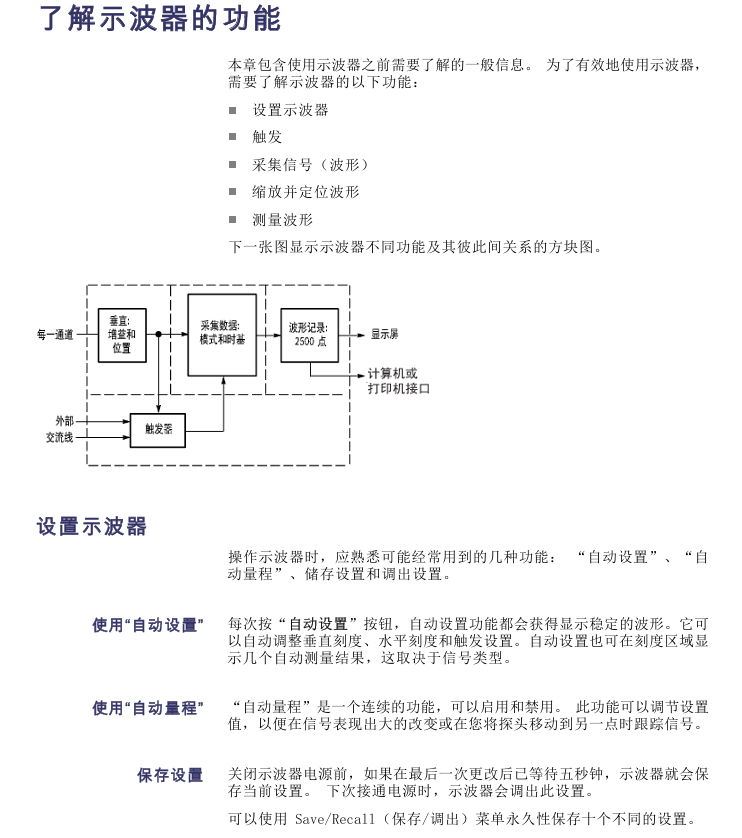
Operation steps: Press the Measure button → Select the source → Select the measurement type → View the reading (including real-time updates).
(2) Cursor measurement
Type: Time cursor (vertical line, measuring time/frequency/amplitude), amplitude cursor (horizontal line, measuring voltage/current);
Example: Measure pulse width → Press cursor → Select "time" from "type" → Move cursor 1/2 to the rising/falling edge of the pulse → Read and display Δ t (pulse width).
2. Advanced analysis function
(1) FFT analysis
Function: Convert time-domain (YT) signals into frequency-domain spectra, supporting 1024 data points (0Hz Nyquist frequency);
Window selection:
Window type characteristics applicable scenarios
Hanning has good frequency accuracy and average amplitude accuracy for periodic waveform frequency analysis
Flattop has good amplitude accuracy, and its frequency accuracy is generally good for measuring the amplitude of periodic waveforms
Rectangular without attenuation, equivalent to windowless pulse/instantaneous waveform
Operation: Math → "Operation" Select FFT → Select source → Adjust scaling (horizontal X1-X10, vertical X0.5-X10).
(2) Data recording and limit testing
Data recording:
Utility → "Data Recording" → Enable → Select Source (Channel/Mathematical Waveform);
Set the recording duration (0.5-24 hours, increments of 30 minutes/60 minutes, or unlimited);
Select storage folder → start collection, and automatically save to USB after completion.
Extreme testing:
Utility → "Extreme Testing" → Define the source and template (internal/external waveform+horizontal/vertical tolerance);
Set violation response (waveform/image storage) and stop conditions (number of waveforms/violation times/time/manual);
Start the test and display the pass/fail statistics after completion.
3. Typical application examples
(1) Capture single pulse signals (such as relay arcing)
Set the expected range for vertical/horizontal scaling, Acquire → "Peak Detection";
Trigger menu → select "Slope" to rise, set the trigger level to the midpoint of the relay switch voltage;
Press Single to trigger the collection when the relay is turned on. After optimizing the settings, collect and observe the rebound of the contacts again.
(2) Video signal trigger (NTSC standard)
Probe connected to video output, AutoSet → "Auto Settings" menu select "Field" → "All Fields";
Trigger menu → "Video" → "Standard" select NTSC, "Sync" select "Odd Field" (only watch odd fields);
Rotate the horizontal scale to display the complete field/line, and the vertical scale ensures full signal display.
Data management and peripheral connectivity
1. USB flash drive operation
Support capacity: ≤ 64GB, file storage capacity (every 1MB): 5 full storage, 16 images, 250 settings, 18 waveforms;
Save function:
Full Storage: Press Save/Recall → "Full Storage" → "Print Button" to set "Full Storage", press the Print Button to save the image+waveform+settings to the ALLnnnn folder;
Save separately: "Save Image" (BMP/JPG format, etc.), "Save Settings" (. SET), "Save Waveform" (. CSV, 2500 data points);
Transfer function: Transfer settings (. SET) or waveforms (to RefA/RefB reference memory) from USB.
2. Peripheral connection
Printer: Connect a PictBridge compatible printer, go to Utility ->"Options" ->"Printer Settings" (ink saving/layout format), press the print button to send the image, and support terminating printing.
PC connection:
Install OpenChoice software (official website download);
Connect the oscilloscope USB device port to the PC using a USB cable;
Follow the prompts to complete the driver installation and transfer data/control the oscilloscope through software.
GPIB connection: Use the TEK-USB-488 adapter, go to "Utility" → "Options" → "GPIB Settings" to set the address (default 1), connect to the GPIB system, and control it through software.
Reference and Appendix
1. Technical specifications (core part)
Vertical specifications: 8-bit resolution (>6.5 bits at 2mV/grid), DC gain accuracy ± 3% (5V-10mV/grid), ± 4% (5mV/2mV/grid);
Horizontal specifications: Long term time accuracy ± 50ppm (≥ 1ms interval), incremental time accuracy ± (1 sampling interval+100ppm × | reading |+0.6ns) (single sampling);
Environmental requirements: working temperature 0-50 ℃, humidity 5% -85% (no condensation), altitude ≤ 3000m.
2. Accessories and Maintenance
Standard attachments: TPP0101 (100MHz)/TPP0201 (200MHz) 10X passive probe, installation and safety manual, customer documentation browser CD;
Optional accessories: RM2000B rack kit, TEK-USB-488 adapter, soft box (AC2100), handling box (HCTEK4321);
Cleaning and maintenance: Use a lint free cloth to remove dust, clean the outer surface with a soft cloth and 75% isopropanol, and avoid abrasive reagents/direct sunlight/humid environments.
- OMRON
- ABB
- General Electric
- EMERSON
- Honeywell
- HIMA
- ALSTOM
- Rolls-Royce
- MOTOROLA
- Rockwell
- Siemens
- Woodward
- YOKOGAWA
- FOXBORO
- KOLLMORGEN
- MOOG
- KB
- YAMAHA
- BENDER
- TEKTRONIX
- Westinghouse
- AMAT
- AB
- XYCOM
- Yaskawa
- B&R
- Schneider
- KONGSBERG
- NI
- WATLOW
- ProSoft
- SEW
- ADVANCED
- Reliance
- TRICONEX
- METSO
- MAN
- Advantest
- STUDER
- DANAHER MOTION
- Bently
- Galil
- EATON
- MOLEX
- DEIF
- B&W
- ZYGO
- Aerotech
- DANFOSS
- Beijer
- Moxa
- Rexroth
- Johnson
- WAGO
- TOSHIBA
- BMCM
- SMC
- HITACHI
- HIRSCHMANN
- Application field
- XP POWER
- CTI
- TRICON
- STOBER
- Thinklogical
- Horner Automation
- Meggitt
- Fanuc
- Baldor
- SHINKAWA
- Other Brands
- UniOP
- KUKA
- Iba
- Beckhoff
- ADLINK
-
 Bonfiglioli ACT401-19A Frequency Inverter
 -
 Bonfiglioli C102PP71 Gear Motor 13.4:1
 -
 Bonfiglioli C312 P P90 Speed Reducer
 -
 VEM K21R 71 G 4 Motor with Bonfiglioli VF44
 -
 Bonfiglioli C31 3 P P63 PV Bevel Gear Reducer V5
 -
 Bonfiglioli WR75UD28150P71B5B3 Gearbox
 -
 Bonfiglioli ACT401-13FA Frequency Inverter
 -
 Bonfiglioli VF62/P Worm Gearbox 38:1
 -
 Bonfiglioli ME210124001Y C Helical Gearbox
 -
 Bonfiglioli VF63PIP90BI4 Gearbox
 -
Bonfiglioli ACT 401-19A Frequency Inverter
-
 Bonfiglioli C102PP71 Variable Speed Gearmotor
 -
Bonfiglioli C312 P P90 Reducer with Clutch
-
 Bonfiglioli VF44 F1 10 Gearmotor with VEM Motor
 -
 Bonfiglioli C31 3 P P63 PV V5 Reducer
 -
 Bonfiglioli WR75UD28150P71B5B3 Gearbox
 -
Bonfiglioli ACT401-13FA Frequency Inverter
-
Bonfiglioli VF 62/P Worm Gearmotor 38 to 1
-
Bonfiglioli ME210124001Y Inline Gearbox
-
 Bonfiglioli VF63PIP90BI4 Worm Gearbox
 -
 Bonfiglioli VF86FC256 Worm Gearbox 1010B03004
 -
Bonfiglioli VF44F1 Gearmotor 0.43kW 460V
-
 Bonfiglioli W 75 UF1 D30 P80 B14 Gearbox i=100
 -
Bonfiglioli VF63NP80B5 Worm Gearbox
-
 Bonfiglioli 300R3133FPP80POG0A Gear Reducer
 -
 Bonfiglioli VF49F1N56C Gearbox
 -
 Bonfiglioli Trasmittal 300L19 Gearmotor with MEZ UD 1104 Motor
 -
 Bonfiglioli BCS30 Permanent Magnet Motor with Encoder
 -
 Bonfiglioli BN56B4 Gearmotor with VF30 Reducer
 -
Bonfiglioli VF44 Gearbox 100480150
-
Bonfiglioli VF63PIP90B14 Gearbox
-
 Bonfiglioli 830420150 BN63A4 230/400-50 IP55 CLF B14 with VF30F2 P63B14B3-I40
 -
Bonfiglioli BN63A2 Motor
-
Bonfiglioli VF44 ALP63B5 Gearbox
-
 Bonfiglioli A102 UR P80 Gearbox
 -
 Bonfiglioli MP 105 2 16 STD 95A1 CD 19 S1 OR SB KE Planetary Gearbox
 -
 Bonfiglioli T56BN/4 Motor
 -
 Bonfiglioli 8E20020594-M285018 Motor
 -
Bonfiglioli VF49 V P71 B5 Gearbox
-
 Bonfiglioli X VFR49 L1 FA1 180 P63B5 B3 Gearbox
 -
Bonfiglioli W63U7P90B14V6 Right Angle Gear Reducer
-
 Bonfiglioli VF/W30/63UFC2 Gear Reducer i=168
 -
 Bonfiglioli VF44 Gear Reducer 100480150
 -
 Bonfiglioli ACU 201-07 FA Frequency Converter
 -
 Bonfiglioli BN-80B-4 Motor with VF63 Gearbox 38:1
 -
Bonfiglioli MVF 49 Gear Reducer for Servo Motor
-
 Bonfiglioli ACT 400-034 A Frequency Inverter 11kW
 -
 Bonfiglioli SYN10-S-220-03-AF AC Drive 0.5HP
 -
 Bonfiglioli LC 090 1 7 STD FM CD 19 KE Gearbox
 -
Bonfiglioli TQFK070350GR80A1CD Gear Unit
-
Bonfiglioli BN 80 B6 FD Three Phase Motor
-
Bonfiglioli W63U Worm Gear Reducer
-
Bonfiglioli 830G2310M-B048052 Gear Motor
-
Bonfiglioli VF49P128P71B5B3 Worm Gearbox
-
Bonfiglioli W75UD30719/140B3 Worm Gearbox
-
Bonfiglioli VF49F17HSB3 Worm Gearbox
-
 Bonfiglioli C12 2P 20.6 P90 B3 Gearbox
 -
Bonfiglioli BN80B4 623136 Geared Motor
-
 Bonfiglioli 4APC3-4 9142882 Geared Motor 0.18 kW
 -
Bonfiglioli W86 80/90-B5 Worm Gear Reducer 20:1
-
 Bonfiglioli ACU 210-07 1 FA PLC Peripheral Module
 -
 Bonfiglioli MVF44/F Worm Gearbox
 -
 Bonfiglioli W63U Worm Gear Reducer
 -
Bonfiglioli BN63A2 Electric Motor
-
 Bonfiglioli BN 132 M B 4 Electric Motor 9.2kW
 -
Bonfiglioli VF49 L1 P1 P63B5 Worm Reducer i=45
-
Bonfiglioli C413 P S2 7717/1000 Gearmotor 1.5kW
-
 Bonfiglioli VF49F1P63B5B3 Worm Gearbox
 -
 Bonfiglioli BTD5-1870-05-400-ENC8A Servo Motor
 -
Bonfiglioli ACU401-03FA Frequency Inverter
-
 Bonfiglioli MVF63/N Gearbox with AEG Servomotor
 -
Bonfiglioli BN80A4 Gearmotor VF49L1P1P80B14
-
Bonfiglioli VFR 72/FC2 Gear Reducer
-
Bonfiglioli W R 86 U 120 Gearbox Assembly
-
Bonfiglioli W 75 U 30 Gear Reducer
-
 Bonfiglioli W R 86 U 120 P80 B5 V5 Gearbox
 -
 Bonfiglioli RAO 50/DC Gearbox
 -
 Bonfiglioli VF49 F1 P63B5 Gearmotor with SPZ MS6324
 -
 Bonfiglioli X_LC 090 Planetary Gearbox
 -
 Bonfiglioli A302 UH35 P90 Gearbox
 -
 Bonfiglioli VF63FCHS Worm Gearbox 103100390
 -
 Bonfiglioli VF 44 P63 B14 Gearbox M00480210008
 -
 Bonfiglioli MPD1006S0006 Precision Planetary Gearbox
 -
Bonfiglioli VF49F1N56C Worm Gearbox
-
Bonfiglioli TR G 105 3 20 STD Planetary Reducer
-
 Bonfiglioli VFR49P1P63B5 Worm Gearbox
 -
Bonfiglioli WR 86 U 120 P80 B5 V5 Gearbox 2G30013944
-
Bonfiglioli BRA 400-060 BF2 Brake Chopper
-
Bonfiglioli VF49P P71B5 Worm Gearbox
-
 Bonfiglioli C402 P VG1 Gear Speed Reducer 31.4:1
 -
Bonfiglioli ISMET LCVT050 DK308/50 Line Reactor
-
Bonfiglioli C 22 2 F GR063 Gearbox
-
 Bonfiglioli C31 3 P P63 PV V5 Reducer
 -
Bonfiglioli CM-485 T Communication Module
-
Bonfiglioli W75UF1D30P90B5 Gearbox
-
 Bonfiglioli BN63 B4 VF49 Gearmotor 0.18kW
 -
Bonfiglioli ACT 400-004 FA Frequency Inverter
-
Bonfiglioli W110U100P90B5B3 Worm Gearbox
-
Bonfiglioli SYN10 T 400 05 AF Inverter
-
Bonfiglioli MP080.1.4.15.16.40.80.100 Gearbox
-
Bonfiglioli SYN10S Inverter
-
 Bonfiglioli VF44L2P160 Gearmotor
 -
Bonfiglioli W 86 U 40 P90 B5 B3 Gear Reducer
-
Bonfiglioli BTD5-1870-05-400 Servomotor
-
 Bonfiglioli MP 080 2 2C Gearbox with BLDC Motor
 -
Bonfiglioli MP080.1.10 Planetary Gearbox
-
Bonfiglioli C212PHS Reducer
-
 Bonfiglioli MVF 49F1 Gearbox with ICME T71B4
 -
 Bonfiglioli VF 49 v P71 B5 Gearbox
 -
Bonfiglioli VF 44 P1 Gearmotor
-
 Bonfiglioli C 22 2 NP 6.1 Helical Gearbox
 -
Bonfiglioli F203 316.9 Gearbox with Kaiser Motor
-
 Bonfiglioli SYN10 S 220 07 AF Frequency Inverter
 -
Bonfiglioli 301L251.8-HC-P90 Gearbox 1/51.8
-
Bonfiglioli ACT401-25A Frequency Inverter
-
Bonfiglioli W75 U D30 30 P90B14 B3 Worm Drive
-
Bonfiglioli 830G2310M-307638 Motor
-
 Bonfiglioli C112-P-P90 Inline Gearbox i=6.2
 -
Bonfiglioli SYN10-S-220-03-AF AC Drive
-
Bonfiglioli VFR49 A HS Worm Drive i=180 B3
-
Bonfiglioli ACT 401-29 A AC VFD Drive 22kW
-
 Bonfiglioli VF49PIP63B14 Gearbox
 -
 Bonfiglioli ANG 410-18 2 FA Inverter
 -
Bonfiglioli GVX2000-7.5-T Converter
-
 Bonfiglioli EM-ENC-02-24 Optical Module
 -
 Bonfiglioli ACT 401-33 A VFD Drive
 -
 Bonfiglioli MVF 49F1 Gearbox with ICME T71B4
 -
 Bonfiglioli BN112M4 Motor


