
TOSHIBA TOSBERT VF-A3 frequency converter
Equipment specifications:
Voltage level, power range, core application scenarios
200V level 0.4-55kW small and medium-sized motor drive (such as conveyor, fan)
400V level 0.75-75kW medium and large motor drive (such as pumps and compressors)
TOSHIBA TOSBERT VF-A3 frequency converter
Overview and Basic Equipment Information
Positioning: The official user manual for Toshiba TOSBERT VF-A3 series high-performance frequency converters, used to guide users in installation, operation, maintenance, and troubleshooting.
Equipment specifications:
Voltage level, power range, core application scenarios
200V level 0.4-55kW small and medium-sized motor drive (such as conveyor, fan)
400V level 0.75-75kW medium and large motor drive (such as pumps and compressors)
Equipment features:
High reliability: Built in current limiting, retry, soft stop, and instantaneous power-off protection functions to reduce the probability of tripping.
Easy to operate: keyboard style operation panel, supports memory commands, basic settings do not require stopping the machine to consult the manual.
Compact design: The research body integrates multiple protection functions, saving installation space.
Model coding rules: Taking "VFA3-2150P" as an example, the meanings of each part are as follows:
VFA3: Series Code (VF-A3 Series)
2: Voltage level (2=200V level, 4=400V level)
15: Capacity (15kW)
0: Special configuration (0=Standard)
P: Panel configuration (P=equipped with operation panel)
Installation and wiring specifications
1. Installation requirements
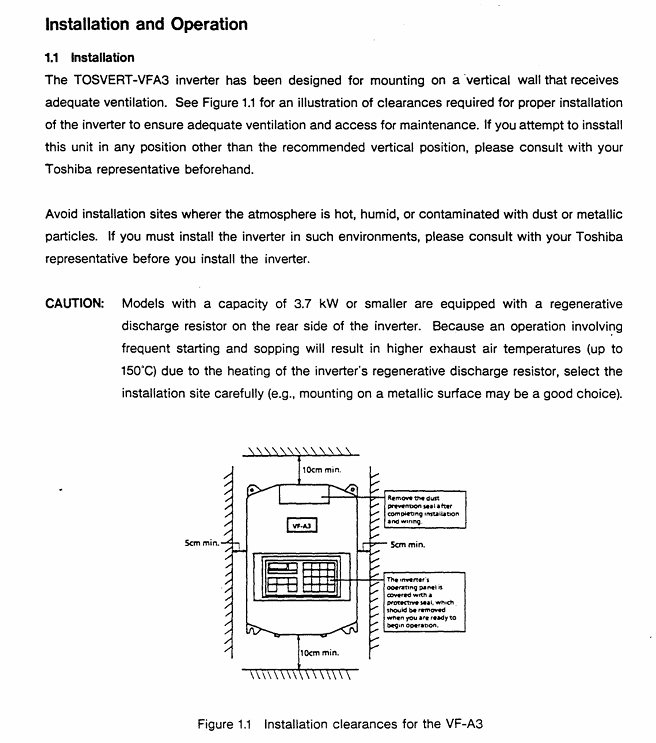
Installation method: Only supports vertical wall mounted installation. For non vertical installation, please consult a Toshiba representative.
Ventilation gap (Figure 1.1):
Top/bottom: minimum 10cm
Left and right sides: minimum 5cm
Environmental restrictions:
Temperature: -10 ℃~40 ℃ (up to 50 ℃ without casing)
Humidity: ≤ 90%, no condensation
Altitude: ≤ 1000m (3300ft)
Vibration: Acceleration ≤ 0.5G (20-50Hz), amplitude ≤ 0.1mm (50-100Hz)
Special note: Models with 3.7kW and below have a built-in regenerative discharge resistor on the back. Frequent start stop cycles can cause the exhaust temperature to reach 150 ℃. It is recommended to install it on a metal surface for heat dissipation.
2. Wiring process and specifications
Preparation before wiring:
Disconnect the main switch of the distribution panel and confirm that the "CHARGE" light of the frequency converter is off (to avoid electric shock).
Open the front cover: Pull forward and lift up (Figure 1.2).
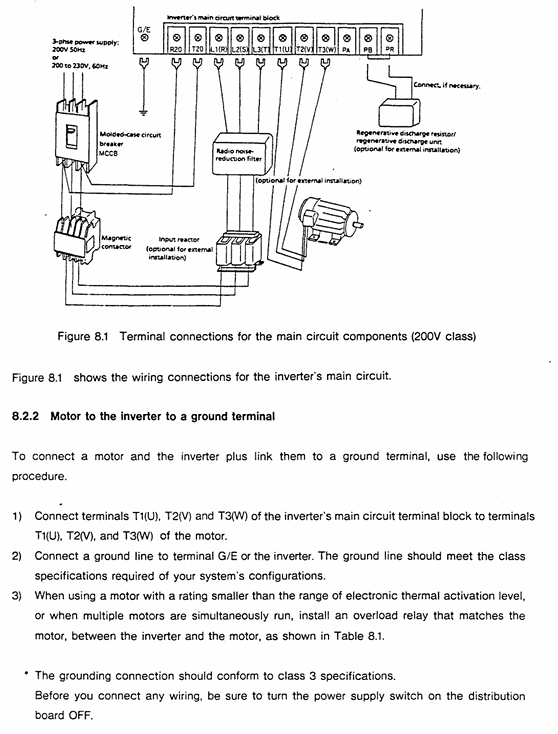
Main circuit wiring (Figure 1.3):
Terminal Name Connection Object Precautions
L1/R, L2/S, L3/T 3-phase power input cannot be reversed to the motor end (T1/U, etc.), otherwise the equipment will be damaged
T1/U, T2/V, T3/W 3-phase motors require corresponding motor U, V, and W terminals
The grounding wire of the G/E system complies with Class 3 grounding specifications
R1/T1 (200V level), R38/R41 (400V level) control circuit power supply single-phase signal, ensuring independent power supply for the control circuit
Control circuit wiring:
Frequency setting signal: PP (10Vdc reference) RR(0-10Vdc/0-5Vdc)、IV(0-5Vdc/4-20mAdc), The type needs to be switched through JP1/JP2 jumper (Table 6.1).
Operation control signals: ST (preparation for operation), F (forward rotation), R (reverse rotation), JOG (jog), short circuit the corresponding terminal to CC to achieve the function.
Taboo:
Do not connect power factor compensation capacitors on the power side or motor end.
The control circuit (excluding FLA/FLB/FLC) needs to be insulated from the main circuit to avoid interference.
Operation process and core function settings
1. Operation panel and basic operations
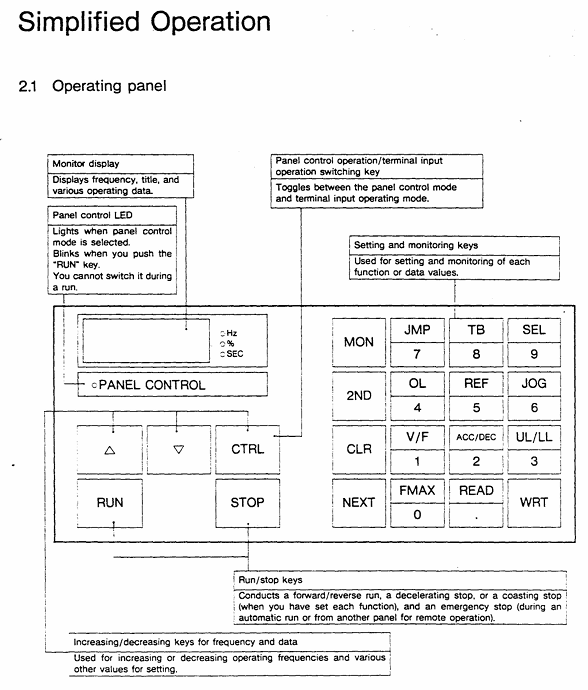
Panel layout (Figure 2.1): including "PANEL CON" LED, MON (monitoring/setting switch), RUN/STOP (run/stop), frequency ± key, parameter setting key (WRT/READ/NEXT, etc.).
Simplify the operation process (trial run, recommended low-frequency startup):
Power ON: When the MCCB is closed, the monitor flashes "OFF" first and then displays "0.0".
Switch panel control: Press the "CTRL" key, and the "PANEL Control" LED will light up.
Set frequency:
Numerical keys: If set to 10Hz, press "1", "0", and "WRT" to display "10" and "FC" alternately.
± key: Long press "△" (increase)/"▽" (decrease), if set to 5.5Hz, press "WRT" to save.
Start/Stop: Press "RUN" to accelerate to the set frequency; Press' STOP 'to slow down and stop.
2. Core Function Settings
(1) Frequency and voltage characteristic settings
Maximum frequency (FH): 30-400Hz (1Hz step size), default 50Hz for 50Hz models and 60Hz for 60Hz models, cannot be modified during operation (requires shutdown).
Torque boost (ub): 0-30% (1% step size), default 3%, used to boost starting torque, excessive can cause overcurrent during startup.
Automatic torque boost (Rub): 0=off, 1=on, automatically adjusts voltage based on load current (Figure 3.4).
Fundamental frequency (uL): 25-400Hz (1Hz step size), set 50Hz for 50Hz motors and 60Hz for 60Hz motors (Table 3.1).
V/f mode (Pt.): 0=constant torque (conveyor), 1=variable torque (fan/pump, energy-saving) (Figure 3.6).
(2) Acceleration, deceleration, and braking control
Acceleration and deceleration time (ACC/DEC):
Range: 0.1-6000 seconds, supports 2 sets of time (ACC1/ACC2, DEC1/DEC2).
Mode: 0=linear, 1=non-linear 1 (slow acceleration at low torque), 2=non-linear 2 (slow acceleration at high speed) (Figure 3.8).
DC injection braking (dbF/dbu/dbt):
Starting frequency (dbF): 0-10Hz, braking voltage (dbu): 0-20%, braking time (dbt): 0-5 seconds, used for precise positioning (Figure 3.27).
Regenerative braking (Pb):
Applicable scenarios for Pb setting function
0 normal load without regenerative braking (or using regenerative discharge unit)
1. There is regenerative braking, no resistance overload detection, and moderate inertia load
2. There is regenerative braking and resistance overload detection for large inertia loads (such as centrifuges)
(3) Multi speed and special operation
Multi speed operation (S1-S7): 7 speeds are achieved through the combination of SS1/SS2/SS3 terminals, with a frequency range from the lower limit frequency (LL) to the upper limit frequency (UL), and can be controlled by panel or external signals (Table 3.7).
Jog operation (JOG): frequency 0-20Hz (0.1Hz step size), only starts when stopped, press the "RUN" button to run, release to stop (Figure 3.21).
Frequency jump (FJ1-FJ3): 3 jump points, set the jump frequency and width to avoid load resonance (Figure 3.24).
3. Status monitoring and fault reset
Operation/shutdown monitoring: Press the "NEXT" button to cycle through the status (Table 3.2), such as "60.0"=operating frequency 60Hz, "PSO. 0"=overvoltage limit activation, "OC"=overcurrent detection.
Fault monitoring: When tripping, press "NEXT" to check the fault status (such as frequency, current, voltage), and support tracing the last 4 faults (Table 3.4).
Fault reset:
Panel reset: Press "CLR"+"WRT".
External reset: Short circuit the RST-CC terminal (Figure 4.9).
Troubleshooting and Maintenance
1. Fault codes and solutions (Table 9.1)
Meaning of fault code and solution measures
OC1 acceleration overcurrent 1. Increase ACC time; 2. Reduce UB settings; 3. Check if there is a sudden change in the load
OH frequency converter overheating 1. Check the cooling fan; 2. Confirm that the ambient temperature is ≤ 40 ℃; 3. Clean the heat dissipation channel
EF load terminal grounding fault 1. Check the insulation of the motor and output circuit; 2. Check the grounding short circuit point
EEP EEPROM abnormality 1. Restart the power supply; 2. If ineffective, repair/replace EEPROM
2. Regular maintenance and storage
Regular inspection (every 3-6 months):
Terminal screws: Tighten loose screws to prevent poor contact.
Line inspection: Check if the wire crimping point is overheated (discolored) and if the insulation is damaged.
Dust removal: Use a vacuum cleaner to clean the ventilation openings and printed circuit board dust to avoid overheating.
Insulation test: Use a 500V megohmmeter to test the insulation of the main circuit. The motor needs to be tested after disconnecting the frequency converter.
Storage requirements:
Environment: Dry, dust-free, non corrosive gas, temperature -10-40 ℃.
Activation: Long term storage (>2 years) requires power on every 2 years; After removing the storage, the motor needs to be powered on for at least 5 hours before running.
Optional accessories and warranty terms
1. Optional accessories (Table 7.1/7.2)
Type Accessory Name Model Example Function
External installation of input reactor PFL2012-2100 improves power factor and suppresses harmonics
External installation of regenerative discharge resistor PBR3-2055 enhances braking effect, suitable for large inertia loads
Built in multi option printed circuit board VF3X-0888B supports RS-232C communication, BCD code input, etc
External installation of PANEL-KIT (1M/3M/5M) remote control panel, including 1/3/5 meter cable
2. Warranty terms
Warranty period: 12 months after delivery.
Warranty expiration situation:
Unauthorized maintenance/modification of equipment.
Damage caused by vibration/impact during transportation/installation.
Force majeure events such as fires, floods, lightning strikes, and abnormal power grid voltage.
Used for designated purposes of non industrial frequency converters.
Acceptance requirements: After opening the box, check that the equipment is undamaged and the model is consistent with the order. If there are any problems, immediately contact a Toshiba representative.
Key issues
Question 1: What are the space and environmental restrictions that must be followed when installing the TOSBERT VF-A3 frequency converter? What are the consequences of ignoring these restrictions?
Answer:
Restrictions that must be followed:
Installation method: Only supports vertical wall mounting, non vertical installation requires prior consultation with Toshiba representatives.
Ventilation gap: minimum 10cm at the top/bottom, and minimum 5cm on both sides to ensure smooth heat dissipation.
Environmental parameters: temperature -10 ℃~40 ℃ (≤ 50 ℃ without casing), humidity ≤ 90% (no condensation), altitude ≤ 1000m, vibration acceleration ≤ 0.5G (20-50Hz)/amplitude ≤ 0.1mm (50-100Hz).
Special models: Models with 3.7kW and below have regenerative discharge resistors on the back, and the exhaust temperature can reach 150 ℃. It is recommended to avoid installing on flammable surfaces and choose metal surfaces for heat dissipation.
The consequences of ignoring restrictions:
Insufficient ventilation can cause the frequency converter to overheat (fault code OH), triggering a protective shutdown and potentially damaging the power module in the long run.
Excessive humidity/condensation can cause a short circuit and ground fault (EF code) in the main circuit.
Excessive vibration may cause loose terminals, poor contact leading to overcurrent (OC code) or equipment shutdown.
Question 2: In the daily operation of VF-A3 frequency converter, how to set the "DC injection braking" function through the panel to achieve precise motor stop? It is necessary to clarify the setting range and default values of key parameters.
Answer: The steps and key parameters for setting "DC injection braking" through the panel are as follows:
Enter the second functional mode:
Press the "MON" button, and the display will show "no.0 →: t: JP"; Press the "2ND" key to switch to the "2nd" mode.
Select DC injection braking related parameters (function number 0, Table 3.1):
Parameter Name Function Setting Range Default Value Operation Instructions
When the DBF (DC injection braking start frequency) motor drops to this frequency, it triggers the braking 0-10Hz (0.1Hz step size) 0Hz. Press "READ" to read the current value, press "△/▽" or the numerical key to adjust, and press "WRT" to save
DBU (DC injection braking voltage) injects a DC voltage that accounts for 0-20% (1% step size) during braking. If the voltage is too high, it will cause the motor to overheat. It is recommended to adjust according to the inertia of the load (such as 10% -15%)
DBT (DC injection braking time) braking duration 0-5 seconds (0.1 second step) 0 seconds. It is necessary to ensure that the time is sufficient to stop the motor and avoid incomplete braking caused by too short a time
Confirm settings: Press the "MON" key to return to the original display (frequency/OFF), and the settings will take effect.
Attention: DC injection braking is only activated during deceleration and stopping process, and should be accompanied by appropriate deceleration time (DEC) to avoid triggering overcurrent protection due to excessive current during braking.
Question 3: What are the possible reasons when the VF-A3 frequency converter displays "OC1" (acceleration overcurrent) fault? What are the corresponding solutions? What safety precautions should be taken during troubleshooting?
Answer:
Reason for "OC1" fault: During acceleration, the main circuit current exceeds the protection threshold. Common reasons include:
The acceleration time (ACC) is set too short, and the motor speed cannot keep up with the frequency increase, resulting in excessive stalling current.
The torque boost (ub) is set too high, causing overcurrent due to high voltage during startup.
Sudden load changes in the motor (such as sudden blockage of the conveyor), and the load current exceeds the rated output of the frequency converter.
Poor wiring of the main circuit (such as loose wiring at the motor end) can cause current fluctuations.
Solution:
Extend acceleration time: Enter the first function ("MON" → select function number 2), adjust "ACC1/ACC2" to a longer time (such as changing from 1 second to 3 seconds), and press "WRT" to save.
Reduce torque boost: Enter the first function (function number 1), reduce the "ub" value (such as from 10% to 5%), and avoid starting overvoltage.
Check the load: Check if the mechanical load is stuck, clean up foreign objects or reduce the load to ensure that the load is within the rated range of the motor.
Check wiring: Disconnect the power supply (MCCB), confirm that the "CHARGE" light is off, tighten the terminal screws of the main circuit (L1/R, T1/U, etc.), and check the insulation of the circuit.
Check safety precautions:
Before checking all wiring, the main switch of the distribution panel must be disconnected and wait for the "CHARGE" light to turn off (to avoid electric shock caused by residual voltage of the capacitor).
When adjusting parameters, it is necessary to ensure that the frequency converter is in a stopped state. Modifying acceleration time/torque increase during operation may cause equipment instability.
If the fault still exists after multiple troubleshooting, it is necessary to check the motor insulation (using a 500V megohmmeter) to avoid overcurrent caused by internal short circuit of the motor.
- OMRON
- ABB
- General Electric
- EMERSON
- Honeywell
- HIMA
- ALSTOM
- Rolls-Royce
- MOTOROLA
- Rockwell
- Siemens
- Woodward
- YOKOGAWA
- FOXBORO
- KOLLMORGEN
- MOOG
- KB
- YAMAHA
- BENDER
- TEKTRONIX
- Westinghouse
- AMAT
- AB
- XYCOM
- Yaskawa
- B&R
- Schneider
- KONGSBERG
- NI
- WATLOW
- ProSoft
- SEW
- ADVANCED
- Reliance
- TRICONEX
- METSO
- MAN
- Advantest
- STUDER
- DANAHER MOTION
- Bently
- Galil
- EATON
- MOLEX
- DEIF
- B&W
- ZYGO
- Aerotech
- DANFOSS
- Beijer
- Moxa
- Rexroth
- Johnson
- WAGO
- TOSHIBA
- BMCM
- SMC
- HITACHI
- HIRSCHMANN
- Application field
- XP POWER
- CTI
- TRICON
- STOBER
- Thinklogical
- Horner Automation
- Meggitt
- Fanuc
- Baldor
- SHINKAWA
- Other Brands
- UniOP
- KUKA
- Iba
- Beckhoff
- ADLINK
-
 Sigmatek MDD111-1 DIAS Drive Axis Module
 -
 Sigmatek DKL042 05-024-042 Terminal Module
 -
 Sigmatek DM822 Control Module
 -
 Sigmatek CDM167 12-008-167-O Module
 -
 Sigmatek TAE151 Touch Display Unit
 -
 Sigmatek DCC041 SLIDES Module 05-700-041-D
 -
 Sigmatek AKM65M-ANC2GBB0 PM Servo Motor
 -
 Sigmatek ETT221 01-230-221 Operator Terminal
 -
 Sigmatek SLIDES DAM 124 Analog Module
 -
Sigmatek AKM31C-ANCNGBB0 Servo Motor
-
 Mannesmann Demag Sigmatek CP626 Central Unit
 -
 SIGMATEK 0332.554.03 Board 371071000154
 -
 SIGMATEK 12-250-021 Base Plate Back Panel CM5V020
 -
 SIGMATEK DM162 S-DIAS Digital Mix Module
 -
 DEMAG ERGOTECH 061 381 66 Sigmatek 9842.243.02 Circuit Board
 -
 SIGMATEK CP313-1 PLC Module
 -
Sigmatek ETV0551-2 VARAN Touch Terminal
-
 Sigmatek SDM 081 FS S-Dias Safety Module
 -
 DEMAG 05-250-023 Ergotech Motherboard with Sigmatek TMS012
 -
Sigmatek CM5V020 12-250-023-K Wiring Base
-
 Sigma Tek 5000B-37 Attitude Gyro Indicator
 -
 Sigmatek SDD120-2 DIAS Drive
 -
 Sigmatek CME221 Memory Module
 -
 Sigmatek DCP640 DIAS Central Unit
 -
 Sigmatek STO040 Safety Output Module
 -
Sigmatek CET281 Control Panel
-
 Sigmatek CIPC LX800 Demag NC5 CPU
 -
 Sigmatek DKL093 05-024-093 Terminal Module
 -
 Sigmatek AI088 20-009-088 Analog Input Module
 -
Sigmatek CAI888 Analog Input Module
-
SIGMATEK CCA021 12-025-021 Analog Output Module
-
SIGMATEK 1104.579.05 Control Module
-
SIGMATEK SDI100 Digital Input Module
-
 SIGMATEK C-IPC 256MB LX800 Compact Dias
 -
 SIGMATEK 9423.090.02 Control Module
 -
SIGMATEK C-IPC 256 Power Supply 148498
-
 SIGMATEK CAI025 Analog Input Module
 -
 SIGMATEK CTO166 Digital Output Module
 -
 SIGMATEK CP112 20-004-112 Processor Module
 -
SIGMATEK CAI887 12-009-887 Safety Module
-
 Sigma-Tek 4000B-31 Directional Gyro 1U262-002-42
 -
Sigmatek C-IPC 256MB LX800 IPC Controller
-
Sigmatek C-IPC 01-450-031 Industrial PC LX800
-
Sigmatek C-IPC 256 Industrial PC Controller
-
Sigmatek CCP-531 PLC Processor Module
-
Sigmatek CDI163 Digital Input Module
-
 Sigmatek ETV0501 VARAN Terminal 12-230-0501
 -
 Sigmatek CTMS020 C-DIAS Technology Module
 -
 Sigmatek CIV512 VARAN Switch Module
 -
 Sigmatek HU011 20-080-011 Interface Module
 -
SIGMATEK SLIDES DAM 124 Module
-
 SIGMATEK C-IPC 161 01-450-161L Industrial PC
 -
SIGMATEK C-IPC 128MB VIA 733MHz 01-450-024-K
-
 SIGMATEK 12-780-012 R8-IPC Geode LX800 Module
 -
SIGMATEK CAM124 Analog Module
-
 SIGMATEK S1 032-8AF61-R4 EZ Servo Motor
 -
 SIGMATEK CTO163 Digital Output Module
 -
 SIGMATEK CCP082 12-004-082 Processor Module
 -
 SIGMATEK CRCH081 C-DIAS Temperature Module
 -
 SIGMATEK PC322-K 01-310-322-K Industrial PC
 -
SIGMATEK SDD310-2 Servo Drive
-
 SIGMATEK AI084 Analog Input Module
 -
SIGMATEK CRCH081 12-752-081 Temperature Module
-
Sigma-Tek 5000L-4 Attitude Gyro 1U284-001-3
-
 SIGMATEK CM5V020 12-250-023-K Wiring Module
 -
Sigma-Tek 4000H-6 Directional Gyro IU262-035-7
-
 SIGMATEK Dias DCP160 05-004-160 Processor Module
 -
SIGMATEK 0147.395.02 Control Module
-
SIGMATEK A1084 Control Module
-
SIGMATEK DI200 20-006-2000 Digital Input Module
-
Sigmatek DNC115 Encoder Module
-
 Sigmatek DAM122 05-017-122 Analog Module
 -
Sigmatek 9802.289.01 Control Board TA71 Display
-
Sigmatek TO127 20-007-127 Digital Output Module
-
Sigmatek DNC031 05-011-031 Digital Module
-
Sigmatek VI022 20-003-022 Interface Module
-
Sigmatek CAI085 Analog Input Module
-
 Sigmatek CP111 S-DIAS CPU Module
 -
Sigmatek CTMS030 Krauss Maffei Module
-
 Sigmatek CAM123 Control Module
 -
 Sigmatek TAE732-P 01-240-732-P Touch Display Unit
 -
Sigmatek MDM021 Digital Mixed Module
-
Sigmatek DCP642 DIAS Central Unit
-
 Sigmatek CST022 12-014-022 C-DIAS Module
 -
 Sigmatek SRO021 20-893-021 Safety Relay Output
 -
 Krauss Maffei MC5 Control System Sigmatek
 -
 Sigmatek DC061 Module 18-24VDC 300mA
 -
 Herrmann EVT0855 Ultrasonic Welder Touch Panel
 -
Sigmatek CIV521 Control Module 1.4A 2W
-
Sigmatek DDI61 05-006-161 Digital Input Module
-
SIGMATEK ETT312-E Touch Terminal 01-230-312
-
Cessna S3326-1 Sigma Tek 5000B-67 Gyro 1U149-015-9
-
SIGMATEK PS101 Power Supply Module
-
SIGMATEK 0332.554.03 Control Module 371071000154
-
 SIGMATEK ETT312-E Touch Terminal 01-230-312
 -
SIGMATEK CDM163 Control Module
-
 SIGMATEK VSV046 16-023-046 Module
 -
SIGMATEK AM221 20-017-221 Analog Module
-
SIGMATEK CTS051 12-053-051 Control Module
-
SIGMATEK AM221 20-017-221 Analog Module
-
Sigmatek CSDI161 12-891-161 Safety Input Module
-
Sigma Tek 4000C-1 Directional Gyro Indicator
-
Sigmatek ETV0501 12-230-0501 VARAN Terminal
-
Sigmatek DDM165 SLIDES Module
-
Sigmatek N100 20-011-100 Control Module
-
Sigmatek AKM54K-ANC2R-B0 PM Servo Motor
-
Sigmatek CTO166 Digital Output Module
-
Sigmatek CP212-K 20-004-212-K CPU Module
-
Sigmatek CDI161 Digital Input Module
-
Sigmatek DCC080 05-700-080-2 Control Module
-
 SIGMATEK SCP011 S-DIAS Safety CPU
 -
SIGMATEK SCP011 S-DIAS Safety CPU
-
SIGMATEK SRO022 Relay Output Module
-
SIGMATEK MDD 121 Drive Axis Module
-
SIGMATEK DSI021 SLIDES Siemens Interface
-
SIGMATEK DIAS DCP161 Module 05-004-161
-
 Sigmatek ETT312 Built-in Touch Terminal
 -
SIGMATEK DCP 643 DIAS Controller System
-
SIGMATEK CIO021 Multi I/O Module
-
SIGMATEK CTMS020 Control Module
-
 Sigmatek CME 221 Memory Module
 -
Sigmatek 0420.615.01 Control Board
-
Sigmatek CP111 20-004-111 CPU Module
-
Sigmatek 9405.065.03 Control Board
-
Sigmatek ETEK 01-450-032-K C-IPC 256MB Industrial PC
-
Sigmatek CTO163 12-007-163 Safety Output Module
-
Sigmatek TO081 20-007-081 Digital Output Module
-
 Sigmatek SI021 20-022-021 Safety Input Module


