
Tektronix TPS2000 series digital storage oscilloscope
Tektronix TPS2000 series digital storage oscilloscope
Overview
The official guide document for the Tektronix TPS2000 series digital storage oscilloscope covers the 2-channel (TPS2012) and 4-channel (TPS2014/TPS2024) models, with a core positioning for portable isolation measurement scenarios (such as industrial equipment floating ground testing and outdoor on-site maintenance). The document structure is clear, gradually deepening from safety specifications to advanced functions, including 11 core chapters and 6 appendices, catering to both novice operation and professional measurement needs, while providing rich diagrams and step instructions to reduce operational complexity.
Core parameters and characteristics of the product
1. Model classification and key parameters
Model Number of Channels Bandwidth Sampling Rate Single Battery Endurance Dual Battery Endurance
TPS 2012 2 100MHz 1GS/s 5.5 hours 11 hours
TPS 2014 4 100MHz 1GS/s 4.5 hours 9 hours
TPS2024 4 200MHz 2GS/s 4.5 hours 9 hours
2. Core Features
Isolation channel: All channels and Ext Trig inputs are isolated from chassis, supporting independent floating ground measurement with an input impedance of 3M Ω, solving the common ground limitation of traditional oscilloscopes;
Portable power supply: compatible with TPSBAT lithium batteries (standard 1, optional 2), can be charged simultaneously when powered by mains electricity;
Full function analysis: supports peak detection (capturing ≥ 10ns glitches), video triggering (NTSC/PAL/SECAM), FFT spectrum analysis (2048 point transform);
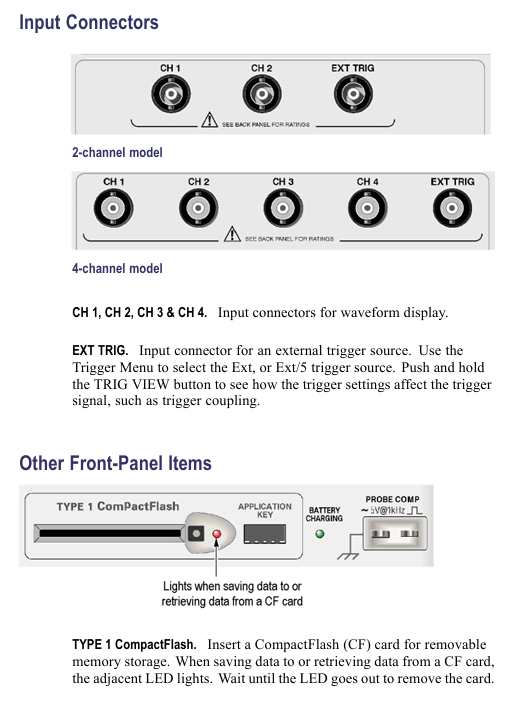
Data interface: Front mounted Type 1 CompactFlash card slot, rear mounted RS-232 (9-pin) and Centronics (parallel printing) interfaces.
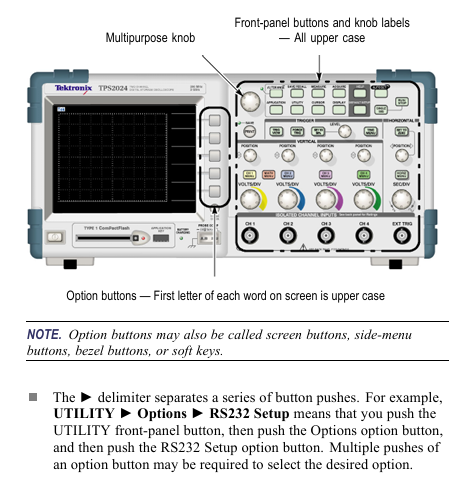
Safety operation standards
1. Electrical safety
Voltage limitation: The maximum voltage of the input channel is 300V RMS CAT II. When it exceeds 100kHz, it will attenuate by 20dB/tenfold to avoid arc damage;
Probe safety: The reference end of the P2220 probe is prohibited from floating above 30V RMS. For high voltage measurements, P5120 (600V RMS CAT II) or differential probes are required;
Grounding requirements: A 3-pin power cord must be used and disconnection of the grounding is prohibited; The equipment chassis needs to be reliably grounded to avoid electric shock caused by floating operations.
2. Operation taboos
Prohibit use in damp/explosive environments and avoid liquid spraying equipment;
Before connecting/disconnecting the probe, the signal source must be disconnected first, and live operation is prohibited;
Before disassembling the battery, it is necessary to turn off the device and avoid short circuiting the battery contacts or putting them into a fire.
Basic operation process
1. Probe operation
Key requirements for operation type steps
Manual compensation: 1. Connect the probe to CH1 and set it to 10X; 2. Connect it to PROBE COMP; 3. Autoset; 4. Adjust the compensation hole to a square wave that is flat and free of dents/bulges. Re compensate each time the channel is changed
Attenuation setting 1. Press CHx MENU → Probe → Voltage Attenuation; 2. Choose 1X/10X P2220 and set the bandwidth limit to 6MHz for 1X
Current probe scaling 1. Press CHx MENU → Probe → Current → Scale; 2. Choose a matching value (such as 10A/V) to ensure consistency with the output ratio of the current probe and avoid reading deviation
2. Self calibration and firmware updates
Self calibration:
Disconnect all probes and press 【 Utility 】 → 【 Do Self Cal 】;
Wait for 2 minutes, and upon completion, display 'Calibration PASSED';
Trigger condition: If the environmental temperature difference exceeds 5 ℃ or once a week, preheating for 20 minutes is required.
Firmware update:
Download the latest firmware from the official website and copy it to the root directory of CompactFlash;
Insert the oscilloscope and press 【 Utility 】 → 【 File Utilities 】 → 【 Update Firmware 】;
Wait for completion, do not power off or unplug the card.
Core Systems and Functions
1. Collection system (three modes)
The working principle of the collection mode is applicable to different scenarios
Sampling mode equidistant sampling, 1-point/interval conventional stable signal (sine wave/square wave)
Peak detection mode records the maximum/minimum values of each interval, including signals with spikes and narrow pulses (≥ 10ns)
After multiple acquisitions in average mode, the signal containing random noise (power ripple, sensor output) is averaged (4/16/64/128 times)
2. Trigger system (three types)
Trigger type key parameters applicable scenarios
Edge triggered slope (rising/falling), coupling (AC/DC/noise suppression), stable display of conventional signals (such as clock signals)
Video trigger standards (NTSC/PAL/SECAM), synchronous (field/line) composite video signals (such as medical equipment video output)
Pulse width triggering condition (=≠<>), width (33ns-10s), polarity capture abnormal pulse (such as communication link narrow pulse interference)
3. FFT spectrum analysis
Setting steps:
Center the time-domain signal (align the 0V line with the center of the screen) to ensure complete waveform;
Press Math Menu → Operation → FFT to select the source channel;
Window selection function (Hanning window: excellent frequency resolution; flat top window: excellent amplitude accuracy).
De aliasing method:
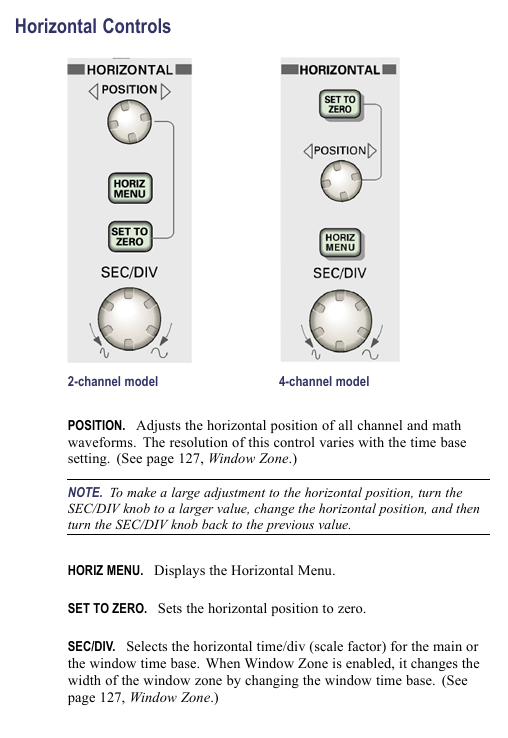
Increase sampling rate (switch from SEC/DIV to faster gear);
Enable 20MHz bandwidth limit;
External filtering (adding a low-pass filter at the signal source end).
Battery Management (Core Features)
1. Charging and battery life
Charging method: single battery charging time, dual battery charging sequence, battery life (4-channel model)
In machine (power on), charge the high battery first for 7 hours, then charge the low battery for 4.5 hours (single battery), and 9 hours (dual battery)
In machine (standby) 4.5 hours as above-
External TPSCHG charger can charge 2 units simultaneously in 3 hours-
2. Calibration and maintenance
Calibration:
External calibration: TPSCHG charger left slot → press "Recalibrate", takes about 10 hours (charge discharge cycle);
In machine calibration: discharge to shutdown → charge for 5 hours → discharge to shutdown → recharge for another 5 hours.
Storage:
Temperature: 5-20 ℃, humidity ≤ 80%;
Electricity consumption: about 50%, replenished once every 6 months;
Taboo: Long term full charge (>80%) or empty charge (<20%) storage is prohibited.
Data Storage and Communication
1. CompactFlash card operation
Storage Content File Name Format 1MB Capacity Approximately Storage Quantity Key Operations
18 waveform files FnnnnCHx.CSV, press 【 Save/Recall 】 → 【 Save Waveform 】 → Select Channel
Set file FnnnnTEK.SET to 250, press 【 Save/Recall 】 → 【 Save Setup 】 → select storage location
16 image files FnnnnTEK.BMP, press [Print] (set to "Save Image to File")
2. RS-232 communication settings
Parameter configuration: Press 【 Utility 】 → 【 Options 】 → 【 RS232 Setup 】 to set the baud rate (default 9600), flow control (Hardtagging), and checksum (None);
Test steps:
Connect the oscilloscope to the PC using cable 012-1379-00;
Open HyperTerminal on the PC and set the same parameters;
Send 'ID?', the oscilloscope returns' ID TEK/TPS2024, CF: 91.1CT, FV: V10.00 '.
Typical application cases
1. Isolation channel measurement differential signal
Connect the probe tip to the positive terminal of the differential signal and the reference terminal to the negative terminal (no common ground required);
Press' AutoSet 'to display the differential waveform;
Press' Single Seq 'to capture a snapshot, and use the cursor to measure the amplitude/rise time.
2. Video signal triggering (NTSC)
Connect the probe to video output, press 【 CH1 MENU 】 → 【 Coupling 】 → 【 AC 】;
Press 【 Trig Menu 】→【 Type 】→【 Video 】→【 Standard 】→【 NTSC 】;
Select [Sync] → [All Lines], adjust SEC/DIV to 500ns/div, and observe the color synchronization signal.
3. Power waveform measurement (voltage x current)
CH1 connected to voltage probe (10X), CH2 connected to current probe (10A/V);
Press 【 Math Menu 】→【 Operation 】→【 × 】→【 CH1 × CH2 】;
Adjust the Math waveform position/scale to display instantaneous power (in VA).
Appendix and Support
1. Key performance parameters
System parameter description
Vertical system resolution 8-bit, 2mV-5V/div
Horizontal system time base range TPS2024:2.5ns-50s/div; TPS2012/2014:5ns-50s/div
Trigger system edge trigger sensitivity DC coupling: 1div (DC-10MHz), 2div (100-200MHz)
Display system resolution of 320 × 240 pixels, 5.7-inch LCD
2. Probe compatibility
Probe model, attenuation ratio, bandwidth, maximum voltage, applicable scenarios
P2220 (Standard) 1X/10X 6MHz/200MHz 150V/300V RMS CAT II Conventional Voltage Measurement
P5120 (optional) 20X 200MHz 1000V RMS CAT II high voltage measurement
TCP303 (optional) 5/50mV/A 15MHz 150A RMS high current AC/DC measurement
- OMRON
- ABB
- General Electric
- EMERSON
- Honeywell
- HIMA
- ALSTOM
- Rolls-Royce
- MOTOROLA
- Rockwell
- Siemens
- Woodward
- YOKOGAWA
- FOXBORO
- KOLLMORGEN
- MOOG
- KB
- YAMAHA
- BENDER
- TEKTRONIX
- Westinghouse
- AMAT
- AB
- XYCOM
- Yaskawa
- B&R
- Schneider
- KONGSBERG
- NI
- WATLOW
- ProSoft
- SEW
- ADVANCED
- Reliance
- TRICONEX
- METSO
- MAN
- Advantest
- STUDER
- DANAHER MOTION
- Bently
- Galil
- EATON
- MOLEX
- DEIF
- B&W
- ZYGO
- Aerotech
- DANFOSS
- Beijer
- Moxa
- Rexroth
- Johnson
- WAGO
- TOSHIBA
- BMCM
- SMC
- HITACHI
- HIRSCHMANN
- Application field
- XP POWER
- CTI
- TRICON
- STOBER
- Thinklogical
- Horner Automation
- Meggitt
- Fanuc
- Baldor
- SHINKAWA
- Other Brands
- UniOP
- KUKA
- Iba
- Beckhoff
- ADLINK
-
 LUST LTI Drives CCD34.024.W2.1.BR Servo Drive
 -
 Lust LTi Drives CDE32.008.W2.2.BR Positioning Controller
 -
 LTi DRiVES LSH-050-3-45-320/T1 Servo Motor
 -
 LUST LTI Drives CDA34.006.W1.5.BR Inverter
 -
 LUST LTI DRIVES VF1204S Frequency Inverter
 -
 Lust LTI Drives EMC100.1 Network Filter
 -
 LUST LTi DRIVES LSH-097-1-30-560/T1 Servo Motor
 -
 LTi Drives Lust CDA34.017.W3.0 Servo Controller
 -
 LUST LTI DRIVES CDE32.003 Frequency Inverter
 -
LUST CDB34.003.C2.0.H15 Servo Drive Positioning Controller
-
 LTi DRiVES SO84.076.S030.0001.2-W Servo Drive
 -
 LUST LTI Drives CDE32.003 Frequency Inverter
 -
 LUST LTI Drives CDA34.017.C2.CP Servo Controller
 -
 LTI Motion CDE32.004.C2.4 Servo Drive
 -
LUST LTI DRIVES CDE34.017.W2.0.H18 Inverter
-
 LUST LTI Drives BR-200.02.540.UR Braking Resistor
 -
 LTi DRiVES LR32.8 Line Reactor
 -
Lust LTI Drives CDS44.032 Inverter
-
 LUST LTI DRIVES CDB34.008 W2.4 Frequency Converter
 -
 LTI DRIVES SO84.012.1030.0000.2 Servo Drive
 -
 LTI SO84.024.1030.0011.2 Servo Drive Controller
 -
 LTi Drives SO84.076.S030.0001.2-W 52.5 kW Controller
 -
LTi LUST SO84.012.1030.0000.2 Servo Drive Controller
-
LTI Drives SO84.008.0020.1070.1 Servo Controller
-
 LTI Motion CDE32.004.C3.0 Positioning Controller 1.6 kVA
 -
LUST LTi Drives CDB34.010C2.4 Servo Drive Controller
-
Lust LTi Drives CDD32.003.C2.0 Servo Controller
-
 Lust LTi Drives CDB32.003C2.3 Servo Controller UM-8I40
 -
 LTi Drives SO CM-1.0003.110C.0 Control Module
 -
 LTI Drives GmbH LR34.44-UR Servo Drive Unit
 -
LTI DRIVES VF1202S Frequency Inverter
-
 LTi ServoOne Junior SO24.004 Servo Drive
 -
Lust CDA34.003 C1.4 LTI Servo Drive
-
 LUST LTi Drives CM-CAN1 Communication Module
 -
LUST LTi Motion CDB22.004 CDB2000 Drive
-
LUST Lti Drives CDE32.003 Frequency Drive
-
 LTI VF1406M.C9.PT1.BR1 Frequency Drive
 -
LUST LTI Drives CDA34.006 W3.0 Servo Drive
-
Lust LTI Drives CDA34.017.C2.CP Servo Controller
-
LTi DRiVES LST-097-5-30-560/T1 Servo Motor
-
LTi Drives LSH-050-2-45-320/T1 Servo Motor 4500rpm
-
 LUST LTI Drives VF1204S G10 FA VFD 0.75 kW 230VAC
 -
 LTi Drives LST-097-3-30-560/T1 1R Servo Motor
 -
 LTI Servo One Junior SO22.003.0082.0000.0 Controller
 -
 LTI Drives GmbH SO22.003.0042.0000.0 Servo Controller
 -
 LUST LTi CDB32.004.C2.4.SH Servo Drive 24-48V
 -
 LTi Drives LST-097-5-30-560/T1 1R Servo Motor
 -
 LUST LTI Drives CM-CAN1 3084464 Communication Module
 -
LUST LTi Drives CDE32.003.C2.3 Positioning Controller 230V
-
 LUST LTi Drives SO84.020.0020.0000.2 Servo One 20A
 -
LTI DRiVES CDB34.003 Servo Drive
-
LTI DRiVES CDE34.010 D2.4 Frequency Inverter
-
 LTi DRiVES BR-090.03.540-UR Braking Resistor
 -
 LTI SO84.012 Servo Drive
 -
 LTi Drives LSH-050 Servo Motor
 -
LTi Drives SO84.004 Servo Controller
-
LTI DRiVES LSN-127 Servo Motor
-
LUST CDA34.006 W3.0 Servo Controller
-
 LTi DRiVES SO84.004 Servo Drive
 -
LUST LTi DRiVES LST-097-3-30-560/T1.1R Servo Motor
-
LTi Drives CDE32.003.C2.4 Software LBXR41024B014
-
 LTI Motion Servo One SO84.006.0173.1100.1 Controller
 -
LTi Drives LSH-074-2-30-320/T1 G6.1M Servo Motor
-
LUST CDB22.004.0111.00.0 LTi Drives Servo Controller
-
 Lust So84.012.0030.1700.2 LTi Drives Servo Controller
 -
LTi Drives Lust VF1204S G10 FB I6 M3 Drive Module
-
LTI Drives GmbH SO84.008.0020.0000.2 Servo Controller
-
Lust CDA34.006.C2.0 LTI Drives Servo Controller 2.2 kW
-
LTi Drives Lust CDA34.017.W3.0 Control Unit 7.5 kW
-
LTi Drives CDE34.010 Positioning Controller 10A
-
Lust LTi Drives CDA34.010 W3.0 Frequency Inverter
-
LTi SO22.003.0010.0000.0 ServoOne Junior Drive
-
LUST LTi Drives CDA32.008 Servo Drive
-
LUST LTi DRIVES LSH-074 Servo Motor
-
Lti CDB32.004.C2.4.SH AC Servo Drive
-
Lust LTi Drives VF1202S Frequency Inverter
-
Lust LTI Drives CDB32.004.C3.0.SH Servo Controller
-
LUST SO84.012.0030.1700.2 Servo Drive
-
Lust LTi CDB32.004 Servo Drive
-
LUST LTI Drives CDA34.006 Servo Drive
-
LTi DRiVES BR-090.03.540-UR Braking Resistor
-
Lust LTI Drives CDA34.017 Servo Controller
-
Lust LTi Drives CDE34.010.D2.4 Positioning Controller 10A
-
LTi Drives LSH-050-3-30-48/T1 PM Servo Motor
-
 LTI CDD34.005.C2.1 Servo Drive Controller
 -
LUST LTI Drives CDB32.003.C2.4 Servo Drive
-
LTI D-35633 Drive Servo Drive Controller
-
 LTI Drives GmbH SO22.003.0042.0000.0 Servo Controller
 -
LTi Drives SO84.006.1030.0000.2 Servo Controller
-
LUST LTi Drives CDA32.008 C1.4 HF V180.15 1.5 kW
-
 LTI Drives Servo One SO84.045.0010.0001.2-W 22 kW
 -
Lust LTI CDE32.003.C2.4 Servo Drive Controller
-
LUST LTI Drives CDA34.003 Servo Controller
-
LUST LTI Drives CDA32.006 Servo Controller
-
Lust LTi Drives CDE32.004 Servo Drive
-
LUST LTi Drives SO84.012 Servo Controller
-
 LTI DRIVES LSH-060 Servo Motor
 -
LUST LTI Drives CDE32.004 with CM-DPV1
-
LTi DRiVES SO84.016 Servo Drive
-
LTI Drive CM-DPV1 Communication Module
-
LTi DRiVES DSM4-05.4-20R82-400 Servo Motor
-
LUST LTI Drives CDA34.003 Servo Controller
-
LTI Drives Servo One SO84.045.0010.0001.2-W 22 kW
-
LUST LTI Drives CDB32.008 W2.4 BR PC1 Servo Drive
-
LTi Drives SO84.006.1030.0000.2 Servo Controller
-
LTI DRIVES CDE34.010D2.4 Servo Drive Controller
-
 Hettich Rotanta 46 RSC Control Board VF1204S
 -
Lust LTI Drives CDA34.017.C2.CP Servo Controller 7.5 kW
-
LUST LTI Drives CDA34.003.C3.0 Servo Controller 0.75 kW
-
Lust LTI Drives CDA34.008.C1.3 Servo Controller 3 kW
-
Lust LTi Drives CDB22.004.0111.00.0 Servo Drive
-
LTi Drives SO84.032.0030.1000.2 Servo Controller
-
LUST LTi CDA32.004 C1.4 H08 B0 Servo Controller
-
LTI DRIVES CDB34.010 C2.4 Servo Drive
-
LUST LTi Drives CDA32.008 C1.4 Servo Controller
-
LTI Motion CDE32.003.C3.0 Servo Positioning Controller
-
LTI DRIVES CDE34.010 D2.4 Servo Drive Unit
-
 LUST LTi Drives CDD34.005.C2.1 Servo Drive
 -
LTi Drives SO84.012.0002.0100.2 Servo Controller
-
LUST LTi Drives CDE34.010.D2.4 Servo Drive
-
LUST LTI Drives CDF30.008 Servo Drive
-
LTi Drives SO CM-P.0010.11.00.0 Power Module
-
 LTi DRiVES SO84.008.0002.0100.2 Servo Controller
 -
LTI MOTION Servo Drive SO22.006.0040.1000.1
-
LTi DRiVES SO24.007.0030.1000.0 ServoOne Junior
-
LTi DRiVES LUST BC1300 Braking Module
-
LUST LTI DRIVES CDE34.010 Variable Frequency Drive
-
LUST LTI DRIVES CDA32.004 Servo Drive


