
Honeywell TR40, TR42 Room Sensors and Displays
Design purpose: Used in conjunction with Trend IQX controllers, it has an integrated temperature sensor and some models also include relative humidity and/or carbon dioxide concentration sensors. TR42 has a monochrome backlit LCD display screen, configurable to display sensor readings, and allows users to control fan speed, occupancy status, and temperature set points.
Connection method: Up to 7 devices can be connected via two-wire Sylk ™ The bus is connected to the controller and simultaneously transmits data and power.
Honeywell TR40, TR42 Room Sensors and Displays
Basic information
Product Name: TR40 and TR42 Series Room Sensors and Displays
Design purpose: Used in conjunction with Trend IQX controllers, it has an integrated temperature sensor and some models also include relative humidity and/or carbon dioxide concentration sensors. TR42 has a monochrome backlit LCD display screen, configurable to display sensor readings, and allows users to control fan speed, occupancy status, and temperature set points.
Connection method: Up to 7 devices can be connected via two-wire Sylk ™ The bus is connected to the controller and simultaneously transmits data and power.
Physical property
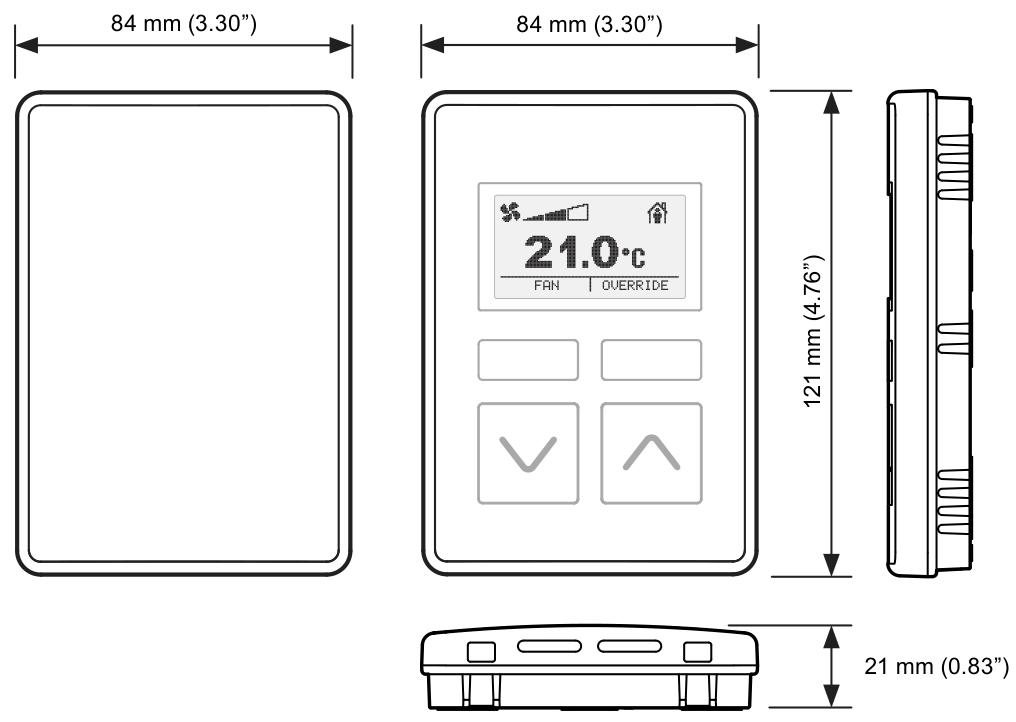
Dimensions: 84mm (width) x 121mm (height) x 21mm (thickness)
characteristic:
Single power/data connection to the controller reduces wiring.
Equipped with temperature sensing function, some versions come with humidity and/or carbon dioxide sensing.
Can operate in Celsius or Fahrenheit.
Universal backplane and connections for easy upgrading from TR40 to TR42.
Unique to TR42: Backlit LCD display screen that can display temperature, humidity, carbon dioxide, fan status, occupancy status, and set points, etc; It has the functions of setting points, fan speed, and occupancy status coverage.
Function
Equipment type and sensor
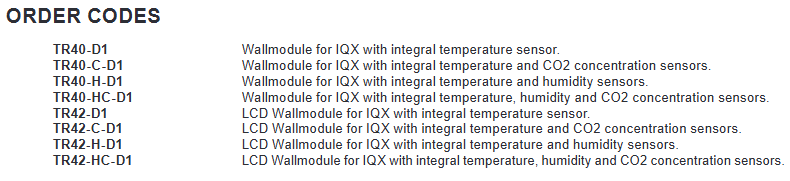
This series includes two main types: TR40 room sensors and TR42 room displays. All models have integrated sensors for measuring ambient temperature, and some models also include sensors for measuring humidity and/or carbon dioxide levels:
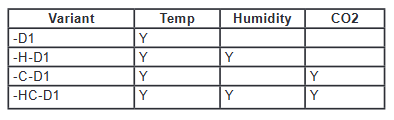
The output value of the sensor can be read by the connected controller. TR42 also has a display screen that can show sensor values and is combined with various control buttons for viewing and changing system operations.
Display and buttons of TR42
Main display screen: In normal operation, the "home" screen can be configured to display various information, such as temperature, humidity, carbon dioxide values, current fan status, current occupancy status, etc. The display backlight will turn off after about 1 minute of button free operation and return to the home screen.
Function buttons: There are two function buttons, whose functions are indicated by labels (or icons) displayed above. On the home screen, there may be main functions such as "FAN", "OVERRIDE", "More", and secondary functions such as "HOME", "EDIT", "DONE", and "CANCEL" in the control screen and menu.
Up and down buttons: The functions are different in different display modes and configurations. On the home screen, the current setpoint can be raised or lowered (if the function is enabled), and pressing them at the same time will display the "More" menu; In editing mode, the display value can be adjusted or the available settings can be browsed step by step.
Fan status and control
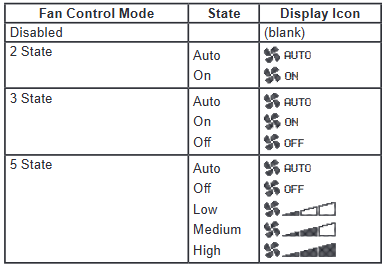
The home screen can be configured to display the current fan status/speed, and the fan operation can be configured in multiple modes. If the fan control is enabled, the home screen will display the "FAN" function button, allowing users to overwrite the current fan status. After making changes through the up and down buttons, users can press "CANCEL" to keep the existing status or "DONE" to save the new status.
Occupation status and control
The home screen can be configured to display the current occupancy status. If the occupation coverage control is enabled, the home screen will display the "OVERRIDE" function button, allowing users to overwrite the occupation status. After changing through the up and down buttons, they can press "CANCEL" to keep the existing status or "DONE" to save the new status. After the coverage is enabled, it can be configured to automatically cancel after a preset time or a specific network bypass time, and users can also manually cancel it at any time.
Setpoint adjustment
If the set point adjustment is enabled, pressing the up and down buttons from the home screen allows the user to adjust the temperature set point between the preset high and low limits. The set point adjustment screen has two formats: numerical and graphic. It can be changed in increments of 1 ° or 0.5 ° by pressing the up and down buttons. Press "CANCEL" to keep the existing set point or "DONE" to save the new set point.
More "menu
Multiple additional display values and settings can be accessed through the "More" function button (if displayed) or by simultaneously pressing the up and down buttons. Users can browse using the up and down buttons. Menu items can be individually configured to display or hide, with editable items labeled as "EDIT" on the right function button. Once selected, you can use the up and down buttons to change the value. Press "CANCEL" to keep the current value or "DONE" to save the new value.
- OMRON
- ABB
- General Electric
- EMERSON
- Honeywell
- HIMA
- ALSTOM
- Rolls-Royce
- MOTOROLA
- Rockwell
- Siemens
- Woodward
- YOKOGAWA
- FOXBORO
- KOLLMORGEN
- MOOG
- KB
- YAMAHA
- BENDER
- TEKTRONIX
- Westinghouse
- AMAT
- AB
- XYCOM
- Yaskawa
- B&R
- Schneider
- KONGSBERG
- NI
- WATLOW
- ProSoft
- SEW
- ADVANCED
- Reliance
- TRICONEX
- METSO
- MAN
- Advantest
- STUDER
- DANAHER MOTION
- Bently
- Galil
- EATON
- MOLEX
- DEIF
- B&W
- ZYGO
- Aerotech
- DANFOSS
- Beijer
- Moxa
- Rexroth
- Johnson
- WAGO
- TOSHIBA
- BMCM
- SMC
- HITACHI
- HIRSCHMANN
- Application field
- XP POWER
- CTI
- TRICON
- STOBER
- Thinklogical
- Horner Automation
- Meggitt
- Fanuc
- Baldor
- SHINKAWA
- Other Brands
- UniOP
- KUKA
- Iba
- Beckhoff
- ADLINK
-
 Sigmatek MDD111-1 DIAS Drive Axis Module
 -
 Sigmatek DKL042 05-024-042 Terminal Module
 -
 Sigmatek DM822 Control Module
 -
 Sigmatek CDM167 12-008-167-O Module
 -
 Sigmatek TAE151 Touch Display Unit
 -
 Sigmatek DCC041 SLIDES Module 05-700-041-D
 -
 Sigmatek AKM65M-ANC2GBB0 PM Servo Motor
 -
 Sigmatek ETT221 01-230-221 Operator Terminal
 -
 Sigmatek SLIDES DAM 124 Analog Module
 -
Sigmatek AKM31C-ANCNGBB0 Servo Motor
-
 Mannesmann Demag Sigmatek CP626 Central Unit
 -
 SIGMATEK 0332.554.03 Board 371071000154
 -
 SIGMATEK 12-250-021 Base Plate Back Panel CM5V020
 -
 SIGMATEK DM162 S-DIAS Digital Mix Module
 -
 DEMAG ERGOTECH 061 381 66 Sigmatek 9842.243.02 Circuit Board
 -
 SIGMATEK CP313-1 PLC Module
 -
Sigmatek ETV0551-2 VARAN Touch Terminal
-
 Sigmatek SDM 081 FS S-Dias Safety Module
 -
 DEMAG 05-250-023 Ergotech Motherboard with Sigmatek TMS012
 -
Sigmatek CM5V020 12-250-023-K Wiring Base
-
 Sigma Tek 5000B-37 Attitude Gyro Indicator
 -
 Sigmatek SDD120-2 DIAS Drive
 -
 Sigmatek CME221 Memory Module
 -
 Sigmatek DCP640 DIAS Central Unit
 -
 Sigmatek STO040 Safety Output Module
 -
Sigmatek CET281 Control Panel
-
 Sigmatek CIPC LX800 Demag NC5 CPU
 -
 Sigmatek DKL093 05-024-093 Terminal Module
 -
 Sigmatek AI088 20-009-088 Analog Input Module
 -
Sigmatek CAI888 Analog Input Module
-
SIGMATEK CCA021 12-025-021 Analog Output Module
-
SIGMATEK 1104.579.05 Control Module
-
SIGMATEK SDI100 Digital Input Module
-
 SIGMATEK C-IPC 256MB LX800 Compact Dias
 -
 SIGMATEK 9423.090.02 Control Module
 -
SIGMATEK C-IPC 256 Power Supply 148498
-
 SIGMATEK CAI025 Analog Input Module
 -
 SIGMATEK CTO166 Digital Output Module
 -
 SIGMATEK CP112 20-004-112 Processor Module
 -
SIGMATEK CAI887 12-009-887 Safety Module
-
 Sigma-Tek 4000B-31 Directional Gyro 1U262-002-42
 -
Sigmatek C-IPC 256MB LX800 IPC Controller
-
Sigmatek C-IPC 01-450-031 Industrial PC LX800
-
Sigmatek C-IPC 256 Industrial PC Controller
-
Sigmatek CCP-531 PLC Processor Module
-
Sigmatek CDI163 Digital Input Module
-
 Sigmatek ETV0501 VARAN Terminal 12-230-0501
 -
 Sigmatek CTMS020 C-DIAS Technology Module
 -
 Sigmatek CIV512 VARAN Switch Module
 -
 Sigmatek HU011 20-080-011 Interface Module
 -
SIGMATEK SLIDES DAM 124 Module
-
 SIGMATEK C-IPC 161 01-450-161L Industrial PC
 -
SIGMATEK C-IPC 128MB VIA 733MHz 01-450-024-K
-
 SIGMATEK 12-780-012 R8-IPC Geode LX800 Module
 -
SIGMATEK CAM124 Analog Module
-
 SIGMATEK S1 032-8AF61-R4 EZ Servo Motor
 -
 SIGMATEK CTO163 Digital Output Module
 -
 SIGMATEK CCP082 12-004-082 Processor Module
 -
 SIGMATEK CRCH081 C-DIAS Temperature Module
 -
 SIGMATEK PC322-K 01-310-322-K Industrial PC
 -
SIGMATEK SDD310-2 Servo Drive
-
 SIGMATEK AI084 Analog Input Module
 -
SIGMATEK CRCH081 12-752-081 Temperature Module
-
Sigma-Tek 5000L-4 Attitude Gyro 1U284-001-3
-
 SIGMATEK CM5V020 12-250-023-K Wiring Module
 -
Sigma-Tek 4000H-6 Directional Gyro IU262-035-7
-
 SIGMATEK Dias DCP160 05-004-160 Processor Module
 -
SIGMATEK 0147.395.02 Control Module
-
SIGMATEK A1084 Control Module
-
SIGMATEK DI200 20-006-2000 Digital Input Module
-
Sigmatek DNC115 Encoder Module
-
 Sigmatek DAM122 05-017-122 Analog Module
 -
Sigmatek 9802.289.01 Control Board TA71 Display
-
Sigmatek TO127 20-007-127 Digital Output Module
-
Sigmatek DNC031 05-011-031 Digital Module
-
Sigmatek VI022 20-003-022 Interface Module
-
Sigmatek CAI085 Analog Input Module
-
 Sigmatek CP111 S-DIAS CPU Module
 -
Sigmatek CTMS030 Krauss Maffei Module
-
 Sigmatek CAM123 Control Module
 -
 Sigmatek TAE732-P 01-240-732-P Touch Display Unit
 -
Sigmatek MDM021 Digital Mixed Module
-
Sigmatek DCP642 DIAS Central Unit
-
 Sigmatek CST022 12-014-022 C-DIAS Module
 -
 Sigmatek SRO021 20-893-021 Safety Relay Output
 -
 Krauss Maffei MC5 Control System Sigmatek
 -
 Sigmatek DC061 Module 18-24VDC 300mA
 -
 Herrmann EVT0855 Ultrasonic Welder Touch Panel
 -
Sigmatek CIV521 Control Module 1.4A 2W
-
Sigmatek DDI61 05-006-161 Digital Input Module
-
SIGMATEK ETT312-E Touch Terminal 01-230-312
-
Cessna S3326-1 Sigma Tek 5000B-67 Gyro 1U149-015-9
-
SIGMATEK PS101 Power Supply Module
-
SIGMATEK 0332.554.03 Control Module 371071000154
-
 SIGMATEK ETT312-E Touch Terminal 01-230-312
 -
SIGMATEK CDM163 Control Module
-
 SIGMATEK VSV046 16-023-046 Module
 -
SIGMATEK AM221 20-017-221 Analog Module
-
SIGMATEK CTS051 12-053-051 Control Module
-
SIGMATEK AM221 20-017-221 Analog Module
-
Sigmatek CSDI161 12-891-161 Safety Input Module
-
Sigma Tek 4000C-1 Directional Gyro Indicator
-
Sigmatek ETV0501 12-230-0501 VARAN Terminal
-
Sigmatek DDM165 SLIDES Module
-
Sigmatek N100 20-011-100 Control Module
-
Sigmatek AKM54K-ANC2R-B0 PM Servo Motor
-
Sigmatek CTO166 Digital Output Module
-
Sigmatek CP212-K 20-004-212-K CPU Module
-
Sigmatek CDI161 Digital Input Module
-
Sigmatek DCC080 05-700-080-2 Control Module
-
 SIGMATEK SCP011 S-DIAS Safety CPU
 -
SIGMATEK SCP011 S-DIAS Safety CPU
-
SIGMATEK SRO022 Relay Output Module
-
SIGMATEK MDD 121 Drive Axis Module
-
SIGMATEK DSI021 SLIDES Siemens Interface
-
SIGMATEK DIAS DCP161 Module 05-004-161
-
 Sigmatek ETT312 Built-in Touch Terminal
 -
SIGMATEK DCP 643 DIAS Controller System
-
SIGMATEK CIO021 Multi I/O Module
-
SIGMATEK CTMS020 Control Module
-
 Sigmatek CME 221 Memory Module
 -
Sigmatek 0420.615.01 Control Board
-
Sigmatek CP111 20-004-111 CPU Module
-
Sigmatek 9405.065.03 Control Board
-
Sigmatek ETEK 01-450-032-K C-IPC 256MB Industrial PC
-
Sigmatek CTO163 12-007-163 Safety Output Module
-
Sigmatek TO081 20-007-081 Digital Output Module
-
 Sigmatek SI021 20-022-021 Safety Input Module


