
TOSHIBA MULTIFUNCTIONAL DIGITAL SYSTEMS TopAccess Guide
Prohibited behavior: Do not modify, decompile, disassemble or reverse engineer software; Do not sublicense, rent, transfer licenses or software.
Intellectual Property: The software (including fonts and documentation) is proprietary to Toshiba Tec Corporation (TTEC) and its suppliers, protected by copyright laws and international treaties. Users have no intellectual property rights and are licensed as passive code.
TOSHIBA MULTIFUNCTIONAL DIGITAL SYSTEMS TopAccess Guide
Software License Agreement
Core licensing rules
License Scope: Users are only allowed to use one copy of the software on a single system CPU (device where the software is installed), and can only copy it for usage purposes. The copy must comply with this agreement.
Prohibited behavior: Do not modify, decompile, disassemble or reverse engineer software; Do not sublicense, rent, transfer licenses or software.
Intellectual Property: The software (including fonts and documentation) is proprietary to Toshiba Tec Corporation (TTEC) and its suppliers, protected by copyright laws and international treaties. Users have no intellectual property rights and are licensed as passive code.
Agreement Term and Termination
Effective condition: Installing or using the software is considered acceptance of the terms.
Termination situation: TTEC termination, or user breach (such as violation of prohibited behavior); After termination, all copies of software and documentation must be destroyed; Users can voluntarily terminate (destroy software and copies).
Disclaimer and Limitation of Liability
Disclaimer: The software is provided as is (AS IS) without any express or implied warranties (including merchantability, fitness for a particular purpose, etc.); The cost of repairing/correcting software defects shall be borne by the user.
Limitation of Liability: TTEC and its suppliers shall not be liable for indirect losses (such as loss of profits, data loss), unless personal injury/death is caused by the fault of TTEC or its suppliers.
Government restrictions on rights: The use of technology by the US government must comply with the Technical Data and Computer Software Rights Clause (such as 252.227-7013, 52.227-19), and the contractor is Toshiba Tiger Co., Ltd. from Japan.
Basic information (trademark, copyright, manual system)
Trademark and Copyright
Trademarks: Windows series (Microsoft), Apple series (Apple), PostScript (Adobe), TopAccess (TTEC), etc. are corresponding company trademarks.
Copyright: © 2007 TOSHIBA TEC CORPORATION, Unauthorized reproduction of manuals is prohibited and patent liability is not assumed.
Manual system: Multiple manuals are provided, and users can choose according to their needs, as shown in the following table:
Manual Name Core Content
Quick Start Guide: Device Initial Setup, Accessories (Manual, CD-ROM) Instructions
Operator's Manual for Basic Functions Basic Functions (with a focus on copying) Usage and Safety Precautions
Functions and settings under the "User Functions" button in the User Functions Guide control panel
Color Guide (color models only) Color related functions (density adjustment, color adjustment, etc.) and basic knowledge of color
TopAccess Guide: This document manages network functions (scanning, job management, etc.) through TopAccess
Network Administration Guide Network Server Setup Guide, Network Troubleshooting (for administrators)
Printing Guide: Windows/Mac/UNIX System Printing Client Software Installation and Printing Operations
Scanning Guide Operation Instructions
The e-Filing Guide uses TWAIN driver, File Downloader, and other operations to perform e-Filing functions
Network Fax Guide network fax function (client sends fax/Internet fax)
User Management Guide: Department Management, User Management Settings, Scan to Email Authentication
TopAccess Overview and End User Mode
1. TopAccess Overview
Definition: A web-based homework and device management tool that supports accessing device information through the network, divided into user mode (regular user) and administrator mode (administrator configuration).
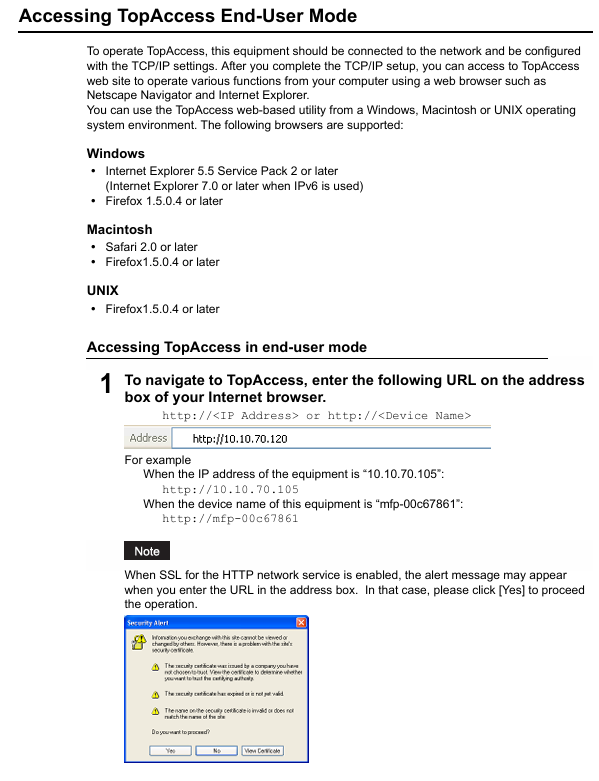
Access prerequisite: The device needs to be connected to the network and configured with TCP/IP settings.
Browser support:
The operating system supports browser versions
Windows Internet Explorer 5.5 SP2+/Firefox 1.5.0.4+(IPv6 requires IE 7.0+)
Macintosh Safari 2.0+/Firefox 1.5.0.4+
UNIX Firefox 1.5.0.4+
Access method: Enter the URL (http://<IP address>or http://<device name>), such as http://10.10.70.105 .
2. Core functions of user mode
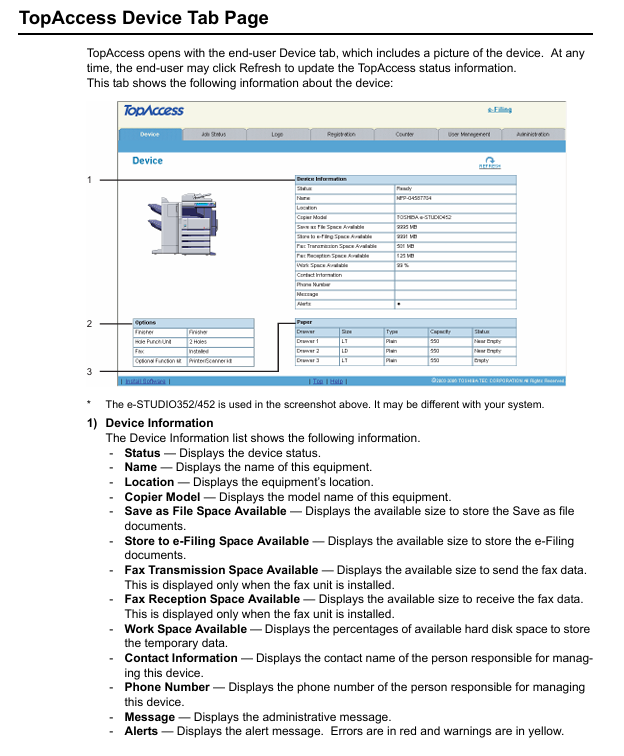
(1) View device status (Device Tab Page)
Device information: Display device name, location, model, storage space (such as Save as File space, e-Filing space, fax sending and receiving space), contact information, administrator message, alert (error red/warning yellow).
Option status: Display the installation status of optional units (binders, punching units, fax units, etc.).
Paper status: Display the paper size, type, capacity, and consumption status of each paper box (such as "Near Empty"/"Empty").
Equipment status indicator light: indicates faults through icons (such as paper jam, paper box open, toner depletion, etc.), which should be resolved by referring to the "Basic Function Operation Manual".
(2) Managing Jobs
Print homework:
Display: View user submitted print jobs (username, date and time, type, paper size, etc.), refresh the list, and sort by header.
Operation: Delete (select 1 at a time, private print jobs need to be deleted by the administrator), Release (select 1 at a time, private jobs cannot be released).
Fax/Internet fax operation:
Display: View fax transmission jobs (file number, destination, date and time, page number, etc.), which can be refreshed and sorted.
Operation: Delete (select one at a time).
Scan homework:
Display: View scan jobs (target/file name, agent, date and time, page count, status), which can be refreshed and sorted.
Operation: Delete (select one at a time).
(3) Viewing Job Logs
Log type: Each log can store up to 100 entries, displayed in reverse chronological order. If exceeded, the earliest record will be deleted
Print log: username, document name, date and time, type, paper size, page count, number of copies.
Transmission log: serial number, file number, date and time, transmission duration (displayed as "59:59" after 1 hour), page count, destination, department code, mode, status, route.
Receiving logs: serial number, file number, date and time, receiving duration, page count, sender, department code, mode, status, line.
Scan logs: target/file name, username, agent, date and time, page count, mode (6-digit code, including job type/transfer type, etc.), status.
(4) Registering from TopAccess
Template management:
Private template group: up to 200, can set group name, owner, email notification, supports password protection (5 digits); Resetting the group will delete all templates within the group.
Private templates: Up to 60 per group, with the option to select agents (copy/fax/scan, etc., scan up to 2 agents), set parameters such as panel, destination, format, etc., and support password protection.
Public template: Only administrators can create/maintain it, users can view it.
Address book management:
Contact person: manually add/edit/delete (name+email/fax number required), or search and add from LDAP server; Fax parameters can be set (such as ECM, line selection).
Group: Create/edit/delete groups (including multiple contacts) for easy bulk sending.
Email management (requires installation of fax unit):
Type: Confidential email (deleted after a single extraction), Billboard email (multiple extractions), Forwarding email (forwarding to other devices/network folders/email/e-filing).
Operation: Create/edit/delete up to 300 email addresses, set passwords, notifications, storage paths, etc.
(5) View counters (Managing Counters)
Total counter: View the total number of pages copied/printed (small/large paper) and scanned (divided into full-color/two-color/black).
Department counter: After entering the department code, view the counter for a specific department. You can click on the department name to view detailed data.
TopAccess Administrator Mode
1. Overview of Access and Core Functions
Access method: After entering TopAccess, click on "Administration" and enter the administrator password (default "123456") to log in.
Core functions: settings (devices/networks/printing services, etc.), maintenance (software updates/data backups), registration (public templates/fax forwarding), user and department management, viewing message logs.
2. Key Function Details
(1) Setting up from TopAccess
Device settings: Configure device name, location, administrator password (6-10 alphanumeric characters), energy-saving time (automatic clearing/sleep/shutdown), date and time, TopAccess language, and session timeout (5-999 minutes).
Network settings: Configure TCP/IP (static/dynamic IP), IPv6, IPX/SPX, AppleTalk, LDAP, DNS, SMTP/POP3, FTP, SNMP, SSL certificates, etc.
Copy settings: default color mode, original mode, exposure, maximum number of copies (9/99/999/9999), etc.
Fax settings (requiring installation of fax unit): Terminal ID, fax number, receiving mode, resolution, ECM, etc.
Printing service settings: Enable/disable Raw TCP (port 9100), LPD (port 515), IPP, FTP, NetWare, Email printing, configure port numbers, authentication, etc.
(2) Maintaining from TopAccess
Software management: Upload client software (drivers, PPD files, etc.), delete software (except for Point and Print drivers).
Data backup and recovery: Backup address book/template/email data (generate backup files), restore data from backup files.
Log management: Export logs (CSV format, including print/fax/scan logs), clear logs.
Directory service: Register LDAP servers (up to multiple), configure server IP, ports, and authentication methods.
Device restart: Restart the device (ensuring that no jobs are running).
(3) User and Department Management
Department management:
Function: Register/modify/delete department codes (up to multiple), set department names, output restrictions (full-color/black), clear department counters.
Note: The default 'Undefined' department cannot be deleted and is used to count invalid jobs.
User management:
Authentication methods: Supports Windows domain authentication, LDAP authentication, and MFP local authentication (up to 10000 users).
User operation: Create/edit/delete users, set usernames, passwords (local authentication), departments, permission restrictions, reset user counters.
(4) Troubleshooting
Error code: Provide error codes and solutions by job type (print/transmit/scan), for example:
402F: 1200 dpi print job requires additional memory, it is recommended to change to 600 dpi.
0011: Cardboard, the paper needs to be cleared.
1C65: SMTP address not set, administrator needs to configure SMTP server.
Other important notes
Optional component dependencies: Some features require the installation of optional components, such as fax unit for fax function and scanner kit for scanning to email.
Security precautions: Enabling SSL requires importing a certificate (self signed or CA certificate); SMTP/POP3/LDAP authentication requires correct configuration of username and password.
Data limitation: Address book import/export supports CSV format; Up to 100 logs can be stored; Up to 300 email addresses; The maximum number of private template groups is 200.
- OMRON
- ABB
- General Electric
- EMERSON
- Honeywell
- HIMA
- ALSTOM
- Rolls-Royce
- MOTOROLA
- Rockwell
- Siemens
- Woodward
- YOKOGAWA
- FOXBORO
- KOLLMORGEN
- MOOG
- KB
- YAMAHA
- BENDER
- TEKTRONIX
- Westinghouse
- AMAT
- AB
- XYCOM
- Yaskawa
- B&R
- Schneider
- KONGSBERG
- NI
- WATLOW
- ProSoft
- SEW
- ADVANCED
- Reliance
- TRICONEX
- METSO
- MAN
- Advantest
- STUDER
- DANAHER MOTION
- Bently
- Galil
- EATON
- MOLEX
- DEIF
- B&W
- ZYGO
- Aerotech
- DANFOSS
- Beijer
- Moxa
- Rexroth
- Johnson
- WAGO
- TOSHIBA
- BMCM
- SMC
- HITACHI
- HIRSCHMANN
- Application field
- XP POWER
- CTI
- TRICON
- STOBER
- Thinklogical
- Horner Automation
- Meggitt
- Fanuc
- Baldor
- SHINKAWA
- Other Brands
- UniOP
- KUKA
- Iba
- Beckhoff
- ADLINK
-
 Sigmatek MDD111-1 DIAS Drive Axis Module
 -
 Sigmatek DKL042 05-024-042 Terminal Module
 -
 Sigmatek DM822 Control Module
 -
 Sigmatek CDM167 12-008-167-O Module
 -
 Sigmatek TAE151 Touch Display Unit
 -
 Sigmatek DCC041 SLIDES Module 05-700-041-D
 -
 Sigmatek AKM65M-ANC2GBB0 PM Servo Motor
 -
 Sigmatek ETT221 01-230-221 Operator Terminal
 -
 Sigmatek SLIDES DAM 124 Analog Module
 -
Sigmatek AKM31C-ANCNGBB0 Servo Motor
-
 Mannesmann Demag Sigmatek CP626 Central Unit
 -
 SIGMATEK 0332.554.03 Board 371071000154
 -
 SIGMATEK 12-250-021 Base Plate Back Panel CM5V020
 -
 SIGMATEK DM162 S-DIAS Digital Mix Module
 -
 DEMAG ERGOTECH 061 381 66 Sigmatek 9842.243.02 Circuit Board
 -
 SIGMATEK CP313-1 PLC Module
 -
Sigmatek ETV0551-2 VARAN Touch Terminal
-
 Sigmatek SDM 081 FS S-Dias Safety Module
 -
 DEMAG 05-250-023 Ergotech Motherboard with Sigmatek TMS012
 -
Sigmatek CM5V020 12-250-023-K Wiring Base
-
 Sigma Tek 5000B-37 Attitude Gyro Indicator
 -
 Sigmatek SDD120-2 DIAS Drive
 -
 Sigmatek CME221 Memory Module
 -
 Sigmatek DCP640 DIAS Central Unit
 -
 Sigmatek STO040 Safety Output Module
 -
Sigmatek CET281 Control Panel
-
 Sigmatek CIPC LX800 Demag NC5 CPU
 -
 Sigmatek DKL093 05-024-093 Terminal Module
 -
 Sigmatek AI088 20-009-088 Analog Input Module
 -
Sigmatek CAI888 Analog Input Module
-
SIGMATEK CCA021 12-025-021 Analog Output Module
-
SIGMATEK 1104.579.05 Control Module
-
SIGMATEK SDI100 Digital Input Module
-
 SIGMATEK C-IPC 256MB LX800 Compact Dias
 -
 SIGMATEK 9423.090.02 Control Module
 -
SIGMATEK C-IPC 256 Power Supply 148498
-
 SIGMATEK CAI025 Analog Input Module
 -
 SIGMATEK CTO166 Digital Output Module
 -
 SIGMATEK CP112 20-004-112 Processor Module
 -
SIGMATEK CAI887 12-009-887 Safety Module
-
 Sigma-Tek 4000B-31 Directional Gyro 1U262-002-42
 -
Sigmatek C-IPC 256MB LX800 IPC Controller
-
Sigmatek C-IPC 01-450-031 Industrial PC LX800
-
Sigmatek C-IPC 256 Industrial PC Controller
-
Sigmatek CCP-531 PLC Processor Module
-
Sigmatek CDI163 Digital Input Module
-
 Sigmatek ETV0501 VARAN Terminal 12-230-0501
 -
 Sigmatek CTMS020 C-DIAS Technology Module
 -
 Sigmatek CIV512 VARAN Switch Module
 -
 Sigmatek HU011 20-080-011 Interface Module
 -
SIGMATEK SLIDES DAM 124 Module
-
 SIGMATEK C-IPC 161 01-450-161L Industrial PC
 -
SIGMATEK C-IPC 128MB VIA 733MHz 01-450-024-K
-
 SIGMATEK 12-780-012 R8-IPC Geode LX800 Module
 -
SIGMATEK CAM124 Analog Module
-
 SIGMATEK S1 032-8AF61-R4 EZ Servo Motor
 -
 SIGMATEK CTO163 Digital Output Module
 -
 SIGMATEK CCP082 12-004-082 Processor Module
 -
 SIGMATEK CRCH081 C-DIAS Temperature Module
 -
 SIGMATEK PC322-K 01-310-322-K Industrial PC
 -
SIGMATEK SDD310-2 Servo Drive
-
 SIGMATEK AI084 Analog Input Module
 -
SIGMATEK CRCH081 12-752-081 Temperature Module
-
Sigma-Tek 5000L-4 Attitude Gyro 1U284-001-3
-
 SIGMATEK CM5V020 12-250-023-K Wiring Module
 -
Sigma-Tek 4000H-6 Directional Gyro IU262-035-7
-
 SIGMATEK Dias DCP160 05-004-160 Processor Module
 -
SIGMATEK 0147.395.02 Control Module
-
SIGMATEK A1084 Control Module
-
SIGMATEK DI200 20-006-2000 Digital Input Module
-
Sigmatek DNC115 Encoder Module
-
 Sigmatek DAM122 05-017-122 Analog Module
 -
Sigmatek 9802.289.01 Control Board TA71 Display
-
Sigmatek TO127 20-007-127 Digital Output Module
-
Sigmatek DNC031 05-011-031 Digital Module
-
Sigmatek VI022 20-003-022 Interface Module
-
Sigmatek CAI085 Analog Input Module
-
 Sigmatek CP111 S-DIAS CPU Module
 -
Sigmatek CTMS030 Krauss Maffei Module
-
 Sigmatek CAM123 Control Module
 -
 Sigmatek TAE732-P 01-240-732-P Touch Display Unit
 -
Sigmatek MDM021 Digital Mixed Module
-
Sigmatek DCP642 DIAS Central Unit
-
 Sigmatek CST022 12-014-022 C-DIAS Module
 -
 Sigmatek SRO021 20-893-021 Safety Relay Output
 -
 Krauss Maffei MC5 Control System Sigmatek
 -
 Sigmatek DC061 Module 18-24VDC 300mA
 -
 Herrmann EVT0855 Ultrasonic Welder Touch Panel
 -
Sigmatek CIV521 Control Module 1.4A 2W
-
Sigmatek DDI61 05-006-161 Digital Input Module
-
SIGMATEK ETT312-E Touch Terminal 01-230-312
-
Cessna S3326-1 Sigma Tek 5000B-67 Gyro 1U149-015-9
-
SIGMATEK PS101 Power Supply Module
-
SIGMATEK 0332.554.03 Control Module 371071000154
-
 SIGMATEK ETT312-E Touch Terminal 01-230-312
 -
SIGMATEK CDM163 Control Module
-
 SIGMATEK VSV046 16-023-046 Module
 -
SIGMATEK AM221 20-017-221 Analog Module
-
SIGMATEK CTS051 12-053-051 Control Module
-
SIGMATEK AM221 20-017-221 Analog Module
-
Sigmatek CSDI161 12-891-161 Safety Input Module
-
Sigma Tek 4000C-1 Directional Gyro Indicator
-
Sigmatek ETV0501 12-230-0501 VARAN Terminal
-
Sigmatek DDM165 SLIDES Module
-
Sigmatek N100 20-011-100 Control Module
-
Sigmatek AKM54K-ANC2R-B0 PM Servo Motor
-
Sigmatek CTO166 Digital Output Module
-
Sigmatek CP212-K 20-004-212-K CPU Module
-
Sigmatek CDI161 Digital Input Module
-
Sigmatek DCC080 05-700-080-2 Control Module
-
 SIGMATEK SCP011 S-DIAS Safety CPU
 -
SIGMATEK SCP011 S-DIAS Safety CPU
-
SIGMATEK SRO022 Relay Output Module
-
SIGMATEK MDD 121 Drive Axis Module
-
SIGMATEK DSI021 SLIDES Siemens Interface
-
SIGMATEK DIAS DCP161 Module 05-004-161
-
 Sigmatek ETT312 Built-in Touch Terminal
 -
SIGMATEK DCP 643 DIAS Controller System
-
SIGMATEK CIO021 Multi I/O Module
-
SIGMATEK CTMS020 Control Module
-
 Sigmatek CME 221 Memory Module
 -
Sigmatek 0420.615.01 Control Board
-
Sigmatek CP111 20-004-111 CPU Module
-
Sigmatek 9405.065.03 Control Board
-
Sigmatek ETEK 01-450-032-K C-IPC 256MB Industrial PC
-
Sigmatek CTO163 12-007-163 Safety Output Module
-
Sigmatek TO081 20-007-081 Digital Output Module
-
 Sigmatek SI021 20-022-021 Safety Input Module


