
Westinghouse WGen7500DF Dual Fuel Portable Generator
Peak power gasoline: 9500W; propane: 8550W meets the instantaneous high power demand of motor equipment during startup
Engine 420cc OHV four stroke, 3600rpm single cylinder design, high combustion efficiency, strong stability
Westinghouse WGen7500DF Dual Fuel Portable Generator
Core parameters and product configuration
1. Key specifications
Specific parameter notes for specification items
Operating power gasoline: 7500W; propane: 6750W. Propane power is slightly lower, suitable for different fuel needs
Peak power gasoline: 9500W; propane: 8550W meets the instantaneous high power demand of motor equipment during startup
Engine 420cc OHV four stroke, 3600rpm single cylinder design, high combustion efficiency, strong stability
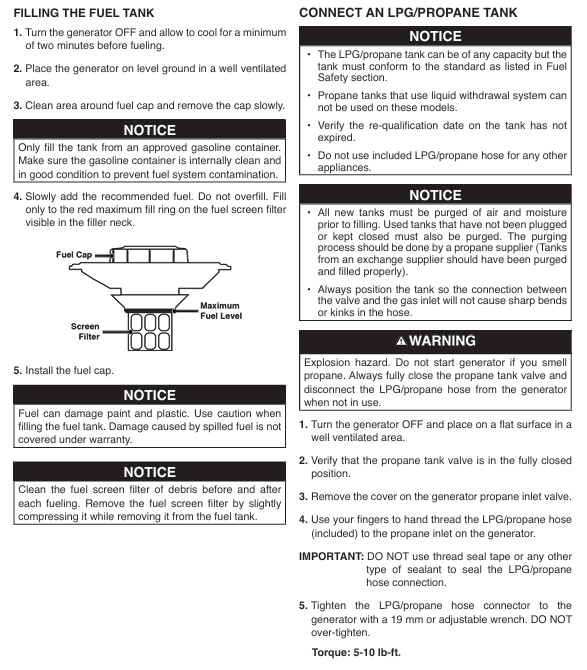
The fuel related gasoline tank has a capacity of 25L (6.6 gallons) and is compatible with unleaded gasoline grades 87-93 (ethanol ≤ 10%); Support standard propane tanks with OPD valves to disable E15/E85 ethanol gasoline to avoid fuel system damage
Oil specification capacity 1.1L (1.16 quarts), recommended SAE 10W-30 extreme temperature can choose 5W-30 or 10W-40 synthetic oil
Starting methods include manual start, electric start, and remote start (up to 30 meters away). Remote control needs to be paired first, and the battery model is CR2016 (2 cells)
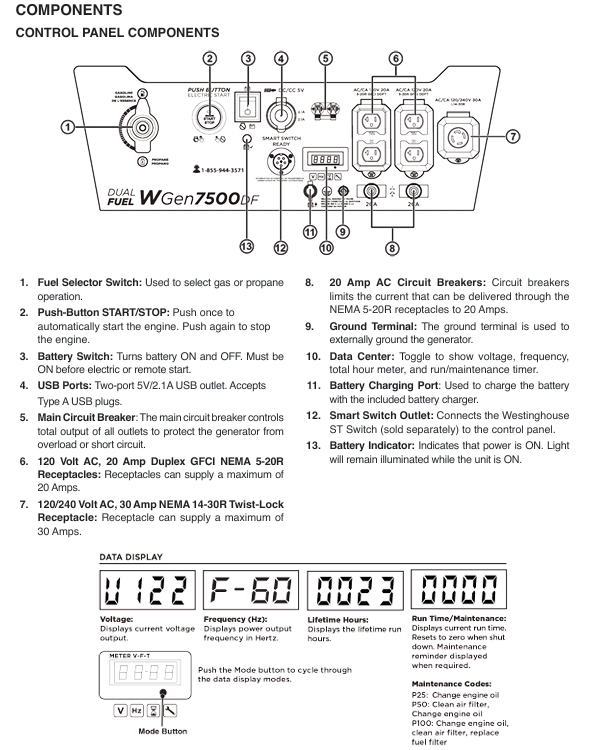
Output interface: 120V 20A dual hole GFCI socket x 2, 120/240V 30A locked socket x 1, 5V/2.1A USB interface x 2, total load not exceeding 40A, supporting multiple devices to be powered simultaneously
Other spark plug models F7TC (with a gap of 0.024-0.032 inches), with a net weight of approximately 59kg, and the noise level is not clearly marked as meeting EPA, CARB, CSA certification standards
2. Core configuration
Fuel switching: The control panel is equipped with a fuel selection switch, which supports switching during operation (propane tank needs to be connected in advance).
Safety configuration: low oil automatic shutdown, overload protection circuit breaker, GFCI leakage protection, neutral wire and frame grounding binding, spark suppressor (fireproof star ignition).
Convenient configuration: digital display screen (displaying voltage, frequency, operating hours, maintenance reminders), foldable handle+swivel wheel (easy to move), battery charging port (including matching charger).
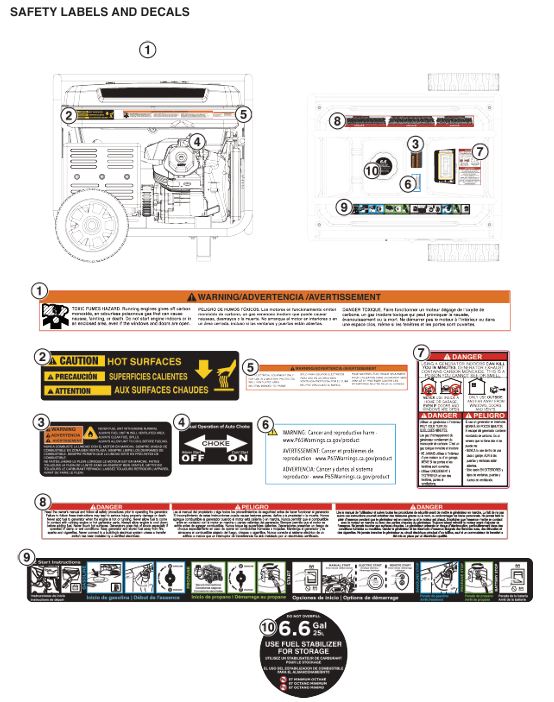
Safety operation standards
1. Environment and placement safety
Placement requirements: Use only in outdoor ventilated areas, at least 5 feet (1.5 meters) away from doors, windows, and ventilation openings; Place on a hard horizontal surface to avoid tilting and causing fuel/oil leakage.
Environmental restrictions: It is prohibited to operate in enclosed spaces (garages, basements, etc.) (exhaust containing carbon monoxide); Do not use in damp, rainy or snowy weather or near water sources (to prevent electric shock); The operating range of ambient temperature is 5 ° F (-15 ° C) -122 ° F (50 ° C). After storage, it needs to be restored to this range before restarting.
2. Fuel and Electricity Safety
Fuel operation:
Turn off the engine and cool it down for 2 minutes before refueling. Do not smoke or approach open flames; The fuel tank cannot be filled to its full capacity, leaving room for expansion. Any spilled fuel must be wiped dry and allowed to evaporate before starting.
The propane tank should be placed upright on the ground, away from heat sources and generator exhaust ports; After connecting, use soapy water to check if the interface is leaking (if there is bubbling, it is a leak). Do not start until the leak is eliminated.
Electricity operation:
It is prohibited to directly connect to the household power distribution system, and it must be connected through a qualified electrician installed conversion switch (to avoid reverse power transmission to the grid).
Only use grounded three core extension cables, with wire diameter matching the load and length (12 cable for 20A load ≤ 50 feet, 10 cable for ≤ 100 feet); Do not use damaged or aged cables.
Disconnect all loads before starting, and connect them in sequence after stable operation (first high-power equipment, then low-power equipment), with the total load not exceeding the rated power.
3. Personnel safety
Wear goggles and gloves during operation, curl up long hair, and avoid contact with high-temperature components such as exhaust pipes (which are prone to burns).
Do not operate after fatigue, drinking alcohol, or taking medication. Children and pets should stay away from running generators (at least 3 meters away).
If symptoms such as dizziness and nausea occur after inhaling carbon monoxide, immediately transfer to fresh air and seek medical attention if severe.
Operation process (assembly+start+stop)
1. Assembly and preparation
Installing wheels and handles: Fix the wheels to the frame with axle pins and split pins, and install and lock the handles with buckles.
Add engine oil: Place the generator horizontally, unscrew the oil filler cap, add the recommended model of engine oil to between the "L" and "H" marks on the dipstick, and tighten the dipstick.
Fuel preparation:
Gasoline: Open the fuel tank cap, add qualified gasoline, tighten the fuel tank cap, and clean any spilled fuel.
Propane: Connect one end of the matching hose to the propane inlet of the generator (manually tighten, no sealing tape required), and the other end to the propane tank valve. After opening the tank valve, check for leaks with soapy water.
Battery connection: Connect the battery quick connector to ensure a secure connection (both electric and remote start rely on the battery).
2. Start the process
Preprocessing: Turn the battery switch to "ON", the fuel selection switch to the corresponding fuel position (gasoline/propane), turn off all loads, and remote start requires pairing to be completed first (long press the pairing button on the control panel, then press the start stop button on the remote control).
Start operation:
Electric start: Press and hold the "START" button on the control panel for 2 seconds, then release it after the engine starts.
Remote control start: Press the "START" button on the remote control for 1 second, effective up to 30 meters away.
Hand pulled start: The refrigerator needs to close the air door, hold the starting rope and slowly pull it until there is resistance, then quickly pull it; After starting, gradually open the air door to the "RUN" position.
Stable operation: Run without load for 3-5 minutes to preheat, observe that the display screen parameters are normal (voltage and frequency are stable), and connect to the load after there is no abnormal noise.
3. Shutdown process
Normal shutdown: Disconnect all loads, let the generator run without load for 3-5 minutes, press the "STOP" button on the control panel or remote control, close the fuel valve (gasoline: close the tank valve; propane: close the tank valve), and finally close the battery switch.
Emergency shutdown: In case of leakage, abnormal noise, overload, etc., press the "STOP" button directly or turn off the engine switch to forcibly shut down.
Cleaning and tidying up: Disconnect fuel and power connections, clean equipment surfaces, and store hoses and cables.
Maintenance and Storage
1. Routine maintenance
Maintenance project cycle operation content
Check the oil level before each use, and if it is below the "L" mark, replenish it
Oil change for the first 25 hours/every 50 hours thereafter. After heating up, drain the oil, replace with new oil, and drain the bolt seal gasket
Air filter maintenance Check every 25 hours/Clean every 50 hours/Replace the foam filter element every 300 hours Clean it with detergent, dry it in the air and apply a small amount of engine oil; Paper filter element is blown with compressed air
Spark plug maintenance check every 100 hours/replace every 300 hours to clean carbon deposits, check gap (0.024-0.032 inches), replace if damaged
Clean the spark suppressor every 100 hours by removing the muffler cover, cleaning the carbon buildup on the filter screen, and replacing it if it is damaged
Replace the fuel filter every 100 hours, close the fuel valve, remove the old filter element, and install the new filter element in the original direction
When the battery is not used for a long time, it should be charged monthly with a matching charger to maintain sufficient power and avoid damage caused by power loss
2. Storage requirements
Short term storage (≤ 1 month): Clean the equipment, empty the residual fuel in the hose, close the fuel valve, and store in a dry and ventilated place.
Mid term storage (2-6 months): Add fresh fuel and stabilizer, empty the fuel in the carburetor float, disconnect the battery and charge it monthly.
Long term storage (>6 months):
Drain the fuel tank and carburetor, and replace with new engine oil.
Remove the spark plug, inject 1 teaspoon of engine oil into the cylinder, pull the starting rope several times (to prevent corrosion), and reinstall the spark plug.
Disconnect the battery, store it separately after fully charging, cover the generator with a dust cover, and place it in a dry and cool place.
Winter storage: After following the long-term storage process, inject RV specific antifreeze (177mL) into the water pump to prevent freezing and cracking.
Common troubleshooting
Possible causes and solutions for the fault phenomenon
Unable to start battery depletion, fuel shortage/deterioration, spark plug failure, propane leakage, incorrect throttle position for charging or battery replacement; Supplement fresh fuel; Clean/replace spark plugs; Check for propane leaks; Cold engine closes the air door, hot engine opens the air door
Immediately stop the machine after starting, low oil protection triggered, load not disconnected, fuel supply interrupted to replenish oil; Disconnect all loads; Check if the fuel valve is open and if the hose is blocked
Insufficient power/unstable speed, excessive load, clogged air filter, poor fuel supply, unadjusted high altitude, reduced load to rated range; Clean/replace the air filter; Check the fuel filter and hoses; High altitude kits need to be installed for altitudes greater than 5000 feet
No output voltage circuit breaker tripped, GFCI not reset, loose wiring, load short circuit, reset circuit breaker after overload investigation; Press the "RESET" button on the GFCI socket; Tighten the wiring; Troubleshooting equipment short circuit issues
Abnormal operation of propane mode, hose bending, fuel selection switch not in place, carburetor residual gasoline sorting hose to avoid bending; Turn the fuel switch to full position; Switch to gasoline mode, exhaust residual gasoline, and then switch back to propane
- OMRON
- ABB
- General Electric
- EMERSON
- Honeywell
- HIMA
- ALSTOM
- Rolls-Royce
- MOTOROLA
- Rockwell
- Siemens
- Woodward
- YOKOGAWA
- FOXBORO
- KOLLMORGEN
- MOOG
- KB
- YAMAHA
- BENDER
- TEKTRONIX
- Westinghouse
- AMAT
- AB
- XYCOM
- Yaskawa
- B&R
- Schneider
- KONGSBERG
- NI
- WATLOW
- ProSoft
- SEW
- ADVANCED
- Reliance
- TRICONEX
- METSO
- MAN
- Advantest
- STUDER
- DANAHER MOTION
- Bently
- Galil
- EATON
- MOLEX
- DEIF
- B&W
- ZYGO
- Aerotech
- DANFOSS
- Beijer
- Moxa
- Rexroth
- Johnson
- WAGO
- TOSHIBA
- BMCM
- SMC
- HITACHI
- HIRSCHMANN
- Application field
- XP POWER
- CTI
- TRICON
- STOBER
- Thinklogical
- Horner Automation
- Meggitt
- Fanuc
- Baldor
- SHINKAWA
- Other Brands
- UniOP
- KUKA
- Iba
- Beckhoff
- ADLINK
-
 Sigmatek MDD111-1 DIAS Drive Axis Module
 -
 Sigmatek DKL042 05-024-042 Terminal Module
 -
 Sigmatek DM822 Control Module
 -
 Sigmatek CDM167 12-008-167-O Module
 -
 Sigmatek TAE151 Touch Display Unit
 -
 Sigmatek DCC041 SLIDES Module 05-700-041-D
 -
 Sigmatek AKM65M-ANC2GBB0 PM Servo Motor
 -
 Sigmatek ETT221 01-230-221 Operator Terminal
 -
 Sigmatek SLIDES DAM 124 Analog Module
 -
Sigmatek AKM31C-ANCNGBB0 Servo Motor
-
 Mannesmann Demag Sigmatek CP626 Central Unit
 -
 SIGMATEK 0332.554.03 Board 371071000154
 -
 SIGMATEK 12-250-021 Base Plate Back Panel CM5V020
 -
 SIGMATEK DM162 S-DIAS Digital Mix Module
 -
 DEMAG ERGOTECH 061 381 66 Sigmatek 9842.243.02 Circuit Board
 -
 SIGMATEK CP313-1 PLC Module
 -
Sigmatek ETV0551-2 VARAN Touch Terminal
-
 Sigmatek SDM 081 FS S-Dias Safety Module
 -
 DEMAG 05-250-023 Ergotech Motherboard with Sigmatek TMS012
 -
Sigmatek CM5V020 12-250-023-K Wiring Base
-
 Sigma Tek 5000B-37 Attitude Gyro Indicator
 -
 Sigmatek SDD120-2 DIAS Drive
 -
 Sigmatek CME221 Memory Module
 -
 Sigmatek DCP640 DIAS Central Unit
 -
 Sigmatek STO040 Safety Output Module
 -
Sigmatek CET281 Control Panel
-
 Sigmatek CIPC LX800 Demag NC5 CPU
 -
 Sigmatek DKL093 05-024-093 Terminal Module
 -
 Sigmatek AI088 20-009-088 Analog Input Module
 -
Sigmatek CAI888 Analog Input Module
-
SIGMATEK CCA021 12-025-021 Analog Output Module
-
SIGMATEK 1104.579.05 Control Module
-
SIGMATEK SDI100 Digital Input Module
-
 SIGMATEK C-IPC 256MB LX800 Compact Dias
 -
 SIGMATEK 9423.090.02 Control Module
 -
SIGMATEK C-IPC 256 Power Supply 148498
-
 SIGMATEK CAI025 Analog Input Module
 -
 SIGMATEK CTO166 Digital Output Module
 -
 SIGMATEK CP112 20-004-112 Processor Module
 -
SIGMATEK CAI887 12-009-887 Safety Module
-
 Sigma-Tek 4000B-31 Directional Gyro 1U262-002-42
 -
Sigmatek C-IPC 256MB LX800 IPC Controller
-
Sigmatek C-IPC 01-450-031 Industrial PC LX800
-
Sigmatek C-IPC 256 Industrial PC Controller
-
Sigmatek CCP-531 PLC Processor Module
-
Sigmatek CDI163 Digital Input Module
-
 Sigmatek ETV0501 VARAN Terminal 12-230-0501
 -
 Sigmatek CTMS020 C-DIAS Technology Module
 -
 Sigmatek CIV512 VARAN Switch Module
 -
 Sigmatek HU011 20-080-011 Interface Module
 -
SIGMATEK SLIDES DAM 124 Module
-
 SIGMATEK C-IPC 161 01-450-161L Industrial PC
 -
SIGMATEK C-IPC 128MB VIA 733MHz 01-450-024-K
-
 SIGMATEK 12-780-012 R8-IPC Geode LX800 Module
 -
SIGMATEK CAM124 Analog Module
-
 SIGMATEK S1 032-8AF61-R4 EZ Servo Motor
 -
 SIGMATEK CTO163 Digital Output Module
 -
 SIGMATEK CCP082 12-004-082 Processor Module
 -
 SIGMATEK CRCH081 C-DIAS Temperature Module
 -
 SIGMATEK PC322-K 01-310-322-K Industrial PC
 -
SIGMATEK SDD310-2 Servo Drive
-
 SIGMATEK AI084 Analog Input Module
 -
SIGMATEK CRCH081 12-752-081 Temperature Module
-
Sigma-Tek 5000L-4 Attitude Gyro 1U284-001-3
-
 SIGMATEK CM5V020 12-250-023-K Wiring Module
 -
Sigma-Tek 4000H-6 Directional Gyro IU262-035-7
-
 SIGMATEK Dias DCP160 05-004-160 Processor Module
 -
SIGMATEK 0147.395.02 Control Module
-
SIGMATEK A1084 Control Module
-
SIGMATEK DI200 20-006-2000 Digital Input Module
-
Sigmatek DNC115 Encoder Module
-
 Sigmatek DAM122 05-017-122 Analog Module
 -
Sigmatek 9802.289.01 Control Board TA71 Display
-
Sigmatek TO127 20-007-127 Digital Output Module
-
Sigmatek DNC031 05-011-031 Digital Module
-
Sigmatek VI022 20-003-022 Interface Module
-
Sigmatek CAI085 Analog Input Module
-
 Sigmatek CP111 S-DIAS CPU Module
 -
Sigmatek CTMS030 Krauss Maffei Module
-
 Sigmatek CAM123 Control Module
 -
 Sigmatek TAE732-P 01-240-732-P Touch Display Unit
 -
Sigmatek MDM021 Digital Mixed Module
-
Sigmatek DCP642 DIAS Central Unit
-
 Sigmatek CST022 12-014-022 C-DIAS Module
 -
 Sigmatek SRO021 20-893-021 Safety Relay Output
 -
 Krauss Maffei MC5 Control System Sigmatek
 -
 Sigmatek DC061 Module 18-24VDC 300mA
 -
 Herrmann EVT0855 Ultrasonic Welder Touch Panel
 -
Sigmatek CIV521 Control Module 1.4A 2W
-
Sigmatek DDI61 05-006-161 Digital Input Module
-
SIGMATEK ETT312-E Touch Terminal 01-230-312
-
Cessna S3326-1 Sigma Tek 5000B-67 Gyro 1U149-015-9
-
SIGMATEK PS101 Power Supply Module
-
SIGMATEK 0332.554.03 Control Module 371071000154
-
 SIGMATEK ETT312-E Touch Terminal 01-230-312
 -
SIGMATEK CDM163 Control Module
-
 SIGMATEK VSV046 16-023-046 Module
 -
SIGMATEK AM221 20-017-221 Analog Module
-
SIGMATEK CTS051 12-053-051 Control Module
-
SIGMATEK AM221 20-017-221 Analog Module
-
Sigmatek CSDI161 12-891-161 Safety Input Module
-
Sigma Tek 4000C-1 Directional Gyro Indicator
-
Sigmatek ETV0501 12-230-0501 VARAN Terminal
-
Sigmatek DDM165 SLIDES Module
-
Sigmatek N100 20-011-100 Control Module
-
Sigmatek AKM54K-ANC2R-B0 PM Servo Motor
-
Sigmatek CTO166 Digital Output Module
-
Sigmatek CP212-K 20-004-212-K CPU Module
-
Sigmatek CDI161 Digital Input Module
-
Sigmatek DCC080 05-700-080-2 Control Module
-
 SIGMATEK SCP011 S-DIAS Safety CPU
 -
SIGMATEK SCP011 S-DIAS Safety CPU
-
SIGMATEK SRO022 Relay Output Module
-
SIGMATEK MDD 121 Drive Axis Module
-
SIGMATEK DSI021 SLIDES Siemens Interface
-
SIGMATEK DIAS DCP161 Module 05-004-161
-
 Sigmatek ETT312 Built-in Touch Terminal
 -
SIGMATEK DCP 643 DIAS Controller System
-
SIGMATEK CIO021 Multi I/O Module
-
SIGMATEK CTMS020 Control Module
-
 Sigmatek CME 221 Memory Module
 -
Sigmatek 0420.615.01 Control Board
-
Sigmatek CP111 20-004-111 CPU Module
-
Sigmatek 9405.065.03 Control Board
-
Sigmatek ETEK 01-450-032-K C-IPC 256MB Industrial PC
-
Sigmatek CTO163 12-007-163 Safety Output Module
-
Sigmatek TO081 20-007-081 Digital Output Module
-
 Sigmatek SI021 20-022-021 Safety Input Module


