
How to troubleshoot the YOKOGAWA CA500/CA550 multifunctional process calibrator?
YOKOGAWA CA500/CA550 Multi functional Process Calibration Instrument
Instrument positioning and core use
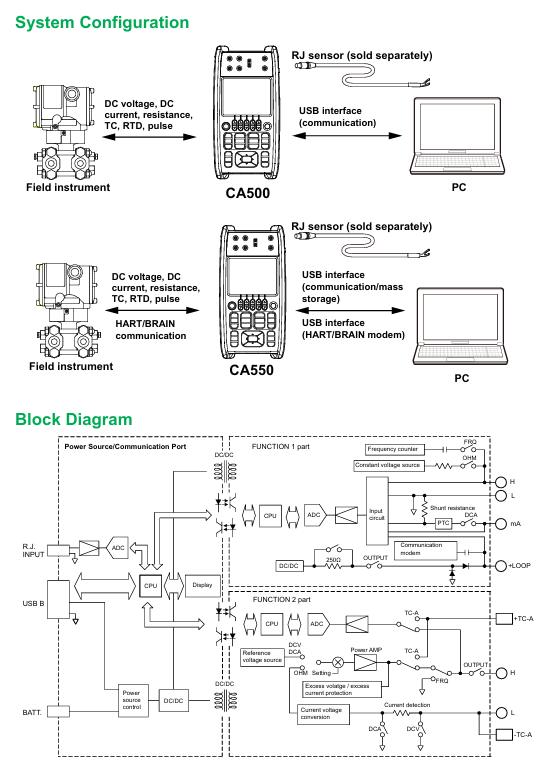
CA500/CA550 is a portable multifunctional process calibrator, whose core function is to provide standard signal generation and parameter measurement for field instruments such as transmitters, sensors, and controllers. It supports synchronous operation of "generation measurement" and achieves high efficiency and accuracy in instrument calibration. The core difference between the two lies in the addition of HART/BRAN communication function in CA550, which can directly interact with smart meters, read device information, perform loop testing, and output adjustment.
Core functions and technical parameters
1. Overview of core functions
CA500/CA550 supports 6 types of signal generation and 6 types of parameter measurement, covering mainstream calibration requirements in industrial sites. The specific functional comparison is as follows:
Function type supports signal (CA500/CA550 universal) CA550 additional functions
Signal generation includes DC voltage (100mV~30V), DC current (20mA/4-20mA), resistance (400 Ω/4000 Ω), thermocouple electromotive force, RTD simulation, frequency/pulse (1Hz~50kHz/CPM), HART/BRAN communication signal superposition, program scanning (20 calibration points), and automatic data grading (Pass/Tail)
Parameter measurement: DC voltage (100mV~50V), DC current (50mA), resistance (400 Ω/4000 Ω), thermocouple temperature, RTD temperature, frequency/pulse counting. HART device information reading (label, range, diagnostic data), BRAIN device model/serial number reading, calibration data CSV export
Scanning function includes linear scanning (0%~100% linear variation), step scanning (equidistant step output), program scanning (CA500 supports 10 points), program scanning supports 20 points, can associate calibration object information (model, serial number, label), automatically save scanning data and grading results
Data management manually saves 100 pieces of data, scanned data is automatically saved (in CA500 dedicated format), data is saved in CSV format (supporting comma/semicolon/tab separation), USB storage is exported, and folders are automatically classified by "year/month/day"
2. Key technical parameters
Accuracy level: DC voltage ± 0.01% FS, DC current ± 0.01% FS, resistance ± 0.01% FS, temperature (thermocouple) ± 0.1 ℃ (K-type, 0~1000 ℃).
Resolution: DC voltage of 100mV with a range of 1 μ V, DC current of 20mA with a range of 1 μ A, resistance of 400 Ω with a range of 0.01 Ω, and frequency of 500Hz with a range of 0.01Hz.
Output capability: DC current output with a maximum load of 20V (4-20mA range), resistance output with a permissible measured current of 0.1-3mA (400 Ω range).
Communication interface: USB Type B (supports remote control and CA550 data export), HART/BRAN communication port (CA550 specific, stacked on 4-20mA loop).
Operation process and core scenarios
1. Basic operations: Signal generation and measurement
Taking "4-20mA current generation+measurement" as an example, explain the standard operating procedure:
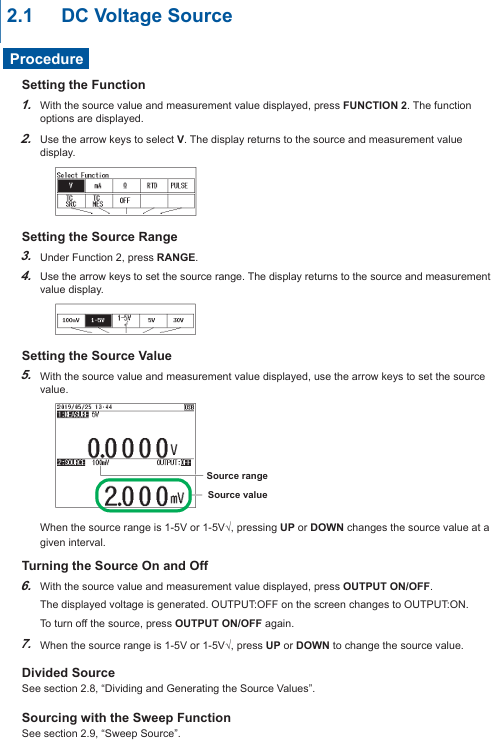
(1) Signal occurrence setting (Function 2)
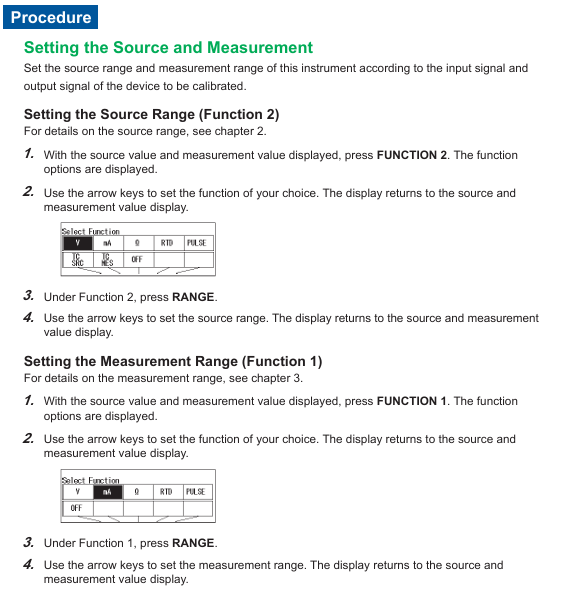
Function selection: Press the Function 2 key, use the directional keys to select mA (current), and press ENTER to confirm.
Range setting: Press the RANGE key, select 4-20mA (default 0%=4mA, 100%=20mA), and press ENTER to confirm.
Parameter adjustment: Set the output value (such as 8mA) through the numeric keys or UP/DOWN keys, press the OUTPUT ON/OFF key to start the output, and the screen will display "OUTPUT: ON".
Scanning function (optional): If step output is required, enter SETUP → Sweep Setup → Step Sweep, set the interval time (such as 10 seconds) and repeat mode (ON/OFF), press the SWEEP key to start step scanning.
(2) Parameter measurement settings (Function 1)
Function selection: Press the Function 1 key, use the directional keys to select mA (current), and press ENTER to confirm.
Range setting: Press the RANGE button, select 50mA (covering 4-20mA measurement requirements), and press ENTER to confirm.
Loop power supply (optional): If measuring a two-wire transmitter, press the LOOP POWER button, and the instrument will output 24VDC loop power while measuring the transmitter output current.
Data reading: The screen displays the measured values in real-time, and pressing the AVERAGE key can view the 5 times moving average, maximum value, and minimum value.
2. Advanced scenario 1: Temperature calibration (thermocouple/RTD)
(1) Thermocouple temperature occurrence (simulating K-type thermocouple)
Function selection: Function 2 → TC SRC (thermocouple occurrence), select K type with the RANGE key, press ENTER to confirm.
Terminal settings: Go to SETUP → Temperature Setup → TC Terminal, select TC-B (banana plug, supports external reference compensation), set TC-B RJC to ON (enables reference compensation).
Temperature setting: Enter the target temperature (such as 200 ℃) through the numerical keys, press OUTPUT ON/OFF to start the output, and the screen will synchronously display the corresponding thermoelectric potential (such as 8.137mV, in accordance with ITS-90 standard).
(2) RTD temperature measurement (PT100)
Function selection: Function 1 → RTD, select PT100 (IEC 60751 standard, -200~800 ℃) with the RANGE key.
Wiring settings: Go to SETUP → Connection Method, select 3W (three wire system, eliminate lead resistance error).
Measurement execution: Connect the PT100 sensor (three wire system), the screen displays the measured temperature, and press the PLAY button to switch the displayed resistance value (e.g. 273.15 Ω corresponds to 0 ℃).
3. CA550 exclusive scenario: HART instrument calibration
Taking the "HART transmitter loop test" as an example, the operation process is as follows:
Communication settings: Press the COM key to enter on-site communication mode, select HART for the HART/BRAN soft key, and set 250 Ω ON/OFF to ON (providing HART communication impedance).
Device connection: Press the CONNECT Device button, and the instrument will automatically connect to the HART device with address 0. After successful connection, the device label and PV value will be displayed.
Loop test: Press the LOOP TEST button to set the target output current (such as 8mA), and the instrument controls the transmitter output through HART commands. At the same time, measure the actual output current and compare the deviation.
Data saving: Enter SETUP → Program Sweep, set calibration points (such as 4/8/12/16/20mA) and tolerances (such as 0.5%), perform scanning, and automatically save data (including device model, serial number, error, and grading results).
Data Management and Remote Control
1. Data storage and export
(1) CA500 Data Management
Manual save: During the measurement/occurrence process, press the SAVE button to automatically save the current time, function, range, measurement value/occurrence value, up to 100 records (memory numbers 001~100).
Data reading: Press the LOAD key, select the memory number, and press ENTER to view and save the data. CA500 only supports local viewing of the instrument and needs to be exported to the PC through USB commands.
(2) CA550 Data Management
Auto Save: Enable Data Save=ON during program scanning, and save data in CSV format to internal memory. The folder structure is Root → CalibrationData/WeekData/SaveData (manual save).
USB export: Connect to a PC via a USB cable, and the instrument is recognized as a USB storage device. Copy the CSV file directly to the PC and open it for analysis in Excel (supporting comma/semicolon/tab separation).
2. Remote control (USB communication)
Connect to PC through USB interface and use dedicated instructions to achieve remote control. The core instructions are as follows:
Signal generation: SD20.000 (set current generation value of 20.000mA), SO1 (start output).
Parameter measurement: OD0? (Query Function 1 measurement values), OS? (Query current instrument settings).
Data saving: TS (perform manual saving) OM1? (Read the saved data of memory number 1).
Equipment settings: IO1 (enable 250 Ω communication resistor), VO1 (start 24V circuit power supply).
Communication protocol: Following USB CDC (Communication Device Class), Yokogawa YKCDC USB Driver driver needs to be installed. The PC end sends commands through a serial port tool (such as PuTTY), with a default baud rate of 9600bps.

Precautions and Maintenance
1. Operational safety and accuracy assurance
Output protection: Avoid short circuits when outputting DC voltage in the 30V range, and avoid open circuits when outputting DC current. The instrument has built-in overvoltage/overcurrent protection, and the output needs to be restarted after triggering the protection.
Temperature effect: Preheat for 1 hour before temperature calibration to avoid the internal temperature rise of the instrument affecting the compensation accuracy of the reference end; The fluctuation of environmental temperature should be controlled within ± 1 ℃ (especially for IL measurement).
Wiring specifications: Three wire or four wire system should be preferred for resistance/RT D measurement to reduce lead resistance errors; Thermocouple wiring needs to distinguish between positive and negative poles (TC-B terminal: red positive, black negative).
2. Instrument maintenance
Battery management: The instrument supports dual power supply of battery and USB, and Power Select can set power priority; When the battery is low, the screen prompts that it needs to be charged in a timely manner (charging time is about 4 hours, full battery life is about 8 hours).
Memory cleaning: When CA550 data is full (250 CSV files), it is necessary to manually delete useless files or format the internal memory (MENU → File Format → QUICK, note: formatting will clear all data).
Calibration cycle: It is recommended to calibrate the instrument once a year. You can contact the authorized service center of Yokogawa or refer to the "User Calibration Manual" downloaded from the official website for self calibration (standard calibration source is required).
Common problems and troubleshooting
Possible causes and solutions for the fault phenomenon
After starting the output, there is no signal. The output terminal is not connected to the load, and the range setting is incorrect. Confirm that the load is within the allowable range (such as 4-20mA range load ≤ 20V), and select the correct range again
The temperature measurement deviation is large, and the reference compensation is not enabled. If the thermocouple type is selected incorrectly, enter the Temperature Setup and enable TC-B RJC. Confirm that the thermocouple type is consistent with the actual one (such as K type)
HART communication connection failure: 250 Ω resistor not enabled, device address non-zero. Press the COM key to enable 250 Ω. Confirm that the HART device address is 0 (default) and check the circuit wiring
USB cannot recognize that the driver is not installed and the USB cable has poor contact. Install YKCDC USB Driver, replace the USB cable and reconnect it
Data cannot be saved. Memory is full, file format is incorrect. Delete useless data or format memory. Confirm that the save format is CSV (CA550) or dedicated format (CA500)
- OMRON
- ABB
- General Electric
- EMERSON
- Honeywell
- HIMA
- ALSTOM
- Rolls-Royce
- MOTOROLA
- Rockwell
- Siemens
- Woodward
- YOKOGAWA
- FOXBORO
- KOLLMORGEN
- MOOG
- KB
- YAMAHA
- BENDER
- TEKTRONIX
- Westinghouse
- AMAT
- AB
- XYCOM
- Yaskawa
- B&R
- Schneider
- KONGSBERG
- NI
- WATLOW
- ProSoft
- SEW
- ADVANCED
- Reliance
- TRICONEX
- METSO
- MAN
- Advantest
- STUDER
- DANAHER MOTION
- Bently
- Galil
- EATON
- MOLEX
- DEIF
- B&W
- ZYGO
- Aerotech
- DANFOSS
- Beijer
- Moxa
- Rexroth
- Johnson
- WAGO
- TOSHIBA
- BMCM
- SMC
- HITACHI
- HIRSCHMANN
- Application field
- XP POWER
- CTI
- TRICON
- STOBER
- Thinklogical
- Horner Automation
- Meggitt
- Fanuc
- Baldor
- SHINKAWA
- Other Brands
- UniOP
- KUKA
- Iba
- Beckhoff
- ADLINK
-
 Sigmatek MDD111-1 DIAS Drive Axis Module
 -
 Sigmatek DKL042 05-024-042 Terminal Module
 -
 Sigmatek DM822 Control Module
 -
 Sigmatek CDM167 12-008-167-O Module
 -
 Sigmatek TAE151 Touch Display Unit
 -
 Sigmatek DCC041 SLIDES Module 05-700-041-D
 -
 Sigmatek AKM65M-ANC2GBB0 PM Servo Motor
 -
 Sigmatek ETT221 01-230-221 Operator Terminal
 -
 Sigmatek SLIDES DAM 124 Analog Module
 -
Sigmatek AKM31C-ANCNGBB0 Servo Motor
-
 Mannesmann Demag Sigmatek CP626 Central Unit
 -
 SIGMATEK 0332.554.03 Board 371071000154
 -
 SIGMATEK 12-250-021 Base Plate Back Panel CM5V020
 -
 SIGMATEK DM162 S-DIAS Digital Mix Module
 -
 DEMAG ERGOTECH 061 381 66 Sigmatek 9842.243.02 Circuit Board
 -
 SIGMATEK CP313-1 PLC Module
 -
Sigmatek ETV0551-2 VARAN Touch Terminal
-
 Sigmatek SDM 081 FS S-Dias Safety Module
 -
 DEMAG 05-250-023 Ergotech Motherboard with Sigmatek TMS012
 -
Sigmatek CM5V020 12-250-023-K Wiring Base
-
 Sigma Tek 5000B-37 Attitude Gyro Indicator
 -
 Sigmatek SDD120-2 DIAS Drive
 -
 Sigmatek CME221 Memory Module
 -
 Sigmatek DCP640 DIAS Central Unit
 -
 Sigmatek STO040 Safety Output Module
 -
Sigmatek CET281 Control Panel
-
 Sigmatek CIPC LX800 Demag NC5 CPU
 -
 Sigmatek DKL093 05-024-093 Terminal Module
 -
 Sigmatek AI088 20-009-088 Analog Input Module
 -
Sigmatek CAI888 Analog Input Module
-
SIGMATEK CCA021 12-025-021 Analog Output Module
-
SIGMATEK 1104.579.05 Control Module
-
SIGMATEK SDI100 Digital Input Module
-
 SIGMATEK C-IPC 256MB LX800 Compact Dias
 -
 SIGMATEK 9423.090.02 Control Module
 -
SIGMATEK C-IPC 256 Power Supply 148498
-
 SIGMATEK CAI025 Analog Input Module
 -
 SIGMATEK CTO166 Digital Output Module
 -
 SIGMATEK CP112 20-004-112 Processor Module
 -
SIGMATEK CAI887 12-009-887 Safety Module
-
 Sigma-Tek 4000B-31 Directional Gyro 1U262-002-42
 -
Sigmatek C-IPC 256MB LX800 IPC Controller
-
Sigmatek C-IPC 01-450-031 Industrial PC LX800
-
Sigmatek C-IPC 256 Industrial PC Controller
-
Sigmatek CCP-531 PLC Processor Module
-
Sigmatek CDI163 Digital Input Module
-
 Sigmatek ETV0501 VARAN Terminal 12-230-0501
 -
 Sigmatek CTMS020 C-DIAS Technology Module
 -
 Sigmatek CIV512 VARAN Switch Module
 -
 Sigmatek HU011 20-080-011 Interface Module
 -
SIGMATEK SLIDES DAM 124 Module
-
 SIGMATEK C-IPC 161 01-450-161L Industrial PC
 -
SIGMATEK C-IPC 128MB VIA 733MHz 01-450-024-K
-
 SIGMATEK 12-780-012 R8-IPC Geode LX800 Module
 -
SIGMATEK CAM124 Analog Module
-
 SIGMATEK S1 032-8AF61-R4 EZ Servo Motor
 -
 SIGMATEK CTO163 Digital Output Module
 -
 SIGMATEK CCP082 12-004-082 Processor Module
 -
 SIGMATEK CRCH081 C-DIAS Temperature Module
 -
 SIGMATEK PC322-K 01-310-322-K Industrial PC
 -
SIGMATEK SDD310-2 Servo Drive
-
 SIGMATEK AI084 Analog Input Module
 -
SIGMATEK CRCH081 12-752-081 Temperature Module
-
Sigma-Tek 5000L-4 Attitude Gyro 1U284-001-3
-
 SIGMATEK CM5V020 12-250-023-K Wiring Module
 -
Sigma-Tek 4000H-6 Directional Gyro IU262-035-7
-
 SIGMATEK Dias DCP160 05-004-160 Processor Module
 -
SIGMATEK 0147.395.02 Control Module
-
SIGMATEK A1084 Control Module
-
SIGMATEK DI200 20-006-2000 Digital Input Module
-
Sigmatek DNC115 Encoder Module
-
 Sigmatek DAM122 05-017-122 Analog Module
 -
Sigmatek 9802.289.01 Control Board TA71 Display
-
Sigmatek TO127 20-007-127 Digital Output Module
-
Sigmatek DNC031 05-011-031 Digital Module
-
Sigmatek VI022 20-003-022 Interface Module
-
Sigmatek CAI085 Analog Input Module
-
 Sigmatek CP111 S-DIAS CPU Module
 -
Sigmatek CTMS030 Krauss Maffei Module
-
 Sigmatek CAM123 Control Module
 -
 Sigmatek TAE732-P 01-240-732-P Touch Display Unit
 -
Sigmatek MDM021 Digital Mixed Module
-
Sigmatek DCP642 DIAS Central Unit
-
 Sigmatek CST022 12-014-022 C-DIAS Module
 -
 Sigmatek SRO021 20-893-021 Safety Relay Output
 -
 Krauss Maffei MC5 Control System Sigmatek
 -
 Sigmatek DC061 Module 18-24VDC 300mA
 -
 Herrmann EVT0855 Ultrasonic Welder Touch Panel
 -
Sigmatek CIV521 Control Module 1.4A 2W
-
Sigmatek DDI61 05-006-161 Digital Input Module
-
SIGMATEK ETT312-E Touch Terminal 01-230-312
-
Cessna S3326-1 Sigma Tek 5000B-67 Gyro 1U149-015-9
-
SIGMATEK PS101 Power Supply Module
-
SIGMATEK 0332.554.03 Control Module 371071000154
-
 SIGMATEK ETT312-E Touch Terminal 01-230-312
 -
SIGMATEK CDM163 Control Module
-
 SIGMATEK VSV046 16-023-046 Module
 -
SIGMATEK AM221 20-017-221 Analog Module
-
SIGMATEK CTS051 12-053-051 Control Module
-
SIGMATEK AM221 20-017-221 Analog Module
-
Sigmatek CSDI161 12-891-161 Safety Input Module
-
Sigma Tek 4000C-1 Directional Gyro Indicator
-
Sigmatek ETV0501 12-230-0501 VARAN Terminal
-
Sigmatek DDM165 SLIDES Module
-
Sigmatek N100 20-011-100 Control Module
-
Sigmatek AKM54K-ANC2R-B0 PM Servo Motor
-
Sigmatek CTO166 Digital Output Module
-
Sigmatek CP212-K 20-004-212-K CPU Module
-
Sigmatek CDI161 Digital Input Module
-
Sigmatek DCC080 05-700-080-2 Control Module
-
 SIGMATEK SCP011 S-DIAS Safety CPU
 -
SIGMATEK SCP011 S-DIAS Safety CPU
-
SIGMATEK SRO022 Relay Output Module
-
SIGMATEK MDD 121 Drive Axis Module
-
SIGMATEK DSI021 SLIDES Siemens Interface
-
SIGMATEK DIAS DCP161 Module 05-004-161
-
 Sigmatek ETT312 Built-in Touch Terminal
 -
SIGMATEK DCP 643 DIAS Controller System
-
SIGMATEK CIO021 Multi I/O Module
-
SIGMATEK CTMS020 Control Module
-
 Sigmatek CME 221 Memory Module
 -
Sigmatek 0420.615.01 Control Board
-
Sigmatek CP111 20-004-111 CPU Module
-
Sigmatek 9405.065.03 Control Board
-
Sigmatek ETEK 01-450-032-K C-IPC 256MB Industrial PC
-
Sigmatek CTO163 12-007-163 Safety Output Module
-
Sigmatek TO081 20-007-081 Digital Output Module
-
 Sigmatek SI021 20-022-021 Safety Input Module


