
YOKOGAWA STARDOM FCN-100/FCJ Migration Technology
YOKOGAWA STARDOM FCN-100/FCJ Migration Technology
Migration core principles and limitations
(1) Core migration logic
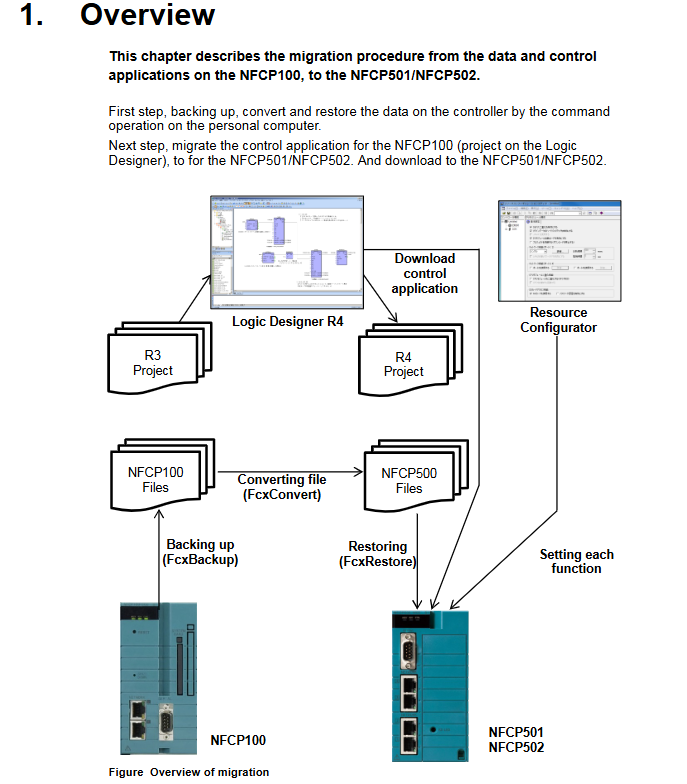
The essence of migration is the process of "adaptation transformation deployment" of source device configuration and application:
Data level: Backup the configuration data (resource configuration, system files) of NFCP100/NFJT100, convert it to NFCP500 compatible format, and then restore it to the target device;
Application level: Upgrade the control projects (R1-R4 versions) in Logic Designer, adapt them to PLC/processor types, recompile and download them to the target device;
Special configuration: Field bus definition and Duolet application need to be separately adapted to the hardware interface and system file format of the target device.
(2) Key Limitations and Rules
Data compatibility:
The FcxConvert command only supports NFCP100 backup file conversion, NFJT100 backup files cannot be converted, and I/O definitions and DUONUS.PRP files need to be reset;
When expanding the hold data area, the hold data saved by NFCP100 cannot be used for NFCP500 and needs to be reconfigured;
Control applications, launch projects, and source files that do not participate in FcxConvert conversion need to be compiled and downloaded separately through Logic Designer.
License restriction: The source device license cannot be migrated to FCN-500, and the CPU module of the target device must be pre bundled with the required license.
IP address inheritance: When restoring converted data, the target device's IP address will automatically inherit the source device's IP address. If modification is required, it needs to be adjusted through the Resource Configurator after recovery.
Hardware interface adaptation: The COM2 port of FCJ needs to be migrated to the RS-232C communication module, and the port name in the application needs to be changed from "COM2" to the module configuration name (such as "RS02").
Detailed explanation of core migration tools and commands
(1) Command line tool functions and usage
Complete syntax and key instructions for the core functions of tool commands
FcxBackup backup source device (NFCP100/NFJT100) data FcxBackup - all - u<username>- p<password><hostname/IP>1. The "- all" parameter requires R3.10+version, and the "- u/- p" parameter requires R4.10+version;
2. Generate a "BACKUP" folder containing data files, resource configuration, DUONUS.PRP, etc;
3. Example: FcxBackup all - u user01- p abc123 192.168.0.1
FcxConvert converts NFCP100 backup files to the target device format FcxConvert.exe - t<NFCP501/NFCP502>- i<source folder>- o<target folder>1. The source folder defaults to "ACKUP", and the target folder needs to be customized (such as "ACKUP_CFCP501");
2. After conversion, the target folder needs to be renamed as "ACKUP" before it can be used for recovery;
3. Example: FcxConvert.exe - t NFCP501- i BackUP - o BackUP_CFCP501
FcxRestore restores the converted data to the target device FcxRestore<hostname/IP>1. Before restoring, it is necessary to clear the hold data in the SRAM of the target device (in conjunction with FcxSaveRetain-c);
2. Example: FcxRestore 192.168.0.1
FcxSaveRetain saves/clears hold data FcxSaveRetain-c<hostname/IP>1. Only use the "- c" parameter during migration (clear SRAM hold data);
2. Ensure that the backup data is correctly mapped to the target device SRAM;
3. Example: FcxSaveRetain - c 192.168.0.1
(2) Tool acquisition and directory structure
Acquisition steps:
Insert R4.20+version system DVD ROM;
Select "DVD Contents" and double-click on "FCN/FCJ Basic Software Package" (FCN-500 corresponds to Pkg.NFCP500. exe in the Pkg.NFCP500 folder);
Specify the installation folder (such as "C: temp"), extract it, and generate the tool files.
Typical directory structure:
plaintext
C:temp
⊙ - NFCP500 # Core Tools Folder
│∝ - FcxBackup.exe # Backup Command
│∝ - FcxConvert.exe # Conversion Command
│└ - FcxRestore.exe # Restore Command
└ - FCXTOOL # Auxiliary Tools Folder
∝ - FcxSaveRetain.bat # Keep Data Processing Batch Processing
└ - save_record. txt # Configuration file
Control the core rules for application migration
(1) PLC type matches processor type
PLC type processor type migration operation (without expanding the hold data area) migration operation (expanding the hold data area) applicable scenarios
IPC40 FCX/FCX_A can be directly recompiled without modifying the project reconstruction resources (PLC=IPC40, processor=FCX_B/FCX_C)+compiling the original configuration of NFCP100, which needs to be expanded to maintain data
IPC32/IPC33- Rebuilding Resources (PLC changed to IPC40)+Copying Configuration (tasks/variables/labels, etc.)+Compiling Rebuilding Resources (PLC=IPC40, processor=FCX_B)+Copying Configuration+Compiling Low Version PLC Type Adaptation Target Device
SH_40- Rebuilding Resources (PLC changed to IPC_40)+Compilation - SH_40 Type Compatibility Upgrade
(2) Processor type description
Processor type applicable to device core characteristics
FCX NFJT100/NFCP100 does not support modules such as NFLF111/NFGS813
- OMRON
- ABB
- General Electric
- EMERSON
- Honeywell
- HIMA
- ALSTOM
- Rolls-Royce
- MOTOROLA
- Rockwell
- Siemens
- Woodward
- YOKOGAWA
- FOXBORO
- KOLLMORGEN
- MOOG
- KB
- YAMAHA
- BENDER
- TEKTRONIX
- Westinghouse
- AMAT
- AB
- XYCOM
- Yaskawa
- B&R
- Schneider
- KONGSBERG
- NI
- WATLOW
- ProSoft
- SEW
- ADVANCED
- Reliance
- TRICONEX
- METSO
- MAN
- Advantest
- STUDER
- DANAHER MOTION
- Bently
- Galil
- EATON
- MOLEX
- DEIF
- B&W
- ZYGO
- Aerotech
- DANFOSS
- Beijer
- Moxa
- Rexroth
- Johnson
- WAGO
- TOSHIBA
- BMCM
- SMC
- HITACHI
- HIRSCHMANN
- Application field
- XP POWER
- CTI
- TRICON
- STOBER
- Thinklogical
- Horner Automation
- Meggitt
- Fanuc
- Baldor
- SHINKAWA
- Other Brands
- UniOP
- KUKA
- Iba
- Beckhoff
- ADLINK
-
 Sigmatek MDD111-1 DIAS Drive Axis Module
 -
 Sigmatek DKL042 05-024-042 Terminal Module
 -
 Sigmatek DM822 Control Module
 -
 Sigmatek CDM167 12-008-167-O Module
 -
 Sigmatek TAE151 Touch Display Unit
 -
 Sigmatek DCC041 SLIDES Module 05-700-041-D
 -
 Sigmatek AKM65M-ANC2GBB0 PM Servo Motor
 -
 Sigmatek ETT221 01-230-221 Operator Terminal
 -
 Sigmatek SLIDES DAM 124 Analog Module
 -
Sigmatek AKM31C-ANCNGBB0 Servo Motor
-
 Mannesmann Demag Sigmatek CP626 Central Unit
 -
 SIGMATEK 0332.554.03 Board 371071000154
 -
 SIGMATEK 12-250-021 Base Plate Back Panel CM5V020
 -
 SIGMATEK DM162 S-DIAS Digital Mix Module
 -
 DEMAG ERGOTECH 061 381 66 Sigmatek 9842.243.02 Circuit Board
 -
 SIGMATEK CP313-1 PLC Module
 -
Sigmatek ETV0551-2 VARAN Touch Terminal
-
 Sigmatek SDM 081 FS S-Dias Safety Module
 -
 DEMAG 05-250-023 Ergotech Motherboard with Sigmatek TMS012
 -
Sigmatek CM5V020 12-250-023-K Wiring Base
-
 Sigma Tek 5000B-37 Attitude Gyro Indicator
 -
 Sigmatek SDD120-2 DIAS Drive
 -
 Sigmatek CME221 Memory Module
 -
 Sigmatek DCP640 DIAS Central Unit
 -
 Sigmatek STO040 Safety Output Module
 -
Sigmatek CET281 Control Panel
-
 Sigmatek CIPC LX800 Demag NC5 CPU
 -
 Sigmatek DKL093 05-024-093 Terminal Module
 -
 Sigmatek AI088 20-009-088 Analog Input Module
 -
Sigmatek CAI888 Analog Input Module
-
SIGMATEK CCA021 12-025-021 Analog Output Module
-
SIGMATEK 1104.579.05 Control Module
-
SIGMATEK SDI100 Digital Input Module
-
 SIGMATEK C-IPC 256MB LX800 Compact Dias
 -
 SIGMATEK 9423.090.02 Control Module
 -
SIGMATEK C-IPC 256 Power Supply 148498
-
 SIGMATEK CAI025 Analog Input Module
 -
 SIGMATEK CTO166 Digital Output Module
 -
 SIGMATEK CP112 20-004-112 Processor Module
 -
SIGMATEK CAI887 12-009-887 Safety Module
-
 Sigma-Tek 4000B-31 Directional Gyro 1U262-002-42
 -
Sigmatek C-IPC 256MB LX800 IPC Controller
-
Sigmatek C-IPC 01-450-031 Industrial PC LX800
-
Sigmatek C-IPC 256 Industrial PC Controller
-
Sigmatek CCP-531 PLC Processor Module
-
Sigmatek CDI163 Digital Input Module
-
 Sigmatek ETV0501 VARAN Terminal 12-230-0501
 -
 Sigmatek CTMS020 C-DIAS Technology Module
 -
 Sigmatek CIV512 VARAN Switch Module
 -
 Sigmatek HU011 20-080-011 Interface Module
 -
SIGMATEK SLIDES DAM 124 Module
-
 SIGMATEK C-IPC 161 01-450-161L Industrial PC
 -
SIGMATEK C-IPC 128MB VIA 733MHz 01-450-024-K
-
 SIGMATEK 12-780-012 R8-IPC Geode LX800 Module
 -
SIGMATEK CAM124 Analog Module
-
 SIGMATEK S1 032-8AF61-R4 EZ Servo Motor
 -
 SIGMATEK CTO163 Digital Output Module
 -
 SIGMATEK CCP082 12-004-082 Processor Module
 -
 SIGMATEK CRCH081 C-DIAS Temperature Module
 -
 SIGMATEK PC322-K 01-310-322-K Industrial PC
 -
SIGMATEK SDD310-2 Servo Drive
-
 SIGMATEK AI084 Analog Input Module
 -
SIGMATEK CRCH081 12-752-081 Temperature Module
-
Sigma-Tek 5000L-4 Attitude Gyro 1U284-001-3
-
 SIGMATEK CM5V020 12-250-023-K Wiring Module
 -
Sigma-Tek 4000H-6 Directional Gyro IU262-035-7
-
 SIGMATEK Dias DCP160 05-004-160 Processor Module
 -
SIGMATEK 0147.395.02 Control Module
-
SIGMATEK A1084 Control Module
-
SIGMATEK DI200 20-006-2000 Digital Input Module
-
Sigmatek DNC115 Encoder Module
-
 Sigmatek DAM122 05-017-122 Analog Module
 -
Sigmatek 9802.289.01 Control Board TA71 Display
-
Sigmatek TO127 20-007-127 Digital Output Module
-
Sigmatek DNC031 05-011-031 Digital Module
-
Sigmatek VI022 20-003-022 Interface Module
-
Sigmatek CAI085 Analog Input Module
-
 Sigmatek CP111 S-DIAS CPU Module
 -
Sigmatek CTMS030 Krauss Maffei Module
-
 Sigmatek CAM123 Control Module
 -
 Sigmatek TAE732-P 01-240-732-P Touch Display Unit
 -
Sigmatek MDM021 Digital Mixed Module
-
Sigmatek DCP642 DIAS Central Unit
-
 Sigmatek CST022 12-014-022 C-DIAS Module
 -
 Sigmatek SRO021 20-893-021 Safety Relay Output
 -
 Krauss Maffei MC5 Control System Sigmatek
 -
 Sigmatek DC061 Module 18-24VDC 300mA
 -
 Herrmann EVT0855 Ultrasonic Welder Touch Panel
 -
Sigmatek CIV521 Control Module 1.4A 2W
-
Sigmatek DDI61 05-006-161 Digital Input Module
-
SIGMATEK ETT312-E Touch Terminal 01-230-312
-
Cessna S3326-1 Sigma Tek 5000B-67 Gyro 1U149-015-9
-
SIGMATEK PS101 Power Supply Module
-
SIGMATEK 0332.554.03 Control Module 371071000154
-
 SIGMATEK ETT312-E Touch Terminal 01-230-312
 -
SIGMATEK CDM163 Control Module
-
 SIGMATEK VSV046 16-023-046 Module
 -
SIGMATEK AM221 20-017-221 Analog Module
-
SIGMATEK CTS051 12-053-051 Control Module
-
SIGMATEK AM221 20-017-221 Analog Module
-
Sigmatek CSDI161 12-891-161 Safety Input Module
-
Sigma Tek 4000C-1 Directional Gyro Indicator
-
Sigmatek ETV0501 12-230-0501 VARAN Terminal
-
Sigmatek DDM165 SLIDES Module
-
Sigmatek N100 20-011-100 Control Module
-
Sigmatek AKM54K-ANC2R-B0 PM Servo Motor
-
Sigmatek CTO166 Digital Output Module
-
Sigmatek CP212-K 20-004-212-K CPU Module
-
Sigmatek CDI161 Digital Input Module
-
Sigmatek DCC080 05-700-080-2 Control Module
-
 SIGMATEK SCP011 S-DIAS Safety CPU
 -
SIGMATEK SCP011 S-DIAS Safety CPU
-
SIGMATEK SRO022 Relay Output Module
-
SIGMATEK MDD 121 Drive Axis Module
-
SIGMATEK DSI021 SLIDES Siemens Interface
-
SIGMATEK DIAS DCP161 Module 05-004-161
-
 Sigmatek ETT312 Built-in Touch Terminal
 -
SIGMATEK DCP 643 DIAS Controller System
-
SIGMATEK CIO021 Multi I/O Module
-
SIGMATEK CTMS020 Control Module
-
 Sigmatek CME 221 Memory Module
 -
Sigmatek 0420.615.01 Control Board
-
Sigmatek CP111 20-004-111 CPU Module
-
Sigmatek 9405.065.03 Control Board
-
Sigmatek ETEK 01-450-032-K C-IPC 256MB Industrial PC
-
Sigmatek CTO163 12-007-163 Safety Output Module
-
Sigmatek TO081 20-007-081 Digital Output Module
-
 Sigmatek SI021 20-022-021 Safety Input Module


