
How to install and wire the Yokogawa FLXA402T turbidity and chlorine liquid analyzer?
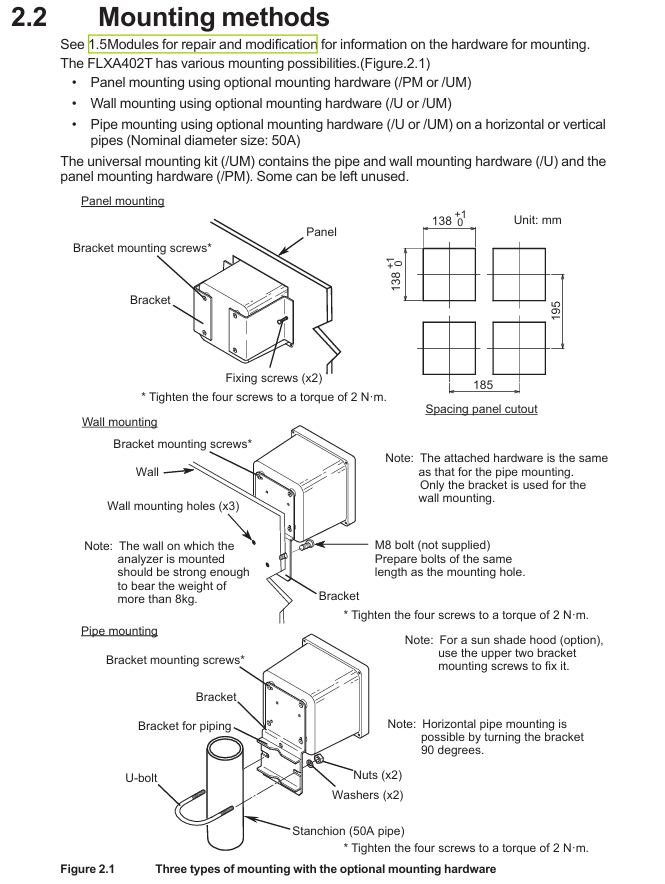
(3) Pipeline installation (required/U option)
Fix the pipeline bracket (including U-bolts) onto the nominal 50A pipeline, ensuring that the bracket is horizontal/vertical;
Fix the analyzer on the bracket with 4 screws, with a torque of 2N · m. If equipped with a sunshade, use the 2 screws above the bracket to fix the sunshade.
3. Disassembly of shielding cover (before wiring)
The high-voltage power terminal and relay module of the analyzer are covered by a shielding cover. Before wiring, the power must be cut off. Loosen the two screws on the shielding cover (marked with a triangle), pinch the circular mark, and pull out the shielding cover (be careful to save the screws to avoid loss); After wiring is completed, the shielding cover needs to be reinstalled to ensure safety and anti-interference.
Wiring operation specifications
1. Installation of cable sealing sleeve
All cable entrances need to be equipped with sealing sleeves (standard M20 × 1.5, compatible with cable outer diameters of 6-12mm), and unused entrances need to be sealed with rubber plugs:
Ordinary cable: Assemble in the order of "sealing sleeve body → sealing ring → nut", torque 2N · m;
Ethernet cable: Use a black dedicated sealing sleeve (suffix - standard for E models);
Catheter protection: When selecting a catheter adapter (/CB □//CD □//CF □), replace the standard sealing sleeve with a dedicated adapter sealing sleeve (white). The adapter needs to be connected to a flexible catheter to avoid stress damage to the housing.
2. Key wiring process
(1) Power wiring
Confirm power outage, strip off the insulation layer of the power cable (cross-sectional area ≤ 2.5mm ², AWG14), and crimp the solderless terminal;
Connect the AC power supply to terminals "L" (live wire) and "N" (neutral wire), and connect the protective grounding wire to the internal grounding terminal (M4 screw);
After checking the wiring is correct, reinstall the shielding cover. The external power switch/circuit breaker should be labeled as a "power-off device" and installed in an easy to operate position.
(2) Relay output wiring (suffix WR)
The four sets of SPDT contact terminals are defined as follows, connected to the controller/PLC using multi-core cables, with terminal screws of M3 (torque 0.6N · m):
|Terminal number | Contact type | Function|
|31/32/33 | S1 (C/NC/NO) | Universal Contact 1 (normally closed/common/normally open)|
|41/42/43 | S2 (C/NC/NO) | Universal Contact 2|
|51/52/53 | S3 (C/NC/NO) | Universal Contact 3|
|71/72/73 | S4 (C/NO/NC) | Fault safety contact (NO → NC when power is off)|
(3) Digital communication cabling
Modbus RTU (RS-485, suffix - R):
Use shielded twisted pair cables (multi-core) to connect terminals 91 (A+, data positive), 92 (B -, data negative), 93 (GND, signal ground), and 94 (SHIELD, shielding layer);
When terminal matching is required at both ends of the bus, use the standard jumper to connect terminals 91 and 95 (with a built-in 110 Ω resistor). Unused jumpers need to be stored in the jumper bracket on the inside of the panel.
Modbus TCP/IP (Ethernet, suffix - E):
Use CAT5 and above shielded twisted pair (STP) cables to make RJ45 connectors (supporting direct/cross connections);
Insert the network cable into the Ethernet interface of the analyzer, fix the cable with a black dedicated sealing sleeve, and ground the shielding layer.
(4) Simulate IO wiring
4-20mA output: Use shielded cables, connect terminals 61 (mA1+)/62 (mA1-), 65 (mA2+)/66 (mA2-), etc., and connect the shielding layer to terminal 63 (or 89, - N4 model);
4-20mA input (- N4 model): Connect terminals 87 (AI+) and 88 (AI -), and connect the shielding layer to terminal 89;
Contact input: Connect terminals 21 (DI1)/24 (DI2, - N4 model) and 22 (COM), used to initiate cleaning cycles or switch ranges, with shielding layer connected to terminal 63.
3. Sensor wiring
(1) SENCOM sensor (- CL/- TB)
Use sensor specific cables, remove the cable sealing sleeve and standard sealing ring, and replace with standard grommet (suitable for thin cables);
Connect according to the terminal markings "SHLD (shielding), GND (signal ground), B - (data negative), A+(data positive), V5 (power supply)", with terminal screw M3 (torque 0.6N · m);
The sensor adopts single ended grounding to avoid interference caused by grounding at both ends.
(2) PH sensor (- P1)
Conventional pH sensor connection terminals 13 (REF, reference electrode), 15 (Glass, measuring electrode), 11/12 (Temp, temperature compensation), 14 (Solution ground), shielding layer connected to 16/17;
Low impedance reference electrodes require the installation of jumpers (2 standard), and unused jumpers should be stored in the jumper bracket; Special double glass electrodes do not require jumper wires.
(3) Conductivity (SC) sensor (- C1)
The 4-electrode sensor is directly connected to terminals 11 (Temp+), 12 (V -), 13 (I -), 15 (V+), and 16 (I+);
Two electrode sensors require one jumper wire (standard) to be connected between terminals 13-14 and 15-16 to ensure normal signal transmission.
Inspection and maintenance
1. Check after wiring
Before powering on: Confirm that all wiring is correct, the shielding cover has been reinstalled, and the panel screws are evenly tightened (torque 1.5~1.6N · m, electric screwdriver speed ≤ 400rpm);
- OMRON
- ABB
- General Electric
- EMERSON
- Honeywell
- HIMA
- ALSTOM
- Rolls-Royce
- MOTOROLA
- Rockwell
- Siemens
- Woodward
- YOKOGAWA
- FOXBORO
- KOLLMORGEN
- MOOG
- KB
- YAMAHA
- BENDER
- TEKTRONIX
- Westinghouse
- AMAT
- AB
- XYCOM
- Yaskawa
- B&R
- Schneider
- KONGSBERG
- NI
- WATLOW
- ProSoft
- SEW
- ADVANCED
- Reliance
- TRICONEX
- METSO
- MAN
- Advantest
- STUDER
- DANAHER MOTION
- Bently
- Galil
- EATON
- MOLEX
- DEIF
- B&W
- ZYGO
- Aerotech
- DANFOSS
- Beijer
- Moxa
- Rexroth
- Johnson
- WAGO
- TOSHIBA
- BMCM
- SMC
- HITACHI
- HIRSCHMANN
- Application field
- XP POWER
- CTI
- TRICON
- STOBER
- Thinklogical
- Horner Automation
- Meggitt
- Fanuc
- Baldor
- SHINKAWA
- Other Brands
- UniOP
- KUKA
- Iba
- Beckhoff
- ADLINK
-
 Lust Antriebstechnik LTI Drives VF1204S Inverter
 -
 Lust LTI Drives CDE32.008 C3.0 Positioning Controller
 -
 LTI Drives LUST Servo One C-5633 D-35633
 -
 Lust LTI Drives CDA34.008.C1.3 Servo Controller 3kW
 -
LTI CDF30.008 C2.6 Servo Drive 10962161
-
 LUST LTi Drives CDB32.004 C2.3 SH Servo Drive
 -
 Lust LTi Drives CDE34.010 D2.0 Servo Drive
 -
 LTi Motion CDA32.006 Servo Drive with CM-CAN1
 -
Lust LTI Drives CDB32.008 C2.3 Servo Controller
-
 LTi CDE34.017.W3.0 Servo Drive
 -
 LUST LTI LST-074-2-30-320/T1 Servomotor
 -
Lust LTi CDF30.002 C3.0 Positioning Controller
-
 LTi DRIVES CDF30.008.C2.4 Drive
 -
 LUST LTI CDB32.008 W2.4 BR PC1 Drive
 -
 LTi SO84.004.0002.0100.2 Servo Controller
 -
 LTi SO84.012.0030.0011.2 ServoOne Drive
 -
LTI Drives LUST Servo One C-5633 D-35633
-
 LTi DRiVES c-line Smart Card A028.V01.1
 -
LUST LTI CD A34.008 W1.4 BR Drive
-
 LUST LTI LSH-097-2-30-560/T1 Servomotor
 -
LUST LTI LST-074-2-30-320/T1 Servomotor
-
LUST LTi CDB32.004 C2.4.SH Servo Drive
-
 LTI Drives PM-E40.2DRA054P Pitch Inverter
 -
Lust LTI Drives CDF30.008 Servo Drive 8673548
-
LTI Drives CDF30.002.C0.7 Servo Controller
-
 Lust LTI Drives CDB32.008.W2.4 Servo Drive
 -
Lust LTI Drives CDB34.003 Servo Motor Driver
-
Lust LTI Drives CDA32.004 Servo Drive 3084456
-
Lust LTI Drives CDE34.005.W2.2 Servo Drive
-
Lust LTI Drives CDA34.006.W3.0 Servo Drive
-
 LTI Drives CDF30.008.C2.4 Servo Controller
 -
LTI Drives Lust CDB32.004.C2.4.SH Servo Drive
-
 Delta Design 1666339-501 Micro Stepper PCB 114970
 -
 APEXEL 100X Microscope Mobile LED Pocket Lens
 -
 Micro Innovation XV-152-D4-10TVR-10 Touch Screen
 -
 Micro Innovation XVH330-57MPI-1-10 Touch Screen Glass
 -
 Delta Design 1666339-501 Micro Stepper PCB 114967
 -
Micro Design MC100-MA V3 Board
-
 Delta Design 1666339-501 Micro Stepper PCB 114968
 -
Delta Design 1666339 PCB Micro Stepper ITR 116487
-
Micro Innovation XV-440-10TVB-1-10 Panel
-
 Sterling 9B21-3 Micro Switch Durable Design
 -
ATTINY104-XNANO Microchip AVR Prototype Board
-
 Delta Design 1666339 Micro Stepper PCB ITR 116539
 -
Super Micro X7SBJ Industrial Main Board
-
 Delta Design NMS BD 1698437-501 Stepper Board
 -
 Micro Innovations Turbo Track Keyboard KB420BL
 -
Micro Design PC-1 PC-1-H-DU010 Operator Panel
-
 TCI MICRO MD 250mA 7W Dimmable LED Driver
 -
 Delta Design 1666339 Micro Stepper PCB ITR 116485
 -
 Delta Design NMS BD 1698437-501 Stepper Board
 -
 Life Instruments 714-1120-1U Micro Curette
 -
Delta Design 1657925-501 Micro Processor PCB
-
Micro 100 RTC-125-2 Carbide Engraving Tool
-
 Micro Design Inc. 2106022 Liquid Level Sensor PCB
 -
Periodontal Micro Surgical Full Kit 20pc Blue Titanium K1004
-
 Micro Innovation XN-2DO-24VDC-0.5A Module
 -
Wide Innovative Technology PS-01 Micro Positioner Set
-
 HU FRIEDY NH5020 Castroviejo Needle Holder Set
 -
Moeller Micro Innovation XV-232-57BAS-1-10 Touch Screen
-
 Micro Design System MCVP-300VR Control Module 24VDC
 -
Scanlan 3003-234-1 Titanium Jacobson Needle Holder
-
 Micro Innovation XV-102-B0-35TQR-10-PLC Panel
 -
Promot Micro Design 3x8 Output 2187F
-
 Micro Innovation LIC-SW-Galileo 91 30 000600 License Certificate
 -
 Micro Design AI0486.A4-50 Control Module Board
 -
 Micro Innovation XN-2DO-24VDC-0.5A Output Module
 -
 Micro Design Not-Aus Relais AE 8.96 AE 896
 -
Micro Innovation CPC-600M-10 Ferag Touch Panel HMI
-
 Micro Design System 96-002-09/1 Adapter 18 Bit
 -
Micro Design LK3160 AI0486 Motherboard
-
Micro Design System 96-002-01/2 GF-1 CPU Board
-
 Micro Design Systems CF1-10TVA-100 Micro Panel
 -
Eaton Micro Innovation XP-702-C0-15TXI-10 Panel
-
HU FRIEDY Castroviejo NH5020 Needle Holder
-
 MPM Micro Precision 3.BMT100 P02 Balancing Station
 -
 Micro Innovation GF1-10TVD-101 Touch Panel
 -
Micro Innovation XV-102-B0-35TQR-10-PLC
-
Micro Innovation XP-601-15T-10 Touch Panel
-
 Micro Innovation License Certificate 9130000650 LIC-SW-MXPRO
 -
Micro Innovation XVC-601-GTI-15-V1-000 Panel
-
MI Micro Innovation HPT-100-82FGBA-01 Panel
-
 Micro Innovation XV-102-B3-35TQR-10 Panel Cable
 -
 Micro Innovation MC2-440-10TVB-1-2 HMI Panel
 -
Promot Micro Design 2x8 Output 2087F
-
 Micro Innovation XN-16DO-24VDC-0.5A Output Module
 -
Micro Design System 96-002-03/1 Power Supply Board
-
Touch Screen for Moeller XV-252-57CNN-1-10 Digitizer
-
Micro Design Systems 96-002-03/1 Power Supply Board
-
 Micropipette Variable Range 100-1000 Microliter
 -
Murphy Nerve Hook 9 Inch Neurosurgery Instrument
-
Micro Innovation XN-2DI-24VDC-P Input Module 225169
-
Micro Innovation ST-GF0-57E0D-000 Touch Panel
-
 Micro Innovation XN-S4T-SBBC Base Module
 -
 Micro Innovation XN-2DO-24VDC-0.5A-P Output
 -
 Micro Innovation XN-PF-24VDC-D 8550225186
 -
Eaton Micro Innovation XV-230-57MPN-1-10 Panel
-
Micro Design MC100-BED REV2 ME96049 Board
-
Micro Innovation XN-PF-24VDC-D 85 50 225186
-
 Micro Innovation XN-PF-24VDC-D Communication Module
 -
Micro Innovation CPC-600M-10 FERAG Panel
-
 Micro Design Systems 96-002-05/1 P-Bus Adapter
 -
Micro Design System MPB1-TP 97-003-01/4 PCB Card
-
Eaton Micro Innovation XVS-440-12MPI-1-10 HMI
-
Micro Components 900806 Test Circuit Board
-
Promot Micro Design PL59-MOC ME95035
-
Micro Innovation XV-440-10TVB-1-21 Panel
-
Micro Forceps 3003-934 Micro Surgical Instrument
-
 Eaton Micro Innovation XN-32DI-24VDC-P Module
 -
 MICRO INNOVATION AG XN-32DI-24VDC-P Input Module
 -
 Micro Innovation XN-PLC-CANOPEN 85 50 274124 Controller VN01-01
 -
Micro Innovation XN-S4S-SBBS Base Module
-
Micro Innovation XN-2DO-24VDC-0.5A-P Module
-
Micro Design MPB2-TP Module
-
Micro Innovation XN-2DO-120/230VAC-0.5A Module
-
Artesyn NLP40-7629 AC/DC Converter
-
Micro Design Systems 96-002-10/1 Adapter
-
Micro Design 975 Microfiche Rubber Feet
-
 Micro Innovation XN-32DI-24VDC-P Input Module
 -
 Micro Design MCVP 5/16 Control Module
 -
Micro Innovation GF0-57SQD-000 Display Panel
-
Micro Design Systems 96-002-05/1 P-Bus Adapter
-
Micro Innovation Micro Panel GF1-10TVD-102
-
Micro Design MC100MA/V10 Board Microfiche Reader
-
Micro Design Systems AI0486 CPU Card Circuit Board
-
Micro Design System 96-002-01/2 GF-1 CPU Board
-
Micro Innovation MC2-440-12TSB-1-1K Touch Panel Glass
-
Micro Innovation CAN Bridge 85 51 224177


