
YASKAWA GA500 series AC micro frequency converter
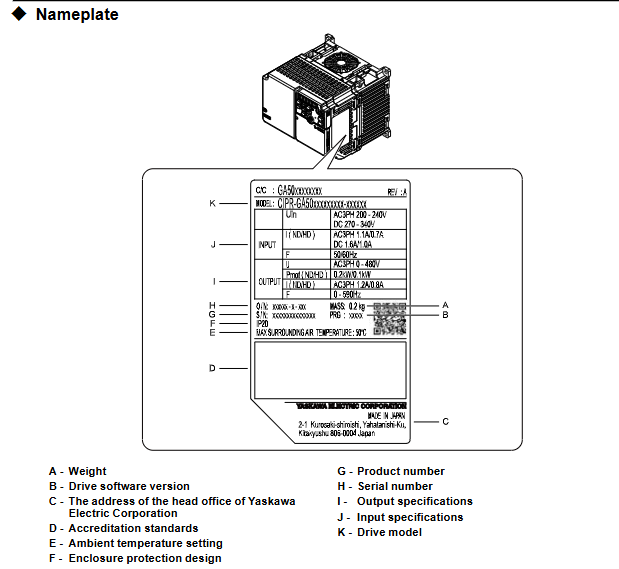
Model identification: CIPR-GA50Cxxxxxxxx, core specifications are classified as follows:
Voltage level, input type, power range, key parameters
200V single-phase 0.1-4.0 kW Max
200V C three-phase 0.1-22kW speed control range 1:40~1:100
400V level three-phase 0.37-30 kW protection level IP20/UL open type
Core features: Supports 5 control modes, compatible with induction motors, PM motors (including IPM/SPM), and synchronous reluctance motors (SynRM), with functions such as automatic tuning, energy saving, and dynamic braking.
Wiring requirements:
Wire type: Shielded twisted pair cables are required for control circuits to avoid electromagnetic interference;
Length limit: Control circuit wiring ≤ 50m, Safe Disable input wiring ≤ 30m;
Isolation requirements: The distance between the control circuit and the main circuit should be ≥ 30cm, avoiding parallel wiring, and the shielding layer should be grounded at one end (driver side).
(3) Special wiring precautions
Braking resistor: can only be connected to terminals B1 and B2, and+1 or - terminals are prohibited. ERF type braking resistors need to be set with parameter L8-01=1;
EMC filter: The built-in filter model (suffix E) needs to be grounded to the neutral line, otherwise it may cause leakage exceeding the standard;
Lightning protection and surge: MCCB (molded case circuit breaker) or RCM/RCD (residual current monitor) should be installed at the input end to avoid short circuit and surge damage.
Startup and Debugging Process
1. Operation preparation
(1) Parameter settings
General Setting Mode (SrUP): Contains 26 core parameters, including control mode (A1-02), acceleration and deceleration time (C1-01/C1-02), motor rated parameters (E2-01~E2-04), load type (C6-01), etc., suitable for quick configuration;
Application Preset (A1-06): To automatically optimize parameters for specific scenarios such as fans, pumps, and cranes, it is necessary to first initialize the parameters through A1-03 (2-wire/3-wire system);
Parameter backup and recovery: Parameters can be backed up locally through the keyboard, and can be quickly written when changing drives to avoid duplicate configurations.
(2) Keyboard operation
Mode switching: LOCAL (keyboard control)/REMOTE (external control) can be switched through the LO/RE keys. Before switching, ensure that there are no running commands to avoid sudden startup;
Core button functions:
RUN/STOP: Start/Stop, STOP key has the highest priority (can be disabled through o2-02);
Arrow keys: adjust parameter values or switch menus;
ESC/ENTER: Return to the previous menu/confirm parameter settings;
RESET: Reset the fault (the cause of the fault needs to be eliminated first).
2. Auto Tuning
(1) Tuning type and applicable scenarios
Core Requirements for Parameter Setting of Motor Type Tuning Method
Induction motor rotation tuning T1-01=0, motor disconnected from load, load rate ≤ 30%, motor nameplate parameters need to be input
Induction motor static tuning T1-01=1. The motor cannot rotate. During the tuning period, the motor does not rotate without power and only detects electrical parameters
Induction motor inter line resistance tuning T1-01=2 wiring distance exceeds 50m, compensating for the influence of line resistance
PM motor rotation tuning T2-01=4 motor disengages load, automatically detects stator resistance, d/q-axis inductance and other parameters
PM motor static tuning T2-01=1 motor fixed, suitable for scenarios where the load cannot be disconnected
PM motor high-frequency injection tuning T2-01=5 is only applicable to IPM motors, and the motor nameplate parameters need to be input first
Control circuit deceleration rate tuning T3-00=2 automatically optimizes deceleration time to prevent overvoltage faults
Control circuit KEB tuning T3-00=3 optimizes dynamic braking parameters and adapts to KEB Ride Thru function
(2) Tuning operation steps
Input the motor nameplate parameters (rated power, voltage, current, number of poles, fundamental frequency);
Confirm that the motor is disconnected from the load (rotation tuning) or firmly fixed (static tuning);
Enter Auto Tuning mode (AfUn) through the keyboard and select the corresponding tuning type;
Start tuning, during the rotation tuning period, the motor will rotate (at a speed of about 50% of the rated speed), and personnel are prohibited from approaching;
After tuning is completed, the system automatically updates the motor parameters, and the modification results can be viewed through the Verify menu.
3. Test Run
(1) No load test
Operation process: Set the frequency to 6Hz → Start the driver → Gradually increase the rated frequency (10Hz each time) → Observe the motor status;
Inspection items: Motor direction (if incorrect, replace U/T1 and V/T2 wiring), vibration (no abnormal shaking), output current (≤ 30% of rated current), no abnormal noise.
(2) Load testing
Operation process: Connect the load → Set the actual operating frequency → Start the driver → Run continuously for more than 30 minutes;
Inspection items: acceleration/deceleration response (no lag), torque output (meeting load requirements), driver temperature (≤ 85 ℃), parameter stability (no drift);
Fine tuning optimization: If vibration occurs, adjust n1-02 (anti oscillation gain), if torque is insufficient, adjust C4-01 (torque compensation gain), and if overvoltage occurs, extend deceleration time (C1-02).
(3) Test Run Checklist
Power supply voltage: The input voltage is within the allowable range on the driver nameplate;
Wiring correctness: The phase sequence of the main circuit and the polarity of the control circuit signal are correct;
Protection function: Simulate overload and overcurrent scenarios, the driver needs to trigger protection and alarm normally;
- OMRON
- ABB
- General Electric
- EMERSON
- Honeywell
- HIMA
- ALSTOM
- Rolls-Royce
- MOTOROLA
- Rockwell
- Siemens
- Woodward
- YOKOGAWA
- FOXBORO
- KOLLMORGEN
- MOOG
- KB
- YAMAHA
- BENDER
- TEKTRONIX
- Westinghouse
- AMAT
- AB
- XYCOM
- Yaskawa
- B&R
- Schneider
- KONGSBERG
- NI
- WATLOW
- ProSoft
- SEW
- ADVANCED
- Reliance
- TRICONEX
- METSO
- MAN
- Advantest
- STUDER
- DANAHER MOTION
- Bently
- Galil
- EATON
- MOLEX
- DEIF
- B&W
- ZYGO
- Aerotech
- DANFOSS
- Beijer
- Moxa
- Rexroth
- Johnson
- WAGO
- TOSHIBA
- BMCM
- SMC
- HITACHI
- HIRSCHMANN
- Application field
- XP POWER
- CTI
- TRICON
- STOBER
- Thinklogical
- Horner Automation
- Meggitt
- Fanuc
- Baldor
- SHINKAWA
- Other Brands
- UniOP
- KUKA
- Iba
- Beckhoff
- ADLINK
-
 Sigmatek MDD111-1 DIAS Drive Axis Module
 -
 Sigmatek DKL042 05-024-042 Terminal Module
 -
 Sigmatek DM822 Control Module
 -
 Sigmatek CDM167 12-008-167-O Module
 -
 Sigmatek TAE151 Touch Display Unit
 -
 Sigmatek DCC041 SLIDES Module 05-700-041-D
 -
 Sigmatek AKM65M-ANC2GBB0 PM Servo Motor
 -
 Sigmatek ETT221 01-230-221 Operator Terminal
 -
 Sigmatek SLIDES DAM 124 Analog Module
 -
Sigmatek AKM31C-ANCNGBB0 Servo Motor
-
 Mannesmann Demag Sigmatek CP626 Central Unit
 -
 SIGMATEK 0332.554.03 Board 371071000154
 -
 SIGMATEK 12-250-021 Base Plate Back Panel CM5V020
 -
 SIGMATEK DM162 S-DIAS Digital Mix Module
 -
 DEMAG ERGOTECH 061 381 66 Sigmatek 9842.243.02 Circuit Board
 -
 SIGMATEK CP313-1 PLC Module
 -
Sigmatek ETV0551-2 VARAN Touch Terminal
-
 Sigmatek SDM 081 FS S-Dias Safety Module
 -
 DEMAG 05-250-023 Ergotech Motherboard with Sigmatek TMS012
 -
Sigmatek CM5V020 12-250-023-K Wiring Base
-
 Sigma Tek 5000B-37 Attitude Gyro Indicator
 -
 Sigmatek SDD120-2 DIAS Drive
 -
 Sigmatek CME221 Memory Module
 -
 Sigmatek DCP640 DIAS Central Unit
 -
 Sigmatek STO040 Safety Output Module
 -
Sigmatek CET281 Control Panel
-
 Sigmatek CIPC LX800 Demag NC5 CPU
 -
 Sigmatek DKL093 05-024-093 Terminal Module
 -
 Sigmatek AI088 20-009-088 Analog Input Module
 -
Sigmatek CAI888 Analog Input Module
-
SIGMATEK CCA021 12-025-021 Analog Output Module
-
SIGMATEK 1104.579.05 Control Module
-
SIGMATEK SDI100 Digital Input Module
-
 SIGMATEK C-IPC 256MB LX800 Compact Dias
 -
 SIGMATEK 9423.090.02 Control Module
 -
SIGMATEK C-IPC 256 Power Supply 148498
-
 SIGMATEK CAI025 Analog Input Module
 -
 SIGMATEK CTO166 Digital Output Module
 -
 SIGMATEK CP112 20-004-112 Processor Module
 -
SIGMATEK CAI887 12-009-887 Safety Module
-
 Sigma-Tek 4000B-31 Directional Gyro 1U262-002-42
 -
Sigmatek C-IPC 256MB LX800 IPC Controller
-
Sigmatek C-IPC 01-450-031 Industrial PC LX800
-
Sigmatek C-IPC 256 Industrial PC Controller
-
Sigmatek CCP-531 PLC Processor Module
-
Sigmatek CDI163 Digital Input Module
-
 Sigmatek ETV0501 VARAN Terminal 12-230-0501
 -
 Sigmatek CTMS020 C-DIAS Technology Module
 -
 Sigmatek CIV512 VARAN Switch Module
 -
 Sigmatek HU011 20-080-011 Interface Module
 -
SIGMATEK SLIDES DAM 124 Module
-
 SIGMATEK C-IPC 161 01-450-161L Industrial PC
 -
SIGMATEK C-IPC 128MB VIA 733MHz 01-450-024-K
-
 SIGMATEK 12-780-012 R8-IPC Geode LX800 Module
 -
SIGMATEK CAM124 Analog Module
-
 SIGMATEK S1 032-8AF61-R4 EZ Servo Motor
 -
 SIGMATEK CTO163 Digital Output Module
 -
 SIGMATEK CCP082 12-004-082 Processor Module
 -
 SIGMATEK CRCH081 C-DIAS Temperature Module
 -
 SIGMATEK PC322-K 01-310-322-K Industrial PC
 -
SIGMATEK SDD310-2 Servo Drive
-
 SIGMATEK AI084 Analog Input Module
 -
SIGMATEK CRCH081 12-752-081 Temperature Module
-
Sigma-Tek 5000L-4 Attitude Gyro 1U284-001-3
-
 SIGMATEK CM5V020 12-250-023-K Wiring Module
 -
Sigma-Tek 4000H-6 Directional Gyro IU262-035-7
-
 SIGMATEK Dias DCP160 05-004-160 Processor Module
 -
SIGMATEK 0147.395.02 Control Module
-
SIGMATEK A1084 Control Module
-
SIGMATEK DI200 20-006-2000 Digital Input Module
-
Sigmatek DNC115 Encoder Module
-
 Sigmatek DAM122 05-017-122 Analog Module
 -
Sigmatek 9802.289.01 Control Board TA71 Display
-
Sigmatek TO127 20-007-127 Digital Output Module
-
Sigmatek DNC031 05-011-031 Digital Module
-
Sigmatek VI022 20-003-022 Interface Module
-
Sigmatek CAI085 Analog Input Module
-
 Sigmatek CP111 S-DIAS CPU Module
 -
Sigmatek CTMS030 Krauss Maffei Module
-
 Sigmatek CAM123 Control Module
 -
 Sigmatek TAE732-P 01-240-732-P Touch Display Unit
 -
Sigmatek MDM021 Digital Mixed Module
-
Sigmatek DCP642 DIAS Central Unit
-
 Sigmatek CST022 12-014-022 C-DIAS Module
 -
 Sigmatek SRO021 20-893-021 Safety Relay Output
 -
 Krauss Maffei MC5 Control System Sigmatek
 -
 Sigmatek DC061 Module 18-24VDC 300mA
 -
 Herrmann EVT0855 Ultrasonic Welder Touch Panel
 -
Sigmatek CIV521 Control Module 1.4A 2W
-
Sigmatek DDI61 05-006-161 Digital Input Module
-
SIGMATEK ETT312-E Touch Terminal 01-230-312
-
Cessna S3326-1 Sigma Tek 5000B-67 Gyro 1U149-015-9
-
SIGMATEK PS101 Power Supply Module
-
SIGMATEK 0332.554.03 Control Module 371071000154
-
 SIGMATEK ETT312-E Touch Terminal 01-230-312
 -
SIGMATEK CDM163 Control Module
-
 SIGMATEK VSV046 16-023-046 Module
 -
SIGMATEK AM221 20-017-221 Analog Module
-
SIGMATEK CTS051 12-053-051 Control Module
-
SIGMATEK AM221 20-017-221 Analog Module
-
Sigmatek CSDI161 12-891-161 Safety Input Module
-
Sigma Tek 4000C-1 Directional Gyro Indicator
-
Sigmatek ETV0501 12-230-0501 VARAN Terminal
-
Sigmatek DDM165 SLIDES Module
-
Sigmatek N100 20-011-100 Control Module
-
Sigmatek AKM54K-ANC2R-B0 PM Servo Motor
-
Sigmatek CTO166 Digital Output Module
-
Sigmatek CP212-K 20-004-212-K CPU Module
-
Sigmatek CDI161 Digital Input Module
-
Sigmatek DCC080 05-700-080-2 Control Module
-
 SIGMATEK SCP011 S-DIAS Safety CPU
 -
SIGMATEK SCP011 S-DIAS Safety CPU
-
SIGMATEK SRO022 Relay Output Module
-
SIGMATEK MDD 121 Drive Axis Module
-
SIGMATEK DSI021 SLIDES Siemens Interface
-
SIGMATEK DIAS DCP161 Module 05-004-161
-
 Sigmatek ETT312 Built-in Touch Terminal
 -
SIGMATEK DCP 643 DIAS Controller System
-
SIGMATEK CIO021 Multi I/O Module
-
SIGMATEK CTMS020 Control Module
-
 Sigmatek CME 221 Memory Module
 -
Sigmatek 0420.615.01 Control Board
-
Sigmatek CP111 20-004-111 CPU Module
-
Sigmatek 9405.065.03 Control Board
-
Sigmatek ETEK 01-450-032-K C-IPC 256MB Industrial PC
-
Sigmatek CTO163 12-007-163 Safety Output Module
-
Sigmatek TO081 20-007-081 Digital Output Module
-
 Sigmatek SI021 20-022-021 Safety Input Module


