
YASKAWA GA700 series AC frequency converter
YASKAWA GA700 series AC frequency converter
Core positioning
The YASKAWA GA700 series high-performance AC frequency converter is designed for electrical engineers and technicians with experience in frequency converter installation, commissioning, and maintenance. Its core covers the entire process of safety specifications, mechanical/electrical installation, startup settings, parameter configuration, fault diagnosis, and scrap disposal for 200V (0.55-110kW) and 400V (0.55-355kW) models, emphasizing compliant operation and risk prevention. It provides precise guidance for motor speed and steering control in industrial scenarios and is suitable for general machinery and high-precision control equipment such as fans, pumps, conveyors, extruders, etc.
Product Core Parameter System
(1) Power supply and power specifications
Model level, power range, input voltage, input frequency, adaptation circuit requirements
200V level 0.55-110kW single-phase/three-phase 200-240VAC (+10%/-15%) 50/60Hz maximum symmetrical current 100000 RMS, suitable for circuits below 240VAC
400V level 0.55-355kW three-phase 380-480VAC (+10%/-15%) 50/60Hz maximum symmetrical current 100000 RMS, suitable for circuits below 480VAC
(2) Environmental and Protection Parameters
Remarks on specific requirements for environmental categories
Operating temperature open type (IP20): -10~50 ℃; Closed type (UL Type 1): -10~40 ℃, if the temperature exceeds 50 ℃, the capacity should be reduced to avoid freezing and condensation
Storage temperature -20~70 ℃ (short-term transportation)-
Relative humidity ≤ 95% RH (no condensation, no freezing)-
Neutral grounding should be consulted with the manufacturer for elevations ≤ 1000m (1% capacity reduction per 100m for 1000-3000m) and above 2000m
Pollution level ≤ 2 should be kept away from dust, oil stains, corrosive gases, and metal powders
Vibration/shock vibration: 10-20Hz (1G), 20-55Hz (0.2-0.6G); Impact: 0.2-0.6G needs to be firmly fixed to avoid resonance
(3) Core performance indicators
Control mode: supports three modes: V/f control, open-loop vector (OLV), and EZ vector (EZOLV)
Overload capacity: Heavy Duty (HD) 150% rated current/60s; Normal Duty (ND) 110% rated current/60s
Carrier frequency: 2kHz-15kHz adjustable, supports Swing PWM noise reduction mode
Speed range: V/f mode 1:40, OLV mode 1:100 (constant torque)
Analog input/output: Input 0-10V/4-20mA, output 0-10V/-10~+10V/4-20mA
Safety regulatory system (top priority)
(1) Risk level definition and core requirements
Risk level, risk degree, typical scenarios, and operational requirements
DANGER causes death/serious injury. 1. Live wiring/maintenance: Power must be cut off and wait for the capacitor to discharge (indicator light off, DC bus voltage<50Vdc); 2. Internal capacitance: It may still be charged after power failure, and it is necessary to wait for the warning label to specify the time
Warning: May cause death/serious injury. 1. Wiring error: The power supply cannot be connected to the output terminal (U/T1/V/T2/W/T3), and the input terminal (R/L1/S/L2/T/L3) needs to be connected; 2. Grounding requirements: The grounding terminal on the motor side must be grounded, and the cross-sectional area of the grounding wire for models such as 4389A-4675A must be ≥ 10mm ² (copper)/16mm ² (aluminum); 3. Sudden startup: Auto Unity, clear personnel/obstacles around the device before switching modes
CAUTION may cause minor/moderate injury. 1. High temperature risk: The temperature of the heat sink is high after operation, and maintenance requires power off and waiting for 15 minutes for cooling; 2. Handling specifications: For weights ≥ 15kg, 2 people and lifting equipment are required. It is prohibited to grip the front cover/terminal cover
NOTICE may cause equipment damage. 1. Cable requirements: Shielded twisted pair cables are required for the control circuit to avoid electromagnetic interference; 2. Prohibited testing: Voltage withstand testing or megohmmeter testing cannot be performed on the frequency converter; 3. Output side taboo: Do not connect phase leading capacitors or LC/RC filters
(2) Special safety requirements
Flammable material protection: The frequency converter should be installed on non combustible materials such as metal, and there should be no flammable materials around it
Terminal tightening: Tighten the terminal screws (3.6-41.5N · m) to the specified torque to avoid loosening and causing a fire
Residual current protection: Type B residual current monitor (RCM/RCD) is required, in compliance with IEC/EN 60755 standard
3-wire control safety: b1-17=0 needs to be set (ignore RUN command when powered on) to avoid misconnection causing motor reversal
Installation specification system
(1) Mechanical installation
1. Installation method and spacing
Installation direction: Priority should be given to vertical installation (to ensure natural heat dissipation), and special models should consult the manufacturer for side installation
Spacing requirements (single machine): up and down ≥ 120mm, left and right ≥ 30mm, front ≥ 50mm; parallel installation (2004xB-2082xB/4002xB-4044xB): driver spacing ≥ 2mm, L8-35=1 needs to be set (parallel installation mode)
Fixed requirement: Tighten with 10.9 grade hex screws to avoid vibration loosening
2. Disassembly and installation process of cover plate
Disassembly steps: 1 Press the hook at the top of the keyboard to remove the keyboard, disconnect the connector, and place it in the hook; 2. Loosen the screws on the front cover, unlock the side buckle, and remove the front cover; 3. Loosen the terminal cover screws, pull down and remove the terminal cover forward
Installation steps: 1 After wiring is completed, reset the terminal cover and tighten the screws to the specified torque; 2. Reset the front cover and fix the screws; 3. Remove the keyboard connector, insert the driver interface, and press the top buckle of the keyboard to secure it
(2) Electrical installation
1. Circuit wiring requirements
Circuit Type Wiring Specification Core Terminals and Functions
Main circuit 1. Cable: The power line uses HIV series heat-resistant polyvinyl chloride insulated wire with a cross-section of ≥ 0.75mm ² (control circuit); 2. Wiring sequence: power supply → input terminals (R/L1/S/L2/T/L3) → frequency converter → output terminals (U/T1/V/T2/W/T3) → motor; 3. Braking unit: For models with built-in braking transistors, connect to B1/- terminal; for models without built-in transistors, connect to+3/- terminal -: DC bus negative terminal; +1/+2: DC reactor terminal; B1/B2: Braking resistor terminal
Control circuit 1. Cable: shielded twisted pair, up to 3m in length, with a distance of ≥ 30cm from the power line; 2. Grounding: single end grounding of the shielding layer, control circuit grounding not shared with the driver housing; 3. Power supply: External 24Vdc power supply connected to PS (+)/AC (-), cannot be reversed S1-S8: multifunctional input terminal; A1-A3: Analog input terminals; FM/AM: Analog output terminal; MA-MC: Fault relay output
2. Cable specifications and crimping terminals
Terminal type Bare wire specification (mm ²/AWG) Crimping terminal specification (mm ²/AWG) Recommended crimping tool
S1-S8, A1-A3 and other control terminals 0.2-1.5 (24-16) 0.25-0.5 (24-20) PHOENIX CONTACT CRIMPFOX 6
3. Key taboos for wiring
Do not connect AC power to DC bus terminals (-,+1,+2, B1, B2)
Do not short-circuit the SP (source) and SN (drain) terminals to avoid damaging the driver
The analog input terminals (+V, - V, AC) cannot be short circuited, and the maximum output current is 20mA
When the length of the motor cable exceeds 100m or the input voltage is ≥ 440V, a dedicated frequency converter motor should be used and the insulation voltage should be monitored
Startup and parameter configuration system
(1) Keyboard operation and mode switching
1. Core components and functions of keyboard
Component Name Function Description Operation Points
RUN/STOP button local mode start stop motor; The STOP key can still be forcibly stopped in remote mode with priority (disabled through o2-02)
The LO/RE key needs to switch between local/remote modes when the motor is stopped, and o2-01 can disable this function
RESET button fault reset; Move the cursor to the right; Press this key to reset when entering the next level menu fault state. The fault source needs to be removed first
Function keys (F1-F3) are used to customize functions, and the function names marked at the bottom of the display window can be configured through parameter settings for corresponding functions (such as parameter backup and monitoring switching)
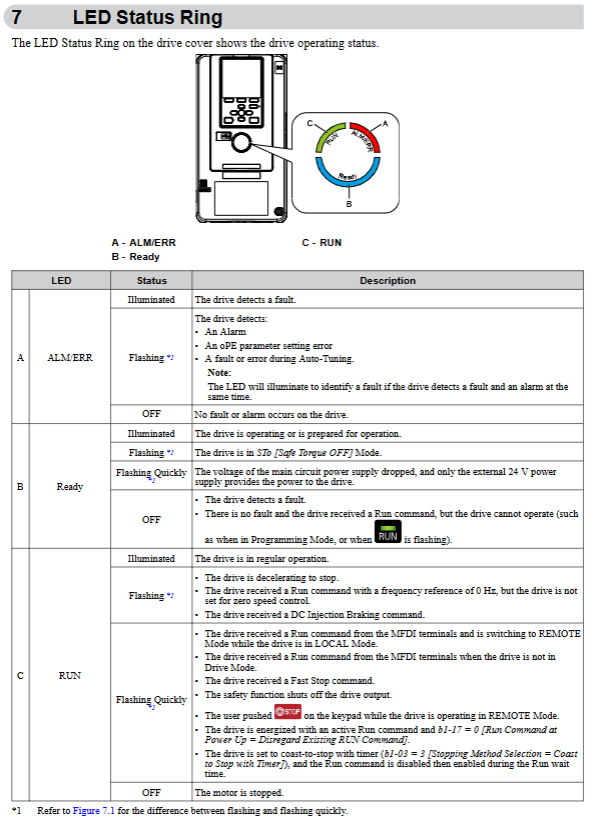
The LED indicator lights RUN, ALM (fault/alarm), LO/RE (mode) are always on to indicate a fault, and flashing to indicate an alarm; RUN flashing indicates deceleration/zero speed
2. Core Mode Description
LOCAL mode: keyboard controls speed and start stop, frequency reference is set by keyboard (d1-01)
REMOTE mode: External terminal or communication control, frequency reference (b1-01) and start stop command (b1-02) are input from external sources
Mode switching condition: The motor must stop and cannot be switched when there is a RUN command in remote mode
(2) Initialize boot process
Preparation work: Confirm that the installation and wiring are correct, enter the motor nameplate parameters (rated power, voltage, current, frequency, number of poles)
Power on startup: Connect the power supply, and the drive enters the initial settings interface (first power on). If it is not displayed, call it up through Menu → F2 → Initial Setup
Basic settings:
Language selection (A1-00): Supports 13 languages including Chinese and English
Date and time setting: CR2016 battery (3V, lifespan of 2 years) needs to be installed
Setup Wizard Run: Follow the prompts to complete basic configurations such as control mode, duty mode, acceleration/deceleration time, etc
Auto Tuning tuning:
Rotational tuning (T1-01=0): It needs to be disconnected from the motor load, with the highest tuning accuracy, and the motor speed should be above 50% of the rated frequency
Static tuning (T1-01=1): does not require detachment from the load, automatically calculates motor parameters, suitable for scenarios where the load cannot be removed
EZ tuning (T4-01): only applicable to EZOLV control (A1-02=8), simplifies parameter settings
Trial operation verification:
No load operation: Confirm that the motor direction is correct, there is no abnormal vibration or noise, and the monitoring current/voltage is normal
Loading and running: gradually increase the load, verify overload capacity, acceleration/deceleration smoothness, fine tune PID and other application parameters
(3) Core parameter configuration
1. Control mode parameters (A1-02)
Control mode parameter setting applicable scenarios core advantages
V/f control 0 fan, pump, and multi motor linkage; Strong universality, high stability, and simple setup without motor parameters
Open loop vector (OLV) 2 high-precision speed control, low-speed high torque scenarios (such as conveyors) without speed feedback, speed range 1:100
EZ Vector (EZOLV) 8 ordinary variable speed scenarios, without the need for fine tuning to simplify operations, balancing performance and usability
2. High frequency core parameters
Parameter code, parameter name, function description, typical settings
C1-01/C1-02 Acceleration Time 1/Deceleration Time 1 Time from 0 to maximum frequency (E1-04) 10.0s (default, the heavier the load, the longer the time)
C6-01 duty mode selection switches between constant torque/variable torque mode 0 (HD, constant torque); 1 (ND, variable torque)
E1-04 maximum output frequency V/f curve maximum frequency 50Hz/60Hz (matching grid frequency)
E2-01 motor rated current matching motor nameplate current entered according to actual motor parameters (such as 10A)
L1-01 motor overload protection electronic thermal protection mode 2 (constant torque 10:1 speed range); 1 (Variable torque)
Select Ramp stop/Free stop/DC brake 0 (Ramp stop, default) as the stopping mode for b1-03; 1 (Free Stop)
3. Comparison of Duty Modes
Duty mode is suitable for load overload capacity and typical applications of carrier frequency
Heavy Duty (HD) Constant Torque Load 150% Rated Current/60s 2kHz (Default) Extruder, Conveyor, Machine Tool
Normal Duty (ND) variable torque load 110% rated current/60s 2kHz Swing PWM fan, pump blower
- OMRON
- ABB
- General Electric
- EMERSON
- Honeywell
- HIMA
- ALSTOM
- Rolls-Royce
- MOTOROLA
- Rockwell
- Siemens
- Woodward
- YOKOGAWA
- FOXBORO
- KOLLMORGEN
- MOOG
- KB
- YAMAHA
- BENDER
- TEKTRONIX
- Westinghouse
- AMAT
- AB
- XYCOM
- Yaskawa
- B&R
- Schneider
- KONGSBERG
- NI
- WATLOW
- ProSoft
- SEW
- ADVANCED
- Reliance
- TRICONEX
- METSO
- MAN
- Advantest
- STUDER
- DANAHER MOTION
- Bently
- Galil
- EATON
- MOLEX
- DEIF
- B&W
- ZYGO
- Aerotech
- DANFOSS
- Beijer
- Moxa
- Rexroth
- Johnson
- WAGO
- TOSHIBA
- BMCM
- SMC
- HITACHI
- HIRSCHMANN
- Application field
- XP POWER
- CTI
- TRICON
- STOBER
- Thinklogical
- Horner Automation
- Meggitt
- Fanuc
- Baldor
- SHINKAWA
- Other Brands
- UniOP
- KUKA
- Iba
- Beckhoff
- ADLINK
-
 Sigmatek MDD111-1 DIAS Drive Axis Module
 -
 Sigmatek DKL042 05-024-042 Terminal Module
 -
 Sigmatek DM822 Control Module
 -
 Sigmatek CDM167 12-008-167-O Module
 -
 Sigmatek TAE151 Touch Display Unit
 -
 Sigmatek DCC041 SLIDES Module 05-700-041-D
 -
 Sigmatek AKM65M-ANC2GBB0 PM Servo Motor
 -
 Sigmatek ETT221 01-230-221 Operator Terminal
 -
 Sigmatek SLIDES DAM 124 Analog Module
 -
Sigmatek AKM31C-ANCNGBB0 Servo Motor
-
 Mannesmann Demag Sigmatek CP626 Central Unit
 -
 SIGMATEK 0332.554.03 Board 371071000154
 -
 SIGMATEK 12-250-021 Base Plate Back Panel CM5V020
 -
 SIGMATEK DM162 S-DIAS Digital Mix Module
 -
 DEMAG ERGOTECH 061 381 66 Sigmatek 9842.243.02 Circuit Board
 -
 SIGMATEK CP313-1 PLC Module
 -
Sigmatek ETV0551-2 VARAN Touch Terminal
-
 Sigmatek SDM 081 FS S-Dias Safety Module
 -
 DEMAG 05-250-023 Ergotech Motherboard with Sigmatek TMS012
 -
Sigmatek CM5V020 12-250-023-K Wiring Base
-
 Sigma Tek 5000B-37 Attitude Gyro Indicator
 -
 Sigmatek SDD120-2 DIAS Drive
 -
 Sigmatek CME221 Memory Module
 -
 Sigmatek DCP640 DIAS Central Unit
 -
 Sigmatek STO040 Safety Output Module
 -
Sigmatek CET281 Control Panel
-
 Sigmatek CIPC LX800 Demag NC5 CPU
 -
 Sigmatek DKL093 05-024-093 Terminal Module
 -
 Sigmatek AI088 20-009-088 Analog Input Module
 -
Sigmatek CAI888 Analog Input Module
-
SIGMATEK CCA021 12-025-021 Analog Output Module
-
SIGMATEK 1104.579.05 Control Module
-
SIGMATEK SDI100 Digital Input Module
-
 SIGMATEK C-IPC 256MB LX800 Compact Dias
 -
 SIGMATEK 9423.090.02 Control Module
 -
SIGMATEK C-IPC 256 Power Supply 148498
-
 SIGMATEK CAI025 Analog Input Module
 -
 SIGMATEK CTO166 Digital Output Module
 -
 SIGMATEK CP112 20-004-112 Processor Module
 -
SIGMATEK CAI887 12-009-887 Safety Module
-
 Sigma-Tek 4000B-31 Directional Gyro 1U262-002-42
 -
Sigmatek C-IPC 256MB LX800 IPC Controller
-
Sigmatek C-IPC 01-450-031 Industrial PC LX800
-
Sigmatek C-IPC 256 Industrial PC Controller
-
Sigmatek CCP-531 PLC Processor Module
-
Sigmatek CDI163 Digital Input Module
-
 Sigmatek ETV0501 VARAN Terminal 12-230-0501
 -
 Sigmatek CTMS020 C-DIAS Technology Module
 -
 Sigmatek CIV512 VARAN Switch Module
 -
 Sigmatek HU011 20-080-011 Interface Module
 -
SIGMATEK SLIDES DAM 124 Module
-
 SIGMATEK C-IPC 161 01-450-161L Industrial PC
 -
SIGMATEK C-IPC 128MB VIA 733MHz 01-450-024-K
-
 SIGMATEK 12-780-012 R8-IPC Geode LX800 Module
 -
SIGMATEK CAM124 Analog Module
-
 SIGMATEK S1 032-8AF61-R4 EZ Servo Motor
 -
 SIGMATEK CTO163 Digital Output Module
 -
 SIGMATEK CCP082 12-004-082 Processor Module
 -
 SIGMATEK CRCH081 C-DIAS Temperature Module
 -
 SIGMATEK PC322-K 01-310-322-K Industrial PC
 -
SIGMATEK SDD310-2 Servo Drive
-
 SIGMATEK AI084 Analog Input Module
 -
SIGMATEK CRCH081 12-752-081 Temperature Module
-
Sigma-Tek 5000L-4 Attitude Gyro 1U284-001-3
-
 SIGMATEK CM5V020 12-250-023-K Wiring Module
 -
Sigma-Tek 4000H-6 Directional Gyro IU262-035-7
-
 SIGMATEK Dias DCP160 05-004-160 Processor Module
 -
SIGMATEK 0147.395.02 Control Module
-
SIGMATEK A1084 Control Module
-
SIGMATEK DI200 20-006-2000 Digital Input Module
-
Sigmatek DNC115 Encoder Module
-
 Sigmatek DAM122 05-017-122 Analog Module
 -
Sigmatek 9802.289.01 Control Board TA71 Display
-
Sigmatek TO127 20-007-127 Digital Output Module
-
Sigmatek DNC031 05-011-031 Digital Module
-
Sigmatek VI022 20-003-022 Interface Module
-
Sigmatek CAI085 Analog Input Module
-
 Sigmatek CP111 S-DIAS CPU Module
 -
Sigmatek CTMS030 Krauss Maffei Module
-
 Sigmatek CAM123 Control Module
 -
 Sigmatek TAE732-P 01-240-732-P Touch Display Unit
 -
Sigmatek MDM021 Digital Mixed Module
-
Sigmatek DCP642 DIAS Central Unit
-
 Sigmatek CST022 12-014-022 C-DIAS Module
 -
 Sigmatek SRO021 20-893-021 Safety Relay Output
 -
 Krauss Maffei MC5 Control System Sigmatek
 -
 Sigmatek DC061 Module 18-24VDC 300mA
 -
 Herrmann EVT0855 Ultrasonic Welder Touch Panel
 -
Sigmatek CIV521 Control Module 1.4A 2W
-
Sigmatek DDI61 05-006-161 Digital Input Module
-
SIGMATEK ETT312-E Touch Terminal 01-230-312
-
Cessna S3326-1 Sigma Tek 5000B-67 Gyro 1U149-015-9
-
SIGMATEK PS101 Power Supply Module
-
SIGMATEK 0332.554.03 Control Module 371071000154
-
 SIGMATEK ETT312-E Touch Terminal 01-230-312
 -
SIGMATEK CDM163 Control Module
-
 SIGMATEK VSV046 16-023-046 Module
 -
SIGMATEK AM221 20-017-221 Analog Module
-
SIGMATEK CTS051 12-053-051 Control Module
-
SIGMATEK AM221 20-017-221 Analog Module
-
Sigmatek CSDI161 12-891-161 Safety Input Module
-
Sigma Tek 4000C-1 Directional Gyro Indicator
-
Sigmatek ETV0501 12-230-0501 VARAN Terminal
-
Sigmatek DDM165 SLIDES Module
-
Sigmatek N100 20-011-100 Control Module
-
Sigmatek AKM54K-ANC2R-B0 PM Servo Motor
-
Sigmatek CTO166 Digital Output Module
-
Sigmatek CP212-K 20-004-212-K CPU Module
-
Sigmatek CDI161 Digital Input Module
-
Sigmatek DCC080 05-700-080-2 Control Module
-
 SIGMATEK SCP011 S-DIAS Safety CPU
 -
SIGMATEK SCP011 S-DIAS Safety CPU
-
SIGMATEK SRO022 Relay Output Module
-
SIGMATEK MDD 121 Drive Axis Module
-
SIGMATEK DSI021 SLIDES Siemens Interface
-
SIGMATEK DIAS DCP161 Module 05-004-161
-
 Sigmatek ETT312 Built-in Touch Terminal
 -
SIGMATEK DCP 643 DIAS Controller System
-
SIGMATEK CIO021 Multi I/O Module
-
SIGMATEK CTMS020 Control Module
-
 Sigmatek CME 221 Memory Module
 -
Sigmatek 0420.615.01 Control Board
-
Sigmatek CP111 20-004-111 CPU Module
-
Sigmatek 9405.065.03 Control Board
-
Sigmatek ETEK 01-450-032-K C-IPC 256MB Industrial PC
-
Sigmatek CTO163 12-007-163 Safety Output Module
-
Sigmatek TO081 20-007-081 Digital Output Module
-
 Sigmatek SI021 20-022-021 Safety Input Module


