
How to troubleshoot Yokogawa OR8EFG KCl filled ORP sensor (IM12C07J01-01E)?
As a 'simple device', OR8EFG must meet the following compliance conditions before it can be used in hazardous areas:
Supporting equipment: It must be used in conjunction with transmitters with built-in isolation functions (such as FLXA202-D - □ - D-CB -...) or systems with isolation safety barriers to avoid risks introduced by non isolated circuits;
Temperature limit: Depending on the ambient temperature (Ta) and temperature level, the upper limit of the process temperature varies (for example, when T6 level Ta=40 ℃, FLXA202 can be used with an upper limit of 16 ℃); T3 level Ta=upper limit of 105 ℃ at 40 ℃);
Electrostatic protection: Avoid wiping the sensor with a dry cloth to prevent the accumulation of static electricity from causing explosions; The titanium material solution grounding terminal (- TN suffix) can eliminate the risk of impact friction sparks;
Installation and wiring process
1. Preparation before installation
(1) Unpacking and Inspection
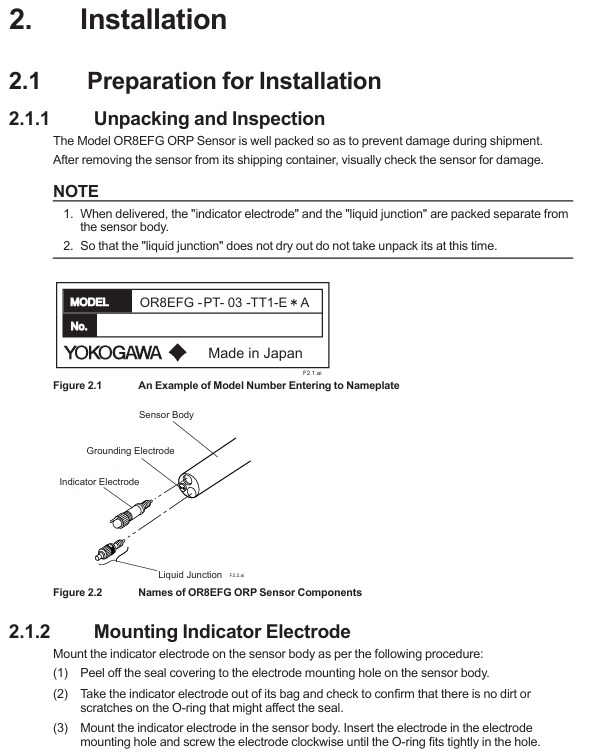
After unpacking, confirm that the sensor body, indicator electrode, liquid interface, and KCl storage tank (if ordered) are not damaged, and verify that the model suffix matches the order (such as electrode material and cable length);
The indicator electrode and the liquid interface are packaged separately, and the liquid interface should be kept moist. After unpacking, it should not be taken out temporarily to avoid drying and affecting performance;
Check the integrity of attachments: installation bracket (such as PH8HS), KCl solution/powder (accessory OR8AX contains 3 bags of 250mL powder), cable sealing glass, etc.
(2) Installation site selection requirements
Avoid installing in dead zones, bubble accumulation areas, or locations with high flow rates (>2 m/s) to prevent measurement response delays or electrode wear;
If the medium contains corrosive gases (such as ammonia and hydrogen sulfide) or the temperature is greater than 80 ℃, a flow-through or immersion bracket must be used and cannot be suspended separately;
The installation in hazardous areas must comply with local electrical regulations (such as ANSI/ISA-RP12.06.01), ensure that the grounding resistance is ≤ 1 Ω, and avoid potential difference sparks.
2. Core installation steps (taking a flow-through bracket as an example)
(1) Assembly of electrode and liquid interface
Installation indicator electrode: Remove the sealing tape from the installation hole of the sensor body electrode, take out the platinum/gold electrode, check that the O-ring is not damaged, and then screw it clockwise into the installation hole until the O-ring is tightly sealed;
Pre installed liquid interface: Remove the sealing tape from the installation hole of the liquid interface, gently screw the liquid interface into 2-3 turns (not tightened temporarily), and reserve a channel for filling with KCl solution;
Connect KCl storage tank: If it is a universal type (- TT1), fix the storage tank on a 2-inch pipe through a bracket, connect the KCl supply pipe of the sensor, and use the accompanying needle to puncture the top of the storage tank (balance air pressure); If it is a medium pressure type (- TT2), an external air pressure regulator (slightly higher than the maximum process pressure) is required, and an air pipeline should be connected.
(2) KCl solution filling
Invert the sensor (below the height of the storage tank) to allow KCl solution to flow from the storage tank into the sensor body;
When the solution overflows from the installation hole of the liquid interface, tighten the liquid interface clockwise (to avoid residual air) to complete the filling;
The medium pressure storage tank needs to be replenished to a distance of 30-40 mm from the top to prevent the solution from overflowing during pressurization.
(3) Bracket assembly and fixation
Remove the protective foam of the circulating bracket (PH8HF), insert the sensor tip into the bracket, and tighten the fixing nut (ensure the O-ring compression seal);
Connect the process pipeline: first open the inlet valve, then open the outlet valve to avoid medium impact on the sensor; Under medium pressure conditions, the storage tank needs to be pressurized first before the process medium is introduced.
3. Wiring specifications
The OR8EFG cable contains 4-core wires and needs to be connected to the transmitter (such as FLXA202) according to the terminal definition. The wiring method may vary slightly depending on the terminal type (pin/ring):
Corresponding terminal for cable core color function (taking FLXA202 as an example) Remarks
The red indicator electrode (GE) at terminal 15 is transmitting ORP signals, and it is necessary to ensure that the wiring is secure to avoid signal interference;
The brown reference electrode (RE) terminal 13 forms a measurement circuit with the indicator electrode and needs to be grounded separately;
The black liquid interface/grounding (SE) terminal 14 is used to eliminate the grounding potential difference and must be reliably grounded;
Connect the green common terminal (G) 16 to the transmitter common terminal to ensure the integrity of the circuit;
Cable sealing: When passing through the transmitter cable inlet, a matching glass should be used, and the nut should be tightened to the seal (to avoid damaging the cable due to over tightening);
- OMRON
- ABB
- General Electric
- EMERSON
- Honeywell
- HIMA
- ALSTOM
- Rolls-Royce
- MOTOROLA
- Rockwell
- Siemens
- Woodward
- YOKOGAWA
- FOXBORO
- KOLLMORGEN
- MOOG
- KB
- YAMAHA
- BENDER
- TEKTRONIX
- Westinghouse
- AMAT
- AB
- XYCOM
- Yaskawa
- B&R
- Schneider
- KONGSBERG
- NI
- WATLOW
- ProSoft
- SEW
- ADVANCED
- Reliance
- TRICONEX
- METSO
- MAN
- Advantest
- STUDER
- DANAHER MOTION
- Bently
- Galil
- EATON
- MOLEX
- DEIF
- B&W
- ZYGO
- Aerotech
- DANFOSS
- Beijer
- Moxa
- Rexroth
- Johnson
- WAGO
- TOSHIBA
- BMCM
- SMC
- HITACHI
- HIRSCHMANN
- Application field
- XP POWER
- CTI
- TRICON
- STOBER
- Thinklogical
- Horner Automation
- Meggitt
- Fanuc
- Baldor
- SHINKAWA
- Other Brands
- UniOP
- KUKA
- Iba
- Beckhoff
- ADLINK
-
 Sigmatek MDD111-1 DIAS Drive Axis Module
 -
 Sigmatek DKL042 05-024-042 Terminal Module
 -
 Sigmatek DM822 Control Module
 -
 Sigmatek CDM167 12-008-167-O Module
 -
 Sigmatek TAE151 Touch Display Unit
 -
 Sigmatek DCC041 SLIDES Module 05-700-041-D
 -
 Sigmatek AKM65M-ANC2GBB0 PM Servo Motor
 -
 Sigmatek ETT221 01-230-221 Operator Terminal
 -
 Sigmatek SLIDES DAM 124 Analog Module
 -
Sigmatek AKM31C-ANCNGBB0 Servo Motor
-
 Mannesmann Demag Sigmatek CP626 Central Unit
 -
 SIGMATEK 0332.554.03 Board 371071000154
 -
 SIGMATEK 12-250-021 Base Plate Back Panel CM5V020
 -
 SIGMATEK DM162 S-DIAS Digital Mix Module
 -
 DEMAG ERGOTECH 061 381 66 Sigmatek 9842.243.02 Circuit Board
 -
 SIGMATEK CP313-1 PLC Module
 -
Sigmatek ETV0551-2 VARAN Touch Terminal
-
 Sigmatek SDM 081 FS S-Dias Safety Module
 -
 DEMAG 05-250-023 Ergotech Motherboard with Sigmatek TMS012
 -
Sigmatek CM5V020 12-250-023-K Wiring Base
-
 Sigma Tek 5000B-37 Attitude Gyro Indicator
 -
 Sigmatek SDD120-2 DIAS Drive
 -
 Sigmatek CME221 Memory Module
 -
 Sigmatek DCP640 DIAS Central Unit
 -
 Sigmatek STO040 Safety Output Module
 -
Sigmatek CET281 Control Panel
-
 Sigmatek CIPC LX800 Demag NC5 CPU
 -
 Sigmatek DKL093 05-024-093 Terminal Module
 -
 Sigmatek AI088 20-009-088 Analog Input Module
 -
Sigmatek CAI888 Analog Input Module
-
SIGMATEK CCA021 12-025-021 Analog Output Module
-
SIGMATEK 1104.579.05 Control Module
-
SIGMATEK SDI100 Digital Input Module
-
 SIGMATEK C-IPC 256MB LX800 Compact Dias
 -
 SIGMATEK 9423.090.02 Control Module
 -
SIGMATEK C-IPC 256 Power Supply 148498
-
 SIGMATEK CAI025 Analog Input Module
 -
 SIGMATEK CTO166 Digital Output Module
 -
 SIGMATEK CP112 20-004-112 Processor Module
 -
SIGMATEK CAI887 12-009-887 Safety Module
-
 Sigma-Tek 4000B-31 Directional Gyro 1U262-002-42
 -
Sigmatek C-IPC 256MB LX800 IPC Controller
-
Sigmatek C-IPC 01-450-031 Industrial PC LX800
-
Sigmatek C-IPC 256 Industrial PC Controller
-
Sigmatek CCP-531 PLC Processor Module
-
Sigmatek CDI163 Digital Input Module
-
 Sigmatek ETV0501 VARAN Terminal 12-230-0501
 -
 Sigmatek CTMS020 C-DIAS Technology Module
 -
 Sigmatek CIV512 VARAN Switch Module
 -
 Sigmatek HU011 20-080-011 Interface Module
 -
SIGMATEK SLIDES DAM 124 Module
-
 SIGMATEK C-IPC 161 01-450-161L Industrial PC
 -
SIGMATEK C-IPC 128MB VIA 733MHz 01-450-024-K
-
 SIGMATEK 12-780-012 R8-IPC Geode LX800 Module
 -
SIGMATEK CAM124 Analog Module
-
 SIGMATEK S1 032-8AF61-R4 EZ Servo Motor
 -
 SIGMATEK CTO163 Digital Output Module
 -
 SIGMATEK CCP082 12-004-082 Processor Module
 -
 SIGMATEK CRCH081 C-DIAS Temperature Module
 -
 SIGMATEK PC322-K 01-310-322-K Industrial PC
 -
SIGMATEK SDD310-2 Servo Drive
-
 SIGMATEK AI084 Analog Input Module
 -
SIGMATEK CRCH081 12-752-081 Temperature Module
-
Sigma-Tek 5000L-4 Attitude Gyro 1U284-001-3
-
 SIGMATEK CM5V020 12-250-023-K Wiring Module
 -
Sigma-Tek 4000H-6 Directional Gyro IU262-035-7
-
 SIGMATEK Dias DCP160 05-004-160 Processor Module
 -
SIGMATEK 0147.395.02 Control Module
-
SIGMATEK A1084 Control Module
-
SIGMATEK DI200 20-006-2000 Digital Input Module
-
Sigmatek DNC115 Encoder Module
-
 Sigmatek DAM122 05-017-122 Analog Module
 -
Sigmatek 9802.289.01 Control Board TA71 Display
-
Sigmatek TO127 20-007-127 Digital Output Module
-
Sigmatek DNC031 05-011-031 Digital Module
-
Sigmatek VI022 20-003-022 Interface Module
-
Sigmatek CAI085 Analog Input Module
-
 Sigmatek CP111 S-DIAS CPU Module
 -
Sigmatek CTMS030 Krauss Maffei Module
-
 Sigmatek CAM123 Control Module
 -
 Sigmatek TAE732-P 01-240-732-P Touch Display Unit
 -
Sigmatek MDM021 Digital Mixed Module
-
Sigmatek DCP642 DIAS Central Unit
-
 Sigmatek CST022 12-014-022 C-DIAS Module
 -
 Sigmatek SRO021 20-893-021 Safety Relay Output
 -
 Krauss Maffei MC5 Control System Sigmatek
 -
 Sigmatek DC061 Module 18-24VDC 300mA
 -
 Herrmann EVT0855 Ultrasonic Welder Touch Panel
 -
Sigmatek CIV521 Control Module 1.4A 2W
-
Sigmatek DDI61 05-006-161 Digital Input Module
-
SIGMATEK ETT312-E Touch Terminal 01-230-312
-
Cessna S3326-1 Sigma Tek 5000B-67 Gyro 1U149-015-9
-
SIGMATEK PS101 Power Supply Module
-
SIGMATEK 0332.554.03 Control Module 371071000154
-
 SIGMATEK ETT312-E Touch Terminal 01-230-312
 -
SIGMATEK CDM163 Control Module
-
 SIGMATEK VSV046 16-023-046 Module
 -
SIGMATEK AM221 20-017-221 Analog Module
-
SIGMATEK CTS051 12-053-051 Control Module
-
SIGMATEK AM221 20-017-221 Analog Module
-
Sigmatek CSDI161 12-891-161 Safety Input Module
-
Sigma Tek 4000C-1 Directional Gyro Indicator
-
Sigmatek ETV0501 12-230-0501 VARAN Terminal
-
Sigmatek DDM165 SLIDES Module
-
Sigmatek N100 20-011-100 Control Module
-
Sigmatek AKM54K-ANC2R-B0 PM Servo Motor
-
Sigmatek CTO166 Digital Output Module
-
Sigmatek CP212-K 20-004-212-K CPU Module
-
Sigmatek CDI161 Digital Input Module
-
Sigmatek DCC080 05-700-080-2 Control Module
-
 SIGMATEK SCP011 S-DIAS Safety CPU
 -
SIGMATEK SCP011 S-DIAS Safety CPU
-
SIGMATEK SRO022 Relay Output Module
-
SIGMATEK MDD 121 Drive Axis Module
-
SIGMATEK DSI021 SLIDES Siemens Interface
-
SIGMATEK DIAS DCP161 Module 05-004-161
-
 Sigmatek ETT312 Built-in Touch Terminal
 -
SIGMATEK DCP 643 DIAS Controller System
-
SIGMATEK CIO021 Multi I/O Module
-
SIGMATEK CTMS020 Control Module
-
 Sigmatek CME 221 Memory Module
 -
Sigmatek 0420.615.01 Control Board
-
Sigmatek CP111 20-004-111 CPU Module
-
Sigmatek 9405.065.03 Control Board
-
Sigmatek ETEK 01-450-032-K C-IPC 256MB Industrial PC
-
Sigmatek CTO163 12-007-163 Safety Output Module
-
Sigmatek TO081 20-007-081 Digital Output Module
-
 Sigmatek SI021 20-022-021 Safety Input Module


