
How to use Honeywell OELD intelligent junction box
Provide local visual status indication and Bluetooth low-energy interface, which can be configured and maintained through Bluetooth enabled mobile devices, certified by ATEX and IECEx, suitable for Zone 1 (gas) or Zone 21 (dust) hazardous areas, and the explosion-proof version also has cULus certification, suitable for Class I Zone 1 or Class II Zone 1.
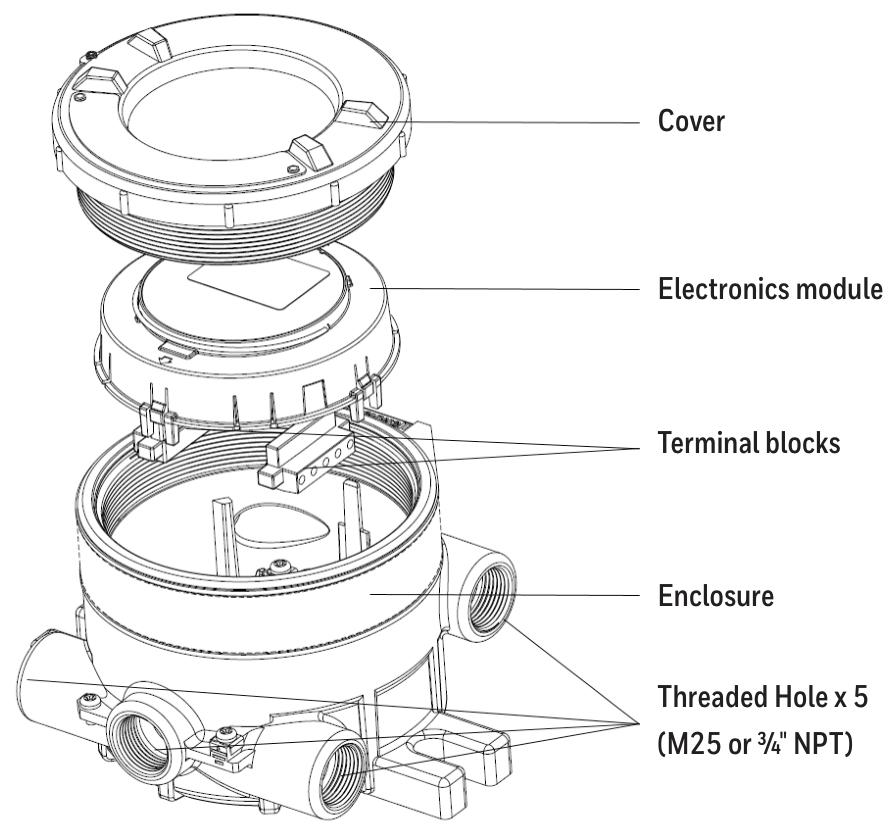
There are 5 entrances (M25 or 3/4 "NPT depending on the version) and 3 certified plugs, while the Ex e version of the OELD only has 5 M25x1.5 entrances.
How to use Honeywell OELD intelligent junction box
Security Warning and Information
The installation must comply with the standards recognized by relevant national authoritative institutions, and reference should be made to EN 60079-14 and EN 60079-29-2 in the European region.
It is strictly prohibited to open the casing when powered on or when there may be explosive atmospheres present.
Operators need to be aware of the measures to be taken when the gas concentration exceeds the alarm level, and must not modify the product structure, otherwise it may render critical safety and certification requirements ineffective.
Only trained personnel are allowed to carry out internal operations of the product. Its measurement function has not obtained ATEX certification, and it is not allowed to rely on the backlight status indication of the OELD display screen for safety related operations. The equipment must not operate in an environment with an oxygen content exceeding 21%.
Special safety conditions for use (increased safety Ex e version)
Each terminal can be connected to a maximum of one single or multiple wires on either side, unless multiple wires are connected in an appropriate manner.
The insulation layer of the wire connected to the terminal should be suitable for the corresponding voltage and extend within 1mm of the terminal throat.
All used and unused terminal screws should be tightened to between 0.5Nm and 0.6Nm, and terminals can only be installed and wired using cables recommended by IECEx KEM 10.0093U.
Disposal and Environmental Protection
The product should be disposed of in accordance with local regulations, including materials such as the shell (aluminum alloy or 316 stainless steel), lid (aluminum alloy or 316 stainless steel, glass).
The product must be disposed of through appropriate WEEE disposal facilities and cannot be treated as general industrial or household waste.
Product Overview
Basic Introduction
OELD is a certified junction box for hazardous locations, suitable for detectors with 4-20mA output, and can be used in conjunction with Searchpoint Optima Plus or Searchline Excel series gas detectors.
Provide local visual status indication and Bluetooth low-energy interface, which can be configured and maintained through Bluetooth enabled mobile devices, certified by ATEX and IECEx, suitable for Zone 1 (gas) or Zone 21 (dust) hazardous areas, and the explosion-proof version also has cULus certification, suitable for Class I Zone 1 or Class II Zone 1.
There are 5 entrances (M25 or 3/4 "NPT depending on the version) and 3 certified plugs, while the Ex e version of the OELD only has 5 M25x1.5 entrances.
Structure and function
There are two grounding connection points and an electronic module with two pluggable terminal blocks inside the shell, used to connect the field and detector wiring.
Featuring four-color backlighting (green, yellow, red, blue) and a customized 7-segment liquid crystal display (LCD), different backlight colors represent different states, such as green for normal operation or warning, red for alarm, etc.
Options
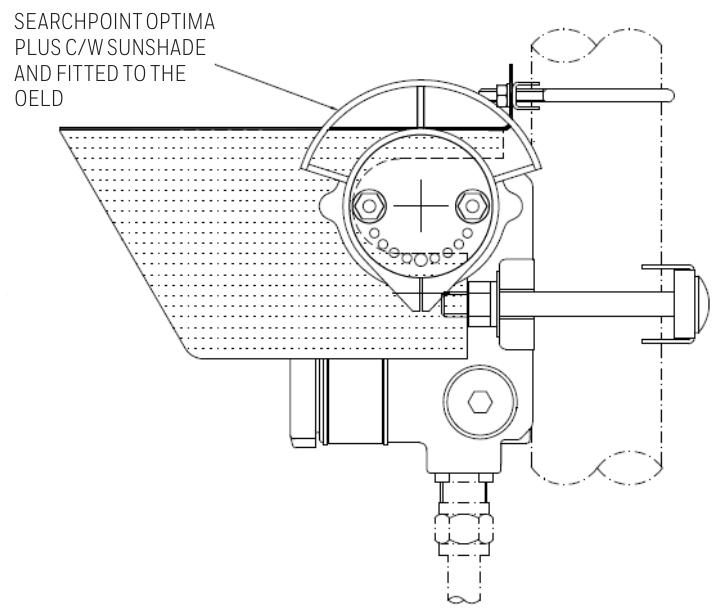
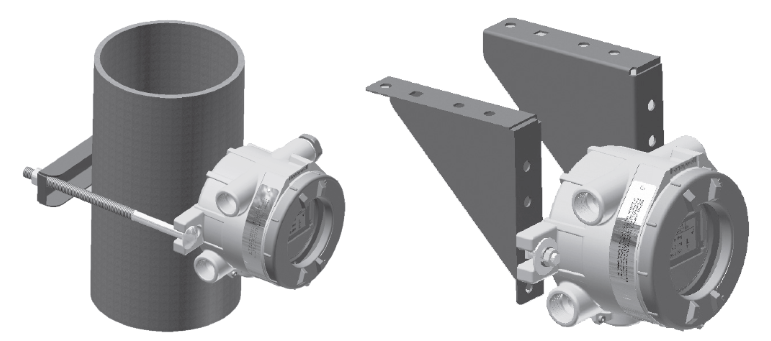
Including pipeline installation kit (1226A0358), which can install OELD on pipelines with diameters ranging from 2 "to 6" (50 to 150mm); Ceiling installation bracket kit (1226A0355), used for ceiling installation; Sun visor (94000-A-1006), made of 316 stainless steel, can protect OELD and related detectors from direct sunlight.

Installation related
Site selection and positioning
The placement of gas detectors should follow the recommendations of gas diffusion experts, process equipment experts, safety personnel, and engineering personnel, and record the protocol for determining the detector location.
Installation designers should refer to IEC/EN 60079-29-2 and other national practice standards, as well as the site selection recommendations for specific locations in the gas detector technical manual.
Mechanical Installation
OELD can be installed in various ways through integrated mounting pads, such as on flat walls Unistrut ® On the bracket, use the optional pipe installation kit to install on the pipeline or utility pole, or use the ceiling installation bracket kit to install on the ceiling.
When installing, it is necessary to consider the correct direction of the detector, ensure that the installation bolts are fully tightened, and use appropriate locking washers.
electrical installation
The detector can be installed directly or remotely to the OELD, and some detectors have corresponding junction boxes for remote installation.
The installation steps include removing the cover, taking out the electronic module, installing cable glands or conduit fittings, installing detectors (with different installation methods for different entrance versions), sealing unused cable entrances, making electrical connections, reinstalling the display module and cover, etc.
Electrical connection
Terminal block definition
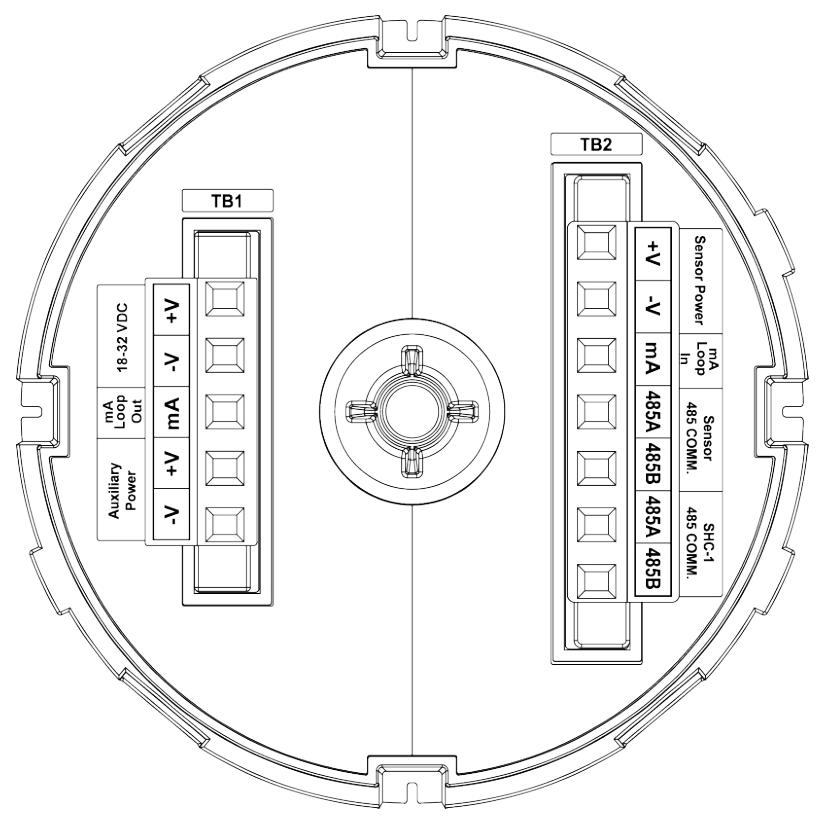
Terminal block 1 (TB1) and terminal block 2 (TB2) have different markings, colors, and functions for each terminal. For example, terminal 1 of TB1 is - V (black) and is used for auxiliary power supply.
- OMRON
- ABB
- General Electric
- EMERSON
- Honeywell
- HIMA
- ALSTOM
- Rolls-Royce
- MOTOROLA
- Rockwell
- Siemens
- Woodward
- YOKOGAWA
- FOXBORO
- KOLLMORGEN
- MOOG
- KB
- YAMAHA
- BENDER
- TEKTRONIX
- Westinghouse
- AMAT
- AB
- XYCOM
- Yaskawa
- B&R
- Schneider
- KONGSBERG
- NI
- WATLOW
- ProSoft
- SEW
- ADVANCED
- Reliance
- TRICONEX
- METSO
- MAN
- Advantest
- STUDER
- DANAHER MOTION
- Bently
- Galil
- EATON
- MOLEX
- DEIF
- B&W
- ZYGO
- Aerotech
- DANFOSS
- Beijer
- Moxa
- Rexroth
- Johnson
- WAGO
- TOSHIBA
- BMCM
- SMC
- HITACHI
- HIRSCHMANN
- Application field
- XP POWER
- CTI
- TRICON
- STOBER
- Thinklogical
- Horner Automation
- Meggitt
- Fanuc
- Baldor
- SHINKAWA
- Other Brands
- UniOP
- KUKA
- Iba
- Beckhoff
- ADLINK
-
 National Instruments PCI-6250 Multifunction DAQ Device
 -
 National Instruments PCI-6224 Multifunction DAQ Card
 -
 National Instruments cRIO-9081 CompactRIO Controller
 -
 National Instruments USB-6353 X Series DAQ Device
 -
 National Instruments NI-9223 Simultaneous Analog Input Module
 -
 National Instruments PXIe-8133 Embedded Controller
 -
 National Instruments NI-9403 Digital I/O Module
 -
 National Instruments PCI-6111E Multifunction I/O Card
 -
 National Instruments FP-1001 FieldPoint Network Module
 -
 National Instruments PCI-6517 Industrial Digital I/O Card
 -
 National Instruments USB-5680 Power Meter
 -
 National Instruments PXI-6562 Digital Module
 -
 National Instruments PCI-6254 DAQ Card
 -
 National Instruments NI 9266 Output Module
 -
National Instruments NI 9862 CAN Module
-
 National Instruments NI 9217 Input Module
 -
National Instruments PCI-4472 DSA Card
-
 National Instruments NI 9232 Vibration Module
 -
 National Instruments NI-9269 Output Module
 -
 National Instruments GPIB-120B Interface
 -
 National Instruments NI 9209 Input Module
 -
National Instruments NI 9210 Input Module
-
 National Instruments NI 9381 Module
 -
National Instruments PXI-2570 Relay Module
-
 National Instruments 777318140 Cable
 -
 National Instruments 781049-01 Module
 -
 National Instruments 779140-01 Module
 -
 National Instruments PXI-6115 DAQ Card
 -
 National Instruments cDAQ-9185 Chassis
 -
National Instruments NI-9375 I O Module
-
National Instruments USB-6366 X Series DAQ Device
-
 National Instruments USB-6361 X Series DAQ Device
 -
 National Instruments PXI-4496 Sound and Vibration Module
 -
 National Instruments PCI-6289 Multifunction DAQ Card
 -
 National Instruments PXI-8119 Quad-Core Controller
 -
National Instruments NI-9206 Analog Input Module
-
National Instruments 779516-01 Ordering Part Number
-
 National Instruments cDAQ-9132 CompactDAQ Controller
 -
 National Instruments 782401-01 Ordering Part Number
 -
National Instruments PXI-8105 Embedded Controller
-
 National Instruments USB-6361 Multifunction I/O Device
 -
 National Instruments SCXI-1314 Terminal Block
 -
 National Instruments PCI-6515 Industrial Digital I/O Card
 -
National Instruments 779038-01 Ordering Part Number
-
 National Instruments cRIO-9012 CompactRIO Controller
 -
 National Instruments PXI-8364 MXI-Express Interface
 -
National Instruments PXIe-8360 Interface Card
-
 National Instruments 196859B-01 Ordering Part Number
 -
 National Instruments PXIe-1073 5-Slot Chassis
 -
 National Instruments NI 9209 Voltage Input Module
 -
 National Instruments USB-5133 Digitizer
 -
 National Instruments PXI-1044 Chassis
 -
National Instruments NI 9266 785046-01 Module
-
 National Instruments USB-6216 DAQ Device
 -
National Instruments NI 9266 Output Module
-
National Instruments NI 9230 Vibration Module
-
 National Instruments PCI-6230 DAQ Card
 -
National Instruments PXI-6123 DAQ Card
-
National Instruments PCI-6255 DAQ Card
-
 National Instruments PXI-8433 Serial Module
 -
 National Instruments PXIe-4138 Source Measure Unit
 -
 National Instruments 781044-01 PCIe-6321 DAQ Part Number
 -
 National Instruments PXIe-6356 X Series DAQ Module
 -
 National Instruments PCI-6513 Industrial Digital Output Card
 -
National Instruments 183345A-04 Ordering Part Number
-
 National Instruments PCIe-6351 X Series DAQ Card
 -
National Instruments PXI-4070 FlexDMM Module
-
National Instruments PXI-6225 Multifunction DAQ Module
-
 National Instruments 781496-01 Ordering Part Number
 -
 National Instruments 779592-01 Ordering Part Number
 -
 National Instruments SCXI-1121 Module
 -
 National Instruments NI 9148 Chassis
 -
National Instruments PXI-6255 DAQ Module
-
 National Instruments USB-4065 DMM
 -
 National Instruments PXI-6221 DAQ Module
 -
 National Instruments PXIe-1065 Chassis
 -
National Instruments NI 9210 Input Module
-
National Instruments 778948-01 Output Module
-
 National Instruments cRIO-9014 Controller
 -
National Instruments cDAQ-9171 Chassis
-
 National Instruments USB-6363 DAQ Device
 -
National Instruments NI 9467 GPS Module
-
 National Instruments USB-6351 DAQ Device
 -
National Instruments NI 6581 Adapter Module
-
 National Instruments 781045-01 Output Module
 -
National Instruments PCI-6225 DAQ Card
-
 National Instruments TRC-8543 CAN Cable
 -
National Instruments PXIe-1073 Chassis
-
 National Instruments USB-6003 DAQ Device
 -
 National Instruments NI 9476 Output Module
 -
National Instruments myRIO-1900 Embedded Controller
-
National Instruments NI-9263 Analog Output Module
-
 National Instruments 158561A-01L Ordering Part Number
 -
 National Instruments 785024-01 Ordering Part Number
 -
National Instruments PCI-6510 Industrial Digital I/O Card
-
 National Instruments USB-6259 Multifunction DAQ Device
 -
National Instruments USB-8452 I2C SPI Interface Device
-
 National Instruments PXI-8432 Serial Interface Module
 -
National Instruments PXIe-5644R Vector Signal Transceiver
-
 National Instruments PXI-2569 Relay Module
 -
National Instruments 781174-01 Module
-
National Instruments 782000-01 Module
-
 National Instruments PXI-5152 Digitizer
 -
 National Instruments PXI-6284 DAQ Card
 -
National Instruments PCI-1428 Frame Grabber
-
 National Instruments PXI-1050 Chassis
 -
National Instruments NI USB-8486 Fieldbus
-
National Instruments NI 9862 CAN Module
-
 National Instruments NI 9146 FPGA Chassis
 -
 National Instruments PXI-8108 Controller
 -
 National Instruments NI SWB-2816A Matrix Module
 -
 National Instruments NI 9269 Analog Output Module
 -
National Instruments PCI-6031E Multifunction DAQ Card
-
National Instruments PXI-6713 Analog Output Module
-
National Instruments NI 9216 RTD Input Module
-
National Instruments NI-9237 Strain Bridge Input Module
-
National Instruments PXI-5124 High Resolution Digitizer
-
National Instruments USB-6343 X Series DAQ Device
-
 National Instruments PXIe-6536 Digital I/O Module
 -
 National Instruments CAL-4330 Calibration Fixture
 -
 National Instruments PXI-4110 Programmable Power Supply
 -
 National Instruments 781503-01 Input Module
 -
 National Instruments FP-AI-V10 Module
 -
National Instruments PXI-5114 Digitizer Card
-
 National Instruments PXIe-8398 MXI Module
 -
 National Instruments cRIO-9056 Controller
 -
National Instruments PCI-6509 DIO Device
-
 National Instruments cRIO-9053 Controller


