
How to install the YAMAHA RCX40 four axis robot controller?
(3) Coordinate and parameter settings
Standard coordinate setting: SCARA robots need to set standard coordinates and support three methods: 4-point teaching, 3-point teaching, and simple teaching;
Displacement coordinates and hand definition: Supports up to 10 displacement coordinate settings, which can limit the robot's operating area; 4 hand definition settings, suitable for motion compensation in different tool installation scenarios.
Maintenance and fault diagnosis
1. Key points of daily maintenance
(1) Regular maintenance project
Battery maintenance: The absolute battery life is about 1.5 years. B3 battery takes 48 hours to fully charge, B4 battery takes 96 hours, and if the voltage is below 3.5V, it needs to be replaced and recharged;
Verification testing: Conduct verification testing every 10 years, refer to the security manual HI 801 003 E;
Data backup: Regularly backup programs, point data, and parameters to internal Flash ROM or external devices to avoid data loss.
(2) Maintain safety requirements
Before maintenance, cut off all power sources and wait for at least 30 minutes to avoid burns or electric shock caused by high-temperature components and high-voltage circuits;
It is prohibited to disassemble or modify the controller. If parts need to be replaced, please contact YAMAHA or an authorized dealer.
2. Fault diagnosis mechanism
(1) Error messages and historical queries
Supports up to 500 error history storage records, including error codes, occurrence times, and error descriptions, which can be obtained through MPB or RS-232C interfaces;
Common types of errors include abnormal power supply, communication failure, motor overload, absolute reset failure, low battery voltage, etc.
(2) Self diagnostic function
Controller self-test: Perform controller checks in SYSTEM>DIAGNOS mode to detect hardware and system status;
Battery voltage detection: The absolute battery voltage of each axis can be viewed, with a normal range of 3.50-4.3V;
System error details: Display detailed information about serious software errors (error code, occurrence time, related parameters).
(3) Common fault handling
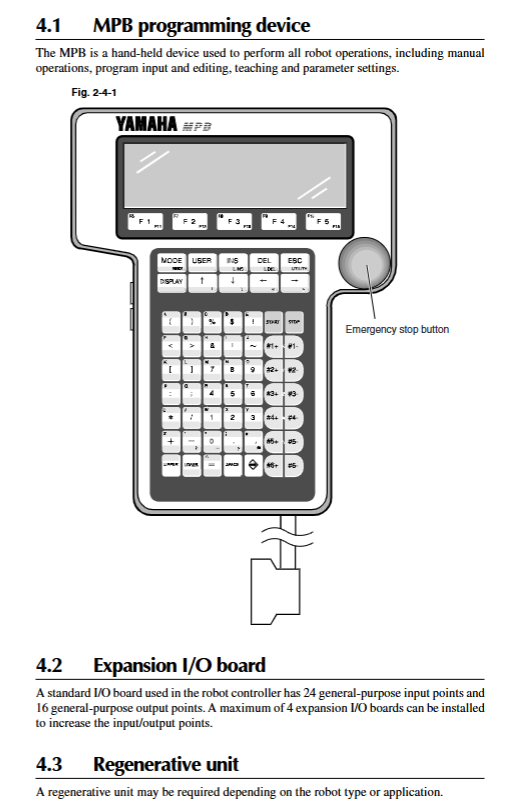
Emergency stop trigger: First, release the emergency stop button, cancel the emergency stop flag in UTILITY mode, and then turn on the motor power;
Incomplete origin: Absolute reset is required, supporting single axis reset and full axis reset. Origin detection methods include marking method, end of travel method, and sensor method;
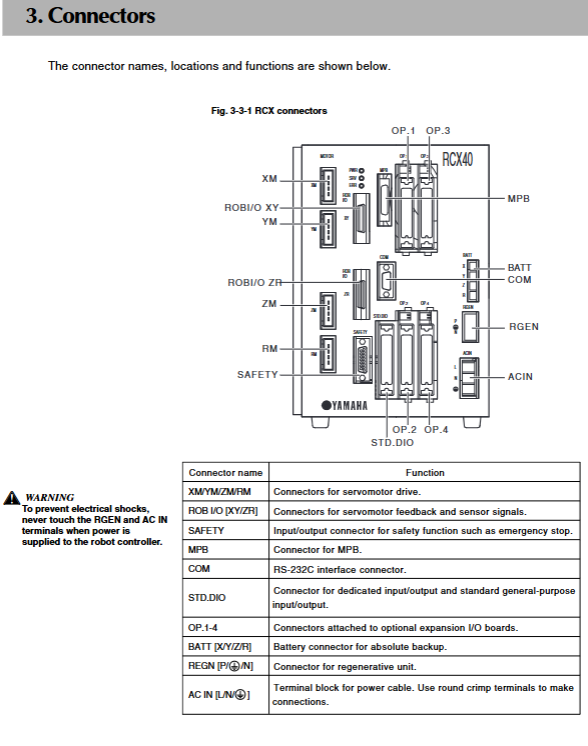
Communication failure: Check if the RS-232C interface parameters (baud rate, data bits, parity bits) match and if the cable connection is reliable.
Compliance and Disposal Standards
1. Certification and Compliance
Compliant with CE certification related directives (Machinery Directive, Low Voltage Directive, EMC Directive), operating in SAFE mode by default;
Program and Data Storage: We do not guarantee that the internal storage data will remain permanently unchanged and needs to be backed up regularly. YAMAHA is not responsible for any industrial property conflicts caused by the content of the manual.
2. Abandonment and disposal
When disposing of products, they should be treated as industrial waste and are prohibited from being discarded indiscriminately;
The disposal of batteries must comply with local regulations and handle lithium manganese dioxide batteries.
Key question answer
How to ensure the operational safety of RCX40 controller?
The core security mechanism includes graded warning (Warning/CAUTION/NOTE), hardware security design (emergency stop terminals, interlock circuits), wiring and installation protection (line spacing ≥ 100mm, reliable grounding), environmental restrictions (non explosion proof environment, temperature and humidity control);
Operators need to receive professional training and are strictly prohibited from staying within the robot's range of motion. They should regularly check the emergency stop function and safety interlock circuit.
What are the core differences and applicable scenarios of different operating modes?
AUTO mode: Program execution automatically, suitable for mass production;
MANUAL mode: manual movement and demonstration, suitable for debugging and setting up new tasks;
Program mode: Program editing and management, suitable for program development;
SYSTEM mode: parameter configuration and system maintenance, suitable for first-time installation or parameter adjustment;
Service mode: Maintenance within the safety fence, with a speed limit of less than 3%, suitable for equipment maintenance.
How to achieve reliable communication between the controller and external devices?
Connect to the upper computer through the RS-232C interface, configure matching parameters such as baud rate (4800-57600bps), data bits, parity bits, etc., and support XON/XOFF or RTS/CTS stream control;
Realize signal interaction with peripheral devices (sensors, actuators) through STD. DIO interface, correctly wire according to NPN/PNP specifications, ensure reliable signal transmission, and avoid cable interference.
- OMRON
- ABB
- General Electric
- EMERSON
- Honeywell
- HIMA
- ALSTOM
- Rolls-Royce
- MOTOROLA
- Rockwell
- Siemens
- Woodward
- YOKOGAWA
- FOXBORO
- KOLLMORGEN
- MOOG
- KB
- YAMAHA
- BENDER
- TEKTRONIX
- Westinghouse
- AMAT
- AB
- XYCOM
- Yaskawa
- B&R
- Schneider
- KONGSBERG
- NI
- WATLOW
- ProSoft
- SEW
- ADVANCED
- Reliance
- TRICONEX
- METSO
- MAN
- Advantest
- STUDER
- DANAHER MOTION
- Bently
- Galil
- EATON
- MOLEX
- DEIF
- B&W
- ZYGO
- Aerotech
- DANFOSS
- Beijer
- Moxa
- Rexroth
- Johnson
- WAGO
- TOSHIBA
- BMCM
- SMC
- HITACHI
- HIRSCHMANN
- Application field
- XP POWER
- CTI
- TRICON
- STOBER
- Thinklogical
- Horner Automation
- Meggitt
- Fanuc
- Baldor
- SHINKAWA
- Other Brands
- UniOP
- KUKA
- Iba
- Beckhoff
- ADLINK
-
 Micro Innovation GF1-10TVA-100 Touch Panel
 -
 Micro Innovation GSO-57EQD-000 Operator Panel
 -
 Micro Innovation XN-2AI-U Analog Input Module
 -
 Micro Innovation CAN-4AI/UI Analog Input Module
 -
 Micro Innovation ZSB-1.5/8-S/S/-/PE Base Terminal
 -
Micro Innovation AG XVH-340-57CAN-1-10 HMI Panel
-
 Micro Innovation GSO-57EQD-000 Micro Panel
 -
 Micro Innovation XN-2AI-PT/NI-2/3 Input Module
 -
 Micro Innovation AG GF0-57SQD-000 Display Panel
 -
 MICRO INNOVATION AG XN-16DI-24VDC-P Input Module
 -
 Micro Innovation XN-2AI-PT/NI-2/3 Input Module
 -
 Micro Innovation MC2-442-57CQB-1-2G Display Panel
 -
 Micro Innovation XN-16DO-24VDC-0.5A-P Module
 -
 Micro Design MC200PROFI Programmable Module
 -
Micro Innovation XV-252-57MPN-1-10 Micro Panel
-
 Micro Innovation CAN-4AI/UI Analog Input Module
 -
Micro Innovation GT1-MPI-A000 Panel
-
Micro Innovation MC2-440-10TVB-1-21 Display Panel
-
Micro Innovation XVS-430-57MPI-1-1S 6" HMI
-
Micro Innovation XV-442-57CQB-1-1AB Monitor
-
 Micro Innovation ZSB-1.5/8-S/S/-/PE Base Terminal
 -
Micro Design 895A Microfiche Reader
-
 MICRO INNOVATION XNE-8DI-24VDC-P Input Module 8550100794
 -
MICRO INNOVATION MICRO PANEL GF0-10CVD-002
-
 Micro Innovation XN-PLC-CANopen Controller 85 50 274124
 -
Micro Innovation Display Panel GS0-57E0D-000
-
MICRO INNOVATION CAN-32DI/P2X16 Input Module
-
MICRO INNOVATION XN-2DO-R-NO Relay Output Module
-
MICRO INNOVATION XNE-16DI-24VDC-P Input Module
-
Micro Innovation AG XN-2AI-U Analog Input Module
-
Micro Innovation XN-BR-24DC-D Power Supply
-
Micro Innovation MH2-342-57EIB-1-20 Panel
-
Micro Innovation XV-252-57MPN-1-10 Micro Panel
-
 Micro Innovation Display Card EIB2-TP
 -
 Micro Innovation XV-252-57MPN-1-10 6" HMI
 -
 Micro Innovation XN-B3T-SBC 16x DO Base Module
 -
Micro Innovation XVH-330-57MPI-1-10 Panel
-
Micro Innovation XN-BR-24VDC-D Power Module
-
 Micro Innovation EIB2-TP EIB2TP Module
 -
Micro Innovation GF0-10CVD-100 Touch Panel
-
MICRO INNOVATION XV-230-57CNN-1-10 HMI-PLC
-
MICRO INNOVATION XN-2DO-R-CO Relay Output Module
-
KMK MICRO INNOVATION GS2-90EMD-000 Micro Panel
-
 Micro Innovation XN-2AO-U Analog Output Module
 -
 Micro Innovation XN-1AO-I Analog Output Module
 -
 Micro Innovation CAN-32DI/P-2x16 Rack Module
 -
Eaton Micro Innovation MC2-440-10TVB-1-11 HMI
-
Micro Innovation AG CAN Bridge 8551224177
-
 Micro Innovation XN-2AI-I Analog Input Module Set
 -
Micro Innovation XN-4DI-24VDC-P Input Module
-
 Micro Innovation Winbloc CAN-16DO/0.5A-PK Module
 -
Micro Innovation Micro Panel GFO-10SVD-002 HMI
-
 Micro Innovation CAN-24DI/8DO/0.5A-PK Module
 -
 Micro Innovation DP-24DI/8DO/0.5A-PK I/O Module
 -
 Weidmuller Micro Innovation CAN-BRIDGE ZSFA 1,5R
 -
Micro Innovation CAN-3AI/1AO-UI Profibus Module
-
 Micro Innovation PDP-TP Profibus DP Module
 -
Micro Innovation CAN-3AI/1AO-UI Analog Module
-
 Micro Innovation MC2-430-12TSB-10 HMI Panel
 -
Micro Innovation XNE-8DO-24VDC-0.5A-P I/O Module
-
MICRO INNOVATION AG WINBLOC CAN-32DI/P-2x16 85 51 224182
-
 MICRO INNOVATION AG WINBLOC CAN-4AO/UI 85 51 224195
 -
Micro Innovation Xv-252-57cnn-1-10 HMI Panel
-
Micro Innovation XN Basis XN-S4T-SBBS-CJ 225200
-
Micro Innovation GF1-10TVD-100 Micro Panel
-
Micro Innovation XN-B3T-SBC 16-Fold DO Base Module
-
MICRO INNOVATION AG WINBLOC CAN-3AI/1AO-UI 85 51 224192
-
KMK Micro Innovation GS2-90EMD-000 Micro Panel
-
Micro Innovation MC2-430-10TVB-1-10 PanelView Terminal 24VDC
-
 Micro Innovation XNE-8DO-24VDC-0.5A-P I/O Module 8550100795
 -
MICRO INNOVATION GF1-10TVB-100 Touch Panel
-
MICRO INNOVATION AG WINBLOC CAN-4AI/UI Analog Input Module
-
MICRO INNOVATION AG WINBLOC CAN-32DO/0.5A-P-2x16 Output Module
-
MICRO INNOVATION AG CAN-32DI/P-2X16 8551224182 Input Module
-
 MICRO INNOVATION MK2-230/232-57 Circuit Board 85 28 200000
 -
 MICRO INNOVATION CAN-BRIDGE 8551224177 CAN Bridge
 -
Micro Innovation MC2-430-10TVB-1-10 Panel 24VDC
-
MICRO INNOVATION MC2-432-57CQB-1-10 HMI Panel
-
MICRO INNOVATION AG CAN-BRIDGE 85 51 224177 CAN Bridge
-
MICRO INNOVATION CAN-4AI/UI Analog Input Module
-
MICRO INNOVATION CAN-32DI/P-2X16 Input Module
-
 SIGMATEK MDD111 09-404-111 Drive Module
 -
 SIGMATEK DVI021 Display Interface Module
 -
 SIGMATEK 00-450-024 C-IPC Processor
 -
 SIGMATEK MDD-111 MDD111 Drive Module
 -
 SIGMATEK ICA011 20-102-011 Interface Module
 -
 SIGMATEK 01-250-010-D NC4Kompakt Control Module
 -
 SIGMATEK CRIF081 12-751-081 Interface Module
 -
 SIGMATEK S1026-8AF61-R4E-Z57 Drive Module
 -
 SIGMATEK 9305.081.02 9227.082.00 Control Module
 -
 Sigma Tek 5000B-36 Attitude Indicator
 -
 SIGMATEK CEZ201 12-051-201-O Counter Module
 -
 SIGMATEK DPS001 Power Supply Module
 -
 SIGMATEK 994 395 01z Via Interface Module
 -
 SIGMATEK PC411-K 01-310-411-K Industrial PC
 -
 SIGMATEK 9816.324.00 Demag NC4 Keyboard
 -
 SIGMATEK ET261 90010C-71 Operator Terminal
 -
 SIGMATEK DDI 164 05-006-164 Input Module
 -
 SIGMATEK CCP 082 C-DIAS Processor Module
 -
SIGMATEK CEZ201 12-051-201-O PLC Module
-
SIGMATEK MDD 1111 06178867 Drive Module
-
SIGMATEK S1 073-6AC61-RE-Y08-Z Drive Module
-
SIGMATEK MDD 111 Drive Module MDD111
-
 SIGMATEK CSDI161 Safety Module 12-891-161
 -
SIGMATEK C-IPC Processor 01-450-024
-
 SIGMATEK DIAS DAM122 Analog Mixing Module
 -
Sigma Tek 5000B-36 Attitude Gyro Indicator
-
 SIGMATEK TMS012 Motherboard Module 05-250-012-T
 -
 SIGMATEK CCP-531 PLC Module
 -
SIGMATEK DIAS DNC4 I/O Module 05-250-011
-
 SIGMATEK AI088 Analog Input Module
 -
 SIGMATEK CEZ201 Counter Module
 -
SIGMATEK CIC011 Industrial Computer Module
-
 SIGMATEK MDM021 Motor Drive Module
 -
 SIGMATEK DTO163 Digital Output Module
 -
SIGMA-TEK 5000B-36 Attitude Gyro
-
SIGMATEK DM161 Digital Input Module
-
SIGMATEK CCP-531 PLC Control Panel
-
 SIGMATEK HZS773 Touch Terminal Operator Panel
 -
SIGMATEK MDP101 3 KVA 45-65Hz Driver
-
 SIGMATEK ETV1251 Touch Panel 12-230-1251
 -
SIGMATEK CIO021 Safety Module 12-013-021
-
Sigma Tek 4000H-5 Directional Gyro
-
 SIGMATEK TAE531 I/O Module 01-240-531
 -
 SIGMATEK DAI081 Input Module 05-009-081
 -
 SIGMATEK DCP640 Drive Control Module
 -
 SIGMATEK DCP643 Slides Module A6-29
 -
SIGMATEK SCP011 Safety Module 20-890-011


