
Yokogawa ROTAMASS TI Coriolis Mass Flow Meter
Yokogawa ROTAMASS TI Coriolis Mass Flow Meter
Basic Information
Focusing on the application scenarios of SIS equipment, clarifying the responsibilities of users in installation, operation, maintenance and other aspects, covering key contents such as verification testing, maintenance and replacement, reliability data, etc., to ensure that the equipment maintains the design safety level.
SIS application core requirements
(1) Safety functions and signal transmission
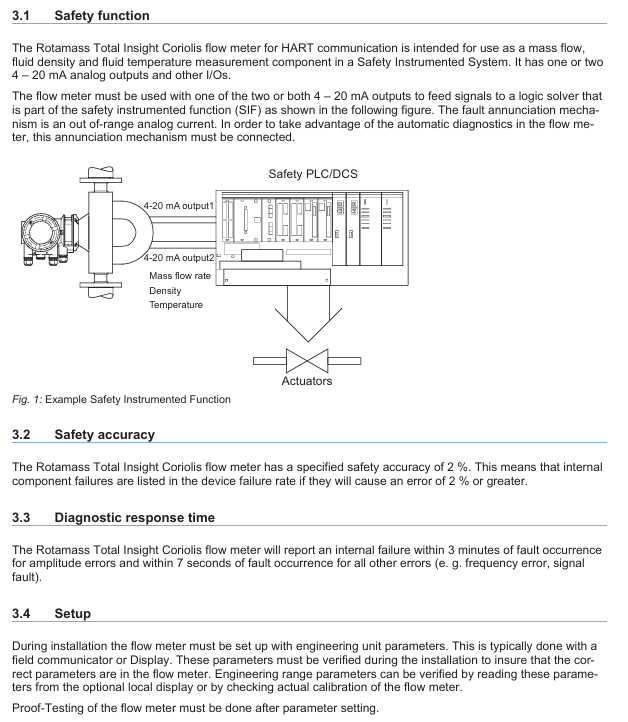
Function positioning: Supports HART communication and can be used as a mass flow rate, fluid density, and fluid temperature measurement component in SIS, equipped with 1-2 4-20mA analog outputs and other I/O interfaces.
Signal connection: The signal needs to be transmitted to the logic solver of SIS (such as safety PLC/DCS) through 4-20mA output; The fault alarm mechanism is "simulated current out of range", which needs to be connected to enable the automatic diagnostic function of the device.
(2) Key technical parameters
Specific requirements for parameter categories
The safety accuracy is set at 2%, which means that internal component failures that result in measurement errors ≥ 2% will be included in the equipment failure rate
Diagnostic response time amplitude error: Report within 3 minutes after the fault occurs; Other errors (such as frequency errors, signal failures): reported within 7 seconds
Generate a valid signal within 20 seconds after powering on the startup time
The expected service life is 10 years, and only reliability data within this period is valid; After more than 10 years, the equipment failure rate may increase, and the safety integrity level (SIL) calculation results based on the original data may become invalid
(3) Set up and validate testing
Device Settings
During installation, it is necessary to configure the engineering unit parameters through a field communicator or display, and verify the correctness of the parameters (which can be read from the local display or checked for actual calibration of the equipment).
Key parameters need to be set according to the following requirements to maintain safety integrity:
|Parameter Category | Setting Requirements|
|4-20mA output | Select one of "Mass Flow", "Density", or "Temperature"|
|Write lock | Set to "All locked"|
|High Low (Burnout) switch | Specify the output current state in case of internal fault (High:>21.6mA; Low:<2.4mA)|
|Write Protect | Disable write function|
Proof Testing
Purpose: To detect faults that have not been detected by the equipment's self diagnosis (especially undetected faults that may cause safety instrument function (SIF) failure), the testing frequency should be determined based on the reliability calculation results of SIF, and the actual execution frequency should not be lower than the calculation requirements.
Test steps:
|Step | Operation Content|
|1 | Bypass safety function, take measures to avoid accidental tripping|
|2 | Verify the rationality of the output current (in compliance with the specified accuracy) when the flow tube is full and in a zero flow state|
|3 | Verify the rationality of the output current when the flow tube is filled with two different flow rates (which can be independently estimated with an accuracy of about 10%)|
|4 | Read the temperature measurement value of the process fluid through digital communication and compare it with the independent measurement value for verification|
|5 | Read diagnostic information through digital communication and take corresponding measures|
|6 | Send digital commands to the transmitter to enter the high and low alarm level output state, verify whether the analog current reaches the corresponding value (test static current, low loop voltage, high loop impedance related faults)|
|7 | Restart the transmitter power supply and clear the RAM soft error|
|8 | Release bypass and restore normal operation|
Detection effect: Both non intrinsic safety (non IS) and intrinsic safety (IS) 4-20mA outputs can detect 93.3% of potential hazard undetected (DU) faults.
Required tools: device display (or digital communication tools such as HART field communicator, PRM, FieldMate, etc.), output current verification instrument, reference temperature measurement tool close to the tested device.
Personnel requirements: Testers must receive SIS operation training, master bypass processes, equipment maintenance, and company change management processes.
(4) Repair, replacement, and firmware update
Repair and replacement: If online repair is required, bypass the equipment first and establish a compliant bypass process; Maintenance/replacement personnel need to have sufficient skills. If maintenance is required, please contact the Yokogawa sales office.
Firmware update: Only executed by the factory, users do not need to operate on their own, and after the update, they need to fulfill relevant responsibilities according to the replacement process.
(5) Reliability, Environment, and Application Limitations
Reliability data
Detailed Failure Mode, Effects, and Diagnostic Analysis (FMEDA) report (No. YEC 20-02-160 R002 V3R1) can be obtained from Yokogawa, including all failure rates and failure modes.
- OMRON
- ABB
- General Electric
- EMERSON
- Honeywell
- HIMA
- ALSTOM
- Rolls-Royce
- MOTOROLA
- Rockwell
- Siemens
- Woodward
- YOKOGAWA
- FOXBORO
- KOLLMORGEN
- MOOG
- KB
- YAMAHA
- BENDER
- TEKTRONIX
- Westinghouse
- AMAT
- AB
- XYCOM
- Yaskawa
- B&R
- Schneider
- KONGSBERG
- NI
- WATLOW
- ProSoft
- SEW
- ADVANCED
- Reliance
- TRICONEX
- METSO
- MAN
- Advantest
- STUDER
- DANAHER MOTION
- Bently
- Galil
- EATON
- MOLEX
- DEIF
- B&W
- ZYGO
- Aerotech
- DANFOSS
- Beijer
- Moxa
- Rexroth
- Johnson
- WAGO
- TOSHIBA
- BMCM
- SMC
- HITACHI
- HIRSCHMANN
- Application field
- XP POWER
- CTI
- TRICON
- STOBER
- Thinklogical
- Horner Automation
- Meggitt
- Fanuc
- Baldor
- SHINKAWA
- Other Brands
- UniOP
- KUKA
- Iba
- Beckhoff
- ADLINK
-
 MICRO INNOVATION GF1-10TVB-100 Touch Panel
 -
 MICRO INNOVATION AG WINBLOC CAN-4AI/UI Analog Input Module
 -
 MICRO INNOVATION AG WINBLOC CAN-32DO/0.5A-P-2x16 Output Module
 -
 MICRO INNOVATION AG CAN-32DI/P-2X16 8551224182 Input Module
 -
 MICRO INNOVATION MK2-230/232-57 Circuit Board 85 28 200000
 -
 MICRO INNOVATION CAN-BRIDGE 8551224177 CAN Bridge
 -
 Micro Innovation MC2-430-10TVB-1-10 Panel 24VDC
 -
 MICRO INNOVATION MC2-432-57CQB-1-10 HMI Panel
 -
MICRO INNOVATION AG CAN-BRIDGE 85 51 224177 CAN Bridge
-
 MICRO INNOVATION CAN-4AI/UI Analog Input Module
 -
MICRO INNOVATION CAN-32DI/P-2X16 Input Module
-
 SIGMATEK MDD111 09-404-111 Drive Module
 -
 SIGMATEK DVI021 Display Interface Module
 -
 SIGMATEK 00-450-024 C-IPC Processor
 -
 SIGMATEK MDD-111 MDD111 Drive Module
 -
 SIGMATEK ICA011 20-102-011 Interface Module
 -
 SIGMATEK 01-250-010-D NC4Kompakt Control Module
 -
 SIGMATEK CRIF081 12-751-081 Interface Module
 -
 SIGMATEK S1026-8AF61-R4E-Z57 Drive Module
 -
 SIGMATEK 9305.081.02 9227.082.00 Control Module
 -
 Sigma Tek 5000B-36 Attitude Indicator
 -
 SIGMATEK CEZ201 12-051-201-O Counter Module
 -
 SIGMATEK DPS001 Power Supply Module
 -
 SIGMATEK 994 395 01z Via Interface Module
 -
 SIGMATEK PC411-K 01-310-411-K Industrial PC
 -
 SIGMATEK 9816.324.00 Demag NC4 Keyboard
 -
 SIGMATEK ET261 90010C-71 Operator Terminal
 -
 SIGMATEK DDI 164 05-006-164 Input Module
 -
 SIGMATEK CCP 082 C-DIAS Processor Module
 -
SIGMATEK CEZ201 12-051-201-O PLC Module
-
SIGMATEK MDD 1111 06178867 Drive Module
-
SIGMATEK S1 073-6AC61-RE-Y08-Z Drive Module
-
SIGMATEK MDD 111 Drive Module MDD111
-
 SIGMATEK CSDI161 Safety Module 12-891-161
 -
SIGMATEK C-IPC Processor 01-450-024
-
 SIGMATEK DIAS DAM122 Analog Mixing Module
 -
Sigma Tek 5000B-36 Attitude Gyro Indicator
-
 SIGMATEK TMS012 Motherboard Module 05-250-012-T
 -
 SIGMATEK CCP-531 PLC Module
 -
SIGMATEK DIAS DNC4 I/O Module 05-250-011
-
 SIGMATEK AI088 Analog Input Module
 -
 SIGMATEK CEZ201 Counter Module
 -
SIGMATEK CIC011 Industrial Computer Module
-
 SIGMATEK MDM021 Motor Drive Module
 -
 SIGMATEK DTO163 Digital Output Module
 -
SIGMA-TEK 5000B-36 Attitude Gyro
-
SIGMATEK DM161 Digital Input Module
-
SIGMATEK CCP-531 PLC Control Panel
-
 SIGMATEK HZS773 Touch Terminal Operator Panel
 -
SIGMATEK MDP101 3 KVA 45-65Hz Driver
-
 SIGMATEK ETV1251 Touch Panel 12-230-1251
 -
SIGMATEK CIO021 Safety Module 12-013-021
-
Sigma Tek 4000H-5 Directional Gyro
-
 SIGMATEK TAE531 I/O Module 01-240-531
 -
 SIGMATEK DAI081 Input Module 05-009-081
 -
 SIGMATEK DCP640 Drive Control Module
 -
 SIGMATEK DCP643 Slides Module A6-29
 -
SIGMATEK SCP011 Safety Module 20-890-011
-
SIGMATEK DDM 164-D Slides Module
-
 SIGMATEK C-IPC Processor 146267
 -
SIGMATEK ET3200 Display Screen
-
SIGMATEK CEZ221 C-DIAS Mixing Module
-
 SIGMATEK SDD120-2 DIAS Servo Drive
 -
SIGMATEK DIP011 05-058-011 Module
-
 Sigmatek DEC181 I/O Module
 -
SIGMATEK DCP640 DIAS Central Unit
-
SIGMATEK 00-450-024 C-IPC Industrial Computer
-
SIGMATEK AKM32C-ANCNR-B0 Servomotor
-
SIGMATEK DVI021 DIAS Power Module
-
SIGMATEK CTS051 12-053-051 Control Module
-
 SIGMATEK CTS022 Control Module
 -
 Sigmatek 01-250-010-D NC4Kompakt V2.1 Module
 -
 SIGMATEK Control Keyboard 01-285-042 Interface
 -
 SIGMATEK TO081 20-007-081 Digital Output Module
 -
 Sigmatek AKM73Q-ANCNGBB0 7.07kW Servo Motor
 -
Sigmatek DIP012 Demag 07024165 Processor Module
-
 SIGMATEK PC 411 Injection Molding Controller
 -
SIGMATEK CEZ201 12-051-201-O Processor Module
-
 SIGMATEK VI021 20-003-021 Digital Input Module
 -
SIGMATEK Computer C-IPC 144904 Industrial PC
-
 SIGMATEK 9307.083.01 9305.081.02 Industrial Module
 -
 SIGMATEK AI075 Analog Input Module
 -
 SIGMATEK HGT834-W Teaching Pendant
 -
Sigmatek CDI161 Digital Input Module
-
 SIGMATEK HGT834 Teaching Pendant
 -
 SIGMATEK CEZ201 12-051-201-O Module
 -
SIGMATEK Demag 9617.067.03 9708.244.00 Module
-
 SIGMATEK SCP010 Safety CPU Module
 -
SIGMATEK N100 20-011-100 Module
-
 SIGMATEK CNC 031 Positioning Output Module
 -
 Sigmatek 01-355-016 Control Module
 -
 Sigmatek MDM021 Digital Mixed Module
 -
Sigmatek DAI411 05-020-411 Analog Module
-
Attitude Gyro 1U367-232-2 Aircraft Instrument
-
 Sigma-Tek 5000B-36 Attitude Gyro 23-501-06-16
 -
Sigmatek HGT834-W Injection Molding Teach Pendant
-
Sigma Tek 5000EG Attitude Gyro 1U670-003-12
-
Sigmatek HGT834-W Teach Pendant
-
Sigmatek DEE011 05-068-011 Module
-
Sigmatek DIAS DCP643 Central Processing Unit
-
Sigmatek MDD111-1 DIAS Drive Axis Module
-
 Sigmatek DKL042 05-024-042 Terminal Module
 -
Sigmatek DM822 Control Module
-
Sigmatek CDM167 12-008-167-O Module
-
Sigmatek TAE151 Touch Display Unit
-
 Sigmatek DCC041 SLIDES Module 05-700-041-D
 -
Sigmatek AKM65M-ANC2GBB0 PM Servo Motor
-
Sigmatek ETT221 01-230-221 Operator Terminal
-
Sigmatek SLIDES DAM 124 Analog Module
-
Sigmatek AKM31C-ANCNGBB0 Servo Motor
-
Mannesmann Demag Sigmatek CP626 Central Unit
-
SIGMATEK 0332.554.03 Board 371071000154
-
 SIGMATEK 12-250-021 Base Plate Back Panel CM5V020
 -
SIGMATEK DM162 S-DIAS Digital Mix Module
-
DEMAG ERGOTECH 061 381 66 Sigmatek 9842.243.02 Circuit Board
-
 SIGMATEK CP313-1 PLC Module
 -
Sigmatek ETV0551-2 VARAN Touch Terminal
-
 Sigmatek SDM 081 FS S-Dias Safety Module
 -
 DEMAG 05-250-023 Ergotech Motherboard with Sigmatek TMS012
 -
Sigmatek CM5V020 12-250-023-K Wiring Base
-
Sigma Tek 5000B-37 Attitude Gyro Indicator
-
Sigmatek SDD120-2 DIAS Drive
-
 Sigmatek CME221 Memory Module
 -
Sigmatek DCP640 DIAS Central Unit
-
 Sigmatek STO040 Safety Output Module
 -
Sigmatek CET281 Control Panel
-
Sigmatek CIPC LX800 Demag NC5 CPU
-
Sigmatek DKL093 05-024-093 Terminal Module


