
HITACHI S10VE Programmable Controller
Pulse counter module: LQC000 (1-phase/2-phase pulse input), supports 1-point pulse counting, with a current consumption of 150mA per module.
3. Key physical and environmental parameters
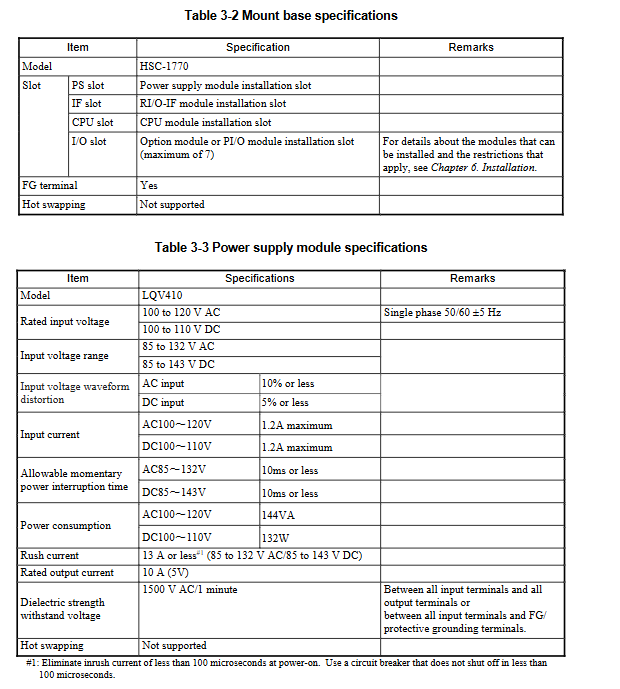
Physical specifications: 7-slot mounting base (HSC-1770) with dimensions of 437 × 138.6 × 100mm and weight ≤ 1300g; the thickness of each module is uniformly 34mm (excluding some), and the tightening torque of the mounting screws is 1.0N · m (M4);
Environmental adaptability: operating temperature 0-55 ° C (temperature variation ≤ 10 ° C/hour), storage temperature -20-75 ° C; relative humidity 10-90% RH (no condensation); Seismic resistance: 10-150Hz, 10m/s ² acceleration, 8 minutes/cycle; Impact resistance: 147m/s ² peak acceleration, 11ms half sine wave;
Grounding requirements: Class D grounding (grounding resistance ≤ 100 Ω), separated from the AC panel grounding main line, with a spacing of ≥ 15m.
Installation and commissioning process
1. Key steps and requirements for installation
(1) Preliminary preparation
Confirm installation environment: temperature 0-55 ° C, humidity 10-90% RH, no corrosive gases, dust concentration ≤ 0.1mg/m ³;
Grounding preparation: Construction shall be carried out in accordance with Class D grounding standards, with a grounding resistance of ≤ 100 Ω, and multiple cabinets shall be connected to the ground using a daisy chain connection;
Tool preparation: Use calibrated measuring instruments and compatible screwdrivers (tightening torque 1.0-1.5N · m).
(2) Installation process
Installation base: fixed on the vertical surface of the cabinet, using M5 screws (tightening torque 1.5N · m) to ensure that the insulation lining does not fall off and the metal part of the base does not touch the control cabinet;
Module assembly: Install in the order of "power module → RI/O-IF module → CPU module → option module → PI/O module", align the module with the guide rail, insert it vertically, and tighten the screws;
Battery connection: Before installing the CPU module, insert the main battery cable into the connector according to the corresponding color, and cover the battery cover tightly (hear a snap sound);
Wiring specifications:
Power cable: ≥ 2mm ² shielded twisted pair, with a distance of ≥ 100mm from the network cable;
Remote I/O cable: Select according to the transmission distance (0.75mm ² cable for long distances, ≤ 300m), with single ended grounding of the shielding layer (RI/O-IF side);
Grounding wiring: The FG terminal is connected in a daisy chain and ultimately connected to the power module FG terminal. The cable cross-section is ≥ 2mm ² (inside the cabinet)/≥ 5.5mm ² (outside the cabinet).
(3) Installation gap requirements
The distance between the cabinet and the unit is ≥ 100mm, and the distance between the sides is ≥ 50mm;
There is a requirement for no distance between modules, but one empty slot needs to be left between the high-voltage PI/O module (≥ 100VAC/48VDC) and the CPU/option/simulation module;
Cooling measures: The cabinet needs to have air vents or install fans to ensure that the intake temperature is ≤ 55 ° C.
2. Debugging core processes and tools
(1) Debugging Tools and Environment
Tool: BASE SYSTEM/S10VE (requires administrator privileges to install), supports Windows 7/10 (64 bit), PADT needs to meet 1GHz CPU, 2GB memory, 200MB free hard disk;
Connection: Connect PADT to CPU module ET1/ET2 ports via Ethernet cable, with default IP address 192.192.192.1 (ET1)/192.192.193.1 (ET2).
(2) Debugging key steps
Project creation: Start BASE SYSTEM, create a new project and configure PC numbers and comments, enable C mode requires installation of RPDP;
Network configuration: Set the IP address, subnet mask, and routing information of the CPU's built-in Ethernet or ET.net module, write them, and restart the system;
Program download: Write the program using LADDER DIAGRAM SYSTEM/HI-FLOW SYSTEM, download it to the CPU module, and confirm that there are no syntax errors;
Parameter configuration: Set PI/O installation status, partition (FIX/FREE), I/O point count, remote I/O synchronization mode, etc;
System startup: Turn the CPU RUN/STOP switch to RUN, observe that the RUN LED is constantly on, and confirm that there are no error codes through the indicator;
Function verification: Monitor memory data through MCS function, view module status and error logs through RAS menu, and verify that I/O signal acquisition and execution are normal.
3. Operations and troubleshooting
(1) Key points of daily operation and maintenance
Regular inspection: monthly check the tightness of module screws, LED status, and cable connections; Clean ventilation ducts and verify grounding resistance annually;
Backup strategy: Regularly backup CPU data, including main memory and MRAM data, through the BACKUP STORE SYSTEM, and backup files need to be stored remotely;
Module replacement: It is recommended to replace the power module within 10 years (the lifespan of the aluminum electrolytic capacitor), and replace the main battery within 5 years. When replacing, the power should be turned off;
(2) Common troubleshooting
LED fault indication:
ERR LED constantly on: CPU module has a serious error. Check the error code through the indicator (such as ECF=xxxxx) and refer to the manual for troubleshooting;
- OMRON
- ABB
- General Electric
- EMERSON
- Honeywell
- HIMA
- ALSTOM
- Rolls-Royce
- MOTOROLA
- Rockwell
- Siemens
- Woodward
- YOKOGAWA
- FOXBORO
- KOLLMORGEN
- MOOG
- KB
- YAMAHA
- BENDER
- TEKTRONIX
- Westinghouse
- AMAT
- AB
- XYCOM
- Yaskawa
- B&R
- Schneider
- KONGSBERG
- NI
- WATLOW
- ProSoft
- SEW
- ADVANCED
- Reliance
- TRICONEX
- METSO
- MAN
- Advantest
- STUDER
- DANAHER MOTION
- Bently
- Galil
- EATON
- MOLEX
- DEIF
- B&W
- ZYGO
- Aerotech
- DANFOSS
- Beijer
- Moxa
- Rexroth
- Johnson
- WAGO
- TOSHIBA
- BMCM
- SMC
- HITACHI
- HIRSCHMANN
- Application field
- XP POWER
- CTI
- TRICON
- STOBER
- Thinklogical
- Horner Automation
- Meggitt
- Fanuc
- Baldor
- SHINKAWA
- Other Brands
- UniOP
- KUKA
- Iba
- Beckhoff
- ADLINK
-
 Sigmatek MDD111-1 DIAS Drive Axis Module
 -
 Sigmatek DKL042 05-024-042 Terminal Module
 -
 Sigmatek DM822 Control Module
 -
 Sigmatek CDM167 12-008-167-O Module
 -
 Sigmatek TAE151 Touch Display Unit
 -
 Sigmatek DCC041 SLIDES Module 05-700-041-D
 -
 Sigmatek AKM65M-ANC2GBB0 PM Servo Motor
 -
 Sigmatek ETT221 01-230-221 Operator Terminal
 -
 Sigmatek SLIDES DAM 124 Analog Module
 -
Sigmatek AKM31C-ANCNGBB0 Servo Motor
-
 Mannesmann Demag Sigmatek CP626 Central Unit
 -
 SIGMATEK 0332.554.03 Board 371071000154
 -
 SIGMATEK 12-250-021 Base Plate Back Panel CM5V020
 -
 SIGMATEK DM162 S-DIAS Digital Mix Module
 -
 DEMAG ERGOTECH 061 381 66 Sigmatek 9842.243.02 Circuit Board
 -
 SIGMATEK CP313-1 PLC Module
 -
Sigmatek ETV0551-2 VARAN Touch Terminal
-
 Sigmatek SDM 081 FS S-Dias Safety Module
 -
 DEMAG 05-250-023 Ergotech Motherboard with Sigmatek TMS012
 -
Sigmatek CM5V020 12-250-023-K Wiring Base
-
 Sigma Tek 5000B-37 Attitude Gyro Indicator
 -
 Sigmatek SDD120-2 DIAS Drive
 -
 Sigmatek CME221 Memory Module
 -
 Sigmatek DCP640 DIAS Central Unit
 -
 Sigmatek STO040 Safety Output Module
 -
Sigmatek CET281 Control Panel
-
 Sigmatek CIPC LX800 Demag NC5 CPU
 -
 Sigmatek DKL093 05-024-093 Terminal Module
 -
 Sigmatek AI088 20-009-088 Analog Input Module
 -
Sigmatek CAI888 Analog Input Module
-
SIGMATEK CCA021 12-025-021 Analog Output Module
-
SIGMATEK 1104.579.05 Control Module
-
SIGMATEK SDI100 Digital Input Module
-
 SIGMATEK C-IPC 256MB LX800 Compact Dias
 -
 SIGMATEK 9423.090.02 Control Module
 -
SIGMATEK C-IPC 256 Power Supply 148498
-
 SIGMATEK CAI025 Analog Input Module
 -
 SIGMATEK CTO166 Digital Output Module
 -
 SIGMATEK CP112 20-004-112 Processor Module
 -
SIGMATEK CAI887 12-009-887 Safety Module
-
 Sigma-Tek 4000B-31 Directional Gyro 1U262-002-42
 -
Sigmatek C-IPC 256MB LX800 IPC Controller
-
Sigmatek C-IPC 01-450-031 Industrial PC LX800
-
Sigmatek C-IPC 256 Industrial PC Controller
-
Sigmatek CCP-531 PLC Processor Module
-
Sigmatek CDI163 Digital Input Module
-
 Sigmatek ETV0501 VARAN Terminal 12-230-0501
 -
 Sigmatek CTMS020 C-DIAS Technology Module
 -
 Sigmatek CIV512 VARAN Switch Module
 -
 Sigmatek HU011 20-080-011 Interface Module
 -
SIGMATEK SLIDES DAM 124 Module
-
 SIGMATEK C-IPC 161 01-450-161L Industrial PC
 -
SIGMATEK C-IPC 128MB VIA 733MHz 01-450-024-K
-
 SIGMATEK 12-780-012 R8-IPC Geode LX800 Module
 -
SIGMATEK CAM124 Analog Module
-
 SIGMATEK S1 032-8AF61-R4 EZ Servo Motor
 -
 SIGMATEK CTO163 Digital Output Module
 -
 SIGMATEK CCP082 12-004-082 Processor Module
 -
 SIGMATEK CRCH081 C-DIAS Temperature Module
 -
 SIGMATEK PC322-K 01-310-322-K Industrial PC
 -
SIGMATEK SDD310-2 Servo Drive
-
 SIGMATEK AI084 Analog Input Module
 -
SIGMATEK CRCH081 12-752-081 Temperature Module
-
Sigma-Tek 5000L-4 Attitude Gyro 1U284-001-3
-
 SIGMATEK CM5V020 12-250-023-K Wiring Module
 -
Sigma-Tek 4000H-6 Directional Gyro IU262-035-7
-
 SIGMATEK Dias DCP160 05-004-160 Processor Module
 -
SIGMATEK 0147.395.02 Control Module
-
SIGMATEK A1084 Control Module
-
SIGMATEK DI200 20-006-2000 Digital Input Module
-
Sigmatek DNC115 Encoder Module
-
 Sigmatek DAM122 05-017-122 Analog Module
 -
Sigmatek 9802.289.01 Control Board TA71 Display
-
Sigmatek TO127 20-007-127 Digital Output Module
-
Sigmatek DNC031 05-011-031 Digital Module
-
Sigmatek VI022 20-003-022 Interface Module
-
Sigmatek CAI085 Analog Input Module
-
 Sigmatek CP111 S-DIAS CPU Module
 -
Sigmatek CTMS030 Krauss Maffei Module
-
 Sigmatek CAM123 Control Module
 -
 Sigmatek TAE732-P 01-240-732-P Touch Display Unit
 -
Sigmatek MDM021 Digital Mixed Module
-
Sigmatek DCP642 DIAS Central Unit
-
 Sigmatek CST022 12-014-022 C-DIAS Module
 -
 Sigmatek SRO021 20-893-021 Safety Relay Output
 -
 Krauss Maffei MC5 Control System Sigmatek
 -
 Sigmatek DC061 Module 18-24VDC 300mA
 -
 Herrmann EVT0855 Ultrasonic Welder Touch Panel
 -
Sigmatek CIV521 Control Module 1.4A 2W
-
Sigmatek DDI61 05-006-161 Digital Input Module
-
SIGMATEK ETT312-E Touch Terminal 01-230-312
-
Cessna S3326-1 Sigma Tek 5000B-67 Gyro 1U149-015-9
-
SIGMATEK PS101 Power Supply Module
-
SIGMATEK 0332.554.03 Control Module 371071000154
-
 SIGMATEK ETT312-E Touch Terminal 01-230-312
 -
SIGMATEK CDM163 Control Module
-
 SIGMATEK VSV046 16-023-046 Module
 -
SIGMATEK AM221 20-017-221 Analog Module
-
SIGMATEK CTS051 12-053-051 Control Module
-
SIGMATEK AM221 20-017-221 Analog Module
-
Sigmatek CSDI161 12-891-161 Safety Input Module
-
Sigma Tek 4000C-1 Directional Gyro Indicator
-
Sigmatek ETV0501 12-230-0501 VARAN Terminal
-
Sigmatek DDM165 SLIDES Module
-
Sigmatek N100 20-011-100 Control Module
-
Sigmatek AKM54K-ANC2R-B0 PM Servo Motor
-
Sigmatek CTO166 Digital Output Module
-
Sigmatek CP212-K 20-004-212-K CPU Module
-
Sigmatek CDI161 Digital Input Module
-
Sigmatek DCC080 05-700-080-2 Control Module
-
 SIGMATEK SCP011 S-DIAS Safety CPU
 -
SIGMATEK SCP011 S-DIAS Safety CPU
-
SIGMATEK SRO022 Relay Output Module
-
SIGMATEK MDD 121 Drive Axis Module
-
SIGMATEK DSI021 SLIDES Siemens Interface
-
SIGMATEK DIAS DCP161 Module 05-004-161
-
 Sigmatek ETT312 Built-in Touch Terminal
 -
SIGMATEK DCP 643 DIAS Controller System
-
SIGMATEK CIO021 Multi I/O Module
-
SIGMATEK CTMS020 Control Module
-
 Sigmatek CME 221 Memory Module
 -
Sigmatek 0420.615.01 Control Board
-
Sigmatek CP111 20-004-111 CPU Module
-
Sigmatek 9405.065.03 Control Board
-
Sigmatek ETEK 01-450-032-K C-IPC 256MB Industrial PC
-
Sigmatek CTO163 12-007-163 Safety Output Module
-
Sigmatek TO081 20-007-081 Digital Output Module
-
 Sigmatek SI021 20-022-021 Safety Input Module


