
TOSHIBA TE2 series low-voltage digital solid-state soft starter
2. Programming operation process
Enter programming mode: In the status display mode (default display of A-phase current), press the 【 Fn 】 key to enter the F001 parameter interface.
Adjust parameters:
Press the ←/→ key to select the digit to be modified (flashing);
Press the 【 ↑/↓ 】 keys to adjust the value (long press for 2 seconds to start automatic stepping);
Press the 【 ENT 】 key to save and display 'End' for confirmation.
Password protection:
Set F070 to a non-zero value (1-999) to enable the password, and enter the password for the next modification;
If you forget your password, please contact Toshiba customer service to restore the factory settings (F071=2) without clearing the password.
Communication programming: Connect PLC/upper computer through RS485 Modbus and modify parameter registers (such as register address 0x0001 corresponding to F001).
Startup and troubleshooting
1. Initiation process and inspection
Step operation content Key checkpoints
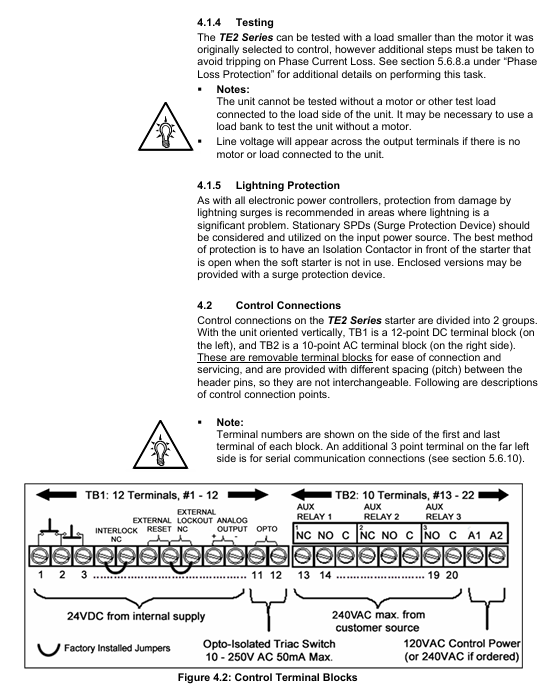
1. Confirm that the wiring of the main power supply, motor, and control power supply is correct, the grounding is reliable, and there is no looseness
The required parameters F001 (FLA), F002 (SF), and F010 (slope type) for parameter settings have been correctly configured
3. Power on test: Connect the control power supply, the "Power On" LED lights up and displays 【 0000. 】 (phase A has no current)
Press the Start button to start the test, the motor accelerates according to the set slope, the "At Speed" LED lights up (the motor reaches full speed), and the bypass contactor is closed
5. If the machine stops during startup, check the fault code (such as "oLA"=overload, increase F003)
2. Common faults and troubleshooting
Troubleshooting steps for fault codes and causes
NFLA motor FLA not set (F001=0) 1. Enter programming mode; 2. Let F001 be the motor nameplate FLA; 3. Restart after saving
1. Check if the main power supply L1/L2/L3 is out of phase during PLc operation; 2. Check if the motor wiring T1/T2/T3 is loose; 3. Confirm that the phase loss protection (F101) has not been mistakenly enabled
Overload during oLA startup: 1. Check if F003 (startup overload level) is too small (if set to Class 5), it can be increased to Class 15; 2. Check if the load is too heavy, reduce the starting load or increase the current limit (F014)
SSd SCR short circuit or no load 1. Disconnect the power supply and measure whether the SCR (L1-T1, L2-T2, L3-T3) is short circuited; 2. Confirm that the motor is connected (no load will report this fault)
Ground fault during GFc operation: 1. Check if the motor winding is grounded; 2. Check if the cable insulation is damaged; 3. Adjust the grounding fault threshold (F046) or delay (F047)
3. Fault recording and reset
Fault record: F085-F093 stores the last 3 faults, including fault codes (F085/F088/F091), timestamps (F086/F089/F092), and date stamps (F087/F090/F093).
Reset method:
Manual reset: After troubleshooting, press the [Reset] button. If there is an overload fault, wait for the motor to cool down (heat capacity H ≥ F059);
Automatic reset: F052 selects the fault type (such as 4=phase loss), F053 sets the reset frequency (1-10 times), 1 minute/time;
Remote reset: Disconnect the control power and reconnect it (applicable to scenarios without Reset button).
Maintenance and Appendix
1. Regular maintenance
Maintenance project cycle operation requirements
Clean the heat sink every 3 months (in dusty environments) and blow it with 80-100psi dry compressed air. Do not use chemicals/metal brushes
Check the power/control terminals for looseness every 6 months and tighten them again (according to torque requirements)
Fan inspection: Every year, listen to the running noise of the fan. If there is any abnormality, replace it (with a lifespan of 3 years/30000 hours)
Capacitor inspection: The main circuit capacitor has a lifespan of 10 years/73000h every 5 years. If it exceeds the lifespan, it is recommended to replace it
Backup parameters every year through BSD Configurator to avoid loss
2. Important Appendix Content
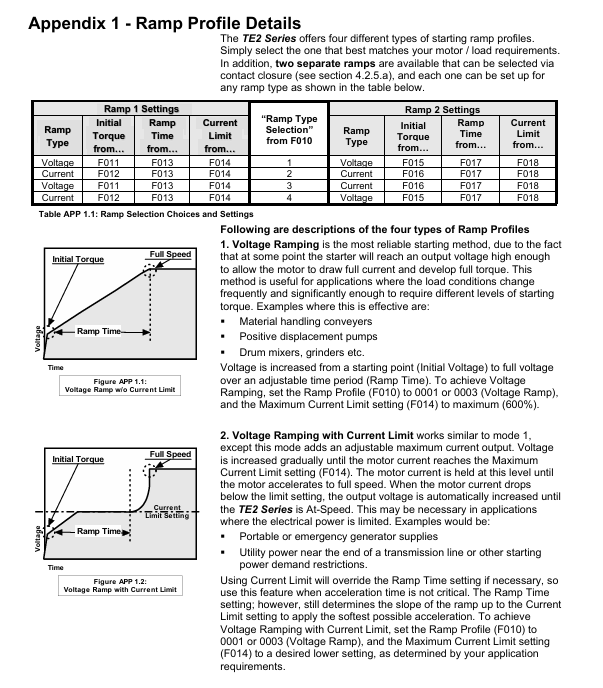
Appendix 1 (Slope Details): Detailed explanation of the differences in VR/CR slope curves. It is recommended to use VR for centrifugal pumps and CR for long conveyor belts.
Appendix 2 (Pump Flex Deceleration): Used for soft stop of pumps to avoid water hammer effect, it is necessary to set the starting deceleration voltage (F025), stopping voltage (F026), and deceleration time (F027).
Appendix 3 (Password Protection): The process for handling lost passwords requires contacting Toshiba customer service for unlocking methods.
Appendix 4 (External Overload): When multiple motors are controlled or started by bypass, an external overload relay (OLR) is required. The wiring example is shown in document APP4.2.
Appendix 5 (Parameter Record): A blank table is used to record the parameters modified by the user for easy maintenance and traceability.
Key issue
Question 1: What are the core startup modes of the TE2 series soft starter? What scenarios are different modes applicable to? How to start voltage ramp (VR) by configuring parameters?
Answer:
Core startup mode and applicable scenarios:
- OMRON
- ABB
- General Electric
- EMERSON
- Honeywell
- HIMA
- ALSTOM
- Rolls-Royce
- MOTOROLA
- Rockwell
- Siemens
- Woodward
- YOKOGAWA
- FOXBORO
- KOLLMORGEN
- MOOG
- KB
- YAMAHA
- BENDER
- TEKTRONIX
- Westinghouse
- AMAT
- AB
- XYCOM
- Yaskawa
- B&R
- Schneider
- KONGSBERG
- NI
- WATLOW
- ProSoft
- SEW
- ADVANCED
- Reliance
- TRICONEX
- METSO
- MAN
- Advantest
- STUDER
- DANAHER MOTION
- Bently
- Galil
- EATON
- MOLEX
- DEIF
- B&W
- ZYGO
- Aerotech
- DANFOSS
- Beijer
- Moxa
- Rexroth
- Johnson
- WAGO
- TOSHIBA
- BMCM
- SMC
- HITACHI
- HIRSCHMANN
- Application field
- XP POWER
- CTI
- TRICON
- STOBER
- Thinklogical
- Horner Automation
- Meggitt
- Fanuc
- Baldor
- SHINKAWA
- Other Brands
- UniOP
- KUKA
- Iba
- Beckhoff
- ADLINK
-
 Sigmatek MDD111-1 DIAS Drive Axis Module
 -
 Sigmatek DKL042 05-024-042 Terminal Module
 -
 Sigmatek DM822 Control Module
 -
 Sigmatek CDM167 12-008-167-O Module
 -
 Sigmatek TAE151 Touch Display Unit
 -
 Sigmatek DCC041 SLIDES Module 05-700-041-D
 -
 Sigmatek AKM65M-ANC2GBB0 PM Servo Motor
 -
 Sigmatek ETT221 01-230-221 Operator Terminal
 -
 Sigmatek SLIDES DAM 124 Analog Module
 -
Sigmatek AKM31C-ANCNGBB0 Servo Motor
-
 Mannesmann Demag Sigmatek CP626 Central Unit
 -
 SIGMATEK 0332.554.03 Board 371071000154
 -
 SIGMATEK 12-250-021 Base Plate Back Panel CM5V020
 -
 SIGMATEK DM162 S-DIAS Digital Mix Module
 -
 DEMAG ERGOTECH 061 381 66 Sigmatek 9842.243.02 Circuit Board
 -
 SIGMATEK CP313-1 PLC Module
 -
Sigmatek ETV0551-2 VARAN Touch Terminal
-
 Sigmatek SDM 081 FS S-Dias Safety Module
 -
 DEMAG 05-250-023 Ergotech Motherboard with Sigmatek TMS012
 -
Sigmatek CM5V020 12-250-023-K Wiring Base
-
 Sigma Tek 5000B-37 Attitude Gyro Indicator
 -
 Sigmatek SDD120-2 DIAS Drive
 -
 Sigmatek CME221 Memory Module
 -
 Sigmatek DCP640 DIAS Central Unit
 -
 Sigmatek STO040 Safety Output Module
 -
Sigmatek CET281 Control Panel
-
 Sigmatek CIPC LX800 Demag NC5 CPU
 -
 Sigmatek DKL093 05-024-093 Terminal Module
 -
 Sigmatek AI088 20-009-088 Analog Input Module
 -
Sigmatek CAI888 Analog Input Module
-
SIGMATEK CCA021 12-025-021 Analog Output Module
-
SIGMATEK 1104.579.05 Control Module
-
SIGMATEK SDI100 Digital Input Module
-
 SIGMATEK C-IPC 256MB LX800 Compact Dias
 -
 SIGMATEK 9423.090.02 Control Module
 -
SIGMATEK C-IPC 256 Power Supply 148498
-
 SIGMATEK CAI025 Analog Input Module
 -
 SIGMATEK CTO166 Digital Output Module
 -
 SIGMATEK CP112 20-004-112 Processor Module
 -
SIGMATEK CAI887 12-009-887 Safety Module
-
 Sigma-Tek 4000B-31 Directional Gyro 1U262-002-42
 -
Sigmatek C-IPC 256MB LX800 IPC Controller
-
Sigmatek C-IPC 01-450-031 Industrial PC LX800
-
Sigmatek C-IPC 256 Industrial PC Controller
-
Sigmatek CCP-531 PLC Processor Module
-
Sigmatek CDI163 Digital Input Module
-
 Sigmatek ETV0501 VARAN Terminal 12-230-0501
 -
 Sigmatek CTMS020 C-DIAS Technology Module
 -
 Sigmatek CIV512 VARAN Switch Module
 -
 Sigmatek HU011 20-080-011 Interface Module
 -
SIGMATEK SLIDES DAM 124 Module
-
 SIGMATEK C-IPC 161 01-450-161L Industrial PC
 -
SIGMATEK C-IPC 128MB VIA 733MHz 01-450-024-K
-
 SIGMATEK 12-780-012 R8-IPC Geode LX800 Module
 -
SIGMATEK CAM124 Analog Module
-
 SIGMATEK S1 032-8AF61-R4 EZ Servo Motor
 -
 SIGMATEK CTO163 Digital Output Module
 -
 SIGMATEK CCP082 12-004-082 Processor Module
 -
 SIGMATEK CRCH081 C-DIAS Temperature Module
 -
 SIGMATEK PC322-K 01-310-322-K Industrial PC
 -
SIGMATEK SDD310-2 Servo Drive
-
 SIGMATEK AI084 Analog Input Module
 -
SIGMATEK CRCH081 12-752-081 Temperature Module
-
Sigma-Tek 5000L-4 Attitude Gyro 1U284-001-3
-
 SIGMATEK CM5V020 12-250-023-K Wiring Module
 -
Sigma-Tek 4000H-6 Directional Gyro IU262-035-7
-
 SIGMATEK Dias DCP160 05-004-160 Processor Module
 -
SIGMATEK 0147.395.02 Control Module
-
SIGMATEK A1084 Control Module
-
SIGMATEK DI200 20-006-2000 Digital Input Module
-
Sigmatek DNC115 Encoder Module
-
 Sigmatek DAM122 05-017-122 Analog Module
 -
Sigmatek 9802.289.01 Control Board TA71 Display
-
Sigmatek TO127 20-007-127 Digital Output Module
-
Sigmatek DNC031 05-011-031 Digital Module
-
Sigmatek VI022 20-003-022 Interface Module
-
Sigmatek CAI085 Analog Input Module
-
 Sigmatek CP111 S-DIAS CPU Module
 -
Sigmatek CTMS030 Krauss Maffei Module
-
 Sigmatek CAM123 Control Module
 -
 Sigmatek TAE732-P 01-240-732-P Touch Display Unit
 -
Sigmatek MDM021 Digital Mixed Module
-
Sigmatek DCP642 DIAS Central Unit
-
 Sigmatek CST022 12-014-022 C-DIAS Module
 -
 Sigmatek SRO021 20-893-021 Safety Relay Output
 -
 Krauss Maffei MC5 Control System Sigmatek
 -
 Sigmatek DC061 Module 18-24VDC 300mA
 -
 Herrmann EVT0855 Ultrasonic Welder Touch Panel
 -
Sigmatek CIV521 Control Module 1.4A 2W
-
Sigmatek DDI61 05-006-161 Digital Input Module
-
SIGMATEK ETT312-E Touch Terminal 01-230-312
-
Cessna S3326-1 Sigma Tek 5000B-67 Gyro 1U149-015-9
-
SIGMATEK PS101 Power Supply Module
-
SIGMATEK 0332.554.03 Control Module 371071000154
-
 SIGMATEK ETT312-E Touch Terminal 01-230-312
 -
SIGMATEK CDM163 Control Module
-
 SIGMATEK VSV046 16-023-046 Module
 -
SIGMATEK AM221 20-017-221 Analog Module
-
SIGMATEK CTS051 12-053-051 Control Module
-
SIGMATEK AM221 20-017-221 Analog Module
-
Sigmatek CSDI161 12-891-161 Safety Input Module
-
Sigma Tek 4000C-1 Directional Gyro Indicator
-
Sigmatek ETV0501 12-230-0501 VARAN Terminal
-
Sigmatek DDM165 SLIDES Module
-
Sigmatek N100 20-011-100 Control Module
-
Sigmatek AKM54K-ANC2R-B0 PM Servo Motor
-
Sigmatek CTO166 Digital Output Module
-
Sigmatek CP212-K 20-004-212-K CPU Module
-
Sigmatek CDI161 Digital Input Module
-
Sigmatek DCC080 05-700-080-2 Control Module
-
 SIGMATEK SCP011 S-DIAS Safety CPU
 -
SIGMATEK SCP011 S-DIAS Safety CPU
-
SIGMATEK SRO022 Relay Output Module
-
SIGMATEK MDD 121 Drive Axis Module
-
SIGMATEK DSI021 SLIDES Siemens Interface
-
SIGMATEK DIAS DCP161 Module 05-004-161
-
 Sigmatek ETT312 Built-in Touch Terminal
 -
SIGMATEK DCP 643 DIAS Controller System
-
SIGMATEK CIO021 Multi I/O Module
-
SIGMATEK CTMS020 Control Module
-
 Sigmatek CME 221 Memory Module
 -
Sigmatek 0420.615.01 Control Board
-
Sigmatek CP111 20-004-111 CPU Module
-
Sigmatek 9405.065.03 Control Board
-
Sigmatek ETEK 01-450-032-K C-IPC 256MB Industrial PC
-
Sigmatek CTO163 12-007-163 Safety Output Module
-
Sigmatek TO081 20-007-081 Digital Output Module
-
 Sigmatek SI021 20-022-021 Safety Input Module


