
Tektronix 5440 oscilloscope
Tektronix 5440 oscilloscope
Overview of Instrument Core
(1) Hardware structure
Plugin compartment: There are a total of 3 compartments that can accommodate 5000 series plugins (without N suffix plugins supporting display readings), 2 vertical compartments (left and middle) for amplifier plugins, and 1 horizontal compartment (right) for time base plugins. The combination of plugins determines the functionality of the measurement system.
Key controls:
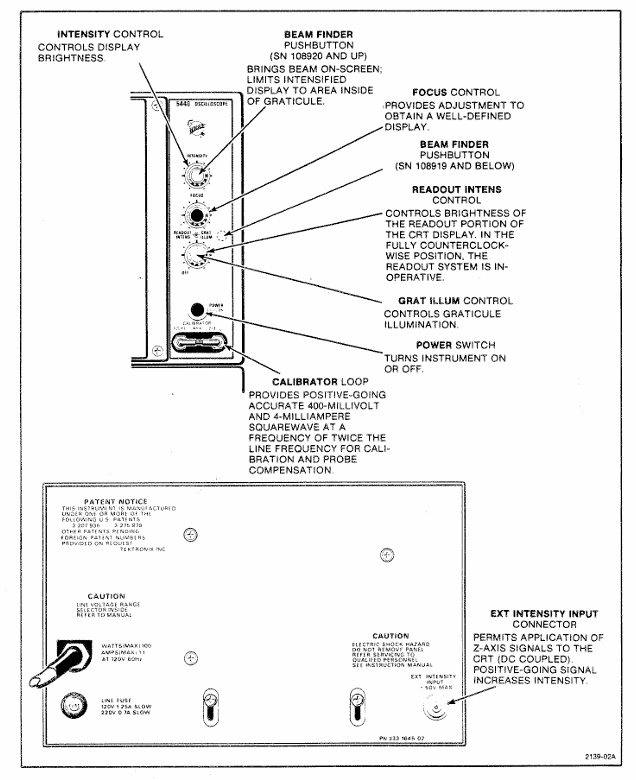
Display related: INTENSITY adjusts the brightness of the trajectory, READOUT INTENS only adjusts the brightness of the reading part (the reading system fails when counterclockwise to the bottom), FOCUS controls for clear display, and BEAM FINDER compresses the trajectory to the scale range.
Power supply and calibration: The power switch (POWER) controls the power on/off, and the internal calibrator (CALIBRATOR LOOP) provides a square wave signal with a voltage of 400mV (± 1%) and a current of 4mA (± 1%), with a frequency of twice the power supply frequency, for calibration and probe compensation.
External interface: EXT INTENSITY INPUT interface receives Z-axis modulation signals (DC coupling,+5V enhanced brightness, -5V reduced brightness, maximum safe input ± 50V, frequency range DC to 2MHz).
(2) Core functions
Display mode:
Alternate mode: The time base plugin display switch pops up and switches between the activated plugin/channel with each CRT scan, suitable for high-frequency signals.
Chop mode: When the time base plugin display switch is pressed, it electronically switches between channels at a rate of 100kHz, suitable for displaying low-frequency signals or single event phenomena.
X-Y operation: Install 5A series amplifiers or 5B series time base plugins with amplifier channels in the horizontal cabin to receive X signals, and 5A series amplifiers in the vertical cabin to receive Y signals, achieving signal comparison display.
Grating display: Both the left vertical cabin and the horizontal cabin are equipped with 5B series time base plugins. The scanning speed of the vertical cabin is slower than that of the horizontal cabin, and brightness modulation is achieved through EXT INTENSITY INPUT, which can simulate TV display.
Reading System: Only supports 5400 series plugins, displaying alphanumeric information in real-time with analog waveforms on CRT. Each plugin's reading occupies a fixed position (channel 1 is indexed at the top, channel 2 is indexed at the bottom), displaying up to 6 readings (option 3 can select 8 readings). The reading interruption waveform display is only about 20 microseconds/character.
Operation Guide
(1) First operation process (19 steps in total, with the following key steps)
Plug in preparation: Install 5A series amplifier plugs in the left/middle vertical cabin and 5B series time base plugs in the horizontal cabin.
Power connection: After confirming the operating voltage, turn off the power switch and connect a power source that meets the voltage/frequency requirements.
Initial setup:
Amplifier plugin: Display on, center position, CH1 Volts/Div set as needed, CH1 Variable Volts/Div clockwise to the end (Cal), CH1 Input Coupling set to DC, mode set to CH1.
Time base plugin: Display alternately (button pops up), center position, Main Sec/Div set to 5ms, Variable Seconds/Div clockwise to the end (Cal), Swp Mag turned off (button pops up), Main Trig Level counterclockwise to the end, trigger source selected to the left (or center, if the amplifier is in the middle compartment), coupled with Auto Trig, AC Couple,+Slope, mode set to Main Sweep.
Calibration check: Connect the probe/test line to the calibrator, adjust the trigger level to obtain stable display, check the waveform amplitude (4 divisions) and cycle (6 complete cycles, 5 cycles for 50Hz power supply), and recalibrate if abnormal.
(2) Basic measurement methods
Calculation formula/explanation for key steps of measurement type
AC peak to peak voltage: 1. The vertical plug-in input coupling is set to Gnd, and AC is set after receiving the signal; 2. Volts/Div is set to display 5-6 vertical divisions, and Variable Volts/Div is set to Cal; 3. Adjust the trigger to obtain stable display, and measure the vertical division of peak values; 4. Result=Division value × Volts/Div × Probe attenuation ratio (if any) Example: 4.6 Division value × 5V/Div=23V
DC instantaneous voltage: 1. The vertical plug-in input coupling is set to Gnd, and the trajectory is positioned to the reference line (such as the bottom part degree, negative voltage is used at the top); 2. After receiving the signal, set the DC and measure the vertical division between the reference line and the measurement point; 3. Result=division value x Volts/Div x probe attenuation ratio (if any), polarity determined by waveform position (+input and waveform is positive on the reference line) Example: 4.6 division x 2V/Div=+9.2V
Time cycle 1. Connect the signal, select AC/DC coupling, set Volts/Div to display 4 divisions; 2. Adjust the trigger to obtain stable display, set Sec/Div to 1 cycle display<8 divisions; 3. Measure the horizontal division of two points (Variable Sec/Div at Cal); 4. Result=Division value x Sec/Div Example: 5 divisions x 0.1ms/Div=0.5ms
Frequency 1. Obtain the period (T) by measuring the time period method; 2. Frequency=1/T Example: Period 0.5ms, Frequency=1/0.5ms=2kHz
Rising time (10% -90% point) 1. Connect the signal, set Volts/Div and Variable to display 5 vertical divisions; 2. Adjust the trigger to obtain stable display, set Sec/Div to 10% -90% point display<8 divisions; 3. Measure the horizontal division of two points; 4. Result=Division value x Sec/Div Example: 4 divisions x 1 μ s/Div=4 μ s
Specification parameters
1: Vertical amplifier specifications
Additional information on characteristic performance requirements
Bandwidth (6-degree reference) DC to at least 85MHz (067-0680-00 calibration fixture); DC to at least 50MHz (calibrated 5A48)-
Rise time (6 divisions reference) 7ns or less (calibrated 5A48)-
Distortion (6-degree reference) 5% or less (067-0680-00 calibration fixture); 4% or less (calibrated 5A48)-
The influence of position on distortion ± step response signal deviation does not exceed ± 5% (trajectory deviation from the center of the scale does not exceed 1 division)-
Within ± 0.5 divisions of the center of the vertical center scale-
Delay line length 140ns-
Chopping rate 50kHz (+50% -30%), conducting in 3 μ s and turning off in 2 μ s-
Alternating rate: scan every two times-
Table 2: Specifications of Horizontal Amplifier and Z-axis Amplifier
Performance requirements for amplifier type characteristics
Horizontal amplifier bandwidth DC to at least 2MHz (8-division signal reference); At least 20kHz at the low frequency end
The Z-axis amplifier inputs a voltage of+5V to switch the CRT beam from off to on; -5V switches the beam from on to off
Available frequency range DC to 2MHz
Input impedance (resistance) 10k Ω
Table 3: Power, Environment, and Physical Specifications
Category Characteristics Performance Requirements
Power input voltage (RMS) nominal 100V, 110V, 120V, 200V
Input frequency adapted to standard power frequency
Maximum 100W at 120V AC and 60Hz input power
Fuse 120V AC with 1.25A slow melting; 240V AC with 0.7A slow melting
Environmental working temperature: 0 ° C to+50 ° C
Storage temperature -40 ° C to+70 ° C
Working altitude up to 15000 feet
Storage altitude up to 50000 feet
Physical weight 25lbs (11kg)
Panel and shell anodized aluminum panel (gray vinyl coated frame), blue vinyl coated shell
Scale dial 8 × 10 divisions, 1.22cm/division, standard white internal scale line, optional black
Installation and maintenance
(1) Rack installation
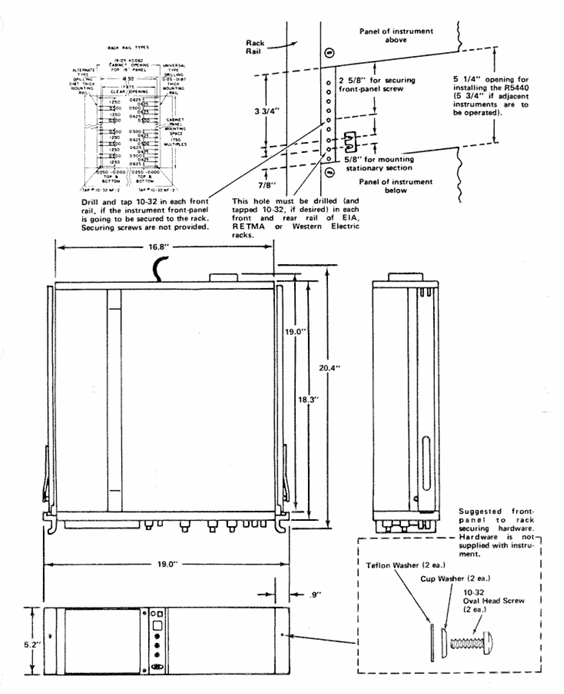
Requirement: Suitable for 19 inch standard racks (Universal, EIA, RETMA, Western Electric hole positions), with a minimum vertical space of 5-1/4 inches and an additional 1/4 inch heat dissipation space above and below; Front rail spacing ≥ 17-5/8 inches (unthreaded) or 17-3/4 inches (tapped); The gap between the rear and the rack enclosure is ≥ 2 inches.
Sliding rail installation: The sliding rail is divided into left and right components (marked LH/RH), with the fixed section installed on the front and rear rails of the rack, the chassis section pre installed with instruments, and the middle section connecting the two; During installation, it is necessary to align horizontally to avoid exchanging left and right (which may cause the safety lock to fail and cause the instrument to slide). The front panel needs to be fixed with 10-32 screws (the rack needs to correspond to the hole position).
Maintenance: The slide rail does not require lubrication, and the dark coating on the sliding parts is permanently lubricated.
(2) Plugin installation and maintenance
Installation: Align the upper and lower slots of the plug-in with the cabin guide rail, and push it into the lock; It can be plugged and unplugged with power, without filling all cabins, only installing the required measuring plugs is needed.
Calibration: After the display unit is calibrated according to the instructions, the vertical/horizontal gain is standardized. The plug-in can be interchanged between cabins without the need for readjustment, but the basic calibration of the plug-in itself needs to be checked to ensure measurement accuracy (refer to the plug-in manual).
(3) Safety regulations
Maintenance safety: Only qualified personnel are allowed to carry out repairs, and individual repairs are prohibited (emergency personnel must be provided); Live maintenance should avoid touching exposed connections/components, and disconnect the power supply before dismantling panels, welding, or replacing components.
Power safety: The power supply must meet the RMS voltage between phase lines and between phase lines and ground ≤ 250V, and the grounding conductor of the power line must be reliably grounded.
Performance check
(1) Testing equipment requirements (key equipment as follows)
Equipment Name Performance Requirements Application Scenarios
DC voltmeter range 0-200V (accuracy 0.1%); 0-3000V (accuracy 1%) low/high voltage power supply inspection and adjustment
Calibration generator amplitude calibration 10mV-1V (accuracy ± 0.25%, 1M Ω load), square wave output gain inspection and adjustment
Timing generator outputs 5ns and 10ns markers (accuracy ± 1%) for scanning timing inspection (5ns, 10ns)
5A48 amplifier plug-in bandwidth DC to 500MHz, display mode CH1 vertical/horizontal system adjustment
5B42 time base plugin scanning speed of at least 10ns/div scanning timing inspection and adjustment
(2) Key inspection items
Trajectory alignment: Horizontal trajectories are aligned with the center horizontal scale line, and vertical trajectories are aligned with the center vertical scale line, with an error of ≤ 0.1 divisions.
Geometric shape: Trajectory curvature/inclination ≤ 0.1 divisions, angle between vertical and horizontal trajectories 90 °± 0.7 °.
Vertical performance:
Gain: Input 1kHz square wave, display 5V reference signal, vertical deflection of 5 divisions ± 0.15 divisions (± 3%).
Bandwidth: Input a 50kHz sine wave, display 6 divisions, increase the frequency until the amplitude drops to 4.2 divisions, and the frequency needs to be ≥ 50MHz (5A48 plugin).
Horizontal performance:
Gain: Input 1kHz square wave, display 5V reference signal, horizontal deviation of 5 divisions ± 0.15 divisions.
Bandwidth: Input a 50kHz sine wave, display 6 divisions, increase the frequency until the amplitude drops to 4.2 divisions, and the frequency needs to be ≥ 2MHz.
Reading system: In dual track mode, readings are displayed at the top/bottom of the CRT without overlap, corresponding to Volts/Div and Sec/Div settings; When CAL controls counterclockwise rotation, the ">" symbol is displayed on the left side of the reading.
- OMRON
- ABB
- General Electric
- EMERSON
- Honeywell
- HIMA
- ALSTOM
- Rolls-Royce
- MOTOROLA
- Rockwell
- Siemens
- Woodward
- YOKOGAWA
- FOXBORO
- KOLLMORGEN
- MOOG
- KB
- YAMAHA
- BENDER
- TEKTRONIX
- Westinghouse
- AMAT
- AB
- XYCOM
- Yaskawa
- B&R
- Schneider
- KONGSBERG
- NI
- WATLOW
- ProSoft
- SEW
- ADVANCED
- Reliance
- TRICONEX
- METSO
- MAN
- Advantest
- STUDER
- DANAHER MOTION
- Bently
- Galil
- EATON
- MOLEX
- DEIF
- B&W
- ZYGO
- Aerotech
- DANFOSS
- Beijer
- Moxa
- Rexroth
- Johnson
- WAGO
- TOSHIBA
- BMCM
- SMC
- HITACHI
- HIRSCHMANN
- Application field
- XP POWER
- CTI
- TRICON
- STOBER
- Thinklogical
- Horner Automation
- Meggitt
- Fanuc
- Baldor
- SHINKAWA
- Other Brands
- UniOP
- KUKA
- Iba
- Beckhoff
- ADLINK
-
 Sigmatek MDD111-1 DIAS Drive Axis Module
 -
 Sigmatek DKL042 05-024-042 Terminal Module
 -
 Sigmatek DM822 Control Module
 -
 Sigmatek CDM167 12-008-167-O Module
 -
 Sigmatek TAE151 Touch Display Unit
 -
 Sigmatek DCC041 SLIDES Module 05-700-041-D
 -
 Sigmatek AKM65M-ANC2GBB0 PM Servo Motor
 -
 Sigmatek ETT221 01-230-221 Operator Terminal
 -
 Sigmatek SLIDES DAM 124 Analog Module
 -
Sigmatek AKM31C-ANCNGBB0 Servo Motor
-
 Mannesmann Demag Sigmatek CP626 Central Unit
 -
 SIGMATEK 0332.554.03 Board 371071000154
 -
 SIGMATEK 12-250-021 Base Plate Back Panel CM5V020
 -
 SIGMATEK DM162 S-DIAS Digital Mix Module
 -
 DEMAG ERGOTECH 061 381 66 Sigmatek 9842.243.02 Circuit Board
 -
 SIGMATEK CP313-1 PLC Module
 -
Sigmatek ETV0551-2 VARAN Touch Terminal
-
 Sigmatek SDM 081 FS S-Dias Safety Module
 -
 DEMAG 05-250-023 Ergotech Motherboard with Sigmatek TMS012
 -
Sigmatek CM5V020 12-250-023-K Wiring Base
-
 Sigma Tek 5000B-37 Attitude Gyro Indicator
 -
 Sigmatek SDD120-2 DIAS Drive
 -
 Sigmatek CME221 Memory Module
 -
 Sigmatek DCP640 DIAS Central Unit
 -
 Sigmatek STO040 Safety Output Module
 -
Sigmatek CET281 Control Panel
-
 Sigmatek CIPC LX800 Demag NC5 CPU
 -
 Sigmatek DKL093 05-024-093 Terminal Module
 -
 Sigmatek AI088 20-009-088 Analog Input Module
 -
Sigmatek CAI888 Analog Input Module
-
SIGMATEK CCA021 12-025-021 Analog Output Module
-
SIGMATEK 1104.579.05 Control Module
-
SIGMATEK SDI100 Digital Input Module
-
 SIGMATEK C-IPC 256MB LX800 Compact Dias
 -
 SIGMATEK 9423.090.02 Control Module
 -
SIGMATEK C-IPC 256 Power Supply 148498
-
 SIGMATEK CAI025 Analog Input Module
 -
 SIGMATEK CTO166 Digital Output Module
 -
 SIGMATEK CP112 20-004-112 Processor Module
 -
SIGMATEK CAI887 12-009-887 Safety Module
-
 Sigma-Tek 4000B-31 Directional Gyro 1U262-002-42
 -
Sigmatek C-IPC 256MB LX800 IPC Controller
-
Sigmatek C-IPC 01-450-031 Industrial PC LX800
-
Sigmatek C-IPC 256 Industrial PC Controller
-
Sigmatek CCP-531 PLC Processor Module
-
Sigmatek CDI163 Digital Input Module
-
 Sigmatek ETV0501 VARAN Terminal 12-230-0501
 -
 Sigmatek CTMS020 C-DIAS Technology Module
 -
 Sigmatek CIV512 VARAN Switch Module
 -
 Sigmatek HU011 20-080-011 Interface Module
 -
SIGMATEK SLIDES DAM 124 Module
-
 SIGMATEK C-IPC 161 01-450-161L Industrial PC
 -
SIGMATEK C-IPC 128MB VIA 733MHz 01-450-024-K
-
 SIGMATEK 12-780-012 R8-IPC Geode LX800 Module
 -
SIGMATEK CAM124 Analog Module
-
 SIGMATEK S1 032-8AF61-R4 EZ Servo Motor
 -
 SIGMATEK CTO163 Digital Output Module
 -
 SIGMATEK CCP082 12-004-082 Processor Module
 -
 SIGMATEK CRCH081 C-DIAS Temperature Module
 -
 SIGMATEK PC322-K 01-310-322-K Industrial PC
 -
SIGMATEK SDD310-2 Servo Drive
-
 SIGMATEK AI084 Analog Input Module
 -
SIGMATEK CRCH081 12-752-081 Temperature Module
-
Sigma-Tek 5000L-4 Attitude Gyro 1U284-001-3
-
 SIGMATEK CM5V020 12-250-023-K Wiring Module
 -
Sigma-Tek 4000H-6 Directional Gyro IU262-035-7
-
 SIGMATEK Dias DCP160 05-004-160 Processor Module
 -
SIGMATEK 0147.395.02 Control Module
-
SIGMATEK A1084 Control Module
-
SIGMATEK DI200 20-006-2000 Digital Input Module
-
Sigmatek DNC115 Encoder Module
-
 Sigmatek DAM122 05-017-122 Analog Module
 -
Sigmatek 9802.289.01 Control Board TA71 Display
-
Sigmatek TO127 20-007-127 Digital Output Module
-
Sigmatek DNC031 05-011-031 Digital Module
-
Sigmatek VI022 20-003-022 Interface Module
-
Sigmatek CAI085 Analog Input Module
-
 Sigmatek CP111 S-DIAS CPU Module
 -
Sigmatek CTMS030 Krauss Maffei Module
-
 Sigmatek CAM123 Control Module
 -
 Sigmatek TAE732-P 01-240-732-P Touch Display Unit
 -
Sigmatek MDM021 Digital Mixed Module
-
Sigmatek DCP642 DIAS Central Unit
-
 Sigmatek CST022 12-014-022 C-DIAS Module
 -
 Sigmatek SRO021 20-893-021 Safety Relay Output
 -
 Krauss Maffei MC5 Control System Sigmatek
 -
 Sigmatek DC061 Module 18-24VDC 300mA
 -
 Herrmann EVT0855 Ultrasonic Welder Touch Panel
 -
Sigmatek CIV521 Control Module 1.4A 2W
-
Sigmatek DDI61 05-006-161 Digital Input Module
-
SIGMATEK ETT312-E Touch Terminal 01-230-312
-
Cessna S3326-1 Sigma Tek 5000B-67 Gyro 1U149-015-9
-
SIGMATEK PS101 Power Supply Module
-
SIGMATEK 0332.554.03 Control Module 371071000154
-
 SIGMATEK ETT312-E Touch Terminal 01-230-312
 -
SIGMATEK CDM163 Control Module
-
 SIGMATEK VSV046 16-023-046 Module
 -
SIGMATEK AM221 20-017-221 Analog Module
-
SIGMATEK CTS051 12-053-051 Control Module
-
SIGMATEK AM221 20-017-221 Analog Module
-
Sigmatek CSDI161 12-891-161 Safety Input Module
-
Sigma Tek 4000C-1 Directional Gyro Indicator
-
Sigmatek ETV0501 12-230-0501 VARAN Terminal
-
Sigmatek DDM165 SLIDES Module
-
Sigmatek N100 20-011-100 Control Module
-
Sigmatek AKM54K-ANC2R-B0 PM Servo Motor
-
Sigmatek CTO166 Digital Output Module
-
Sigmatek CP212-K 20-004-212-K CPU Module
-
Sigmatek CDI161 Digital Input Module
-
Sigmatek DCC080 05-700-080-2 Control Module
-
 SIGMATEK SCP011 S-DIAS Safety CPU
 -
SIGMATEK SCP011 S-DIAS Safety CPU
-
SIGMATEK SRO022 Relay Output Module
-
SIGMATEK MDD 121 Drive Axis Module
-
SIGMATEK DSI021 SLIDES Siemens Interface
-
SIGMATEK DIAS DCP161 Module 05-004-161
-
 Sigmatek ETT312 Built-in Touch Terminal
 -
SIGMATEK DCP 643 DIAS Controller System
-
SIGMATEK CIO021 Multi I/O Module
-
SIGMATEK CTMS020 Control Module
-
 Sigmatek CME 221 Memory Module
 -
Sigmatek 0420.615.01 Control Board
-
Sigmatek CP111 20-004-111 CPU Module
-
Sigmatek 9405.065.03 Control Board
-
Sigmatek ETEK 01-450-032-K C-IPC 256MB Industrial PC
-
Sigmatek CTO163 12-007-163 Safety Output Module
-
Sigmatek TO081 20-007-081 Digital Output Module
-
 Sigmatek SI021 20-022-021 Safety Input Module


