
WESTINGHOUSE iGen5000 Digital Inverter Generator
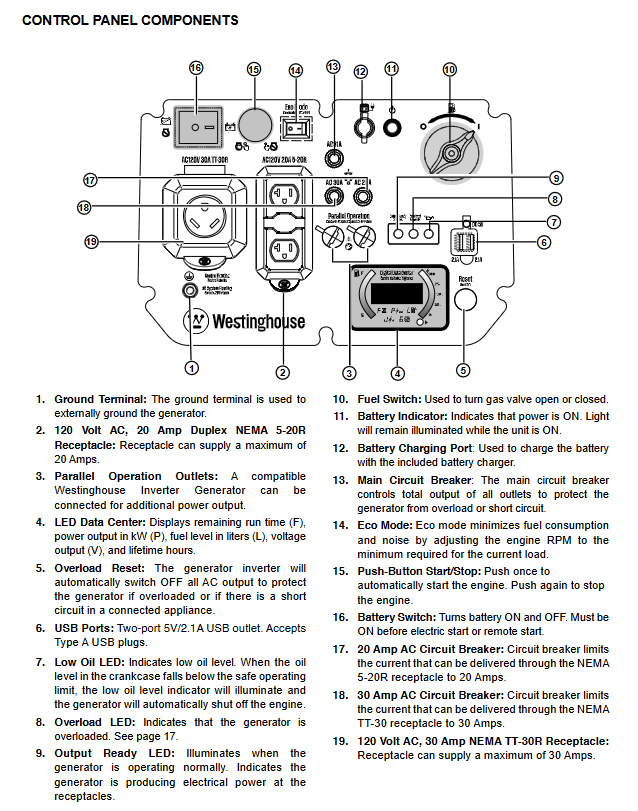
Display system: LED digital data center, real-time display of remaining operating time, output power (kW), fuel level (liters), output voltage, and cumulative operating hours, with clear status at a glance.
Control buttons: One click start/stop, ECO mode switch, overload reset button, battery switch. The operation logic is clear and easy for beginners to learn.
Convenient design:
Scalable metal handle+large-sized rubber wheels, easy to move by one person, suitable for outdoor complex terrain.
The fuselage is equipped with independent openings such as fuel filling port, oil filling port, battery inspection cover, etc., and maintenance operations do not require disassembling the entire components.
Safety standards and protection mechanisms
(1) Core safety usage requirements
Usage environment restrictions:
It is strictly prohibited to use it indoors, in garages, basements, crawl spaces, and other enclosed/semi enclosed spaces. It can only be operated outdoors in ventilated areas and must be kept at least 5 feet (1.5 meters) away from doors, windows, and ventilation openings to avoid carbon monoxide poisoning.
Do not use in humid environments (rainy, snowy, or waterlogged areas) to avoid short circuits and electric shocks caused by moisture; Keep hands dry and wear insulated gloves during operation.
A ventilation gap of ≥ 5 feet (1.5 meters) should be reserved around the equipment, away from combustibles (hay, wood, gasoline barrels, etc.), and the exhaust port should face unmanned areas to avoid high temperature exhaust gas causing fires or burns.
Fuel safety regulations:
Before refueling, the machine must be stopped and cooled for at least 5 minutes. Smoking or approaching open flames is prohibited; Fuel should not be overfilled, and expansion space should be reserved (up to the red filling ring in the fuel tank).
Fuel must be stored in approved gasoline containers, away from heat and fire sources; If fuel spills, immediately wipe it clean and wait for the area to dry before starting the equipment.
Prohibit the use of gasoline as a cleaning agent, avoid contact between fuel and skin, and wash hands promptly after operation.
(2) Comprehensive protection function
Protection type triggers condition protection action
Overload protection output current exceeds the rated value or load short circuit automatically cuts off all AC outputs, overload LED red light lights up, and the engine continues to run
Low oil level protection: When the oil level in the crankcase is below the safety threshold, the low oil LED yellow light will turn on, and the engine will automatically stop to avoid damage caused by cylinder pulling
Overcurrent/short circuit protection circuit short circuit or branch current exceeding the standard (20A/30A branch) corresponds to automatic tripping of the branch circuit breaker, and the main circuit breaker (31A) is linked for protection
Overvoltage/undervoltage protection: Abnormal output voltage (overvoltage>132V/undervoltage<108V). Digital regulator intervenes in regulation, and in severe cases, the output is cut off
Ground fault protection equipment shell or line grounding abnormality triggers safe power-off, reducing the risk of electric shock
Overheating protection: If the engine or inverter temperature exceeds the safety threshold, it will automatically reduce power or shut down, and can be restored after cooling down
Operation and usage process
(1) First use preparation
Oil filling: The equipment has not been filled with oil before leaving the factory. It is necessary to use the accompanying 10W-30 oil and funnel to fill the level surface between the "L-H" mark on the dipstick to avoid overfilling or underfilling.
Fuel filling: Use 87-93 unleaded gasoline, clean the area around the fuel tank cap before filling, slowly fill to the red filling ring, and tighten the fuel tank cap until you hear a "click" sound.
Battery connection: Open the battery access cover, connect the pre installed quick connector, ensure that the battery strap is securely fastened, and avoid loosening during transportation.
Equipment positioning: Place in a dry, flat, and ventilated outdoor area, away from doors, windows, and flammable materials, and reserve sufficient ventilation gaps.
(2) Startup and operation steps
Pre start check: Confirm that all loads have been disconnected, the oil level is normal, the fuel is sufficient, and the battery switch is in the "ON" position.
Start operation:
Remote start: Press the "ON" button on the remote control for 1 second, and the device will automatically start. Wait for the "output ready" LED green light to turn on before connecting the load.
Electric start: Press the "Start/Stop" button on the control panel for 2 seconds. After the engine starts, wait for 30 seconds until the speed stabilizes.
Hand pulled start: Slowly pull the rope until resistance is felt, then quickly pull again, and release the rope to naturally retract after starting.
Load connection: According to the principle of "high power priority", first connect large loads such as air conditioning and refrigerator, wait for the equipment to stabilize (engine running smoothly), and then connect small loads in sequence, with a total load not exceeding 3900W.
- OMRON
- ABB
- General Electric
- EMERSON
- Honeywell
- HIMA
- ALSTOM
- Rolls-Royce
- MOTOROLA
- Rockwell
- Siemens
- Woodward
- YOKOGAWA
- FOXBORO
- KOLLMORGEN
- MOOG
- KB
- YAMAHA
- BENDER
- TEKTRONIX
- Westinghouse
- AMAT
- AB
- XYCOM
- Yaskawa
- B&R
- Schneider
- KONGSBERG
- NI
- WATLOW
- ProSoft
- SEW
- ADVANCED
- Reliance
- TRICONEX
- METSO
- MAN
- Advantest
- STUDER
- DANAHER MOTION
- Bently
- Galil
- EATON
- MOLEX
- DEIF
- B&W
- ZYGO
- Aerotech
- DANFOSS
- Beijer
- Moxa
- Rexroth
- Johnson
- WAGO
- TOSHIBA
- BMCM
- SMC
- HITACHI
- HIRSCHMANN
- Application field
- XP POWER
- CTI
- TRICON
- STOBER
- Thinklogical
- Horner Automation
- Meggitt
- Fanuc
- Baldor
- SHINKAWA
- Other Brands
- UniOP
- KUKA
- Iba
- Beckhoff
- ADLINK
-
 National Instruments PXI-5421 Arbitrary Waveform Generator
-
 National Instruments cRIO-9023 CompactRIO Controller
-
 National Instruments PCI-6221 Multifunction DAQ Card
-
 National Instruments PXI-4065 Digital Multimeter Card
-
 National Instruments NI 9477 Digital Output Module
-
 National Instruments cDAQ-9185 TSN Ethernet Chassis
-
 National Instruments NI 9147 4-Slot cRIO Chassis
-
 National Instruments USB-6259 Mass Termination DAQ Device
-
 National Instruments 184120F-01 Ordering Part Number
-
 National Instruments PCI-4472B Sound and Vibration Module
-
 National Instruments SCXI-1130 Switch
-
 National Instruments VB-8012 VirtualBench
-
 National Instruments PXI-7350 Controller
-
 National Instruments eDAQ-9174 Chassis
-
 National Instruments PXI-4461 DSA Module
-
 National Instruments PCI-6280 DAQ Card
-
 National Instruments PXI-6251 DAQ Card
-
 National Instruments PXI-6653 Module
-
 National Instruments PCI-6509 DIO Device
-
 National Instruments NI 9751 Driver Module
-
 National Instruments PXIe-6361 Multifunction I/O Module
-
 National Instruments cRIO-9014 CompactRIO Controller
-
National Instruments PCI-7390 Motion Control Card
-
National Instruments PXI-8512 CAN Interface Module
-
National Instruments sbRIO-9636 Single-Board Controller
-
 National Instruments IC-3120 Industrial Controller
-
 National Instruments PCI-6220 M Series DAQ Card
-
 National Instruments PXI-8176 Embedded Controller
-
 National Instruments PXI-6132 S Series DAQ Module
-
 National Instruments NI 9206 Analog Input Module
-
 National Instruments PXI-2584 Switch Module
-
 National Instruments 196541B-01L Module
-
 National Instruments 778075-01 Module
-
 National Instruments FP-RLY-420 Module
-
 National Instruments USRP-2920 Radio
-
National Instruments PCIe-6351 DAQ Card
-
National Instruments cRIO-9040 Controller
-
 National Instruments NI 9201 Input Module
-
National Instruments NI 9411 Input Module
-
National Instruments NI 9216 Input Module
-
National Instruments PCI-6221 DAQ Device
-
National Instruments PXI-4498 DSA Module
-
 National Instruments PXI-6259 DAQ Card
-
 National Instruments PXI-7354 Motion Controller
-
National Instruments FP-AI-110 Input Module
-
 National Instruments 192172F-04L Module
-
 National Instruments PXIe-8115 Controller
-
 National Instruments 142931B-01L Module
-
 National Instruments PXI-2503 Switch Module
-
National Instruments 776246-01 Module
-
 National Instruments CFP-2110 Compact FieldPoint Controller
-
National Instruments 779429-01 Ordering Part Number
-
National Instruments NI-9149 8-Slot EtherCAT Chassis
-
National Instruments PXI-4110 Programmable DC Supply
-
 National Instruments 192061-10 Ordering Part Number
-
 National Instruments cDAQ-9181 Chassis Module Carrier
-
National Instruments NI 9437 Digital Input Module
-
National Instruments cFP-2020 Compact FieldPoint Controller
-
National Instruments PCI-6259 Multifunction DAQ Card
-
National Instruments FP-TC-120 Thermocouple Module
-
National Instruments NI-9174 CompactDAQ Chassis
-
 National Instruments PXI-6030E DAQ Module
-
 National Instruments PXIe-5160 Oscilloscope
-
National Instruments PXI-4462 DSA Module
-
National Instruments PXI-8109 Controller
-
 National Instruments PXI-6259 DAQ Card
-
National Instruments PXI-6030E DAQ Card
-
National Instruments cRIO-9056 Controller
-
National Instruments PXIe-8370 MXI Kit
-
 National Instruments USB-6212 DAQ Device
-
 National Instruments RMX-4000 Electronic Load System
-
National Instruments 785040-01 Ordering Part Number
-
 National Instruments cFP-AI-110 Analog Input Module
-
 National Instruments cDAQ-9189 8-Slot Chassis
-
National Instruments PXIe-4139 Source Measure Unit
-
 National Instruments PXI-5620 Digitizer Module
-
 National Instruments PCIe-8371 MXI-Express Card
-
National Instruments 196762B-01L Ordering Part Number
-
 National Instruments NI-9361 Counter Input Module
-
National Instruments cDAQ-9181 Ethernet Chassis
-
National Instruments NI 9221 Input Module
-
 National Instruments cDAQ-9171 Chassis
-
 National Instruments NI 9225 Input Module
-
 National Instruments NI 9171 Chassis
-
 National Instruments 779373-01 Module
-
National Instruments PCI-6034E DAQ Card
-
 National Instruments NI-9211 Input Module
-
National Instruments 779013-01 Module
-
 National Instruments NI-9159 RIO Chassis
-
National Instruments PCIe-GPIB Analyzer Card 778930-01
-
 National Instruments PCI-6110 Multifunction DAQ Card
-
National Instruments PXIe-8840QC Embedded Controller
-
 National Instruments PXI-2530 Switch Module
-
National Instruments 780927-01 Ordering Part Number
-
National Instruments PXI-8420 Serial Interface Module
-
 National Instruments PXIe-8135 Embedded Controller
-
 National Instruments GPIB-ENET/1000 Controller
-
 National Instruments PCI-6704 Analog Output Card
-
National Instruments PXI-6133 S Series DAQ Module
-
 National Instruments PXI-1042 8-Slot Chassis
-
National Instruments NI 9512 Module
-
National Instruments 779003-01 Module
-
 National Instruments cDAQ-9191 Chassis
-
National Instruments USRP-2921 Radio
-
 National Instruments 783368-01 Module
-
National Instruments PXI-2510 Switch Module
-
National Instruments PCI-7344 Controller
-
 National Instruments PXIe-1082 Chassis
-
National Instruments PXI-8108 Controller
-
 National Instruments USB-6363 DAQ Device
-
National Instruments cDAQ-9191 Wireless Chassis
-
National Instruments PXIe-4357 RTD Input Module
-
 National Instruments PCI-6512 Industrial Digital I/O Card
-
 National Instruments PXI-6115 Multifunction DAQ Module
-
National Instruments NI-9231 Sound and Vibration Module
-
National Instruments PCI-7344 Motion Controller
-
 National Instruments PCI-8512 CAN Interface Device
-
 National Instruments PCI-1409 Image Acquisition Card
-
National Instruments 783451-01 Ordering Part Number
-
National Instruments 781496-01 cDAQ-9181 Chassis
-
 National Instruments PCI-6250 Multifunction DAQ Device
-
 National Instruments PCI-6224 Multifunction DAQ Card
-
 National Instruments cRIO-9081 CompactRIO Controller
-
National Instruments USB-6353 X Series DAQ Device
-
 National Instruments NI-9223 Simultaneous Analog Input Module
-
 National Instruments PXIe-8133 Embedded Controller
-
National Instruments NI-9403 Digital I/O Module
-
 National Instruments PCI-6111E Multifunction I/O Card


