
XYCOM XVME-100 memory module
Power pin:+5 V(A32/B32/C32)、+12V(C31)、-12V(A31)、+5V STDBY(B31)、GND( Multiple pins scattered to ground);
Address pins: A01-A23 (A24-A31 located in row 2B);
Data pins: D00-D07 (A1-A8), D08-D15 (C1- C8);
Control pins: AS*(A18)、DS0*(A13)、DS1*(A12)、DTACK*(A16)、WRITE*(A14) Wait.
Installation and configuration process
1. Detailed explanation of jumper configuration
XVME-100 has a total of 52 jumpers, and the core configuration items and their corresponding relationships are as follows:
(1) Address and chip size configuration (core configuration)
Configure the target jumper position configuration logic
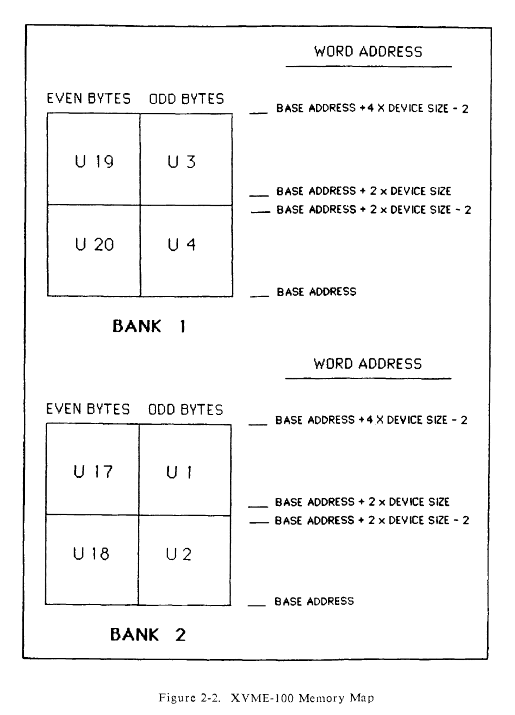
The Bank1 base address settings for J14 (A23) and J17-J24 (A15-A22) jumper "Out" correspond to address bit 1, and "In" corresponds to address bit 0, which needs to be set according to the system address plan
Bank1 chip size setting J50-J52 8K × 8: J50=In/J51=In/J52=In;
16K×8:J50=In/J51=In/J52=Out;
32K×8:J50=In/J51=Out/J52=In;
64K×8:J50=In/J51=Out/J52=Out;
128K×8:J50=Out/J51=In/J52=In
The basic address settings for Bank2 are J16 (A23) and J26-J33 (A15-A22), which follow the same logic as Bank1. It is necessary to avoid overlapping with the address space of Bank1
Bank2 chip size setting J47-J49 with Bank1 chip size jumper logic
(2) Other key configuration jumpers
Configuration Category Jumper Position Configuration Options
Address modifier decoding Bank1: J10-J13; Bank2: J9/J12/J15 privileged access: J13 (Bank1)/J15 (Bank2) "In" is only accessed by superusers, "Out" is accessed by all users;
Data space: J11 (Bank1)/J9 (Bank2) "In" supports data access;
Program space: J10 (Bank1)/J12 (Bank2) "In" supports program access
Chip speed selection Bank1: J6-J7; Bank2:J4-J5 100ns:Out/Out; 150ns:Out/In; 200ns:In/Out; 250ns: In/In (default)
Backup power selection J34-J35 No backup: J34=A/J35=Out (default);
Battery backup: J34=B/J35=Out;
+5V STDBY backup: J34=A/J35=In
Definition of memory chip pins Bank1: J40-J46; Bank2: J2/J3/J25/J36-J39 Select according to storage type, refer to Table 2-5 in the manual for corresponding jumper combinations
2. Installation steps and specifications
(1) Preparation before installation
Environmental verification: Confirm that the installation environment temperature and humidity meet the requirements, there are no corrosive gases, and anti-static measures are in place;
Component inspection: Check that the module has no external damage, the connector pins are not bent, and the storage chip model matches the jumper configuration;
Tool preparation: Prepare anti-static wristbands, torque screwdrivers (0.5~0.8 N · m), multimeters, and chip extractors.
(2) Installation process
Chip installation:
In the power-off state, configure the corresponding jumper according to the storage type and confirm that the chip notch direction is consistent with the slot notch;
Hand hold the edge of the chip (avoid touching the pins) and insert it evenly into the 32 pin slot, ensuring that the pins are fully in contact without bending or loosening;
Rack deployment:
Confirm that the VMEbus rack power has been turned off, align the module with the guide rail, and slowly push it in until the P1 connector is fully engaged with the backplane;
Secure the front panel of the module with M3 screws and tighten to a torque of 0.5~0.8 N · m to prevent loose screws from causing poor contact;
6U panel installation (optional):
Remove the screws and handle of the original 3U panel, and transfer the handle to the XVME-945 6U panel;
Align the mounting holes of the panel and module, fix them with screws, and ensure that the panel fits snugly with the rack;
Post installation inspection:
Use a multimeter to measure the power supply voltage of the module (+5V normal, fluctuation ≤ ± 5%);
Connect the rack power supply and observe the storage group LED light (which lights up instantly during access). If there are no abnormalities, the installation is complete.
3. Common configuration examples
Example 1: Bank1 configured with 32K × 8 EPROM, base address 8E0000 Hex
Chip size jumper (Bank1): J50=In, J51=Out, J52=In;
Base address jumper (Bank1): J14=Out (A23=1), J23=In (A22=0), J21=In (A21=0), J22=In (A20=0), J24=Out (A19=1), J20=Out (A18=1), J18=Out (A17=1), J19=A (A16=0), J17=A (A15=0);
Address space: 8E0000 Hex~8FFFF Hex (a total of 128KB, i.e. 32K × 8 × 4);
Other configurations: J13=Out (all user access), J11=In (supports data access), J10=In (supports program access), J6-J7=In/In (250ns speed), J40-J46 configured according to EPROM pin definitions.
Applicable scenarios and boundary limitations
1. Core applicable scenarios
(1) Industrial automation control
Scenario features: VMEbus architecture PLC and DCS systems require stable program storage and data caching, with large environmental temperature fluctuations and vibration interference;
Recommended configuration: Bank1 uses 64K × 8 RAM to cache real-time data (battery backup), and Bank2 uses 128K × 8 EPROM to store control programs;
Core advantages: wide temperature adaptability, strong vibration resistance, reliable data backup, and support for on-site maintenance.
(2) Military embedded devices
Scenario features: VMEbus military computer, requiring resistance to harsh environments, long lifespan, low power consumption, and storage of programs and critical data;
- OMRON
- ABB
- General Electric
- EMERSON
- Honeywell
- HIMA
- ALSTOM
- Rolls-Royce
- MOTOROLA
- Rockwell
- Siemens
- Woodward
- YOKOGAWA
- FOXBORO
- KOLLMORGEN
- MOOG
- KB
- YAMAHA
- BENDER
- TEKTRONIX
- Westinghouse
- AMAT
- AB
- XYCOM
- Yaskawa
- B&R
- Schneider
- KONGSBERG
- NI
- WATLOW
- ProSoft
- SEW
- ADVANCED
- Reliance
- TRICONEX
- METSO
- MAN
- Advantest
- STUDER
- DANAHER MOTION
- Bently
- Galil
- EATON
- MOLEX
- DEIF
- B&W
- ZYGO
- Aerotech
- DANFOSS
- Beijer
- Moxa
- Rexroth
- Johnson
- WAGO
- TOSHIBA
- BMCM
- SMC
- HITACHI
- HIRSCHMANN
- Application field
- XP POWER
- CTI
- TRICON
- STOBER
- Thinklogical
- Horner Automation
- Meggitt
- Fanuc
- Baldor
- SHINKAWA
- Other Brands
- UniOP
- KUKA
- Iba
- Beckhoff
- ADLINK
-
 Sigmatek MDD111-1 DIAS Drive Axis Module
 -
 Sigmatek DKL042 05-024-042 Terminal Module
 -
 Sigmatek DM822 Control Module
 -
 Sigmatek CDM167 12-008-167-O Module
 -
 Sigmatek TAE151 Touch Display Unit
 -
 Sigmatek DCC041 SLIDES Module 05-700-041-D
 -
 Sigmatek AKM65M-ANC2GBB0 PM Servo Motor
 -
 Sigmatek ETT221 01-230-221 Operator Terminal
 -
 Sigmatek SLIDES DAM 124 Analog Module
 -
Sigmatek AKM31C-ANCNGBB0 Servo Motor
-
 Mannesmann Demag Sigmatek CP626 Central Unit
 -
 SIGMATEK 0332.554.03 Board 371071000154
 -
 SIGMATEK 12-250-021 Base Plate Back Panel CM5V020
 -
 SIGMATEK DM162 S-DIAS Digital Mix Module
 -
 DEMAG ERGOTECH 061 381 66 Sigmatek 9842.243.02 Circuit Board
 -
 SIGMATEK CP313-1 PLC Module
 -
Sigmatek ETV0551-2 VARAN Touch Terminal
-
 Sigmatek SDM 081 FS S-Dias Safety Module
 -
 DEMAG 05-250-023 Ergotech Motherboard with Sigmatek TMS012
 -
Sigmatek CM5V020 12-250-023-K Wiring Base
-
 Sigma Tek 5000B-37 Attitude Gyro Indicator
 -
 Sigmatek SDD120-2 DIAS Drive
 -
 Sigmatek CME221 Memory Module
 -
 Sigmatek DCP640 DIAS Central Unit
 -
 Sigmatek STO040 Safety Output Module
 -
Sigmatek CET281 Control Panel
-
 Sigmatek CIPC LX800 Demag NC5 CPU
 -
 Sigmatek DKL093 05-024-093 Terminal Module
 -
 Sigmatek AI088 20-009-088 Analog Input Module
 -
Sigmatek CAI888 Analog Input Module
-
SIGMATEK CCA021 12-025-021 Analog Output Module
-
SIGMATEK 1104.579.05 Control Module
-
SIGMATEK SDI100 Digital Input Module
-
 SIGMATEK C-IPC 256MB LX800 Compact Dias
 -
 SIGMATEK 9423.090.02 Control Module
 -
SIGMATEK C-IPC 256 Power Supply 148498
-
 SIGMATEK CAI025 Analog Input Module
 -
 SIGMATEK CTO166 Digital Output Module
 -
 SIGMATEK CP112 20-004-112 Processor Module
 -
SIGMATEK CAI887 12-009-887 Safety Module
-
 Sigma-Tek 4000B-31 Directional Gyro 1U262-002-42
 -
Sigmatek C-IPC 256MB LX800 IPC Controller
-
Sigmatek C-IPC 01-450-031 Industrial PC LX800
-
Sigmatek C-IPC 256 Industrial PC Controller
-
Sigmatek CCP-531 PLC Processor Module
-
Sigmatek CDI163 Digital Input Module
-
 Sigmatek ETV0501 VARAN Terminal 12-230-0501
 -
 Sigmatek CTMS020 C-DIAS Technology Module
 -
 Sigmatek CIV512 VARAN Switch Module
 -
 Sigmatek HU011 20-080-011 Interface Module
 -
SIGMATEK SLIDES DAM 124 Module
-
 SIGMATEK C-IPC 161 01-450-161L Industrial PC
 -
SIGMATEK C-IPC 128MB VIA 733MHz 01-450-024-K
-
 SIGMATEK 12-780-012 R8-IPC Geode LX800 Module
 -
SIGMATEK CAM124 Analog Module
-
 SIGMATEK S1 032-8AF61-R4 EZ Servo Motor
 -
 SIGMATEK CTO163 Digital Output Module
 -
 SIGMATEK CCP082 12-004-082 Processor Module
 -
 SIGMATEK CRCH081 C-DIAS Temperature Module
 -
 SIGMATEK PC322-K 01-310-322-K Industrial PC
 -
SIGMATEK SDD310-2 Servo Drive
-
 SIGMATEK AI084 Analog Input Module
 -
SIGMATEK CRCH081 12-752-081 Temperature Module
-
Sigma-Tek 5000L-4 Attitude Gyro 1U284-001-3
-
 SIGMATEK CM5V020 12-250-023-K Wiring Module
 -
Sigma-Tek 4000H-6 Directional Gyro IU262-035-7
-
 SIGMATEK Dias DCP160 05-004-160 Processor Module
 -
SIGMATEK 0147.395.02 Control Module
-
SIGMATEK A1084 Control Module
-
SIGMATEK DI200 20-006-2000 Digital Input Module
-
Sigmatek DNC115 Encoder Module
-
 Sigmatek DAM122 05-017-122 Analog Module
 -
Sigmatek 9802.289.01 Control Board TA71 Display
-
Sigmatek TO127 20-007-127 Digital Output Module
-
Sigmatek DNC031 05-011-031 Digital Module
-
Sigmatek VI022 20-003-022 Interface Module
-
Sigmatek CAI085 Analog Input Module
-
 Sigmatek CP111 S-DIAS CPU Module
 -
Sigmatek CTMS030 Krauss Maffei Module
-
 Sigmatek CAM123 Control Module
 -
 Sigmatek TAE732-P 01-240-732-P Touch Display Unit
 -
Sigmatek MDM021 Digital Mixed Module
-
Sigmatek DCP642 DIAS Central Unit
-
 Sigmatek CST022 12-014-022 C-DIAS Module
 -
 Sigmatek SRO021 20-893-021 Safety Relay Output
 -
 Krauss Maffei MC5 Control System Sigmatek
 -
 Sigmatek DC061 Module 18-24VDC 300mA
 -
 Herrmann EVT0855 Ultrasonic Welder Touch Panel
 -
Sigmatek CIV521 Control Module 1.4A 2W
-
Sigmatek DDI61 05-006-161 Digital Input Module
-
SIGMATEK ETT312-E Touch Terminal 01-230-312
-
Cessna S3326-1 Sigma Tek 5000B-67 Gyro 1U149-015-9
-
SIGMATEK PS101 Power Supply Module
-
SIGMATEK 0332.554.03 Control Module 371071000154
-
 SIGMATEK ETT312-E Touch Terminal 01-230-312
 -
SIGMATEK CDM163 Control Module
-
 SIGMATEK VSV046 16-023-046 Module
 -
SIGMATEK AM221 20-017-221 Analog Module
-
SIGMATEK CTS051 12-053-051 Control Module
-
SIGMATEK AM221 20-017-221 Analog Module
-
Sigmatek CSDI161 12-891-161 Safety Input Module
-
Sigma Tek 4000C-1 Directional Gyro Indicator
-
Sigmatek ETV0501 12-230-0501 VARAN Terminal
-
Sigmatek DDM165 SLIDES Module
-
Sigmatek N100 20-011-100 Control Module
-
Sigmatek AKM54K-ANC2R-B0 PM Servo Motor
-
Sigmatek CTO166 Digital Output Module
-
Sigmatek CP212-K 20-004-212-K CPU Module
-
Sigmatek CDI161 Digital Input Module
-
Sigmatek DCC080 05-700-080-2 Control Module
-
 SIGMATEK SCP011 S-DIAS Safety CPU
 -
SIGMATEK SCP011 S-DIAS Safety CPU
-
SIGMATEK SRO022 Relay Output Module
-
SIGMATEK MDD 121 Drive Axis Module
-
SIGMATEK DSI021 SLIDES Siemens Interface
-
SIGMATEK DIAS DCP161 Module 05-004-161
-
 Sigmatek ETT312 Built-in Touch Terminal
 -
SIGMATEK DCP 643 DIAS Controller System
-
SIGMATEK CIO021 Multi I/O Module
-
SIGMATEK CTMS020 Control Module
-
 Sigmatek CME 221 Memory Module
 -
Sigmatek 0420.615.01 Control Board
-
Sigmatek CP111 20-004-111 CPU Module
-
Sigmatek 9405.065.03 Control Board
-
Sigmatek ETEK 01-450-032-K C-IPC 256MB Industrial PC
-
Sigmatek CTO163 12-007-163 Safety Output Module
-
Sigmatek TO081 20-007-081 Digital Output Module
-
 Sigmatek SI021 20-022-021 Safety Input Module


