
Zygo MicroLUPI Micro Hole Diameter Laser Unequal Path Interferometer
The MicroLUPI is a versatile and precise instrument used for testing spherical and flat optics. It can be configured to measure surface figure and radius of curvature of individual optical parts or optical arrays.
The MicroLUPI has a 3 millimeter diameter,collimated measurement beam. All MicroLUPI’s come with a granite base, a stable gantry column, motorized focus control, and X/Y motorized stage.
Zygo MicroLUPI Micro Hole Diameter Laser Unequal Path Interferometer
Options
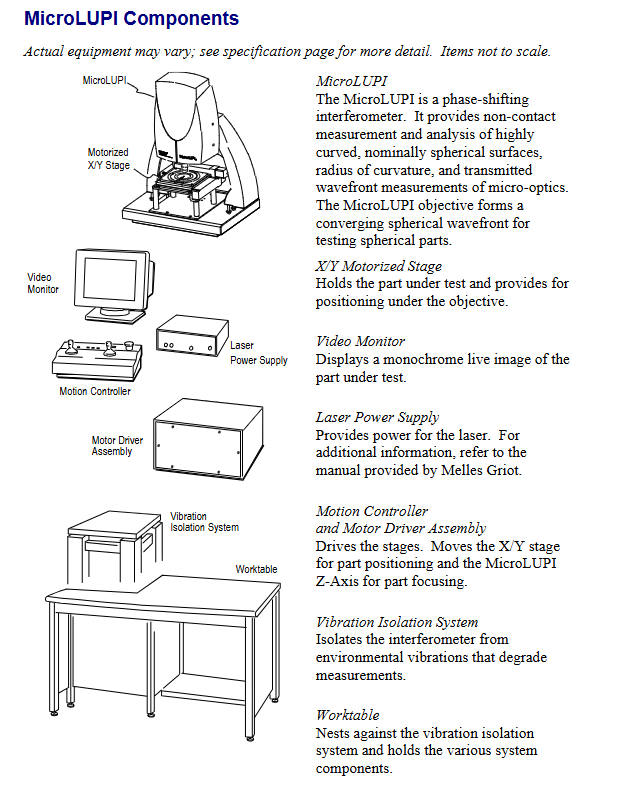
How the MicroLUPI Works
Key technical parameters
Laser: Stable frequency helium neon laser (fiber output), power ≤ 1mW, coherence length ≥ 10m
Motion system: The X/Y stage and Z-axis focusing are both driven by DC brushless micro stepper motors, with a stroke of 152mm (6 inches), a resolution of 0.1 μ m (4 μ in), and a maximum speed of 12.7mm/s (0.5in/s)
Imaging and Observation: Maximum 640 × 480 pixel camera, 9-inch monochrome video monitor for real-time display, supports manual/auto focus
Environmental requirements: temperature 15-30 ℃ (59-86 ° F), temperature change rate<1.0 ℃/15 minutes, humidity 5% -95% (no condensation), vibration isolation frequency 1-120Hz
Laser safety: Complies with DHHS Class II laser standards, emits only visible red light, and has no visible radiation
Installation and initialization
1. Preparation before installation
Environmental requirements: Concrete floor should be used to reduce vibration, avoid air conditioning/fan direct blowing causing airflow disturbance, and stay away from optical pollution sources such as smoke and dust
**Utility requirements * *: 100-240VAC 50/60Hz power supply (with grounding), vibration isolation table requires ≥ 60psi compressed air (1/4 inch interface), vacuum suction cup requires 1/8 inch NPT interface vacuum source
Installation restriction: The device must be operated by Zygo trained personnel, and after opening the box, it must be left to stand in the installation environment for 24 hours to adapt to temperature and humidity
2. Core installation steps
Position the vibration isolation system and workbench, and install the granite base, column, Z-axis stage, and MicroLUPI machine head in sequence
Connect the laser power supply, motion controller, motor driver and other cables, ensure that the hardware key is connected to the parallel port of the computer, and the controller board cables are correctly connected
Install the objective lens (align with the dovetail groove pin and tighten the locking screw), adjust the working distance of the objective lens (match the engraved line according to the nominal curvature radius of the measured part)
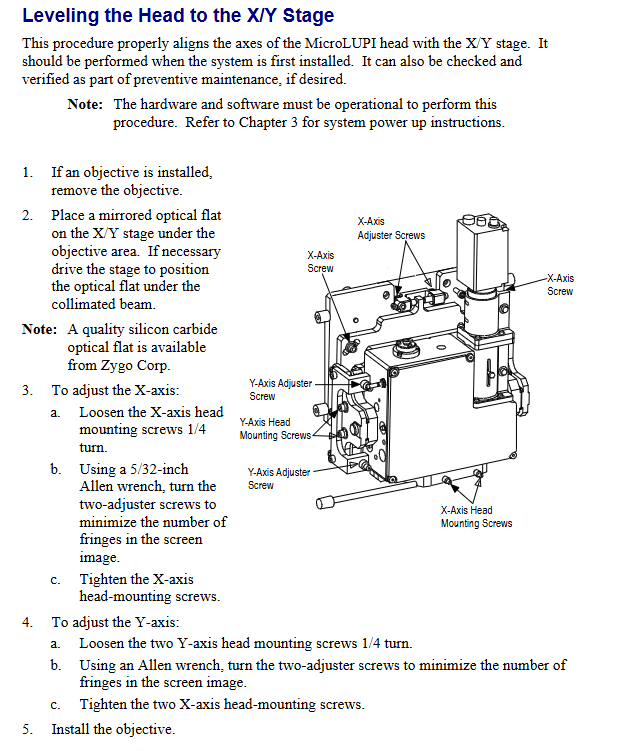
Calibrate the machine head and X/Y stage: After removing the objective lens, place the optical flat mirror and adjust the X/Y axis adjustment screws to minimize the number of interference fringes
3. Startup initialization process
Turn on the laser power with the key and wait for the "Locked" indicator light to turn on; Turn on all components through the power manager
Log in to Windows NT on the computer (default username "zygo"), open MetroPro software and load MicroLUPI.app application
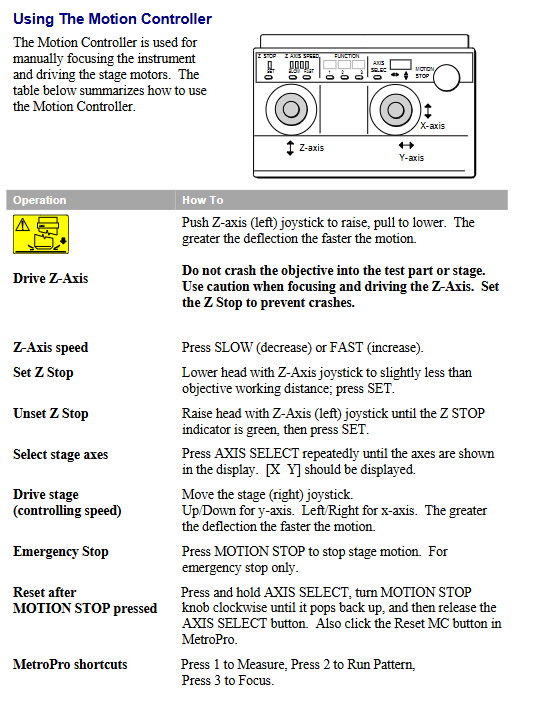
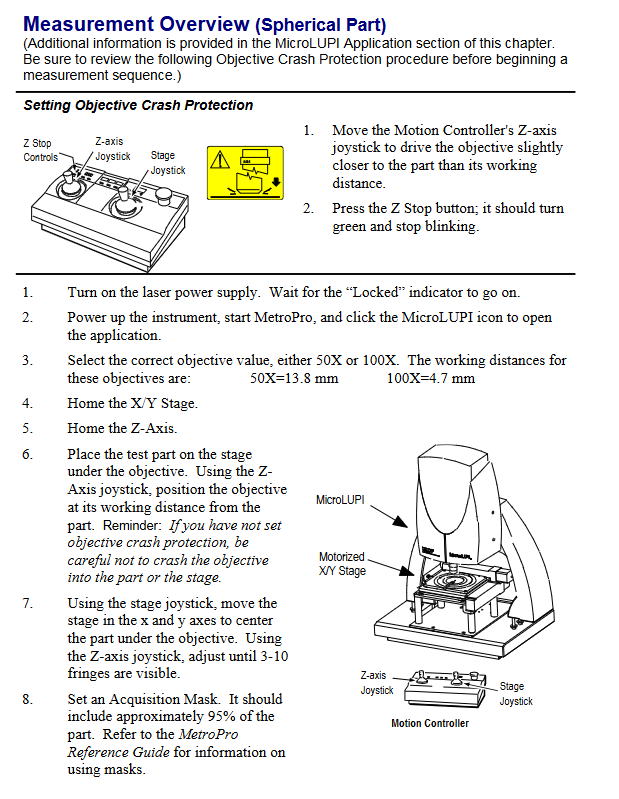
Perform X/Y stage and Z-axis "home" operation, set Z-axis collision protection (move the objective lens to a slightly smaller distance than the working distance, press the Z Stop button until the green light stays on)
Measurement operation process
1. Basic operation preparation
Controller usage: Adjust the height of the objective lens through the Z-axis joystick (push/pull to control lifting, deflection amplitude to control speed), move the stage with the X/Y joystick, and the emergency stop button (Motion Stop) can interrupt all movements
Light intensity adjustment: Press F4 to open the light intensity window, adjust all indicators to green through the numeric keypad (to avoid saturation and data loss), and F5 can automatically set the light intensity
2. System error calibration (key steps)
Calibration purpose: To eliminate inherent errors in the optical system of the instrument and improve measurement accuracy, recalibration is required after replacing the objective lens, adjusting the camera mode/phase resolution, or changing the ambient temperature
Operation steps:
Place the Zygo standard reference ball (avoid touching the optical surface), adjust X/Y/Z to align the center of the ball and hide the stripes
Set the average number of phase measurements in the measurement control window (recommended to be 3 times that of regular measurements, with a minimum of 8 times), and turn off "Subtext Sys Error"
After measuring with F1, save the data (named in a format such as "SysErrLN1x. dat" to distinguish between camera mode and phase resolution). During subsequent measurements, enable "Subtext Sys Error" and load the corresponding error file
3. Typical measurement scenarios (curvature radius of spherical parts)
Select the matching objective lens (50X working distance 13.8mm, 100X working distance 4.7mm), place the test piece and center it through the stage control lever
Enable AutoNULL (optional Power/Focus mode), set Lateral Pass Limit and Power/Focus Pass Limit
Click on "Auto Calibrate" to calibrate the X/Y/Z calibration coefficients (the fitting quality should be close to 1), and execute AutoNULL to optimize the stripes
Start measuring with F1, and the system automatically collects "cat's eye" and "confocal" data to calculate the curvature radius; Batch measurement can create rectangular/circular measurement paths through the "Pattern Editor" (setting parameters such as row and column count, spacing, etc.)
Maintenance and after-sales service
1. Daily maintenance
Cleaning of optical components:
Dust: Blow off with compressed air, and wipe the remaining dust in one direction with lens paper dipped in isopropanol/methanol
Fingerprints/oil stains: Dip in 1% neutral soap solution to wipe, then use distilled water to remove residue, and finally finish with alcohol (do not reuse wiping materials)
Mechanical and electronic components: Use a soft cloth dipped in mild cleaner to wipe the external surface, and do not disassemble components such as motor drivers and controllers (no user repairable parts)
2. Malfunctions and after-sales service
Warranty Policy: The equipment comes with a 1-year warranty from the date of shipment (for material/process defects), standard support is provided for 5 years after discontinuation, and "best effort" support is provided thereafter; The warranty service includes free repair/replacement (with transportation, cleaning, and calibration fees to be borne), a 90 day warranty for replacement parts, or the remaining warranty period of the original warranty (whichever is longer)
Return requirement: Unused and well packaged products can be returned within 30 days, with a 20% restocking fee charged; Customized products cannot be returned, and returns must first obtain a Return Authorization (RA) number
Technical Support: In North America, you can call (800) 994-6669 (Monday to Friday 8:00-17:00 EST). In other regions, you need to provide the device model, serial number, and software version to contact the local agent
Safety and Compliance
1. Laser safety operation
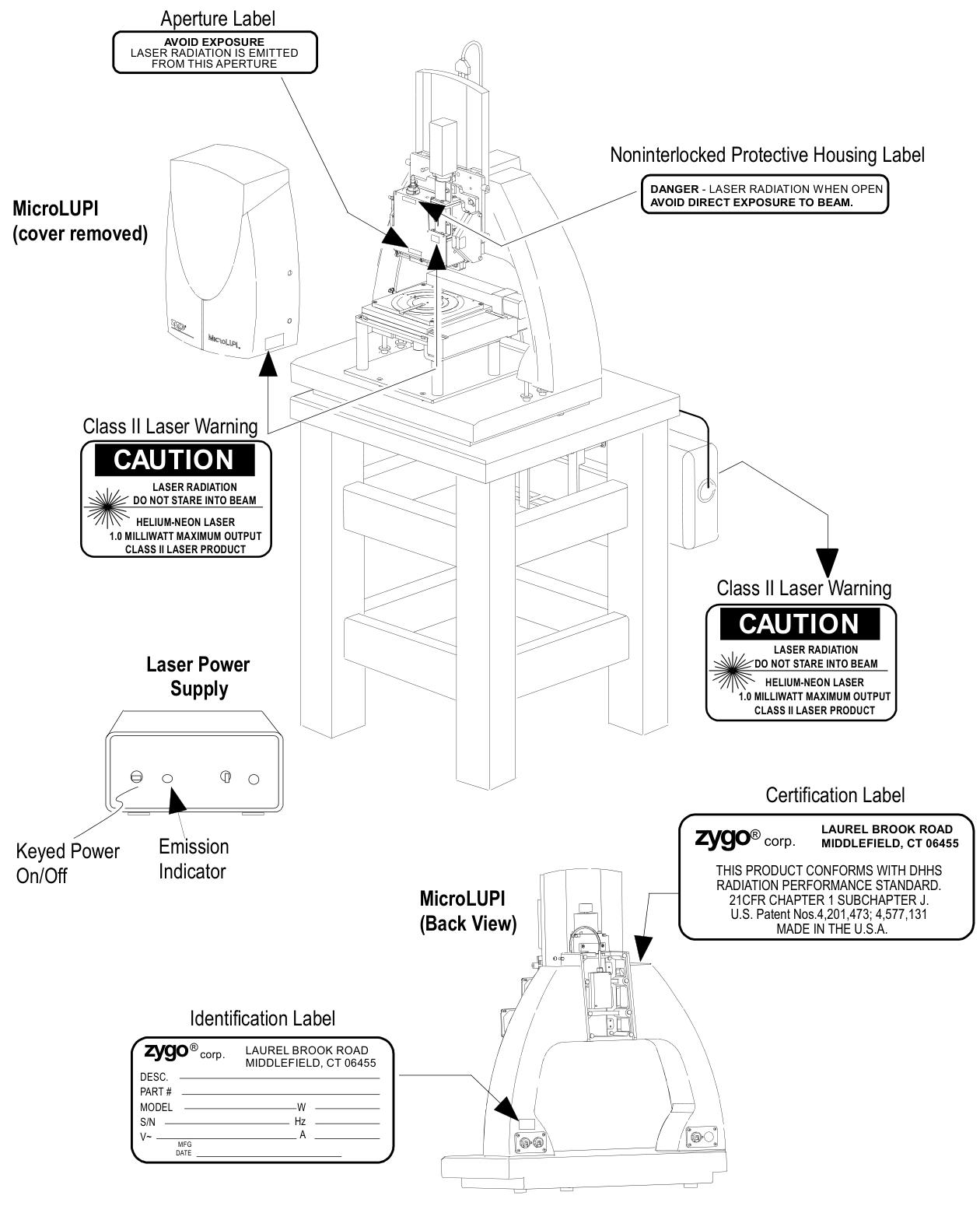
Do not stare directly at the laser beam or its strong light reflection. When the device is turned on, ensure that the laser exit is unobstructed
Laser emission control: The key switch on the laser power supply is the main control (no radiation after turning off), and the "Emission Indicator" light is on to indicate that there may be laser output
Safety signs: The equipment is labeled with Class II laser warning signs ("CAUTION LASER RADATION DO NOT STARE IN BEAM"), exit port signs, non interlocking protective shell signs, etc., which must be kept clear and visible
2. Compliance certification
Compliant with the EU EMC Directive and Low Voltage Directive, meeting standards such as EN 55011 (ISM equipment RF interference), EN 61010-1 (safety of measuring equipment), EN 60825-1 (laser safety), etc
Having CE certification and JISO 9001 certification, the relevant conformity declaration is archived at Zygo's US headquarters
- OMRON
- ABB
- General Electric
- EMERSON
- Honeywell
- HIMA
- ALSTOM
- Rolls-Royce
- MOTOROLA
- Rockwell
- Siemens
- Woodward
- YOKOGAWA
- FOXBORO
- KOLLMORGEN
- MOOG
- KB
- YAMAHA
- BENDER
- TEKTRONIX
- Westinghouse
- AMAT
- AB
- XYCOM
- Yaskawa
- B&R
- Schneider
- KONGSBERG
- NI
- WATLOW
- ProSoft
- SEW
- ADVANCED
- Reliance
- TRICONEX
- METSO
- MAN
- Advantest
- STUDER
- DANAHER MOTION
- Bently
- Galil
- EATON
- MOLEX
- DEIF
- B&W
- ZYGO
- Aerotech
- DANFOSS
- Beijer
- Moxa
- Rexroth
- Johnson
- WAGO
- TOSHIBA
- BMCM
- SMC
- HITACHI
- HIRSCHMANN
- Application field
- XP POWER
- CTI
- TRICON
- STOBER
- Thinklogical
- Horner Automation
- Meggitt
- Fanuc
- Baldor
- SHINKAWA
- Other Brands
- UniOP
- KUKA
- Iba
- Beckhoff
- ADLINK
-
 Sigmatek MDD111-1 DIAS Drive Axis Module
 -
 Sigmatek DKL042 05-024-042 Terminal Module
 -
 Sigmatek DM822 Control Module
 -
 Sigmatek CDM167 12-008-167-O Module
 -
 Sigmatek TAE151 Touch Display Unit
 -
 Sigmatek DCC041 SLIDES Module 05-700-041-D
 -
 Sigmatek AKM65M-ANC2GBB0 PM Servo Motor
 -
 Sigmatek ETT221 01-230-221 Operator Terminal
 -
 Sigmatek SLIDES DAM 124 Analog Module
 -
Sigmatek AKM31C-ANCNGBB0 Servo Motor
-
 Mannesmann Demag Sigmatek CP626 Central Unit
 -
 SIGMATEK 0332.554.03 Board 371071000154
 -
 SIGMATEK 12-250-021 Base Plate Back Panel CM5V020
 -
 SIGMATEK DM162 S-DIAS Digital Mix Module
 -
 DEMAG ERGOTECH 061 381 66 Sigmatek 9842.243.02 Circuit Board
 -
 SIGMATEK CP313-1 PLC Module
 -
Sigmatek ETV0551-2 VARAN Touch Terminal
-
 Sigmatek SDM 081 FS S-Dias Safety Module
 -
 DEMAG 05-250-023 Ergotech Motherboard with Sigmatek TMS012
 -
Sigmatek CM5V020 12-250-023-K Wiring Base
-
 Sigma Tek 5000B-37 Attitude Gyro Indicator
 -
 Sigmatek SDD120-2 DIAS Drive
 -
 Sigmatek CME221 Memory Module
 -
 Sigmatek DCP640 DIAS Central Unit
 -
 Sigmatek STO040 Safety Output Module
 -
Sigmatek CET281 Control Panel
-
 Sigmatek CIPC LX800 Demag NC5 CPU
 -
 Sigmatek DKL093 05-024-093 Terminal Module
 -
 Sigmatek AI088 20-009-088 Analog Input Module
 -
Sigmatek CAI888 Analog Input Module
-
SIGMATEK CCA021 12-025-021 Analog Output Module
-
SIGMATEK 1104.579.05 Control Module
-
SIGMATEK SDI100 Digital Input Module
-
 SIGMATEK C-IPC 256MB LX800 Compact Dias
 -
 SIGMATEK 9423.090.02 Control Module
 -
SIGMATEK C-IPC 256 Power Supply 148498
-
 SIGMATEK CAI025 Analog Input Module
 -
 SIGMATEK CTO166 Digital Output Module
 -
 SIGMATEK CP112 20-004-112 Processor Module
 -
SIGMATEK CAI887 12-009-887 Safety Module
-
 Sigma-Tek 4000B-31 Directional Gyro 1U262-002-42
 -
Sigmatek C-IPC 256MB LX800 IPC Controller
-
Sigmatek C-IPC 01-450-031 Industrial PC LX800
-
Sigmatek C-IPC 256 Industrial PC Controller
-
Sigmatek CCP-531 PLC Processor Module
-
Sigmatek CDI163 Digital Input Module
-
 Sigmatek ETV0501 VARAN Terminal 12-230-0501
 -
 Sigmatek CTMS020 C-DIAS Technology Module
 -
 Sigmatek CIV512 VARAN Switch Module
 -
 Sigmatek HU011 20-080-011 Interface Module
 -
SIGMATEK SLIDES DAM 124 Module
-
 SIGMATEK C-IPC 161 01-450-161L Industrial PC
 -
SIGMATEK C-IPC 128MB VIA 733MHz 01-450-024-K
-
 SIGMATEK 12-780-012 R8-IPC Geode LX800 Module
 -
SIGMATEK CAM124 Analog Module
-
 SIGMATEK S1 032-8AF61-R4 EZ Servo Motor
 -
 SIGMATEK CTO163 Digital Output Module
 -
 SIGMATEK CCP082 12-004-082 Processor Module
 -
 SIGMATEK CRCH081 C-DIAS Temperature Module
 -
 SIGMATEK PC322-K 01-310-322-K Industrial PC
 -
SIGMATEK SDD310-2 Servo Drive
-
 SIGMATEK AI084 Analog Input Module
 -
SIGMATEK CRCH081 12-752-081 Temperature Module
-
Sigma-Tek 5000L-4 Attitude Gyro 1U284-001-3
-
 SIGMATEK CM5V020 12-250-023-K Wiring Module
 -
Sigma-Tek 4000H-6 Directional Gyro IU262-035-7
-
 SIGMATEK Dias DCP160 05-004-160 Processor Module
 -
SIGMATEK 0147.395.02 Control Module
-
SIGMATEK A1084 Control Module
-
SIGMATEK DI200 20-006-2000 Digital Input Module
-
Sigmatek DNC115 Encoder Module
-
 Sigmatek DAM122 05-017-122 Analog Module
 -
Sigmatek 9802.289.01 Control Board TA71 Display
-
Sigmatek TO127 20-007-127 Digital Output Module
-
Sigmatek DNC031 05-011-031 Digital Module
-
Sigmatek VI022 20-003-022 Interface Module
-
Sigmatek CAI085 Analog Input Module
-
 Sigmatek CP111 S-DIAS CPU Module
 -
Sigmatek CTMS030 Krauss Maffei Module
-
 Sigmatek CAM123 Control Module
 -
 Sigmatek TAE732-P 01-240-732-P Touch Display Unit
 -
Sigmatek MDM021 Digital Mixed Module
-
Sigmatek DCP642 DIAS Central Unit
-
 Sigmatek CST022 12-014-022 C-DIAS Module
 -
 Sigmatek SRO021 20-893-021 Safety Relay Output
 -
 Krauss Maffei MC5 Control System Sigmatek
 -
 Sigmatek DC061 Module 18-24VDC 300mA
 -
 Herrmann EVT0855 Ultrasonic Welder Touch Panel
 -
Sigmatek CIV521 Control Module 1.4A 2W
-
Sigmatek DDI61 05-006-161 Digital Input Module
-
SIGMATEK ETT312-E Touch Terminal 01-230-312
-
Cessna S3326-1 Sigma Tek 5000B-67 Gyro 1U149-015-9
-
SIGMATEK PS101 Power Supply Module
-
SIGMATEK 0332.554.03 Control Module 371071000154
-
 SIGMATEK ETT312-E Touch Terminal 01-230-312
 -
SIGMATEK CDM163 Control Module
-
 SIGMATEK VSV046 16-023-046 Module
 -
SIGMATEK AM221 20-017-221 Analog Module
-
SIGMATEK CTS051 12-053-051 Control Module
-
SIGMATEK AM221 20-017-221 Analog Module
-
Sigmatek CSDI161 12-891-161 Safety Input Module
-
Sigma Tek 4000C-1 Directional Gyro Indicator
-
Sigmatek ETV0501 12-230-0501 VARAN Terminal
-
Sigmatek DDM165 SLIDES Module
-
Sigmatek N100 20-011-100 Control Module
-
Sigmatek AKM54K-ANC2R-B0 PM Servo Motor
-
Sigmatek CTO166 Digital Output Module
-
Sigmatek CP212-K 20-004-212-K CPU Module
-
Sigmatek CDI161 Digital Input Module
-
Sigmatek DCC080 05-700-080-2 Control Module
-
 SIGMATEK SCP011 S-DIAS Safety CPU
 -
SIGMATEK SCP011 S-DIAS Safety CPU
-
SIGMATEK SRO022 Relay Output Module
-
SIGMATEK MDD 121 Drive Axis Module
-
SIGMATEK DSI021 SLIDES Siemens Interface
-
SIGMATEK DIAS DCP161 Module 05-004-161
-
 Sigmatek ETT312 Built-in Touch Terminal
 -
SIGMATEK DCP 643 DIAS Controller System
-
SIGMATEK CIO021 Multi I/O Module
-
SIGMATEK CTMS020 Control Module
-
 Sigmatek CME 221 Memory Module
 -
Sigmatek 0420.615.01 Control Board
-
Sigmatek CP111 20-004-111 CPU Module
-
Sigmatek 9405.065.03 Control Board
-
Sigmatek ETEK 01-450-032-K C-IPC 256MB Industrial PC
-
Sigmatek CTO163 12-007-163 Safety Output Module
-
Sigmatek TO081 20-007-081 Digital Output Module
-
 Sigmatek SI021 20-022-021 Safety Input Module


