
Allen Bradley 1734 series POINT I/O common terminal module and voltage terminal module
Common Terminal Module (1734-CTM/CTMK): Used to expand the common terminal wiring capability of POINT I/O modules, supporting centralized management of common lines for 8-channel high-density I/O modules. The suffix "K" is the conformal coating version (moisture-proof/corrosive environment), with specifications consistent with the uncoated version.
Allen Bradley 1734 series POINT I/O common terminal module and voltage terminal module
Core framework and scope of application
The document follows the logical mainline of "safety regulations → installation process → wiring guidance → technical parameters", covering the entire process of module preparation to deployment. The applicable products are two types of terminal modules in the 1734 series:
Common Terminal Module (1734-CTM/CTMK): Used to expand the common terminal wiring capability of POINT I/O modules, supporting centralized management of common lines for 8-channel high-density I/O modules. The suffix "K" is the conformal coating version (moisture-proof/corrosive environment), with specifications consistent with the uncoated version.
Voltage Terminal Module (1734-VTM/VTMK): Provides voltage output terminals to distribute power to field devices such as sensors and actuators, and also supports 8-channel configuration. The "K" version is a conformal coating version.
Applicable scenarios: In industrial automation control systems, it is used in conjunction with 1734 series POINT I/O modules (such as digital input/output modules, analog modules) to solve terminal expansion and power distribution problems in high-density wiring scenarios. It is compatible with 1734-TB/TBS (two-piece terminal base) and 1734-TOP/TOPS (one-piece terminal base), but not compatible with 1734-TB3/TB3S and 1734-TOP3/TOP3S bases.
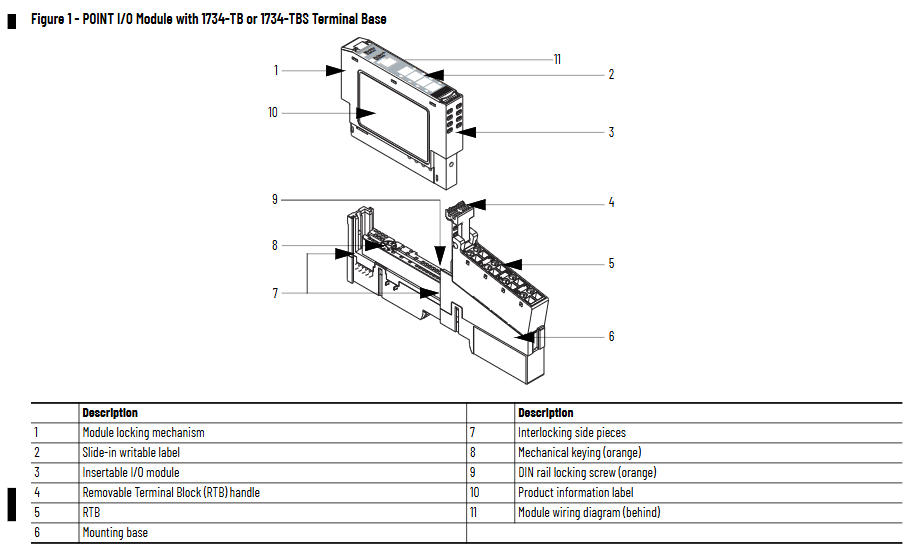
Core content sorting
(1) Preparation in advance: Safety regulations and environmental requirements
Safety prerequisite
Operation qualification: Installation, wiring, and maintenance must be carried out by trained professionals and comply with local electrical regulations (such as NFPA 70E, EN/IEC standards).
Static electricity protection: The module is sensitive to static electricity. When operating, it is necessary to touch a grounded object to discharge and wear a grounding wristband. It is forbidden to touch the pins or components of the circuit board. When idle, it should be stored in anti-static packaging.
Attention to hazardous environments: If used in Class I, Zone 2 hazardous areas, it must be installed in a compliant enclosure and the wiring method must meet local explosion-proof standards; When replacing modules or terminals, power off or ensure that the environment is not hazardous.
Environmental and shell requirements
Environmental level: Suitable for industrial environments with pollution level 2, overvoltage category II (EN/IEC 60664-1), altitude up to 2000 meters (no need to downgrade), prohibited for residential environments.
Shell requirements: The module is of open design and needs to be installed inside a closed shell. The shell should have flame retardant properties (flame propagation level 5VA or non-metallic materials need to be certified), and the interior can only be accessed through tools. The protection level should refer to NEMA 250 or EN/IEC 60529 standards (such as dustproof and waterproof requirements).
Temperature range: Operating temperature -20 ° C~+55 ° C (-4 ° F~+131 ° F), non operating temperature -40 ° C~+85 ° C (-40 ° F~+185 ° F). Exceeding this range can cause module failure.
(2) Installation process: Base, module, and terminal block deployment
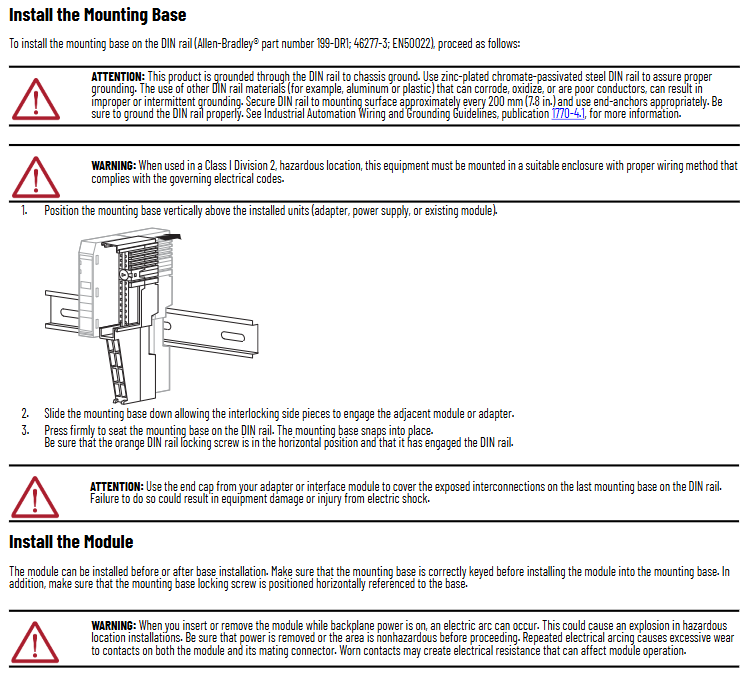
1. Install the terminal base (Mounting Base)
The module needs to be installed on a DIN rail through a 1734-TB/TBS or 1734-TOP/TOPS terminal base (recommended Allen Bradley 199-DR1 rail, compliant with EN 50022 standard). The steps are as follows:
Rail grounding confirmation: Use galvanized chromate passivated steel rails (aluminum/plastic rails are prone to oxidation or poor conductivity, which can cause grounding abnormalities), fix the rails every 200mm (7.8 inches), and install end anchors at both ends. Grounding must comply with the Industrial Automation Wiring and Grounding Guidelines (1770-4.1).
Positioning and installation of the base: Align the base vertically with the installed equipment (adapter, power supply, or existing module), slide down to engage the side interlocking structure with adjacent equipment, and press until the buckle is locked; Confirm that the orange DIN rail locking screw is in a horizontal position (unlocked) to prevent the base from loosening.
End cap protection: The end cap of the terminal base should be covered with an adapter or interface module to prevent electric shock or equipment damage to the exposed interconnected parts.
2. Install terminal module
The module can be deployed before or after installation on the base, and the key steps are as follows:
Base key switch configuration: Use a Phillips screwdriver to rotate the orange key switch on the base clockwise to align the corresponding module type number with the base groove (default position 1, refer to the module label for details), ensuring correct mechanical positioning.
Module installation: Insert the module vertically into the base and press it until the locking buckle is engaged; If the base is powered on, inserting/removing the module may generate an arc. In hazardous environments, power should be cut off first to avoid explosions caused by the arc.
3. Install Removable Terminal Block (RTB)
Module matching 1734-RTB (detachable terminal block), supports wire free replacement of base, installation steps:
Terminal block positioning: Insert the RTB handleless end (with arc-shaped buckle) into the base and rotate it to lock (hear a "click" sound).
Handle fixation: If the I/O module has been installed, fasten the RTB handle onto the module to ensure that the terminal block is stable; When disassembling, simply pull the handle upwards without removing the wiring.
Special terminal block operation:
1734-RTBS/RTB3S: Use a 3mm diameter screwdriver (1492-N90) to insert into the opening at a 73 ° angle and gently push up to lock/unlock the wiring.
1734-TOPS/TOP3S: Insert the screwdriver into the opening at a 97 ° angle to avoid damaging the terminals.
(3) Wiring guidance: Terminal definition and typical scenarios
The module needs to be used in conjunction with POINT I/O modules, and the wiring needs to be disconnected first. The key specifications are as follows:
1. Terminal definition
1734-CTM (Common Terminal Module): The terminals are divided into "Common 0-7", corresponding to the common end of the 8-channel I/O module (such as the power common line of the digital module), which centrally manages the common line and reduces wiring redundancy.
1734-VTM (Voltage Terminal Module): The terminals are divided into "Voltage out 0~7" (voltage output) and "Common 0~7" (common terminal), providing power distribution for on-site equipment. The output voltage needs to be matched with an external power source (10~28.8V DC or 120/240V AC).
2. Typical wiring scenarios
The document provides wiring diagrams for four core scenarios (Figures 4 to 7), with key examples as follows:
Leakage type input wiring (1734-IB8 module+CTM/VTM): The "signal terminal" of the 2-wire/3-wire proximity sensor is connected to the input terminal of the I/O module, the "power terminal" is connected to the "Voltage out" of the VTM, and the "common terminal" is connected to the "Common" of the CTM, achieving separate management of power and common terminals.
Source type output wiring (1734-OB8 module+CTM): The "positive pole" of the actuator (such as indicator lights, relays) is connected to the output terminal of the I/O module, and the "negative pole" is centrally connected to the "Common" of the CTM, simplifying multi device common terminal wiring.
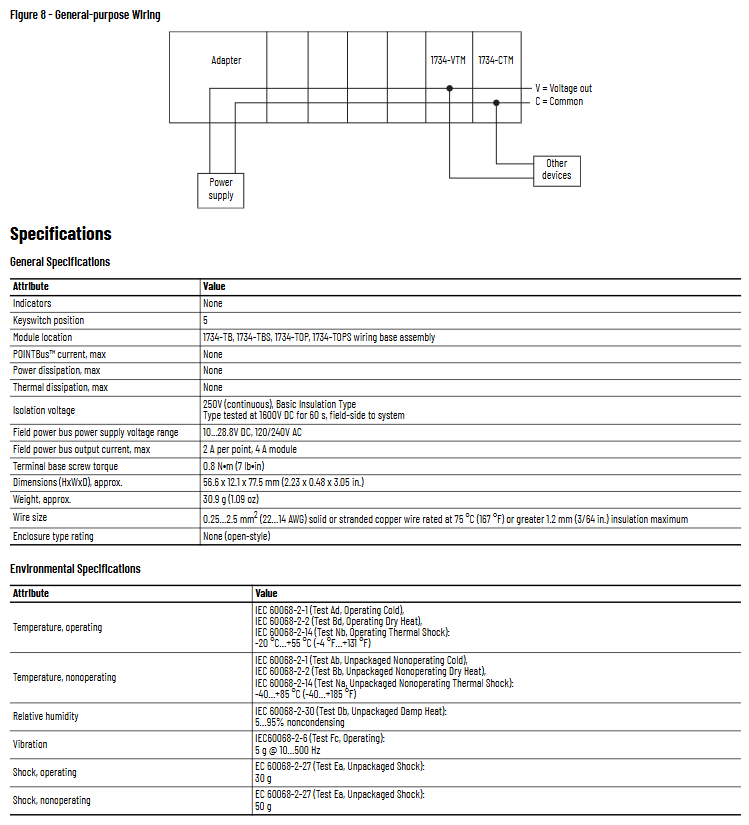
Universal wiring (adapter+CTM/VTM): VTM connects to an external power source to distribute voltage to other devices; CTM connects to the adapter's common end, achieving the aggregation of multiple module common lines and avoiding duplicate wiring.
3. Wiring parameters
Wire specifications: Supports solid or stranded copper wire of 0.25~2.5mm ² (22~14 AWG), with a maximum insulation thickness of 1.2mm (3/64 inches), and a rated temperature of ≥ 75 ° C (167 ° F).
Terminal torque: The tightening torque of the base screw is 0.8 N · m (7 lb · in), excessive tightening can damage the terminal.
(4) Technical parameters: Electrical and environmental specifications
1. General parameters
Parameter values
No indicator light
Key switch position 5
Adaptation base 1734-TB/TBS, 1734-TOP/TOPS
POINT Bus maximum current none
Maximum power consumption/heat dissipation none (only terminal expansion, no active components)
Isolation voltage 250V AC (continuous), 1600V DC (60 second test, on-site system side)
On site power bus voltage 10~28.8V DC, 120/240V AC
The maximum output current of the on-site power bus is 2A per point and 4A per module
The dimensions (height x width x depth) are approximately 56.6 x 12.1 x 77.5mm (2.23 x 0.48 x 3.05 inches)
Weight approximately 30.9g (1.09 ounces)
2. Environmental parameters
Parameter standards and numerical values
Working temperature -20 ° C~+55 ° C (-4 ° F~+131 ° F), in accordance with IEC 60068-2-1/2/14
Non working temperature -40 ° C~+85 ° C (-40 ° F~+185 ° F), in accordance with IEC 60068-2-1/2/14
Relative humidity of 5%~95% (non condensing), in accordance with IEC 60068-2-30
Vibration (working) 5g @ 10~500Hz, in accordance with IEC 60068-2-6
Impact (working) 30g, compliant with IEC 60068-2-27
50g impact (non working), in accordance with IEC 60068-2-27
3. Authentication information
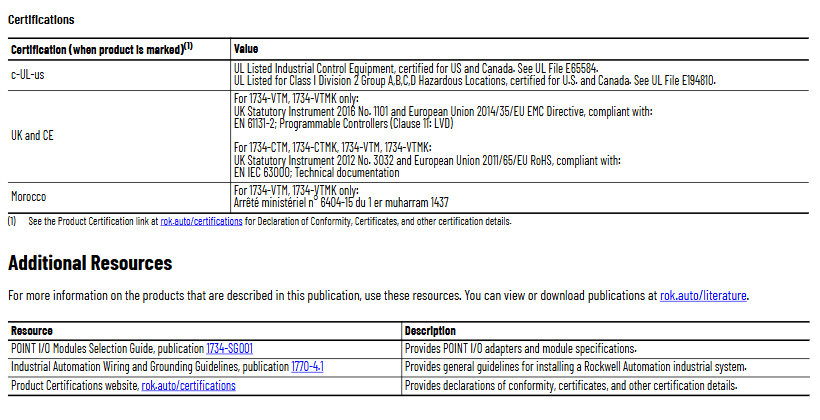
C-UL-US certification: UL listed industrial control equipment, suitable for the United States and Canada; Certification for Class I Zone 2 (Groups A/B/C/D) Hazardous Areas (UL Document E194810).
UK and CE certification: VTM/VTMK complies with UK Regulation 1101 of 2016 and EU EMC Directive 2014/35/EU (EN 61131-2); All modules comply with the EU 2011/65/EU RoHS Directive (EN IEC 63000).
Moroccan certification: VTM/VTMK complies with Moroccan Ministerial Decree No. 6404-15.
(5) Module dismantling and maintenance
Dismantling process: The module, adjacent module on the right side, and RTB (if wired) need to be dismantled first. The steps are:
Disconnect the RTB handle buckle and pull out the RTB;
Press the lock button on the top of the module and pull out the module;
Use a Phillips screwdriver to rotate the orange base locking screw to a vertical position, release the locking mechanism, and lift the base upwards to complete the removal.
Maintenance precautions: Do not disassemble the module by yourself in case of a malfunction and return it to the manufacturer for repair; When cleaning, only dry anti-static cloth can be used for wiping, and the use of cleaning agents is prohibited.
- OMRON
- ABB
- General Electric
- EMERSON
- Honeywell
- HIMA
- ALSTOM
- Rolls-Royce
- MOTOROLA
- Rockwell
- Siemens
- Woodward
- YOKOGAWA
- FOXBORO
- KOLLMORGEN
- MOOG
- KB
- YAMAHA
- BENDER
- TEKTRONIX
- Westinghouse
- AMAT
- AB
- XYCOM
- Yaskawa
- B&R
- Schneider
- KONGSBERG
- NI
- WATLOW
- ProSoft
- SEW
- ADVANCED
- Reliance
- TRICONEX
- METSO
- MAN
- Advantest
- STUDER
- DANAHER MOTION
- Bently
- Galil
- EATON
- MOLEX
- DEIF
- B&W
- ZYGO
- Aerotech
- DANFOSS
- Beijer
- Moxa
- Rexroth
- Johnson
- WAGO
- TOSHIBA
- BMCM
- SMC
- HITACHI
- HIRSCHMANN
- Application field
- XP POWER
- CTI
- TRICON
- STOBER
- Thinklogical
- Horner Automation
- Meggitt
- Fanuc
- Baldor
- SHINKAWA
- Other Brands
- UniOP
- KUKA
- Iba
- Beckhoff
- ADLINK
-
 Sigmatek MDD111-1 DIAS Drive Axis Module
 -
 Sigmatek DKL042 05-024-042 Terminal Module
 -
 Sigmatek DM822 Control Module
 -
 Sigmatek CDM167 12-008-167-O Module
 -
 Sigmatek TAE151 Touch Display Unit
 -
 Sigmatek DCC041 SLIDES Module 05-700-041-D
 -
 Sigmatek AKM65M-ANC2GBB0 PM Servo Motor
 -
 Sigmatek ETT221 01-230-221 Operator Terminal
 -
 Sigmatek SLIDES DAM 124 Analog Module
 -
Sigmatek AKM31C-ANCNGBB0 Servo Motor
-
 Mannesmann Demag Sigmatek CP626 Central Unit
 -
 SIGMATEK 0332.554.03 Board 371071000154
 -
 SIGMATEK 12-250-021 Base Plate Back Panel CM5V020
 -
 SIGMATEK DM162 S-DIAS Digital Mix Module
 -
 DEMAG ERGOTECH 061 381 66 Sigmatek 9842.243.02 Circuit Board
 -
 SIGMATEK CP313-1 PLC Module
 -
Sigmatek ETV0551-2 VARAN Touch Terminal
-
 Sigmatek SDM 081 FS S-Dias Safety Module
 -
 DEMAG 05-250-023 Ergotech Motherboard with Sigmatek TMS012
 -
Sigmatek CM5V020 12-250-023-K Wiring Base
-
 Sigma Tek 5000B-37 Attitude Gyro Indicator
 -
 Sigmatek SDD120-2 DIAS Drive
 -
 Sigmatek CME221 Memory Module
 -
 Sigmatek DCP640 DIAS Central Unit
 -
 Sigmatek STO040 Safety Output Module
 -
Sigmatek CET281 Control Panel
-
 Sigmatek CIPC LX800 Demag NC5 CPU
 -
 Sigmatek DKL093 05-024-093 Terminal Module
 -
 Sigmatek AI088 20-009-088 Analog Input Module
 -
Sigmatek CAI888 Analog Input Module
-
SIGMATEK CCA021 12-025-021 Analog Output Module
-
SIGMATEK 1104.579.05 Control Module
-
SIGMATEK SDI100 Digital Input Module
-
 SIGMATEK C-IPC 256MB LX800 Compact Dias
 -
 SIGMATEK 9423.090.02 Control Module
 -
SIGMATEK C-IPC 256 Power Supply 148498
-
 SIGMATEK CAI025 Analog Input Module
 -
 SIGMATEK CTO166 Digital Output Module
 -
 SIGMATEK CP112 20-004-112 Processor Module
 -
SIGMATEK CAI887 12-009-887 Safety Module
-
 Sigma-Tek 4000B-31 Directional Gyro 1U262-002-42
 -
Sigmatek C-IPC 256MB LX800 IPC Controller
-
Sigmatek C-IPC 01-450-031 Industrial PC LX800
-
Sigmatek C-IPC 256 Industrial PC Controller
-
Sigmatek CCP-531 PLC Processor Module
-
Sigmatek CDI163 Digital Input Module
-
 Sigmatek ETV0501 VARAN Terminal 12-230-0501
 -
 Sigmatek CTMS020 C-DIAS Technology Module
 -
 Sigmatek CIV512 VARAN Switch Module
 -
 Sigmatek HU011 20-080-011 Interface Module
 -
SIGMATEK SLIDES DAM 124 Module
-
 SIGMATEK C-IPC 161 01-450-161L Industrial PC
 -
SIGMATEK C-IPC 128MB VIA 733MHz 01-450-024-K
-
 SIGMATEK 12-780-012 R8-IPC Geode LX800 Module
 -
SIGMATEK CAM124 Analog Module
-
 SIGMATEK S1 032-8AF61-R4 EZ Servo Motor
 -
 SIGMATEK CTO163 Digital Output Module
 -
 SIGMATEK CCP082 12-004-082 Processor Module
 -
 SIGMATEK CRCH081 C-DIAS Temperature Module
 -
 SIGMATEK PC322-K 01-310-322-K Industrial PC
 -
SIGMATEK SDD310-2 Servo Drive
-
 SIGMATEK AI084 Analog Input Module
 -
SIGMATEK CRCH081 12-752-081 Temperature Module
-
Sigma-Tek 5000L-4 Attitude Gyro 1U284-001-3
-
 SIGMATEK CM5V020 12-250-023-K Wiring Module
 -
Sigma-Tek 4000H-6 Directional Gyro IU262-035-7
-
 SIGMATEK Dias DCP160 05-004-160 Processor Module
 -
SIGMATEK 0147.395.02 Control Module
-
SIGMATEK A1084 Control Module
-
SIGMATEK DI200 20-006-2000 Digital Input Module
-
Sigmatek DNC115 Encoder Module
-
 Sigmatek DAM122 05-017-122 Analog Module
 -
Sigmatek 9802.289.01 Control Board TA71 Display
-
Sigmatek TO127 20-007-127 Digital Output Module
-
Sigmatek DNC031 05-011-031 Digital Module
-
Sigmatek VI022 20-003-022 Interface Module
-
Sigmatek CAI085 Analog Input Module
-
 Sigmatek CP111 S-DIAS CPU Module
 -
Sigmatek CTMS030 Krauss Maffei Module
-
 Sigmatek CAM123 Control Module
 -
 Sigmatek TAE732-P 01-240-732-P Touch Display Unit
 -
Sigmatek MDM021 Digital Mixed Module
-
Sigmatek DCP642 DIAS Central Unit
-
 Sigmatek CST022 12-014-022 C-DIAS Module
 -
 Sigmatek SRO021 20-893-021 Safety Relay Output
 -
 Krauss Maffei MC5 Control System Sigmatek
 -
 Sigmatek DC061 Module 18-24VDC 300mA
 -
 Herrmann EVT0855 Ultrasonic Welder Touch Panel
 -
Sigmatek CIV521 Control Module 1.4A 2W
-
Sigmatek DDI61 05-006-161 Digital Input Module
-
SIGMATEK ETT312-E Touch Terminal 01-230-312
-
Cessna S3326-1 Sigma Tek 5000B-67 Gyro 1U149-015-9
-
SIGMATEK PS101 Power Supply Module
-
SIGMATEK 0332.554.03 Control Module 371071000154
-
 SIGMATEK ETT312-E Touch Terminal 01-230-312
 -
SIGMATEK CDM163 Control Module
-
 SIGMATEK VSV046 16-023-046 Module
 -
SIGMATEK AM221 20-017-221 Analog Module
-
SIGMATEK CTS051 12-053-051 Control Module
-
SIGMATEK AM221 20-017-221 Analog Module
-
Sigmatek CSDI161 12-891-161 Safety Input Module
-
Sigma Tek 4000C-1 Directional Gyro Indicator
-
Sigmatek ETV0501 12-230-0501 VARAN Terminal
-
Sigmatek DDM165 SLIDES Module
-
Sigmatek N100 20-011-100 Control Module
-
Sigmatek AKM54K-ANC2R-B0 PM Servo Motor
-
Sigmatek CTO166 Digital Output Module
-
Sigmatek CP212-K 20-004-212-K CPU Module
-
Sigmatek CDI161 Digital Input Module
-
Sigmatek DCC080 05-700-080-2 Control Module
-
 SIGMATEK SCP011 S-DIAS Safety CPU
 -
SIGMATEK SCP011 S-DIAS Safety CPU
-
SIGMATEK SRO022 Relay Output Module
-
SIGMATEK MDD 121 Drive Axis Module
-
SIGMATEK DSI021 SLIDES Siemens Interface
-
SIGMATEK DIAS DCP161 Module 05-004-161
-
 Sigmatek ETT312 Built-in Touch Terminal
 -
SIGMATEK DCP 643 DIAS Controller System
-
SIGMATEK CIO021 Multi I/O Module
-
SIGMATEK CTMS020 Control Module
-
 Sigmatek CME 221 Memory Module
 -
Sigmatek 0420.615.01 Control Board
-
Sigmatek CP111 20-004-111 CPU Module
-
Sigmatek 9405.065.03 Control Board
-
Sigmatek ETEK 01-450-032-K C-IPC 256MB Industrial PC
-
Sigmatek CTO163 12-007-163 Safety Output Module
-
Sigmatek TO081 20-007-081 Digital Output Module
-
 Sigmatek SI021 20-022-021 Safety Input Module


