
Allen Bradley 1747-DCM Direct Communication Module
Allen Bradley 1747-DCM Direct Communication Module
Core framework and scope of application
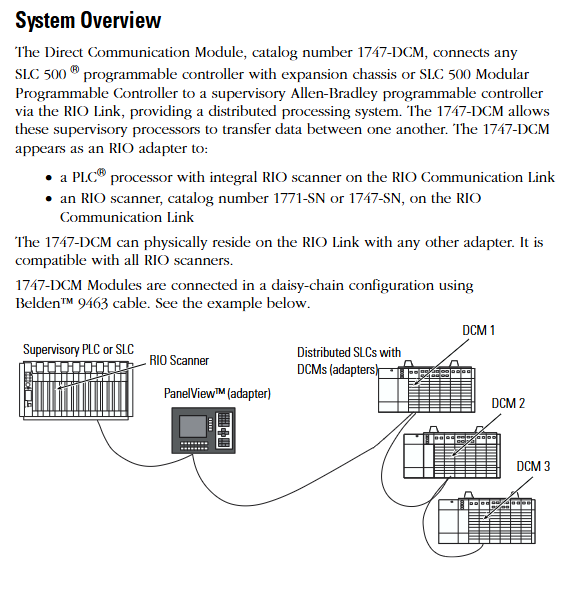
The document follows the logical mainline of "safety specifications → system positioning → hardware configuration → installation and operation → fault handling", covering the entire process of module configuration from early stage to later stage maintenance. The applicable product is the 1747-DCM direct communication module, which serves as the communication interface module for SLC 500 series controllers (including extended chassis or modular controllers). It is connected to higher-level Allen Bradley controllers (such as PLC-2/3/5, SLC with RIO scanner) through RIO (Remote I/O) links to achieve data transmission between distributed processors, and is suitable for multi controller collaboration scenarios in industrial automation (such as multi area data exchange in production lines and remote device monitoring).
Core content sorting
(1) System positioning and hardware characteristics
Module core functions
Communication bridge function: manifested as an RIO adapter on the RIO link, it supports communication with PLC processors (such as PLC-5/250) or independent RIO scanners (1771-SN, 1747-SN) with integrated RIO scanners, enabling bidirectional data transmission between the upper level controller and the distributed SLC 500 controller.
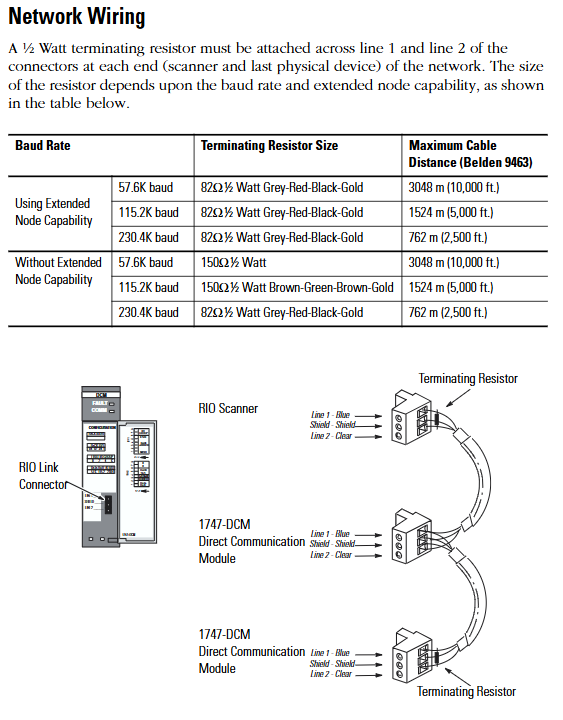
Expansion node capability: Supports expansion node functionality. If all scanners and adapters on the RIO link have this capability, up to 32 adapters can be connected. At full baud rate, 82 Ω terminal resistors (1/2W) need to be connected at both ends of the link to ensure signal integrity.
Hardware structure and key components
Physical components: including self-locking buckle (fixing module to chassis), 2 sets of DIP switches (configuration parameters), 2 status LEDs (red FAULT light, green COMM light), RIO link connector (front end), cable fixing slot, side label (module information), door label (parameter identification). The module is a full-size circuit board and needs to be installed in the non-zero slot of SLC 500 chassis (slot 0 reserved for CPU).
Status LED function:
FAULT light (red): Always on indicates an internal fault, flashing indicates a configuration error, and off indicates normal operation.
COMM light (green): Always on indicates normal communication, flashing indicates that the upper level processor is in programming/testing/fault mode, and off indicates communication interruption (such as scanner not connected or link failure).
(2) Module configuration: DIP switch parameter setting
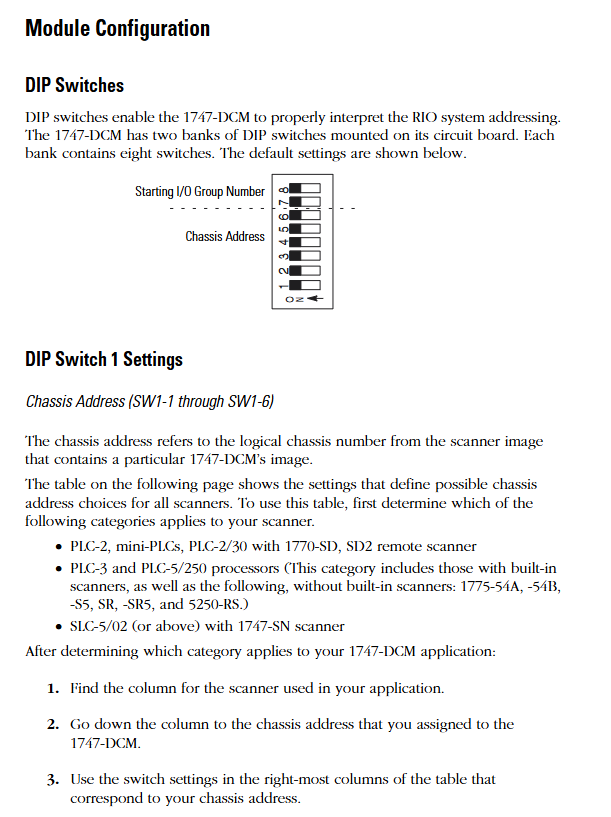
The 1747-DCM contains 2 sets of 8-bit DIP switches (SW1, SW2), which need to be configured before installation. The key parameters are as follows:
1. SW1 (chassis address and starting I/O group)
Rules for configuring switch position functions
SW1-1~SW1-6 logical chassis addresses correspond to the chassis number (octal) of the higher-level scanner. The switch status needs to be selected according to the scanner type (PLC-2/3/5, 1747-SN). For example, chassis address 1 of PLC-5/250 corresponds to SW1-1~5 being ON and SW1-6 being OFF
The starting I/O group numbers for SW1-7~SW1-8 only support even numbers (0/2/4/6) and need to match the chassis size:
-0 (ON+ON): Suitable for all sizes
-2 (ON+OFF): Suitable for 3/4, 1/2, and 1/4 sizes
-4 (OFF+ON): Suitable for 1/2 and 1/4 sizes
-6 (OFF+OFF): Only compatible with 1/4 size
2. SW2 (data rate, fault handling, chassis attributes)
Rules for configuring switch position functions
SW2-1~SW2-2 data rates support three baud rates, which need to be consistent with the RIO link:
-57.6K baud (ON+ON): Maximum cable length 3048m (Belden 9463)
-115.2K baud (ON+OFF): Maximum 1524m
-230.4K baud (OFF+ON): maximum 762m
-Disable (OFF+OFF): Do not enable communication
When SW2-3 fault occurs, clear all data bits in the input image table (status bits are retained) - OFF: When there is a communication fault with RIO or when the upper level processor enters fault mode, clear all data bits in the input image table
-ON: Maintain the last state of the data bit in case of malfunction (confirm that there is no safety risk)
SW2-4 Last chassis identifier - OFF: The module shares logical chassis with other adapters and is the device with the highest I/O group number in the chassis
-ON: Not the last chassis device
SW2-5~SW2-6 logical chassis size allocation allocates the image space of modules in the scanner, determining the number of data transmission words:
-1/4 size (ON+ON): 1 status word+1 data word (2 words in total)
-1/2 size (ON+OFF): 1 status word+3 data words (4 words in total)
-3/4 size (OFF+ON): 1 status word+5 data words (a total of 6 words)
-Full size (OFF+OFF): 1 status word+7 data words (a total of 8 words)
Key note: Module images cannot cross logical chassis boundaries. For example, selecting the starting I/O group 6 while configuring as 1/2 size will trigger a configuration error.
(3) Installation and wiring: practical operation specifications
Pre-installation preparation
Power requirements: Power is obtained through the SLC 500 chassis backplane, requiring a current of+5V DC/360mA. Before installation, the remaining capacity of the chassis power supply needs to be confirmed; The fixed SLC 500 controller's 2-slot expansion chassis only supports one 1747-DCM and requires reference to the 1746-2.35 manual to confirm compatibility with other I/O modules.
Electrostatic protection: The module contains sensitive electronic components, and before installation/disassembly, it is necessary to touch a grounded object to discharge electricity and avoid electrostatic damage.
Switch pre configuration: DIP switch settings (chassis address, data rate, chassis size, etc.) must be completed before installing the module to avoid repeated disassembly after installation.
Module installation steps
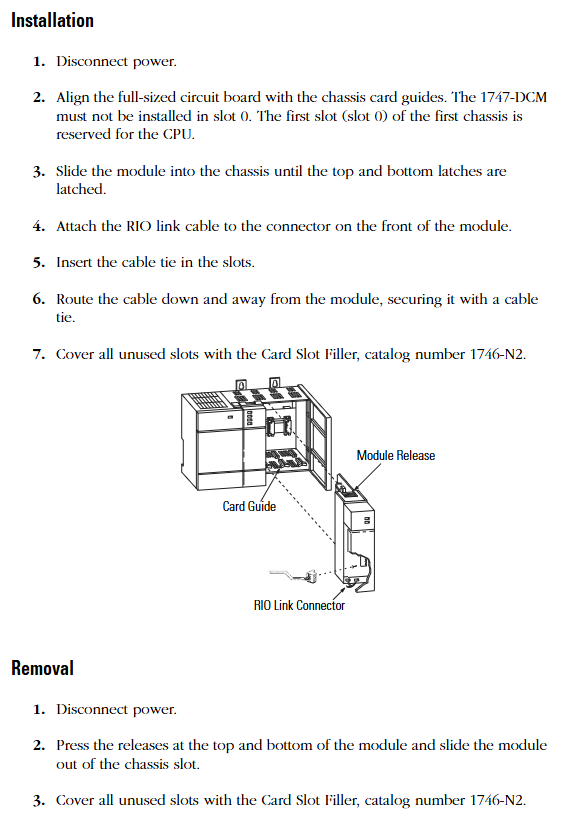
Power off operation: Disconnect the chassis power supply to ensure safe installation.
Align the guide rail: Align the full-size circuit board with the upper and lower guide rails of the chassis, and confirm that the module is not installed in slot 0 (slot 0 is reserved for the CPU).
Fixed module: Slide the module to the self-locking buckle to ensure reliable contact between the module and the backplane connector.
Connect RIO cable: Connect the RIO link cable to the front-end connector of the module, use cable fixing slots and zip ties to secure the cable and prevent it from loosening.
Covering empty slots: Cover unused slots with 1746-N2 slot fillers to prevent dust from entering or electric shock risks.
RIO Link Wiring Specification
Cable selection: It is recommended to use Belden 9463 cable, which supports differential signal transmission and has strong anti-interference ability.
Terminal resistance: A 1/2W terminal resistance should be connected at both ends of the link (scanner and the last physical device), and the resistance value should be selected based on whether the expansion node function is enabled
Enable extended node: Use 82 Ω for full baud rate (color ring: gray red black gold).
Extension node not enabled: 150 Ω (brown green brown gold) for 57.6K/115.2K baud, 82 Ω for 230.4K baud.
Wiring definition: The link includes Line 1 (blue), Line 2 (transparent), and a shielding layer. The shielding layer needs to be grounded at one end to avoid interference signals from ground current.
(4) Troubleshooting: LED Status and Handling
Fault interpretation of FAULT light (red)
|LED status | Reason for malfunction | Solution|
|Always on | Internal module faults (such as circuit and memory errors) | Restart I/O chassis containing 1747-DCM; If it still lights up after restarting, replace the module|
|Flashing | Configuration error (such as mismatch between I/O group and chassis size, chassis address error) | Check DIP switch settings to ensure compatibility between the starting I/O group and chassis size, and confirm that the chassis address matches the scanner|
|Extinguish | Normal state | No operation required|
COMM light (green) fault interpretation
|LED status | Reason for malfunction | Solution|
|Always on | Communication is normal | No operation required|
|Blinking | The upper level RIO scanner processor is in programming/testing/fault mode | Investigate the scanner processor fault and restart 1747-DCM after restoring normal mode|
|Extinguish | 1 The scanner is not connected to the processor
2. Scanner chassis disabled
3. No communication between 1747-DCM and scanner (baud rate mismatch, loose cable, connector not installed) | 1 Confirm that the scanner is correctly installed in chassis
2. Check the integrity of the scanner chassis and restart the module after repairing it
3. Verify the baud rate between 1747-DCM and scanner, check cable connections and connector installation|
(5) Technical specifications and safety standards
Core technical parameters
|Category | Specification|
|Power consumption | Backboard power supply,+5V DC/360mA|
|Working temperature | 0 ° C~+60 ° C (32 ° F~+140 ° F)|
|Storage temperature | -40 ° C~+85 ° C (-40 ° F~+185 ° F)|
|Humidity | 5%~95% (no condensation)|
|Certification | UL certification, CSA certification, Class I Division 2 (A/B/C/D groups) hazardous environment certification, CE compliance, C-Tick labeling|
|Physical dimensions | Full size SLC 500 module, compatible with standard SLC chassis slots|
Safety regulations for hazardous environments
The module is only applicable to Class I Division 2 (A/B/C/D groups) hazardous or non hazardous environments and is prohibited from being used in higher-level hazardous areas.
Taboos for operating in hazardous environments: Do not replace components or disconnect equipment (unless power is cut off), do not connect/disconnect components with electricity, all wiring must comply with NEC 501-4 (b) specifications, and do not replace components that may affect the applicability of hazardous environments.
Key considerations and supplementary resources
Compatibility check: The expansion of node functionality requires support from all devices (scanners, adapters) on the RIO link; When installing the 2-plot expansion chassis, it is necessary to confirm compatibility with other I/O modules (refer to manual 1746-2.35).
Configuration consistency: The DIP switch settings need to match the higher-level scanner, especially the chassis address, data rate, and chassis size, to avoid communication failures caused by parameter mismatches.
Wiring specifications: RIO cables should be kept away from power lines (to avoid electromagnetic interference), the shielding layer should be grounded at one end, terminal resistors should only be installed at both ends of the link, and intermediate equipment does not need to be installed.
- OMRON
- ABB
- General Electric
- EMERSON
- Honeywell
- HIMA
- ALSTOM
- Rolls-Royce
- MOTOROLA
- Rockwell
- Siemens
- Woodward
- YOKOGAWA
- FOXBORO
- KOLLMORGEN
- MOOG
- KB
- YAMAHA
- BENDER
- TEKTRONIX
- Westinghouse
- AMAT
- AB
- XYCOM
- Yaskawa
- B&R
- Schneider
- KONGSBERG
- NI
- WATLOW
- ProSoft
- SEW
- ADVANCED
- Reliance
- TRICONEX
- METSO
- MAN
- Advantest
- STUDER
- DANAHER MOTION
- Bently
- Galil
- EATON
- MOLEX
- DEIF
- B&W
- ZYGO
- Aerotech
- DANFOSS
- Beijer
- Moxa
- Rexroth
- Johnson
- WAGO
- TOSHIBA
- BMCM
- SMC
- HITACHI
- HIRSCHMANN
- Application field
- XP POWER
- CTI
- TRICON
- STOBER
- Thinklogical
- Horner Automation
- Meggitt
- Fanuc
- Baldor
- SHINKAWA
- Other Brands
- UniOP
- KUKA
- Iba
- Beckhoff
- ADLINK
-
 Sigmatek MDD111-1 DIAS Drive Axis Module
 -
 Sigmatek DKL042 05-024-042 Terminal Module
 -
 Sigmatek DM822 Control Module
 -
 Sigmatek CDM167 12-008-167-O Module
 -
 Sigmatek TAE151 Touch Display Unit
 -
 Sigmatek DCC041 SLIDES Module 05-700-041-D
 -
 Sigmatek AKM65M-ANC2GBB0 PM Servo Motor
 -
 Sigmatek ETT221 01-230-221 Operator Terminal
 -
 Sigmatek SLIDES DAM 124 Analog Module
 -
Sigmatek AKM31C-ANCNGBB0 Servo Motor
-
 Mannesmann Demag Sigmatek CP626 Central Unit
 -
 SIGMATEK 0332.554.03 Board 371071000154
 -
 SIGMATEK 12-250-021 Base Plate Back Panel CM5V020
 -
 SIGMATEK DM162 S-DIAS Digital Mix Module
 -
 DEMAG ERGOTECH 061 381 66 Sigmatek 9842.243.02 Circuit Board
 -
 SIGMATEK CP313-1 PLC Module
 -
Sigmatek ETV0551-2 VARAN Touch Terminal
-
 Sigmatek SDM 081 FS S-Dias Safety Module
 -
 DEMAG 05-250-023 Ergotech Motherboard with Sigmatek TMS012
 -
Sigmatek CM5V020 12-250-023-K Wiring Base
-
 Sigma Tek 5000B-37 Attitude Gyro Indicator
 -
 Sigmatek SDD120-2 DIAS Drive
 -
 Sigmatek CME221 Memory Module
 -
 Sigmatek DCP640 DIAS Central Unit
 -
 Sigmatek STO040 Safety Output Module
 -
Sigmatek CET281 Control Panel
-
 Sigmatek CIPC LX800 Demag NC5 CPU
 -
 Sigmatek DKL093 05-024-093 Terminal Module
 -
 Sigmatek AI088 20-009-088 Analog Input Module
 -
Sigmatek CAI888 Analog Input Module
-
SIGMATEK CCA021 12-025-021 Analog Output Module
-
SIGMATEK 1104.579.05 Control Module
-
SIGMATEK SDI100 Digital Input Module
-
 SIGMATEK C-IPC 256MB LX800 Compact Dias
 -
 SIGMATEK 9423.090.02 Control Module
 -
SIGMATEK C-IPC 256 Power Supply 148498
-
 SIGMATEK CAI025 Analog Input Module
 -
 SIGMATEK CTO166 Digital Output Module
 -
 SIGMATEK CP112 20-004-112 Processor Module
 -
SIGMATEK CAI887 12-009-887 Safety Module
-
 Sigma-Tek 4000B-31 Directional Gyro 1U262-002-42
 -
Sigmatek C-IPC 256MB LX800 IPC Controller
-
Sigmatek C-IPC 01-450-031 Industrial PC LX800
-
Sigmatek C-IPC 256 Industrial PC Controller
-
Sigmatek CCP-531 PLC Processor Module
-
Sigmatek CDI163 Digital Input Module
-
 Sigmatek ETV0501 VARAN Terminal 12-230-0501
 -
 Sigmatek CTMS020 C-DIAS Technology Module
 -
 Sigmatek CIV512 VARAN Switch Module
 -
 Sigmatek HU011 20-080-011 Interface Module
 -
SIGMATEK SLIDES DAM 124 Module
-
 SIGMATEK C-IPC 161 01-450-161L Industrial PC
 -
SIGMATEK C-IPC 128MB VIA 733MHz 01-450-024-K
-
 SIGMATEK 12-780-012 R8-IPC Geode LX800 Module
 -
SIGMATEK CAM124 Analog Module
-
 SIGMATEK S1 032-8AF61-R4 EZ Servo Motor
 -
 SIGMATEK CTO163 Digital Output Module
 -
 SIGMATEK CCP082 12-004-082 Processor Module
 -
 SIGMATEK CRCH081 C-DIAS Temperature Module
 -
 SIGMATEK PC322-K 01-310-322-K Industrial PC
 -
SIGMATEK SDD310-2 Servo Drive
-
 SIGMATEK AI084 Analog Input Module
 -
SIGMATEK CRCH081 12-752-081 Temperature Module
-
Sigma-Tek 5000L-4 Attitude Gyro 1U284-001-3
-
 SIGMATEK CM5V020 12-250-023-K Wiring Module
 -
Sigma-Tek 4000H-6 Directional Gyro IU262-035-7
-
 SIGMATEK Dias DCP160 05-004-160 Processor Module
 -
SIGMATEK 0147.395.02 Control Module
-
SIGMATEK A1084 Control Module
-
SIGMATEK DI200 20-006-2000 Digital Input Module
-
Sigmatek DNC115 Encoder Module
-
 Sigmatek DAM122 05-017-122 Analog Module
 -
Sigmatek 9802.289.01 Control Board TA71 Display
-
Sigmatek TO127 20-007-127 Digital Output Module
-
Sigmatek DNC031 05-011-031 Digital Module
-
Sigmatek VI022 20-003-022 Interface Module
-
Sigmatek CAI085 Analog Input Module
-
 Sigmatek CP111 S-DIAS CPU Module
 -
Sigmatek CTMS030 Krauss Maffei Module
-
 Sigmatek CAM123 Control Module
 -
 Sigmatek TAE732-P 01-240-732-P Touch Display Unit
 -
Sigmatek MDM021 Digital Mixed Module
-
Sigmatek DCP642 DIAS Central Unit
-
 Sigmatek CST022 12-014-022 C-DIAS Module
 -
 Sigmatek SRO021 20-893-021 Safety Relay Output
 -
 Krauss Maffei MC5 Control System Sigmatek
 -
 Sigmatek DC061 Module 18-24VDC 300mA
 -
 Herrmann EVT0855 Ultrasonic Welder Touch Panel
 -
Sigmatek CIV521 Control Module 1.4A 2W
-
Sigmatek DDI61 05-006-161 Digital Input Module
-
SIGMATEK ETT312-E Touch Terminal 01-230-312
-
Cessna S3326-1 Sigma Tek 5000B-67 Gyro 1U149-015-9
-
SIGMATEK PS101 Power Supply Module
-
SIGMATEK 0332.554.03 Control Module 371071000154
-
 SIGMATEK ETT312-E Touch Terminal 01-230-312
 -
SIGMATEK CDM163 Control Module
-
 SIGMATEK VSV046 16-023-046 Module
 -
SIGMATEK AM221 20-017-221 Analog Module
-
SIGMATEK CTS051 12-053-051 Control Module
-
SIGMATEK AM221 20-017-221 Analog Module
-
Sigmatek CSDI161 12-891-161 Safety Input Module
-
Sigma Tek 4000C-1 Directional Gyro Indicator
-
Sigmatek ETV0501 12-230-0501 VARAN Terminal
-
Sigmatek DDM165 SLIDES Module
-
Sigmatek N100 20-011-100 Control Module
-
Sigmatek AKM54K-ANC2R-B0 PM Servo Motor
-
Sigmatek CTO166 Digital Output Module
-
Sigmatek CP212-K 20-004-212-K CPU Module
-
Sigmatek CDI161 Digital Input Module
-
Sigmatek DCC080 05-700-080-2 Control Module
-
 SIGMATEK SCP011 S-DIAS Safety CPU
 -
SIGMATEK SCP011 S-DIAS Safety CPU
-
SIGMATEK SRO022 Relay Output Module
-
SIGMATEK MDD 121 Drive Axis Module
-
SIGMATEK DSI021 SLIDES Siemens Interface
-
SIGMATEK DIAS DCP161 Module 05-004-161
-
 Sigmatek ETT312 Built-in Touch Terminal
 -
SIGMATEK DCP 643 DIAS Controller System
-
SIGMATEK CIO021 Multi I/O Module
-
SIGMATEK CTMS020 Control Module
-
 Sigmatek CME 221 Memory Module
 -
Sigmatek 0420.615.01 Control Board
-
Sigmatek CP111 20-004-111 CPU Module
-
Sigmatek 9405.065.03 Control Board
-
Sigmatek ETEK 01-450-032-K C-IPC 256MB Industrial PC
-
Sigmatek CTO163 12-007-163 Safety Output Module
-
Sigmatek TO081 20-007-081 Digital Output Module
-
 Sigmatek SI021 20-022-021 Safety Input Module


