
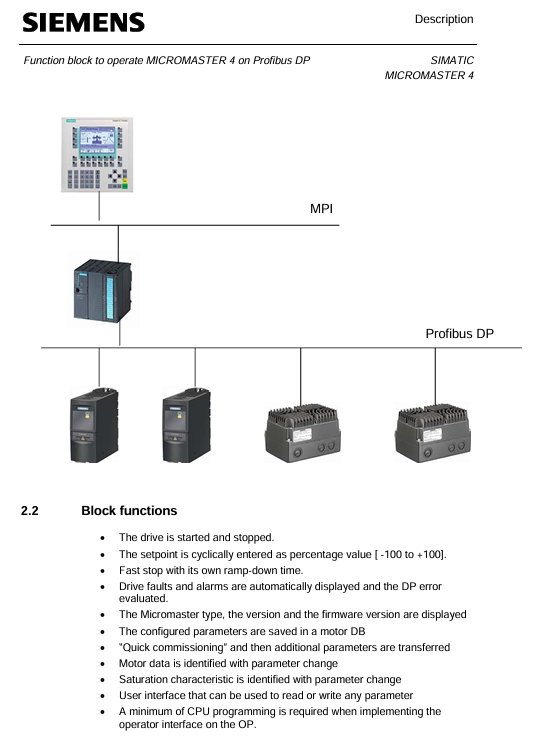
SIEMENS SIMATIC S7 300/400 operates MICROMASTER 4 (MM4) frequency converter through Profibus DP
Set value transmission: Loop the speed set value in the form of percentages from * * -100% to+100% * *, and any changes will take effect in real-time.
Status feedback: Output signals such as motor rotation direction (O-Right/O-Left), actual frequency (O-Actual_frequency, range -100% to+100%), and shutdown status (O-STOP).
SIEMENS SIMATIC S7 300/400 operates MICROMASTER 4 (MM4) frequency converter through Profibus DP
Core purpose and value of functional blocks
Inverter control
Implement motor start stop: supports regular start stop (dependent on P1120 ramp up time, P1121 ramp down time) and quick stop (dependent on P1135 OFF3 ramp down time).
Set value transmission: Loop the speed set value in the form of percentages from * * -100% to+100% * *, and any changes will take effect in real-time.
Status feedback: Output signals such as motor rotation direction (O-Right/O-Left), actual frequency (O-Actual_frequency, range -100% to+100%), and shutdown status (O-STOP).
Automatic debugging
Batch/Replacement Scenario Adaptation: When debugging multiple MM4 units in bulk or replacing a single faulty unit, there is no need for PG/PC or professional debugging software. The PLC can automatically complete the parameter configuration of the new MM4.
Simplified debugging process: including quick debugging (P0010=1), motor recognition (requires motor cold state), and saturation characteristic recognition (only supported by MM440).
parameter management
Full parameter read and write: Read and write all parameters of MM4 through PKW communication, and the OP (operation panel) only supports parameter reading.
Parameter backup: Store the debugged parameters in the PLC's parameter DB (data block) for easy recovery in the future.
Diagnostic function
Multi dimensional error monitoring: covering MM4 faults/alarms, Profibus DP errors, parameter transmission errors, and automatic debugging errors.
Historical data recording: stores the latest and historical fault/alarm information (such as the fault codes and values of the last 3 faults), supports fault reset (I_RESET_Corr).
Scope and Limitations of Application
3.1 Applicable Equipment
Equipment type, specific model/specification
MM4 frequency converter MM411 V1.10, MM420 V1.17, MM430 V2.00, MM440 V2.05
Controller SIMATIC S7 300 (CPU 313-2DP and above) S7 400、C7、SINUMERIK
3.2 Not Applicable Devices and Limitations
Not applicable to controllers: SIMATIC S7 200, SIMATIC S5.
Function limitation: The system does not monitor whether the startup signal (I_Enable) meets safety conditions, and users need to provide additional protection in the program.
Installation and configuration process
4.1 Scenario without Drive ES Basic and Starter
Hardware configuration: Set the Profibus DP address of MM4 (no need to reset to factory settings).
HW Config operation:
Start HW Config in Step 7 and configure PLC hardware.
Select "MICROMASTER 4" in the "PROFIBUS-DP/SIMOVERT Catalog" and specify the DP address.
Select slot 1 and configure PPO type as PPO1 (4 PKW+2 PZD).
Program loading:
Save and compile HW Config, download to PLC module.
Copy the program blocks and symbol table from the functional block example to the user program, adapt them, load them into the PLC, and start them.
Debugging startup: Call the MM4 diagnostic interface of OP to troubleshoot DP errors, enter the debugging interface to enter motor data, start automatic debugging (set I2 Enable=0, I2 Enable QC=1, IOU_ Parameters=1), and execute motor recognition after completion.
4.2 Scenarios with Drive ES Basic and Starter
Hardware configuration: Follow step 1 of section 4.1 to set the DP address of MM4.
HW Config operation:
Configure PLC and MM4, select the corresponding MM4 version (refer to the equipment nameplate, such as "A01/2.05" corresponding to version 2.0x).
Pre allocate PPO type as PPO1 (PKW+PZD-2/2), fill in the I/O address of MM4 (PKW starting address, PZD address is PKW address+8).
Program and OP adaptation:
Load the program block and symbol table in step 3 of section 4.1.
Install OP project and adapt to "MM4" and "ParameterDB" text lists.
Debugging startup: The first debugging can be completed through Starter, and the parameters can be entered into the parameter DB; or the OP debugging interface can be directly called, and the subsequent process is the same as step 4 in 4.1.
Detailed explanation of key functions
5.1 Definition of Control and Feedback Signals
Parameter Name Type Direction Unit/Range Description
The starting I/O address of the PKW area configured in the I-Address INT IN - HW Config
I-Enable BOOL IN - Variable frequency drive enable signal, can only be set when O-Drive-ready=1
I-Fast-STOP BOOL IN - Fast Shutdown Signal: 0=Fast Shutdown (using P1135), 1=Normal Shutdown (default can be set to 1)
Setpoint INT IN -100~+100 speed setting value (percentage)
Actual operating frequency INT OUT -100~+100 (percentage)
O-Drive-ready BOOL OUT - Inverter ready signal: must meet the requirements of "shutdown, I-Fast-STOP=1, no faults, no debugging in progress"
O-Fault BOOL OUT - MM4 fault signal (excluding data transmission errors)
O-Data_ error BOOL OUT - Parameter transmission/automatic debugging error signal
IOU_ Parameters BOOL IN/OUT - Start automatic debugging signal (user set 1 to start, clear 0 after FB is completed)
5.2 Automatic Debugging Process
5.2.1 Parameter DB adaptation
Motor data area: Enter the required parameters for quick debugging (P0010=1), using motor dataset 0 by default; Multiple parameter DBs need to be created for multiple datasets, which can be specified through Z_Sotor_data_SBNr.
- OMRON
- ABB
- General Electric
- EMERSON
- Honeywell
- HIMA
- ALSTOM
- Rolls-Royce
- MOTOROLA
- Rockwell
- Siemens
- Woodward
- YOKOGAWA
- FOXBORO
- KOLLMORGEN
- MOOG
- KB
- YAMAHA
- BENDER
- TEKTRONIX
- Westinghouse
- AMAT
- AB
- XYCOM
- Yaskawa
- B&R
- Schneider
- KONGSBERG
- NI
- WATLOW
- ProSoft
- SEW
- ADVANCED
- Reliance
- TRICONEX
- METSO
- MAN
- Advantest
- STUDER
- DANAHER MOTION
- Bently
- Galil
- EATON
- MOLEX
- DEIF
- B&W
- ZYGO
- Aerotech
- DANFOSS
- Beijer
- Moxa
- Rexroth
- Johnson
- WAGO
- TOSHIBA
- BMCM
- SMC
- HITACHI
- HIRSCHMANN
- Application field
- XP POWER
- CTI
- TRICON
- STOBER
- Thinklogical
- Horner Automation
- Meggitt
- Fanuc
- Baldor
- SHINKAWA
- Other Brands
- UniOP
- KUKA
- Iba
- Beckhoff
- ADLINK
-
 Bonfiglioli ACT 401-25A Frequency Inverter
 -
 Bonfiglioli PMT400-034 BF1 Inverter
 -
 Bonfiglioli CM-485 T Communication Module
 -
 Bonfiglioli AS 20 F 21.19 071 B5 Gearbox
 -
Bonfiglioli W86UFC146P90B5B3 Gear Reducer
-
 Bonfiglioli ACT201-05FA Frequency Inverter
 -
 Bonfiglioli VF 44 P P63 B14 Gear Reducer Motor
 -
 Bonfiglioli ZFA 400-014 D Frequency Inverter
 -
 Bonfiglioli Engineering 2B HMI Touch Panel
 -
 Bonfiglioli ACT 401-26A Inverter Driver
 -
 Bonfiglioli SPL400 13F Inverter
 -
 Bonfiglioli ZFA 400-040 D Frequency Inverter
 -
 Bonfiglioli ACT 401-23A Frequency Inverter
 -
 Bonfiglioli BTD5-2730-30-400-FD24 Servo Motor
 -
 Bonfiglioli ACT401-11FA Frequency Inverter
 -
 Bonfiglioli EM-ENC 03 179-675 022 Encoder Module
 -
 Bonfiglioli EM-I/O 03 179-675 043 I/O Module
 -
 Bonfiglioli DS179675597 Meter Module
 -
 Bonfiglioli ZFA 400-010 D2 Frequency Inverter
 -
Bonfiglioli Vectron ZBA400-018D Frequency Inverter
-
 Bonfiglioli Vectron ACT 401-26A Inverter
 -
 Bonfiglioli ACT ZR 401-18D Frequency Inverter
 -
Bonfiglioli Vectron ZFB 400-018 Frequency Inverter
-
Bonfiglioli ACT W 401-29 C Frequency Inverter
-
Bonfiglioli Vectron BRA 400-045 BF2 Inverter
-
 Bonfiglioli ACT 400-034A Frequency Inverter
 -
 Bonfiglioli RAN 15 D A 1 HS B3 Gear Unit
 -
 Bonfiglioli ZFB 400-060 Frequency Inverter
 -
 Milton Industries LT1240 LTI Tool Lugnut Remover
 -
 LTi Drives SO84.200.P030.0000.0-W Servo Spindle 100kW
 -
 Milton LTI LT1600P Torx Stick
 -
 LTI Lust VF1424L Variable Frequency Drive
 -
LTI SO84.045.0002.0001.2-W Servo Drive
-
 LTI Lust VF1404M Frequency Inverter
 -
 LTI SA54.0550.0033.0000.0 Servo Drive
 -
LTI Tools LT-1400C Wheel Torque Extension
-
LTI SO84.143.0020.0101.2-W Servo Drive
-
 LTI MOTION SC34.0200.0011.0000.0 Servo Drive
 -
LTI DRIVES MS100 0927.0017 Assembly Set
-
 LTI MOTION SO84.032.0003.0101.2 Servo Drive
 -
LTI DRIVES SE84.200.SC00.0001.0-W 110kW Drive
-
 Lust CDE34.005.W2.2 Lti Drives Servo Drive
 -
 LTi SO84.012.0030.0011.2 ServoOne Servo Drive
 -
 LTi CDE34.017.W3.0 Servo Drive
 -
 Seagate 9CC132-302 Harris LTI-CS Hard Drive 160GB
 -
 LTI SO24.007.0070.0000.1 Servo Controller
 -
 LTi Drive CDA32.003.C3.0.H05-01.PC1 Controller
 -
LTI SO84.016.0030.0000.2 Servo Controller
-
LUST LTI CD A34.008 W1.4 BR Servo Drive
-
LTI Servo One SO84.045.0030.0001.2-W Drive 22kW
-
Lust LTi Servo One SO84.032.0040.0000.2 Drive
-
 Milton LTI LT1600P Torx Stick
 -
LTI Lust VF1424L Variable Frequency Drive
-
 LTI SO84.045.0002.0001.2-W Servo Drive
 -
 LTI Lust VF1404M Frequency Inverter
 -
 LTI SA54.0550.0033.0000.0 Servo Drive
 -
LTI Tools LT-1400C Wheel Torque Extension
-
LTI SO84.143.0020.0101.2-W Servo Drive
-
LTI MOTION SC34.0200.0011.0000.0 Servo Drive
-
LTI DRIVES MS100 0927.0017 Assembly Set
-
 LTI MOTION SO84.032.0003.0101.2 Servo Drive
 -
 LTI SO84.032.0003.0101.2 Servo Drive Commissioning Guide
 -
LTI CDD34.032 C1 Servo Drive
-
Lust Servo One SO84.008.0030.1000.0 Drive
-
 LTI MOTION SO84.032.0003.0101.2 Servo Drive
 -
 LTI Tools LT-1400C 1/2 inch Wheel Torque Extension 100 Ft/Lbs
 -
LTI LT1400-E 1/2 inch Wheel Torque Extension 80 Ft/Lbs
-
LTI Tools LT 4800 7 Piece Twist Socket Oil Drain Set
-
 LTI DRIVES GmbH MS100 Mounting Set 0927.0017
 -
 MOOG Pitch Master CDE 54.044.GDA Turbine Drive
 -
 Allen-Bradley 5069-L306ER - SER A CompactLogix Controller PLC
 -
Allen-Bradley 6189-PS2 - Power Supply Industrial Computer PS
-
 Applied Materials 0195-14157 CMP Tool Controller
 -
 Allen-Bradley SK-H1-PWRMOD-D590 Power Structure
 -
 Zebra RSR12-RG5G8G5G5A1A2B XSLATE R12 Rugged Tablet
 -
 LTI SC52.0040.0012.0000.0 Compact Servo Drive
 -
LTI Tools LT4400-30 Twist Socket 1/2 inch Drive
-
Lust LTi CDE32.008 Position Controller
-
 LUST B-DS 125.1 LTi Drives 181-00635 Module
 -
 LTI DRIVES MS100 Montageset 0927.0017
 -
 Lust LTi Servo One SO84.032.0043.0000.2 Drive
 -
LTI CDF 30.008.C3.6 Drive Power Supply
-
 LTI SC52.0040.0012.0000.0 Servo Drive
 -
 LTi Drive CDF30.002 Power Supply Fuse
 -
LTI Tools LT-4621-D Deep Well Twist Socket
-
 MOOG LTI CDE54.044.D Pitch Master Turbine Drive
 -
LTI TOOLS LT-1460 Wheel Torque Extension Kit
-
 LUST LTi SO82.004.0030.0000.2 Servo Drive
 -
LTI MOTION SA54.0075.0033.0000.0 Servo Drive
-
 LUST LTi CDE34.006 W2.0 BR Servo Drive
 -
LUST LTi MOTION CDE34.044 W2.4 H13 Servo Drive
-
LUST LTi CDE32.008 W2.2.BR Positioning Controller
-
 LUST LTi DRiVES B-DS 125.1 Braking Resistor
 -
 LTI MOTION CDE34.006.WXX.PC1 Servo Drive
 -
LTI MOTION SO24.007.0030.1000.0 Servo Drive
-
Lust CDD34.005.C2.1 LTI Drive
-
LTI SC52.0040.0012.0000.0 Compact Servo Drive
-
LTI Tools LT4400-30 Twist Socket 1/2 inch Drive
-
 Lust LTi CDE32.008 Position Controller
 -
LUST B-DS 125.1 LTi Drives 181-00635 Module
-
LTI DRIVES MS100 Montageset 0927.0017
-
 Lust LTi Servo One SO84.032.0043.0000.2 Drive
 -
LTI CDF 30.008.C3.6 Drive Power Supply
-
LTI SC52.0040.0012.0000.0 Servo Drive
-
LTi Drive CDF30.002 Power Supply Fuse
-
LTI Tools LT-4621-D Deep Well Twist Socket
-
LTI Tools LT-1400C Wheel Torque Extension
-
LTI SO CM-P.0122.2015.1 Servo Drive SA000-13029N
-
LTI MOTION SC32.0075.1011.0000.0 Servo Drive
-
 LTI MOTION SC34.0200.0011.0000.0-SL Servo Drive
 -
 LTI CDE34.017 W2.4 H18 Frequency Inverter
 -
 LTI SO CM-P.0122.2015.1 Servo Drive
 -
 LTI FLPF-142-3-12-560/T4 Servomotor
 -
MOOG LTI CDE54.044.D Pitchmaster Turbine Drive
-
Lust LTi CDB34.003.C2.4 SH Servo Controller
-
 LTI SC52.0040.0012.0000.0 Servo Drive
 -
LTI SA52.0100.0033.0000.0 Servo Driver
-
 LUST CDE 54.044.D Pitch Master Turbine Drive
 -
Lust LTi Servo One SO84.032.0040.0000.2 Drive
-
 LTi LSH-074-2-60-560/T1 P S4 B14.1R Servo Motor
 -
LTI SC52.0040.0012.0000.0 Servo Drive
-
 LTI CDS44.072.LC1.1.NF Servo Driver
 -
LTI SO CM-P.0122.2015.1 Servo Drive
-
LTI MOTION SO24.007.0030.1000.0 Servo Drive
-
LTI MOTION SC34.0300.0011.0000.0 Servo Drive
-
 LTI DRIVES GmbH MS100 Mounting Set 0927.0017
 -
 LTI CDB34.014 W2.4 BR SH Servo Driver
 -
LTi Drives 0920.0034.14 Documentation DVD


