
Westinghouse WGen9500c portable generator
Power specification: 120/240V single-phase AC, frequency 60Hz, speed 3600rpm, voltage stability range 230-250V, frequency stability range 58-62Hz, suitable for most household and industrial equipment
4. Personnel safety protection
Operation protection: goggles must be worn (to prevent fuel splashing and debris from entering the eyes), gloves must be worn (to prevent oil contamination and burns); Long hair should be curled up to avoid getting caught up in moving parts.
Personnel management: Children and pets should stay away from the running generator (at least 5 feet away); Do not operate the generator when fatigued, under the influence of alcohol, or after taking medication (which affects judgment).
Emergency response:
If you experience symptoms such as dizziness, nausea, and fatigue after inhaling carbon monoxide, immediately move to fresh air and seek medical attention in severe cases (carbon monoxide is colorless and odorless, so be alert).
If burns occur (due to contact with high-temperature components such as exhaust pipes), immediately rinse the burned area with cold water, and seek medical attention in severe cases.
If a fire occurs, use ABE or BE type fire extinguishers to extinguish it (it is prohibited to directly extinguish electrical or fuel fires with water).
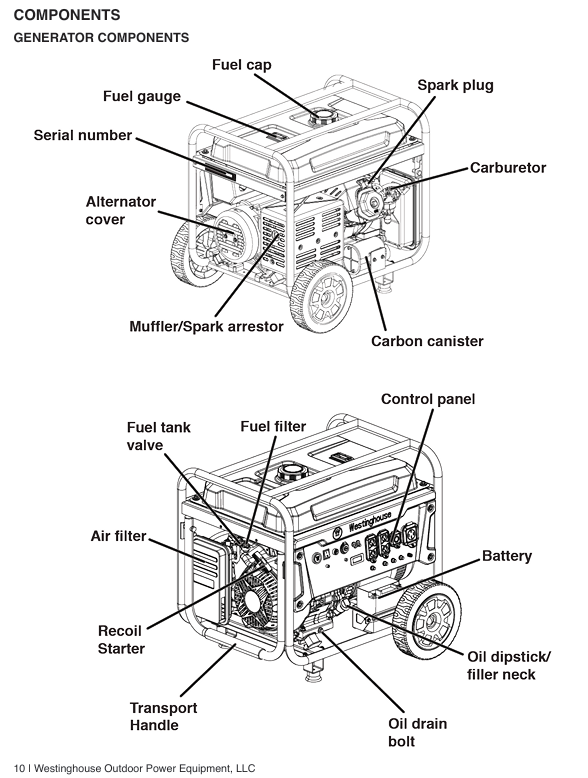
Complete operation process (assembly → start → run → stop)
1. First use assembly and preparation
Open box inspection:
Remove the generator and its accessories (tripod, roller, tool kit, engine oil, battery, remote control, manual).
Check that the appearance of the generator is undamaged, the components are not loose, the sockets and switches are functioning properly, and the battery is fully charged.
Install the tripod and roller:
Tilt the generator (ensuring that the fuel valve is closed to avoid fuel leakage), and use the accompanying bolts and wrenches to secure the tripod on both sides of the bottom of the body.
Install the roller into the slot below the tripod, tighten the fixing bolts to ensure that the roller rotates flexibly and is securely installed (which can drive the generator to test stability).
Add engine oil:
Place the generator on a level surface, open the oil filler cap on the left side of the body, and remove the dipstick.
Slowly add the recommended model of engine oil (SAE 10W-30) and check the dipstick while adding until the oil level is between the "L" (lowest) and "H" (highest) marks (not exceeding the "H" mark to avoid excessive oil accumulation and oil leakage).
Tighten the oil filler cap and dipstick, and wipe off any remaining oil with a dry cloth.
Add fuel:
Unscrew the fuel tank cap (counterclockwise) and clean the impurities around the fuel inlet.
Add unleaded gasoline with a fuel level not exceeding the red limit ring inside the fuel tank, and tighten the fuel tank cap (clockwise).
Check for leaks at the connection between the fuel tank and oil pipe. If there is any overflow, wipe it clean immediately.
Battery connection:
Find the battery quick connector on the side of the body (red positive pole, black negative pole), align the battery connector with the body connector and insert it. When you hear a "click" sound, it will lock (the connector is pre installed at the factory and does not require additional wiring).
Turn on the battery switch (to the "ON" position) and check if the control panel data center is lit up (confirm that the battery power supply is normal).
2. Startup process (detailed explanation of three startup methods)
(1) Remote start (recommended, convenient and efficient)
Preprocessing: Confirm that the fuel valve is "ON", the battery switch is "ON", all loads are disconnected, and the generator is placed for horizontal ventilation.
Start operation: Press the "START" button on the remote control for 1 second, and release it immediately after the generator starts (do not long press to avoid damaging the starter motor).
Check after startup: After the generator is started, the remote control indicator light will flash, and the data center will display voltage and frequency. Observe that the engine runs smoothly without any abnormal noise.
Cold machine regulation: If the cold machine is started, the generator may run at high speed and wait for 3-5 minutes for the speed to stabilize (automatic regulation).
(2) Electric start (used when there is no remote control or when the remote control fails)
Preprocessing: Same as remote control startup, ensure that all switch positions are correct and the load is disconnected.
Start operation: Press the "START/STOP" button on the control panel for 2 seconds, and release it after the engine starts; If it fails to start once, try again after a 30 second interval (to avoid overheating of the starting motor).
Fault handling: If the startup fails 3 times, check the battery level (possibly low), whether the fuel is sufficient, and whether the spark plug is normal.
(3) Hand pulled start (emergency backup, used when the battery is low)
Preprocessing: Close the air door (push in the air door knob), turn on the fuel valve, turn off the battery switch (no power supply required), and disconnect the load.
Start operation:
Press and hold the generator body with one hand (to prevent vibration displacement), and hold the starting rope handle with the other hand. Slowly pull until you feel an increase in resistance (piston compression stroke), then quickly and forcefully pull the handle.
- OMRON
- ABB
- General Electric
- EMERSON
- Honeywell
- HIMA
- ALSTOM
- Rolls-Royce
- MOTOROLA
- Rockwell
- Siemens
- Woodward
- YOKOGAWA
- FOXBORO
- KOLLMORGEN
- MOOG
- KB
- YAMAHA
- BENDER
- TEKTRONIX
- Westinghouse
- AMAT
- AB
- XYCOM
- Yaskawa
- B&R
- Schneider
- KONGSBERG
- NI
- WATLOW
- ProSoft
- SEW
- ADVANCED
- Reliance
- TRICONEX
- METSO
- MAN
- Advantest
- STUDER
- DANAHER MOTION
- Bently
- Galil
- EATON
- MOLEX
- DEIF
- B&W
- ZYGO
- Aerotech
- DANFOSS
- Beijer
- Moxa
- Rexroth
- Johnson
- WAGO
- TOSHIBA
- BMCM
- SMC
- HITACHI
- HIRSCHMANN
- Application field
- XP POWER
- CTI
- TRICON
- STOBER
- Thinklogical
- Horner Automation
- Meggitt
- Fanuc
- Baldor
- SHINKAWA
- Other Brands
- UniOP
- KUKA
- Iba
- Beckhoff
- ADLINK
-
 Sigmatek MDD111-1 DIAS Drive Axis Module
 -
 Sigmatek DKL042 05-024-042 Terminal Module
 -
 Sigmatek DM822 Control Module
 -
 Sigmatek CDM167 12-008-167-O Module
 -
 Sigmatek TAE151 Touch Display Unit
 -
 Sigmatek DCC041 SLIDES Module 05-700-041-D
 -
 Sigmatek AKM65M-ANC2GBB0 PM Servo Motor
 -
 Sigmatek ETT221 01-230-221 Operator Terminal
 -
 Sigmatek SLIDES DAM 124 Analog Module
 -
Sigmatek AKM31C-ANCNGBB0 Servo Motor
-
 Mannesmann Demag Sigmatek CP626 Central Unit
 -
 SIGMATEK 0332.554.03 Board 371071000154
 -
 SIGMATEK 12-250-021 Base Plate Back Panel CM5V020
 -
 SIGMATEK DM162 S-DIAS Digital Mix Module
 -
 DEMAG ERGOTECH 061 381 66 Sigmatek 9842.243.02 Circuit Board
 -
 SIGMATEK CP313-1 PLC Module
 -
Sigmatek ETV0551-2 VARAN Touch Terminal
-
 Sigmatek SDM 081 FS S-Dias Safety Module
 -
 DEMAG 05-250-023 Ergotech Motherboard with Sigmatek TMS012
 -
Sigmatek CM5V020 12-250-023-K Wiring Base
-
 Sigma Tek 5000B-37 Attitude Gyro Indicator
 -
 Sigmatek SDD120-2 DIAS Drive
 -
 Sigmatek CME221 Memory Module
 -
 Sigmatek DCP640 DIAS Central Unit
 -
 Sigmatek STO040 Safety Output Module
 -
Sigmatek CET281 Control Panel
-
 Sigmatek CIPC LX800 Demag NC5 CPU
 -
 Sigmatek DKL093 05-024-093 Terminal Module
 -
 Sigmatek AI088 20-009-088 Analog Input Module
 -
Sigmatek CAI888 Analog Input Module
-
SIGMATEK CCA021 12-025-021 Analog Output Module
-
SIGMATEK 1104.579.05 Control Module
-
SIGMATEK SDI100 Digital Input Module
-
 SIGMATEK C-IPC 256MB LX800 Compact Dias
 -
 SIGMATEK 9423.090.02 Control Module
 -
SIGMATEK C-IPC 256 Power Supply 148498
-
 SIGMATEK CAI025 Analog Input Module
 -
 SIGMATEK CTO166 Digital Output Module
 -
 SIGMATEK CP112 20-004-112 Processor Module
 -
SIGMATEK CAI887 12-009-887 Safety Module
-
 Sigma-Tek 4000B-31 Directional Gyro 1U262-002-42
 -
Sigmatek C-IPC 256MB LX800 IPC Controller
-
Sigmatek C-IPC 01-450-031 Industrial PC LX800
-
Sigmatek C-IPC 256 Industrial PC Controller
-
Sigmatek CCP-531 PLC Processor Module
-
Sigmatek CDI163 Digital Input Module
-
 Sigmatek ETV0501 VARAN Terminal 12-230-0501
 -
 Sigmatek CTMS020 C-DIAS Technology Module
 -
 Sigmatek CIV512 VARAN Switch Module
 -
 Sigmatek HU011 20-080-011 Interface Module
 -
SIGMATEK SLIDES DAM 124 Module
-
 SIGMATEK C-IPC 161 01-450-161L Industrial PC
 -
SIGMATEK C-IPC 128MB VIA 733MHz 01-450-024-K
-
 SIGMATEK 12-780-012 R8-IPC Geode LX800 Module
 -
SIGMATEK CAM124 Analog Module
-
 SIGMATEK S1 032-8AF61-R4 EZ Servo Motor
 -
 SIGMATEK CTO163 Digital Output Module
 -
 SIGMATEK CCP082 12-004-082 Processor Module
 -
 SIGMATEK CRCH081 C-DIAS Temperature Module
 -
 SIGMATEK PC322-K 01-310-322-K Industrial PC
 -
SIGMATEK SDD310-2 Servo Drive
-
 SIGMATEK AI084 Analog Input Module
 -
SIGMATEK CRCH081 12-752-081 Temperature Module
-
Sigma-Tek 5000L-4 Attitude Gyro 1U284-001-3
-
 SIGMATEK CM5V020 12-250-023-K Wiring Module
 -
Sigma-Tek 4000H-6 Directional Gyro IU262-035-7
-
 SIGMATEK Dias DCP160 05-004-160 Processor Module
 -
SIGMATEK 0147.395.02 Control Module
-
SIGMATEK A1084 Control Module
-
SIGMATEK DI200 20-006-2000 Digital Input Module
-
Sigmatek DNC115 Encoder Module
-
 Sigmatek DAM122 05-017-122 Analog Module
 -
Sigmatek 9802.289.01 Control Board TA71 Display
-
Sigmatek TO127 20-007-127 Digital Output Module
-
Sigmatek DNC031 05-011-031 Digital Module
-
Sigmatek VI022 20-003-022 Interface Module
-
Sigmatek CAI085 Analog Input Module
-
 Sigmatek CP111 S-DIAS CPU Module
 -
Sigmatek CTMS030 Krauss Maffei Module
-
 Sigmatek CAM123 Control Module
 -
 Sigmatek TAE732-P 01-240-732-P Touch Display Unit
 -
Sigmatek MDM021 Digital Mixed Module
-
Sigmatek DCP642 DIAS Central Unit
-
 Sigmatek CST022 12-014-022 C-DIAS Module
 -
 Sigmatek SRO021 20-893-021 Safety Relay Output
 -
 Krauss Maffei MC5 Control System Sigmatek
 -
 Sigmatek DC061 Module 18-24VDC 300mA
 -
 Herrmann EVT0855 Ultrasonic Welder Touch Panel
 -
Sigmatek CIV521 Control Module 1.4A 2W
-
Sigmatek DDI61 05-006-161 Digital Input Module
-
SIGMATEK ETT312-E Touch Terminal 01-230-312
-
Cessna S3326-1 Sigma Tek 5000B-67 Gyro 1U149-015-9
-
SIGMATEK PS101 Power Supply Module
-
SIGMATEK 0332.554.03 Control Module 371071000154
-
 SIGMATEK ETT312-E Touch Terminal 01-230-312
 -
SIGMATEK CDM163 Control Module
-
 SIGMATEK VSV046 16-023-046 Module
 -
SIGMATEK AM221 20-017-221 Analog Module
-
SIGMATEK CTS051 12-053-051 Control Module
-
SIGMATEK AM221 20-017-221 Analog Module
-
Sigmatek CSDI161 12-891-161 Safety Input Module
-
Sigma Tek 4000C-1 Directional Gyro Indicator
-
Sigmatek ETV0501 12-230-0501 VARAN Terminal
-
Sigmatek DDM165 SLIDES Module
-
Sigmatek N100 20-011-100 Control Module
-
Sigmatek AKM54K-ANC2R-B0 PM Servo Motor
-
Sigmatek CTO166 Digital Output Module
-
Sigmatek CP212-K 20-004-212-K CPU Module
-
Sigmatek CDI161 Digital Input Module
-
Sigmatek DCC080 05-700-080-2 Control Module
-
 SIGMATEK SCP011 S-DIAS Safety CPU
 -
SIGMATEK SCP011 S-DIAS Safety CPU
-
SIGMATEK SRO022 Relay Output Module
-
SIGMATEK MDD 121 Drive Axis Module
-
SIGMATEK DSI021 SLIDES Siemens Interface
-
SIGMATEK DIAS DCP161 Module 05-004-161
-
 Sigmatek ETT312 Built-in Touch Terminal
 -
SIGMATEK DCP 643 DIAS Controller System
-
SIGMATEK CIO021 Multi I/O Module
-
SIGMATEK CTMS020 Control Module
-
 Sigmatek CME 221 Memory Module
 -
Sigmatek 0420.615.01 Control Board
-
Sigmatek CP111 20-004-111 CPU Module
-
Sigmatek 9405.065.03 Control Board
-
Sigmatek ETEK 01-450-032-K C-IPC 256MB Industrial PC
-
Sigmatek CTO163 12-007-163 Safety Output Module
-
Sigmatek TO081 20-007-081 Digital Output Module
-
 Sigmatek SI021 20-022-021 Safety Input Module


