
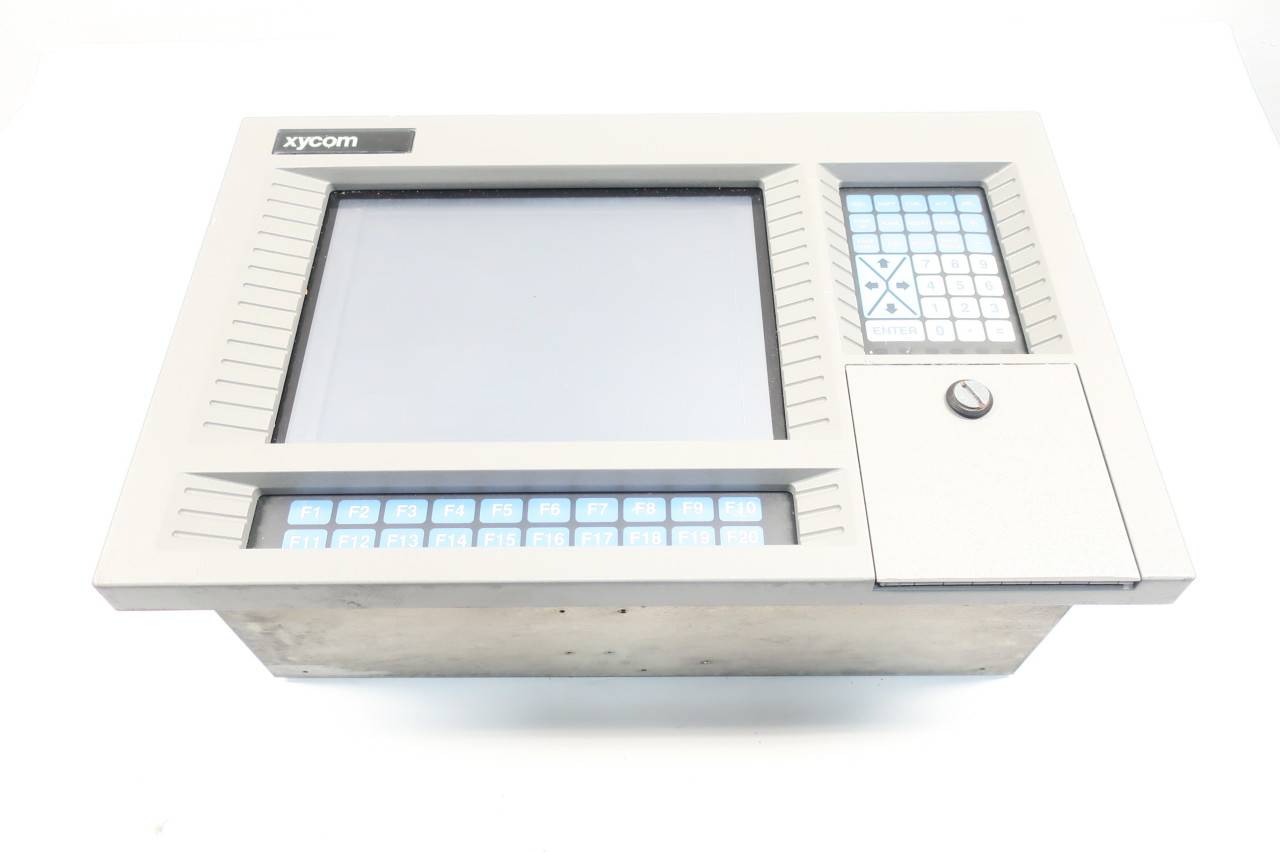
Xycom 2000T 97957-101 97957101 Operator Interface Panel with 2112-MEM
Xycom 2000T 97957-101 97957101 Operator Interface Panel with 2112-MEM
Product overview
The Xycom 2000T 97957-101 operator interface panel with 2112-MEM memory module is a human-machine interaction solution designed specifically for industrial automation control. This panel, with stable and reliable performance, rich functional configuration, and powerful data storage and processing capabilities of 2112-MEM, is widely used in industrial production line control, equipment monitoring, process automation, and other fields, providing operators with convenient and efficient equipment control and data interaction interfaces.
Specification parameters
(1) Operator Interface Panel (2000T 97957-101)
Display specifications
Screen type: Industrial grade LCD display screen is used, with high brightness and high contrast characteristics, which can display images clearly in complex industrial environments. Even in workshops with strong or dim lighting, it can ensure that operators can read information clearly.
Screen size: Please refer to the product manual for specific dimensions. Common industrial operator panel screen sizes range from 10-15 inches and are suitable for different sizes of industrial control cabinets and operating spaces.
Resolution: Supports high-definition resolution display (such as 1024 × 768 and above), which can accurately present equipment operating parameters, process flow charts, alarm prompts, and other content, reducing the risk of information misreading.
Input method
Touch screen: Equipped with high-precision resistive or capacitive touch screen (depending on product design), supporting multi touch operation, sensitive response, operators can quickly complete parameter settings, function selection, screen switching and other operations through simple touch, making operation convenient and efficient.
Physical buttons: equipped with function buttons and numeric keypad, used for quickly executing common functions (such as emergency stop, mode switching, etc.), as well as inputting numerical parameters, to meet different operating habits and complex operating requirements, and can also be used stably in glove operation or special scenarios.
communication interface
Equipped with Ethernet interface (supporting TCP/IP protocol), it can achieve high-speed data communication with industrial computers, PLC controllers, SCADA systems and other devices, facilitating remote monitoring, program downloading and system configuration updates.
Provide RS232 and RS485 serial ports, compatible with various industrial device communication protocols (such as Modbus RTU), making it convenient to connect traditional industrial devices such as printers, sensors, and actuators, achieving data exchange and device control.
It may be equipped with a USB interface for data backup, software upgrades (such as importing new operating interface programs through a USB flash drive), and connecting external storage devices to store device operation logs, operation records, and other data.
Electrical parameters
Working voltage: Supports wide voltage input, usually 24V DC (direct current), can adapt to voltage fluctuations in industrial sites, ensuring stable operation of equipment; Some models may also be compatible with 110V AC or 220V AC power input to enhance power compatibility.
Power consumption: The overall power consumption of the device is relatively low (specific values vary depending on the configuration). The optimized power management design reduces energy consumption, lowers equipment operating costs, and reduces heat generation, improving equipment reliability.
Physical specifications
Shell material: Made of high-strength engineering plastic or metal material, it has good wear resistance, impact resistance, and corrosion resistance, which can effectively resist dust, oil, and water vapor erosion in industrial environments and extend the service life of equipment.
Protection level: reaching IP65 or above protection level, dustproof and waterproof, able to adapt to harsh industrial environments, such as stable operation in dusty mines, humid food processing plants and other places.
Installation method: Supports panel embedded installation and rail installation, making it easy to integrate into industrial control cabinets, operation consoles, and other equipment. The installation is stable and easy to operate and maintain.
(2) Memory module (2112-MEM)
Storage capacity: Provides multiple storage capacity options (such as 1GB, 2GB, 4GB, etc.) to meet the data storage needs of different industrial application scenarios. For example, in data intensive industrial production line monitoring, large capacity memory can ensure long-term recording of equipment operation data, process parameter changes, and other information.
Data transmission speed: It has high-speed data reading and writing capabilities, fast data transmission speed, can quickly respond to panel operation instructions, timely load the operation interface, process data storage and retrieval tasks, ensure smooth human-computer interaction, and avoid operation delays.
Interface type: It is connected to the operator interface panel through a dedicated interface to ensure stable and reliable data transmission. The interface design is compact, easy to install and maintain, and can achieve quick insertion and replacement of memory modules and panels.
Compatibility: Designed specifically for the Xycom 2000T series operator interface panel, it has high compatibility and can be seamlessly integrated into the panel system, working together to enhance overall equipment performance.
Core functions
(1) Efficient human-computer interaction
Intuitive operation interface design, through the combination of touch screen and physical buttons, operators can easily complete device start stop, parameter adjustment, operation mode switching and other operations. At the same time, a clear graphical display interface presents the equipment operating status and process flow in intuitive and understandable charts and animations, reducing the learning cost of operators and improving work efficiency.
The 2112-MEM memory module has powerful data processing capabilities and can quickly respond to operation instructions, ensuring that the panel can still respond quickly under multitasking operations. When performing data queries, parameter settings, and screen switching at the same time, the operation is smooth and without lag, providing operators with a good user experience.
(2) Data Storage and Management
The 2112-MEM memory module can store a large amount of data during device operation, including real-time parameters (such as temperature, pressure, speed, etc.), historical data records, operation logs, alarm information, etc. These data provide important basis for equipment fault diagnosis, production process optimization, and quality traceability.
Supporting data classification, storage, and retrieval functions, operators can quickly query the required data through the panel operation interface, such as filtering data by time, device number, parameter type, etc., facilitating data analysis and processing, and helping enterprises achieve data-driven decision management.
(3) Equipment monitoring and alarm
Real time monitoring of the operating status of connected devices, real-time acquisition of device data through communication interfaces, and intuitive display of device normal, fault, alarm, and other statuses in different colors, icons, text, and other ways on the panel interface. If the device is running abnormally, the corresponding icon on the interface will flash and sound an alarm to remind operators to handle it in a timely manner.
Customizable alarm thresholds and alarm methods can be used, and alarm upper and lower limits for each parameter can be set according to equipment operation requirements and production process standards. When the parameters exceed the set range, the panel immediately triggers an alarm, and remote management personnel can be notified through SMS, email, and other means (with the cooperation of relevant communication modules) to ensure timely handling of faults and reduce production losses.
(4) System Integration and Expansion
Rich communication interfaces support integration with various industrial equipment and control systems, and can serve as the human-machine interaction core of industrial automation systems, working in conjunction with PLC, DCS, SCADA and other systems to achieve centralized monitoring and management of the entire production process.
Has a certain degree of scalability, can connect external devices (such as printers, barcode scanners, etc.) through interfaces, or connect more sensors and actuators to meet the needs of enterprise production scale expansion, process upgrading, etc., reduce system upgrade costs, and improve equipment universality.
Working principle
The operator interface panel establishes a connection with external industrial equipment through a communication interface and receives real-time operational data and status information sent by the equipment. After the internal processor of the panel parses and processes the data, it is presented to the operator in an intuitive interface form on the display screen. When the operator operates through the touch screen or physical buttons, the operation instructions are also processed by the processor and transmitted to the corresponding device through the communication interface to achieve control of the device.
The 2112-MEM memory module is responsible for data storage and fast retrieval in the system. When the device's operational data is transmitted to the panel, some of the data will be stored in the memory module; When the operator needs to query historical data or perform data analysis, the processor reads the data from the memory module and displays it on the panel interface. At the same time, the memory module also provides memory space support for the operation of panel operating systems and application programs, ensuring stable system operation.
Throughout the entire work process, the panel collaborates with the memory module and external devices through strict communication protocols and data exchange mechanisms to ensure accurate data transmission and timely response to operations, achieving efficient and stable human-machine interaction and device control.
Operation and usage guide
(1) Startup and initialization
Confirm that the device power connection is correct, connect the 2000T 97957-101 operator interface panel power, and the device will automatically start.
During the panel startup process, the system performs self check and initialization operations, and the display screen shows the startup screen and device information. After waiting for the initialization to complete, enter the main operation interface and start device operation and data monitoring.
(2) Basic operations
Device control: Select the device control function module through the touch screen or physical buttons, such as clicking the "device start stop" button, to achieve the start and stop operation of the connected device; In the parameter setting interface, enter or adjust the operating parameters of the device (such as speed, temperature setting values, etc.), and save the settings.
Data query: Enter the data query interface, select the query criteria (such as time range, device name, etc.), and the system retrieves the corresponding data from the 2112-MEM memory module and displays it in the form of tables and charts, making it convenient for operators to view the historical data and trend changes of device operation.
Screen switching: By sliding or clicking the screen switching button on the touch screen, users can quickly switch between different functional interfaces (such as the main monitoring interface, alarm interface, parameter setting interface, etc.) to meet different operational needs.
(3) Alarm processing
When the device encounters abnormal operation and triggers an alarm, the panel will sound an alarm, and the alarm interface will automatically pop up, displaying detailed information such as the name of the alarm device, alarm type, alarm time, etc. The operator can troubleshoot and handle the fault according to the alarm prompt. After completing the handling, click the "Alarm Confirmation" button on the alarm interface to eliminate the alarm prompt.
(4) Data backup and recovery
Data backup: Insert a USB flash drive into the USB interface of the panel, select the "Data Backup" function in the system menu, set the backup data type and storage path, and the system will back up important data (such as historical records, operation logs, etc.) in the memory module to the USB flash drive. Regularly backing up data can prevent data loss.
Data recovery: When system data is lost or damaged, insert a USB flash drive containing backup data, select the "Data Recovery" function, follow the prompts to restore the backup data to the memory module, and restore the system to its normal operating state.
Precautions
(1) Installation and use
During the installation process, ensure that the equipment is powered off and strictly follow the installation manual to avoid damaging the panel and memory module due to improper operation. Pay attention to the secure connection of the interface during installation to prevent loosening and abnormal data transmission.
Do not use the equipment in harsh environments such as high temperatures (over 60 ℃), humidity (relative humidity greater than 85%), and strong magnetic fields (such as near large motors or transformers). If it is unavoidable to use in special environments, protective measures should be taken (such as installing heat dissipation devices, shielding covers, etc.) to ensure the normal operation of the equipment.
Regularly check the power connection and communication cable connection of the equipment to ensure stable connection. Avoid frequent plugging and unplugging of communication cables and USB devices to prevent interface damage.
(2) Maintenance and upkeep
When cleaning the panel screen and casing, use a dry and soft cloth to gently wipe them, avoiding the use of cleaning agents containing corrosive ingredients to prevent damage to the screen coating and casing material. Regularly (at least once a month) clean the equipment to keep its appearance clean.
When maintaining the 2112-MEM memory module, it is necessary to wear an anti-static wristband to prevent static electricity from damaging electronic components. Avoid frequent disassembly of memory modules. If replacement or inspection is necessary, ensure to operate in a power-off state and follow the correct steps for installation.
Regularly (every six months to one year) upgrade the system software of the equipment, update the operating interface functions, fix vulnerabilities, and improve performance. Before upgrading, it is necessary to backup important data to prevent data loss. At the same time, check whether the various functions of the equipment are normal. If any abnormalities are found, promptly contact professional technicians for maintenance and handling.
Comparison of similar products
There are some products under Xycom and other brands that have similar functions to the 2000T 97957-101 operator interface panel paired with 2112-MEM. For example, some branded products may have different configurations in display resolution, touch screen technology, memory capacity, and other aspects. Some high-end models may use higher resolution displays and more advanced capacitive touch screens for a smoother operating experience; And some products have larger memory capacity, which can meet the extremely high requirements for data storage in application scenarios.
Compared with other series of operator interface panels in Xycom, the 2000T series performs outstandingly in terms of cost-effectiveness and functional practicality, and is suitable for most conventional industrial automation control scenarios; Some high-end series products have advantages in communication speed, protection level, scalability, etc., and are suitable for special industrial fields that require strict equipment performance, such as aerospace testing and high-end precision manufacturing. Users can comprehensively evaluate and select the most suitable product based on their industrial application needs, budget, and equipment compatibility requirements.
- OMRON
- ABB
- General Electric
- EMERSON
- Honeywell
- HIMA
- ALSTOM
- Rolls-Royce
- MOTOROLA
- Rockwell
- Siemens
- Woodward
- YOKOGAWA
- FOXBORO
- KOLLMORGEN
- MOOG
- KB
- YAMAHA
- BENDER
- TEKTRONIX
- Westinghouse
- AMAT
- AB
- XYCOM
- Yaskawa
- B&R
- Schneider
- KONGSBERG
- NI
- WATLOW
- ProSoft
- SEW
- ADVANCED
- Reliance
- TRICONEX
- METSO
- MAN
- Advantest
- STUDER
- DANAHER MOTION
- Bently
- Galil
- EATON
- MOLEX
- DEIF
- B&W
- ZYGO
- Aerotech
- DANFOSS
- Beijer
- Moxa
- Rexroth
- Johnson
- WAGO
- TOSHIBA
- BMCM
- SMC
- HITACHI
- HIRSCHMANN
- Application field
- XP POWER
- CTI
- TRICON
- STOBER
- Thinklogical
- Horner Automation
- Meggitt
- Fanuc
- Baldor
- SHINKAWA
- Other Brands
- UniOP
- KUKA
- Iba
- Beckhoff
- ADLINK
-
 Applied Materials 0195-14157 CMP Tool Controller
 -
 Allen-Bradley SK-H1-PWRMOD-D590 Power Structure
 -
 Zebra RSR12-RG5G8G5G5A1A2B XSLATE R12 Rugged Tablet
 -
 LTI SC52.0040.0012.0000.0 Compact Servo Drive
 -
LTI Tools LT4400-30 Twist Socket 1/2 inch Drive
-
 Lust LTi CDE32.008 Position Controller
 -
 LUST B-DS 125.1 LTi Drives 181-00635 Module
 -
 LTI DRIVES MS100 Montageset 0927.0017
 -
 Lust LTi Servo One SO84.032.0043.0000.2 Drive
 -
 LTI CDF 30.008.C3.6 Drive Power Supply
 -
 LTI SC52.0040.0012.0000.0 Servo Drive
 -
 LTi Drive CDF30.002 Power Supply Fuse
 -
 LTI Tools LT-4621-D Deep Well Twist Socket
 -
 MOOG LTI CDE54.044.D Pitch Master Turbine Drive
 -
 LTI TOOLS LT-1460 Wheel Torque Extension Kit
 -
 LUST LTi SO82.004.0030.0000.2 Servo Drive
 -
 LTI MOTION SA54.0075.0033.0000.0 Servo Drive
 -
 LUST LTi CDE34.006 W2.0 BR Servo Drive
 -
LUST LTi MOTION CDE34.044 W2.4 H13 Servo Drive
-
LUST LTi CDE32.008 W2.2.BR Positioning Controller
-
 LUST LTi DRiVES B-DS 125.1 Braking Resistor
 -
 LTI MOTION CDE34.006.WXX.PC1 Servo Drive
 -
 LTI MOTION SO24.007.0030.1000.0 Servo Drive
 -
Lust CDD34.005.C2.1 LTI Drive
-
LTI SC52.0040.0012.0000.0 Compact Servo Drive
-
LTI Tools LT4400-30 Twist Socket 1/2 inch Drive
-
 Lust LTi CDE32.008 Position Controller
 -
 LUST B-DS 125.1 LTi Drives 181-00635 Module
 -
LTI DRIVES MS100 Montageset 0927.0017
-
 Lust LTi Servo One SO84.032.0043.0000.2 Drive
 -
LTI CDF 30.008.C3.6 Drive Power Supply
-
LTI SC52.0040.0012.0000.0 Servo Drive
-
LTi Drive CDF30.002 Power Supply Fuse
-
LTI Tools LT-4621-D Deep Well Twist Socket
-
 LTI Tools LT-1400C Wheel Torque Extension
 -
LTI SO CM-P.0122.2015.1 Servo Drive SA000-13029N
-
LTI MOTION SC32.0075.1011.0000.0 Servo Drive
-
 LTI MOTION SC34.0200.0011.0000.0-SL Servo Drive
 -
 LTI CDE34.017 W2.4 H18 Frequency Inverter
 -
 LTI SO CM-P.0122.2015.1 Servo Drive
 -
 LTI FLPF-142-3-12-560/T4 Servomotor
 -
 MOOG LTI CDE54.044.D Pitchmaster Turbine Drive
 -
Lust LTi CDB34.003.C2.4 SH Servo Controller
-
 LTI SC52.0040.0012.0000.0 Servo Drive
 -
LTI SA52.0100.0033.0000.0 Servo Driver
-
 LUST CDE 54.044.D Pitch Master Turbine Drive
 -
 Lust LTi Servo One SO84.032.0040.0000.2 Drive
 -
 LTi LSH-074-2-60-560/T1 P S4 B14.1R Servo Motor
 -
LTI SC52.0040.0012.0000.0 Servo Drive
-
 LTI CDS44.072.LC1.1.NF Servo Driver
 -
 LTI SO CM-P.0122.2015.1 Servo Drive
 -
LTI MOTION SO24.007.0030.1000.0 Servo Drive
-
LTI MOTION SC34.0300.0011.0000.0 Servo Drive
-
 LTI DRIVES GmbH MS100 Mounting Set 0927.0017
 -
 LTI CDB34.014 W2.4 BR SH Servo Driver
 -
LTi Drives 0920.0034.14 Documentation DVD
-
 LTI MOOG CDE54.044 Pitchmaster Frequency Converter 181-01019
 -
LTI LSN-097-0960-30-560 Servo Motor
-
LUST LTI CDE32.008 W2.2.BR Positioning Controller
-
LTI Drives MS100 0927.0017 Assembly Set
-
 LTI SO82.004.0030.0000.2 Servo Drive
 -
LTI MOTION SC32.0040.1011.0000.0 Servo Drive
-
LTi Drives 0920.0034.14 Product DVD
-
LTI MOOG CDE54.044 Pitchmaster Servo Drive 181-01019
-
LUST LTI CDE34.017 W2.4 Servo Drive
-
 Lust LTi Servo One SO84.032.0040.0000.2 Drive
 -
 LUST LTI SO84.012.0011.1700.2 Servo Drive
 -
LTI LSN-097-0960-30-560 Servo Motor
-
LUST CDE 54.044.D Pitch Master Turbine Drive
-
 LTI Luster SA54.0550.0033.0000.0 Servo Drive
 -
LTI CDS44.072.LC1.1.NF Servo Driver
-
 LTI DRIVES GmbH MS100 Assembly Set 0927.0017
 -
 LTi Drives DSM4-14.2-21R83-200 Servo Motor
 -
LTI Motion SC52.0150.0012.0000.0 Servo Drive
-
LTI Motion LSP04-004-048-60-0PR1PY17E0440 Servo Motor
-
 LTI KP300-R Drive Interface Operator Display
 -
 Lust LTI SO84.020.0002.0100.2 Servo Drive
 -
 LUST LTI CDD34.008.W2.1 CDD3000 Servo Drive
 -
LTI MOTION SA54.0550.0033.0000.0 Servo Drive
-
 LTI Drives MS100 0927.0017 Mounting Kit
 -
 LTi DRiVES LSP06-015-320-30-00H1MY170 Servo Motor
 -
 LTI MC6412 C1 D3 S12 Servo Drive
 -
LUST LTi SO82.004.0030.0000.2 Servo Drive
-
LTi Drives LSP06-015-320-30-00H1MY170 Servomotor
-
LUST LTi CDE34.003 C2.0 Servo Drive
-
LUST LTi LSH-127-1-30-560 T1 Servo Motor
-
 LTI MOOG CDE54.044 Pitchmaster Servo Drive
 -
LTI Lock Technology 1237 Flip Socket Set
-
LTi LSP08-028-560-55-00H1MY1M0 Servomotor
-
Lust LTi CDE34.010.D2.4 Position Controller 10A
-
 Lust LTi CDE34.010.D2.4 Positioning Controller 10A
 -
LTi Drives FLPF-142-3-12-560/T4 Servomotor
-
 LUST LTI Motion CDD54.045 W2.1 Servo Drive
 -
LUST LTI CDD34.006.W2.2.PC1 Servo Drive
-
 LTI KP200-XL Operator Panel Keypad 4 Key
 -
 Lust LTI CDE32.008 W2.2.BR Positioning Controller
 -
LTI Servo One SO82.004.0030.0000.2 Drive Amplifier
-
LTI MOTION SC54.0550.0012.0000.0 Servo Drive
-
LTI LSN-097-0510-30-560 Servo Motor
-
LTi Drives 0920.0034.14 Product DVD
-
LTI SO82.004.0030.0000.2 Servo Drive
-
MOOG LTI CDE54.044 Pitchmaster Frequency Converter
-
LUST LTI CDE34.017 W3.0 Servo Drive
-
LUST LTi Drives CDS44.072 LC1.1 Servo Drive
-
LUST LTi DC1-3.0006.1000.0 Servo Drive
-
LTi LSMM13-100-4N-001 Servo Motor
-
LTI MOOG CDE54.044 Pitchmaster Servo Drive
-
 LUST LTi Drives NFE12.3 Line Filter
 -
LTI MOTION SC34.0100.1011.0000.0 Drive
-
LUST LTi LSH-074-2-30-560/T1 B S4 G6.1M Servomotor
-
LUST LTI CDE34.044W2.3 Servo Drive
-
LUST LTi LST-127-5-15-560/T1 S4 G12.1S Servomotor
-
Lust LTi MOTION CDE34.044 W2.4 H13 Servo Drive
-
LTI Servo One SO82.004.0030.0000.2 Drive Amplifier
-
Lust LTI CDE34.006 W2.4 V4.10-02 Servo Controller
-
LTI Drives Stromag FLP 20/0014-60 BA 1 Servomotor
-
Lust LTI CDE34.024.Wx.x.PC1 Servo Controller
-
LTI Drives FLP13-0395-30-AC2 9.5 kW Servo Motor
-
LTI CDB32.004-C2.0SH Servo Drive
-
LTi LSH-074-2-30-320/T1 1R Servo Motor
-
LTi DRiVES LSP08-028-320-30-BPH2MY17E0803 Servo Motor
-
LUST LTI SO24.007.0020.0000.1 Servo Controller
-
LTI CDE34.017.W3.0 Frequency Inverter
-
LUST LTi DRIVES LSH-097-0960-30-560/T1 Servomotor
-
LTi DRiVES LSP10-056-560-50-00H1MY 1M0 Servomotor
-
LTi DRiVES LSP08-028-320-55-00H1MY 170 Servomotor
-
 LTI MC6432 C1 D3 S12 G20 Servo Drive
 -
 Keba LTi CDE32.008 C3.0 Frequency Inverter


