
How to install GE V7768/V7769 hardware?
How to install GE V7768/V7769 hardware?
Basic information
V7768/V7769 is a product launched by GE based on Intel ® Core ™ The VME single board computer (SBC) with Duo processor adopts the dual slot, passive cooling VME Eurocard external specification, which complies with the current version of the EU RoHS directive (2002/95/EC). V7768 is equipped with Intel ® Core ™ 2 Duo or Celeron ® The V7769 is a fully functional SBC equipped with an Intel Core 2 Duo processor, both of which use Intel's 945GM chipset and ICH7-M I/O controller hub. When paired with a Celeron M processor, the front-end bus of the 945GM chipset is 533 MHz, and when paired with a Core 2 Duo processor, it is 667 MHz. Both comply with the VMEbus specification VITA 1-1994 and have transparent PCI to VME bridging capabilities.
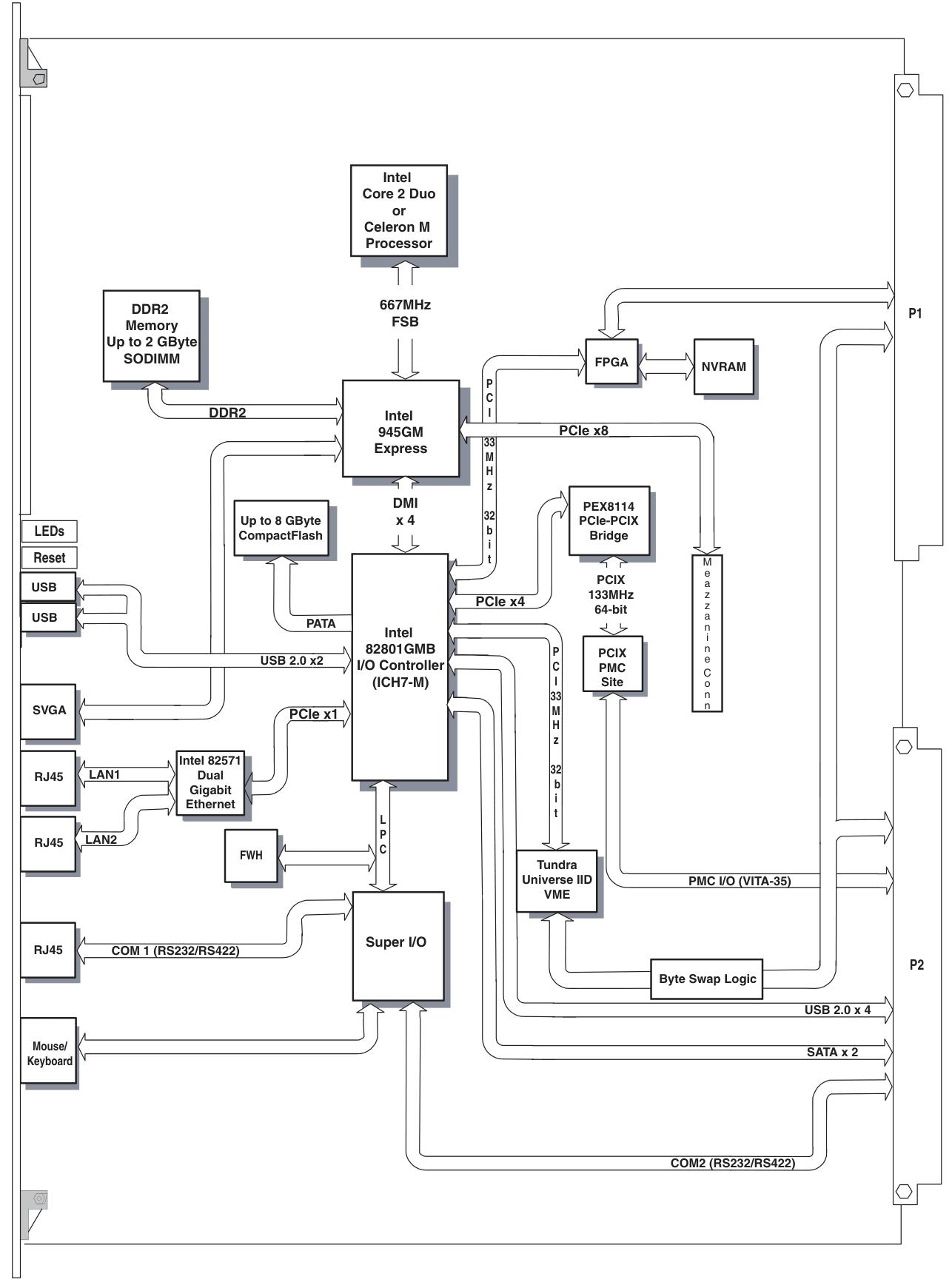
Main functions and features
desktop function
Processor and Memory: V7768 is equipped with Intel Core 2 Duo or Celeron M processors, while V7769 is equipped with Intel Core 2 Duo processors; In terms of memory, the maximum capacity is 2.0GB DDR2 SDRAM (one SODIMM).
Display and Interface: Equipped with SVGA port (front I/O), dual Gigabit Ethernet (GbE) (front I/O), one RS232/422 COM port (front I/O), one RS232/422 COM support (rear I/O), two USB 2.0 ports (front I/O), four USB 2.0 supports (rear I/O), supports two SATA connections (rear I/O), V7769 can choose a 2.5-inch SATA hard drive, V7769 has unique dual SAS connectors (front I/O), etc.
Other: including real-time clock/calendar, front panel reset switch, PS/2 keyboard/mouse connection (front I/O), onboard parallel connector, etc.
Embedded functionality
Storage and Expansion: Supports remote boot from the front panel, up to 8GB bootable CompactFlash (optional), PMC site with PCI-X functionality (with VITA 35 P2 I/O, factory installed on V7768 and V7769 motherboards), etc.
Compatibility and Storage: Complies with VITA 1-1994 standard and supports byte swapping, 32KB NVRAM, optional watchdog timer with reset function, PMC expansion site.
Applicable scenarios: Suitable for various application scenarios such as telecommunications, simulation, instrumentation, industrial control, process control and monitoring, factory automation, automatic testing systems, data acquisition systems, etc.
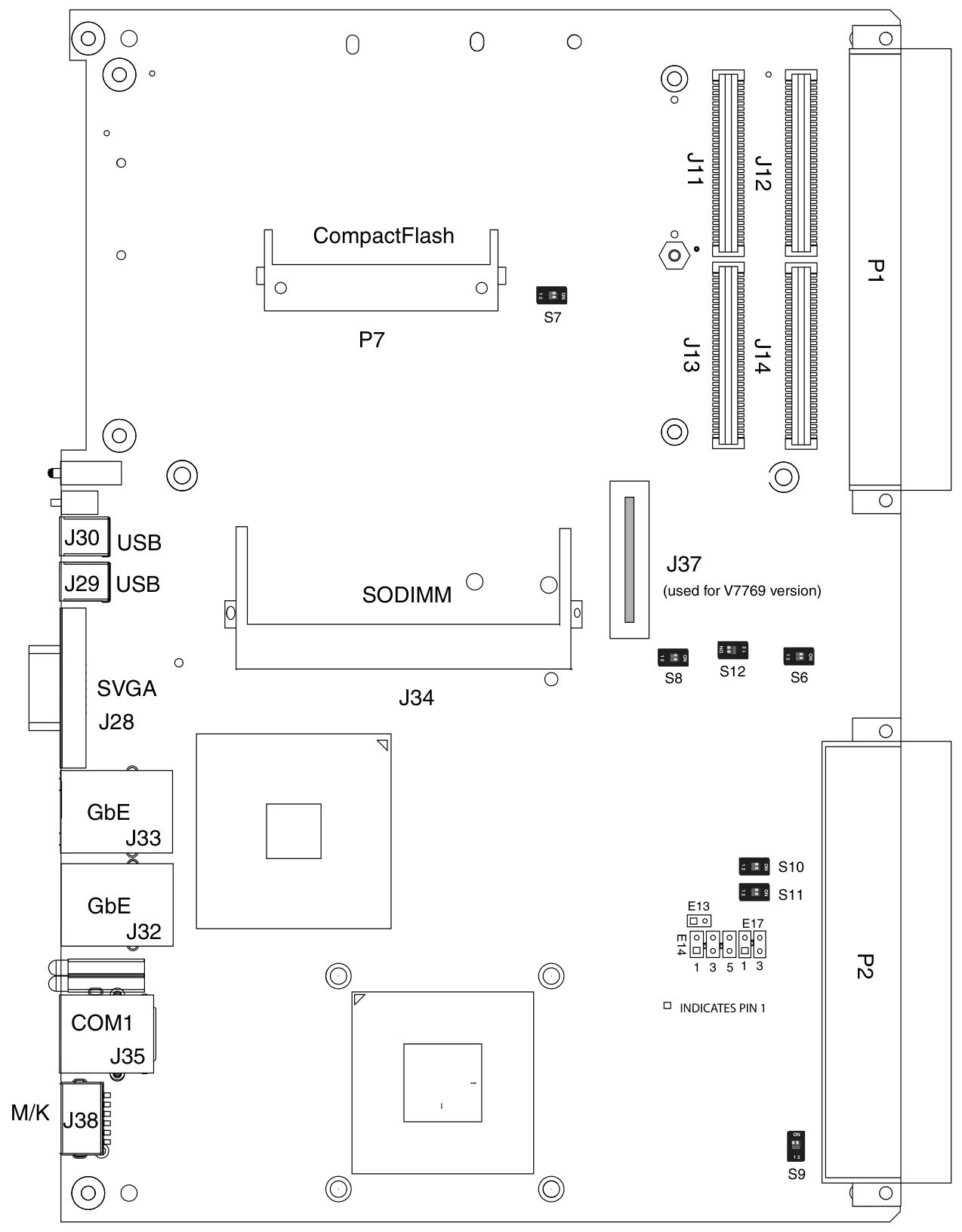
Installation and setup
Unboxing and hardware setup
After opening the box, it is necessary to check whether the items have been damaged during transportation and pay attention to electrostatic protection.
Hardware settings involve various connectors, joints, and switches, such as VME interface connector (P1), USB 2.0 and other related connectors (P2), CompactFlash slot (P7), etc. Users can configure some jumper wires according to their needs, and factory configured jumper wires should not be modified by users. Modifying jumper wires that are not user configured will void the warranty and may damage the equipment.
Installation steps
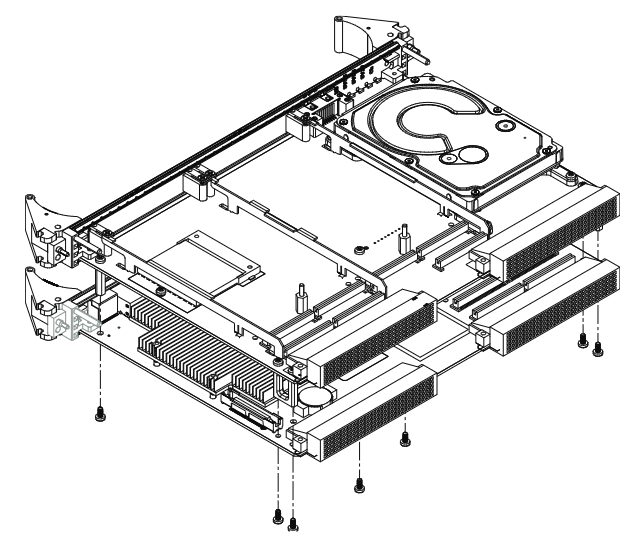
If using PMC module, connect it to V7768/V7769 before installing the motherboard, and refer to the product manual of PMC module for configuration and settings.
Insert V7768/V7769 into the system controller or peripheral slot of the VME chassis, ensuring proper alignment and secure installation.
The required peripherals can be accessed from the front panel or rear I/O, and each connector is clearly labeled. The detailed pin distribution can be found in Appendix A.
If the system is not pre configured, a keyboard and mouse need to be connected.
V7768 has an optional onboard CompactFlash disk, please refer to Chapter 3 "Embedded PC/RTOS Functions" for configuration details.
If an external driver module is installed, the BIOS setup program must be used to configure the driver type. Refer to Appendix B for proper system configuration.
If there is a driver module, install the operating system according to the manufacturer's instructions.
BIOS settings
Entering the BIOS setup interface: Pressing the DEL key will enter the BIOS setup utility during system startup, which includes multiple menu options for detailed system configuration.
Main Menu: displays system information such as BIOS version, processor type, clock speed, and supports setting system clock and calendar. The configurable options in the menu are displayed in blue, while the options displayed in gray are not configurable. After selecting an item, its brief description will be displayed on the right side.
Advanced BIOS Setup Menu: Used to configure CPU settings, IDE bus, other external devices, and internal drives. Caution should be exercised during operation, as incorrect settings may lead to system malfunctions. If there is a problem after the change, you can select "Load Failed Safe Defaults" from the Exit menu and restart the system; If a system malfunction prevents access to the BIOS interface, you can refer to the "Installation and Setup" chapter to clear the CMOS.
PCI/PnP Setup Menu: Used to control internal peripheral cards and various interrupts, as well as set the system's plug and play functionality. Similarly, incorrect settings may cause system failures, and the solution is similar to the advanced BIOS settings menu.
Boot Setup Menu: You can set the priority of starting the device, including starting from a remote network. If the installed driver is not displayed in the menu, check the hardware installation. In addition, basic system related behaviors can be set, such as PS/2 mouse support and whether to use "Quick Boot".
Security Setup Menu: Provides password settings for both Supervisor and User. If two passwords are used simultaneously, the administrator password must be set first. The system can be configured to require the user to enter a password every time it starts or enters ezPORT settings. When you forget your password, you need to clear the NVRAM and reconfigure it. Please refer to the "Installation and Setup" chapter for specific instructions.
Chipset Setup Menu: Used to select various options for the chipset in the system, such as CPU configuration and north-south bridge configuration. Due to the fact that chipset settings are processor related, extra caution should be taken when changing settings, following troubleshooting methods similar to those in the above menu.
Exit Menu: You can choose to save or discard changes and exit BIOS settings. If the previous BIOS settings cause system failure, you can select 'Load Failed Safe Defaults' from this menu and continue restarting.
First Boot Menu: Pressing the F11 key will enter this menu during startup, allowing users to choose to boot from a specific device at once, such as selecting ATAPI CD-ROM Drive when installing the operating system from a CD. This selection is only valid for the current boot. If you are unable to access this menu, you can disable QuickBoot Mode in the Main BIOS settings screen, save the changes, and try again.
- OMRON
- ABB
- General Electric
- EMERSON
- Honeywell
- HIMA
- ALSTOM
- Rolls-Royce
- MOTOROLA
- Rockwell
- Siemens
- Woodward
- YOKOGAWA
- FOXBORO
- KOLLMORGEN
- MOOG
- KB
- YAMAHA
- BENDER
- TEKTRONIX
- Westinghouse
- AMAT
- AB
- XYCOM
- Yaskawa
- B&R
- Schneider
- KONGSBERG
- NI
- WATLOW
- ProSoft
- SEW
- ADVANCED
- Reliance
- TRICONEX
- METSO
- MAN
- Advantest
- STUDER
- DANAHER MOTION
- Bently
- Galil
- EATON
- MOLEX
- DEIF
- B&W
- ZYGO
- Aerotech
- DANFOSS
- Beijer
- Moxa
- Rexroth
- Johnson
- WAGO
- TOSHIBA
- BMCM
- SMC
- HITACHI
- HIRSCHMANN
- Application field
- XP POWER
- CTI
- TRICON
- STOBER
- Thinklogical
- Horner Automation
- Meggitt
- Fanuc
- Baldor
- SHINKAWA
- Other Brands
- UniOP
- KUKA
- Iba
- Beckhoff
- ADLINK
-
 Bonfiglioli ISMET LCVT050 DK308/50 Line Reactor
 -
 Bonfiglioli C 22 2 F GR063 Gearbox
 -
 Bonfiglioli C31 3 P P63 PV V5 Reducer
 -
 Bonfiglioli CM-485 T Communication Module
 -
 Bonfiglioli W75UF1D30P90B5 Gearbox
 -
 Bonfiglioli BN63 B4 VF49 Gearmotor 0.18kW
 -
 Bonfiglioli ACT 400-004 FA Frequency Inverter
 -
 Bonfiglioli W110U100P90B5B3 Worm Gearbox
 -
 Bonfiglioli SYN10 T 400 05 AF Inverter
 -
 Bonfiglioli MP080.1.4.15.16.40.80.100 Gearbox
 -
Bonfiglioli SYN10S Inverter
-
 Bonfiglioli VF44L2P160 Gearmotor
 -
Bonfiglioli W 86 U 40 P90 B5 B3 Gear Reducer
-
 Bonfiglioli BTD5-1870-05-400 Servomotor
 -
 Bonfiglioli MP 080 2 2C Gearbox with BLDC Motor
 -
 Bonfiglioli MP080.1.10 Planetary Gearbox
 -
 Bonfiglioli C212PHS Reducer
 -
 Bonfiglioli MVF 49F1 Gearbox with ICME T71B4
 -
 Bonfiglioli VF 49 v P71 B5 Gearbox
 -
Bonfiglioli VF 44 P1 Gearmotor
-
 Bonfiglioli C 22 2 NP 6.1 Helical Gearbox
 -
Bonfiglioli F203 316.9 Gearbox with Kaiser Motor
-
 Bonfiglioli SYN10 S 220 07 AF Frequency Inverter
 -
Bonfiglioli 301L251.8-HC-P90 Gearbox 1/51.8
-
 Bonfiglioli ACT401-25A Frequency Inverter
 -
 Bonfiglioli W75 U D30 30 P90B14 B3 Worm Drive
 -
 Bonfiglioli 830G2310M-307638 Motor
 -
 Bonfiglioli C112-P-P90 Inline Gearbox i=6.2
 -
Bonfiglioli SYN10-S-220-03-AF AC Drive
-
 Bonfiglioli VFR49 A HS Worm Drive i=180 B3
 -
Bonfiglioli ACT 401-29 A AC VFD Drive 22kW
-
 Bonfiglioli VF49PIP63B14 Gearbox
 -
 Bonfiglioli ANG 410-18 2 FA Inverter
 -
 Bonfiglioli GVX2000-7.5-T Converter
 -
 Bonfiglioli EM-ENC-02-24 Optical Module
 -
 Bonfiglioli ACT 401-33 A VFD Drive
 -
 Bonfiglioli MVF 49F1 Gearbox with ICME T71B4
 -
 Bonfiglioli BN112M4 Motor
 -
Bonfiglioli MP080.1.7 Planetary Gearbox
-
 Bonfiglioli VF-EP 49 BN-71-B2 Gearmotor
 -
 Bonfiglioli W75UD3010P80B14B3 Gear Reducer
 -
Bonfiglioli W 110 U 100 P80 B5 B3 Worm Gearbox
-
Bonfiglioli ACT 201-11 FA Frequency Inverter 1.5kW
-
Bonfiglioli MP080380STDISS5 Planetary Gearbox
-
 Bonfiglioli ACU 210-05 1 FA Frequency Inverter
 -
 Bonfiglioli BN63B4 Electric Motor 265 460V
 -
Bonfiglioli BN 63 C 2 Electric Motor
-
Bonfiglioli 12.502.410 BCLP 40XDSM Assembly
-
Bonfiglioli ACU401-13FA Frequency Inverter
-
Bonfiglioli MP 130.2.20.15.16.40.80.100 Gearbox
-
Bonfiglioli VF49N60HSB3 Gearbox
-
 Bonfiglioli VF30P Gearbox
 -
Bonfiglioli ACU410-31A5 Inverter
-
 Bonfiglioli 301L251.8 Gearbox
 -
Bonfiglioli 8XNC63040004 Electric Motor
-
Bonfiglioli VF30F115P63B14B3 Gearbox
-
 Bonfiglioli RAN 28/DA HS Right Angle Gear Unit
 -
 Bonfiglioli 300L220.1PCP90E Gear Unit
 -
Bonfiglioli BN90LA4 Motor
-
Bonfiglioli KG2001030 Gear Unit
-
 Bonfiglioli VF44F135P71B14B3 with VF30 Combination
 -
Bonfiglioli W63 U P90B5 B3 Gear Motor 10:1
-
Bonfiglioli W75 U D30 15 P90 B5 B3 Gearbox
-
 Bonfiglioli B310 DC Motor 600W 3000rpm
 -
Bonfiglioli W 110 U 100 P80 B5 B3 Gearbox
-
 Bonfiglioli VF44P120P71B5B3 Worm Gearbox
 -
 Bonfiglioli BN 71 B 2 Gearmotor VF44 F1 P71B14
 -
 Bonfiglioli 2E130136140005 Assembly Reference
 -
Bonfiglioli KE0702030 Gearbox
-
Bonfiglioli ACT400-004A Frequency Inverter
-
 Bonfiglioli W110 UFC1 P100 B14 B6 Gearbox
 -
 Bonfiglioli Vectron ZBA400-010FC Inverter
 -
 Bonfiglioli 700C-1H Final Drive Motor
 -
Bonfiglioli VF 86 P Gearbox
-
Bonfiglioli W63 U 15 Gearbox
-
 Bonfiglioli VF/W30/63U450P63B14B3 Gearbox
 -
 Bonfiglioli BN 63 A 2 Gear Motor
 -
Bonfiglioli BN 63B 4 Motor
-
 Bonfiglioli VF44P17 Gearmotor
 -
Bonfiglioli T56BN/4 Asynchronous Motor
-
Bonfiglioli W63UF1P90B5 Worm Gearbox
-
Bonfiglioli ACU401-13FA Frequency Inverter
-
Bonfiglioli W63UFC1P90B5 Worm Gearbox
-
Bonfiglioli W75 1/50 D30 Speed Reducer
-
 Bonfiglioli KG2401180 Non Standard Gearbox
 -
Bonfiglioli ACU 201 07 FA Frequency Inverter
-
 Bonfiglioli RAN25SA1HSB3 Gear Unit
 -
Bonfiglioli SPL400 17F Industrial Drive 3.7kW
-
Bonfiglioli VF63P124P71B14B3 Worm Gearbox
-
Bonfiglioli W63U64P71B5B3 Worm Gearbox
-
Bonfiglioli BN90LA4FD Motor
-
Bonfiglioli ANG 410-33 6A Inverter
-
 Bonfiglioli CM-CAN 149-650-034 179-675 140 Communication Module
 -
Bonfiglioli WR110U120P90B5B3 Gearbox
-
Bonfiglioli C 112 F S05 Gearmotor with Pump
-
 Bonfiglioli C50 2P P100 Gear Reducer
 -
 Bonfiglioli ACT 401-31A Inverter 30kW
 -
 Bonfiglioli A102UH25S1PV Gearmotor
 -
Bonfiglioli ACT 201-05 FA Inverter
-
Bonfiglioli AGL402-21 3FA Inverter
-
Bonfiglioli VF49 V 71B14 Gearbox with ESA 6S 12 Motor
-
Bonfiglioli GVX2002-22-T Inverter 22kW
-
Bonfiglioli BN63A2 Electric Motor
-
Bonfiglioli EM I/O-03 I/O Module
-
Bonfiglioli C112 U P63 Inline Gearbox
-
Bonfiglioli BRA 400-075 BF2 Brake Chopper
-
Bonfiglioli VF49 P1 HSRB Worm Gearbox
-
Bonfiglioli GVX2000-18.5-T Inverter
-
Bonfiglioli BMD 118 14 3000 400 165 24 K 67 TC1 Drive
-
Bonfiglioli WR 86 U 120 P80 B5 V5 Gearbox
-
 Bonfiglioli W110U56P100B5B3 Gear Reducer
 -
Bonfiglioli A202 UR 35.4 Bevel Gearbox
-
Bonfiglioli ACU 401-26A Inverter
-
 Bonfiglioli BN 71 B 4 Motor
 -
 Bonfiglioli Vectron BTD5-1870-05-400 Servo Motor
 -
Bonfiglioli BE 80B 4 Motor with C122PP80 Gear
-
Bonfiglioli TR160225STD130ACD Gear Unit
-
Bonfiglioli W 63 U 24 P71 Gearbox
-
Bonfiglioli Trasmital KYB MHKAYABAKTMAGA050VP34 Hydraulic Track Drive
-
Bonfiglioli EM-ABS-01 Encoder Module
-
Bonfiglioli RPS Log 100 Data Logging Module
-
Bonfiglioli VF49P1P71B14 Gearbox
-
Bonfiglioli W86U Right Angle Gear Reducer
-
Bonfiglioli W63 U P71B5 Gear Reducer
-
Bonfiglioli W63UP90B5 Gearmotor
-
 Bonfiglioli VER/S 400-150 Inverter
 -
Bonfiglioli F202 H30 P80 Gearbox
-
Bonfiglioli W75UD307P90B14 Gearbox


