
GE VMIVME-2128 128 bit high voltage digital output board
GE VMIVME-2128 128 bit high voltage digital output board
Product Overview
Basic function: VMIVME-2128 can provide 128 channels of high voltage and/or high current surge current output. Its open collector electrode output driver supports output voltages from 5 to 48VDC and has built-in test (BIT) logic, allowing users to verify the operation of each channel under software control.
Key Features
128 channel high-voltage digital output (5 to 48VDC), supporting 8-bit, 16 bit, or 32-bit VME data transmission.
High current open collector electrode driver (600mA current) with built-in suppression diode, output can be connected in parallel for higher driving capability, optional open collector electrode pull-up resistor.
The output has fault protection function (when the current exceeds 1.0A, the output is turned off), built-in testing logic, and a software controlled fault LED on the front panel (for built-in testing).
Users can configure address jumpers to allow for continuous addressing of multiple boards when used in a VME system.
Application scenarios: Suitable for various applications such as relay drive, lamp drive, solenoid drive, hammer drive, stepper motor drive, LED drive, high current and high voltage drive, fiber optic LED drive, etc.
Security Summary
To minimize the risk of electric shock, the chassis and system cabinets must be connected to electrical grounding, using three core AC power cords, and correctly connected to grounded sockets.
Do not operate the system in an explosive atmosphere to avoid potential safety hazards.
Operators are not allowed to remove the product casing. Component replacement and internal adjustment must be carried out by qualified maintenance personnel. When replacing components, do not connect the power cord. Even if the power cord is removed, there may still be dangerous voltage in some cases. Before contacting the circuit, the power supply must be disconnected and discharged.
Do not perform internal repairs or adjustments alone, personnel who can provide first aid and resuscitation must be present.
Do not replace components or modify the system to avoid introducing additional hazards. Product repairs should be returned to the GE Fanuc embedded system to ensure that safety functions are maintained.
Dangerous program warning: There will be a warning in the manual before potential dangerous programs, and the instructions in the warning must be followed.
Safety symbols
STOP: Inform the operator not to perform a certain operation, as it may result in personal injury or partial or complete damage to the system.
Warning: Indicates the presence of danger and reminds attention to a certain procedure, operation, or condition. Improper execution or compliance may result in personal injury or death.
CAUTION: Indicates the presence of danger and reminds attention to a certain operating procedure, operation, or condition. Improper execution or compliance may result in partial or complete damage to the system.
NOTE: Remind attention to an important program, operation, or condition.
Operating principle
Functional modules: The design of the VMIVME-2128 board mainly consists of four parts: VME basic logic, device addressing, output drivers, and built-in test logic. It supports eight 16 bit bidirectional registers, one control and status register (CSR), high-performance output drivers, typical VME basic logic, and device address jumper groups, which allow users to select the base address.
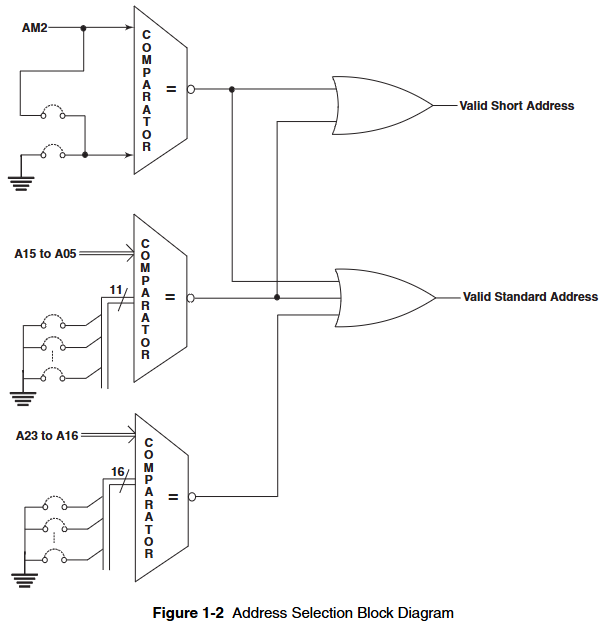
Device Addressing: Supports data transfer in short or standard I/O memory space, with monitoring and/or non privileged data access capabilities. The I/O access type is selected through jumper wires, and the factory defaults to responding to short monitoring I/O access.
VME basic logic: composed of drivers, receivers, and control logic, the DTACK generator is designed to provide high data transmission rates.
Data transmission: The data transmission transceiver supports read and write operations on 8-bit, 16 bit, and 32-bit boundaries.
Register control logic: Supports read and write operations on eight 16 bit bidirectional dual port latches, as well as read operations on CSR registers that control test modes and front panel LEDs. The 128 bit high voltage output can be addressed as four 32-bit long words, eight 16 bit words, or sixteen 8-bit bytes.
Built in testing (BIT): By enabling the test mode bit in CSR, test data can be written to any output data register (ODR) in test mode and read back during read operations. At this time, all drives are turned off (tri state), and ODR can be read independently of the test mode bit at any time. This function provides real-time loopback testing (when the output driver is connected) and offline diagnostic testing (when the output driver is disconnected from the field device) capabilities. The front panel has a fault LED for quick fault isolation to the board level. The fault LED lights up when powered on or the system is reset, and the user can turn it off after successful diagnosis.
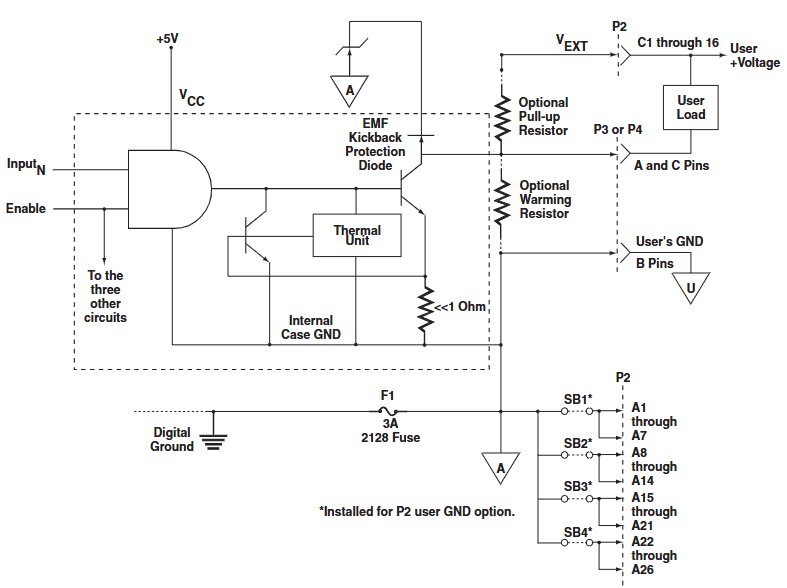
Output driver: Equipped with thermal and surge current shutdown protection, surge current protection allows up to 990mA of surge current before the driver shuts down. If the surge current of each channel in the external circuit exceeds the 990mA limit, preheating resistors should be used. SIP resistor sockets are provided on the board for these preheating resistors, which must be of bus type, with pin 1 as the common terminal and pin 1 of the socket grounded. The power rating of the SIP resistor should be sufficient to handle the required power consumption. The output driver user load return current must provide the lowest possible resistance return path to the user voltage source, and must not be returned through VME backplane digital ground. It must be returned to the user power supply through the B-row pins of the front panel connectors P3 and P4, or through pins A1 to A26 of the P2 connector if the P2 user ground option is ordered. If the user's grounding quality is poor, causing the user's load to return current to the digital grounding of the backplane, fuse F1 will melt and make the board unable to work. A blown fuse usually indicates poor grounding quality for the user, and this fuse circuit is necessary for the digital input grounding return of the control signal to the output driver.
P2 user grounding option: The user grounding is connected to all B-row pins of the front panel connectors P3 and P4. If the P2 user grounding option is ordered, these grounds are also routed to pins A1 to A26 of the backplane P2 connector through the installation of short-circuit bars SB1 to SB4 (RP33 to 36). The external power supply grounding (user grounding) can now be accessed from the P2 backplane connector of the VME chassis. All 26 wires are required to provide a low resistance user load current return path. For a typical 300mA/channel load, the current of each wire can reach up to 1.48A. Each unused wire means that its current must be shared by the remaining wires, so 28 AWG or larger wires should be used.
Configuration and Installation
Unpacking procedure: Some components on GE Fanuc embedded system products may be sensitive to electrostatic discharge. When placing the board on a workbench for configuration and other operations, it is recommended to insert conductive material underneath the board to provide conductive diversion. Unused boards should be stored in their original packaging. After receiving the product, all precautions in the transport container should be followed, all items should be carefully unpacked, and a thorough inspection should be conducted for any transport damage. All claims arising from transport damage should be made to the carrier and a complete report should be sent to the GE Fanuc embedded system, requesting advice on the handling of damaged items.
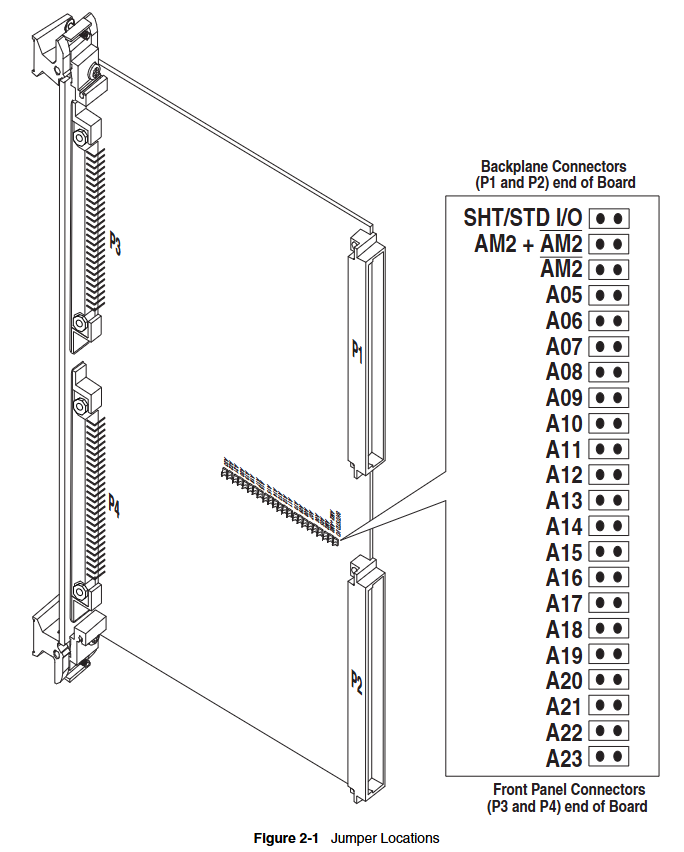
Jumper and switch positions: Introduces the physical positions on the jumper, and the address modifier can change the configuration by installing the jumper at the appropriate position on connector H1, supporting multiple I/O access types. The address selection jumper is used to specify the starting board address for data transmission. The installed jumper is equal to zero, and the omitted jumper is equal to one. The factory default configuration is to respond to 0000 HEX in the short monitoring space.
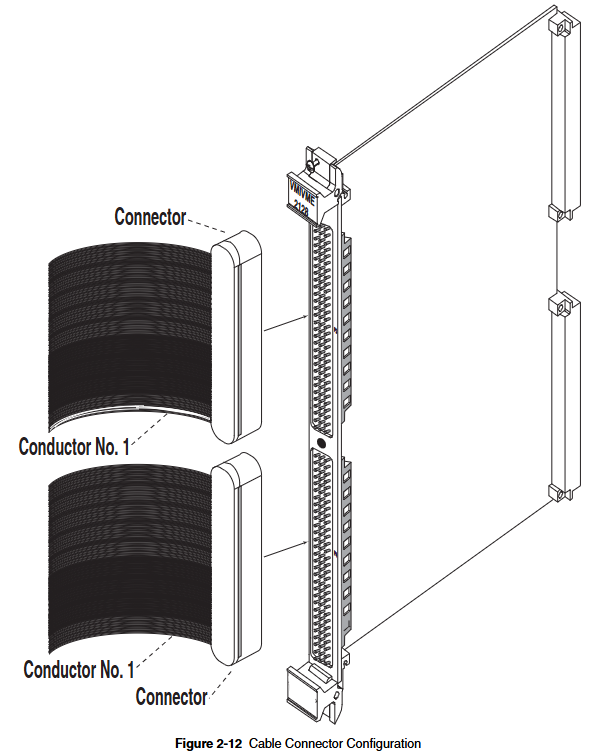
I/O cable and front panel connector configuration: The output connectors (P3 and P4) on VMIVME-2128 are 96 pin DIN standard and can be used with various cables and matching connectors. Users can refer to the relevant application guide for more information. Detailed explanation of the use of user I/O pins and external voltage input for connector P2, as well as the pin configuration of output connectors for P3 and P4. The VMIVME-2128 board is designed with a high-quality ground plane, which is connected to the VME ground through fuse F1 and to the B-row pins on connectors P3 and P4 to enhance noise resistance and improve operational reliability. Users are also reminded that the grounding conductor should be connected to the power supply (GND return) associated with these signal loads, and the grounding connection should prevent excessive current (DC or noise) from flowing through the VME backplane. External user voltage should not be applied to VMIVME-2128 without connecting the VME backplane+5VDC. If these voltages cannot be applied and removed together, the preferred order is: user voltage is connected last and disconnected first.
Optional user grounding: If the user grounding option is ordered, the output return is routed to pins A1 to A26 of P2 through the installation of short-circuit bars SB1 to SB4, allowing access to the external power supply grounding from the P2 backplane of the VME chassis. It is important to maintain the grounding path resistance lower than the VME grounding path resistance and use as many wires as possible to lead out these grounding points. The current in the wires may be large, so 28 AWG or larger wires should be used, while being careful not to exceed the maximum current rating of the connector pins.
Preheating resistor: When the incandescent lamp is initially turned on, the cold filament resistor is the smallest, usually allowing 10 to 12 times the surge current. A surge current of 1A or greater will force the output driver to enter the return current limit. To avoid this problem, preheating or current limiting resistors should be used in the lamp circuit. The preheating resistor should consume about 10% of the rated (hot) current of the bulb. A ten pin SIP socket is provided on the board for preheating resistors, which must be bus type, with pin 1 as the common terminal and pin 1 of the socket grounded. The power rating of the preheating resistor should be sufficient to handle the required power consumption.
Programming
Register Mapping: VMIVME-2128 includes a 16 bit board ID register, a 16 bit CSR, and eight 16 bit ODRs, providing register address mapping. ODRs allow control of 128 high-voltage digital output channels, which can be addressed as four 32-bit long words, eight 16 bit words, or sixteen 8-bit bytes. ODRs can be read under program control for data verification or diagnostic testing. CSR and board ID can be addressed as 16 bit words or two 8-bit bytes, and ID and CSR bit mappings as well as ODR bit mappings are provided. The board uses a 32 byte address space.
Detailed programming: In output data transmission, the data register address mapping displays the correspondence between ODR (DR0 to DR7) and output data channels 127 to 0. The built-in testing function provides real-time loopback data verification and offline diagnostic execution capability. The offline built-in testing function is activated by setting the test mode (TM) bit in CSR to logic "zero". When the TM bit is set, all output drivers are in three states, and test data can be written into the selected data register and read back during read transmission without affecting the user device. When the test mode is turned off, the data can also be read back, allowing online testing of the board. The test mode bit and fault LED control bit are initialized to active state when powered on or system reset, so the fault LED lights up and the output driver is disabled. A simplified programming flowchart is also provided.
Maintenance
When a product malfunctions, it is necessary to first check the software, system configuration, electrical connections, jumper or configuration options, whether the board is fully inserted into its correct connector position, whether the connector pins are clean and free of contaminants, whether there are components or adjacent boards disturbed when inserting or removing the board from the chassis, and the quality of cables and I/O connections.
If you need to return the item, you need to contact GE Fanuc Embedded System to obtain a Return Merchandise Authorization (RMA) number, which can be obtained via email. Customer service can also be contacted by phone or email.
User level maintenance is not recommended, and the drawings and charts in the manual are for reference only.
- OMRON
- ABB
- General Electric
- EMERSON
- Honeywell
- HIMA
- ALSTOM
- Rolls-Royce
- MOTOROLA
- Rockwell
- Siemens
- Woodward
- YOKOGAWA
- FOXBORO
- KOLLMORGEN
- MOOG
- KB
- YAMAHA
- BENDER
- TEKTRONIX
- Westinghouse
- AMAT
- AB
- XYCOM
- Yaskawa
- B&R
- Schneider
- KONGSBERG
- NI
- WATLOW
- ProSoft
- SEW
- ADVANCED
- Reliance
- TRICONEX
- METSO
- MAN
- Advantest
- STUDER
- DANAHER MOTION
- Bently
- Galil
- EATON
- MOLEX
- DEIF
- B&W
- ZYGO
- Aerotech
- DANFOSS
- Beijer
- Moxa
- Rexroth
- Johnson
- WAGO
- TOSHIBA
- BMCM
- SMC
- HITACHI
- HIRSCHMANN
- Application field
- XP POWER
- CTI
- TRICON
- STOBER
- Thinklogical
- Horner Automation
- Meggitt
- Fanuc
- Baldor
- SHINKAWA
- Other Brands
- UniOP
- KUKA
- Iba
- Beckhoff
- ADLINK
-
 Sigmatek SE051 Network Splitter Module
 -
 Sigmatek CIO011 C-DIAS I O Module
 -
 Sigmatek SE051 Ethernet Splitter
 -
 Sigmatek CCL911 CD Processor Module
 -
 Sigmatek SDD310-4 DIAS Drive 14kVA
 -
Sigmatek CTMS020 C-DIAS Technology Module
-
 Sigmatek CTMS020 CD Technology Module
 -
 Sigmatek CTO167 C-SLIDES Digital Output Module
 -
 Sigmatek C-IPC 152 Industrial PC
 -
 Sigmatek SDD310-4 SLIDES Drive 310
 -
 SIGMATEK MDP 102-1 DIAS Power Module
 -
 SIGMATEK SCP111 S-DIAS Safety CPU Industrial
 -
 SIGMATEK CAO081 Analog Output Module
 -
 SIGMATEK DCC080L Control Module
 -
 SIGMATEK MDP101-1 Power Module
 -
 SIGMATEK SCP111 S-DIAS Safety CPU
 -
 SIGMATEK PC325-K Industrial PC
 -
 SIGMATEK ETT 731 Operator Terminal
 -
 SIGMATEK DSV011 SLIDES Hub Module 05-023-011
 -
SIGMATEK 12-780-012 R8-IPC Industrial Computer
-
 Sigmatek SE051 Ethernet Splitter
 -
 Sigmatek DAI 883 DIAS Analog Module
 -
 Sigma Tek 4000B-30 Directional Gyro
 -
 Sigmatek CP112 S-DIAS Processor Module
 -
 Sigmatek SDD310 DIAS Drive
 -
 Sigmatek SDD120-23 DIAS Drive 14kVA
 -
Sigmatek C-IPC 152 Industrial PC
-
 Sigmatek CIV513 VARAN Control Module
 -
Sigmatek DCP 082 Processor Module
-
 Sigmatek C-IPC Industrial PC 01-450-023 GEB
 -
 SIGMATEK PC572 Operating Terminal
 -
 SIGMATEK DCC041 DIAS Compact Controller HW 6.10
 -
SIGMATEK C-IPC 152 1GB Celeron M440 Controller
-
 SIGMATEK 01-310-322-K PC322-K Industrial PC
 -
SIGMATEK TAE732-P Touch Screen Operator Panel
-
SIGMATEK 01-018-100 Control Module
-
SIGMATEK DDI-164 Digital Input Module
-
 Sigma-Tek 5000B-36 Artificial Horizon
 -
 SIGMATEK 12-780-012 R8-IPC Geode LX800 Computer
 -
SIGMATEK CTMS 020 Servo Drive
-
 Sigmatek MDD121-1 Controller
 -
 Sigmatek ETV1021-L VARAN Terminal
 -
Sigmatek DST022 DIAS Module
-
Sigmatek CCP512-K C-Dias Processor Module
-
 Sigmatek SRO 021 Relay Output Module
 -
 Sigmatek SDI 101 Digital Input Module
 -
 Sigmatek IPC 221 Industrial PC
 -
Sigmatek DNC-305 Digital Input Module
-
 Sigmatek SDD335 DIAS Drive
 -
Sigmatek C-IPC Industrial Controller
-
 SIGMATEK 01-450-031 C-IPC 256MB LX800 Computer
 -
SIGMATEK SDD310-3 DIAS Drive 310
-
 SIGMATEK DSV011 SLIDES Hub Module 05-023-011
 -
SIGMATEK CNC031 CD Analog Module 12-011-031
-
 SIGMATEK 01-450-031 C-IPC 256MB LX800
 -
SIGMATEK 01-450-026 C-IPC VIA 733MHz Controller
-
 SIGMATEK DCP-643 DIAS CPU Module with DKL-003
 -
 SIGMATEK MDD111-L DIAS Drive Axis Module
 -
SIGMATEK SDD310-23-L DIAS Drive 310
-
 SIGMATEK Viscotec ETV0551 Touch Panel
 -
 SIGMATEK PC321K Industrial Computer
 -
SIGMATEK MDP 102-1 SLIDES Power Module
-
 SIGMATEK TAE-151 12-200-151 Light Terminal
 -
SIGMATEK CP102 20-004-102P6995B HMI Panel
-
 SIGMATEK CAM-123 12-017-123-C Analog Mixing Module
 -
SIGMATEK DCC041 DIAS Compact Controller
-
SIGMATEK DVI021 and DKL015 DIAS Power Module
-
 SIGMATEK SDD340-46 SDD Series Servo Drive
 -
 SIGMATEK Robotdrive L6 02220-7997 Engel Drive
 -
 SIGMATEK AKM63M-ANCNGBB0 4.38kW PM Servomotor
 -
 Sigmatek SDD 310 SLIDES-Drive SDD310-4O
 -
 Sigmatek SDD335-23K Drive VARAN Interface 14kVA
 -
 Sigmatek TAE1922-K Touch Display Unit
 -
 Sigmatek DIAS DCP 643 CPU Module DKL003
 -
 Sumitomo CNH-4105Y-43 NSNP Gear Reducer
 -
 Sumitomo CHHP-4160Y-35-213T Inline Gear Reducer
 -
 Sumitomo CNHM02-6090YA-87 NSNP Gear Motor
 -
 Sumitomo CNVXS-6100Y-43 NSNP Gear Reducer
 -
 Sumitomo CNHM2609511 Gear Motor
 -
 Sumitomo CHVM3-6130-B-35 Gear Motor
 -
 Sumitomo HW0389042-A Industrial Component
 -
 Sumitomo F2CF-W55-ZG05-64 Gear Reducer
 -
 Sumitomo CHH-6165Y-13 Inline Gear Reducer
 -
 Sumitomo CNVM3-6125C-EP-6 Cyclo Gear Motor
 -
 Sumitomo RNYX-1320Y-20 Gear Reducer
 -
Sumitomo XFCG111-43/24/165 Control Component
-
 Sumitomo LHYJ-3A105K-Y3-102 Gear Reducer
 -
 Sumitomo CNFM02-6095DA-B-121 TC-FX/FB-02A Motor
 -
 Sumitomo CNHJ-4105DAY-289 NSNP Gear Reducer
 -
 Sumitomo LHYJS-4C145Y-Y1-112 NSNB Gear Reducer
 -
 Radiator 2060351111 Komatsu Sumitomo Linkbelt
 -
 Sumitomo BL3-09B-35MEHDK6 Gearbox ANFJ-L30
 -
 Sumitomo Truninger 8H1-150 Internal Gear Pump
 -
Sumitomo RNFMS01-25R-B-150 200V NSNP Gearmotor
-
Sumitomo CHHBJN1HA-6135Y-29 Inline Reducer
-
Sumitomo EHYMS5-B6125YA-Y3-74 NSNB Reducer
-
 Sumitomo Eaton H-050AA2F-J Orbit Motor
 -
Sumitomo TC-FXVP Motor 0.75kW 4P 400V N-80M
-
 Sumitomo XFCG111-87/24130 Industrial Control Component
 -
 Sumitomo AF3122-030 Inverter 30kW 3Ph 200V
 -
 Sumitomo QT42-25FS-B Internal Gear Pump
 -
 Sumitomo F2CS-A35-ZG09-59 Speed Reducer
 -
 Sumitomo CNHM05-6090-B-29 Gear Motor
 -
 Sumitomo CHHJ-6145Y-29-210T Gear Reducer
 -
 Sumitomo E3P-20-2.2-S1450-E Hydraulic Pump
 -
 Sumitomo RNYMS1-1420C-AV-20 Right Angle Gear Motor
 -
 Sumitomo SR101 SRKG101-76-40-060 Reamer Head
 -
Sumitomo RNYM05-1220-25/UBAABB Gear Motor
-
 Optidrive E3 Sumitomo GHB-36 Vector Inverter Motor
 -
Sumitomo CNH-614HY-35 UNMP Gear Reducer
-
 Sumitomo CNH-612HY-6 SM-Cyclo Gearmotor
 -
 Sumitomo HF3214-A75 Electric Motor
 -
 Sumitomo CNVM02-6100-B-59 NSMP Gear Reducer
 -
 Sumitomo CNHJ4105Y35 NSNP Gear Reducer
 -
 Sumitomo CHH6165Y-29 NSNB Gear Reducer
 -
Sumitomo RNYM1-1420-25 Hyponic Gear Motor
-
 Sumitomo T600C Industrial Control Unit
 -
 Sumitomo LHH-4A115-K2-28 NSNB Gear Reducer
 -
 Sumitomo RNYM02-1220-AV-20 Speed Reducer
 -
 Sumitomo CHHS-6140Y-SB-17 Gear Motor
 -
 Sumitomo Heavy Industries SSE-100A-RM Drive Unit
 -
Sumitomo PA228771 CNHM2-6100YB-EP-8 Gear Motor
-
 Sumitomo RNYM02-1231-B-50 Speed Reducer
 -
Sumitomo CNFM1H-6090-6 Induction Motor
-
 Sumitomo CHH-614HY-11 Gear Reducer
 -
Sumitomo F4C-D25-ZG01-41 Speed Reducer
-
Sumitomo PA224280 CNHM1-6095YC-EP-21 Gear Motor
-
Sumitomo KHYJB4115K185145TC Gear Motor


