

Product model: 6AV2124-2DC01-0AX0
Series: Siemens SIMATIC HMI, specifically SIMATIC HMI KTP400 COMFORT Comfort Panel
Core positioning: A human-machine interaction interface that integrates touch and button operations, suitable for process control and data monitoring in industrial automation scenarios. The document version date is June 23, 2014, and there may be subsequent modifications to the content.
Siemens 6AV2124-2DC01-0AX0 Comfort Panel
Product basic information
Product model: 6AV2124-2DC01-0AX0
Series: Siemens SIMATIC HMI, specifically SIMATIC HMI KTP400 COMFORT Comfort Panel
Core positioning: A human-machine interaction interface that integrates touch and button operations, suitable for process control and data monitoring in industrial automation scenarios. The document version date is June 23, 2014, and there may be subsequent modifications to the content.
Core hardware specifications
(1) Display and operation configuration
Category parameter details
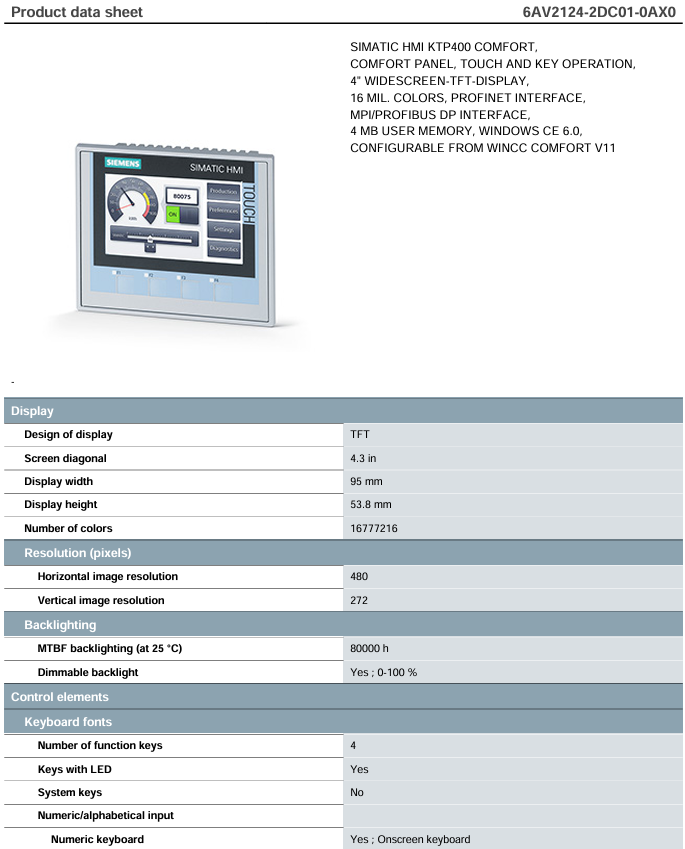
Display design: 4.3-inch widescreen TFT display screen, with a width of 95mm and a height of 53.8mm
Display performance of 16777216 colors (16 million colors), resolution of 480 × 272 pixels
Backlight characteristics MTBF (at 25 ° C) 80000 hours, supporting 0-100% brightness adjustment
Operation mode touch operation: supports touch screen function;
Key operation: 4 function keys with LED indicator lights, no system key;
Input method: Supports on-screen virtual numeric/alphabetical keyboard
Expand control with 4 direct buttons (F1 FX) for S7 input/output, 32 touch direct buttons for S7 input/output, and 4 DP direct LEDs (as S7 output I/O)
(2) Installation and Dimensions
Installation flexibility: Supports vertical and horizontal installation, with vertical installation as the default method and a maximum allowable tilt angle of 35 ° (without external ventilation)
Protection level: IP65 on the front (compliant with Type 4/4x protection standards), IP20 on the back
Size and weight:
-Front dimensions: width 140mm x height 116mm
-Installation incision: width 123mm x height 99mm
-Equipment depth: 49mm
-Weight: 0.6kg without packaging, 0.7kg with packaging included
(3) Power supply and power consumption
Power supply requirements: DC 24V, allowable range 19.2V-28.8V
Current characteristics: rated current 0.13A, surge current 0.5A ² · s
Power consumption: typical value of 3.1W
(4) Processor and Storage
Processor: ARM architecture (non-X86)
Storage configuration: including Flash and RAM, user available memory 4MB; supports 2 SD card slots, 1 USB 2.0 interface, 1 5-pole USB Mini B interface, expandable storage
Interface and Communication Capability
(1) Physical interface
Number and specifications of interface types
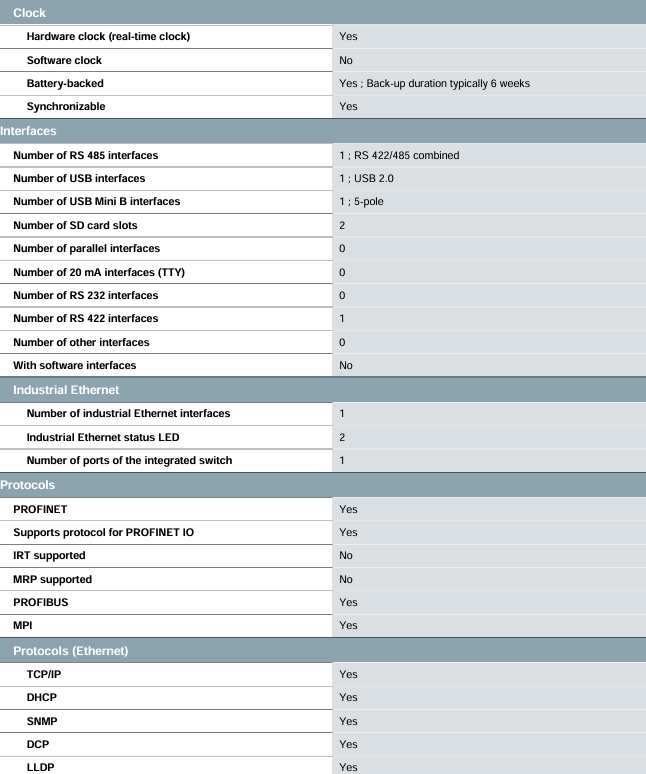
One industrial Ethernet interface with two status LEDs, integrated with one port switch
1 RS 422/485 interface (combination interface), including 1 RS 422 interface
USB interface: 1 USB 2.0, 1 5-pole USB Mini B
2 SD card slots
Other interfaces have no parallel interface, 20mA TTY interface, or RS 232 interface
(2) Support agreement
Industrial bus protocols: PROFINET (supports PROFINET IO, does not support IRT and MRP), PROFIBUS DP, MPI
Ethernet protocols: TCP/IP, DHCP, SNMP, DCP, LLDP
Other protocols: MODBUS, EtherNet/IP (supporting Allen Bradley device communication)
Web related: Supports HTTP, HTML, CSS, JavaScript, but does not support HTTPS, XML, Active X, Java VM
Software and Function Configuration
(1) System and Configuration
Operating System: Windows CE 6.0
Software configuration: Requires configuration through WinCC Comfort (TIA Portal V11 and above), WinCC Advanced/Professional (TIA Portal V11 and above), does not support STEP 7 Basic/Professional, WinCC flexible series
Clock function: Hardware real-time clock (with battery backup, typical backup duration of 6 weeks), supports synchronization, no software clock
(2) Core functions
Specific abilities of functional categories
Supports 32 online/running languages and 32 project languages (including simplified and complex Chinese, English, German, French, Japanese, etc.)
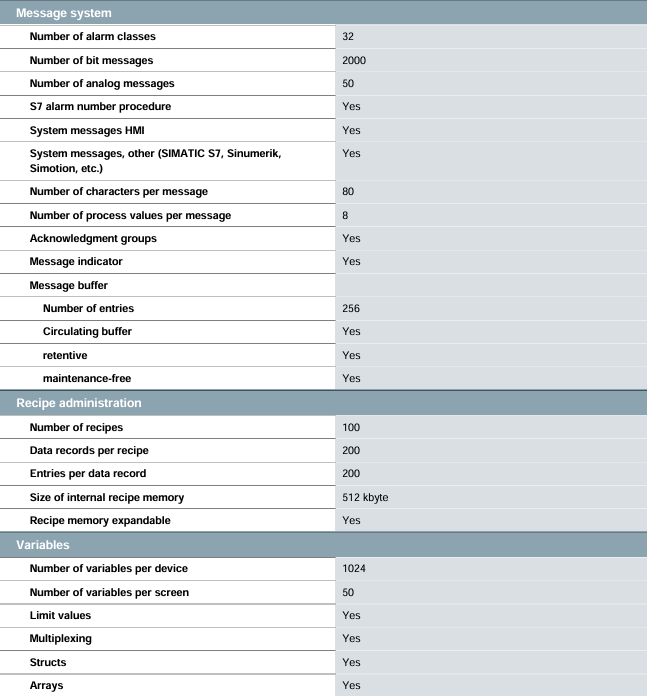
32 alarm categories, 2000 bit messages, and 50 simulated messages for alarms and messages; Support S7 alarm number, HMI and other system messages; 256 message buffers (loop, hold, maintenance free), each containing 80 characters and 8 process values, supporting confirmation groups and message indications
100 formulas are managed, with 200 data records for each formula and 200 entries for each data record; Internal recipe memory 512KB, supports expansion
Variable management includes 1024 variables for a single device and 50 variables for a single screen; Supports limit values, multiplexing, structures, and arrays
500 configurable screens for images and objects, with 50 objects per screen (text boxes, I/O fields, switches, buttons, etc.) and 5 complex objects (alarm views, trend views, etc.); Support global screen, configurable startup screen, and screen selection through PLC
10 data archives, with 10000 entries per archive; Support message archiving and process value archiving, with archiving methods including sequential archiving and short-term archiving; Can be stored on a memory card USB、 Ethernet, supports CSV, TXT, RDB formats
50 user groups, 50 users, and 32 user permissions for security management; Support password import/export SIMATIC Logon
Additional tools support screen cleaning, touch calibration, backup/restore (including automatic backup), simulation, device switching, and incremental transfer; Can connect to printers (print alarms, shift records, etc.) and network cameras
Environment and Certification
(1) Environmental adaptability
Temperature range:
-Operating temperature: Vertical installation 0-50 ° C, maximum tilt angle 0-40 ° C; vertical screen installation 0-40 ° C, maximum tilt angle 0-35 ° C
-Storage/transportation temperature: -20-60 ° C
Humidity: Maximum relative humidity of 90% (without condensation)
Installation angle: Vertical installation is the main method, with a maximum tilt angle of 35 ° (without external ventilation)
(2) Certification and Compliance
Basic certifications: CE, KC, cULus, RCM (formerly C-TICK)
Maritime certification: GL, ABS, BV, DNV, LRS, NK, not supported by PRS
Hazardous Area Use: Supports ATEX Zone 2/22, IECEx Zone 2/22 (soon to be available) cULus Class I Zone 2(Division 2)、FM Class I Division 2, Not supporting cULus Class I Zone 1
EMC compliance: Complies with EN 55 011 radio interference emission standard (limit level A, non level B)
Equipment compatibility
Support coupling communication with various industrial equipment, including Siemens S7-1200/1500/200/300/400, LOGO! 、 Win AC、SINUMERIK, And third-party devices such as Allen Bradley(EtherNet/IP、DF1)、Mitsubishi(MC TCP/IP、FX)、OMRON(LINK/Multilink, Not supporting FINS TCP, Modicon (Modbus TCP/IP, Modbus); Support OPC UA client (non server).
- User name Member Level Quantity Specification Purchase Date
- Satisfaction :
-


-
 GMW IPP 144-40 GS Thermal Printer Troubleshooting Guide
 -
 Meggitt C327845 Gas Shutoff Valve Troubleshooting and Replacement Guide
 -
 Meggitt C422685 Gas Solenoid Valve Troubleshooting Guide
 -
 LTI ServoOne Servo Troubleshooting Guide
 -
 Jenaer Antriebstechnik ECOVARIO Servo Troubleshooting Guide
 -
 Honeywell TDC3000X Troubleshooting Guide
 -
 Honeywell NOTIFIER NFS2-3030 Troubleshooting Guide
 -
 Troubleshooting of Honeywell FC series safety barriers
 -
 Honeywell XL1404 Troubleshooting Guide
 -
 Honeywell TDC 3000 Troubleshooting and Module Replacement Guide
 -
 HIMA X-DI 64 01 Safety Module
 -
 Hirschmann MICE MS20/MS30 Switch Integration and Troubleshooting
 -
 EXOR ePAD05/ePAD06 button screen replacement and troubleshooting
 -
 EXOR eVO58-TST/TNT Compact HMI Human Machine Panel
 -
 Esd VME-PCM-CADDY/2 Carrier Board Integration and Troubleshooting Guide
 -
 Elmo Gold Tuba Servo Drive Integration and Troubleshooting Guide
 -
 Eaton COM-MPB1-TP/MPB2-TP communication module
 -
 DeltaTau PMAC2 PCI Ultralite Programmable Multi Axis Motion Controller
 -
 DATA PATTERNS DP-VME-5114 Dual PMC Carrier Board Integration and Troubleshooting
 -
 CMZ SVM1608 Intelligent Servo Driver
 -
 SUMITOMO T2100Z steel turning selection and troubleshooting
 -
 SUMITOMO PSZ Turn Quick Change System Selection and Troubleshooting
 -
 SUMITOMO EGU chip breaker selection and troubleshooting
 -
 SUMITOMO GND slotting tool holder selection and troubleshooting
 -
 SUMITOMO AC8000P steel turning selection and troubleshooting
 -
 SUMITOMO AC6000M Stainless Steel Turning Guide
 -
 SUMITOMO ELECTRIC AC5000S Heat Resistant Alloy Turning Guide
 -
 SUMITOMO ELECTRIC AC4000K Cast Iron Turning Selection Guide
 -
 SUMITOMO ELECTRIC AC1135U Small Parts Turning Application Guide
 -
 SUMITOMO ELECTRIC AC1030U Precision Machining Selection and Practice for Small Parts
 -
 CCS 6900G/P pressure switch
 -
 BENDER WR Transformer Selection
 -
 BENDER RCMA475LY Residual Current Monitoring
 -
 BENDER IRDH575 Insulation Monitoring
 -
 BENDER IRDH265 Insulation Monitoring and Debugging
 -
 Bender RCMA475LY residual current monitor debugging
 -
 Beckwith Electric M-3425A Generator Protection Relay Debugging Guide
 -
 Automated MEX816U Expander Troubleshooting Guide
 -
 ASEM HT2150 Industrial Tablet Selection and Troubleshooting
 -
 Troubleshooting and practical application of Advantest U3771/3772 microwave spectrum analyzer
 -
 Advantest R6144 Programmable DC Voltage/Current Source (Calibration Source) Calibration and Maintenance
 -
 Aerotech UNIDEX 100/U100i single axis motion controller
 -
 Aerotech Ndrive MP Ultra Compact PWM Digital Servo Driver
 -
 Aerotech Ndrive HPe 10/20/30 High Performance PWM Digital Servo Drive
 -
 Aerotech Ndrive HLe maintenance replacement
 -
 Aerotech Ndrive CP maintenance replacement
 -
 Aerotech Ndrive Linear Drive Selection
 -
 Aerotech NDrive HL linear drive maintenance replacement
 -
 Aerotech NDrive HP 10/20/30 Maintenance and Replacement
 -
 Aerotech NDrive CP10 Servo Drive Guide
 -
 SIGMATEK TAE1941 Display Unit Replacement and Troubleshooting
 -
 SIGMATEK TAE151 Replacement and Troubleshooting
 -
 SIGMATEK AKM Servo Motor Replacement and Troubleshooting Guide
 -
 SIGMATEK S-DIAS Control System Replacement and Upgrade Guide
 -
 SIGMATEK ETT Series HMI Replacement and Selection Guide
 -
 SIGMATEK DIAS Drive 310-23 servo amplifier
 -
 SIGMATEK CCP 521 C-DIAS processor module
 -
 Megmeet L6 electric drive troubleshooting
 -
 Sysmex XN-1000/2000 Technical Guide
 -
 Sysmex XN-L blood analyzer maintenance and troubleshooting
 -
 Troubleshooting and Maintenance of Sysmex XN-9000
 -
 LTI Motion ServoOne PROFIBUS/PROFINET Troubleshooting and Replacement
 -
 Micro Innovation MICRO GF1 Touch Screen Troubleshooting and Replacement
 -
 Troubleshooting and Replacement of Micro Innovation WINbloc Distributed I/O System
 -
 MICRO PANEL GS-2 Troubleshooting and Debugging
 -
 LTi Synchronous Motor LST/LSH Replacement Selection Guide
 -
 Fault diagnosis of LTi CDE/CDB3000
 -
 Maintenance and troubleshooting of ENOTEC SILOTEC 8000 silo analyzer
 -
 ENOTEC ENSITU 7000 Oxygen Analyzer
 -
 ENOTEC COMTEC 6000 ATEX GasEx Analyzer Maintenance, Calibration, and Troubleshooting Guide
 -
 ENOTEC Analyzer Family Selection Guide
 -
 ENOTEC OXITEC 500E Oxygen Analyzer
 -
 KUKA KR CS Box-2 Compact Controller for Four Axis SCARA Robot
 -
 KUKA KR C5 slim-2 Robot Controller
 -
 KUKA KR C5 micro KSS troubleshooting
 -
 KUKA KR C5 micro debugging and troubleshooting
 -
 KUKA KR C5 Controller Assembly and Troubleshooting
 -
 KUKA KR C5 Cabinet Assembly and Troubleshooting
 -
 KUKA KR C4 Smallsize-2 Debugging Guide
 -
 KUKA KR C4 Midsize Assembly Guide
 -
 ENOTEC OXITEC 5000 Oxygen Analyzer Maintenance Guide
 -
 KUKA KR C4 extended assembly and debugging
 -
 KUKA KR C4 compact assembly and debugging
 -
 KUKA Sunrise Cabinet Med Medical Collaborative Robot Special Control Cabinet
 -
 KUKA Sunrise Cabinet Next Generation Small Control Cabinet
 -
 KUKA KR C4 Smallsize-2 family's smallest control cabinet
 -
 KUKA KR C4 Midsize Fault Diagnosis
 -
 KUKA KR C4 extended is a high-power multi axis control cabinet
 -
 Troubleshooting and Maintenance of KUKA KR C4 Control Cabinet
 -
 Troubleshooting and Maintenance of KUKA KR C4 Compact Control Cabinet
 -
 KUKA KR15 DELTA-2 V2 Robot Installation and Debugging
 -
 KUKA TITAN-2 Ultra Assembly and Maintenance Guide
 -
 KUKA KR SCARA-2 CS Assembly, Debugging, and Operation Guide
 -
 Troubleshooting KUKA SCARA X
 -
 Troubleshooting of KUKA KR FORTEC-2 ultra
 -
 Troubleshooting of KUKA KR FORTEC-2
 -
 Troubleshooting KUKA KR 1000 Titan
 -
 Troubleshooting of KUKA KR 600 FORTEC
 -
 KUKA KR 500 MT FORTEC Maintenance and Inspection
 -
 KUKA KR 360 FORTEC Inspection and Maintenance Guide
 -
 Troubleshooting KUKA Sunrise Cabinet Med
 -
 KUKA KR SCARA HO Assembly and Maintenance
 -
 KUKA QUANTEC-2 PA maintenance troubleshooting
 -
 KUKA QUANTEC-2 K/P Maintenance Troubleshooting Guide
 -
 KUKA QUANTEC-2 HO Maintenance Guide
 -
 KUKA KR QUANTEC-2 HC Maintenance and Rescue Guide
 -
 KUKA KR QUANTEC-2 Maintenance Troubleshooting Guide
 -
 KUKA KR QUANTEC PA series heavy-duty palletizing robot
 -
 KUKA KR IONTEC-2 Debugging and Maintenance Guide
 -
 KUKA KR IONTEC ultra series six axis heavy-duty industrial robot
 -
 KUKA KR IONTEC HO Maintenance Troubleshooting Guide
 -
 KUKA KR CYBERTECH-3 HW maintenance troubleshooting
 -
 KUKA KR CYBERTECH-3 maintenance troubleshooting
 -
 KUKA KR8 R2100-2 arc HW maintenance troubleshooting
 -
 KUKA KR CYBERTECH nano-2 maintenance troubleshooting
 -
 KUKA KR 20 R1810 HO maintenance troubleshooting
 -
 KUKA CYBERTECH maintenance troubleshooting
 -
 KUKA KR CYBERTECH CR maintenance troubleshooting
 -
 KUKA KR AGILUS-3 ultra maintenance troubleshooting
 -
 KUKA KR 300 R2700-2 C-F maintenance troubleshooting
 -
 KUKA KR 20 R1820-2 E Maintenance Troubleshooting and Replacement Practice
 -
 KUKA AGILUS-3 troubleshooting
 -
 KUKA KR AGILUS-2 maintenance troubleshooting
 -
 KUKA KR 1000 titan PA troubleshooting
 -
 KUKA KR 700 PA maintenance troubleshooting
 -
 KUKA KR18 R1450-3 PP Operation and Maintenance Essentials
 -
KUKA KR12 SCARA Operations Essentials
-
 KUKA KR4 R600 Operation and Maintenance Essentials


