

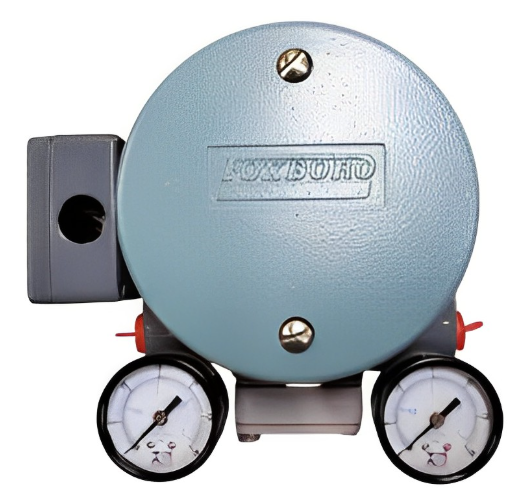
The E69F Current-to-Pneumatic Signal Converter (Figure 1) is a field-mounted instrument that transforms a dc milliampere input signal to a proportional pneumatic output signal.
This output signal can be used either to operate such pneumatic devices as dampers, and valve actuators, and so forth, or as the input to various pneumatic instruments.
FOXBORO E69F-BI2-S Current Pneumatic Signal Converter
Introduction
General Description
The E69F Current-to-Pneumatic Signal Converter (Figure 1) is a field-mounted instrument that transforms a dc milliampere input signal to a proportional pneumatic output signal.
This output signal can be used either to operate such pneumatic devices as dampers, and valve actuators, and so forth, or as the input to various pneumatic instruments.
Principle of Operation
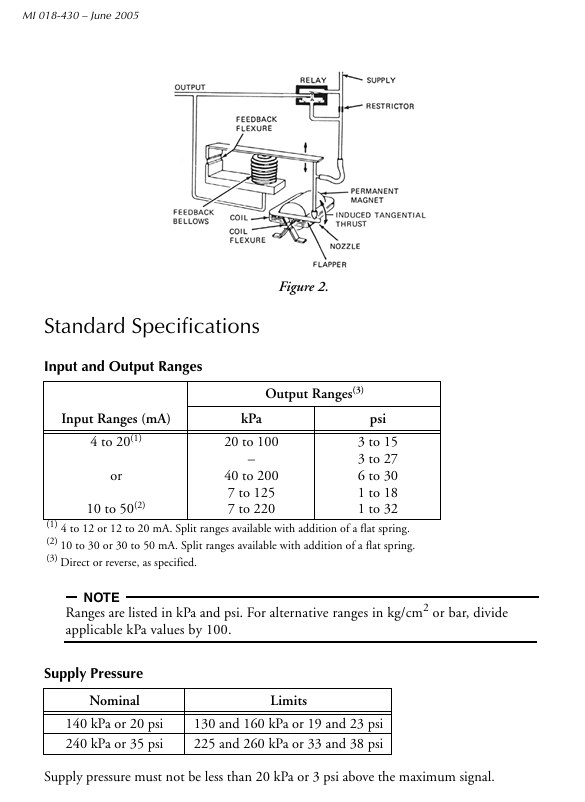
A dc milliampere input signal is converted to a proportional pneumatic output signal in the fol lowing manner (see Figure 2). A coil positioned in the field of a permanent magnet reacts to the current by producing a tangential thrust proportional to the input signal flowing through it. The thrust, acting through coil flexures, varies the gap between a flapper and a nozzle. This causes a change in the output pressure of the relay, which is also the converter output pressure. This pres sure is fed to a feedback bellows which exerts a force on a feedback flexure to move the nozzle and establish a throttling relationship between the flapper and the nozzle.
Input Resistance
4 to 20 mA Input: 170 Ω
10 to 50 mA Input: 27 Ω
Air Consumption
20 to 100 kPa or 3 to 15 psi output:
40G Relay: 0.5 m3/h (0.30 cfm) at standard conditions.
All other outputs: 40D Relay:
1.3 m3/h (0.75 cfm) at standard conditions with 140 kPa or 20 psi supply.
1.7 m3/h (1.0 cfm) at standard conditions with 240 kPa or 35 psi supply.
Ambient Temperature Limits
Normal Operating Conditions:
-30 and +60°C (-20 and +140°F)
Operative Limits: -40 and +80°C (-40 and +180°F)
Calibrated Accuracy
±0.5% of span; but ±2% of span with output signals of 7 to 125 and 7 to 220 kPa or 1 to 18 and 1 to 32 psi
Mass (Approximate) 2.3 kg (5 lb)
Product Safety
For electrical classification of converter, refer to data plate. For conditions of certification, refer to Table 1.
Calibration
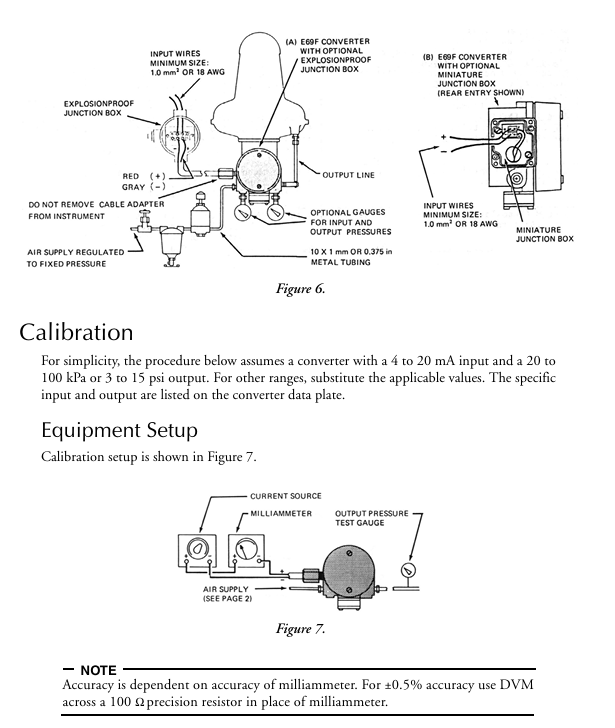
For simplicity, the procedure below assumes a converter with a 4 to 20 mA input and a 20 to 100 kPa or 3 to 15 psi output. For other ranges, substitute the applicable values. The specific input and output are listed on the converter data plate.
Procedure
NOTE Any adjustment to the span will interact with the zero adjustment and will change the initial zero setting. Therefore, any adjustment made to the span must be followed by readjustment of zero.
Set up equipment as shown in Figure 7.
Apply 12 mA (50%) input to converter and adjust output (zero screw) to 60 kPa or 9 psi (50%). See Figure 8.
Apply 20 mA (100%) input to converter and note amount of error above or below 100 kPa or 15 psi (100%) output. If error is greater than ±2% (1.6 kPa or 0.025 psi), perform Step 4. If error is less than ±2%, proceed to Step 5.
Loosen 5/16-inch bellows locknut. Note reference line on bellows. Rotate bellows1 so that reference line moves toward motor to decrease span or away from motor to increase span until the error is within ±2%. Tighten bellows locknut.Repeat Steps 2 and 3.
See Figure 9. Loosen the 5/16-inch span locknut and turn the 5/16-inch span adjustment nut a proportional amount (noted in Step 3) based on the following: 1/6 of a turn (point to point on the hexagonal nut) corrects the error by 0.5%.
Disregard output changes that occur when span adjustment is made. Tighten span locknut.
Apply 12 mA (50%) input to converter and adjust output (zero screw) to 60 kPa or 9 psi (50%).
Apply 20 mA (100%) input and check output for 100 kPa or 15 psi (100%). If output is not correct, repeat Steps 5 through 7.
Apply 4 mA (0%) and check output for 20 kPa or 3 psi (0%). If necessary, readjust zero screw for correct output.
Apply 100% input and check output. If output is not correct, repeat Steps 5 and 8 until both 0% and 100% outputs are correct.
To Reverse Converter Action
The existing action of the converter is indicated by the marking on the exposed top of the motor cover: INC-INC (increasing input produces an in creasing output), or INC-DEC (increasing input produces a de creasing output). When reinstalling the motor (Step 9 below), the exposed marking on the motor cover must indicate the desired action.
Disconnect instrument from installation (input wiring, air lines, and mounting bolts).
Remove two screws holding span bracket. See Figure 12
Remove two screws holding feedback assembly (with bellows). Note routing of tubing for later replacement
Lift aside feedback assembly (do not damage nozzle) to expose spring on bottom of case. Slide transparent cover off span bracket as shown in Figure 13. Unhook spring from motor bracket. (For convenience, feedback assembly can be removed entirely by disconnecting tubing. Note identification of tubing for later reconnection.)
On feedback assembly, remove two hex head (formerly buttonhead) screws. Interchange locations of angle bracket and spacer. See Figure 13. Reinstall hex head screws and tighten to a torque of 3.4 to 4.0 N•m (30 to 35 lb•in). Switching locations of angle bracket and spacer allows the Ni-Span angle bracket to correct for temperature induced errors in the INC-DEC mode.
Remove hex columns (use 5/16-inch wrench), and lift off motor pivot plate. See Figure 12.
Lift out motor. Carefully lift flapper straight up from flapper arm on motor. Do not deform flapper. Holding on to flapper arm on other end of motor while removing will prevent internal motor flexure deformation.
Remove two screws holding bracket to bottom of motor. See Figure 14. Invert motor and reinstall bracket (on side of motor that was formerly on top).
Wind excess wire clockwise around motor and carefully place motor into position in the case assuring that bottom arm is in cavity provided. Make sure that wires will not interfere with moving parts and pivot is in hole at bottom of motor.
Reinstall motor pivot plate and hex columns. Adjust motor pivot screw to remove all end play (approximately 1/8 to 1/4 turn interference) and lock in place. Reconnect spring on motor bracket. Reinstall flapper on flapper arm maintaining gap as shown in Figure 15.
Reinstall feedback assembly and other remaining parts. Make sure that tubing is not kinked and is connected properly. Tighten screws removed in Steps 2 and 3 gradually and uniformly. When tightening feedback assembly screws, line up mounting plate with pad on casting.After assembly, loosen nut A (identified in Figure 12), tap adjacent plate and then retighten nut A.
Perform “Full Realignment.”
To Change to a Split-Range Converter Input
The converter input can be changed to a split-range with the addition of a flat spring (available from Foxboro). Refer to page 2 for available ranges.
Refer to Table 2 for parts required. Obtain parts from Foxboro.
Perform Steps 1 through 4 in “To Reverse Converter Action” section
Loosen the four hex head screws (formerly button head screws) but do not remove them. See Figure 16.
Insert the flat spring into space between the feedback springs.
Line up edges of flat spring, angle bracket, feedback spring, and spacer to be flush with feedback assembly bracket.
Insert four buttonhead screws supplied with flat spring and tighten assembly securely.
Tighten four hex head screws to a torque of 3.4 to 4.0 N•m (30 to 35 lb•in).
Perform Steps 11 and 12 in “To Reverse Converter Action” on page 10.
Full Realignment
Full realignment is required when converter action has been reversed, range has been changed to a split range, or converter was disassembled for some other reason.
Set up equipment as shown in Figure 7.
Apply 12 mA (50%) input signal and adjust zero screw to bring flapper arm to horizontal position (at 90° to edge of span bracket, as shown in Figure 17).
Loosen span locknut. Turn 5/16-inch span adjustment nut to position nozzle to center of flapper arm, as shown in Figure 17. Tighten span locknut.
Move 5/32-inch nozzle adjustment nuts (see Figure 8) to obtain 60 kPa or 9 psi output within 2% (1.6 kPa or 0.25 psi). Tighten nuts.
Nozzle should now be at 90° to flapper. If not , trim slightly with zero screw and repeat Step 4.
Set input to 4 mA (0%) and adjust zero screw for 20 kPa or 3 psi (0%) output.
Momentarily turn off power. When power is returned, output should respond crisply. If not, recheck Step 5 at 12 mA (50%) input and repeat Steps 6 and 7.
Calibrate converter.
- User name Member Level Quantity Specification Purchase Date
- Satisfaction :
-


-
 SIGMATEK TAE1941 Display Unit Replacement and Troubleshooting
 -
 SIGMATEK TAE151 Replacement and Troubleshooting
 -
 SIGMATEK AKM Servo Motor Replacement and Troubleshooting Guide
 -
 SIGMATEK S-DIAS Control System Replacement and Upgrade Guide
 -
 SIGMATEK ETT Series HMI Replacement and Selection Guide
 -
 SIGMATEK DIAS Drive 310-23 servo amplifier
 -
 SIGMATEK CCP 521 C-DIAS processor module
 -
 Megmeet L6 electric drive troubleshooting
 -
 Sysmex XN-1000/2000 Technical Guide
 -
 Sysmex XN-L blood analyzer maintenance and troubleshooting
 -
 Troubleshooting and Maintenance of Sysmex XN-9000
 -
 LTI Motion ServoOne PROFIBUS/PROFINET Troubleshooting and Replacement
 -
 Micro Innovation MICRO GF1 Touch Screen Troubleshooting and Replacement
 -
 Troubleshooting and Replacement of Micro Innovation WINbloc Distributed I/O System
 -
 MICRO PANEL GS-2 Troubleshooting and Debugging
 -
 LTi Synchronous Motor LST/LSH Replacement Selection Guide
 -
 Fault diagnosis of LTi CDE/CDB3000
 -
 Maintenance and troubleshooting of ENOTEC SILOTEC 8000 silo analyzer
 -
 ENOTEC ENSITU 7000 Oxygen Analyzer
 -
 ENOTEC COMTEC 6000 ATEX GasEx Analyzer Maintenance, Calibration, and Troubleshooting Guide
 -
 ENOTEC Analyzer Family Selection Guide
 -
 ENOTEC OXITEC 500E Oxygen Analyzer
 -
 KUKA KR CS Box-2 Compact Controller for Four Axis SCARA Robot
 -
 KUKA KR C5 slim-2 Robot Controller
 -
 KUKA KR C5 micro KSS troubleshooting
 -
 KUKA KR C5 micro debugging and troubleshooting
 -
 KUKA KR C5 Controller Assembly and Troubleshooting
 -
 KUKA KR C5 Cabinet Assembly and Troubleshooting
 -
 KUKA KR C4 Smallsize-2 Debugging Guide
 -
 KUKA KR C4 Midsize Assembly Guide
 -
 ENOTEC OXITEC 5000 Oxygen Analyzer Maintenance Guide
 -
 KUKA KR C4 extended assembly and debugging
 -
 KUKA KR C4 compact assembly and debugging
 -
 KUKA Sunrise Cabinet Med Medical Collaborative Robot Special Control Cabinet
 -
 KUKA Sunrise Cabinet Next Generation Small Control Cabinet
 -
 KUKA KR C4 Smallsize-2 family's smallest control cabinet
 -
 KUKA KR C4 Midsize Fault Diagnosis
 -
 KUKA KR C4 extended is a high-power multi axis control cabinet
 -
 Troubleshooting and Maintenance of KUKA KR C4 Control Cabinet
 -
 Troubleshooting and Maintenance of KUKA KR C4 Compact Control Cabinet
 -
 KUKA KR15 DELTA-2 V2 Robot Installation and Debugging
 -
 KUKA TITAN-2 Ultra Assembly and Maintenance Guide
 -
 KUKA KR SCARA-2 CS Assembly, Debugging, and Operation Guide
 -
 Troubleshooting KUKA SCARA X
 -
 Troubleshooting of KUKA KR FORTEC-2 ultra
 -
 Troubleshooting of KUKA KR FORTEC-2
 -
 Troubleshooting KUKA KR 1000 Titan
 -
 Troubleshooting of KUKA KR 600 FORTEC
 -
 KUKA KR 500 MT FORTEC Maintenance and Inspection
 -
 KUKA KR 360 FORTEC Inspection and Maintenance Guide
 -
 Troubleshooting KUKA Sunrise Cabinet Med
 -
 KUKA KR SCARA HO Assembly and Maintenance
 -
 KUKA QUANTEC-2 PA maintenance troubleshooting
 -
 KUKA QUANTEC-2 K/P Maintenance Troubleshooting Guide
 -
 KUKA QUANTEC-2 HO Maintenance Guide
 -
 KUKA KR QUANTEC-2 HC Maintenance and Rescue Guide
 -
 KUKA KR QUANTEC-2 Maintenance Troubleshooting Guide
 -
 KUKA KR QUANTEC PA series heavy-duty palletizing robot
 -
 KUKA KR IONTEC-2 Debugging and Maintenance Guide
 -
 KUKA KR IONTEC ultra series six axis heavy-duty industrial robot
 -
 KUKA KR IONTEC HO Maintenance Troubleshooting Guide
 -
 KUKA KR CYBERTECH-3 HW maintenance troubleshooting
 -
 KUKA KR CYBERTECH-3 maintenance troubleshooting
 -
 KUKA KR8 R2100-2 arc HW maintenance troubleshooting
 -
 KUKA KR CYBERTECH nano-2 maintenance troubleshooting
 -
 KUKA KR 20 R1810 HO maintenance troubleshooting
 -
 KUKA CYBERTECH maintenance troubleshooting
 -
 KUKA KR CYBERTECH CR maintenance troubleshooting
 -
 KUKA KR AGILUS-3 ultra maintenance troubleshooting
 -
 KUKA KR 300 R2700-2 C-F maintenance troubleshooting
 -
 KUKA KR 20 R1820-2 E Maintenance Troubleshooting and Replacement Practice
 -
 KUKA AGILUS-3 troubleshooting
 -
 KUKA KR AGILUS-2 maintenance troubleshooting
 -
 KUKA KR 1000 titan PA troubleshooting
 -
 KUKA KR 700 PA maintenance troubleshooting
 -
 KUKA KR18 R1450-3 PP Operation and Maintenance Essentials
 -
KUKA KR12 SCARA Operations Essentials
-
 KUKA KR4 R600 Operation and Maintenance Essentials
 -
 KUKA KR 3 AGILUS Operation and Maintenance Safety Essentials
 -
 KUKA LBR iiwa CR Cleanroom Troubleshooting and Maintenance
 -
 Troubleshooting and Maintenance of KUKA KR AGILUS sixx
 -
 KUKA KR60 SCARA CS Maintenance Guide
 -
 KUKA KR 23 SCARA-2 Robot Installation and Maintenance Detailed Explanation
 -
 KUKA KR 20 SCARA CS Robot Selection and Maintenance Guide
 -
 KUKA KR 15 DELTA-2 Robot Installation and Maintenance
 -
 KUKA KR 13 SCARA-2 CS Detailed Explanation
 -
 KUKA KR 3 D1200 Robot Operation and Maintenance
 -
 KUKA KR 3 D1200 HM Robot Operation and Maintenance Guide
 -
 KUKA LBR Med Medical Robot Integration Guide
 -
 KUKA iiwa Robot Safety Operation and Maintenance
 -
 KUKA LBR iiwa CR Operations and Troubleshooting
 -
 Lauer PCS Series Operation Console Configuration Guide
 -
 Installation and Maintenance Guide for KUKA LBR iisy Series Collaborative Robots
 -
 KUKA LBR iisy 3 R760 Collaborative Robot Debugging Guide
 -
 KUKA LBR iico Robot Installation and Debugging Technical Guide
 -
 Lauer Starline LCA 300/320/325 Text Display Application Guide
 -
 Lauer PCS 950 Operation Console Application Guide
 -
 Lauer EPC series industrial computer configuration
 -
 Bonfiglioli Precision Planetary Gearbox Selection and Application Guide
 -
 Installation and heat dissipation of Bonfiglioli Vectron cold plate frequency converter
 -
 Bonfiglioli Vectron EM-RES-02 Expansion Module Installation and Configuration Guide
 -
 Bonfiglioli Vectron EM-RES-01 Expansion Module Rotary Transformer Interface Configuration Guide
 -
 Bonfiglioli Vectron EM-IO-04 module KTY temperature measurement and digital port configuration
 -
 Bonfiglioli Vectron EM-IO-03 Expansion Module Dual Analog Output and PTC Configuration
 -
 Installation of Bonfiglioli Vectron EM-IO-02 Expansion Module and PTC Temperature Monitoring Configuration
 -
 Bonfiglioli Vectron EM-IO-01 Expansion Module Installation and System Bus Configuration Guide
 -
 Bonfiglioli F series gearbox spare parts identification and replacement guide
 -
 Installation, maintenance, and troubleshooting of Bonfiglioli HF series reducers for hoisting applications
 -
 Bonfiglioli 300 series reducer installation, maintenance, and troubleshooting guide
 -
 Selection and integration guide for Bonfiglioli R3 series planetary gearboxes in primary crushing equipment
 -
 Bonfiglioli C-series ATEX gearbox selection and explosion-proof application guide
 -
 Bonfiglioli Vectron EM-ENC-05 Full Function Expansion Module Integration Guide
 -
 Bonfiglioli Vectron EM-ENC-04 Multi functional Expansion Module Complete Configuration Guide
 -
 Bonfiglioli Vectron EM-ENC-03 Second Encoder Interface and System Bus Expansion Guide
 -
 Bonfiglioli Vectron EM-ENC-02 Expansion Module Integration and Encoder Interface Guide
 -
 Bonfiglioli Vectron CM-CAN CANopen Communication Configuration and DS402 Control Guide
 -
 Bonfiglioli Vectron EM-SYS System Bus Networking and Virtual Link Configuration Guide
 -
 Bonfiglioli Vectron CM-PDP Profibus DP Configuration and Debugging Guide
 -
 Bonfiglioli Vectron CM-232/485 Modbus Communication Configuration Guide
 -
 Bonfiglioli BMS series servo reduction motor selection and integration guide
 -
 Bonfiglioli ACTION 210/410 Inverter Debugging and Fault Diagnosis Complete Guide
 -
 Honeywell Enhanced Micro TDC 3000X System Redundancy Architecture and Maintenance Guide
 -
 Selection and Configuration of Bonfiglioli Active Series Inverter
 -
 Installation, Maintenance, and Troubleshooting Guide for Bonfiglioli HDP/HDO Series Heavy duty Gearboxes
 -
 Installation, Maintenance, and Troubleshooting Guide for Bonfiglioli 300/300M Series Gearboxes
 -
 Bonfiglioli 300M planetary gearbox selection and thermal verification guide
 -
 Bonfiglioli 3/H series heavy-duty gearbox selection and verification guide
 -
 Bonfiglioli KRG/KCG/KSD Hydraulic Coupling Selection and Integration Guide


