
TEKTRONIX CFG 253 Function Generator
TEKTRONIX CFG 253 Function Generator
Basic and Product Positioning
The official user manual for Tektronix CFG253 function generator (model 070-8362-04) states that the core purpose of the device is to generate various standard waveforms for audio equipment testing, ultrasound equipment calibration, servo system debugging, and other scenarios. It supports flexible adjustment of amplitude, frequency, waveform symmetry, as well as internal/external sweep functions to meet different testing needs.
Core parameters and functions
1. Key Electrical Characteristics
Parameter Category Specific Indicator Remarks
Normal frequency range (Freq/1): 0.3 Hz-3 MHz (7-speed RANGE: 1/10/100 Hz, 1/10/100 KHz, 1 MHz); 10 frequency division (Freq/10): 0.03 Hz -300 KHz Frequency accuracy: ± 5% Full scale (applicable to both normal and 10 frequency division)
Waveform types: sine wave, square wave, sawtooth wave, TTL synchronization signal. TTL signal is output from SYNC OUTPUT with fixed parameters
There are two selectable main output amplitudes (VOLTS OUT button switch):
1. Pop up mode: 0-20 V ₚₚ (open circuit), 0-10 V ₚₚ (50 Ω load)
2. Press the gear: 0-2 V ₚₚ (open circuit), 0-1 V ₚₚ (50 Ω load). The amplitude is continuously adjusted by the AMPLITUDE knob
DC offset ± 10 V (open circuit), ± 5 V (50 Ω load) Pull the DC OFFSET knob to activate, and when pressed, the offset is 0
Waveform quality sine wave distortion:<1% (10 Hz-100 KHz); Square wave rise/fall time: ≤ 100 ns (50 Ω load); Sawtooth wave linearity: ≥ 99% (20 Hz-200 KHz), ≥ 97% (200 KHz -3 MHz)-
Internal frequency scanning function: rate 0.5-50 Hz (SWEEP RATE adjustment), width 1:1-100:1 (SWEEP WIDTH adjustment); External sweep frequency: VCF INPUT input 0-+10 VDC, sweep frequency range 2 times (100:1). When performing external sweep frequency, the SWEEP button needs to pop up
2. Physical parameters
Specific indicators for parameter categories
Dimensions: Width 240 mm (9.46 in), Height 64 mm (2.53 in), Depth 230 mm (9.0 in)
Weight 2.0 kg (4.4 lb)
Safe operation and initialization
1. Safety regulations (must be followed)
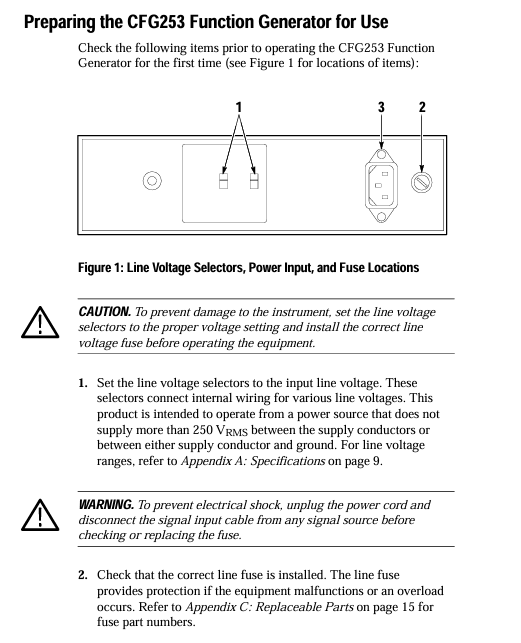
Grounding requirements: The equipment should be grounded through the grounding conductor of the power cord. It is forbidden to remove the grounding pin of the power cord, otherwise it may cause electric shock; Before connecting the signal, it is necessary to confirm that the device is reliably grounded.
Line voltage and fuse:
The line voltage needs to be set to the appropriate value (supporting 4 levels: 90-110/108-132/198-242/216-250 VAC, 50-60 Hz). Setting it incorrectly can burn out the equipment;
Fuses need to be matched according to voltage: 0.3 A, 250 V, 3AG specifications (part number 159-0029-00) are used for 90-132 V operation, and 0.15 A, 250 V, 3AG specifications (part number 159-0054-00) are used for 198-250 V operation. Before replacement, the power must be turned off and the signal input disconnected.
Interface limitation: The VCF INPUT input voltage of the rear panel can reach a maximum of ± 10 V ₚₖ. Exceeding this range may damage the internal circuit.
Environmental taboos: Do not operate in damp or explosive environments; Do not operate with the cover open (as it may come into contact with high-voltage components, causing electric shock or fire).
2. Initialization operation steps
Set line voltage: Adjust the equipment line voltage selector (position shown in Figure 1) according to the local power supply voltage to ensure it matches the power supply voltage.
Check the fuse: Open the fuse cover and confirm that the installed fuse specifications are compatible with the line voltage. If the specifications are incorrect, replace it.
Connect power supply: Use the device's designated power cord (standard configuration is 115V North American model, other regions require corresponding accessories, refer to Table 7), and plug it into a grounded power outlet.
Power on check: Press the POWER button, confirm that the POWER On Light is on, and the device enters standby mode.
Panel controls and interface functions
1. Front panel controls (Figure 2)
Control Number Control Name/Function Operation Instructions
1 POWER ON Light indicator light on → Device powered on, off → Power off or malfunction (such as blown fuse)
2 AMPLITUDE knob adjusts the amplitude of the main output signal, with the range determined by the VOLTS OUT button (0-2 V ₚₚ or 0-20 V ₚₚ)
Press the 3 DC OFFSET knob → DC offset is 0; Pull on → Adjust the DC level of the main output signal (range ± 10 V open circuit)
The SYMMETRY knob only takes effect when the SYMMETRY button is pressed: adjust the square wave duty cycle, sawtooth wave/sine wave rise and fall time
5 RANGE (Hz) button (7 levels: 1/10/100 Hz, 1/10/100 KHz, 1 MHz) to select the frequency range, such as pressing "1 K" → frequency range 0.3 KHz -3.0 KHz
Press the corresponding button (sine wave/square wave/sawtooth wave) to select the desired waveform for the main output
Within the selected range of the RANGE button, continuously fine tune the output frequency with the 7 FREQUEncy knob
The 8 SWEEP WIDTH knob only takes effect when the SWEEP button is pressed internally: adjust the sweep amplitude (1:1-100:1)
The 9 SWEEP RATE knob only works when scanning internally: adjust the scanning rate (0.5-50 Hz)
Press the 10 SWEEP button → Enable internal sweep frequency; Pop up → Enable external sweep (controlled through VCF INPUT)
Press the SYMMETRY button → Output frequency ÷ 10, and activate the SYMMETRY knob function at the same time; Pop up → Normal frequency, knob failure
Press the 12 VOLTS OUT button → amplitude range 0-2 V ₚₚ (50 Ω load 0-1 V ₚₚ); Pop up → amplitude range 0-20 V ₚₚ (50 Ω load 0-10 V ₚₚ)
13 SYNC (TTL) OUTPUT (BNC interface) outputs TTL synchronization signal with fixed amplitude and DC offset (not affected by AMPLITUDE/DC OFFSET knob)
14 MAIN OUTPUT (BNC interface) outputs sine wave/square wave/sawtooth wave signals, with parameters adjusted by corresponding controls
Press the POWER button to turn on the device; Press again → Shut down
2. Rear panel interface (Figure 3)
Interface Name Function Description
VCF INPUT (BNC) external sweep frequency input interface: Input 0-+10 VDC signal, control the main output frequency sweep (range of 2 times ten)
Core Function Operation Guide
1. TTL signal generation
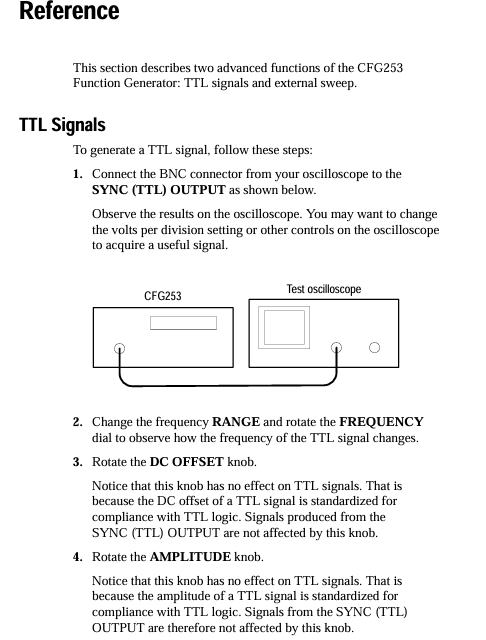
The TTL signal parameters (amplitude, DC offset) comply with the TTL standard and cannot be adjusted. The operation steps are as follows:
Connect the oscilloscope input to the SYNC (TTL) OUTPUT interface of CFG 253 using a BNC cable;
Press the POWER button to turn on the device, use the RANGE button to select the frequency range, and rotate the FREQUEncy knob to fine tune the frequency;
Observe oscilloscope waveform: Rotate the DC OFFSET or AMPLITUDE knob, and the waveform remains unchanged (TTL signal parameters are fixed).
2. External frequency scanning operation
External frequency scanning requires controlling the scanning parameters through an external voltage source. The steps are as follows:
Connect the MAIN OUTPUT of CFG253 to the oscilloscope input using a BNC cable, and connect the external voltage source to the VCF INPUT (rear panel) of CFG253 using a BNC cable;
Rotate the SWITCHY knob to the "0.3" position (ensuring that the sweep range covers the required area);
Pop up SWEEP button (turn off internal sweep and enable external control);
Adjust the output of the external voltage source (0-+10 VDC), and observe the frequency change of the main output with an oscilloscope: voltage increase → frequency decrease, voltage decrease → frequency increase, with a sweep frequency range of 2 harmonics (100:1).
3. Adjustment of waveform symmetry
Symmetry adjustment can change the "asymmetry degree" of the waveform, which only takes effect when the SYMMETRY button is pressed. The steps are as follows:
Press the Function button to select the target waveform (square wave/sawtooth wave/sine wave);
Press the SYMMETRY button (at this point, the output frequency will automatically ÷ 10, such as the original 100 Hz → 10 Hz);
Rotate the SYMMETRY knob:
Square wave: clockwise → duty cycle increases (high-level time prolongs), counterclockwise → duty cycle decreases (low-level time prolongs), center position → duty cycle 50%;
Sawtooth wave: clockwise → increase rise time, decrease time, counterclockwise opposite;
Sine wave: clockwise → positive half cycle time prolongs, negative half cycle shortens, counterclockwise is the opposite.
Maintenance and Accessories
1. Daily maintenance
Cleaning:
After the power is cut off, use a soft cloth dipped in a mixture of "mild detergent+water" to wipe the surface of the equipment;
It is prohibited to directly spray cleaning agents onto the equipment (which may seep into the interior and damage the circuit);
Do not use solvents or abrasives containing benzene, toluene, acetone, or xylene (which can corrode the casing/scratch the panel).
Transport packaging:
If there is no original packaging, choose corrugated cardboard boxes with internal dimensions at least 3 inches larger than the equipment;
Put the equipment into a plastic bag (to prevent moisture and loose fillers from entering);
Fix the equipment with foam, bubble film and other materials to avoid shaking during transportation;
Seal the cardboard box with packing tape to ensure firmness.
Troubleshooting:
Problem: After pressing the POWER button, the POWER On Light does not light up;
Troubleshooting: After power failure, disconnect all signal cables, open the fuse cover to check if the fuse is blown. If it is blown, replace it with a new fuse of the corresponding specification (refer to the fuse specifications in the "Safety Regulations").
2. Accessories List
(1) Standard accessories (shipped with equipment)
Accessory Name Tektronix Part Number Applicable Scenarios
3AG fuse (0.3 A, 250 V) 159-0029-00 90-132 VAC power environment
115 V power cord reference table 7 North American 115 V power supply
CFG 253 User Manual 070-8362-XX Equipment Operation and Maintenance Guide
(2) Optional accessories (additional order required)
Accessory Name Tektronix Part Number Applicable Scenarios
3AG fuse (0.15 A, 250 V) 159-0054-00 198-250 VAC power environment
230 V power cord (regional adaptation) reference table 7: Europe, UK, Australia and other 230 V regions
(3) Regional compatible power cord specifications (Table 7)
Plug type applicable region Tektronix part number
North American standard plug North American (115 V) 161-0104-00
European standard plug Europe (230 V) 161-0104-06
British Standard Plug UK (230 V) 161-0104-07
Australian Standard Plug Australia (230 V) 161-0104-05
North American 230 V plug North American (230 V) 161-0104-08
Swiss standard plug Switzerland (230 V) 161-0167-00

- OMRON
- ABB
- General Electric
- EMERSON
- Honeywell
- HIMA
- ALSTOM
- Rolls-Royce
- MOTOROLA
- Rockwell
- Siemens
- Woodward
- YOKOGAWA
- FOXBORO
- KOLLMORGEN
- MOOG
- KB
- YAMAHA
- BENDER
- TEKTRONIX
- Westinghouse
- AMAT
- AB
- XYCOM
- Yaskawa
- B&R
- Schneider
- KONGSBERG
- NI
- WATLOW
- ProSoft
- SEW
- ADVANCED
- Reliance
- TRICONEX
- METSO
- MAN
- Advantest
- STUDER
- DANAHER MOTION
- Bently
- Galil
- EATON
- MOLEX
- DEIF
- B&W
- ZYGO
- Aerotech
- DANFOSS
- Beijer
- Moxa
- Rexroth
- Johnson
- WAGO
- TOSHIBA
- BMCM
- SMC
- HITACHI
- HIRSCHMANN
- Application field
- XP POWER
- CTI
- TRICON
- STOBER
- Thinklogical
- Horner Automation
- Meggitt
- Fanuc
- Baldor
- SHINKAWA
- Other Brands
- UniOP
- KUKA
- Iba
- Beckhoff
- ADLINK
-
 LTI Motion SC52.0150.0012.0000.0 Servo Drive
 -
 LTI Motion LSP04-004-048-60-0PR1PY17E0440 Servo Motor
 -
 LTI KP300-R Drive Interface Operator Display
 -
 Lust LTI SO84.020.0002.0100.2 Servo Drive
 -
 LUST LTI CDD34.008.W2.1 CDD3000 Servo Drive
 -
 LTI MOTION SA54.0550.0033.0000.0 Servo Drive
 -
 LTI Drives MS100 0927.0017 Mounting Kit
 -
 LTi DRiVES LSP06-015-320-30-00H1MY170 Servo Motor
 -
 LTI MC6412 C1 D3 S12 Servo Drive
 -
 LUST LTi SO82.004.0030.0000.2 Servo Drive
 -
LTi Drives LSP06-015-320-30-00H1MY170 Servomotor
-
 LUST LTi CDE34.003 C2.0 Servo Drive
 -
LUST LTi LSH-127-1-30-560 T1 Servo Motor
-
 LTI MOOG CDE54.044 Pitchmaster Servo Drive
 -
 LTI Lock Technology 1237 Flip Socket Set
 -
LTi LSP08-028-560-55-00H1MY1M0 Servomotor
-
 Lust LTi CDE34.010.D2.4 Position Controller 10A
 -
 Lust LTi CDE34.010.D2.4 Positioning Controller 10A
 -
LTi Drives FLPF-142-3-12-560/T4 Servomotor
-
 LUST LTI Motion CDD54.045 W2.1 Servo Drive
 -
 LUST LTI CDD34.006.W2.2.PC1 Servo Drive
 -
 LTI KP200-XL Operator Panel Keypad 4 Key
 -
 Lust LTI CDE32.008 W2.2.BR Positioning Controller
 -
 LTI Servo One SO82.004.0030.0000.2 Drive Amplifier
 -
 LTI MOTION SC54.0550.0012.0000.0 Servo Drive
 -
LTI LSN-097-0510-30-560 Servo Motor
-
 LTi Drives 0920.0034.14 Product DVD
 -
 LTI SO82.004.0030.0000.2 Servo Drive
 -
 MOOG LTI CDE54.044 Pitchmaster Frequency Converter
 -
 LUST LTI CDE34.017 W3.0 Servo Drive
 -
LUST LTi Drives CDS44.072 LC1.1 Servo Drive
-
LUST LTi DC1-3.0006.1000.0 Servo Drive
-
LTi LSMM13-100-4N-001 Servo Motor
-
 LTI MOOG CDE54.044 Pitchmaster Servo Drive
 -
 LUST LTi Drives NFE12.3 Line Filter
 -
LTI MOTION SC34.0100.1011.0000.0 Drive
-
 LUST LTi LSH-074-2-30-560/T1 B S4 G6.1M Servomotor
 -
LUST LTI CDE34.044W2.3 Servo Drive
-
LUST LTi LST-127-5-15-560/T1 S4 G12.1S Servomotor
-
Lust LTi MOTION CDE34.044 W2.4 H13 Servo Drive
-
 LTI Servo One SO82.004.0030.0000.2 Drive Amplifier
 -
 Lust LTI CDE34.006 W2.4 V4.10-02 Servo Controller
 -
LTI Drives Stromag FLP 20/0014-60 BA 1 Servomotor
-
Lust LTI CDE34.024.Wx.x.PC1 Servo Controller
-
LTI Drives FLP13-0395-30-AC2 9.5 kW Servo Motor
-
LTI CDB32.004-C2.0SH Servo Drive
-
LTi LSH-074-2-30-320/T1 1R Servo Motor
-
LTi DRiVES LSP08-028-320-30-BPH2MY17E0803 Servo Motor
-
LUST LTI SO24.007.0020.0000.1 Servo Controller
-
LTI CDE34.017.W3.0 Frequency Inverter
-
LUST LTi DRIVES LSH-097-0960-30-560/T1 Servomotor
-
 LTi DRiVES LSP10-056-560-50-00H1MY 1M0 Servomotor
 -
LTi DRiVES LSP08-028-320-55-00H1MY 170 Servomotor
-
 LTI MC6432 C1 D3 S12 G20 Servo Drive
 -
 Keba LTi CDE32.008 C3.0 Frequency Inverter
 -
 Lust LTI CDE32.004 C2.4 V4.10-02 Servo Controller
 -
LTI SO CM-P.0122.2015.1 Servo Drive
-
LUST LTi LST-127-2-30-560/T1 Servomotor
-
 LTI VF1402S Drive
 -
LUST LTi LSH-074-3-45-560/T1 Servomotor
-
 LUST LTi CDB32.004 C2.4.SH Servo Drive
 -
 LTI SO82.004.0030.0000.2 Servo Drive
 -
 LTi Drives CDD34.008 W2.1 BR Servo Driver
 -
Lust LTI CDE32.004 C2.4 Servo Controller
-
 LTi Drives DSM4-14.2-21R83-200 Servo Motor
 -
LTI CDB32.004 C2.4 SH V4.00-3 Servo Drive
-
 LUST LTi Drives CDA34.017 W1.4 BR B0 Servo Drive
 -
 LTI Drives MS100 0927.0017 Mounting Set
 -
LTi REENERGY E230 G360 Frequency Inverter Controller
-
 LTI Drives Netzfilter 090.01.540.UR Mains Filter
 -
LTI Drives LSP08-035-320-30-B0R1PY170 Servo Motor
-
LUST LTi Drives CDS44.072LC1.2 Servo Drive
-
LTI Drives BR-090.03.540.UR.H38 Braking Resistor
-
 LTi Drives PM-E40.2DRA054P Pitch Control Inverter
 -
LTI Drives LSN-097-0960-30-0560/T1 S4 B Servo Motor
-
LUST LTI SO24.002.0020.0000.1 Servo One Junior
-
 LTI MOTION SO84.032.0003.0001.2 Servo Drive
 -
LTI 330-0919 IBOP Actuator Cylinder
-
 LTI CDE32.004 C2.4 Servo Drive
 -
 LUST LTI CDD34.017 W3.4PC1 Servo Drive
 -
 LTI CDA3208 C3.0 HF AC Servo Drive
 -
LTi LSP08-028-560-55-00H1MY170 Servo Motor
-
LUST LTI LSH-074-3-30-560/T1 G6.1S Servo Motor
-
LTi CDA32.006 C3.0 H09 Servo Drive
-
LTI SO22.003.0010.0000.0 Servo One Junior Drive
-
LTi DSM4-14.2-21R83-200 Servo Motor
-
LTi Tools 1237 7 Piece Flip Socket Set
-
 LTi CDE34.008.W2.4 Servo Drive
 -
LUST SO84.008.1020.0070.1 ServoOne Drive
-
LTi LSP06-015-320-30-00H1MY170 Component
-
LTi LSP08-028-320-55-B0H1MY17W Servo Motor
-
 LTi SO84.032.0173.0100.1 Servo Drive
 -
LTi CDB34.006.W3.0.PC1.H39 Servo Drive
-
 LUST BR-200.02.540.UR Brake Resistor
 -
LTi REENERGY E230 G360 Frequency Inverter
-
 LTi BR-026.03.540-UR Brake Resistor
 -
 LUST CDA32.006.C3.0.H09 Frequency Inverter
 -
 LTi SO84.016.1030.0000.0 ServoOne Drive
 -
LTi SO24-004-0030-1000-0 Servo Controller
-
LUST CDE34.010.D2.4 Positioning Controller
-
LTi SO22.003.0080.0000.0 Servo Controller
-
 LUST CDB32.004.C2.4.SH Servo Drive
 -
LTi LSP06-015-320-60-B0H1MY170 Unit
-
LTi Motion PM-D35.1WVA02 Module
-
 LTi BR-090.03.540.UR.H38 Brake Resistor
 -
LTi FGP 111/002-25 AA Servo Motor
-
 LTi ServoOne Junior SO22.006 Servo Controller
 -
LUST CDA34.008.W1.4.BR Drive Controller
-
LUST CDA34.017.W3.0 Drive System
-
LUST CDE32.004.C2.4 Drive Controller
-
LTI CDE32.004.C3.0 Servo Drive
-
LUST LSH-097-2-30-560 Servo Motor
-
 LUST CDB32.003.C2.4 Servo Controller
 -
 LUST CDB32.003.C2.3 Servo Controller
 -
LUST CDA34.017.W3.0 Drive Controller
-
 LTI Tools LT-1400Q Torque Extension
 -
LUST SO82.004.0030.0060.2 Servo Drive
-
LUST CDA32.006.C3.0.H09 Drive Controller
-
LTI CDB32.004.C3.7.SH Servo Drive
-
LTI LSH-127-3-30-560 Servo Motor
-
LUST CDA34.017.C2 Servo Drive
-
LTI CM-DPV1 3.0 V2.25-00 Module
-
 LTI CDE34.005 W2.4 Servo Drive Controller
 -
 LUST LR32.8 0925.0018 Line Choke
 -
LUST LTi CM-DPV1 3.0 Communication Module
-
LUST LTI Drives CCD34.024.W2.1.BR Servo Drive
-
Lust LTi Drives CDE32.008.W2.2.BR Positioning Controller
-
LTi DRiVES LSH-050-3-45-320/T1 Servo Motor


