

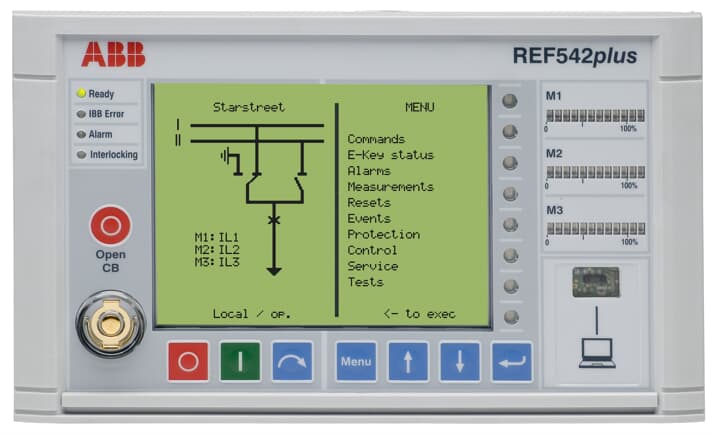
ABB REF542PLUS 1VCF752000 is an intelligent feeder terminal cabinet designed specifically for medium and high voltage distribution networks. It belongs to the ABB REF series feeder protection products and its core function is to achieve fault protection, real-time monitoring, remote control, and automated operation and maintenance of 10kV-35kV distribution network feeder circuits. It is a key on-site equipment for distribution network automation systems. Its model code follows ABB's power protection product specifications, with "REF542PLUS" as the base model, representing that the terminal cabinet is an upgraded and enhanced version of REF542, integrating more intelligent functions; 1VCF752000 "is a configuration code that covers customized parameters such as cabinet specifications, protection function modules, and communication interface types, adapting to different distribution network topologies and operational requirements.
ABB REF542PLUS 1VCF752000 Feeder Terminal Panel
Product Overview
ABB REF542PLUS 1VCF752000 is an intelligent feeder terminal cabinet designed specifically for medium and high voltage distribution networks. It belongs to the ABB REF series feeder protection products and its core function is to achieve fault protection, real-time monitoring, remote control, and automated operation and maintenance of 10kV-35kV distribution network feeder circuits. It is a key on-site equipment for distribution network automation systems. Its model code follows ABB's power protection product specifications, with "REF542PLUS" as the base model, representing that the terminal cabinet is an upgraded and enhanced version of REF542, integrating more intelligent functions; 1VCF752000 "is a configuration code that covers customized parameters such as cabinet specifications, protection function modules, and communication interface types, adapting to different distribution network topologies and operational requirements.
This terminal cabinet adopts an integrated design, which integrates protection devices, measurement units, control circuits, communication modules, power systems, etc. into a standard cabinet. It can be directly installed at distribution stations and switch stations, and connected to the distribution automation system (DMS) through standardized communication protocols to achieve the "four remote" (telemetry, remote signaling, remote control, remote adjustment) functions of feeders. It provides a full lifecycle solution for the safe and stable operation of distribution networks in fields such as power, municipal, and industrial parks, and is widely used in feeder monitoring and protection scenarios of radial distribution networks and ring network distribution networks.
Specification parameters
Electrical characteristics
System voltage: 10kV/20kV/35kV (suitable for medium and high voltage distribution networks); Current input: 5A/1A (CT secondary side, accuracy level 0.2); Voltage input: 100V (PT secondary side, accuracy level 0.2); Power system: DC 220V/110V (allowable fluctuation ± 20%) or AC 220V (allowable fluctuation ± 15%), equipped with a 220Ah backup battery (endurance ≥ 4h)
Protection function parameters
Overcurrent protection: setting range 0.1-20Ie, action time 0.05-60s (timed/inverse time limit optional); Quick break protection: setting range 1.5-30Ie, action time ≤ 0.04s; zero sequence protection: setting range 0.05-10Ie, action time 0.05-60s; reclosing: supports single-sided/double-sided power supply mode, setting time 0.1-10s, adjustable reclosing times 1-3 times
Measurement and Monitoring
Measurement accuracy: current/voltage level 0.2, power/energy level 0.5, frequency ± 0.01Hz (45-55Hz); Monitoring parameters: three-phase current, three-phase voltage, active power, reactive power, power factor, electrical energy, feeder temperature, cabinet environment temperature and humidity
Communication and Structure
Communication interface: 2 Ethernet ports (10/100M adaptive, supporting IEC 61850-8-1/MMS, IEC 60870-5-104), 1 RS485 port (supporting Modbus RTU); Cabinet specifications: 2200mm x 800mm x 600mm (height x width x depth), protection level IP54 (outdoor type)/IP40 (indoor type); Installation method: Outdoor floor installation (with foundation bracket) or indoor wall mounted installation
Performance characteristics
Full scenario feeder protection capability: covering all types of faults in medium and high voltage distribution network feeders. In addition to basic overcurrent, quick break, and zero sequence protection, it also integrates overload protection (inverse time characteristic in accordance with IEC 60255-4), overvoltage/low voltage protection (setting range 0.8-1.2Un), frequency anomaly protection (47-53Hz), and acceleration protection after reclosing. The protection logic can be flexibly configured according to the distribution network topology (radiation network, ring network, dual power supply) to achieve "accurate identification, rapid isolation, self-healing recovery" of faults and reduce the range and duration of power outages.
High precision measurement and energy efficiency management: using high-precision ADC chips and digital signal processing algorithms, the current and voltage measurement accuracy reaches 0.2 level, and the power and energy can reach 0.5 level. It can collect real-time three-phase electrical parameters and energy loss data of the feeder line, and support forward and reverse active/reactive energy measurement; The built-in line loss analysis function can automatically calculate the line loss (daily/monthly/annual) during the feeder period, providing data support for energy efficiency optimization and reactive power compensation configuration in the distribution network, without the need for additional dedicated metering cabinets.
High reliability and environmental adaptability: The cabinet is made of 304 stainless steel material (outdoor type) or cold-rolled steel plate spray painted (indoor type), which has the ability to resist corrosion, ultraviolet rays, and impact; The internal equipment adopts industrial grade components, and the protection device complies with the IEC 61000-4 series immunity standards (6kV surge immunity, 10V/m electric field immunity), which can resist strong electromagnetic interference and voltage fluctuations in distribution stations; Equipped with a temperature and humidity control system (heating element+fan), ensuring that the internal temperature of the cabinet is -25 ℃~+70 ℃ and the humidity is ≤ 85% RH (no condensation), suitable for harsh outdoor environments such as high temperature, high humidity, and high cold.
Intelligent operation and digital integration: Native support for IEC 61850 digital protocol, can be directly connected to distribution network automation system (DMS), realizing remote issuance of protection settings, remote retrieval of fault recording, and remote monitoring of equipment status; Built in fault recording function (recording waveforms of 20 cycles before and 40 cycles after the fault, with a sampling rate of 2kHz), supporting COMTRADE format export for easy tracing of fault causes; Equipped with a local human-machine interface (7-inch touch screen), it can intuitively view real-time data, protection events, and fault waveforms. It supports local operations and parameter configuration, greatly improving the convenience of operation and maintenance.
Working principle
The ABB REF542PLUS 1VCF752000 feeder terminal cabinet has the core workflow of "data acquisition logic judgment action execution information exchange", and the specific mechanism is as follows:
Data acquisition stage: The three-phase current and three-phase voltage analog signals of the feeder are obtained through current transformers (CT) and voltage transformers (PT). After internal isolation, filtering, and ADC conversion by the protection device, the analog signals are converted into digital signals; Simultaneously collect switch signals such as circuit breaker opening and closing positions, grounding switch status, cabinet temperature and humidity, battery voltage, etc., and transmit them to the core processor through a photoelectric isolation circuit; The measurement unit synchronously collects electrical parameters, calculates active power, reactive power, electrical energy and other data, and stores them in the local database.
Logic judgment stage: The core processor (based on a dual core 32-bit embedded CPU) analyzes the real-time collected data according to the preset protection setting and control strategy. If the current exceeds the overcurrent setting value and the duration reaches the setting time, or the current instantly exceeds the quick break setting value, it is judged as a short circuit fault and triggers the corresponding protection logic (such as overcurrent trip, quick break trip); If abnormal voltage or frequency is detected, or if the switch status does not match the remote control command, trigger the alarm logic; The reclosing module determines whether to perform reclosing based on the fault type (instantaneous/permanent) (power supply is restored after successful reclosing of instantaneous faults, and accelerated tripping is performed after reclosing of permanent faults).
Action execution stage: When it is determined to be a fault or abnormal state, the protection device sends a trip command to the circuit breaker through the outlet relay (in case of fault), or drives the indicator light and sound and light alarm through the control circuit (in case of abnormality); If the distribution network self-healing function is configured, the terminal cabinet receives fault information from adjacent terminal cabinets through the communication module, collaborates to determine the fault section, automatically controls the action of the section switch and contact switch, and realizes the isolation of the fault section and the restoration of power supply to the non fault section; The power system automatically switches to backup battery power supply when there is an external power outage, ensuring that the protection device and communication module continue to work for ≥ 4 hours
Information exchange stage: The terminal cabinet uploads protection action events (action time, action type, fault parameters), real-time measurement data, and equipment operating status (power status, communication status, cabinet temperature and humidity) to the distribution automation system through Ethernet or RS485; Simultaneously receive remote control commands issued by the system (such as opening and closing circuit breakers, modifying protection settings), and perform corresponding operations; The local touch screen displays real-time operational data and status, supporting on-site query and operation by maintenance personnel, forming a dual management mode of "remote monitoring+local maintenance".
Precautions
Selection and system matching: When selecting, the cabinet configuration should be determined based on the voltage level of the distribution network (10kV/20kV/35kV), CT/PT ratio, and installation environment (outdoor/indoor). For outdoor scenarios, IP54 protection level and stainless steel cabinet should be selected, and the "dual power interlock protection logic" should be enabled for the dual power feeder; When interfacing with the distribution automation system, it is necessary to confirm the communication protocol (IEC 61850/IEC 60870-5-104) and IP address planning to ensure compatibility of data exchange.
Installation and wiring specifications: Outdoor installation requires pouring a concrete foundation (size ≥ 1000mm × 800mm × 300mm), with the top surface of the foundation 300mm above the ground to prevent rainwater immersion; The cabinet grounding system needs to be independently set up, with a grounding resistance of ≤ 4 Ω (protective grounding) and ≤ 10 Ω (lightning protection grounding), and grounding cables using ≥ 50mm ² copper cables; CT secondary side is strictly prohibited from open circuit, PT secondary side is strictly prohibited from short circuit, and polarity (P1/P2 end) should be checked during wiring to avoid measurement errors or protection misoperation; The communication cable adopts shielded twisted pair, with the shielding layer grounded at one end, and is laid away from the power cable (with a spacing of ≥ 30cm).
Debugging and commissioning process: Static debugging is required before commissioning, including checking the power system (main power supply and battery switching are normal), analog input (inputting standard current/voltage signals to verify measurement accuracy), and protection function (simulating overcurrent/short circuit faults, verifying tripping action time and logic); Communication debugging requires testing the stability of the connection with the distribution automation system (continuous 24-hour communication without interruption or packet loss) to ensure the normal functioning of the "four remote" functions; After debugging is completed, lock the protection setting (through password or hardware lock) and record the initial operating data (such as initial energy value, cabinet temperature and humidity).
Maintenance and troubleshooting: Regularly (quarterly) inspect the appearance of the cabinet (for corrosion and deformation), sealing performance (for rainwater infiltration), and grounding connection (for looseness); Check the battery status monthly (voltage ≥ 2.2V/cell, capacity ≥ 80% rated value), and conduct a battery charge and discharge test every six months; If there is a "communication interruption" fault, it is necessary to check the communication cable, IP address configuration, and protocol compatibility; If there is a "protection refusal", it is necessary to check the protection setting, outlet relay, and circuit breaker operating mechanism; Fault repair requires contacting ABB authorized service providers. It is prohibited to disassemble protective devices or modify core parameters on your own.
- User name Member Level Quantity Specification Purchase Date
- Satisfaction :
-


-
 CCS 6900G/P pressure switch
 -
 BENDER WR Transformer Selection
 -
 BENDER RCMA475LY Residual Current Monitoring
 -
 BENDER IRDH575 Insulation Monitoring
 -
 BENDER IRDH265 Insulation Monitoring and Debugging
 -
 Bender RCMA475LY residual current monitor debugging
 -
 Beckwith Electric M-3425A Generator Protection Relay Debugging Guide
 -
 Automated MEX816U Expander Troubleshooting Guide
 -
 ASEM HT2150 Industrial Tablet Selection and Troubleshooting
 -
 Troubleshooting and practical application of Advantest U3771/3772 microwave spectrum analyzer
 -
 Advantest R6144 Programmable DC Voltage/Current Source (Calibration Source) Calibration and Maintenance
 -
 Aerotech UNIDEX 100/U100i single axis motion controller
 -
 Aerotech Ndrive MP Ultra Compact PWM Digital Servo Driver
 -
 Aerotech Ndrive HPe 10/20/30 High Performance PWM Digital Servo Drive
 -
 Aerotech Ndrive HLe maintenance replacement
 -
 Aerotech Ndrive CP maintenance replacement
 -
 Aerotech Ndrive Linear Drive Selection
 -
 Aerotech NDrive HL linear drive maintenance replacement
 -
 Aerotech NDrive HP 10/20/30 Maintenance and Replacement
 -
 Aerotech NDrive CP10 Servo Drive Guide
 -
 SIGMATEK TAE1941 Display Unit Replacement and Troubleshooting
 -
 SIGMATEK TAE151 Replacement and Troubleshooting
 -
 SIGMATEK AKM Servo Motor Replacement and Troubleshooting Guide
 -
 SIGMATEK S-DIAS Control System Replacement and Upgrade Guide
 -
 SIGMATEK ETT Series HMI Replacement and Selection Guide
 -
 SIGMATEK DIAS Drive 310-23 servo amplifier
 -
 SIGMATEK CCP 521 C-DIAS processor module
 -
 Megmeet L6 electric drive troubleshooting
 -
 Sysmex XN-1000/2000 Technical Guide
 -
 Sysmex XN-L blood analyzer maintenance and troubleshooting
 -
 Troubleshooting and Maintenance of Sysmex XN-9000
 -
 LTI Motion ServoOne PROFIBUS/PROFINET Troubleshooting and Replacement
 -
 Micro Innovation MICRO GF1 Touch Screen Troubleshooting and Replacement
 -
 Troubleshooting and Replacement of Micro Innovation WINbloc Distributed I/O System
 -
 MICRO PANEL GS-2 Troubleshooting and Debugging
 -
 LTi Synchronous Motor LST/LSH Replacement Selection Guide
 -
 Fault diagnosis of LTi CDE/CDB3000
 -
 Maintenance and troubleshooting of ENOTEC SILOTEC 8000 silo analyzer
 -
 ENOTEC ENSITU 7000 Oxygen Analyzer
 -
 ENOTEC COMTEC 6000 ATEX GasEx Analyzer Maintenance, Calibration, and Troubleshooting Guide
 -
 ENOTEC Analyzer Family Selection Guide
 -
 ENOTEC OXITEC 500E Oxygen Analyzer
 -
 KUKA KR CS Box-2 Compact Controller for Four Axis SCARA Robot
 -
 KUKA KR C5 slim-2 Robot Controller
 -
 KUKA KR C5 micro KSS troubleshooting
 -
 KUKA KR C5 micro debugging and troubleshooting
 -
 KUKA KR C5 Controller Assembly and Troubleshooting
 -
 KUKA KR C5 Cabinet Assembly and Troubleshooting
 -
 KUKA KR C4 Smallsize-2 Debugging Guide
 -
 KUKA KR C4 Midsize Assembly Guide
 -
 ENOTEC OXITEC 5000 Oxygen Analyzer Maintenance Guide
 -
 KUKA KR C4 extended assembly and debugging
 -
 KUKA KR C4 compact assembly and debugging
 -
 KUKA Sunrise Cabinet Med Medical Collaborative Robot Special Control Cabinet
 -
 KUKA Sunrise Cabinet Next Generation Small Control Cabinet
 -
 KUKA KR C4 Smallsize-2 family's smallest control cabinet
 -
 KUKA KR C4 Midsize Fault Diagnosis
 -
 KUKA KR C4 extended is a high-power multi axis control cabinet
 -
 Troubleshooting and Maintenance of KUKA KR C4 Control Cabinet
 -
 Troubleshooting and Maintenance of KUKA KR C4 Compact Control Cabinet
 -
 KUKA KR15 DELTA-2 V2 Robot Installation and Debugging
 -
 KUKA TITAN-2 Ultra Assembly and Maintenance Guide
 -
 KUKA KR SCARA-2 CS Assembly, Debugging, and Operation Guide
 -
 Troubleshooting KUKA SCARA X
 -
 Troubleshooting of KUKA KR FORTEC-2 ultra
 -
 Troubleshooting of KUKA KR FORTEC-2
 -
 Troubleshooting KUKA KR 1000 Titan
 -
 Troubleshooting of KUKA KR 600 FORTEC
 -
 KUKA KR 500 MT FORTEC Maintenance and Inspection
 -
 KUKA KR 360 FORTEC Inspection and Maintenance Guide
 -
 Troubleshooting KUKA Sunrise Cabinet Med
 -
 KUKA KR SCARA HO Assembly and Maintenance
 -
 KUKA QUANTEC-2 PA maintenance troubleshooting
 -
 KUKA QUANTEC-2 K/P Maintenance Troubleshooting Guide
 -
 KUKA QUANTEC-2 HO Maintenance Guide
 -
 KUKA KR QUANTEC-2 HC Maintenance and Rescue Guide
 -
 KUKA KR QUANTEC-2 Maintenance Troubleshooting Guide
 -
 KUKA KR QUANTEC PA series heavy-duty palletizing robot
 -
 KUKA KR IONTEC-2 Debugging and Maintenance Guide
 -
 KUKA KR IONTEC ultra series six axis heavy-duty industrial robot
 -
 KUKA KR IONTEC HO Maintenance Troubleshooting Guide
 -
 KUKA KR CYBERTECH-3 HW maintenance troubleshooting
 -
 KUKA KR CYBERTECH-3 maintenance troubleshooting
 -
 KUKA KR8 R2100-2 arc HW maintenance troubleshooting
 -
 KUKA KR CYBERTECH nano-2 maintenance troubleshooting
 -
 KUKA KR 20 R1810 HO maintenance troubleshooting
 -
 KUKA CYBERTECH maintenance troubleshooting
 -
 KUKA KR CYBERTECH CR maintenance troubleshooting
 -
 KUKA KR AGILUS-3 ultra maintenance troubleshooting
 -
 KUKA KR 300 R2700-2 C-F maintenance troubleshooting
 -
 KUKA KR 20 R1820-2 E Maintenance Troubleshooting and Replacement Practice
 -
 KUKA AGILUS-3 troubleshooting
 -
 KUKA KR AGILUS-2 maintenance troubleshooting
 -
 KUKA KR 1000 titan PA troubleshooting
 -
 KUKA KR 700 PA maintenance troubleshooting
 -
 KUKA KR18 R1450-3 PP Operation and Maintenance Essentials
 -
KUKA KR12 SCARA Operations Essentials
-
 KUKA KR4 R600 Operation and Maintenance Essentials
 -
 KUKA KR 3 AGILUS Operation and Maintenance Safety Essentials
 -
 KUKA LBR iiwa CR Cleanroom Troubleshooting and Maintenance
 -
 Troubleshooting and Maintenance of KUKA KR AGILUS sixx
 -
 KUKA KR60 SCARA CS Maintenance Guide
 -
 KUKA KR 23 SCARA-2 Robot Installation and Maintenance Detailed Explanation
 -
 KUKA KR 20 SCARA CS Robot Selection and Maintenance Guide
 -
 KUKA KR 15 DELTA-2 Robot Installation and Maintenance
 -
 KUKA KR 13 SCARA-2 CS Detailed Explanation
 -
 KUKA KR 3 D1200 Robot Operation and Maintenance
 -
 KUKA KR 3 D1200 HM Robot Operation and Maintenance Guide
 -
 KUKA LBR Med Medical Robot Integration Guide
 -
 KUKA iiwa Robot Safety Operation and Maintenance
 -
 KUKA LBR iiwa CR Operations and Troubleshooting
 -
 Lauer PCS Series Operation Console Configuration Guide
 -
 Installation and Maintenance Guide for KUKA LBR iisy Series Collaborative Robots
 -
 KUKA LBR iisy 3 R760 Collaborative Robot Debugging Guide
 -
 KUKA LBR iico Robot Installation and Debugging Technical Guide
 -
 Lauer Starline LCA 300/320/325 Text Display Application Guide
 -
 Lauer PCS 950 Operation Console Application Guide
 -
 Lauer EPC series industrial computer configuration
 -
 Bonfiglioli Precision Planetary Gearbox Selection and Application Guide
 -
 Installation and heat dissipation of Bonfiglioli Vectron cold plate frequency converter
 -
 Bonfiglioli Vectron EM-RES-02 Expansion Module Installation and Configuration Guide
 -
 Bonfiglioli Vectron EM-RES-01 Expansion Module Rotary Transformer Interface Configuration Guide
 -
 Bonfiglioli Vectron EM-IO-04 module KTY temperature measurement and digital port configuration
 -
 Bonfiglioli Vectron EM-IO-03 Expansion Module Dual Analog Output and PTC Configuration
 -
 Installation of Bonfiglioli Vectron EM-IO-02 Expansion Module and PTC Temperature Monitoring Configuration
 -
 Bonfiglioli Vectron EM-IO-01 Expansion Module Installation and System Bus Configuration Guide
 -
 Bonfiglioli F series gearbox spare parts identification and replacement guide
 -
 Installation, maintenance, and troubleshooting of Bonfiglioli HF series reducers for hoisting applications


