
Horner APG HE693CALKIT simulation module
Horner APG HE693CALKIT calibration software is a computer program designed to support on-site and factory calibration of specific Horner APG simulation modules.
(2) Package composition
Each set includes: a floppy disk with calibration software, an RS-232 9-pin serial cable, a TTL to RS-232 converter, and an RS-232 ribbon cable with a 10 pin plug.
(3) Software operation requirements
Operating environment: Requires running on an IBM or compatible computer using DOS 3.1 or higher.
Hardware requirements: A text display is required and a serial port (COM1 or COM2) is used. The program defaults to using COM1.
(4) Module connection and preparation
The simulation module needs to be connected to the selected serial port on the computer through an RS-232 cable, combined with a TTL-to-RS-232 converter or an RS-232 ribbon cable with a 10 pin plug (depending on the simulation module to be calibrated).
The module does not need to be configured in the PLC, but appropriate power must be provided for the bus pins of the module.
Horner APG HE693CALKIT simulation module
Product Introduction
(1) Product Features
Horner APG HE693CALKIT calibration software is a computer program designed to support on-site and factory calibration of specific Horner APG simulation modules.
(2) Package composition
Each set includes: a floppy disk with calibration software, an RS-232 9-pin serial cable, a TTL to RS-232 converter, and an RS-232 ribbon cable with a 10 pin plug.
(3) Software operation requirements
Operating environment: Requires running on an IBM or compatible computer using DOS 3.1 or higher.
Hardware requirements: A text display is required and a serial port (COM1 or COM2) is used. The program defaults to using COM1.
(4) Module connection and preparation
The simulation module needs to be connected to the selected serial port on the computer through an RS-232 cable, combined with a TTL-to-RS-232 converter or an RS-232 ribbon cable with a 10 pin plug (depending on the simulation module to be calibrated).
The module does not need to be configured in the PLC, but appropriate power must be provided for the bus pins of the module.
Set conditions
(1) General Requirements (2.1)
Module installation: The module to be calibrated must be inserted into the PLC it will be used in the application; When inserting, the PLC must be powered off. After the module is correctly inserted into the PLC rack, the rack should be installed vertically (see Figure 1) to ensure good ventilation of the module; The PLC must be in 'stop' mode.
Stabilization time: After inserting the module into the PLC and completing the calibration connection, it needs to stabilize for at least 15 minutes after power on to ensure appropriate temperature balance.
Environmental requirements: Do not expose any equipment involved in the module or calibration process to extreme temperature changes; Calibration can be performed using an expansion rack.
(2) Set up process (2.2)
No additional special steps are required, and it should be carried out in conjunction with equipment preparation and module specific conditions.
(3) Equipment Requirements (2.3)
Calibrator: High quality calibrators (such as Omega CL511) must be used, and their accuracy must be more than twice that of the module (for example, THM884 has an accuracy of ± 1 degree Celsius, and the calibrator accuracy must be at least ± 0.5 degrees Celsius); It is recommended that all Horner Electric simulation modules use battery powered calibrators. When calibrating any thermocouple module, a battery powered calibrator must be used.
Wire requirements: The wire used for calibration must be the same as the wire used in the application, and must be of high quality with the shortest possible length; Avoid exposing wires to excessive radio frequency (RF) or electromagnetic interference (EMI) during the calibration process to prevent introducing errors.
(4) Module specific conditions (2.4)
1. Analog input module (2.4.1)
Covering HE693ADC406, HE693ADC405, HE693ADC415, HE693ADC410, HE693ADC420, the general requirements are as follows:
Calibrator: More than twice the accuracy of the module and powered by batteries.
Wire: Use high-quality wire that is the same as the wire used in the application and has the shortest length.
Environment: Avoid exposing the module to excessive EMI or RF, extreme temperature changes.
Installation and status: The module needs to be inserted into the PLC slot used in the application, and after being powered on and connected, it should be stable for at least 15 minutes. It should be installed vertically (in the panel installation position), and the PLC should be in "stop" mode; The unused channels during the calibration process of HE693ADC406 need to be short circuited and grounded.
2. Analog output module (2.4.2)
Regarding HE693DAC410 and HE693DAC420, it is required to be consistent with the analog input module (except for the channel short-circuit grounding of HE693ADC406).
3. Resistance Temperature Detector (RTD) module (2.4.3)
Including HE693RTD600, HE693RTD601, HE693RTD660, HE693RTD665, HE693RTD666, in addition to meeting the general requirements of the analog input module, there are additional requirements: unused channels during calibration must be short circuited and grounded; Modules with a suffix of -20 need to use the a=d switch (PT100D) in the calibration software.
4. Strain gauge module (2.4.4)
Including HE693STG883 and HE693STG884, it is required to be consistent with the RTD module (without using channel short-circuit grounding).
5. Thermocouple module (2.4.5)
Covering multiple models such as HE697THM160 and HE693THM166, in addition to meeting the general requirements for analog input modules, there are additional requirements: modules with a suffix of -21 need to use external ISOBLK for cold end compensation; During the calibration process, the last channel needs to be short circuited and grounded to optimize cold end compensation; Modules with suffix -02 need to use the "=k" switch in the executable file (refer to section 4.1).

Calibration process
(1) General Instructions (3.1)
The general calibration process is only a basic framework, with slight differences in the calibration process of each module, but the core logic is consistent. The simulation module needs to be calibrated according to the specific process described in the subsequent sections; Table 3.1 lists the simulation modules and their corresponding calibration files, with some corresponding relationships as follows:
Product model calibration software Product model calibration software
HE693ADC405 adc4x5.exe HE693THM166 thm166.exe
HE693ADC410、HE693ADC420 adciso.exe HE693THM665、HE693THM666、HE693THM668 thm668.exe
HE693ADC406 adc406.exe HE693THM884(REV. A,B,C) thm884_1.exe
HE693DAC410、HE693DAC420 daciso.exe HE693THM884(REV. D,E,F,G,H,HX,J,K,L) thm884_2.exe、THM884cal.exe(Windows Version)
(2) Software startup (3.2)
1. Startup steps
Select the corresponding executable file from the floppy disk list (for example, calibrate HE693THM884 and select Thm884. exe).
Enter the corresponding command at the DOS prompt to run the calibration program: when using the COM1 port by default, enter "Thm884" and press "ENTER"; When using the COM2 port, enter "Thm884=C2" and press "ENTER".
To view command line switches and their instructions, enter "Thm884=?" at the DOS prompt and press "ENTER".
2. Screen Example (3.2.1)
After the program starts, the top of the screen will display the program name and version. Taking the THM884 thermocouple module calibrator (V2.04) as an example, the screen will display channel values, types, scales, zero points, and other information, as well as module models, channel quantities, hardware alarms, versions, and other parameters. At the same time, it will prompt the functions of each function key (F1-F9, Esc) (such as F1 calibration of J-type thermocouples, Esc exit, etc.).
3. Windows version software installation and operation (3.2.2, 3.2.3)
Installation: Load the floppy disk containing the THM884cal.exe (Windows version) installation file, locate and select the setup. exe file, follow the prompts to select the application file storage directory, and after installation is complete, you can use it.
Run: Find THM884cal.exe in the directory specified during installation, double-click the file to open the application; This version operates similarly to the DOS version. If you have any questions about the functionality, press the F12 key to access the help file.
(3) Process Overview (3.3)
Disable non-volatile random access memory (NVRAM): If the "disable" option is not provided, it will be automatically disabled. This step closes the old calibration constant and uses the default value for new calibration. The module needs to be reset to use the default value.
Disable PLC configuration: Make the module use default values (the module defaults to PLC configuration mode when powered on).
Initialization module: Execute after disabling PLC configuration.
Perform calibration: If it is a thermocouple module, you need to first select the calibration type. The software will prompt you for each step in the calibration process, and you need to follow the prompts.
Update NVRAM: Update the new default values to NVRAM.
Activate NVRAM: Enable the module to use the stored calibration constants the next time it is powered on.
Re initialize the module: Let the module re read the calibration and filtering constants from the NVRAM.
(4) Module specific calibration process (3.4)
The calibration steps and corresponding function keys for each module are as follows (some module examples):
1. Analog input module (3.4.1)
Taking HE693ADC406, HE693ADC405/415, and HE693ADC410/420 as examples:
Step Process Function Key
1. Disable NVRAM F5
Initialization module F6
3. Disable PLC configuration F8
Perform calibration (follow software prompts) F1
5 Update NVRAM (store new constants, select "Yes") F3
Activate NVRAM F4
7 Initialization module F6
2. Analog output module (3.4.2)
The calibration steps for HE693DAC410 and HE693DAC420 are the same as those for the analog input module. It should be noted that when calibrating the analog output module, the PLC must be in non operating mode.
3. RTD module (3.4.3)
HE693RTD600 and other models:
Step Process Function Key
1. Disable NVRAM F7
Initialization module F6
3. Disable PLC configuration F8
Perform calibration (follow software prompts) F1, F2, F3
5. Update NVRAM (store new constants, select "Yes") F5
Activate NVRAM F7
7 Initialization module F6
4. Strain gauge module (3.4.4)
The calibration steps for HE693STG883 and HE693STG884 are the same as those for the analog input module.
5. Thermocouple module (3.4.5-3.4.7)
HE697THM160, HE697THM260: Follow the same steps as the RTD module.
HE693THM166: The steps are consistent with the analog input module.
HE693THM406 and other models: The steps are consistent with the RTD module.
HE693THM884 (K-type+channel offset calibration): Use THM884_K.bat batch file, consisting of 15 steps, including module installation, power on, NVRAM disable/activate, PLC configuration disable/enable, calibration execution, offset setting and transmission, NVRAM update, module initialization, etc. Some steps require the use of function keys such as F1, F4, F5, F6, F7, F8, and finally remove the module after power off.
HE693THM894 (K-type calibration): Use the THM894_K.bat batch file, following the same steps as HE693THM884 (K-type+channel offset calibration).
Switch settings
(1) Switch Description (4.1)
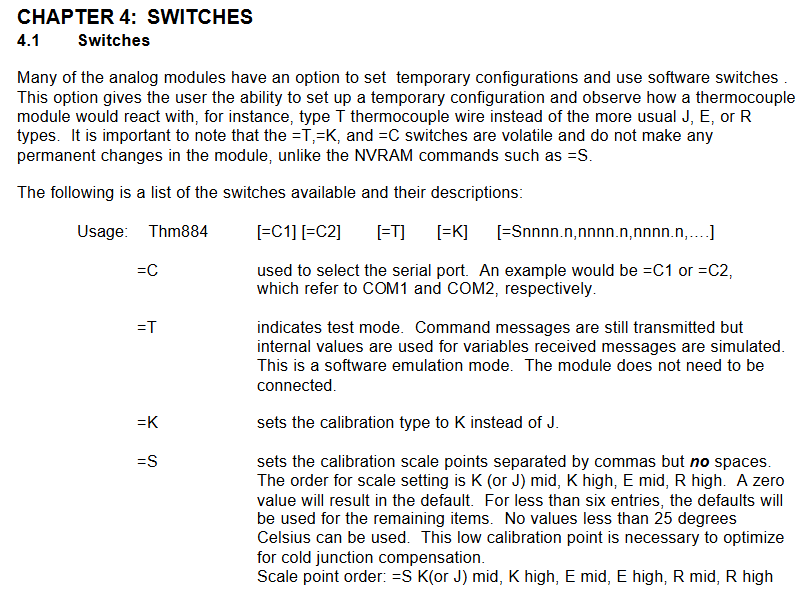
Many simulation modules can be temporarily configured and software switches can be used, such as observing the reaction of thermocouple modules using T-shaped thermocouple wires (rather than the commonly used J, E, R types); Please note that the=T,=K, and=C switches are volatile and will not cause permanent changes to the module, while commands such as=NVRAM (such as=S) will cause permanent changes. The switch format is "Thm884 [=C1] [=C2] [=T] [=K] [=Snnnn. n, nnnn. n, nnnn. n,...]", and the functions of each switch are as follows:
Switch Function Description
=C is used to select serial ports, for example=C1 (COM1),=C2 (COM2)
=T represents test mode, still transmitting command messages, but variables use internal values, receiving messages generated by simulation (software simulation mode), without the need to connect modules
=K sets the calibration type to K instead of the default J type
=Set calibration scale points for S, separated by commas (without spaces), in the order of K (or J) median, K high value, E median, E high value, R median, and R high value; When the value is 0, use the default value; If there are less than 6 entries, the remaining entries will use default values; The scale point must not be lower than 25 degrees Celsius (this low-temperature calibration point is crucial for optimizing cold end compensation)
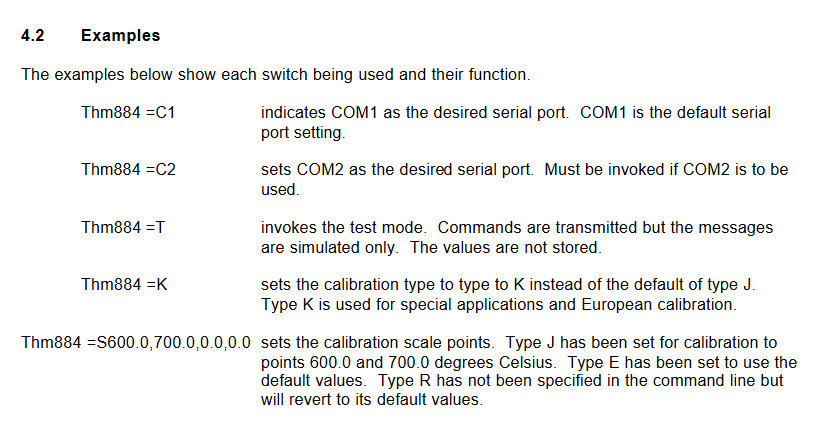
(2) Example (4.2)
Command function
Thm884=C1 specifies COM1 as the serial port (default port)
Thm884=C2 specifies COM2 as the serial port (this command needs to be called to use COM2)
Thm884=T Enable test mode, transmit commands but only simulate messages, do not store values
Thm884=K sets the calibration type to K type (default J type), suitable for special applications and European calibration
Thm884 =S600.0,700
- OMRON
- ABB
- General Electric
- EMERSON
- Honeywell
- HIMA
- ALSTOM
- Rolls-Royce
- MOTOROLA
- Rockwell
- Siemens
- Woodward
- YOKOGAWA
- FOXBORO
- KOLLMORGEN
- MOOG
- KB
- YAMAHA
- BENDER
- TEKTRONIX
- Westinghouse
- AMAT
- AB
- XYCOM
- Yaskawa
- B&R
- Schneider
- KONGSBERG
- NI
- WATLOW
- ProSoft
- SEW
- ADVANCED
- Reliance
- TRICONEX
- METSO
- MAN
- Advantest
- STUDER
- DANAHER MOTION
- Bently
- Galil
- EATON
- MOLEX
- DEIF
- B&W
- ZYGO
- Aerotech
- DANFOSS
- Beijer
- Moxa
- Rexroth
- Johnson
- WAGO
- TOSHIBA
- BMCM
- SMC
- HITACHI
- HIRSCHMANN
- Application field
- XP POWER
- CTI
- TRICON
- STOBER
- Thinklogical
- Horner Automation
- Meggitt
- Fanuc
- Baldor
- SHINKAWA
- Other Brands
- UniOP
- KUKA
- Iba
- Beckhoff
- ADLINK
-
 Lust Antriebstechnik LTI Drives VF1204S Inverter
 -
 Lust LTI Drives CDE32.008 C3.0 Positioning Controller
 -
 LTI Drives LUST Servo One C-5633 D-35633
 -
 Lust LTI Drives CDA34.008.C1.3 Servo Controller 3kW
 -
LTI CDF30.008 C2.6 Servo Drive 10962161
-
 LUST LTi Drives CDB32.004 C2.3 SH Servo Drive
 -
 Lust LTi Drives CDE34.010 D2.0 Servo Drive
 -
 LTi Motion CDA32.006 Servo Drive with CM-CAN1
 -
Lust LTI Drives CDB32.008 C2.3 Servo Controller
-
 LTi CDE34.017.W3.0 Servo Drive
 -
 LUST LTI LST-074-2-30-320/T1 Servomotor
 -
Lust LTi CDF30.002 C3.0 Positioning Controller
-
 LTi DRIVES CDF30.008.C2.4 Drive
 -
 LUST LTI CDB32.008 W2.4 BR PC1 Drive
 -
 LTi SO84.004.0002.0100.2 Servo Controller
 -
 LTi SO84.012.0030.0011.2 ServoOne Drive
 -
LTI Drives LUST Servo One C-5633 D-35633
-
 LTi DRiVES c-line Smart Card A028.V01.1
 -
LUST LTI CD A34.008 W1.4 BR Drive
-
 LUST LTI LSH-097-2-30-560/T1 Servomotor
 -
LUST LTI LST-074-2-30-320/T1 Servomotor
-
LUST LTi CDB32.004 C2.4.SH Servo Drive
-
 LTI Drives PM-E40.2DRA054P Pitch Inverter
 -
Lust LTI Drives CDF30.008 Servo Drive 8673548
-
LTI Drives CDF30.002.C0.7 Servo Controller
-
 Lust LTI Drives CDB32.008.W2.4 Servo Drive
 -
Lust LTI Drives CDB34.003 Servo Motor Driver
-
Lust LTI Drives CDA32.004 Servo Drive 3084456
-
Lust LTI Drives CDE34.005.W2.2 Servo Drive
-
Lust LTI Drives CDA34.006.W3.0 Servo Drive
-
 LTI Drives CDF30.008.C2.4 Servo Controller
 -
LTI Drives Lust CDB32.004.C2.4.SH Servo Drive
-
 Delta Design 1666339-501 Micro Stepper PCB 114970
 -
 APEXEL 100X Microscope Mobile LED Pocket Lens
 -
 Micro Innovation XV-152-D4-10TVR-10 Touch Screen
 -
 Micro Innovation XVH330-57MPI-1-10 Touch Screen Glass
 -
 Delta Design 1666339-501 Micro Stepper PCB 114967
 -
Micro Design MC100-MA V3 Board
-
 Delta Design 1666339-501 Micro Stepper PCB 114968
 -
Delta Design 1666339 PCB Micro Stepper ITR 116487
-
Micro Innovation XV-440-10TVB-1-10 Panel
-
 Sterling 9B21-3 Micro Switch Durable Design
 -
ATTINY104-XNANO Microchip AVR Prototype Board
-
 Delta Design 1666339 Micro Stepper PCB ITR 116539
 -
Super Micro X7SBJ Industrial Main Board
-
 Delta Design NMS BD 1698437-501 Stepper Board
 -
 Micro Innovations Turbo Track Keyboard KB420BL
 -
Micro Design PC-1 PC-1-H-DU010 Operator Panel
-
 TCI MICRO MD 250mA 7W Dimmable LED Driver
 -
 Delta Design 1666339 Micro Stepper PCB ITR 116485
 -
 Delta Design NMS BD 1698437-501 Stepper Board
 -
 Life Instruments 714-1120-1U Micro Curette
 -
Delta Design 1657925-501 Micro Processor PCB
-
Micro 100 RTC-125-2 Carbide Engraving Tool
-
 Micro Design Inc. 2106022 Liquid Level Sensor PCB
 -
Periodontal Micro Surgical Full Kit 20pc Blue Titanium K1004
-
 Micro Innovation XN-2DO-24VDC-0.5A Module
 -
Wide Innovative Technology PS-01 Micro Positioner Set
-
 HU FRIEDY NH5020 Castroviejo Needle Holder Set
 -
Moeller Micro Innovation XV-232-57BAS-1-10 Touch Screen
-
 Micro Design System MCVP-300VR Control Module 24VDC
 -
Scanlan 3003-234-1 Titanium Jacobson Needle Holder
-
 Micro Innovation XV-102-B0-35TQR-10-PLC Panel
 -
Promot Micro Design 3x8 Output 2187F
-
 Micro Innovation LIC-SW-Galileo 91 30 000600 License Certificate
 -
 Micro Design AI0486.A4-50 Control Module Board
 -
 Micro Innovation XN-2DO-24VDC-0.5A Output Module
 -
 Micro Design Not-Aus Relais AE 8.96 AE 896
 -
Micro Innovation CPC-600M-10 Ferag Touch Panel HMI
-
 Micro Design System 96-002-09/1 Adapter 18 Bit
 -
Micro Design LK3160 AI0486 Motherboard
-
Micro Design System 96-002-01/2 GF-1 CPU Board
-
 Micro Design Systems CF1-10TVA-100 Micro Panel
 -
Eaton Micro Innovation XP-702-C0-15TXI-10 Panel
-
HU FRIEDY Castroviejo NH5020 Needle Holder
-
 MPM Micro Precision 3.BMT100 P02 Balancing Station
 -
 Micro Innovation GF1-10TVD-101 Touch Panel
 -
Micro Innovation XV-102-B0-35TQR-10-PLC
-
Micro Innovation XP-601-15T-10 Touch Panel
-
 Micro Innovation License Certificate 9130000650 LIC-SW-MXPRO
 -
Micro Innovation XVC-601-GTI-15-V1-000 Panel
-
MI Micro Innovation HPT-100-82FGBA-01 Panel
-
 Micro Innovation XV-102-B3-35TQR-10 Panel Cable
 -
 Micro Innovation MC2-440-10TVB-1-2 HMI Panel
 -
Promot Micro Design 2x8 Output 2087F
-
 Micro Innovation XN-16DO-24VDC-0.5A Output Module
 -
Micro Design System 96-002-03/1 Power Supply Board
-
Touch Screen for Moeller XV-252-57CNN-1-10 Digitizer
-
Micro Design Systems 96-002-03/1 Power Supply Board
-
 Micropipette Variable Range 100-1000 Microliter
 -
Murphy Nerve Hook 9 Inch Neurosurgery Instrument
-
Micro Innovation XN-2DI-24VDC-P Input Module 225169
-
Micro Innovation ST-GF0-57E0D-000 Touch Panel
-
 Micro Innovation XN-S4T-SBBC Base Module
 -
 Micro Innovation XN-2DO-24VDC-0.5A-P Output
 -
 Micro Innovation XN-PF-24VDC-D 8550225186
 -
Eaton Micro Innovation XV-230-57MPN-1-10 Panel
-
Micro Design MC100-BED REV2 ME96049 Board
-
Micro Innovation XN-PF-24VDC-D 85 50 225186
-
 Micro Innovation XN-PF-24VDC-D Communication Module
 -
Micro Innovation CPC-600M-10 FERAG Panel
-
 Micro Design Systems 96-002-05/1 P-Bus Adapter
 -
Micro Design System MPB1-TP 97-003-01/4 PCB Card
-
Eaton Micro Innovation XVS-440-12MPI-1-10 HMI
-
Micro Components 900806 Test Circuit Board
-
Promot Micro Design PL59-MOC ME95035
-
Micro Innovation XV-440-10TVB-1-21 Panel
-
Micro Forceps 3003-934 Micro Surgical Instrument
-
 Eaton Micro Innovation XN-32DI-24VDC-P Module
 -
 MICRO INNOVATION AG XN-32DI-24VDC-P Input Module
 -
 Micro Innovation XN-PLC-CANOPEN 85 50 274124 Controller VN01-01
 -
Micro Innovation XN-S4S-SBBS Base Module
-
Micro Innovation XN-2DO-24VDC-0.5A-P Module
-
Micro Design MPB2-TP Module
-
Micro Innovation XN-2DO-120/230VAC-0.5A Module
-
Artesyn NLP40-7629 AC/DC Converter
-
Micro Design Systems 96-002-10/1 Adapter
-
Micro Design 975 Microfiche Rubber Feet
-
 Micro Innovation XN-32DI-24VDC-P Input Module
 -
 Micro Design MCVP 5/16 Control Module
 -
Micro Innovation GF0-57SQD-000 Display Panel
-
Micro Design Systems 96-002-05/1 P-Bus Adapter
-
Micro Innovation Micro Panel GF1-10TVD-102
-
Micro Design MC100MA/V10 Board Microfiche Reader
-
Micro Design Systems AI0486 CPU Card Circuit Board
-
Micro Design System 96-002-01/2 GF-1 CPU Board
-
Micro Innovation MC2-440-12TSB-1-1K Touch Panel Glass
-
Micro Innovation CAN Bridge 85 51 224177


