
Honeywell System 57 5704 Control System
Honeywell System 57 5704 Control System
The Honeywell System 57 5704 control system is a modular control platform designed specifically for industrial gas detection under Honeywell. It is mainly used to monitor gas detectors installed on site, achieve multi-channel gas concentration monitoring, alarm triggering, and remote control functions. This system has the core advantages of high reliability, flexible scalability, and strict safety compliance, and is widely used in industrial scenarios such as petrochemicals, chemical engineering, pharmaceuticals, and power that require strict gas leak detection. It can be adapted to various types of gas sensors such as catalytic combustion and 4-20mA.
System core positioning and security standards
1. Core functions and scope of application
Multi channel monitoring capability: The standard 19 inch 3U rack can support up to 64 channels of gas detection (4 channels per card), and the half 19 inch 3U rack can support up to 32 channels, adapting to the distributed monitoring needs of large-scale industrial sites.
Sensor compatibility: Supports two types of core sensor inputs - catalytic combustion sensors (for combustible gas detection) and 4-20mA signal sensors (for toxic gas, oxygen, etc. detection), meeting the monitoring needs of different gas types.
Alarm and Control: Provides multi-level alarms (A1/A2/A3 three-level concentration alarm, STEL short-term exposure limit alarm, LTEL long-term exposure limit alarm), fault alarms (sensor faults, line faults), and suppression alarms, supports relay output, analog output (0-20mA/4-20mA), and can be linked to external devices (such as exhaust systems, sound and light alarms).
2. Safety and compliance requirements
Environmental restrictions: Non explosion proof design, only applicable to safe areas (non hazardous areas), and limited to indoor use only. Exposure to rainwater or humid environments is prohibited.
Operating standards: Installation, calibration, and maintenance must be carried out by professionals, and only Honeywell certified accessories are allowed to be used to avoid safety risks caused by unauthorized replacement of components.
Compliance standards: Compliant with the EU ATEX Directive (EC Type Examination Certificate BVS 04 ATEX G 001 X), EN 50073 (Specification for Selection and Maintenance of Gas Detection Equipment), EN 60079-14 (Standard for Electrical Installation in Hazardous Areas), etc. Electromagnetic compatibility (EMC) meets the EN 61000-6 series standards, and the ability to resist radio frequency interference (RFI) reaches 10V/m (27-1000MHz).
System hardware composition and module functions
The 5704 control system adopts a modular design, with core components including control cards, interface cards, engineering cards, power modules, and racks/cabinets. Each module has clear functions and can be flexibly combined
1. Core functional modules
Module Name Model Example Core Function Key Parameters
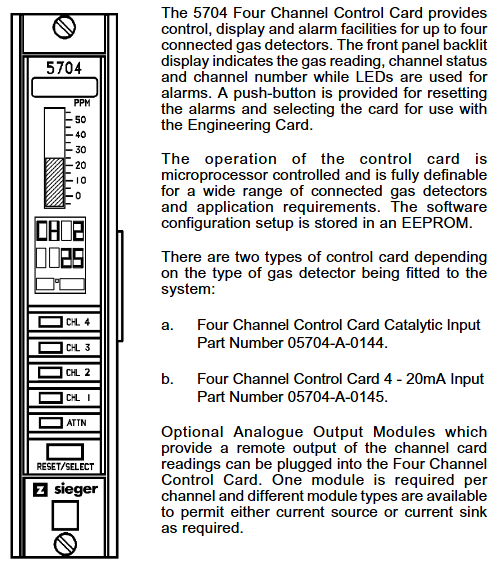
Four channel control card 05704-A-0144 (catalytic input)
05704-A-0145 (4-20mA input) sensor signal processing, concentration display, alarm logic judgment, 4 channels per card; The catalytic card supports constant current drive of 90-315mA; 4-20mA card supports 0-25mA signal measurement
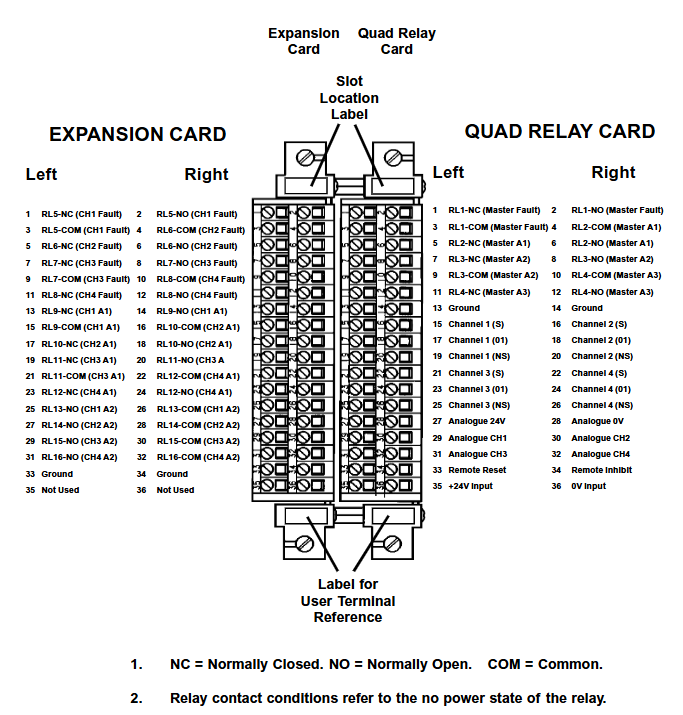
The four relay interface card 05704-A-0121 provides a wiring interface for sensors and control systems, providing four relay outputs (single pole double throw) with a rated current of 5A (110/250V AC or 32V DC) for relay contacts; Supports 2.5mm ² (14 AWG) wire connection
Relay expansion component 05704-A-0131 (interface card+expansion card) expands the number of relays to 16 (12 single pole double throw+4 single pole single throw), adapting to complex alarm linkage requirements and occupying 2 rack slots; Extra weight of 0.5kg, requires separate power supply
The core operating interface for system configuration, calibration, and diagnosis of engineering card 05701-A-0361 provides RS232 interface for connecting to PC or printer to support parameter adjustment (such as alarm threshold, sensor current), fault diagnosis, and maintenance record printing; Engineering key is required to unlock advanced features
DC input card 05701-A-0325 system power access and distribution, supports dual power input (main power+backup battery), provides overcurrent protection input voltage 18-32V DC; Built in 10A anti surge fuse; Support power diode isolation to avoid power conflicts
AC-DC power module 05701-A-0405 (16 channels)
05701-A-0406 (8-way) converts 85-264V AC to 24V DC system power supply, supports power upgrade (50W → 200W), 50W basic module can be expanded to 200W (16 way rack); Input frequency 47-440Hz, compatible with global power grid
2. Rack and cabinet configuration
Rack types: Four standard racks are available -19 inch 3U (rear wiring), 19 inch 6U (front wiring), half 19 inch 3U (rear wiring), half 19 inch 6U (front wiring), supporting both front and rear wiring methods to meet different on-site wiring requirements.
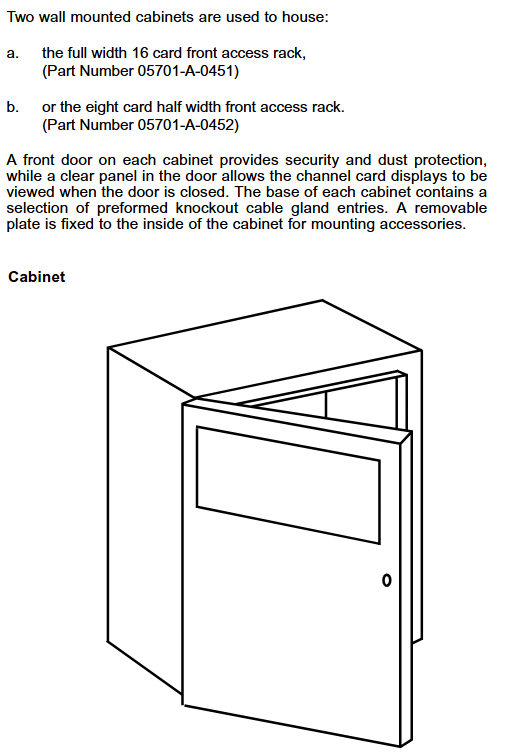
Cabinet accessories: Optional wall mounted cabinet (8/16 channels), made of cold-rolled steel plate material (RAL 7015 dark gray), providing multiple cable entry holes (M20/M25/PG11/PG16), with dust-proof and safety lock functions to protect internal modules from physical damage.
System operation and core functions
1. Basic operating procedures
(1) System startup and initialization
Power off inspection: Before starting, confirm that all control cards and interface cards have been correctly installed, the wiring is not loose, and the power supply voltage meets the requirements of 18-32V DC.
Step by step power on: First, connect the DC input card power supply and check that the green power light on the engineering card is always on (indicating that the power supply is normal); Insert the control cards one by one and observe that the "INHIBIT" light on each card lights up (the suppression period starts for about 30 seconds). After the suppression period ends, the light goes out and the system enters normal monitoring mode.
Sensor signal verification: Use the engineering card "BEAD mA" (catalytic card) or "SIGNAL" (4-20mA card) function to check if the sensor signal is normal (such as catalytic card bridge current of 200mA, 4-20mA card signal within normal range).
(2) Alarm and reset operations
Alarm recognition: Determine the alarm type through the control card LED light——
Red flashing: A1 (1 time/second), A2 (2 times/second), A3 (3 times/second) concentration alarm; STEL/LTEL alarm (1 second on/1 second off, slow flashing).
Yellow flashing: sensor malfunction, circuit malfunction; Yellow constantly on: Channel suppressed (manual/remote suppression).
Reset operation:
Normal reset: Short press the "RESET/SET" button on the control card to clear inactive lock alarms, fault prompts, and peak displays.
Extended reset: Long press the "RESET/SET" button for 5 seconds to clear the maximum/minimum concentration record, STEL/LTEL timer, and reset the delay relay.
2. Engineering calibration and maintenance
(1) Key calibration steps (unlocked with engineering key)
Zero point calibration (ZERO):
Place the sensor in a clean environment without target gas (such as fresh air) and wait for the signal to stabilize (the control card displays the "Stable" icon).
Select the target channel, press the "ZERO" button on the engineering card, and the system will automatically set the current signal to zero. After calibration, the channel suppression needs to be released.
Range Calibration (SPAN):
Introduce a standard gas of known concentration (recommended concentration ≥ 40% of full range) and wait for the sensor signal to stabilize.
Press the "SPAN" button on the engineering card to adjust the numerical display to the standard gas concentration. After confirmation, the system saves the range parameters and updates the calibration date.
First range calibration (1st SPAN): For new catalytic sensors, record the initial sensitivity for subsequent sensor life monitoring (triggering a "life expiration" alarm when the sensitivity drops to 50% of the initial value).
(2) Key points for regular maintenance
Monthly inspection: Clean the surface dust of the module, check the tightness of the wiring terminals, and verify whether the alarm relay operates normally.
Annual calibration: Perform zero and range calibration according to sensor type (catalytic/4-20mA), check the accuracy of the engineering card clock, and print maintenance records (via RS232 printer).
Sensor replacement: It is recommended to replace catalytic sensors every 1-2 years, and 4-20mA sensors should be replaced according to the manufacturer's requirements. After replacement, the "1st SPAN" calibration needs to be performed again.

System configuration and scalability
1. Flexible configuration options
Alarm logic configuration: supports multiple alarm modes——
Independent alarm: Single channel alarm does not affect other channels;
Zoned alarm: Any channel alarm within the designated area triggers the overall alarm of the zone;
Voted alarm: Multiple channels alarm simultaneously (such as 2/3 channel alarm) to trigger the total alarm, avoiding single sensor false alarms;
Update alarm: Even if there are unreset alarms, new alarms can still trigger prompts to avoid omissions.
Output configuration:
Relay output: can be configured as "normal power on" (power off trigger) or "normal power off" (power on trigger), supporting a switching time of 13-48ms;
Analog output: Each channel can choose 0-20mA or 4-20mA isolated output, used to connect PLC, DCS and other systems to transmit real-time concentration data.
2. Expansion and customization capabilities
Hardware expansion: Increase the number of relays by adding relay expansion cards (05704-A-0131); Upgrade the system power from 50W to 200W by stacking AC-DC power modules (05701-A-0440), supporting more channels.
Software and Communication Expansion:
Engineering software: Configure system parameters (such as alarm thresholds and sensor types) on PC through "Engineering Interface Software", and support data log storage;
Communication module: optional Modbus interface module (RS232/RS422/485), realizing digital communication with the upper computer (such as SCADA system), only used for data visualization, prohibited for safety related control;
Event printing module: Record alarm, fault events, and timestamps for easy traceability and compliance auditing.
Fault diagnosis and common problems
1. Fault codes and troubleshooting
The system displays the "ERxx" fault code through the control card LCD, and the core fault types and handling methods are as follows:
Meaning of fault code, possible causes, handling suggestions
ER97 EEPROM malfunction (configuration data lost) Control card storage chip damaged Replace control card
ER87 signal out of range (above configuration limit), sensor short circuit, high gas concentration. Check the sensor circuit and confirm the gas concentration on site
ER88 signal under range (below the lower limit of configuration) sensor open circuit, wire breakage check sensor wiring, replace faulty sensor
ER83 catalytic sensor bridge current fault sensor aging, excessive line resistance check line resistance (≤ 40 Ω), replace sensor
ER82 sensor lifespan expires, catalytic sensor sensitivity drops below 50%, replace sensor immediately
2. Common operational issues
Engineering card unresponsive: Check the DC input card power supply (18-32V DC) and fuse (10A). If the power supply is normal, try restarting the system;
Alarm not triggered: Confirm that the channel is not suppressed (INHIBIT light off), check if the alarm threshold configuration is correct, and verify the relay wiring;
Analog output abnormality: Check if the analog module (04200-A-0145/0146) is securely plugged in and confirm that the output type (current source/current sink) matches the external device.
Technical parameters and ordering information
1. Core technical parameters
Environmental adaptability: working temperature 0-55 ℃ (ATEX certification system starts at 0 ℃), storage temperature -25-85 ℃, relative humidity 0-90% (no condensation), altitude ≤ 5000m.
Electrical parameters: System power supply 18-32V DC; Control card power consumption 8.3-12.8W (depending on type); Relay contact capacity 5A (AC/DC).
Display and accuracy: Control card LCD display (4-character number+25 segment analog strip), concentration measurement accuracy ± 1% of full range, alarm threshold resolution 1% of full range.
2. Main ordering models
Example description of component type and model
Control card 05704-A-0144 four channel catalytic combustion sensor input card
Control card 05704-A-0145 four channel 4-20mA sensor input card
Relay Interface Card 05704-A-0121 Four Relay Interface Card (Basic Version)
Engineering Card 05701-A-0361 System Configuration and Diagnostic Card
AC-DC power supply 05701-A-0405 16 channel 50W power module (upgradable to 200W)
Cabinet 05701-A-0451 8-way wall mounted cabinet (cold-rolled steel plate)
- OMRON
- ABB
- General Electric
- EMERSON
- Honeywell
- HIMA
- ALSTOM
- Rolls-Royce
- MOTOROLA
- Rockwell
- Siemens
- Woodward
- YOKOGAWA
- FOXBORO
- KOLLMORGEN
- MOOG
- KB
- YAMAHA
- BENDER
- TEKTRONIX
- Westinghouse
- AMAT
- AB
- XYCOM
- Yaskawa
- B&R
- Schneider
- KONGSBERG
- NI
- WATLOW
- ProSoft
- SEW
- ADVANCED
- Reliance
- TRICONEX
- METSO
- MAN
- Advantest
- STUDER
- DANAHER MOTION
- Bently
- Galil
- EATON
- MOLEX
- DEIF
- B&W
- ZYGO
- Aerotech
- DANFOSS
- Beijer
- Moxa
- Rexroth
- Johnson
- WAGO
- TOSHIBA
- BMCM
- SMC
- HITACHI
- HIRSCHMANN
- Application field
- XP POWER
- CTI
- TRICON
- STOBER
- Thinklogical
- Horner Automation
- Meggitt
- Fanuc
- Baldor
- SHINKAWA
- Other Brands
- UniOP
- KUKA
- Iba
- Beckhoff
- ADLINK
-
 National Instruments USB-6363 DAQ Device
 -
 National Instruments NI 9467 GPS Module
 -
 National Instruments USB-6351 DAQ Device
 -
 National Instruments NI 6581 Adapter Module
 -
 National Instruments 781045-01 Output Module
 -
 National Instruments PCI-6225 DAQ Card
 -
 National Instruments TRC-8543 CAN Cable
 -
 National Instruments PXIe-1073 Chassis
 -
 National Instruments USB-6003 DAQ Device
 -
 National Instruments NI 9476 Output Module
 -
 National Instruments myRIO-1900 Embedded Controller
 -
 National Instruments NI-9263 Analog Output Module
 -
 National Instruments 158561A-01L Ordering Part Number
 -
 National Instruments 785024-01 Ordering Part Number
 -
 National Instruments PCI-6510 Industrial Digital I/O Card
 -
 National Instruments USB-6259 Multifunction DAQ Device
 -
National Instruments USB-8452 I2C SPI Interface Device
-
 National Instruments PXI-8432 Serial Interface Module
 -
 National Instruments PXIe-5644R Vector Signal Transceiver
 -
 National Instruments PXI-2569 Relay Module
 -
 National Instruments 781174-01 Module
 -
 National Instruments 782000-01 Module
 -
 National Instruments PXI-5152 Digitizer
 -
 National Instruments PXI-6284 DAQ Card
 -
 National Instruments PCI-1428 Frame Grabber
 -
 National Instruments PXI-1050 Chassis
 -
National Instruments NI USB-8486 Fieldbus
-
 National Instruments NI 9862 CAN Module
 -
 National Instruments NI 9146 FPGA Chassis
 -
 National Instruments PXI-8108 Controller
 -
 National Instruments NI SWB-2816A Matrix Module
 -
 National Instruments NI 9269 Analog Output Module
 -
National Instruments PCI-6031E Multifunction DAQ Card
-
National Instruments PXI-6713 Analog Output Module
-
 National Instruments NI 9216 RTD Input Module
 -
 National Instruments NI-9237 Strain Bridge Input Module
 -
National Instruments PXI-5124 High Resolution Digitizer
-
National Instruments USB-6343 X Series DAQ Device
-
 National Instruments PXIe-6536 Digital I/O Module
 -
 National Instruments CAL-4330 Calibration Fixture
 -
 National Instruments PXI-4110 Programmable Power Supply
 -
 National Instruments 781503-01 Input Module
 -
 National Instruments FP-AI-V10 Module
 -
National Instruments PXI-5114 Digitizer Card
-
 National Instruments PXIe-8398 MXI Module
 -
 National Instruments cRIO-9056 Controller
 -
 National Instruments PCI-6509 DIO Device
 -
 National Instruments cRIO-9053 Controller
 -
National Instruments 781056-01 Output Module
-
 National Instruments 782606-01 Input Module
 -
 National Instruments cRIO-9112 Chassis
 -
National Instruments PXIe-1078 Chassis
-
 National Instruments PCIe-6536 DIO Board
 -
 National Instruments NI-9425 Input Module
 -
 National Instruments PCI-5122 Digitizer Card
 -
National Instruments 779072-01 Relay Module
-
 National Instruments 783703-01 DAQ Module
 -
 National Instruments PXI-6515 Digital Module
 -
National Instruments 781099-01 DAQ Device
-
National Instruments PXI-8183 PXI Controller
-
 National Instruments sbRIO-9626 Single-Board RIO Controller
 -
National Instruments PXIe-1435 Camera Link Frame Grabber
-
 National Instruments NI 9237 Strain Bridge Input Module
 -
National Instruments PXIe-4353 Thermocouple Input Module
-
National Instruments PCIe-6320 X Series DAQ Card
-
 National Instruments NI 1454 Compact Vision System
 -
 National Instruments PCIe-6321 X Series DAQ Card
 -
 National Instruments PXIe-5172 PXI Oscilloscope Module
 -
 National Instruments cDAQ-9134 CompactDAQ Controller
 -
 National Instruments cRIO-9063 CompactRIO Controller
 -
 National Instruments PXI-4070 DMM Card
 -
 National Instruments cFP-BP-4 Backplane
 -
National Instruments 779521-01 Bridge Module
-
 National Instruments cDAQ-9172 Chassis
 -
 National Instruments NI 9236 Strain Module
 -
National Instruments PXI-1042Q Chassis
-
 National Instruments SCXI-1102 Input Module
 -
 National Instruments 776990-01 Input Module
 -
 National Instruments PXI-1045 PXI Chassis
 -
 National Instruments PCIe-6251 DAQ Device
 -
 National Instruments NI 9219 Universal Analog Input Module
 -
National Instruments NI 9215 BNC Analog Input Module
-
 National Instruments PXIe-6570 Digital Pattern Instrument
 -
National Instruments NI-9477 Digital Output Module
-
National Instruments NI 9145 EtherCAT Chassis
-
 National Instruments PCI-6521 Industrial Digital I/O Card
 -
 National Instruments NI 9239 BNC Voltage Input Module
 -
 National Instruments NI 9265 Current Output Module
 -
 National Instruments NI 9212 Thermocouple Input Module
 -
 National Instruments PXI-6229 Multifunction DAQ Module
 -
 National Instruments NI-9146 Chassis
 -
 National Instruments PXIe-5622 Digitizer
 -
 National Instruments PXI-6704 Output Module
 -
National Instruments 782362-01 Input Module
-
National Instruments 779068-01 Digital Module
-
 National Instruments 781063-01 Output Module
 -
 National Instruments PCI-7356 Motion Controller
 -
 National Instruments 779787-01 Input Module
 -
 National Instruments PXIe-1071 System
 -
 National Instruments NI 9219 Input Module
 -
 National Instruments NI 9214 Thermocouple Input Module
 -
 National Instruments PXIe-1085 18-Slot Chassis
 -
 National Instruments PCIe-6320 Multifunction DAQ Card
 -
National Instruments USB-6211 Multifunction I/O Device
-
National Instruments USB-6341 X Series DAQ Device
-
National Instruments NI 9205 Analog Input Module
-
National Instruments NI 9149 8-Slot Chassis
-
 National Instruments PXIe-2569 Relay Module
 -
National Instruments NI 9230 Sound and Vibration Module
-
National Instruments cRIO-9047 CompactRIO Controller
-
National Instruments PCI-6534 Digital IO Card
-
 National Instruments PXI-5122 Digitizer Module
 -
 National Instruments cDAQ-9188XT Chassis
 -
National Instruments cDAQ-9184 Ethernet Chassis
-
National Instruments USB-6225 OEM DAQ Device
-
National Instruments NI 9205 Input Module
-
National Instruments NI 9207 Input Module
-
National Instruments NI-9862 CAN Module
-
National Instruments 781156-01 CAN Module
-
 National Instruments FP-AO-200 Output Module
 -
National Instruments NI 9264 Output Module
-
 National Instruments IC-3173 Controller
 -
 National Instruments NI 9234 Vibration Module
 -
 National Instruments SMB-2163 DIO Accessory
 -
National Instruments PXIe-1062Q DSA System
-
 National Instruments USB-6289 DAQ Device
 -
National Instruments NI 9233 Vibration Module
-
National Instruments PXIe-5840 VST


