
Bender LifeGuard ® LG2 series protective panel
Bender LifeGuard ® LG2 series protective panel
Product Overview
Bender LifeGuard ® The LG2 series is an industrial grade ground fault protection panel launched by Bender, a German company. Its core function is to monitor the ground fault current in the circuit, quickly cut off the load power supply when the current reaches the trip threshold, and avoid safety risks such as electric shock and arc flashover. The product is compatible with various voltage and phase industrial circuits, providing flexible installation forms and operation methods, complying with UL 508A industrial control panel standards, and widely used in factory equipment, industrial control systems, and other scenarios.
Core parameters and specifications
Category specific parameters
Adaptation voltage 120VAC、208VAC、208/120VAC、240/120VAC、480VAC、480/277VAC、600VAC、600/347VAC
Circuit phase 1ph (2w/3w), 3ph (3w/4w)
Rated current < 100A, 100A
Release level digital display fixed 6mA
Shell type NEMA 4X polycarbonate, NEMA 4X stainless steel, backplate only (requires self provided cabinet)
Dimensions (length × width × depth) < 100A: 305 × 254 × 152mm (12 "× 10" × 6 "); 100A: 406 × 356 × 203mm (16" × 14 "× 8")
The wire requirement is only copper wire; Rated at 60 ℃ (140 ℉) or above for<100A; 100A requires a rated temperature of 75 ℃ (167 ℉) or above
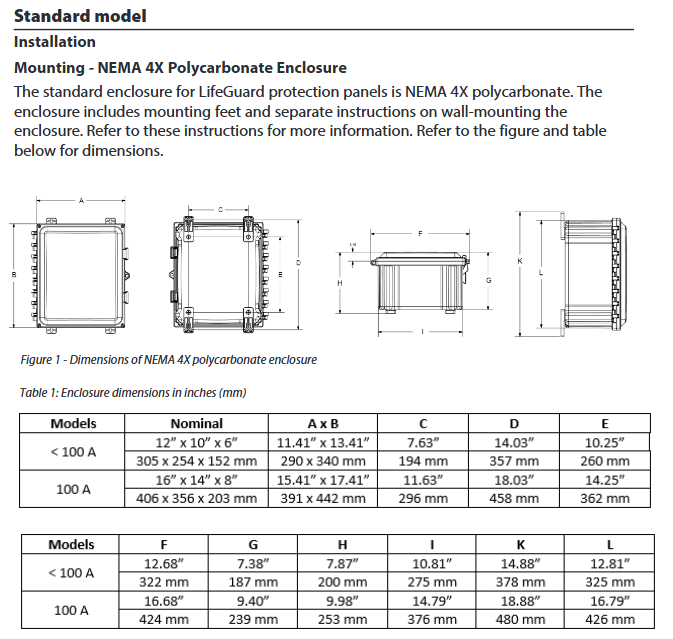
Installation and wiring specifications
(1) Installation requirements
Installation of shell:
Provide wall mounted mounting feet and follow separate wall mounting instructions;
It is recommended to use NEMA 4X or higher grade connectors at the bottom of the casing for cable perforation to maintain the protection level.
Only for backplate installation:
It needs to be installed in a compliant cabinet, with vertical clearance requirements of 152mm (6 ") for<100A and 203mm (8") for 100A;
Fix with 4 # 10 screws, with a mounting hole diameter of 6.4mm (1/4 ").
(2) Wiring rules
Installation must be carried out by licensed electricians, following local, state, and national electrical regulations;
All active conductors (including neutral wire N) need to pass through a current transformer and be connected to the incoming side of the contactor;
Connect the load or protected branch to the outgoing side of the contactor;
The incoming and load grounding wires must be connected to the backplane grounding terminal and must not pass through the current transformer;
The number of conductors and wiring diagrams corresponding to different voltages are as follows:
Reference wiring diagram for voltage specification, number of conductors (excluding grounding)
120 VAC 1ph/2w(L1、N) Figure W1
208 VAC 3ph/3w(L1、L2、L3) Figure W2
208/120 VAC 3ph/4w(L1、L2、L3、N) Figure W3
240/120 VAC 1ph/3w(L1、L2、N) Figure W4
480 VAC 3ph/3w(L1、L2、L3) Figure W2
480/277 VAC 3ph/4w(L1、L2、L3、N) Figure W3
600 VAC 3ph/3w(L1、L2、L3) Figure W2
600/347 VAC 3ph/4w(L1、L2、L3、N) Figure W3
Operation process and functions
(1) Basic operation (non digital version)
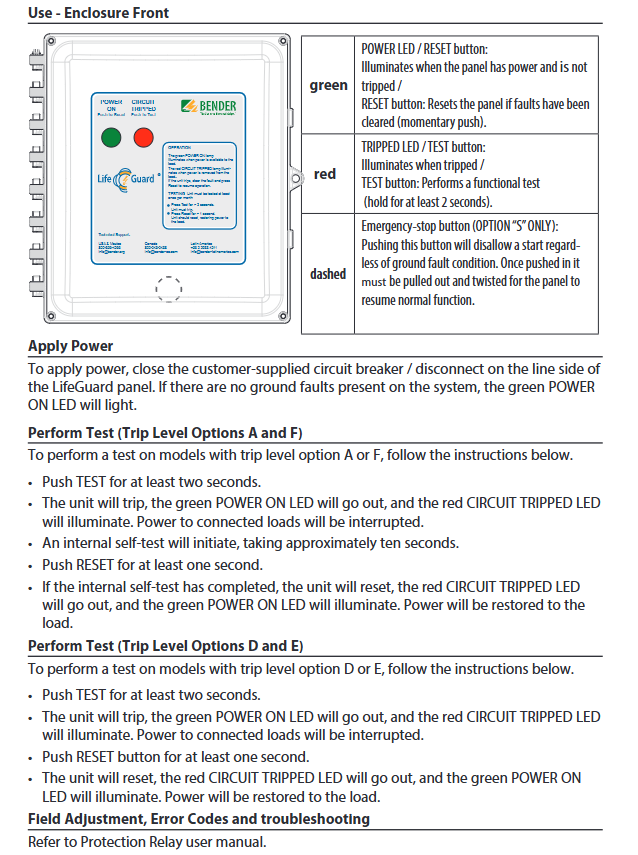
Power on: Close the circuit breaker/isolation switch on the incoming side, and the green POWER ON LED will light up when there is no ground fault;
Test (trip level A/F):
Press and hold the TEST button for ≥ 2 seconds, the device will trip, the red CIRCUIT TRIPPED LED will light up, and the load will be powered off;
After internal self check for about 10 seconds, press and hold the RESET button for ≥ 1 second to reset the device and restore power supply;
Test (trip level D/E):
Press and hold the TEST button for ≥ 2 seconds, the device will trip, and the red LED will light up;
Press and hold the RESET button for at least 1 second to reset the device and restore power supply.
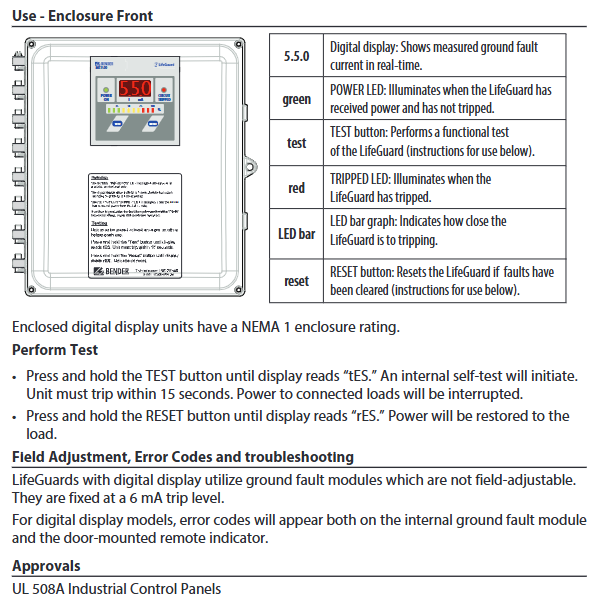
(2) Digital display operation (model ending with "- N-D")
Additional support for real-time display of ground fault current, LED bar chart indicating tripping risk;
Test: Press and hold the TEST button until the display screen shows "tES", and the device will trip within 15 seconds;
Reset: Press and hold the RESET button until the display screen shows "rES" to restore power supply;
Remote function:
Can connect to MK1500-D remote indicator, copy local testing/reset function;
Use AWG 18 shielded RS-485 cable connection and turn on the "R" switch on the grounding fault module;
MK1500-D requires an external power supply of 100-240VAC, 50/60Hz.
Safety and Compliance
Before installation, all power sources must be disconnected to avoid the risk of electric shock and arc flashover;
Separate isolation switches, branch protections, and/or overload relays need to be configured;
The three-phase three wire system can adopt direct grounding or resistance grounding methods;
Equipment troubleshooting and parameter adjustment should refer to the user manual of the protective relay.
Key issue
Question 1: LifeGuard ® What is the core protection function of the LG2 series? What are the differences in adaptation scenarios for different specifications?
Answer: The core protection function is to monitor the grounding fault current in the circuit in real time through current transformers. When the current reaches the tripping threshold, the load power supply is quickly cut off to prevent risks such as electric shock and equipment damage. The differences in adaptation scenarios for different specifications are as follows: ① Rated current<100A: Small size (305 × 254 × 152mm), suitable for small and medium power industrial equipment and branch circuit protection; ② Rated current 100A: larger size (406 × 356 × 203mm), suitable for high-power main circuits and heavy-duty equipment power protection; ③ Digital display version: Fixed 6mA trip level, real-time display of fault current, suitable for scenarios with requirements for protection accuracy; ④ Backplane only: needs to be installed inside the cabinet and is suitable for integrated industrial control systems.
Question 2: Install LifeGuard ® What are the key requirements for wiring and installation in the LG2 series? What compliance standards should be followed?
Answer: The key installation and wiring requirements are as follows: ① Wiring requirements: Use only copper wires, rated at 60 ℃ or above for<100A, and rated at 75 ℃ or above for 100A; All active conductors (including neutral wires) must pass through the current transformer, and the grounding wire must be directly connected to the grounding terminal, without passing through the transformer; ② Installation requirements: The shell should be wall mounted and fixed, with cable holes at the bottom and NEMA 4X connectors used; Only the backplane version needs to be installed inside the cabinet, with a vertical gap of 152mm for<100A and 203mm for 100A; ③ Compliance specifications: must be installed by licensed electricians, following local, state, and national electrical regulations, and complying with UL 508A industrial control panel standards; Separate isolation switches and overload protection devices need to be configured.
Question 3: LifeGuard ® What are the testing and reset operations for the LG2 series? What is the difference in operation between the digital display model and the regular model?
Answer: There are two ways to test and reset: ① Local operation: For ordinary models, the TEST (long press ≥ 2 seconds) and RESET (long press ≥ 1 second) buttons on the panel are used to achieve this; Long press TEST to display "tES" and RESET to display "rES" for digital models; ② Remote operation: Only the digital version supports connecting to the MK1500-D remote indicator, which can be achieved through its built-in button or external button. Operational differences: ① Testing process: Ordinary A/F grades require a 10 second self check, while D/E grades can be reset directly; The digital model has no self check waiting and must trip within 15 seconds; ② Function display: The digital version can view the grounding fault current in real time, and the LED bar chart indicates the risk of tripping. The ordinary version only indicates the status through a two-color LED; ③ Release level: The digital version is fixed at 6mA, while the regular version has four release levels: A/F/D/E. Please refer to the product configuration.
- OMRON
- ABB
- General Electric
- EMERSON
- Honeywell
- HIMA
- ALSTOM
- Rolls-Royce
- MOTOROLA
- Rockwell
- Siemens
- Woodward
- YOKOGAWA
- FOXBORO
- KOLLMORGEN
- MOOG
- KB
- YAMAHA
- BENDER
- TEKTRONIX
- Westinghouse
- AMAT
- AB
- XYCOM
- Yaskawa
- B&R
- Schneider
- KONGSBERG
- NI
- WATLOW
- ProSoft
- SEW
- ADVANCED
- Reliance
- TRICONEX
- METSO
- MAN
- Advantest
- STUDER
- DANAHER MOTION
- Bently
- Galil
- EATON
- MOLEX
- DEIF
- B&W
- ZYGO
- Aerotech
- DANFOSS
- Beijer
- Moxa
- Rexroth
- Johnson
- WAGO
- TOSHIBA
- BMCM
- SMC
- HITACHI
- HIRSCHMANN
- Application field
- XP POWER
- CTI
- TRICON
- STOBER
- Thinklogical
- Horner Automation
- Meggitt
- Fanuc
- Baldor
- SHINKAWA
- Other Brands
- UniOP
- KUKA
- Iba
- Beckhoff
- ADLINK
-
 Sigmatek MDD111-1 DIAS Drive Axis Module
 -
 Sigmatek DKL042 05-024-042 Terminal Module
 -
 Sigmatek DM822 Control Module
 -
 Sigmatek CDM167 12-008-167-O Module
 -
 Sigmatek TAE151 Touch Display Unit
 -
 Sigmatek DCC041 SLIDES Module 05-700-041-D
 -
 Sigmatek AKM65M-ANC2GBB0 PM Servo Motor
 -
 Sigmatek ETT221 01-230-221 Operator Terminal
 -
 Sigmatek SLIDES DAM 124 Analog Module
 -
Sigmatek AKM31C-ANCNGBB0 Servo Motor
-
 Mannesmann Demag Sigmatek CP626 Central Unit
 -
 SIGMATEK 0332.554.03 Board 371071000154
 -
 SIGMATEK 12-250-021 Base Plate Back Panel CM5V020
 -
 SIGMATEK DM162 S-DIAS Digital Mix Module
 -
 DEMAG ERGOTECH 061 381 66 Sigmatek 9842.243.02 Circuit Board
 -
 SIGMATEK CP313-1 PLC Module
 -
Sigmatek ETV0551-2 VARAN Touch Terminal
-
 Sigmatek SDM 081 FS S-Dias Safety Module
 -
 DEMAG 05-250-023 Ergotech Motherboard with Sigmatek TMS012
 -
Sigmatek CM5V020 12-250-023-K Wiring Base
-
 Sigma Tek 5000B-37 Attitude Gyro Indicator
 -
 Sigmatek SDD120-2 DIAS Drive
 -
 Sigmatek CME221 Memory Module
 -
 Sigmatek DCP640 DIAS Central Unit
 -
 Sigmatek STO040 Safety Output Module
 -
Sigmatek CET281 Control Panel
-
 Sigmatek CIPC LX800 Demag NC5 CPU
 -
 Sigmatek DKL093 05-024-093 Terminal Module
 -
 Sigmatek AI088 20-009-088 Analog Input Module
 -
Sigmatek CAI888 Analog Input Module
-
SIGMATEK CCA021 12-025-021 Analog Output Module
-
SIGMATEK 1104.579.05 Control Module
-
SIGMATEK SDI100 Digital Input Module
-
 SIGMATEK C-IPC 256MB LX800 Compact Dias
 -
 SIGMATEK 9423.090.02 Control Module
 -
SIGMATEK C-IPC 256 Power Supply 148498
-
 SIGMATEK CAI025 Analog Input Module
 -
 SIGMATEK CTO166 Digital Output Module
 -
 SIGMATEK CP112 20-004-112 Processor Module
 -
SIGMATEK CAI887 12-009-887 Safety Module
-
 Sigma-Tek 4000B-31 Directional Gyro 1U262-002-42
 -
Sigmatek C-IPC 256MB LX800 IPC Controller
-
Sigmatek C-IPC 01-450-031 Industrial PC LX800
-
Sigmatek C-IPC 256 Industrial PC Controller
-
Sigmatek CCP-531 PLC Processor Module
-
Sigmatek CDI163 Digital Input Module
-
 Sigmatek ETV0501 VARAN Terminal 12-230-0501
 -
 Sigmatek CTMS020 C-DIAS Technology Module
 -
 Sigmatek CIV512 VARAN Switch Module
 -
 Sigmatek HU011 20-080-011 Interface Module
 -
SIGMATEK SLIDES DAM 124 Module
-
 SIGMATEK C-IPC 161 01-450-161L Industrial PC
 -
SIGMATEK C-IPC 128MB VIA 733MHz 01-450-024-K
-
 SIGMATEK 12-780-012 R8-IPC Geode LX800 Module
 -
SIGMATEK CAM124 Analog Module
-
 SIGMATEK S1 032-8AF61-R4 EZ Servo Motor
 -
 SIGMATEK CTO163 Digital Output Module
 -
 SIGMATEK CCP082 12-004-082 Processor Module
 -
 SIGMATEK CRCH081 C-DIAS Temperature Module
 -
 SIGMATEK PC322-K 01-310-322-K Industrial PC
 -
SIGMATEK SDD310-2 Servo Drive
-
 SIGMATEK AI084 Analog Input Module
 -
SIGMATEK CRCH081 12-752-081 Temperature Module
-
Sigma-Tek 5000L-4 Attitude Gyro 1U284-001-3
-
 SIGMATEK CM5V020 12-250-023-K Wiring Module
 -
Sigma-Tek 4000H-6 Directional Gyro IU262-035-7
-
 SIGMATEK Dias DCP160 05-004-160 Processor Module
 -
SIGMATEK 0147.395.02 Control Module
-
SIGMATEK A1084 Control Module
-
SIGMATEK DI200 20-006-2000 Digital Input Module
-
Sigmatek DNC115 Encoder Module
-
 Sigmatek DAM122 05-017-122 Analog Module
 -
Sigmatek 9802.289.01 Control Board TA71 Display
-
Sigmatek TO127 20-007-127 Digital Output Module
-
Sigmatek DNC031 05-011-031 Digital Module
-
Sigmatek VI022 20-003-022 Interface Module
-
Sigmatek CAI085 Analog Input Module
-
 Sigmatek CP111 S-DIAS CPU Module
 -
Sigmatek CTMS030 Krauss Maffei Module
-
 Sigmatek CAM123 Control Module
 -
 Sigmatek TAE732-P 01-240-732-P Touch Display Unit
 -
Sigmatek MDM021 Digital Mixed Module
-
Sigmatek DCP642 DIAS Central Unit
-
 Sigmatek CST022 12-014-022 C-DIAS Module
 -
 Sigmatek SRO021 20-893-021 Safety Relay Output
 -
 Krauss Maffei MC5 Control System Sigmatek
 -
 Sigmatek DC061 Module 18-24VDC 300mA
 -
 Herrmann EVT0855 Ultrasonic Welder Touch Panel
 -
Sigmatek CIV521 Control Module 1.4A 2W
-
Sigmatek DDI61 05-006-161 Digital Input Module
-
SIGMATEK ETT312-E Touch Terminal 01-230-312
-
Cessna S3326-1 Sigma Tek 5000B-67 Gyro 1U149-015-9
-
SIGMATEK PS101 Power Supply Module
-
SIGMATEK 0332.554.03 Control Module 371071000154
-
 SIGMATEK ETT312-E Touch Terminal 01-230-312
 -
SIGMATEK CDM163 Control Module
-
 SIGMATEK VSV046 16-023-046 Module
 -
SIGMATEK AM221 20-017-221 Analog Module
-
SIGMATEK CTS051 12-053-051 Control Module
-
SIGMATEK AM221 20-017-221 Analog Module
-
Sigmatek CSDI161 12-891-161 Safety Input Module
-
Sigma Tek 4000C-1 Directional Gyro Indicator
-
Sigmatek ETV0501 12-230-0501 VARAN Terminal
-
Sigmatek DDM165 SLIDES Module
-
Sigmatek N100 20-011-100 Control Module
-
Sigmatek AKM54K-ANC2R-B0 PM Servo Motor
-
Sigmatek CTO166 Digital Output Module
-
Sigmatek CP212-K 20-004-212-K CPU Module
-
Sigmatek CDI161 Digital Input Module
-
Sigmatek DCC080 05-700-080-2 Control Module
-
 SIGMATEK SCP011 S-DIAS Safety CPU
 -
SIGMATEK SCP011 S-DIAS Safety CPU
-
SIGMATEK SRO022 Relay Output Module
-
SIGMATEK MDD 121 Drive Axis Module
-
SIGMATEK DSI021 SLIDES Siemens Interface
-
SIGMATEK DIAS DCP161 Module 05-004-161
-
 Sigmatek ETT312 Built-in Touch Terminal
 -
SIGMATEK DCP 643 DIAS Controller System
-
SIGMATEK CIO021 Multi I/O Module
-
SIGMATEK CTMS020 Control Module
-
 Sigmatek CME 221 Memory Module
 -
Sigmatek 0420.615.01 Control Board
-
Sigmatek CP111 20-004-111 CPU Module
-
Sigmatek 9405.065.03 Control Board
-
Sigmatek ETEK 01-450-032-K C-IPC 256MB Industrial PC
-
Sigmatek CTO163 12-007-163 Safety Output Module
-
Sigmatek TO081 20-007-081 Digital Output Module
-
 Sigmatek SI021 20-022-021 Safety Input Module


