
Watlow MLS300 Series Controller
Watlow MLS300 Series Controller
Product basic positioning and core features
1. Product positioning
The MLS300 series is a multi loop PID controller, available in two versions: 16 loop (MLS316) and 32 loop (MLS332), supporting thermocouples RTD、 Multiple sensor inputs such as linear voltage/current and pulse can achieve independent or linked control of process parameters such as temperature, pressure, and flow rate. The system adopts a modular design, compatible with multiple expansion modules (such as DAC/SDAC analog output modules), supports EIA/TIA-232/485 serial communication, can be connected to upper computer or PLC systems, and complies with CE and UL standards ®/ C-UL ® Certification and EU EMC Directive (EN 61326).
2. Core advantages
Advantages Category Specific Characteristics Value Explanation
Multi loop control single device supports 16/32 independent PID loops, each loop can be configured with heating/cooling dual outputs to reduce the number of devices, reduce panel space occupation, and adapt to multi zone process scenarios (such as multi-stage extruders and large ovens)
Flexible input compatibility supports J/K/T/S/R/B/E type thermocouples, 100 Ω platinum RTD (2/3 wire system), 0-20mA/4-20mA current, 0-12V voltage, and pulse input (up to 2kHz) to reduce spare parts inventory and adapt to sensor requirements of different processes without the need for additional signal conversion modules
Advanced control function supports cascade control, proportional control, remote simulation set point, and differential control (enhanced firmware); Ramp/Soak batch control (optional firmware) to meet complex process requirements (such as temperature pressure linkage in chemical reaction vessels, staged temperature control for material aging testing)
High reliability built-in sensor fault detection (open circuit/short circuit/reverse connection), power failure protection, CPU watchdog; Supports storing and calling 8 job programs to shorten troubleshooting time, avoid process abnormalities, and adapt to switching between multiple varieties and small batch production
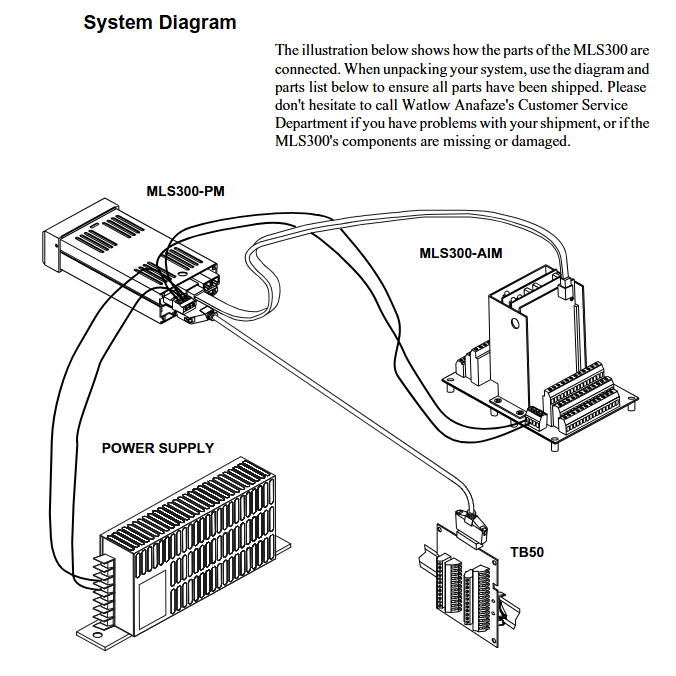
System composition and hardware architecture
1. List of core components
Component Name, Model/Specification, Function and Function
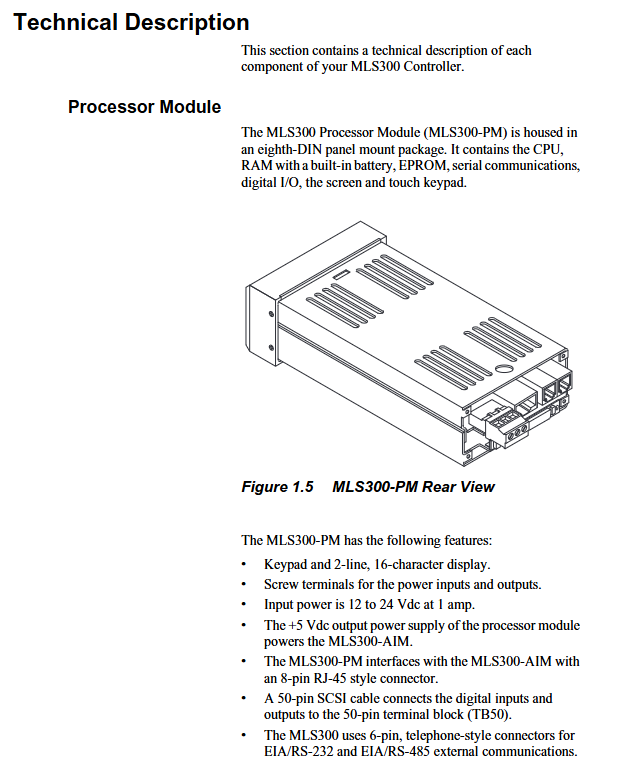
Processor module (PM) MLS300-PM system core, including CPU, 2-line 16 character fluorescent display screen, 8-key keyboard, responsible for data calculation, loop control, and communication management
The Analog Input Module (AIM) MLS300-AIM-16 (16 channels)/AIM-32 (32 channels) receives sensor signals, completes signal conditioning and A/D conversion, and communicates with the processor module through RJ45 cables
Compact Input Module (CIM) CIM316 (16 channels)/CIM332 (32 channels) high-density input module, using D-Sub 50 connector to reduce installation space and adapt to high integration scenarios
Terminal board (TB50) MLS300-TB50 50 50 pin SCSI interface terminal board, used for digital I/O, power and control output wiring, supports DIN rail or bracket installation
Expansion Module - DAC (Digital to Analog Converter): 2-channel configurable 4-20mA/0-5V/0-10V output
-SDAC (Serial Digital to Analog Converter): 1 high-precision analog output, supporting process variable retransmission to convert digital output to analog signal, suitable for analog control equipment such as valves and frequency converters
The MLS300-PS power module inputs 120/240V AC and outputs 15V DC/1.2A and 5V DC/4A, providing isolated power supply for the system
2. Hardware architecture logic
The system adopts a "master-slave" communication architecture, and the data flow is as follows:
Perception layer: Sensors (thermocouples/RTDs, etc.) transmit process signals to the AIM/CIM module, completing signal conditioning and A/D conversion;
Control layer: The processor module (PM) receives digital signals from AIM/CIM, generates control instructions through PID algorithm, and sends them to the TB50 terminal board;
Execution layer: TB50 transmits instructions to actuators such as solid-state relays (SSRs) and contactors to control heating/cooling equipment;
Monitoring layer: Implement parameter settings, status monitoring, and alarm processing through the front-end panel or upper computer (such as WatView software).
Key technical parameters
1. Input parameters
(1) Sensor support and accuracy
Input Type Range Accuracy (25 ℃ environment) Remarks
Thermocouple (Type J) -212~760 ℃ (-350~1400 ℉) ± 1.1 ℃ with cold end compensation, linearization, and open/short/reverse detection
Thermocouple (Type K) -268~1371 ℃ (-450~2500 ℉) ± 1.3 ℃-
RTD1 (high precision) -100~275 ℃ (-148~527 ℉) ± 0.35 ℃ (25 ℃) 0.1 ℃ resolution, only supported by MLS304/308
RTD2 (Wide Range) -120~840 ℃ (-184~1544 ℉) ± 0.9 ℃ (25 ℃) 1 ℃ resolution, only supported by MLS304/308
Linear current 0-20mA/4-20mA ± 0.03% full range requires external scaling resistor
Linear voltage 0-5V/0-10V/0-12V ± 0.03% full-scale-
Pulse input 0-2kHz resolution 0.006% used for encoder speed measurement (such as conveyor belt speed control)
(2) Input performance
Sampling rate: MLS316 is 1.5 times/second (60Hz), MLS332 is 0.75 times/second (60Hz);
Noise suppression: Common mode rejection ratio (CMR)>85dB at 60Hz, input filtering configurable (0-255 scan period);
Temperature coefficient: 40ppm/℃, ensuring measurement stability in a wide temperature environment.
2. Output and communication parameters
Parameter category specification value precautions
Digital output with 34 open collector outputs, each with a maximum sink current of 60mA (5V DC). The onboard power supply provides a total current of 350mA for controlling SSR, alarm indicator lights, etc. It can be configured as a control output or alarm output
Analog output without onboard analog output, needs to be expanded through DAC/SDAC module:
-DAC: 2-channel 4-20mA/0-5V/0-10V, accuracy ± 0.75%
-SDAC: 1 high-precision output with an accuracy of ± 0.05%. Full scale SDAC supports process variable retransmission and is suitable for scenarios that require high-precision analog signals (such as PLC analog inputs)
Serial communication interface: EIA/TIA-232 (single device, maximum 50m), EIA/TIA-485 (multi device, maximum 4000ft);
Baud rate: 2400/9600/19200bps;
Protocol: Modbus RTU, Anafaze protocol, Allen Bradley PLC/2 compatible protocol EIA/TIA-485 supports networking of 32 devices and requires 200 Ω terminal resistors to be configured at both ends of the bus
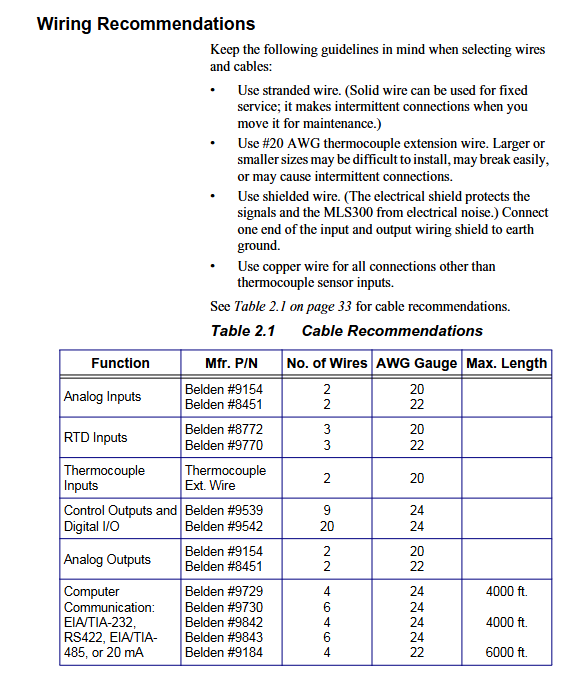
Power requirements: Processor module: 12-24V DC ± 15%, maximum 1A;
AIM/CIM module: 5V DC (provided by the processor module). It is recommended to use an isolated power supply to avoid sharing the circuit with high-power devices and reduce interference
Installation and wiring specifications
1. Pre installation requirements
Environmental conditions: working temperature 0-50 ℃, storage temperature -20-60 ℃, relative humidity 10% -95% (no condensation); Keep away from strong electromagnetic interference sources (such as frequency converters and high-voltage cables) and avoid vibration (amplitude ≤ 0.5mm, frequency ≤ 50Hz).
Qualification requirements: Installation personnel must have industrial electrical installation qualifications, and high-voltage wiring (such as power module input) must be operated by certified electricians; Prepare torque wrenches (0.5-0.6Nm), shielded cables, crimping tools, etc.
Space requirements: A 1.96 × 3.78-inch (50 × 96mm) opening should be reserved for the installation of the processor module panel, and a wiring space of ≥ 7.4 inches (188mm) should be reserved on the back; The AIM module requires a reserved installation space of 6.5 x 5 x 5.75 inches (165 x 127 x 146mm).
2. Installation steps of core components
(1) Processor module (MLS300-PM)
Cut 1.8 × 3.63 inch (46 × 92mm) openings on the panel, remove module brackets and baffles;
Insert the module into the opening, fit the installation ring on the back, fix the upper and lower brackets, and tighten the screws (torque 0.5Nm);
Connect the AIM/CIM communication cable (RJ45 interface, labeled "To AIM"), TB50 50 50 pin SCSI cable, and power supply (TB1 terminal:+V to 12-24V DC, COM to negative pole).
(2) Input module (AIM/CIM)
AIM module:
Fix the AIM-TB terminal board with 4 # 6 screws to ensure grounding (grounding resistance ≤ 4 Ω);
Connect sensor cables: thermocouple "+" is connected to A+, "-" is connected to A -; RTD 3-wire system requires the "common end" to be connected to A COM, and the "signal end" to be connected to A+/A -;
Connect AIM to the processor module via RJ45 cable and test AIM power supply (TB3 terminal:+5 IN to PWR COM voltage 4.75-5.25V DC).
CIM module:
Support DIN rail or direct installation, connect sensors through D-Sub 50 connectors (J1 for 16 channels, J2 for 32 channel expansion);
Communication cable (RJ45) connected to CIM J3 interface, power supply (TB2 terminal: EX connected to processor EX, COM connected to processor COM).
(3) Terminal board (TB50)
Choose DIN rail or bracket installation, connect 50 pin SCSI cable to the processor module;
Wiring specifications:
Digital output (terminals 9-42): When controlling SSR, connect+5V to the positive pole of SSR and connect the output terminal to the negative pole of SSR;
Digital input (terminals 43-50): One end of the external switch is connected to the input terminal, and the other end is connected to CTRL COM (terminal 3/4);
Power terminal (1-2):+5V is the output (for SSR, etc.), CTRL COM is the common terminal, and grounding is prohibited.
3. Wiring and anti-interference requirements
Recommended specifications for cable types and wiring requirements
Sensor cable thermocouple: 20AWG thermocouple extension wire; RTD: 22AWG shielded twisted pair cable; Linear signal: 22AWG shielded twisted pair cable should be kept away from high-voltage cables (≥ 10cm), and the shielding layer should be grounded at one end (processor end); RTD cable length ≤ 100m
Control the output cable with 24AWG multi-core shielded wire and separate it from the input cable to avoid parallel laying; SSR control line length ≤ 50m
Communication cable EIA/TIA-232: Belden 9729 (6-core shielded wire, ≤ 50m); EIA/TIA-485: Shielded 9843 (4-core shielded twisted pair, ≤ 1200m) with both ends of the shielding layer grounded; The EIA/TIA-485 bus requires a 200 Ω terminal resistor to be configured at both ends
Basic Operations and Configuration
1. Startup and initialization
After confirming that the wiring is correct, turn on the power and the processor module display screen will light up. After about 1 second, it will enter the "bar chart display" (default display shows 8 circuit statuses);
If an "AIM COMM FAIL" alarm occurs, it is necessary to check whether the AIM/CIM communication cable is securely plugged in and whether the power supply is normal;
The first startup requires the execution of the "NO key reset" (press and hold the NO key in the power-off state, press YES to confirm after powering on), and restore the factory default parameters (skip when backing up the configuration in advance).
2. Core operations (front-end panel)
(1) Loop monitoring and parameter adjustment
Display switching:
Press the BACK key to switch between "Bar Chart Display" (8 circuit status), "Single Circuit Display" (Single Circuit PV/SP/Output%), and "Job Display" (Current Running Job);
Under single circuit display, press the YES/NO key to switch circuits, press the CHNG SP key to modify the set point (press YES/NO to adjust the value, press ENTER to confirm).
Control mode switching:
Press the MAN/AUTO key to switch between "AUTO" and "MAN" modes; In manual mode, adjust the output percentage (0-100%) according to YES/NO;
Press MAN/AUTO+ENTER to start "TUNE", and the controller will automatically calculate PID parameters (ensuring process stability and no severe disturbances).
(2) Alarm processing
When the alarm is triggered, the display screen automatically switches to the fault circuit, displaying the alarm code (such as "FS" for sensor fault, "HP" for high process alarm), and the buzzer is activated;
Press the ALARM ACK button to confirm the alarm. If there are multiple alarms, they need to be confirmed one by one; After troubleshooting, the alarm will automatically clear;
The global alarm output (terminal 8) is activated when any unconfirmed alarm occurs, and can be connected to an external alarm light or buzzer.
3. Basic parameter configuration (Setup menu)
Enter the Setup menu through the "three key combination" (ENTER → ALARM ACK → CHNG SP), and the core configuration items are as follows:
Menu Name Key Parameter Configuration Description
When communicating with multiple devices, a unique address (1-247) must be set for the SETUP GLOBAL ParameterS controller address, communication baud rate, and power on output status; The baud rate needs to be consistent with the upper computer (default 19200bps)
SETUP LOOP INPUT input type, unit, filter coefficient selection corresponding to sensor type (such as "J T/C" and "RTD1"); Input filtering (0-255 scan) is used to suppress noise
SETUP LOOP Control PARAMS heating/cooling PID parameters (PB/TI/TD), the smaller the output filter PB (proportional band), the higher the gain; The longer the TI (integration time), the stronger the ability to eliminate steady-state errors; TD (Differential Time) is used to suppress overshoot
SETUP LOOP OUTPUTS heating/cooling output enable, output type, sensor fault output type optional "TP (time ratio)" "DZC (distributed zero crossing)" "SDAC"; When the sensor fails, the output can be set to 0% (default) or a custom value
SETUP LOOP ALARMS high/low process alarm, deviation alarm, alarm dead zone high process alarm set point needs to be higher than the process upper limit; Set the deviation alarm to SP ± 5% (to avoid frequent alarms); Set the dead zone to 2-5 (unit consistent with PV)
Advanced features (firmware optional)
1. Enhanced Features firmware
(1) Cascade Control
Application scenario: Suitable for processes with "primary secondary" variables (such as reactor temperature jacket temperature control), where the main circuit output serves as the secondary circuit set point;
Configuration steps:
Enter the SETUP LOOP CASCADE menu and select "PRIM. LOOP" (such as reactor temperature loop 1);
Set the "Base SP", "Minimum/Maximum Set Point", and "Heating/Cooling Span (HT/CL SPAN)" to define the magnitude of the impact of the main circuit output on the secondary circuit set point;
The secondary circuit (jacket temperature circuit 2) needs to enable the "cascade mode" to ensure that the sampling period of the main and secondary circuits matches.
(2) Ratio Control
Application scenario: Suitable for processes that require proportional control (such as KOH solution dilution, water flow KOH flow 1:2);
Configuration steps:
Enter the SETUP LOOP RATIO CON menu and select "MSTR LOOP" (water flow circuit 1);
Set "CTRL RATIO" (e.g. 0.5, KOH flow=water flow x 0.5), "SP DIFF" (compensating deviation, default 0);
The proportional circuit (KOH flow circuit 2) automatically follows the changes in the main circuit PV and maintains the set ratio.
2. Slope - Insulation Fasteners (Ramp/Soak)
Application scenario: staged temperature control process (such as material annealing: heating → insulation → cooling), supporting 17 profiles, each profile containing 20 segments;
Core functions:
Ramp: Rise from the current SP to the target SP within a set time (e.g. 10 ℃/min to 200 ℃);
Soak: Maintain the target SP setting time (such as holding at 200 ℃ for 60 minutes);
Trigger and Event: Each segment can be configured with 2 digital trigger inputs (such as external signal activation) and 4 event outputs (such as initiating agitation);
Configuration steps:
Enter the SETUP RAMP/SOAK PROFILE menu, select Profile (A-Q), and set the "Time Reference" (HH: MM/MM: SS);
Edit Segment: Set "Segment Time", "Target SP", "TOLERANCE" (if ± 2 ℃, pause timing if exceeded);
Assign Profile to the target circuit, press the RAM/SOAK key to start, and the display screen will show the remaining time and current segment number in real time.
Troubleshooting and Maintenance
1. Common fault handling
Possible causes and solutions for the fault phenomenon
The display screen is not properly connected to the power supply, and the processor module is faulty. Check the TB1 terminal voltage (12-24V DC); Replace the processor module for testing
Abnormal sensor readings (high/low), incorrect sensor wiring, incorrect input type configuration, interference confirmation of thermoelectric dipole/RTD wiring; Check the "Input Type" in the Setup menu; Check the grounding of cable shielding
No response output enabled, SSR fault, loose TB50 wiring entering SETUP LOOP OUTPUTS confirmation output enabled; Measure the voltage at the SSR control terminal (conducting at 5V DC); Re tighten the terminal screws
Communication failure address/baud rate mismatch, cable failure, EIA/TIA-485 terminal resistance not connected, check the communication parameters between the controller and the upper computer; Use a multimeter to test the continuity of communication cables; Connect a 200 Ω resistor at the beginning and end of the bus
Alarm for "FS (sensor malfunction)" thermocouple open/short circuit, RTD disconnection, input module malfunction check sensor cable continuity; Replace the sensor for testing; Replace the AIM/CIM module for testing
2. Regular maintenance
Requirements for maintenance cycle operation content
Check the display screen daily for any errors and ensure that the alarm light is functioning properly; Do not wipe the display screen with alcohol when cleaning the panel and sensor; The sensor probe is free of oil stains/damage
Check the wiring terminals weekly for any looseness; Test the emergency stop and alarm function terminals and tighten the screw torque to 0.5-0.6Nm; confirm the ALARM ACK is valid after triggering the alarm
Monthly calibration of critical circuits (using standard signal sources to simulate sensor inputs); The calibration error of the cooling holes in the cleaning AIM/CIM module should be ≤ 0.1% of the full range; Compressed air blows away dust from the heat dissipation holes (pressure ≤ 0.3MPa)
Replace the processor module battery (CR2032, after power failure to avoid configuration loss) annually; Check that the battery replacement time for the shielding layer of the communication cable is ≤ 5 minutes; The shielding layer is undamaged and well grounded
Order
Ordering code rules (core position)
Code bit meaning optional values
Input module 16=AIM316 (16 channels), 32=AIM332 (32 channels) C1=CIM316、C2=CIM332 -
Firmware Type 1=Standard, 2=Extruder Specific, 3=Enhanced Features, 4=Ramp/Soak, C=Custom-
Terminal board 0=none, 1=18 pin terminal block, 2=50 pin terminal block (including 3-foot SCSI cable)-
Communication jumper 0=EIA/TIA-232, 1=EIA/TIA-485, 2=EIA/TIA-485 terminal matching-
- OMRON
- ABB
- General Electric
- EMERSON
- Honeywell
- HIMA
- ALSTOM
- Rolls-Royce
- MOTOROLA
- Rockwell
- Siemens
- Woodward
- YOKOGAWA
- FOXBORO
- KOLLMORGEN
- MOOG
- KB
- YAMAHA
- BENDER
- TEKTRONIX
- Westinghouse
- AMAT
- AB
- XYCOM
- Yaskawa
- B&R
- Schneider
- KONGSBERG
- NI
- WATLOW
- ProSoft
- SEW
- ADVANCED
- Reliance
- TRICONEX
- METSO
- MAN
- Advantest
- STUDER
- DANAHER MOTION
- Bently
- Galil
- EATON
- MOLEX
- DEIF
- B&W
- ZYGO
- Aerotech
- DANFOSS
- Beijer
- Moxa
- Rexroth
- Johnson
- WAGO
- TOSHIBA
- BMCM
- SMC
- HITACHI
- HIRSCHMANN
- Application field
- XP POWER
- CTI
- TRICON
- STOBER
- Thinklogical
- Horner Automation
- Meggitt
- Fanuc
- Baldor
- SHINKAWA
- Other Brands
- UniOP
- KUKA
- Iba
- Beckhoff
- ADLINK
-
 Atlas Copco 48R050-01001 Relay Module
 -
 Atlas Copco 49-4100-01C5L Power Supply
 -
 Atlas Copco D303-DL-BASIC Controller
 -
 Atlas Copco 8433056445 I/O Expander Error Proofing Module
 -
 Atlas Copco PF4000-G-HW Screwdriver Controller
 -
 Atlas Copco 1202-66270-9325 Cooler Cover Valve
 -
 Atlas Copco EA2-TX-100 Dew Point Sensor
 -
 Atlas Copco PF4000-C-HW Controller 240VAC
 -
 Atlas Copco 1900 0701 05 Elektronikon Control Panel
 -
 Atlas Copco PF3107-C-HW Tensor 3-7 Controller
 -
 Atlas Copco TPS Control 8202900410 Controller
 -
 Atlas Copco 1900-1005-27 Circuit Board XAS 750
 -
 Atlas Copco Power Focus SL PF4002-C-HW Controller
 -
 Atlas Copco 1900520490 Air Compressor Control Panel
 -
 Atlas Copco QCM2-T-34050 Mass Flow Meter
 -
 Atlas Copco CSS91-B2 Compressor Controller Module
 -
 Atlas Copco PF3109-C-DN-HW Industrial Controller
 -
 Atlas Copco P1900520060 Air Compressor Controller Gateway
 -
 Atlas Copco Coupling 1635099600 Compressor Part
 -
 Atlas Copco ACTA 4000 Torque Calibrator
 -
 Atlas Copco 1626850005 Compressor Control Panel
 -
 Atlas Copco DMC50412 Digital Motion Controller
 -
 Kontron 2-DH34-0100-03 Atlas Copco SOKO-M@C-IIA-70 HMI 12-24V
 -
 Atlas Copco PF3107-G-HW PF3107GHW Controller
 -
 Atlas Copco PF3109-G-DN-HW PF3109GDNHW Controller
 -
 Atlas Copco 8433-2742-00 Power Supply Module
 -
 Atlas Copco 1900-0710-82 Controller Module
 -
 Atlas Copco 9040120204 Industrial Component
 -
 Atlas Copco 2906-0674-00 Zr55-90 8000H Maintenance Kit
 -
 Atlas Copco 1900 0701 23 High Range Regulator for Compressor Controller
 -
 Atlas Copco 4220263610 PF4 Tool Cable 10M ST Cable
 -
 Atlas Copco XC2002 1604951601 Compressor Panel
 -
 Atlas Copco S9 Tensor PF3009-G-DN-HW Controller
 -
 Atlas Copco 80471.000009 Pneumatic Roller Screw Unit
 -
 Atlas Copco 8433710005 PF4000-C-HW Compact Controller Profibus
 -
 Atlas Copco PF4002-G-HW Power Focus Controller
 -
 Atlas Copco 8431038150 Impulse Nutrunner
 -
Atlas Copco PF6000 Power Focus Nutrunner Controller
-
 Atlas Copco 1626850006 Compressor Controller Panel
 -
 Atlas Copco STR61-70-13 Tensor Angle Wrench
 -
 Atlas Copco ETV ST61-40-10 Right Angle Electric Screwdriver with Cable
 -
 Atlas Copco MK5S Touch Display Controller P1900520400
 -
 Atlas Copco 1900520020 Controller Panel for Compressor
 -
 Atlas Copco SRTT-B 1000Nm-50 Transducer 8059094675
 -
 Atlas Copco ETV ST61-50-10 Right Angle Electric Screwdriver with Cables
 -
 Atlas Copco 4240070100 Power Supply Module
 -
 Atlas Copco TC-52S-I TC52SI Controller
 -
 Atlas Copco ACTA 4000 QC Torque Calibrator
 -
 Atlas Copco 8433 1236 51 ETV S42-10-10 Right Angle Nutrunner
 -
 Atlas Copco ETV STB63-50-B10-BCR-IRCW Tensor STB Right Angle Nutrunner
 -
 Atlas Copco PF6000 SE-10523 Screwdriver Control System
 -
 Atlas Copco Power MACS TC52S 4240 0442 81 Controller
 -
 Atlas Copco 1900071162 Operator Interface Panel
 -
 Atlas Copco 4230-1705-80 I/O Expansion Module
 -
 Atlas Copco 8433 0005 10 Power Supply Module
 -
 Atlas Copco 8433-0020-20 Interface Module
 -
 Atlas Copco TC-4000-S 8435 6500 00 Controller
 -
 Atlas Copco PF4002-C-HW Power Focus SL Controller
 -
 Atlas Copco STanalyser STA-6000 8059095560 Torque Analyzer
 -
 Atlas Copco ComNode 2 Touch 8433271110 Communication Gateway
 -
 Atlas Copco PF3000-C-HW Tensor S4 S7 RBU Controller
 -
Atlas Copco PPBE0613 24VAC Control Panel
-
Atlas Copco PF3000-C-HW Tensor S4 S7 Controller
-
 Atlas Copco Neos ARC-D130-S+ Inverter Drive
 -
Atlas Copco Power Focus SL PF4002-G-HW Controller
-
 Atlas Copco 8436 6770 00 ILT Base Station
 -
 Atlas Copco 1900520400 Air Compressor Control Panel
 -
 Atlas Copco 1900-0711-51 Display Keypad Unit
 -
 Atlas Copco 1900-0710-52 Communication Control Board
 -
 Atlas Copco 1900-0701-04 Control Interface Module
 -
 Atlas Copco 8092 1143 40 SRTT Transducer 180Nm
 -
 Atlas Copco MT Focus 6000 Controller with Pump and Screwdriver
 -
 Atlas Copco Elektronikon GraphicPlus Controller PPBE0622 PPBE0633
 -
 Atlas Copco PF3109-G-DN-HW Tensor 8-9 Power Focus Nutrunner Control
 -
Atlas Copco Elektronikon P1900520440 Touch Controller
-
 Atlas Copco Power Focus 8 Controller 8436280002
 -
 Atlas Copco 8436 1500 03 FlexCarrier 3-Slot Torque System Component
 -
 Atlas Copco Power Focus 6000 PF6000 Industrial Controller
 -
 Atlas Copco TC-4000-P-PB-ES Power Macs Controller
 -
 Atlas Copco 8433-0015-20 8433001520 Cable Assembly
 -
 Atlas Copco 49X10301AB Pressure Transducer Sensor
 -
 Atlas Copco 8436180002 Replacement Filter Element
 -
 Atlas Copco C4700A01V216 Compressor Control Module
 -
 Alcatel-Lucent 3HE01019AAAA01 High-Speed Interface Module
 -
 Alcatel-Lucent 111381 Power Distribution Module
 -
 Alcatel TN 2523 1:1 CDN III Module – MRPQAE3
 -
 Alcatel-Lucent 3he06151aaac01 8-Port Interface Module – IPUIBKB3AA
 -
 Alcatel-Lucent LNW46 DMX Metro OC12 Interface Module – 108694878
 -
 Alcatel-Lucent 41A12C FT-2000 Optical Transponder Unit – 108188053
 -
 Alcatel-Lucent 8DG02607AA POW100 DC-DC Converter Module
 -
 Alcatel-Lucent LambdaXtreme WWBQ21 40G Optical Transponder
 -
 Alcatel-Lucent TN1891 5ESS Protocol Handler PHV5 Commcode 108747064
 -
 Alcatel-Lucent 300-0303-900 T1D3PDL1AE Digital Matrix Card
 -
 Alcatel-Lucent G-821M-A Module
 -
 Alcatel Lucent MPT-GC Eth 1G+ARM TX 81-86GHz 3DB80005AAAAO1
 -
 Nokia 3KC48990AB 1830PSS 16FAN2 Fan Unit
 -
 Alcatel 3EC17041AA PSPC-G4 PCB CP011200552
 -
 Alcatel 300-0437-906 Rev F DEXCS DMC T1D1L0S Module
 -
 Alcatel-Lucent 3DW03697ABBA01 TFD64A Module
 -
 Alcatel-Lucent AWR12 S1-1 UN Interface T3PQAC3AAA
 -
 ALCATEL LUCENT 9500-MPR ODU RADIO MPT-HC V2 9558HC 3DB20914BAAA03 6GHZ
 -
 Alcatel-Lucent 9500-MPR ODU 300 11GHz Microwave Radio MPT 3DB23035AEAA01
 -
 Alcatel 2C7-1005-000 Teflon Bell Jar Holder Ring – 146111
 -
 Alcatel-Lucent BNJ118 S1:4 Circuit Board – Interface Module
 -
Alcatel-Lucent 9500-MPR ODU 300 6GHz Microwave Radio MPT 3DB23215AFAA01
-
 Alcatel 3EM04001AA Signal Processing Unit with Accessory Cards
 -
 Alcatel VAUCAL5KAB AA1418FE2BG 3FE67437AAD02 Interface Card
 -
Alcatel-Lucent 1642 Edge Multiplexer N1217P YF – Access Node
-
 Alcatel-Lucent 3HE07158BA 7750 SR-12 12-Port 10GIGE MultiCore IMM IPUCA741AA
 -
 Alcatel 101200429000 Power Divider 746-776 MHz with Heatsinks
 -
 Alcatel-Lucent 9500-MPR ODU 300 MPT 6GHz 3DB23215ADAA01 High Power Radio
 -
 Alcatel-Lucent 9500-MPR MPT-HC 23GHz 2/2P ODU Radio 3DB20474BA
 -
Alcatel-Lucent 9500-MPR ODU 300 MPT 6GHz 3DB23215AAAA01 Low Power Radio
-
Alcatel 3BA52126ABAA OmniPCX 4400 Compact Cabinet
-
 Alcatel-Lucent 3HE12300AA 7750 SR-1 Subrack with Licenses
 -
Alcatel 300-1368-903 Rev C DEXCS SPA-1 T1PQAC1 Line Card
-
 Alcatel-Lucent 408977981 WOWUAB6HAA 10G XPR OTU2 XPonder Card
 -
 Alcatel-Lucent-Nokia 3HE08423AARC01 7750 SR Control Processor Module IPUCBGZ1AA
 -
 Alcatel-Lucent 9500-MPR ODU 300 MPT 6GHz 3DB23215ABAA01 Low Power Radio
 -
 Alcatel-Lucent CPU7-2 3BA23259ABJE 05 Control Processor Module
 -
 Alcatel WTM11AD 3DW03915DABA01 Optical Transponder Module
 -
Alcatel-Lucent 1340FMPK Card Chip BA5IVY6BAA – Processor Module
-
 Alcatel-Lucent 3HE06151ACAC01 Control Fabric Module
 -
 Alcatel-Lucent 9500-MPR 18GHz 1P-1 Protection ODU Radio 3DB20433BA AA04
 -
 Alcatel-Lucent 9500-MPR ODU MPT-HC 18GHz Radio 3DB20433BAAA04
 -
 Alcatel-Lucent SM269 LMPQ04KAXX Circuit Pack – Interface Module
 -
 Alcatel OME25HP Filter Cartridge – 107494
 -
Alcatel-Lucent ALU-BZ74 99BC-4 –48V Battery Cabinet


