
Watlow PM PLUS ™ PID/Integrated Limit Controller
Watlow PM PLUS ™ PID/Integrated Limit Controller
Product Core Overview
Watlow PM PLUS ™ It is an enhanced PID/integrated limit controller that optimizes user experience and functional scalability while being compatible with the previous generation EZ-ZONE PM controller. The product is positioned as an industrial grade temperature and process control, supporting single/dual PID control loops and integrating functions such as limit control, timing, and curve programming. It is widely used in semiconductor manufacturing, chemical reactions, equipment heating, and other scenarios. Its core advantages include Bluetooth wireless configuration, intuitive touch operation, support for multiple communication protocols, and comprehensive security authentication, which can adapt to the precise control needs in complex industrial environments.
Core features:
Compatibility and Upgradeability: Fully compatible with the wiring and parameter settings of EZ-ZONE PM, can be replaced without hardware modification, and upgraded with smooth touch keyboard, multilingual display (English/German/Spanish) and other operations.
Control capability: Supports PID (including P/PI/PD mode), switch control, curve programming (4 curves, a total of 40 steps), equipped with TRU-TUNE+adaptive algorithm and automatic tuning function to improve dynamic control accuracy.
Communication and wireless functions: Supports Bluetooth (via EZ-LINK mobile application), Modbus RTU/TCP, EtherNet/IP, DeviceNet and other protocols, allowing remote configuration of parameters and monitoring, reducing on-site wiring dependence.
Safety and Certification: Certified by UL, CSA, CE, RoHS, FM, etc., some models support Class 1, Zone 2 hazardous environments, integrate limit control and multiple alarms to ensure equipment and personnel safety.
Product model and core configuration
(1) Model classification and structure
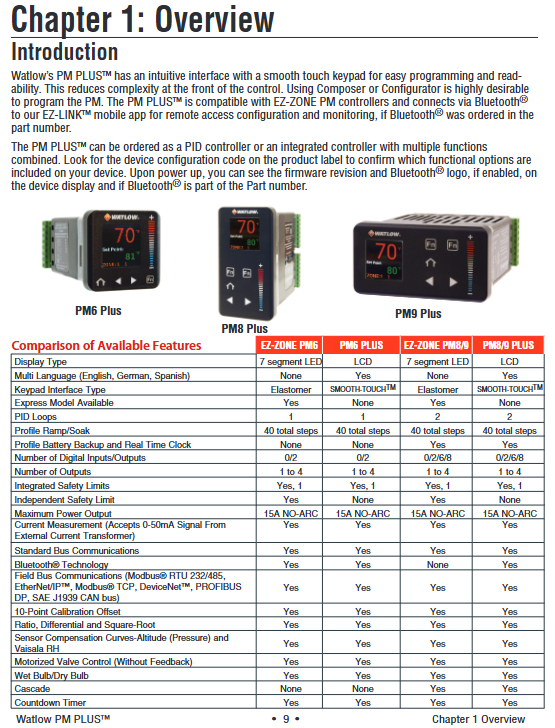
The product is divided into three series based on installation size and function. The core model parameters are defined by a 14 digit configuration code, and the key dimensions are as follows:
Classification, specific specifications, applicable scenarios
Installation size: 1/16 DIN (PM6), 1/8 DIN vertical (PM8), 1/8 DIN horizontal (PM9). Different panel space requirements, 1/16 DIN is suitable for compact scenarios, and 1/8 DIN is suitable for multi parameter display requirements
Core function - PID basic type (C/R/T/J/N): including universal input, curve programming (some models), and timing function
-Integrated limit type (L/M): Additional support for sensor backup, over limit protection, output 4 fixed limit control - Basic type: Single heating/cooling control
-Integrated type: Scenarios that require dual safety protection (such as high-temperature furnaces and hazardous material heating)
The power supply and I/O power supply can be selected from 100-240V AC or 20-28V AC/12-40V DC. The digital I/O supports 2-point or 6-point expansion to adapt to the global power grid. Multiple I/O point models can be connected to external trigger signals (such as emergency stop and start switches)
Output types support switch DC, mechanical relay (5A), SSR (0.5A), NO-ARC relay (15A), universal process output (0-10V/4-20mA) - NO-ARC relay: high-power resistive load (such as large heaters)
-Universal process output: signal retransmission to recorder or PLC
(2) Core hardware specifications
Category detailed parameters
Input Characteristics - Universal Input: Thermocouple (J/K/T/E, etc.), RTD (100 Ω/1k Ω), Process Signal (0-20mA/0-10V)
-Input accuracy: ± 0.1% range (typical value), temperature stability ± 100ppm/° C
-Sensor backup: supports dual sensor switching, automatically switches to backup sensor in case of failure
Output Capacity - Maximum Output: 15A NO-ARC Relay (AC Load Only)
-Process output: 0-10V (minimum 1k Ω load) or 4-20mA (maximum 800 Ω load), accuracy ± 20 μ A/± 10mV
Environmental adaptability - Operating temperature: 0-65 ° C (non condensing)
-Protection level: Front panel IP67/IP4X (indoor)
-Anti interference: Compliant with IEC 61000-4 series standards, anti-static and radio frequency interference resistant
Installation and wiring specifications
(1) Installation requirements
Panel opening and fixing
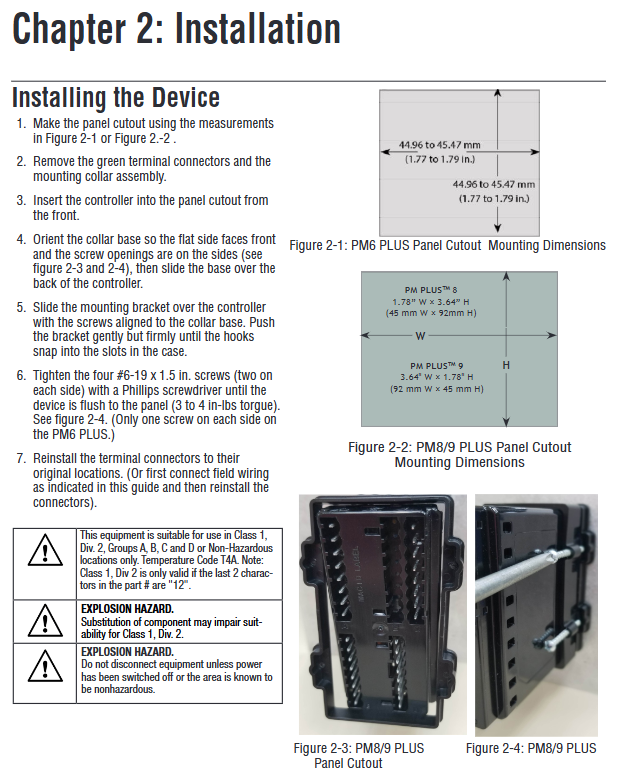
Size standards: 1/16 DIN (PM6) opening 45 × 45mm, 1/8 DIN (PM8/9) opening 45 × 92mm (vertical)/92 × 45mm (horizontal).
Installation steps: Remove the terminal and fixing ring → Insert the controller from the front of the panel → Align the fixing ring and tighten the screws (torque 3-4 in lbs) → Reinstall the terminal.
Environmental restrictions: Avoid corrosive gases and high vibration environments, install vertically to ensure heat dissipation, and reserve a spacing of ≥ 30mm for parallel installation of multiple units.
Power supply and wiring safety
Power adaptation: High power models (1/2) are connected to 100-240V AC, while low-power models (3/4) are connected to 20-28V AC/12-40V DC, and must match the power type indicated on the equipment label.
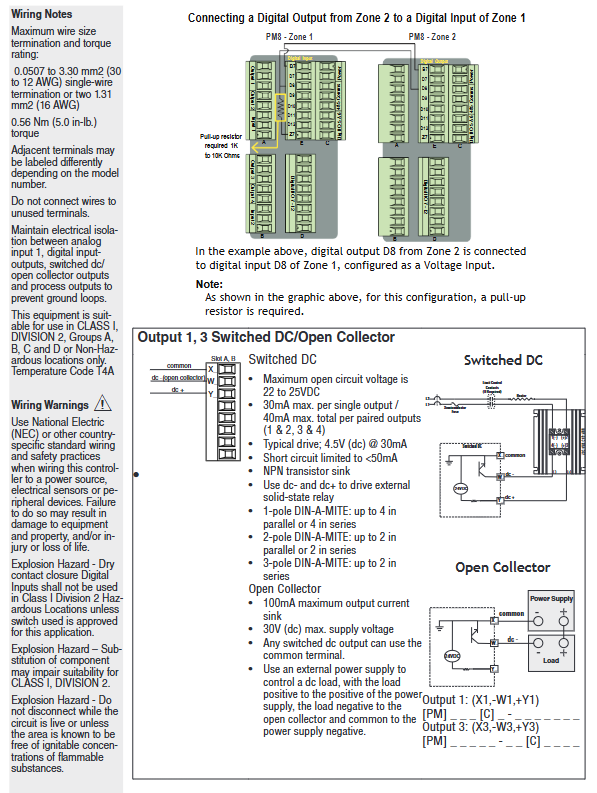
Wiring specifications: Wire specifications are 12-30 AWG, terminal torque is 5.0 in lb, unused terminals need to be empty, analog input and power/digital signals need to be isolated and wired to avoid grounding loops.
Attention to hazardous environments: Class 1, Zone 2 models (with "12" at the end of the configuration code) require the use of explosion-proof switches. It is prohibited to plug or unplug wiring when powered on, and replacement parts must comply with hazardous environment certification.
(2) Key wiring example
Sensor wiring
Thermocouple: Connect the negative electrode (usually red) to the S1/S2 terminal, and the extension wire should be consistent with the thermocouple material (such as K-type extension wire for K-type).
RTD: 2/3 wire system, 3-wire system needs to ensure that the resistance of the three leads is consistent (≤ 20 Ω), S1 is connected to a white lead to compensate for the lead resistance.
Process signal: 4-20mA signal connected to+R1/- S1 terminal, 0-10V signal connected to+T1/- S1 terminal, requiring separate shielded wiring.
Output and communication wiring
NO-ARC relay: only connected to AC loads (85-264V AC), load current ≤ 15A, prohibited from series use, cycle time ≥ 5 seconds.
Communication wiring: RS-485 uses twisted pair cables (T+/R+connected to B, T -/R - connected to A), and a 120 Ω terminal resistor needs to be added at the end of the bus. The distance between the communication line and the power line should be ≥ 305mm.
Digital I/O: 2-point I/O model (configuration code 2/4) supports dry contact or 3-36V DC input, 6-point I/O model (configuration code C/D/M/N) expandable switch output, with a maximum load of 1.5A per channel.
Operating interface and core functions
(1) User interface
Touch buttons and display
Key functions: Home button (return to home page), left and right buttons (menu navigation), increase and decrease buttons (parameter adjustment), custom function buttons (F1/F2, can set start/stop curves, reset alarms, etc.).
Display mode: default display of process values (such as temperature), set values, and regions, supporting 4 themes (such as white background, high contrast blue background), customizable display parameters (such as output power, remaining time).
Message prompt: Automatically switch display in case of alarm/error, such as "Limit High" or "Input Error". The lock alarm can be cleared by pressing the home button.
Menu Structure
Operations List: Real time monitoring and adjustment of operating parameters (such as set values, manual power).
Setup: Configure basic parameters such as input type, control algorithm, alarm threshold, etc.
Profile: Edit curve steps (heating/holding/waiting for events).
Factory List: Calibration, password locking, factory reset (permission required).
(2) Core function operation
PID control and tuning
Auto tuning: Enter "Operations - Autotune" and select "Yes". The controller aims to achieve 90% of the set value and automatically calculates parameters such as proportional band and integration time. During the tuning period, it outputs 100% power and ensures load safety.
TRU-TUNE+adaptive: enabled in the "Setup Control Loop", automatically optimizes PID parameters by monitoring process value fluctuations, suitable for scenarios with dynamic load changes (such as batch production).
Manual tuning: If the automatic tuning effect is not good, you can manually adjust the Heat Prop. Band and Time Integral. It is recommended to set the integration time to 0 first and gradually reduce it after stabilization to eliminate static errors.
Curve Programming (Ramp/Soak)
Curve configuration: Enter the "Profile List", each curve supports 10 steps, including Time/Ramp Rate, Soak, Wait for Event/Process, Jump, etc.
Example: Set the target temperature for "Step 1 (heating up)" to 150 ° C for 30 minutes; Step 2 (insulation) lasts for 60 minutes; Set 'Step 3' to 'Hold' to maintain the final temperature.
Startup method: It can be remotely started through function keys, numerical input, or communication. It can pause/resume during operation. If the restart time is ≤ the set "Power Off Time" after power failure, the curve can be continued.
Alarm and limit control
Alarm configuration: Supports 4 alarm channels, including process alarm (fixed threshold), deviation alarm (relative set value), and can be set to lock/non lock, shield (not triggered temporarily when starting/set value changes).
Limit control: The integrated limit model (L/M) supports high/low limit, and automatically cuts off the output when it exceeds the limit. It needs to be manually reset (through buttons, digital inputs, or communication), and outputs 4 fixed limit dedicated.
Current monitoring: Equipped with a current transformer (CT) input, it can detect open/short circuits in the heater, trigger the "Heater Error" alarm, and protect the load and controller.
Communication and Remote Configuration
(1) Communication Protocol and Settings
Protocol configuration key points applicable scenarios
Bluetooth (EZ-LINK application) devices can be paired through Bluetooth after being powered on, supporting parameter reading and writing, alarm viewing, curve downloading, and quick on-site configuration without the need for physical wiring, reducing wiring costs
Modbus RTU baud rate 1200-19200bps, addresses 1-247, supports function codes 03 (read register), 06 (write single register), and 16 (write multiple registers) to connect PLC or HMI and achieve multi device networking
EtherNet/IP supports DHCP or fixed IP, with a maximum of 40 members in the I/O assembly, capable of real-time transmission of process values and control commands in industrial Ethernet environments, requiring high-speed data exchange
DeviceNet node address 0-63, baud rate 125/250/500kbps, supports implicit/explicit communication, compatible with Rockwell and other brands of PLCs, suitable for device layer networking
(2) Remote configuration process (using Bluetooth as an example)
Download the EZ-LINK app (supports iOS/Android), turn on the controller Bluetooth ("Setup - Global - Bluetooth" set to "On").
Search for and pair devices within the application, enter "Parameter Configuration", and modify input types (such as thermocouple J-type), PID parameters, and alarm thresholds.
Save parameters to the device or local (supports 2 sets of user configurations), monitor process values and output power in real-time during operation, and receive alarm push notifications.
Maintenance and troubleshooting
(1) Daily maintenance
Regular inspection: monthly cleaning of panels and heat sinks, quarterly tightening of terminals (to avoid cold flow loosening), annual calibration of input/output (via the "Factory Calibration" menu, requiring a standard signal source).
Parameter backup: Save the configuration to User Set 1/2 through "Setup - Global - Save Settings As" to avoid resetting after a malfunction.
Firmware Upgrade: Supports firmware upgrade through communication port. The latest firmware and upgrade tool must be downloaded from the Watlow official website. Power off is prohibited during the upgrade process.
(2) Common fault handling
Possible causes and solutions for the fault phenomenon
No display/output power supply not connected, fuse burned out, loose terminals. Check the power supply voltage and fuse (Slot C terminal 98/99), re tighten the terminals, and replace the fuse (matching model required)
The temperature cannot reach the set value due to heating output fault, improper PID parameters, sensor error check output wiring and load, re perform automatic tuning, calibrate sensor offset ("Setup - Analog Input - Calibration Offset")
Alarm cannot be cleared. Alarm not cleared, alarm locked, parameter error confirmation process value returned to safe range. Clear it through "Operations - Alarm - Clear Alarm" and check the alarm type configuration
Communication failure: Address/baud rate mismatch, wiring error, interference with unified device communication parameters. Check RS-485 polarity (A/B lines), route away from power lines, and add terminal resistors
- OMRON
- ABB
- General Electric
- EMERSON
- Honeywell
- HIMA
- ALSTOM
- Rolls-Royce
- MOTOROLA
- Rockwell
- Siemens
- Woodward
- YOKOGAWA
- FOXBORO
- KOLLMORGEN
- MOOG
- KB
- YAMAHA
- BENDER
- TEKTRONIX
- Westinghouse
- AMAT
- AB
- XYCOM
- Yaskawa
- B&R
- Schneider
- KONGSBERG
- NI
- WATLOW
- ProSoft
- SEW
- ADVANCED
- Reliance
- TRICONEX
- METSO
- MAN
- Advantest
- STUDER
- DANAHER MOTION
- Bently
- Galil
- EATON
- MOLEX
- DEIF
- B&W
- ZYGO
- Aerotech
- DANFOSS
- Beijer
- Moxa
- Rexroth
- Johnson
- WAGO
- TOSHIBA
- BMCM
- SMC
- HITACHI
- HIRSCHMANN
- Application field
- XP POWER
- CTI
- TRICON
- STOBER
- Thinklogical
- Horner Automation
- Meggitt
- Fanuc
- Baldor
- SHINKAWA
- Other Brands
- UniOP
- KUKA
- Iba
- Beckhoff
- ADLINK
-
 SIGMATEK 0332.554.03 Board 371071000154
 -
 SIGMATEK 12-250-021 Base Plate Back Panel CM5V020
 -
 SIGMATEK DM162 S-DIAS Digital Mix Module
 -
 DEMAG ERGOTECH 061 381 66 Sigmatek 9842.243.02 Circuit Board
 -
 SIGMATEK CP313-1 PLC Module
 -
 Sigmatek ETV0551-2 VARAN Touch Terminal
 -
 Sigmatek SDM 081 FS S-Dias Safety Module
 -
 DEMAG 05-250-023 Ergotech Motherboard with Sigmatek TMS012
 -
Sigmatek CM5V020 12-250-023-K Wiring Base
-
 Sigma Tek 5000B-37 Attitude Gyro Indicator
 -
 Sigmatek SDD120-2 DIAS Drive
 -
 Sigmatek CME221 Memory Module
 -
 Sigmatek DCP640 DIAS Central Unit
 -
 Sigmatek STO040 Safety Output Module
 -
 Sigmatek CET281 Control Panel
 -
 Sigmatek CIPC LX800 Demag NC5 CPU
 -
 Sigmatek DKL093 05-024-093 Terminal Module
 -
 Sigmatek AI088 20-009-088 Analog Input Module
 -
 Sigmatek CAI888 Analog Input Module
 -
 SIGMATEK CCA021 12-025-021 Analog Output Module
 -
SIGMATEK 1104.579.05 Control Module
-
SIGMATEK SDI100 Digital Input Module
-
 SIGMATEK C-IPC 256MB LX800 Compact Dias
 -
 SIGMATEK 9423.090.02 Control Module
 -
SIGMATEK C-IPC 256 Power Supply 148498
-
 SIGMATEK CAI025 Analog Input Module
 -
 SIGMATEK CTO166 Digital Output Module
 -
 SIGMATEK CP112 20-004-112 Processor Module
 -
SIGMATEK CAI887 12-009-887 Safety Module
-
 Sigma-Tek 4000B-31 Directional Gyro 1U262-002-42
 -
Sigmatek C-IPC 256MB LX800 IPC Controller
-
Sigmatek C-IPC 01-450-031 Industrial PC LX800
-
Sigmatek C-IPC 256 Industrial PC Controller
-
Sigmatek CCP-531 PLC Processor Module
-
Sigmatek CDI163 Digital Input Module
-
 Sigmatek ETV0501 VARAN Terminal 12-230-0501
 -
 Sigmatek CTMS020 C-DIAS Technology Module
 -
 Sigmatek CIV512 VARAN Switch Module
 -
 Sigmatek HU011 20-080-011 Interface Module
 -
 SIGMATEK SLIDES DAM 124 Module
 -
 SIGMATEK C-IPC 161 01-450-161L Industrial PC
 -
SIGMATEK C-IPC 128MB VIA 733MHz 01-450-024-K
-
 SIGMATEK 12-780-012 R8-IPC Geode LX800 Module
 -
SIGMATEK CAM124 Analog Module
-
 SIGMATEK S1 032-8AF61-R4 EZ Servo Motor
 -
 SIGMATEK CTO163 Digital Output Module
 -
 SIGMATEK CCP082 12-004-082 Processor Module
 -
 SIGMATEK CRCH081 C-DIAS Temperature Module
 -
 SIGMATEK PC322-K 01-310-322-K Industrial PC
 -
SIGMATEK SDD310-2 Servo Drive
-
 SIGMATEK AI084 Analog Input Module
 -
SIGMATEK CRCH081 12-752-081 Temperature Module
-
Sigma-Tek 5000L-4 Attitude Gyro 1U284-001-3
-
 SIGMATEK CM5V020 12-250-023-K Wiring Module
 -
Sigma-Tek 4000H-6 Directional Gyro IU262-035-7
-
 SIGMATEK Dias DCP160 05-004-160 Processor Module
 -
SIGMATEK 0147.395.02 Control Module
-
SIGMATEK A1084 Control Module
-
SIGMATEK DI200 20-006-2000 Digital Input Module
-
Sigmatek DNC115 Encoder Module
-
 Sigmatek DAM122 05-017-122 Analog Module
 -
Sigmatek 9802.289.01 Control Board TA71 Display
-
Sigmatek TO127 20-007-127 Digital Output Module
-
Sigmatek DNC031 05-011-031 Digital Module
-
Sigmatek VI022 20-003-022 Interface Module
-
Sigmatek CAI085 Analog Input Module
-
 Sigmatek CP111 S-DIAS CPU Module
 -
 Sigmatek CTMS030 Krauss Maffei Module
 -
 Sigmatek CAM123 Control Module
 -
 Sigmatek TAE732-P 01-240-732-P Touch Display Unit
 -
Sigmatek MDM021 Digital Mixed Module
-
Sigmatek DCP642 DIAS Central Unit
-
 Sigmatek CST022 12-014-022 C-DIAS Module
 -
 Sigmatek SRO021 20-893-021 Safety Relay Output
 -
 Krauss Maffei MC5 Control System Sigmatek
 -
 Sigmatek DC061 Module 18-24VDC 300mA
 -
 Herrmann EVT0855 Ultrasonic Welder Touch Panel
 -
Sigmatek CIV521 Control Module 1.4A 2W
-
 Sigmatek DDI61 05-006-161 Digital Input Module
 -
SIGMATEK ETT312-E Touch Terminal 01-230-312
-
Cessna S3326-1 Sigma Tek 5000B-67 Gyro 1U149-015-9
-
SIGMATEK PS101 Power Supply Module
-
SIGMATEK 0332.554.03 Control Module 371071000154
-
 SIGMATEK ETT312-E Touch Terminal 01-230-312
 -
SIGMATEK CDM163 Control Module
-
 SIGMATEK VSV046 16-023-046 Module
 -
SIGMATEK AM221 20-017-221 Analog Module
-
SIGMATEK CTS051 12-053-051 Control Module
-
SIGMATEK AM221 20-017-221 Analog Module
-
Sigmatek CSDI161 12-891-161 Safety Input Module
-
Sigma Tek 4000C-1 Directional Gyro Indicator
-
Sigmatek ETV0501 12-230-0501 VARAN Terminal
-
Sigmatek DDM165 SLIDES Module
-
 Sigmatek N100 20-011-100 Control Module
 -
Sigmatek AKM54K-ANC2R-B0 PM Servo Motor
-
Sigmatek CTO166 Digital Output Module
-
Sigmatek CP212-K 20-004-212-K CPU Module
-
Sigmatek CDI161 Digital Input Module
-
Sigmatek DCC080 05-700-080-2 Control Module
-
 SIGMATEK SCP011 S-DIAS Safety CPU
 -
SIGMATEK SCP011 S-DIAS Safety CPU
-
SIGMATEK SRO022 Relay Output Module
-
SIGMATEK MDD 121 Drive Axis Module
-
SIGMATEK DSI021 SLIDES Siemens Interface
-
SIGMATEK DIAS DCP161 Module 05-004-161
-
 Sigmatek ETT312 Built-in Touch Terminal
 -
SIGMATEK DCP 643 DIAS Controller System
-
SIGMATEK CIO021 Multi I/O Module
-
SIGMATEK CTMS020 Control Module
-
 Sigmatek CME 221 Memory Module
 -
Sigmatek 0420.615.01 Control Board
-
Sigmatek CP111 20-004-111 CPU Module
-
Sigmatek 9405.065.03 Control Board
-
Sigmatek ETEK 01-450-032-K C-IPC 256MB Industrial PC
-
Sigmatek CTO163 12-007-163 Safety Output Module
-
Sigmatek TO081 20-007-081 Digital Output Module
-
 Sigmatek SI021 20-022-021 Safety Input Module
 -
Sigmatek 05-052-014 Control Module HW 1.0
-
Sigmatek TO127 20-007-127 Digital Output Module
-
Sigmatek SV141 20-023-141 VARAN Splitter
-
 SIGMATEK CIV513 C-DIAS VARAN Control Module
 -
Sigmatek DCP 642 SLIDES Control Module with DKL002
-
Sigma-Tek 5000B-36 Attitude Gyro
-
SIGMATEK 01-450-024 C-IPC Industrial Computer
-
SIGMATEK CP102 S-DIAS Processor Module
-
Sigmatek CRCH081 12-752-081 PLC Module
-
SIGMATEK SDD340-46 Series Drive
-
SIGMATEK TAE731 Touch Display Unit


