
ABB Sace BSD series brushless servo drive
ABB Sace BSD series brushless servo drive
Equipment Overview
1. Specification of servo amplifier
Model Applicable Motor Capacity Power Type Key Parameters
BSD0100 BSM0100 (100W) single-phase 200-230V carrier frequency 10kHz, overload capacity 300%/about 3 seconds
BSD0200 BSM0200 (200W) single-phase 200-230V-
BSD0400 BSM0400 (400W) single-phase 200-230V-
BSD0750 BSM0750 (750W) single-phase/three-phase 200-230V-
BSD1000 BSM1000 (1000W) three-phase 200-230V-
BSD1500 BSM1500 (1500W) three-phase 200-230V-
BSD2000 BSM2000 (2000W) three-phase 200-230V-
2. Specification of servo motor
Series model Capacity Rated speed Rated torque Encoder
Low inertia BSM0100 100W 3000r/min 0.318N · m 17 bit serial
Low inertia BSM0200 200W 3000r/min 0.637N · m 17 bit serial
Low inertia BSM0400 400W 3000r/min 1.27N · m 17 bit serial
Low inertia BSM0750 750W 3000r/min 2.39N · m 17 bit serial
Medium inertia BSM1000 1000W 2000r/min 4.77N · m 17 bit serial
Medium inertia BSM1500 1500W 2000r/min 7.16N · m 17 bit serial
Medium inertia BSM2000 2000W 2000r/min 9.55N · m 17 bit serial
3. Model coding rules
Servo amplifier: Only specify power, such as the power corresponding to "XXXX" in "BSDXXXX" (0100=100W).
Servo motor: format is "BSMXXXXXX", where "XXXX"=power, "C"=shaft type (C=keyway, L=flat shaft), "N/B"=brake (N=none, B=present), "00/01"=option (00=none, 01=oil seal).
Installation requirements
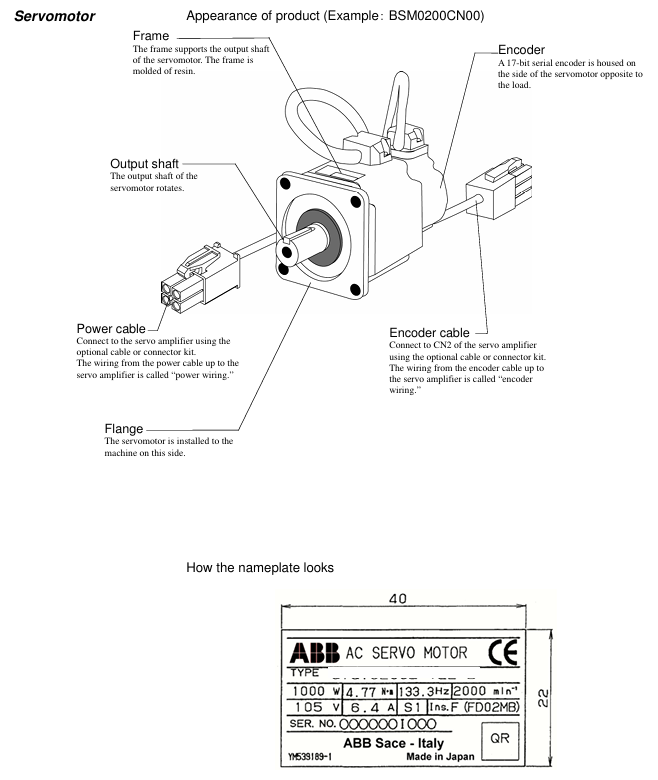
1. Installation of servo motor
Project Requirements Remarks
Storage environment temperature -20 ° C~60 ° C, humidity 10% -90% RH (no condensation), the same requirement applies when equipped with gear heads
Working environment temperature -10 ° C~40 ° C, humidity 10% -90% RH (no condensation), temperature with gear head 0 ° C~40 ° C
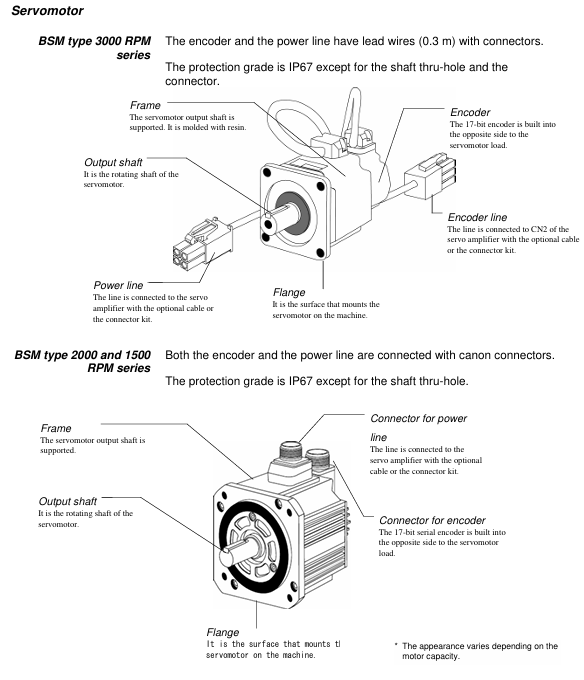
The installation direction can be horizontal, downward, or upward (in accordance with IEC standards IMB5/L51, etc.), and the encoder end should not be subjected to force
Load limit radial load (127N-510N), axial load (19N-253N) refer to Table 2-5 in the document, such as BSM0100 radial 127N
Cable protection for mobile scenarios requires drag chains with a maximum bending radius to avoid oil/water immersion
2. Installation of servo amplifier
Project Requirements Remarks
Storage environment temperature -20 ° C~85 ° C, humidity 10% -90% RH (no condensation), altitude ≤ 1000m, no dust/corrosive gas
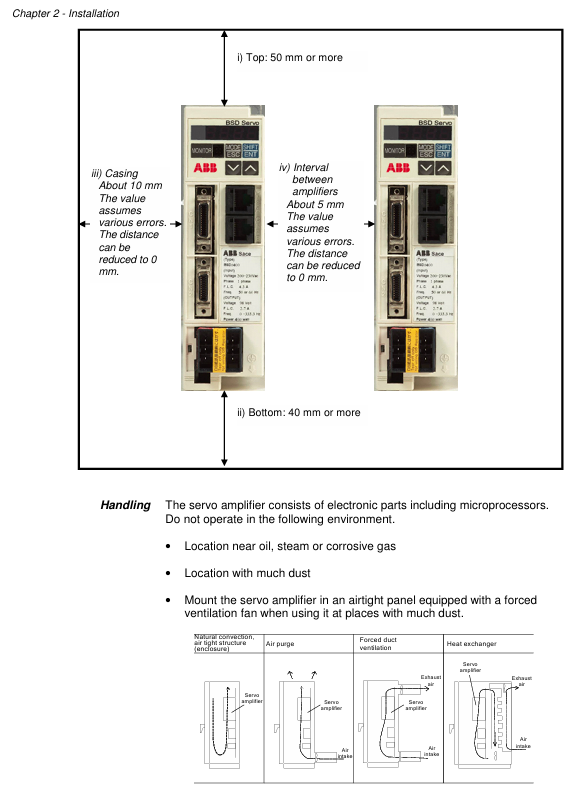
Working environment temperature -10 ° C~55 ° C, humidity 10% -90% RH (no condensation), non drip/dust-proof, multiple installations require spacing
Installation direction Upright direction (horizontal marked with "BSD") Heat dissipation requirements
When the installation spacing is ≥ 50mm at the top and ≥ 40mm at the bottom, and the spacing between multiple parallel units is ≥ 5mm and < 5mm, the rating needs to be reduced to 80% ED
Leave ≥ 70mm (for easy operation) for wiring in the front space, with a depth of 165mm for 1.0kW and below, and 185mm for 1.5kW and above
Wiring specifications
1. Power wiring
Equipment power type, wiring terminal voltage range, frequency
Servo amplifier (0.4kW and below) single-phase L1, L2 200-230VAC (-10%~+10%) 50/60Hz
Servo amplifier (0.75kW) single-phase/three-phase L1, L2 (single-phase); L1, L2, L3 (three-phase) 200-230VAC (single-phase -10%~+10%, three-phase -15%~+10%) 50/60Hz
Servo amplifier (0.85kW and above) three-phase L1, L2, L3 200-230VAC (-15%~+10%) 50/60Hz
Control power supply (all models) single-phase sL1, sL2 200-230VAC (-10%~+10%) 50/60Hz
2. Key wiring taboos
Do not connect the commercial power supply (200V) to the U/V/W terminals of the servo motor (as it may burn the motor).
Do not connect the grounding wire (E) to the U/V/W terminal, and do not connect the U/V/W terminal in reverse (which may cause fire/malfunction).
It is prohibited to conduct voltage withstand, megaohm, and buzzing tests on the encoder terminal (CN2) as it may damage the encoder.
The distance between the serial I/O (CN1) and the motor power cable should be ≥ 10cm (to avoid interference).
Test Run
1. Three stage testing process
Key inspection items for stage testing content
The first stage servo amplifier and motor are tested separately (not connected to the machine). 1. Power wiring (L1/L2/L3); 2. Motor power supply (U/V/W) and encoder wiring; 3. Motor rotation direction (parameter # 04); 4. No alarm
In the second stage, connect to the upper control system (not connected to the machine). 1. Connect the signal lines of the upper system; 2. I/O signals (such as emergency stop EMG, overtravel ± OT); 3. Motor speed/torque (in accordance with instructions)
The third stage of testing after installing the machine (final state): 1. The firmness of the motor installation; 2. Machine travel; 3. Servo parameter adjustment (refer to Chapter 6); 4. Positioning accuracy
2. Origin regression requirements
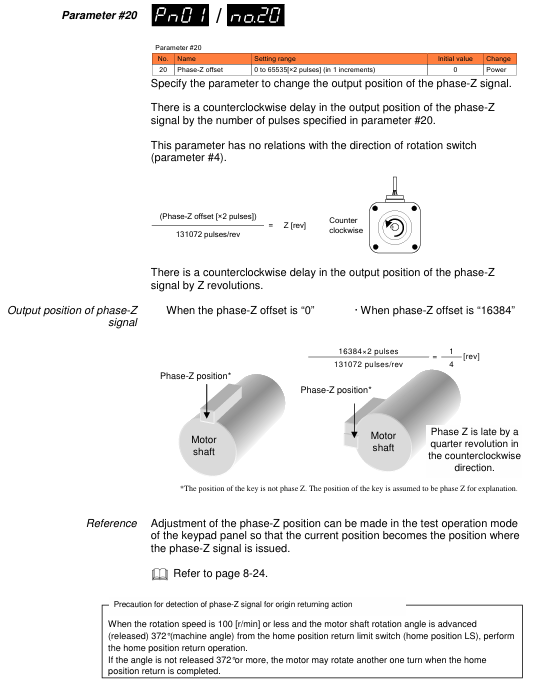
After power failure and restart, the motor needs to be rotated at a speed of ≤ 100r/min for 372 ° or more (approximately 1.04 rpm) in order to correctly detect the Z-phase.
Parameter settings
1. Parameter configuration method
Keyboard operation: Switch to "Parameter Editing Mode" (PnO) for settings through a 4-digit 7-segment LED display and 4 buttons (MODE/ESC, SHIFT, ENT, ∧/∨).
BSD Configurator: Connected to CN3 via LAN cable (CAT. 5 direct connection), supports parameter read/write, batch transfer, and monitoring.
2. Core parameter table
Parameter number, parameter name, control mode, setting range, initial value, key role
#01 Command pulse compensation alpha position 1-32767 16 electronic gear ratio molecule, converting command pulse to mechanical stroke
#02 instruction pulse compensation β position 1-32767 1 electronic gear ratio denominator
#03 Pulse train input form: Position 0 (command pulse+symbol), 1 (forward/reverse pulse), 2 (two signals with a 90 ° phase difference), 1 matches the output type of the upper system pulse
#04 Rotation direction switching/output pulse phase all 0-30 set motor forward rotation direction (CCW/CW) and output pulse phase
#05 tuning mode position/speed 0 (automatic), 1 (semi-automatic), 2 (manual) 0 select servo gain tuning mode
#06 Load inertia ratio position/velocity GYS: 0.0-100.0; GYG: 0.0-30.0 5.0 (BSM low power), 1.0 (BSM high power) ratio of motor inertia to load inertia
#07 Automatic tuning gain position/speed 1-20 10 Adjust servo response speed (high value, fast response but prone to vibration)
#09 Control mode switch all 0 (position), 1 (speed), 2 (torque), 3 (position) ↔ 0 fixed or switchable control mode for speed)
3. Parameter Effectiveness Rules
The parameters marked as "Power" (such as # 03, # 04, # 09) need to be powered off and restarted to take effect; Other parameters (such as # 01, # 02, # 07) take effect in real-time.
Servo adjustment and special functions
1. Tuning method
Operation points for applicable scenarios of tuning types
Automatic tuning (# 05=0) Most conventional mechanical amplifiers automatically estimate the inertia ratio and set the optimal gain
Semi automatic tuning (# 05=1) inaccurate estimation of inertia ratio, manual setting of # 06 (load inertia ratio) in scenarios, amplifier automatically calculates gain
Manual tuning (# 05=2) Automatic/semi-automatic tuning failed. Manually set # 40 (position gain), # 41 (speed response), # 42 (speed integration time), etc
2. Special adjustment function
Vibration suppression control: By setting parameters # 60- # 63 (anti resonance frequency 0-3), mechanical vibrations (such as end effector vibrations of robotic arms) are suppressed within a frequency range of 5.0-200.0Hz.
Instruction Follow Control: Parameter # 55 is set (0=none, 1=follow, 2=follow+stop compensation) to achieve zero deviation following of pulse instructions, suitable for high rigidity machinery.
Inspection and maintenance
1. Regular inspection items
Equipment inspection content inspection frequency
Servo motor 1. Mechanical coupling deviation; 2. Smoothness of axis rotation; 3. Cable damage; 4. Loosening of screws regularly (e.g. monthly)
Servo amplifier 1. Dust accumulation; 2. Abnormal noise from the cooling fan; 3. Loose terminal screws; 4. No odor/signs of overheating regularly (e.g. monthly)
2. Service life and replacement of vulnerable parts
Component Standard Life Replacement Tips
Servo amplifier main circuit capacitor 73000h (10 years), lifespan shortened when ambient temperature exceeds 30 ° C
Replace the servo amplifier cooling fan when it makes abnormal noise or stops running after 30000 hours (3 years)
Replace servo motor bearings when vibration/abnormal noise occurs after 20000-30000 hours (3-5 years)
Replace the servo motor oil seal after 5000 hours of oil leakage
3. Common alarm handling
Alarm code, alarm reason, handling measures
OC1/OC2 overcurrent 1. Check the U/V/W wiring of the motor; 2. Check if the motor is short circuited/grounded; 3. Replace the amplifier
OL overload 1. Check motor load matching; 2. Extend the acceleration and deceleration time; 3. Reduce operating frequency
HV overvoltage 1. Check the power supply voltage; 2. Connect external regenerative resistors; 3. Extend deceleration time
LV undervoltage 1. Check the power supply voltage; 2. Confirm parameter # 26 (undervoltage detection) setting; 3. Improve the power environment
RS485 communication
1. Communication specifications
Project specifications
Signal level RS485
Communication method: 4-wire half duplex, asynchronous communication
Baud rate 9600/19200/38400bps (parameter # 83 setting)
Data format: 1 start bit, 8 data bits, 1 even check bit, 1 stop bit
Station number 1-31 (parameter # 2 setting)
Connect cable LAN line (CAT. 5 direct connection)
2. Core functions
Read: Multiple monitoring data (such as speed, torque), sequence mode, I/O signals, alarm history, system status.
Write: parameters, alarm reset, parameter initialization.
Key issue
Question 1: What are the matching rules between BSD series servo amplifiers and servo motors? What are the differences in power wiring requirements for amplifiers of different capacities?
Answer:
Matching rule: The selection should be based on the principle of "consistent capacity+matching speed", and the specific corresponding relationship is shown in the table below:
Servo amplifier model applicable servo motor model motor capacity motor rated speed
BSD0100 BSM0100xxxx 100W 3000r/min
BSD0200 BSM0200xxxx 200W 3000r/min
BSD0400 BSM0400xxxx 400W 3000r/min
BSD0750 BSM0750xxxx 750W 3000r/min
BSD1000 BSM1000xxxx 1000W 2000r/min
BSD1500 BSM1500xxxx 1500W 2000r/min
BSD2000 BSM2000xxxx 2000W 2000r/min
(Note: "xxxx" represents motor shaft type, brake and options, such as BSM0100CN00=100W, keyway shaft, no brake, no options)
Differences in power wiring:
0.4kW and below (BSD0100/0200/0400): Only supports single-phase 200-230VAC, wired to L1 and L2 terminals, voltage fluctuation allowed -10%~+10%.
0.75kW (BSD0750): Supports single-phase or three-phase 200-230VAC, with single-phase connected to L1 and L2, and three-phase connected to L1, L2, and L3; Single phase voltage fluctuation -10%~+10%, three-phase -15%~+10%.
0.85kW and above (BSD1000/1500/2000): Only supports three-phase 200-230VAC, wired to terminals L1, L2, and L3, with allowable voltage fluctuations of -15% to+10%.
All models of control power supply are unified as single-phase 200-230VAC, wired to sL1 and sL2 terminals, with voltage fluctuations ranging from -10% to+10%.
Question 2: What are the core objectives and key operational steps of the three-stage testing in the testing operation of BSD series servo systems? What are the requirements to pay attention to when returning to the origin?
Answer:
Core purpose and steps of three-stage testing:
Key operational steps for the core objectives of the stage
In the first stage, verify that the servo amplifier and motor work separately and eliminate basic wiring/hardware faults. 1. Fix the motor (axis without load); 2. Connect the amplifier motor power/encoder cable (not connected to CN1); 3. Power on and check the charging LED and keyboard display; 4. Test the rotation direction of the motor (parameter # 04) and ensure there are no alarms
The communication and command response between the second stage verification and the upper control system are normal. 1. Connect amplifier CN1 to the upper system; 2. Check the I/O signals (emergency stop EMG, overtravel ± OT, brake timing); 3. Power on and output pulse/analog commands, check motor speed, rotation direction, and I/O signal recognition
The third stage verifies that the motor operates normally as a whole after installation and meets the actual working conditions. 1. Securely install the motor onto the machine; 2. Reproduce the second stage I/O signal inspection; 3. Verify that the machine travel matches the instructions; 4. Adjust servo parameters (refer to Chapter 6) to ensure positioning accuracy/no vibration
Origin regression requirements:
After power failure and restart, the motor needs to rotate 372 ° or more at a speed of * * ≤ 100r/min (approximately 1.04 revolutions, motor output shaft angle) in order to correctly detect the encoder Z phase.
If the requirements of "speed ≤ 100r/min+rotation ≥ 372 °" are not met, the Z-phase cannot be correctly identified, which may result in the motor rotating an additional circle after returning to the origin.
Question 3: In the BSD series servo system, what scenarios are the three settings (automatic/semi-automatic/manual) of core parameter # 05 (tuning mode) applicable to? How to suppress mechanical vibration through parameter adjustment?
Answer:
Tuning mode (parameter # 05) Applicable scenarios:
Tuning mode parameter # 05 setting applicable scenario operation points
Automatic tuning: Most conventional mechanical amplifiers (with stable load inertia and no special resonance) automatically estimate the load inertia ratio without manually setting # 06, directly generating the optimal gain (such as # 40/# 41/# 42)
Semi automatic tuning 1. Inaccurate load inertia estimation scenarios (such as large load fluctuations, high friction, and applications with thrust) 1. Manually set # 06 (load inertia ratio, read or calculated through keyboard monitoring mode); 2. The amplifier automatically calculates gain based on # 06
Manual tuning 2 automatic/semi-automatic tuning failure scenarios (such as obvious mechanical resonance and high rigidity requirements) 1. Manually set # 40 (position controller gain), # 41 (velocity response), and # 42 (velocity integration time); 2. Optimize with # 45 (feedforward filtering) and # 46 (torque filtering); 3. Use BSD Configurator to monitor waveforms
Parameter adjustment method for suppressing mechanical vibration:
Method 1: Enable vibration suppression control (position control only):
First, optimize the servo gain according to Chapter 6 "Basic Adjustment" (ensuring no basic vibration);
Find the mechanical anti resonance frequency (5.0-200.0Hz) through the BSD Configurator servo analysis function;
Set the anti resonance frequency to parameter # 60- # 63 (anti resonance frequency 0-3), while setting # 43 (S-curve time constant, reference: anti resonance frequency<10Hz set 10ms, 10-20Hz set 5ms,>20Hz set 2-3ms).
Method 2: Use notch filter (position/velocity control):
Find the mechanical resonance frequency (through servo analysis function);
Set parameter # 56 (notch filter 1 frequency)=resonance frequency, # 57 (notch filter 1 damping)=5-20dB (to avoid excessive control instability);
If there are two resonance points, repeat step 2 to set # 58 (filter 2 frequency) and # 59 (filter 2 damping).
Method 3: Adjust gain and filtering:
Reduce # 07 (automatic tuning gain) by 1-2 levels (decrease response speed, suppress vibration);
Increase # 46 (torque filtering time constant) by 0.01-0.05ms (smooth torque command, reduce mechanical impact).
- OMRON
- ABB
- General Electric
- EMERSON
- Honeywell
- HIMA
- ALSTOM
- Rolls-Royce
- MOTOROLA
- Rockwell
- Siemens
- Woodward
- YOKOGAWA
- FOXBORO
- KOLLMORGEN
- MOOG
- KB
- YAMAHA
- BENDER
- TEKTRONIX
- Westinghouse
- AMAT
- AB
- XYCOM
- Yaskawa
- B&R
- Schneider
- KONGSBERG
- NI
- WATLOW
- ProSoft
- SEW
- ADVANCED
- Reliance
- TRICONEX
- METSO
- MAN
- Advantest
- STUDER
- DANAHER MOTION
- Bently
- Galil
- EATON
- MOLEX
- DEIF
- B&W
- ZYGO
- Aerotech
- DANFOSS
- Beijer
- Moxa
- Rexroth
- Johnson
- WAGO
- TOSHIBA
- BMCM
- SMC
- HITACHI
- HIRSCHMANN
- Application field
- XP POWER
- CTI
- TRICON
- STOBER
- Thinklogical
- Horner Automation
- Meggitt
- Fanuc
- Baldor
- SHINKAWA
- Other Brands
- UniOP
- KUKA
- Iba
- Beckhoff
- ADLINK
-
 Sigmatek MDD111-1 DIAS Drive Axis Module
 -
 Sigmatek DKL042 05-024-042 Terminal Module
 -
 Sigmatek DM822 Control Module
 -
 Sigmatek CDM167 12-008-167-O Module
 -
 Sigmatek TAE151 Touch Display Unit
 -
 Sigmatek DCC041 SLIDES Module 05-700-041-D
 -
 Sigmatek AKM65M-ANC2GBB0 PM Servo Motor
 -
 Sigmatek ETT221 01-230-221 Operator Terminal
 -
 Sigmatek SLIDES DAM 124 Analog Module
 -
Sigmatek AKM31C-ANCNGBB0 Servo Motor
-
 Mannesmann Demag Sigmatek CP626 Central Unit
 -
 SIGMATEK 0332.554.03 Board 371071000154
 -
 SIGMATEK 12-250-021 Base Plate Back Panel CM5V020
 -
 SIGMATEK DM162 S-DIAS Digital Mix Module
 -
 DEMAG ERGOTECH 061 381 66 Sigmatek 9842.243.02 Circuit Board
 -
 SIGMATEK CP313-1 PLC Module
 -
Sigmatek ETV0551-2 VARAN Touch Terminal
-
 Sigmatek SDM 081 FS S-Dias Safety Module
 -
 DEMAG 05-250-023 Ergotech Motherboard with Sigmatek TMS012
 -
Sigmatek CM5V020 12-250-023-K Wiring Base
-
 Sigma Tek 5000B-37 Attitude Gyro Indicator
 -
 Sigmatek SDD120-2 DIAS Drive
 -
 Sigmatek CME221 Memory Module
 -
 Sigmatek DCP640 DIAS Central Unit
 -
 Sigmatek STO040 Safety Output Module
 -
Sigmatek CET281 Control Panel
-
 Sigmatek CIPC LX800 Demag NC5 CPU
 -
 Sigmatek DKL093 05-024-093 Terminal Module
 -
 Sigmatek AI088 20-009-088 Analog Input Module
 -
Sigmatek CAI888 Analog Input Module
-
SIGMATEK CCA021 12-025-021 Analog Output Module
-
SIGMATEK 1104.579.05 Control Module
-
SIGMATEK SDI100 Digital Input Module
-
 SIGMATEK C-IPC 256MB LX800 Compact Dias
 -
 SIGMATEK 9423.090.02 Control Module
 -
SIGMATEK C-IPC 256 Power Supply 148498
-
 SIGMATEK CAI025 Analog Input Module
 -
 SIGMATEK CTO166 Digital Output Module
 -
 SIGMATEK CP112 20-004-112 Processor Module
 -
SIGMATEK CAI887 12-009-887 Safety Module
-
 Sigma-Tek 4000B-31 Directional Gyro 1U262-002-42
 -
Sigmatek C-IPC 256MB LX800 IPC Controller
-
Sigmatek C-IPC 01-450-031 Industrial PC LX800
-
Sigmatek C-IPC 256 Industrial PC Controller
-
Sigmatek CCP-531 PLC Processor Module
-
Sigmatek CDI163 Digital Input Module
-
 Sigmatek ETV0501 VARAN Terminal 12-230-0501
 -
 Sigmatek CTMS020 C-DIAS Technology Module
 -
 Sigmatek CIV512 VARAN Switch Module
 -
 Sigmatek HU011 20-080-011 Interface Module
 -
SIGMATEK SLIDES DAM 124 Module
-
 SIGMATEK C-IPC 161 01-450-161L Industrial PC
 -
SIGMATEK C-IPC 128MB VIA 733MHz 01-450-024-K
-
 SIGMATEK 12-780-012 R8-IPC Geode LX800 Module
 -
SIGMATEK CAM124 Analog Module
-
 SIGMATEK S1 032-8AF61-R4 EZ Servo Motor
 -
 SIGMATEK CTO163 Digital Output Module
 -
 SIGMATEK CCP082 12-004-082 Processor Module
 -
 SIGMATEK CRCH081 C-DIAS Temperature Module
 -
 SIGMATEK PC322-K 01-310-322-K Industrial PC
 -
SIGMATEK SDD310-2 Servo Drive
-
 SIGMATEK AI084 Analog Input Module
 -
SIGMATEK CRCH081 12-752-081 Temperature Module
-
Sigma-Tek 5000L-4 Attitude Gyro 1U284-001-3
-
 SIGMATEK CM5V020 12-250-023-K Wiring Module
 -
Sigma-Tek 4000H-6 Directional Gyro IU262-035-7
-
 SIGMATEK Dias DCP160 05-004-160 Processor Module
 -
SIGMATEK 0147.395.02 Control Module
-
SIGMATEK A1084 Control Module
-
SIGMATEK DI200 20-006-2000 Digital Input Module
-
Sigmatek DNC115 Encoder Module
-
 Sigmatek DAM122 05-017-122 Analog Module
 -
Sigmatek 9802.289.01 Control Board TA71 Display
-
Sigmatek TO127 20-007-127 Digital Output Module
-
Sigmatek DNC031 05-011-031 Digital Module
-
Sigmatek VI022 20-003-022 Interface Module
-
Sigmatek CAI085 Analog Input Module
-
 Sigmatek CP111 S-DIAS CPU Module
 -
Sigmatek CTMS030 Krauss Maffei Module
-
 Sigmatek CAM123 Control Module
 -
 Sigmatek TAE732-P 01-240-732-P Touch Display Unit
 -
Sigmatek MDM021 Digital Mixed Module
-
Sigmatek DCP642 DIAS Central Unit
-
 Sigmatek CST022 12-014-022 C-DIAS Module
 -
 Sigmatek SRO021 20-893-021 Safety Relay Output
 -
 Krauss Maffei MC5 Control System Sigmatek
 -
 Sigmatek DC061 Module 18-24VDC 300mA
 -
 Herrmann EVT0855 Ultrasonic Welder Touch Panel
 -
Sigmatek CIV521 Control Module 1.4A 2W
-
Sigmatek DDI61 05-006-161 Digital Input Module
-
SIGMATEK ETT312-E Touch Terminal 01-230-312
-
Cessna S3326-1 Sigma Tek 5000B-67 Gyro 1U149-015-9
-
SIGMATEK PS101 Power Supply Module
-
SIGMATEK 0332.554.03 Control Module 371071000154
-
 SIGMATEK ETT312-E Touch Terminal 01-230-312
 -
SIGMATEK CDM163 Control Module
-
 SIGMATEK VSV046 16-023-046 Module
 -
SIGMATEK AM221 20-017-221 Analog Module
-
SIGMATEK CTS051 12-053-051 Control Module
-
SIGMATEK AM221 20-017-221 Analog Module
-
Sigmatek CSDI161 12-891-161 Safety Input Module
-
Sigma Tek 4000C-1 Directional Gyro Indicator
-
Sigmatek ETV0501 12-230-0501 VARAN Terminal
-
Sigmatek DDM165 SLIDES Module
-
Sigmatek N100 20-011-100 Control Module
-
Sigmatek AKM54K-ANC2R-B0 PM Servo Motor
-
Sigmatek CTO166 Digital Output Module
-
Sigmatek CP212-K 20-004-212-K CPU Module
-
Sigmatek CDI161 Digital Input Module
-
Sigmatek DCC080 05-700-080-2 Control Module
-
 SIGMATEK SCP011 S-DIAS Safety CPU
 -
SIGMATEK SCP011 S-DIAS Safety CPU
-
SIGMATEK SRO022 Relay Output Module
-
SIGMATEK MDD 121 Drive Axis Module
-
SIGMATEK DSI021 SLIDES Siemens Interface
-
SIGMATEK DIAS DCP161 Module 05-004-161
-
 Sigmatek ETT312 Built-in Touch Terminal
 -
SIGMATEK DCP 643 DIAS Controller System
-
SIGMATEK CIO021 Multi I/O Module
-
SIGMATEK CTMS020 Control Module
-
 Sigmatek CME 221 Memory Module
 -
Sigmatek 0420.615.01 Control Board
-
Sigmatek CP111 20-004-111 CPU Module
-
Sigmatek 9405.065.03 Control Board
-
Sigmatek ETEK 01-450-032-K C-IPC 256MB Industrial PC
-
Sigmatek CTO163 12-007-163 Safety Output Module
-
Sigmatek TO081 20-007-081 Digital Output Module
-
 Sigmatek SI021 20-022-021 Safety Input Module


